

Spam Domain Reputation: How to Check & Fix It in 2026
A RevOps lead we know switched ESPs last quarter - Klaviyo to Zoho - and blasted their full 12,000-person list on day one without warming up. Open rates cratered from ~70% to under 10% overnight, then hit 1% on the next send. The domain wasn't blacklisted. It wasn't hacked. They just didn't understand how spam domain reputation works, and how quickly providers punish senders who skip warmup.
The Short Version
Check your domain reputation right now with Google Postmaster Tools (Gmail), Microsoft SNDS (IP reputation for Outlook.com/Hotmail/Live traffic), and Spamhaus (reputation + blocklists). All free. If it's bad, stop sending, fix SPF/DKIM/DMARC, purge anyone inactive 6+ months, and warm up at 50 emails/day over 6 weeks.
What Is Domain Reputation?
Domain reputation is a score mailbox providers assign to your sending domain based on your sending history - bounce rates, spam complaints, authentication, engagement patterns. It's not the same as IP reputation. IP reputation is tied to the specific mail server; domain reputation follows your domain everywhere, across every ESP and every IP you'll ever use.
This distinction matters because inbox providers increasingly put domain reputation in the driver's seat. Switching ESPs or getting a fresh IP won't save you if your domain is burned. Providers also evaluate domains in your Return-Path, DKIM signing domain, and even domains embedded in your links and headers - not just your visible From: address. The reputation is portable, and so is the damage.
What Destroys Domain Reputation
Here's the hit list, roughly ordered by how fast each one will wreck you:
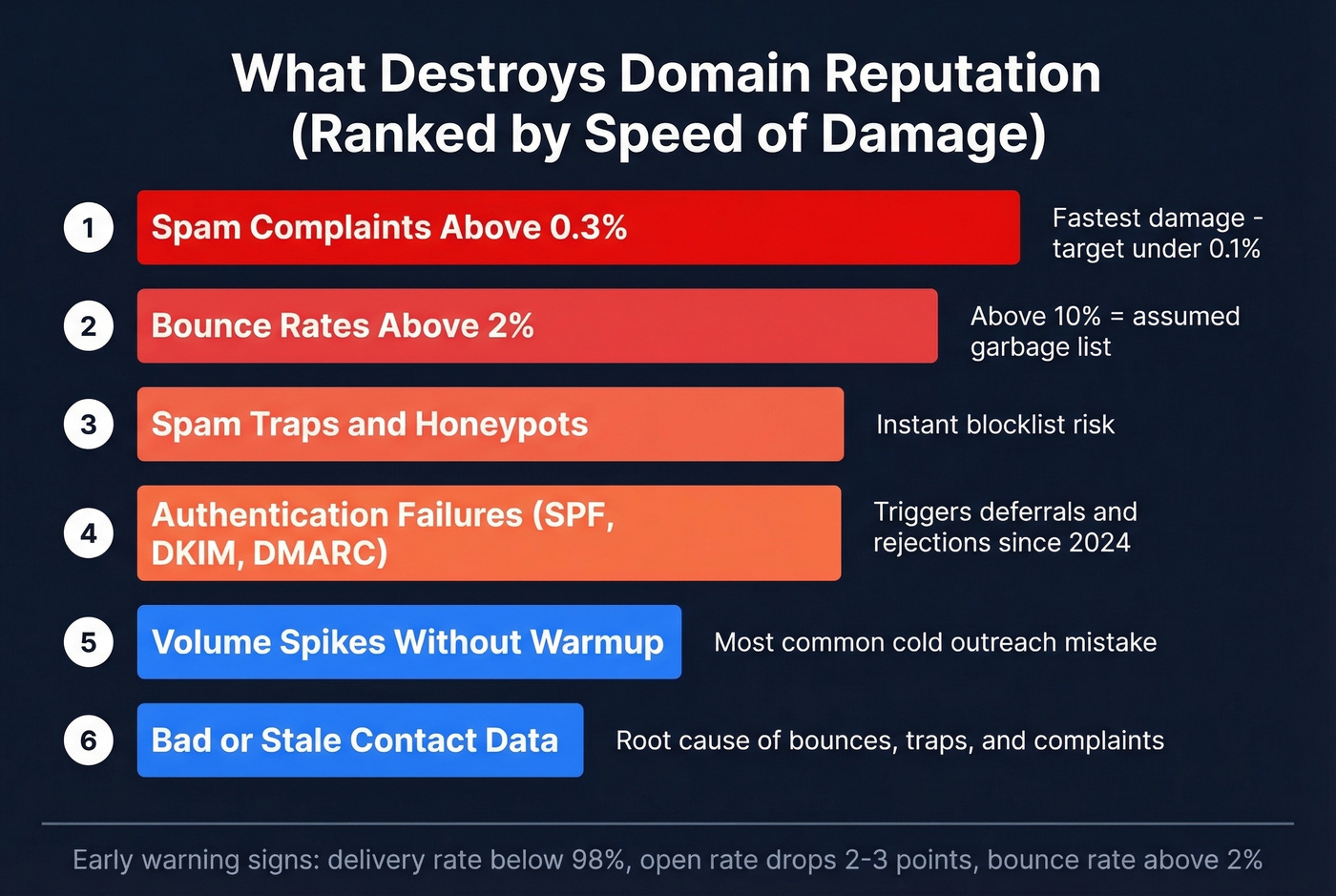
- Spam complaints above 0.3%. Google and Yahoo both treat 0.3% as the danger zone. Your target is under 0.1%.
- Bounce rates above 2%. Once you cross 2%, you're in warning territory. Above 10%, providers assume you're sending to a garbage list. (See bounce rate benchmarks and fixes.)
- Spam traps and honeypots. Email addresses that exist solely to catch senders with bad hygiene. Hit enough and you're on a blocklist. (If you’re already flagged, follow a spam trap removal playbook.)
- Authentication failures. Missing or misconfigured SPF, DKIM, or DMARC records. Under the bulk-sender rules that rolled out starting in 2024, authentication and alignment issues trigger deferrals and rejections. (Use a SPF record example to sanity-check syntax.)
- Volume spikes without warmup. Going from 200 emails/day to 12,000 overnight is the single most common way cold outreach teams destroy their reputation. (Manage email velocity to avoid sudden spikes.)
- Bad or stale contact data. Outdated lists generate bounces, hit spam traps, and trigger complaints simultaneously. Verify before you send - a damaged email domain reputation is almost always traceable back to list quality.
If your delivery rate drops below 98%, your open rate drops 2-3 points without explanation, or your bounce rate creeps above 2%, treat those as early warning signs. Don't wait for a full reputation collapse.


Most domain reputation damage traces back to stale, unverified contact data. Prospeo's 5-step verification catches spam traps, honeypots, and invalid addresses before they tank your sender score - with 98% email accuracy on a 7-day refresh cycle.
Stop burning your domain. Send to verified contacts only.
2024-2026 Bulk Sender Rules
The big three mailbox providers converged on nearly identical requirements between 2024 and 2026:
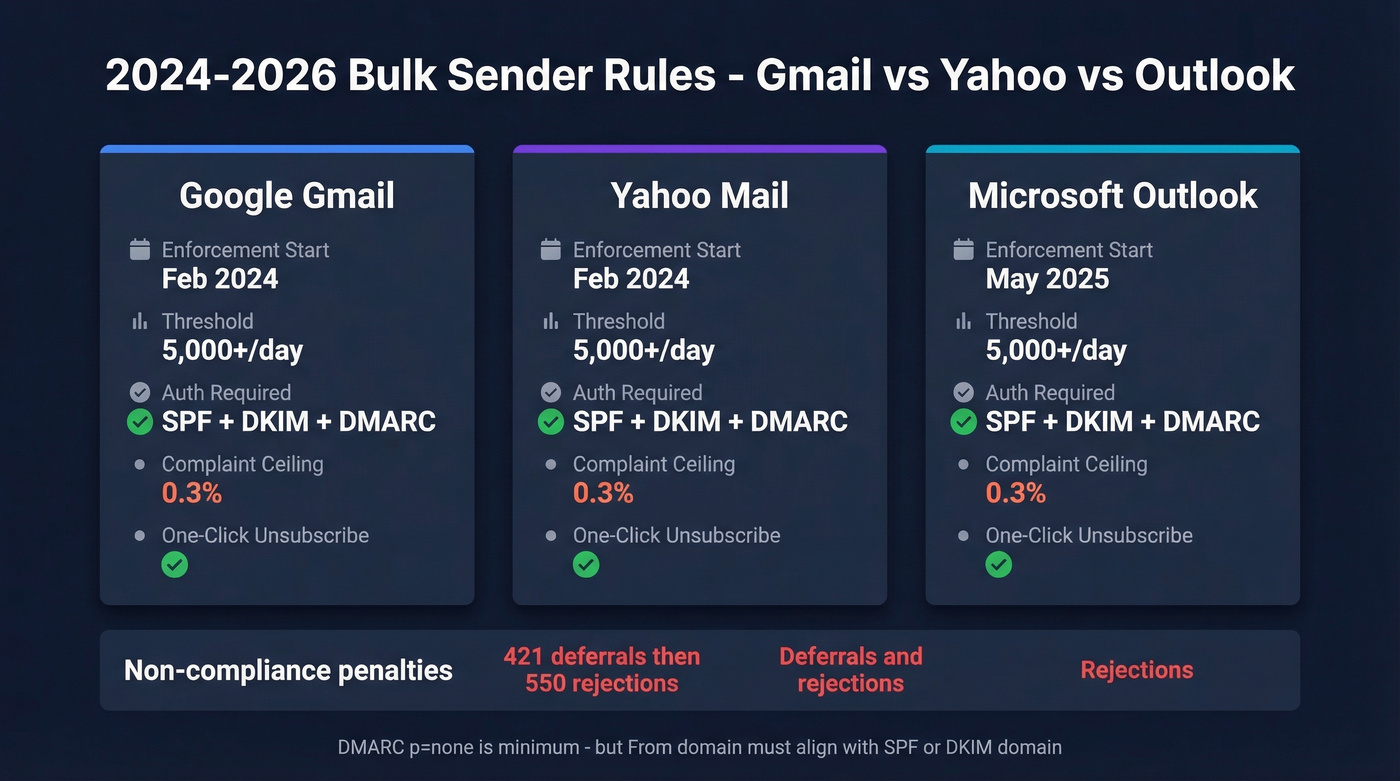
| Google Gmail | Yahoo Mail | Microsoft Outlook | |
|---|---|---|---|
| Enforcement start | Feb 2024 | Feb 2024 | May 2025 |
| Threshold | 5,000+/day | 5,000+/day | 5,000+/day |
| Auth required | SPF + DKIM + DMARC | SPF + DKIM + DMARC | SPF + DKIM + DMARC |
| Complaint ceiling | 0.3% | 0.3% | 0.3% |
| Unsubscribe | One-click | One-click | One-click |
| Non-compliance | 421 deferrals → 550 rejections | Deferrals/rejections | Rejections |
Gmail started with temporary 421 deferrals in early 2024 before ramping enforcement to permanent 550 rejections by late 2025. If you're seeing 421 codes, that's your grace period - fix things before you get 550s.
One thing that confuses people: DMARC p=none is the minimum policy, but your From: domain still needs to align with either your SPF or DKIM domain (relaxed alignment is fine). A lot of the post-February 2024 deliverability crashes on r/Emailmarketing came from senders who thought they had DMARC set up but didn't have alignment configured correctly. (Deep dive: DMARC alignment.)
How to Check Your Domain Reputation
You don't need 10 tools. You need three, and you need to actually understand what they're telling you. (If you want a bigger list, see email reputation tools.)
Google Postmaster Tools
If any meaningful portion of your list uses Gmail, this is your single most important data point. Free. It shows your domain reputation as High, Medium, Low, or Bad specifically for Gmail traffic. Start here.
Microsoft SNDS
Free but IP-based, not domain-based - an important distinction. SNDS gives you visibility into IP reputation and performance for mail sent to Outlook/Hotmail consumer domains, not Microsoft 365 enterprise traffic.
The SmartScreen filter results use a color system: green means less than 10% flagged as spam, yellow means 10-90%, and red means over 90%. SNDS also shows complaint rate bands - under 0.1% is healthy, 0.1-0.5% is concerning, above 0.5% is a serious problem. Data is retained for 90 days, and you won't see anything unless you're sending at least 100 messages/day to Outlook/Hotmail consumer domains.
Blacklist Lookups and Scoring
Spamhaus checks domain reputation data and whether your domain appears on major blocklists. MxToolbox checks multiple lists simultaneously for a quick sweep.
For a broader numerical score, Sender Score uses a 0-100 scale where 80+ is strong and below 70 usually means you've got a deliverability problem. Cisco's Talos Intelligence adds another data point by categorizing reputation as Good, Neutral, or Poor.
Here's the thing: there's no single universal score. Every provider has their own system and their own opacity. You have to triangulate across at least two or three of these tools. If Google Postmaster shows "Bad" but Sender Score is 75, your Gmail reputation is worse than your overall average - focus on Gmail-specific fixes first.
How to Fix a Damaged Reputation
Priority order matters. Don't skip ahead.
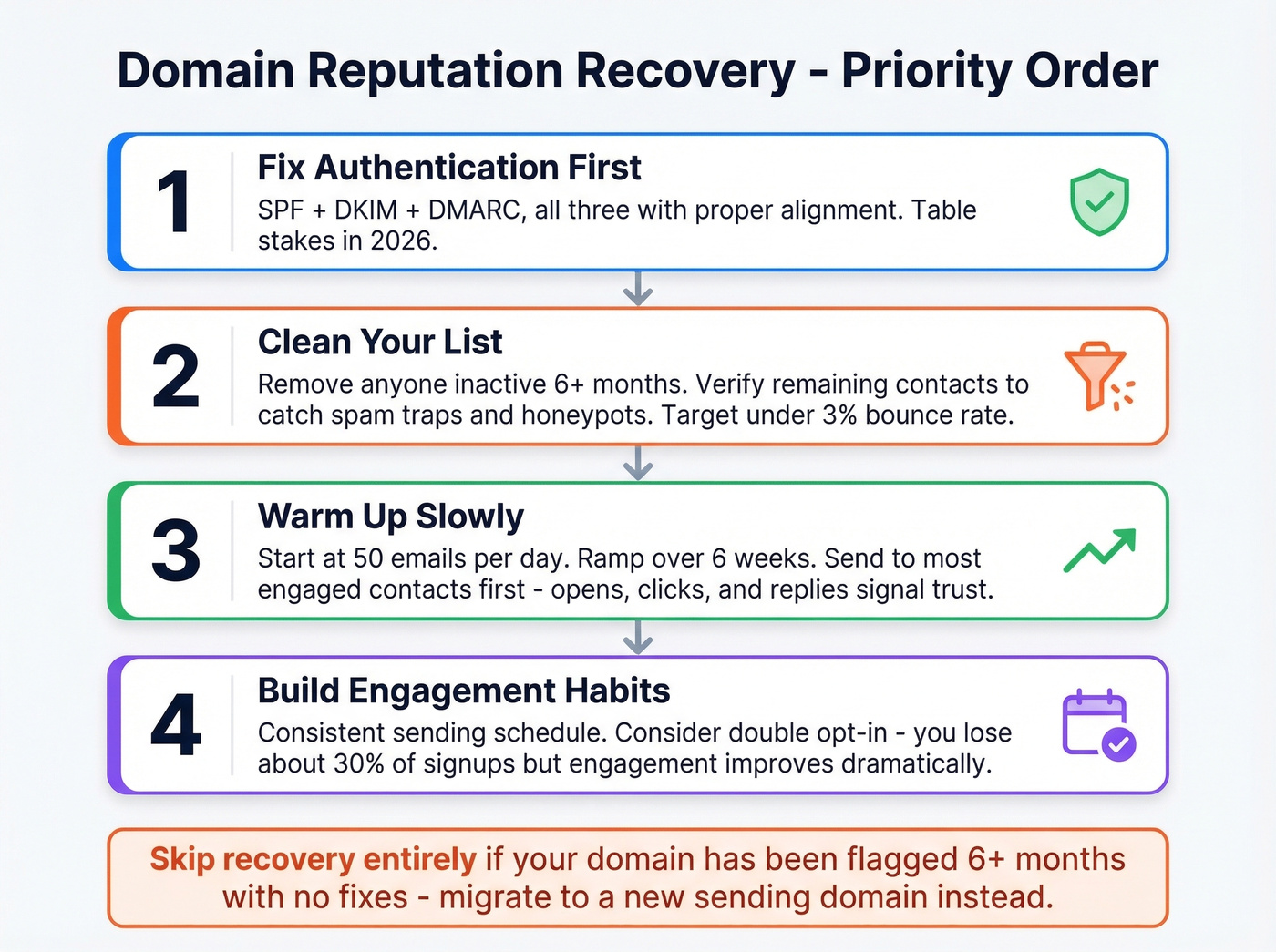
1. Fix authentication first. SPF, DKIM, and DMARC - all three, configured correctly, with alignment. This is table stakes in 2026. (If you’re unsure, start with how to verify DKIM is working.)
2. Clean your list. Remove anyone who hasn't engaged in 6+ months. Re-verify your existing list with a tool that catches spam traps in real time. We've seen teams go from 10%+ bounce rates to under 3% just by running their list through Prospeo's 5-step verification before sending - it catches spam traps, honeypots, and invalid addresses at 98% accuracy on a 7-day refresh cycle.
3. Warm up slowly. Start at 50 emails/day. Ramp over 6 weeks. Send to your most engaged contacts first - they'll open, click, and reply, which signals to mailbox providers that your mail is wanted. (More options: unlimited email warmup tools.)
4. Build engagement habits. Consistent sending schedule. Double opt-in if you can stomach the ~30% signup reduction - the engagement improvement is worth it.
Let's be honest about most "avoid spam" advice online. It's outdated garbage. Spam trigger words, physical address placement, image-to-text ratios - these are rounding errors compared to authentication and list hygiene. The consensus on r/Emailmarketing is clear: technical setup plus list quality plus content people actually engage with. No single magic fix. (If you need a technical baseline, use an email deliverability guide.)
If your deals average under $15k, you probably don't need a complex deliverability stack. SPF/DKIM/DMARC, a verified list, and a 6-week warmup will solve 90% of reputation problems. The expensive monitoring tools are for senders doing 50,000+ emails/day - everyone else is overthinking it.
Warming up a damaged domain takes 6 weeks. Building a clean list from scratch takes minutes. Prospeo gives you 143M+ verified emails with bounce rates consistently under 3% - so you never need a reputation recovery plan again.
Clean data is cheaper than domain recovery. Start at $0.01 per email.
How Long Recovery Takes
IP reputation typically recovers in 2-4 weeks. Domain reputation takes 6-12 weeks. That gap catches a lot of people off guard.
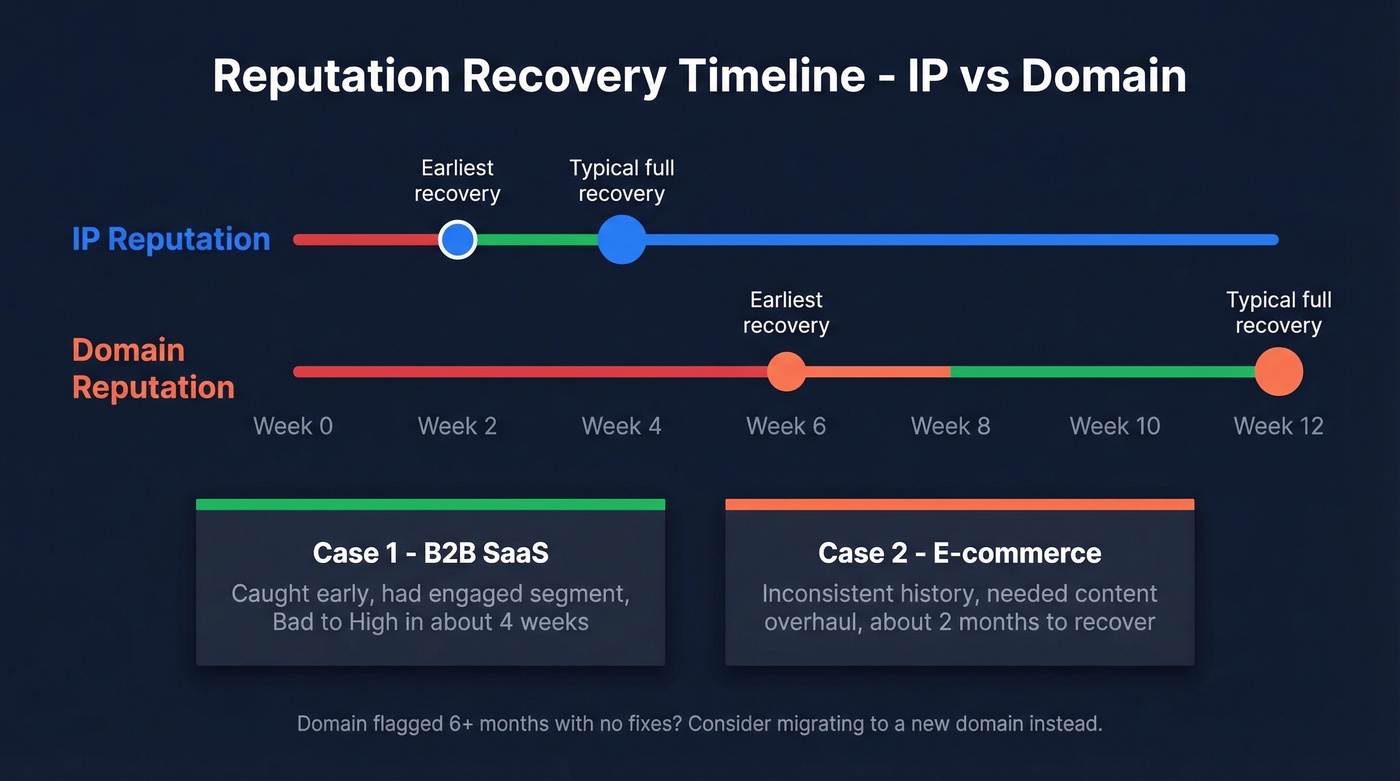
Case 1 - B2B SaaS, ~4 weeks. This team halted all sends immediately after their bounce rate had been running above 10%. They warmed back up at 10-20 emails/day to their most engaged segment, then gradually ramped. Domain went from Bad to High in just over a month - fast, because they caught it early and had a clean engaged segment to lean on.
Case 2 - E-commerce, ~2 months. Inconsistent sending history made recovery slower. Required a content overhaul and proper segmentation alongside the warmup. Minor dips during recovery are normal - don't panic if reputation fluctuates week to week. The trend line matters more than any single data point.
Skip the recovery process entirely if your domain has been flagged for over 6 months with no remediation. At that point, it's often faster to migrate to a new sending domain and warm it up from scratch than to rehabilitate the old one.
FAQ
Is domain reputation the same as IP reputation?
No. Domain reputation follows your sending domain across any ESP or IP change. Inbox providers now weigh domain signals more heavily than IP signals - switching servers won't fix a burned domain. You need to repair the domain itself.
Can I check my domain reputation for free?
Yes. Google Postmaster Tools, Microsoft SNDS, Spamhaus, Sender Score, and Talos Intelligence are all free. Start with Postmaster Tools for Gmail-specific data, then cross-reference with Sender Score for a 0-100 numerical benchmark.
How do I prevent reputation damage from cold outreach?
Verify every email address before sending. Bounces and spam traps from unverified lists are the fastest way to tank reputation. In our experience, teams that verify upstream - before anything hits their sending infrastructure - maintain sub-3% bounce rates consistently. Stack Optimize runs all client campaigns through Prospeo's verification and has maintained zero domain flags across their entire client base.
What's the difference between reputation-based and content-based spam filtering?
Reputation-based filtering evaluates your sending history and trust signals before examining message content. Content-based filters analyze the email body for suspicious patterns. A domain with a poor reputation will have messages filtered regardless of how clean the content is - reputation outweighs content signals in modern filtering stacks.