

Spam List Checker: Which Blacklists Matter in 2026
You ran a spam list checker, saw your IP flagged on 12 lists, and your stomach dropped. Then you Googled each one and realized you'd never heard of 11 of them. That panic is exactly what these tools are designed to produce - and it's mostly unwarranted.
There are over 300 publicly available spam blacklists. The vast majority don't affect whether your emails reach Gmail, Outlook, or Yahoo inboxes. Even brand-new domains can show up on niche lists within days. The real skill isn't running a blacklist check - it's knowing which results to care about and which to ignore.
What You Need (Quick Version)
- Quick check right now? Run your IP and domain through MXToolbox or the Spamhaus lookup at https://check.spamhaus.org/. Both are free and instant. MXToolbox covers 100+ DNSBLs in a single query.
- For major mailbox providers, Spamhaus is the one that consistently matters. Barracuda and SpamCop matter most for corporate gateways and smaller providers.
- If you're listed on Spamhaus or Barracuda: fix the root cause first (bad list, compromised server, authentication gaps), then request removal. Delisting without remediation gets you relisted within weeks.
- If you keep getting listed, your contact data is the problem, not the blacklist. High bounce rates and spam trap hits are the #1 trigger, and no amount of delisting requests fixes that.
How DNSBL Lookups Work
A spam list checker queries DNS-based blackhole lists - also called DNSBLs or RBLs - to see if your sending IP or domain appears on any of them. It's a bulk DNS lookup: the tool sends your IP address as a query to each blacklist's DNS server and checks whether a record exists. If it does, you're listed. These lists exist so mail servers can reject known-bad senders at the connection level, before the message body is even evaluated.
There are two main types of blacklists. IP-based lists flag the IP address your mail server sends from. Domain and URI-based lists - like SURBL, URIBL, and Spamhaus DBL - flag domains that appear in email content, links, or headers. This distinction matters because you can have a clean IP but still get filtered if your domain or a link in your signature is flagged.
Most free checkers run your IP against 50-200+ blocklists simultaneously and return a red/green dashboard. The problem? That dashboard treats a listing on Spamhaus the same as a listing on some obscure list nobody queries. That's where the noise starts.
Which Blacklists Actually Matter
Stop checking 100 blacklists. You need to check three. Maybe five if you're sending to a lot of corporate recipients behind gateway filters.
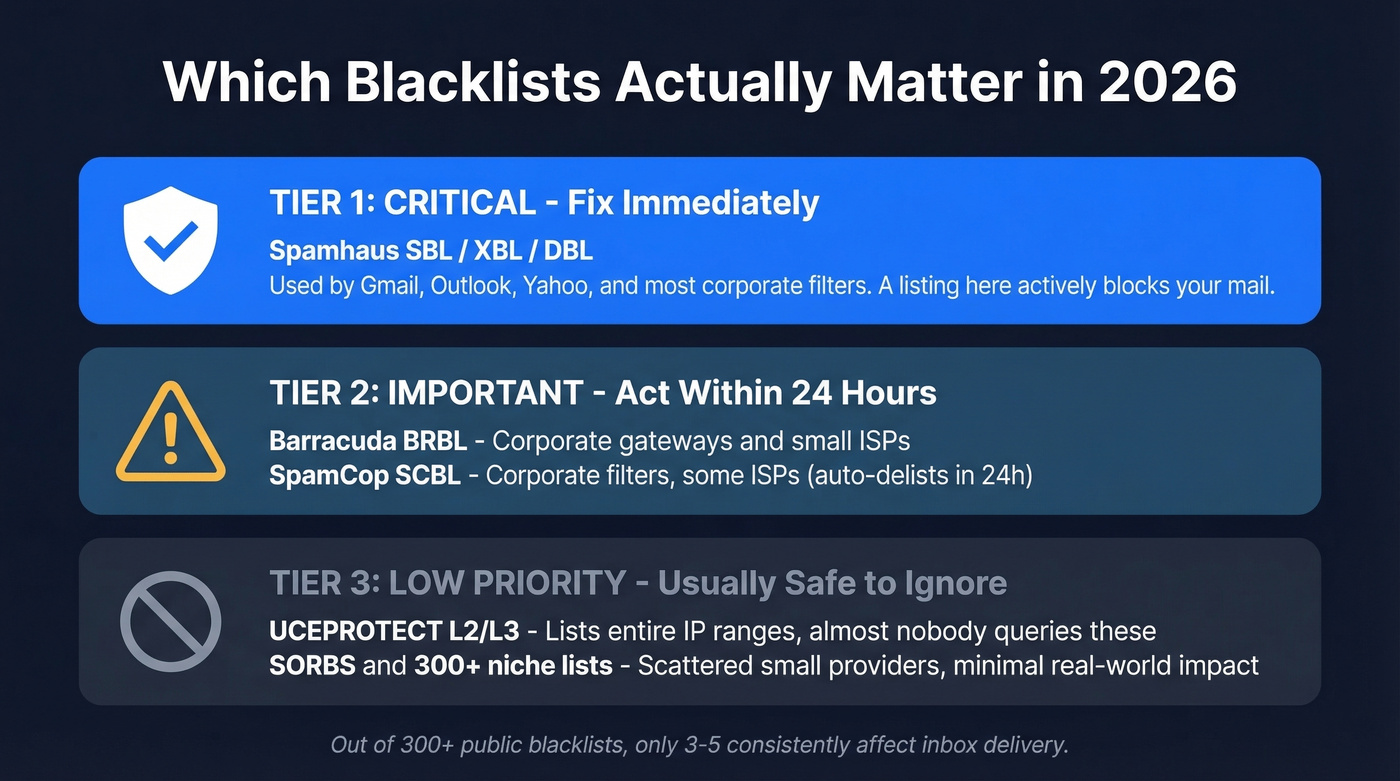
| Priority | Blacklist | Impact | Who Uses It |
|---|---|---|---|
| Critical | Spamhaus SBL/XBL/DBL | High - major providers | Gmail, Outlook, Yahoo, corp filters |
| Important | Barracuda BRBL | Medium | Corporate gateways, small ISPs |
| Important | SpamCop SCBL | Medium | Corporate filters, some ISPs |
| Low | UCEPROTECT L2/L3 | Minimal | Almost nobody of consequence |
| Low | SORBS, niche lists | Minimal | Scattered small providers |
Spamhaus is the only blacklist with confirmed major-provider impact. Its sub-lists serve different purposes: SBL covers confirmed spam sources and is editor-driven, XBL flags security issues like compromised machines and open proxies, and DBL is the domain-based list that catches malicious URLs in email content.
PBL lists dynamic and residential IPs that shouldn't send mail directly. Gmail and Google Workspace don't rely heavily on external blacklists, but they do reference Spamhaus PBL for unauthorized direct-to-MX sending from dynamic IPs. Outlook, Yahoo, and AOL are more aggressive - they'll reject listed IPs at the SMTP level, meaning the email never even reaches the spam folder.
Here's the thing: when you send through a cold email platform like Instantly or Smartlead, the sending infrastructure's IPs are what blacklists check, not your home router IP.
Barracuda and SpamCop matter primarily for corporate recipients. If your prospects sit behind Barracuda email gateways, a BRBL listing can block or heavily filter your emails. The SpamCop blocklist is less severe because it auto-delists within 24 hours once spam reports stop.
UCEPROTECT Level 2 and Level 3 list entire IP ranges and even full ASNs - meaning your IP can appear on them because of someone else's behavior on a neighboring IP. We've seen teams waste hours trying to get delisted from UCEPROTECT when the listing had zero impact on their actual deliverability. Don't fall into that trap.
Best Free Blacklist Checker Tools
| Tool | Lists Checked | Free? | Monitoring? | Paid Pricing |
|---|---|---|---|---|
| MXToolbox | 100+ | Yes (one-time) | Yes (paid) | $129-$399/mo |
| MultiRBL | 200+ | Yes | No | Free |
| Spamhaus | Spamhaus only | Yes | No | Free |
| DNSChecker | 50+ | Yes | No | Free |
| ZeroBounce | Multiple | Yes (one-time) | Yes (paid) | From $49/mo |
| Google Postmaster | Gmail internal | Yes | Yes | Free |
| Microsoft SNDS | Microsoft sender telemetry | Yes | Yes | Free |

MXToolbox
The most widely used checker, and it earns that status. MXToolbox checks 100+ blacklists with a single IP or domain lookup, and the free version gives you instant results. Green means clean, red means listed, and you get direct links to each blacklist's removal page.
For ongoing monitoring, their Delivery Center plan runs $129/mo and sends alerts when a new listing appears. The Plus tier at $399/mo adds deeper diagnostics. For most teams, the free one-time check is all you need unless you're a high-volume sender managing multiple IPs.
MultiRBL
Want the broadest blacklist sweep available? MultiRBL aggregates 200+ blocklists and categorizes results with more granularity than most tools - listed, brownlisted, yellowlisted, whitelisted. It's completely free. The downside is no monitoring; it's a point-in-time snapshot. Use this when MXToolbox shows you clean but you want a deeper look.
Spamhaus Lookup
Skip the aggregators and go straight to the source. The Spamhaus lookup tool lets you check your IP or domain directly against the blacklist that actually matters. It's free, it's authoritative, and it tells you exactly which sub-list you're on with specific remediation guidance. If you only check one blacklist, make it this one.
Other Tools Worth Knowing
DNSChecker covers 50+ lists and can automatically fetch IPs from your MX records - handy if you don't know your sending IP offhand. ZeroBounce combines blacklist checking with email verification, starting from $49/mo. GlockApps starts at $85/mo and pairs blacklist monitoring with inbox placement testing.
Then there are the provider-native tools. Google Postmaster Tools and Microsoft SNDS are free monitoring dashboards direct from the two largest mailbox providers. They won't tell you about third-party blacklists, but they show you how Gmail and Outlook actually perceive your sending reputation - which is often more useful than any blacklist check. If you're not using both of these already, set them up today.

High bounce rates and spam trap hits are the #1 reason you end up on blacklists. Prospeo's 5-step verification - including catch-all handling, spam-trap removal, and honeypot filtering - delivers 98% email accuracy. That's how teams like Snyk cut bounce rates from 35% to under 5%.
Stop fighting blacklists. Start with data that never puts you on them.
How to Read Your Results
Listed on 1-2 niche lists you've never heard of? Probably fine. Check whether those lists are even queried by any major provider or corporate gateway. If they're not Spamhaus, Barracuda, or SpamCop, you can safely ignore them.
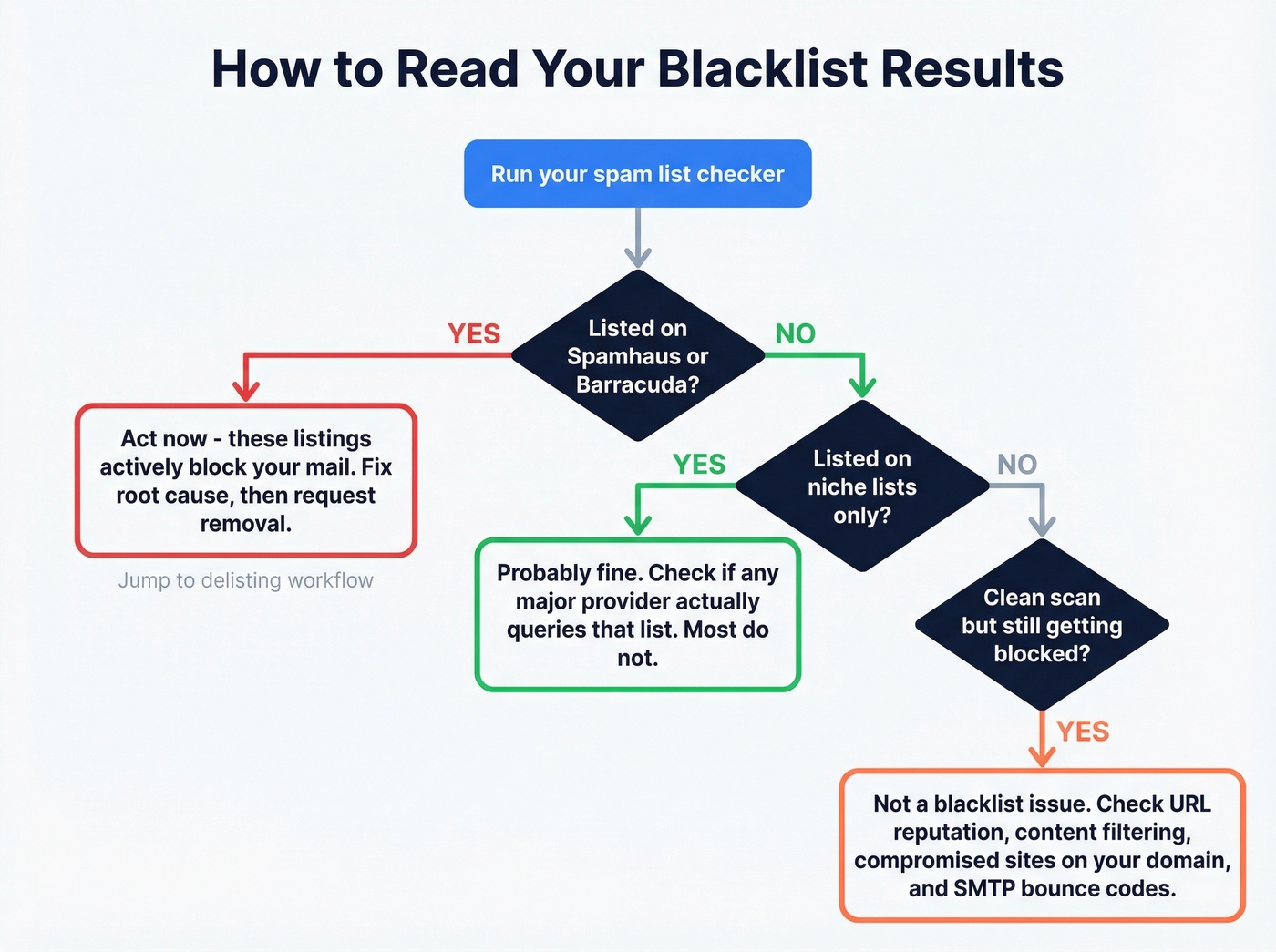
Listed on Spamhaus or Barracuda? Act now. These listings actively block your mail from reaching recipients. Jump to the Spamhaus Blacklist Removal section below.
Clean scan but still getting blocked? This is more common than people realize - and it's the scenario that trips up even experienced sysadmins. One admin on r/sysadmin ran "a bunch of blacklist scanners" and none showed any issues, yet recipients were blocking their emails outright. The culprit turned out to be a compromised WordPress site on the same domain. Removing the website link from their email signature restored delivery immediately. The issue wasn't a DNSBL listing at all; it was URL reputation and security filtering.
Look for SMTP error codes in your bounce messages. A 550 Rejected due to sender reputation or 554 IP blacklisted confirms a blacklist-related block. Soft bounces or silent filtering with no error codes? The problem is likely content-based or engagement-based, not blacklist-related.
What to Do If You're Blacklisted
Delisting is straightforward if you've actually fixed the underlying problem. Here's the workflow:
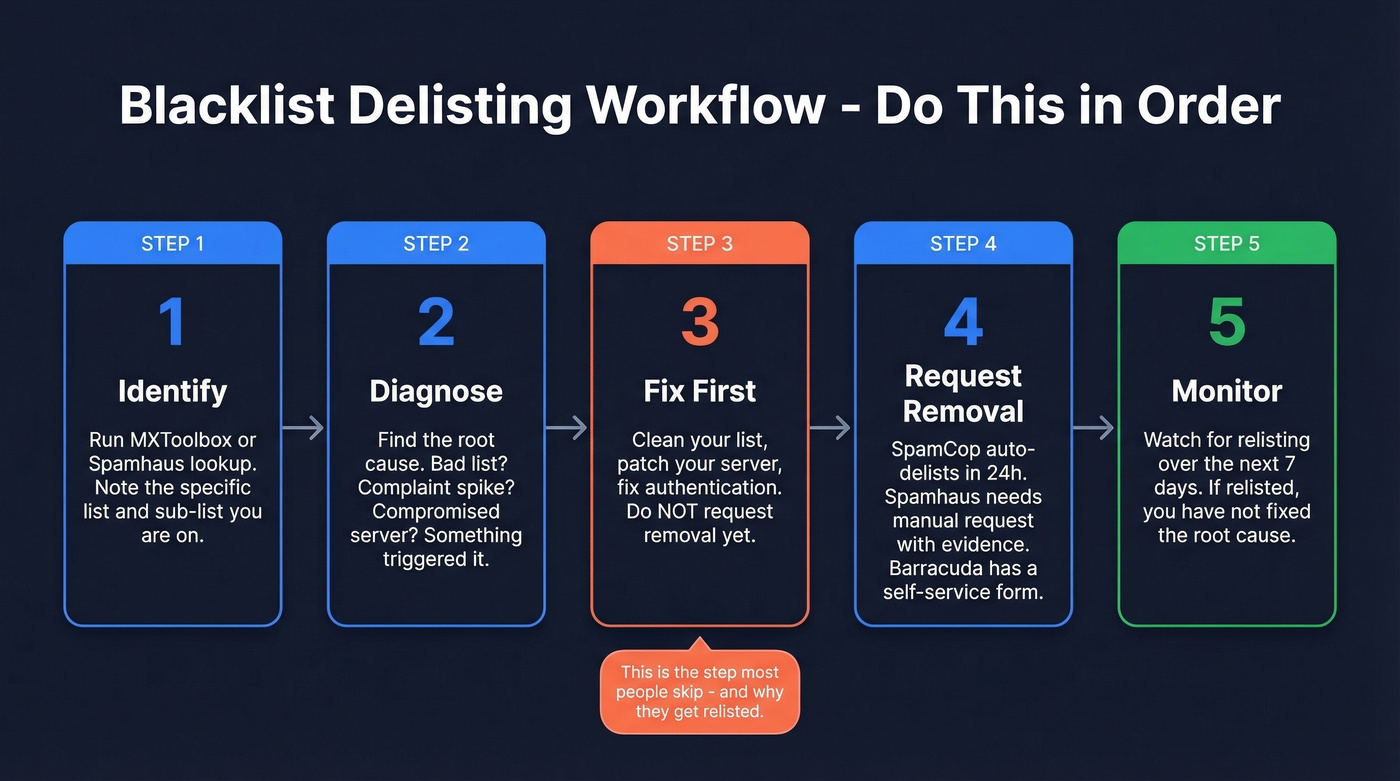
- Identify which lists you're on. Run MXToolbox or Spamhaus lookup. Note the specific list and sub-list.
- Diagnose the root cause. Were you sending to a bad list? Did complaint rates spike? Is your server compromised? Blacklists don't list you randomly - something triggered it.
- Fix the root cause first. Clean your list, patch your server, fix your authentication. Requesting removal before remediation is pointless.
- Submit removal requests. SpamCop auto-delists within 24 hours once spam reports stop - no action needed. Spamhaus often requires a manual removal request with evidence you've remediated. Barracuda provides a self-service removal form.
- Monitor for relisting. If you get relisted within a week, you haven't fixed the root cause.
One practitioner on r/coldemail described exactly this workflow: found an older sending domain on Spamhaus and Barracuda, followed the removal instructions, cleaned their list, and reported that "things already look better." The key detail? They cleaned the list before requesting removal. That order matters.
Why You Got Blacklisted
Blacklists don't flag you for sending email. They flag you for sending email that looks like spam - and the triggers are more mechanical than you'd think.
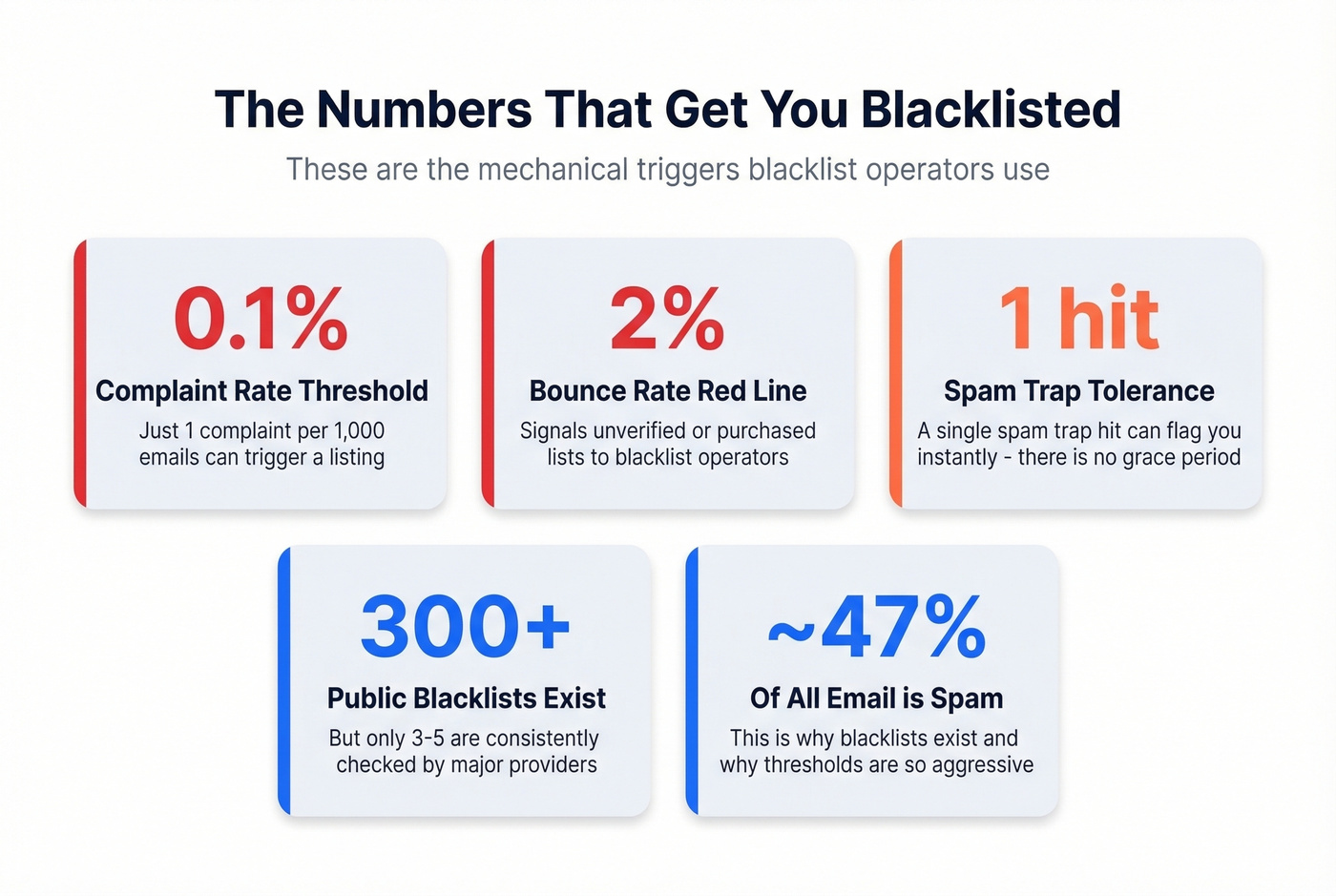
Complaint rates above 0.1% - that's just 1 in every 1,000 emails. Bounce rates above 2% signal you're sending to unverified or purchased lists, which blacklist operators interpret as spammer behavior. Spam trap hits are the silent killer: recycled email addresses that haven't been active for years get repurposed as traps, and hitting one flags you instantly. Compromised infrastructure - an open relay, a hacked WordPress install, or malware on your server - can send spam without your knowledge. And if you're on a shared sending IP, which is common with budget email providers, someone else's bad behavior can get your IP listed.
For context, roughly 46-47% of all email sent daily is spam - about 176 billion messages. Blacklist operators are aggressive because they have to be.
Let's be honest: most teams obsess over blacklist monitoring when the real fix is upstream. The fastest way to land on a blacklist is sending to a list full of dead addresses. Every bounce chips away at sender reputation. Before any campaign, verify your list. Prospeo's 5-step verification catches invalid addresses, spam traps, and honeypots before they damage your domain, with 98% email accuracy and catch-all domain handling.
If you want a deeper diagnostic beyond blacklists, use email reputation tools and track your sender reputation over time.
How to Prevent Future Blacklistings
Prevention beats delisting every time. In our experience, teams that verify before sending almost never end up on a blacklist.
Lock down authentication. SPF, DKIM, and DMARC aren't optional in 2026. Gmail, Yahoo, and Microsoft all require them for bulk senders. Yet adoption is still surprisingly low - only 55.4% of senders have SPF configured, 58.5% have DKIM, and just 42.5% have DMARC. If you haven't set all three up, do it today. (If you’re troubleshooting, start with DMARC alignment and a clean SPF record.)
Verify every list before sending. This is the single highest-impact prevention step. If you're building prospect lists for outbound, use a data provider with built-in verification and a fast refresh cycle so you're not sending to addresses that went stale three months ago. We've watched teams go from chronic blacklisting to zero incidents just by adding a verification step before every campaign.
Monitor the right lists at the right frequency. Focus on 10-15 high-impact blacklists, not 100+. High-volume senders should run a blacklist check every few hours. Moderate senders, daily. Set up Google Postmaster Tools and Microsoft SNDS for continuous, free monitoring from the providers that matter most.
Warm up new domains and IPs gradually. Don't send 10,000 emails from a fresh domain on day one. Ramp volume over 2-4 weeks, starting with your most engaged contacts. (More on safe ramping in our email velocity guide.)
Watch your complaint rate like a hawk. Stay below 0.1%. If you're approaching that threshold, something's wrong with your targeting, your content, or your list quality - and no blacklist checker will save you from the consequences. If bounces are creeping up, fix your email bounce rate before you touch delisting.
Every delisting request is wasted time if your contact list keeps feeding spam traps back into your pipeline. Prospeo refreshes all 300M+ profiles every 7 days - not the 6-week industry average - so stale emails and dead addresses never reach your outbox. At $0.01 per email, clean data costs less than one blacklist recovery.
Replace your blacklist checker habit with data that stays clean weekly.
FAQ
How often should I run a spam list checker?
High-volume senders (10K+ emails/day) should check every few hours; moderate senders need a daily scan. Focus on Spamhaus, Barracuda, and SpamCop - not 100+ lists. Supplement with Google Postmaster Tools and Microsoft SNDS for free, continuous monitoring.
How do I check if my email is on a spam list?
Enter your sending IP or domain into MXToolbox or the Spamhaus lookup tool - both are free and return results in seconds. MXToolbox queries 100+ lists at once, while Spamhaus checks only its own databases, which are the most impactful. For a broader sweep, MultiRBL covers 200+ blocklists.
How long does delisting take?
SpamCop auto-delists within 24 hours once spam reports stop - no action needed. Spamhaus typically requires a manual removal request with proof of remediation, which can take 24-72 hours. Barracuda offers a self-service form with similar turnaround. Skip this step if you haven't fixed the root cause first; you'll just end up relisted within weeks.
Can bad contact data cause blacklisting?
It's one of the most common triggers. Sending to unverified lists produces high bounce rates and spam trap hits, both of which trigger blacklistings fast. Verifying emails before every campaign is the simplest upstream fix and the one that makes the biggest difference long-term.