

SPF DKIM DMARC Checker: How to Read Results and Fix What's Broken
You updated your SPF record, the checker says "pass," and Gmail still junks your outbound. Sound familiar? Most SPF DKIM DMARC checker tools tell you what passed without explaining why you're still failing. Here's how to run the right checks, read the results properly, and fix the actual problems - not just the symptoms.
What You Need (Quick Version)
Stop cycling through 10 different checkers. Two checks - one DNS lookup, one real-email test - tell you everything.
- Run a combined DNS checker (MxToolbox or EasyDMARC) for a baseline pass/fail on all three records.
- Send a test email to a dynamic checker (Red Sift Investigate) to confirm real-world sender behavior across every sending path.
- If you also need BIMI, MTA-STS, or DANE validation, run URIports for RFC-compliance checks.
DNS lookup catches record-level mistakes. The dynamic test catches sending-path misalignment that DNS-only tools miss entirely. Let's break down each piece.
What Authentication Checkers Actually Do
An SPF DKIM DMARC checker queries your domain's DNS TXT records - the ones starting with v=spf1 for SPF and v=DMARC1 for DMARC - parses the syntax, and reports whether the records exist and are formatted correctly. That's the DNS-only model, and it's what most free tools offer. If you're unfamiliar with TXT records, think of them as public instructions your domain publishes so receiving mail servers know how to verify your emails.
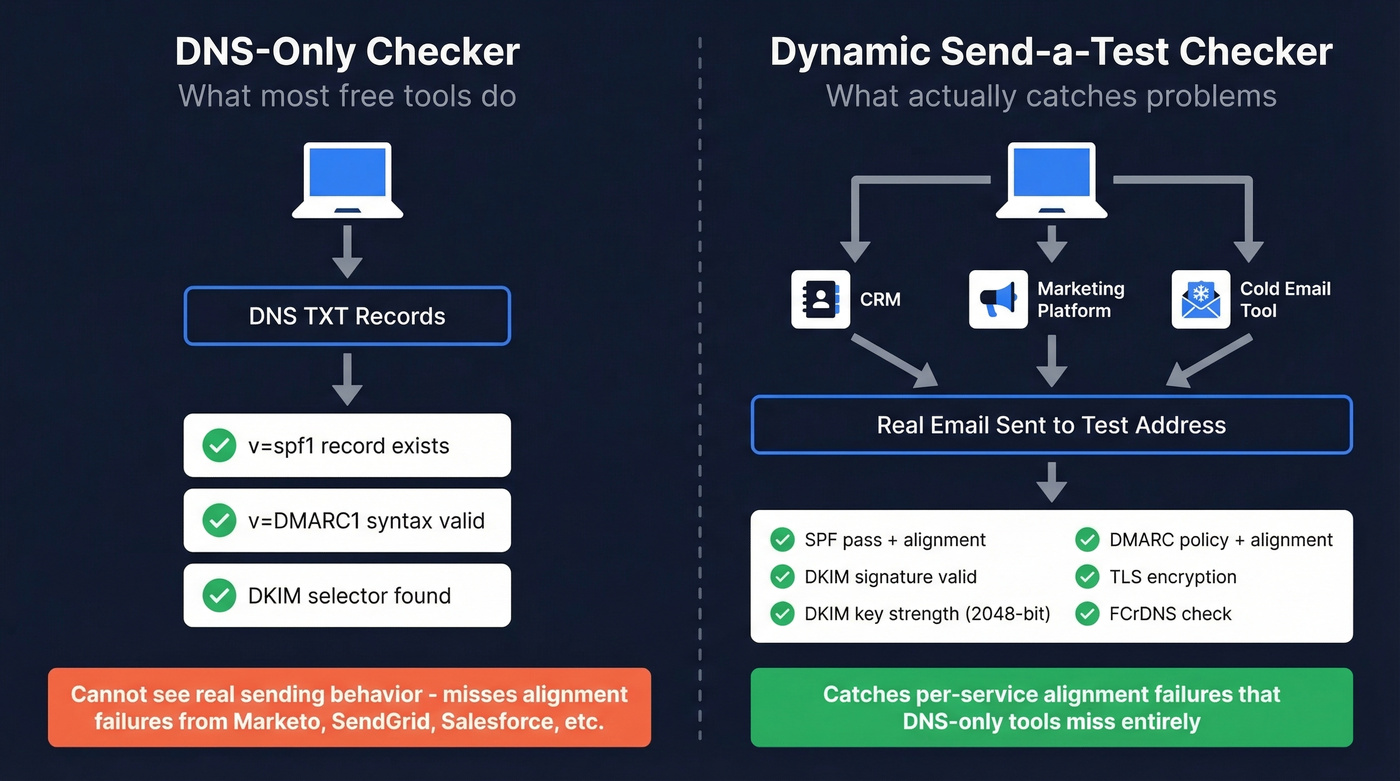
What these tools don't do is test real sending behavior. Your domain might send from Google Workspace, Marketo, Salesforce, and a transactional service like SendGrid - each with its own sending IP and DKIM selector. A DNS-only checker can't see whether those individual paths actually pass authentication when a message hits an inbox.
This gap trips up most teams. The checker shows green, but emails from your marketing automation platform fail DMARC because DKIM alignment was never configured. You don't find out until bounce rates spike.
The Two Checks That Matter
Check 1: DNS Record Validation
Use MxToolbox or EasyDMARC to pull your SPF, DKIM, and DMARC records. You're looking for three things: the record exists, the syntax is valid, and there are no conflicting entries. Takes 30 seconds. Catches the most common mistakes - duplicate SPF records, missing DMARC, broken DKIM selectors.
Check 2: Dynamic Send-a-Test-Email
Red Sift Investigate generates a unique email address. You send a real message to it from each sending service you use - your CRM, your marketing platform, your cold email tool. It checks SPF, DKIM signature validity, DMARC policy status, DMARC alignment, DKIM key strength, TLS, and FCrDNS against the actual message path.
This is the check most people skip, and it's the one that actually matters. Threads in r/sysadmin and r/DMARC consistently surface requests for tools that test real sending behavior, not just DNS records. Your domain might have a perfect SPF record, but if Marketo sends with a Return-Path that doesn't align with your header From, DMARC fails on that path even though DNS looks clean. The only way to catch this is to test the actual sending service.
How to Read Your Results
Most tools show pass/fail badges without telling you what to fix. Here's the translation.
| Result | What It Means | Next Action |
|---|---|---|
| SPF: Pass | Sending IP is in your SPF record | No action needed |
| SPF: Fail | IP isn't authorized | Add the service's SPF include |
| SPF: PermError | Record is broken (syntax, >1 record, too many lookups) | Fix the record - see below |
| DKIM: Pass | Signature verified against DNS public key | No action needed |
| DKIM: Fail | Signature doesn't match or key is invalid | Check selector + key strength |
| DKIM: Key not found | Selector in header doesn't match DNS | Verify s= value and DNS entry |
| DMARC: Pass | SPF or DKIM passes with alignment | No action needed |
| DMARC: Fail | Neither SPF nor DKIM aligns with header From | Fix alignment - the tricky one |
| DMARC: None | No DMARC record published | Publish one immediately (p=none) |
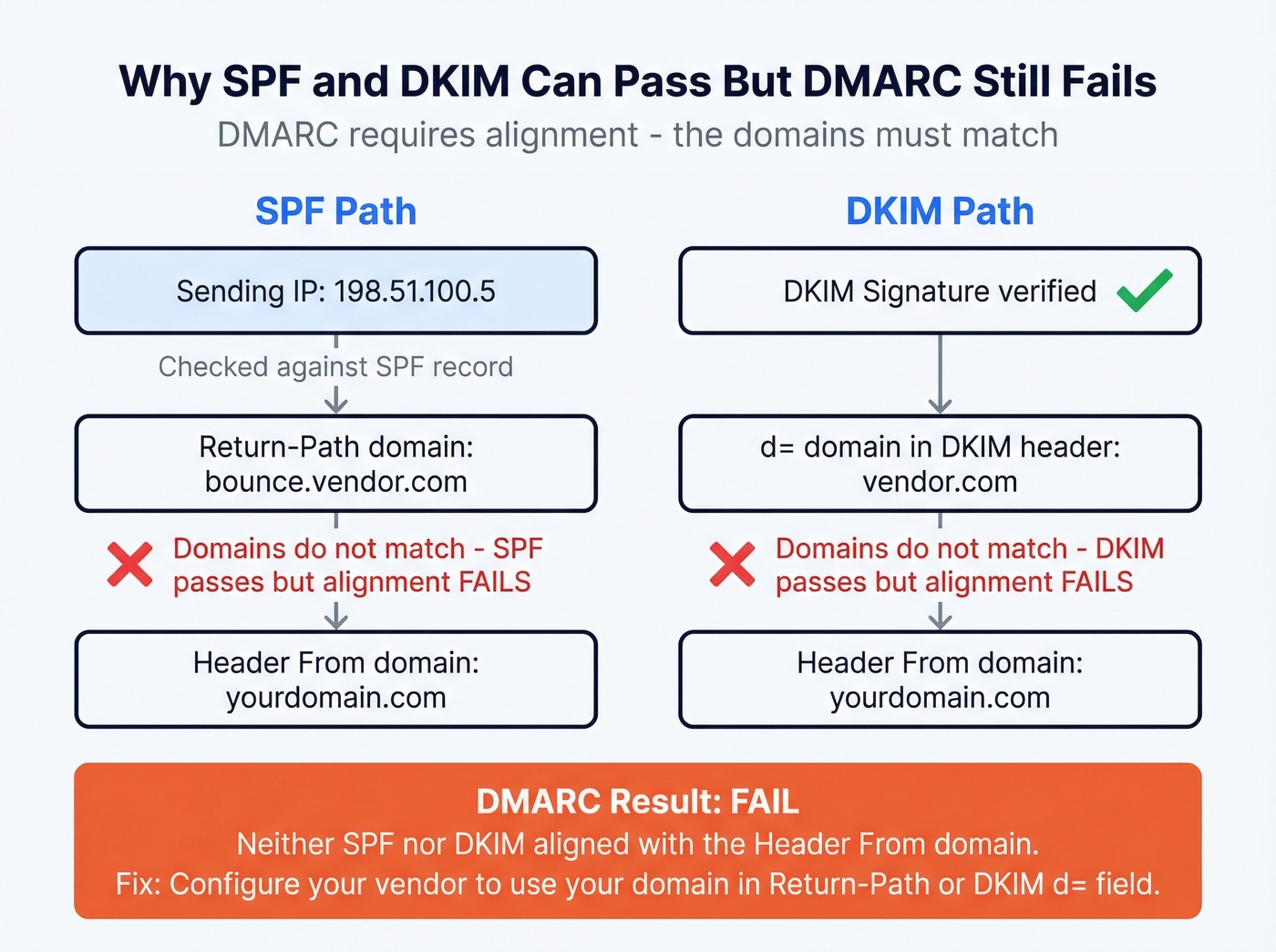
The critical concept here is alignment. SPF can pass - the sending IP is authorized - but DMARC still fails if the domain in the Return-Path (envelope sender) doesn't match the domain in the header From. Same with DKIM: the signature verifies, but if the d= domain in the DKIM-Signature header doesn't match the header From domain, DMARC won't count it.
Check the Authentication-Results header in any received email to see exactly which mechanisms passed and whether alignment held. That header is the ground truth - it tells you more than any external checker.

Authentication fixes protect your domain. But sending to invalid addresses destroys it just as fast. Prospeo's 5-step email verification - with catch-all handling, spam-trap removal, and honeypot filtering - keeps your bounce rate under control so your DMARC-aligned emails actually land.
98% email accuracy. Zero bounces undoing your authentication work.
Common Failures and Exact Fixes
SPF Failures
Multiple SPF records on one domain. DNS allows only one SPF TXT record per domain. If you've got two - common when different teams add records independently - SPF returns a PermError and fails entirely. Merge them into a single record.
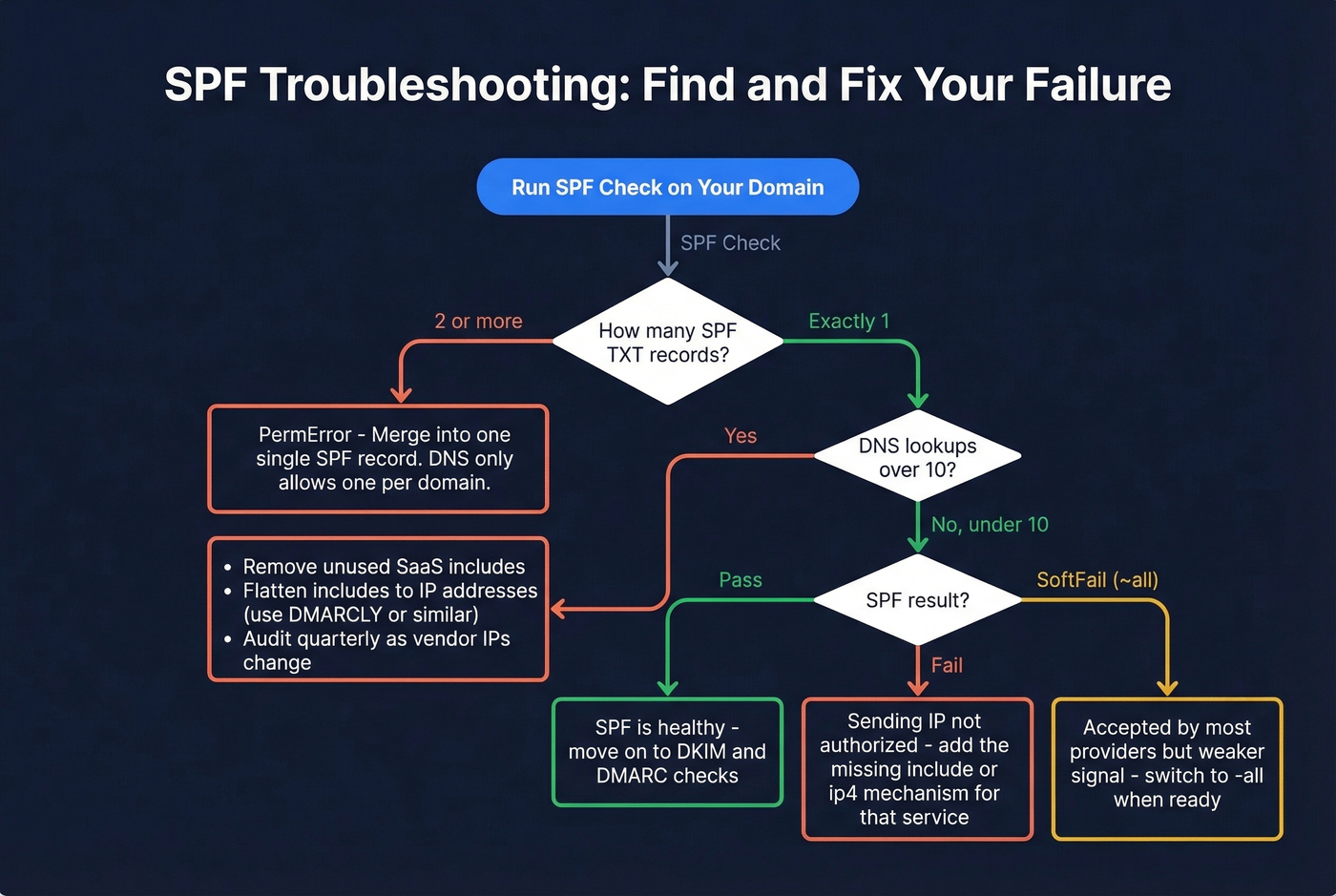
10 DNS lookup limit exceeded. Every include:, a:, mx:, and redirect= mechanism counts as a lookup. We've audited dozens of SPF records that hit this limit, and it happens faster than you'd expect once you add three or four SaaS tools. The fix is SPF flattening - resolving includes to IP addresses - but you'll need to maintain the flattened record as vendor IPs change. Tools like DMARCLY offer automatic flattening.
Include bloat. Every SaaS vendor tells you to add their SPF include. After a few years, your record is a mess. Audit it quarterly. Remove services you no longer use.
If you need a reference pattern to compare against, start with an SPF record example and adapt it to your senders.
DKIM Failures
Selector mismatch. The s= parameter in the DKIM-Signature header must match the DNS record name at selector._domainkey.yourdomain.com. If your email platform signs with s=dkim1 but your DNS has the key under s1._domainkey, DKIM fails with "key not found."
Here's the thing: most checker tools ask you for a DKIM selector without telling you how to find it, which wastes hours. Open a received email, view full headers, find the DKIM-Signature line, and look for the s= parameter. Common defaults: Microsoft 365 uses selector1 or selector2, and Gmail/Google Workspace often uses selectors starting with google (for example, google20161025). If you want a step-by-step, see how to verify DKIM is working.
TXT record formatting mistakes. If your DKIM key is long (and RSA-2048 keys are), the TXT record needs to be split into multiple quoted strings within a single TXT record - not multiple TXT records at the same selector name. Multiple TXT records at the same name is a common setup mistake that causes intermittent failures.
Canonicalization brittleness. If your DKIM canonicalization is set to simple/simple, minor transit modifications - like whitespace changes from forwarding - can break the signature. Use relaxed/relaxed unless you have a specific reason not to.
Weak keys. RSA-2048 is the practical baseline today. If you're still running RSA-1024 or lower, rotate immediately. Some providers still default to 1024-bit keys on initial setup.
Unsafe key rotation. When rotating DKIM keys, follow this sequence: publish the new selector in DNS, wait for propagation (24-48 hours), switch your sending platform to sign with the new selector, validate with a dynamic checker, keep the old selector live until mail queues drain, then remove it. Skipping the overlap period means in-flight messages signed with the old key will fail verification.
DMARC Failures
No DMARC record at all. As of 2026, roughly 18.2% of the top 10 million domains have a valid DMARC record, and only 7.6% enforce quarantine or reject. If you haven't published one, you're in the majority - but you're also invisible to mailbox providers' trust signals.
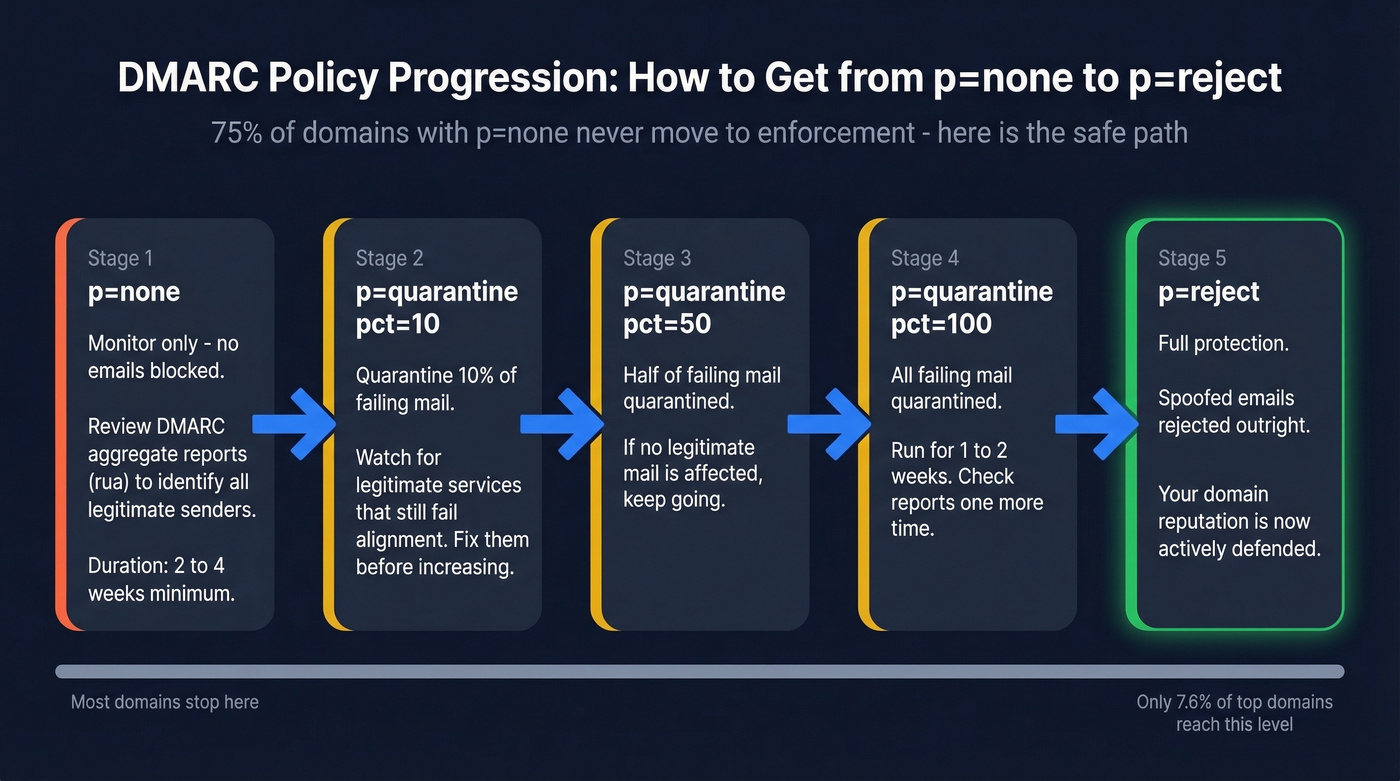
p=none is monitoring, not protection. It meets the baseline DMARC policy level referenced in bulk-sender requirements. But p=none does nothing to stop spoofing. DMARC adoption sits at roughly 54%, with p=none as the most common policy at about 32% - and roughly 75% of those p=none users have no plans to move to enforcement. That's a lot of domains stuck in limbo. The end goal is p=reject. Get there incrementally: p=none, then p=quarantine (with pct=10, then 50, then 100), then p=reject.
Subdomain policy gaps. If your DMARC record doesn't include an sp= tag, subdomains inherit the parent policy. Fine if you're at p=reject. At p=none, every subdomain is also unprotected.
Forwarding breaks alignment. If your domain's mail gets forwarded through mailing lists, look into ARC (Authenticated Received Chain). Microsoft specifically recommends ARC because forwarding breaks DMARC alignment, and without it, legitimate forwarded messages can get rejected under strict policies.
If you want the deeper mechanics, read this guide on DMARC alignment.
2026 Sender Requirements
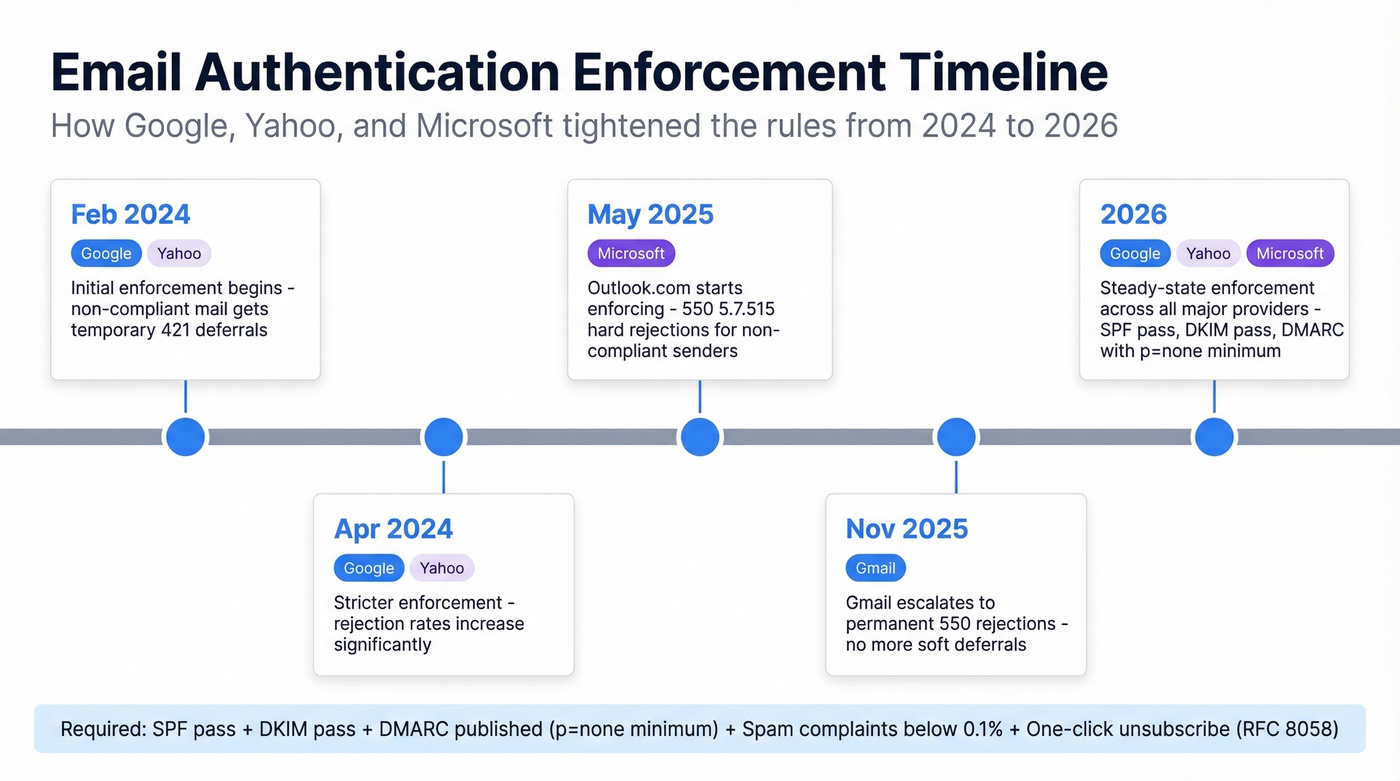
Every major mailbox provider now enforces email authentication for bulk senders (5,000+ emails/day). Here's the timeline that got us here.
| Date | Provider | What Happened |
|---|---|---|
| Feb 2024 | Google/Yahoo | Initial enforcement; non-compliant mail gets 421 deferrals |
| Apr 2024 | Google/Yahoo | Stricter enforcement; rejection rates increase |
| May 2025 | Microsoft | Outlook.com enforcement begins; 550; 5.7.515 rejections |
| Nov 2025 | Gmail | Gmail escalates to permanent 550 rejections |
| 2026 | All three | Steady-state enforcement across all major providers |
The requirements are consistent across providers: SPF must pass, DKIM must pass, DMARC must be published with at least p=none and alignment to either SPF or DKIM. Microsoft's official documentation also calls out the 10 DNS lookup limit as a common SPF pitfall.
Beyond authentication, keep spam complaint rates below 0.1% and never hit 0.3%. One-click unsubscribe (RFC 8058) is required, with unsubscribe requests processed within two days. Miss these and you're looking at deferrals, junking, or outright rejections.
If you're sending at scale, also watch your email velocity so you don't trigger provider throttling.
Best Free Verification Tools
| Tool | Type | Protocols | Free? | Best For |
|---|---|---|---|---|
| MxToolbox | DNS-only | SPF/DKIM/DMARC | Yes | Quick baseline check |
| Red Sift Investigate | Dynamic (send-a-test) | SPF/DKIM/DMARC + BIMI, MTA-STS, TLS | Yes | Real sending-path validation |
| URIports | Multi-protocol RFC | SPF/DKIM/DMARC + MTA-STS, DANE, BIMI | Yes | Full RFC compliance audit |
| EasyDMARC | DNS-only + educational | SPF/DKIM/DMARC | Yes (free plan) | Beginners needing guided setup |
| DMARCLY | DNS-only + generator | SPF/DKIM/DMARC | Yes (tools) | Record generation + SPF flattening |
MxToolbox is the workhorse - paste your domain, get instant pass/fail on SPF and DMARC, plus blacklist status and MX issues. For DKIM, you'll enter a selector to validate the key. EasyDMARC adds more educational context around each result, which is useful if you're new to authentication. DMARCLY's free tools include record generators alongside checkers, saving time when building records from scratch.
Red Sift Investigate is the one most people don't know about. You send it an actual email, and it analyzes the real authentication chain - including alignment, key validity, and TLS. URIports goes further, validating against RFC specifications for SPF, DKIM, DMARC, MTA-STS, DANE, and BIMI in a single pass.
One feature gap across most free tools: they don't offer pre-publish SPF validation (spf.access.nu is a notable exception). For deeper pre-change testing and monitoring workflows, you're looking at paid platforms.
When You Need Monitoring
One-time checks are fine for setup and troubleshooting. But if you're sending at volume across multiple domains, you need continuous DMARC monitoring - tools that parse aggregate XML reports into dashboards and alert you when legitimate sources start failing.
| Tool | Starting Price | Notes |
|---|---|---|
| PowerDMARC | $8/mo | Cheapest entry point |
| Postmark | $14/mo | Clean UI, email-focused |
| Valimail | $19/mo | Strong automation |
| Dmarcian | $19.99/mo | Industry veteran |
| Cloudflare | $25/mo | Best if you're already on Cloudflare |
| EasyDMARC | $35.99/mo | Generous free tier for small setups |
| ZeroBounce | $49/mo | Bundled with email validation |
For a single domain, the free tiers from EasyDMARC or PowerDMARC work fine to get started.
If you're also tracking deliverability outcomes, pair monitoring with email reputation tools so you can connect auth changes to inbox placement.
After Auth Is Clean - Protect Sender Reputation
Look, here's what most authentication guides won't tell you: perfect SPF, DKIM, and DMARC records are necessary but nowhere near sufficient. Authentication is the minimum bar. What actually determines whether you reach inboxes is sender reputation - and nothing tanks reputation faster than bounces from bad email addresses.
The numbers back this up. Fully authenticated senders are 2.7x more likely to reach inboxes - but only if bounce rates stay low. Microsoft inbox placement has collapsed year-over-year: Office 365 dropped from 77% to 51%, and Outlook/Hotmail fell from 49% to 27%. Authentication alone doesn't explain that gap. List hygiene does.
We've seen teams spend weeks fixing authentication, hit green across every checker, and then tank their deliverability by sending to a stale list full of invalid addresses. Prospeo's 5-step verification process - catch-all handling, spam-trap removal, and honeypot filtering - delivers 98% email accuracy across 143M+ verified addresses. Data refreshes every 7 days, so you're not sending to addresses that went invalid last month. There's a free tier to test it, no contracts required.
If you're troubleshooting bounce-driven damage, start with email bounce rate benchmarks and fixes, then move to spam trap removal if you suspect list poisoning.
Authentication gets you past the front door. Clean data keeps you from getting thrown out.
You just spent hours debugging SPF lookups and DKIM selectors to protect deliverability. Don't waste that effort on stale data. Prospeo refreshes every record on a 7-day cycle and verifies emails at $0.01 each - so the contacts you send to are as clean as the authentication behind them.
Bad data kills deliverability faster than a broken SPF record.
FAQ
What's the difference between SPF, DKIM, and DMARC?
SPF authorizes which IP addresses can send email for your domain. DKIM adds a cryptographic signature verified against a public key in DNS. DMARC ties them together by requiring alignment between the authenticated domain and the visible From address, plus setting a policy (none, quarantine, or reject) for messages that fail.
Why does SPF pass but DMARC still fail?
DMARC requires alignment: the domain in the Return-Path (envelope sender) must match the header From domain. If your marketing platform sends with its own Return-Path, SPF passes for their domain but DMARC fails because it doesn't match your From address. Fix this by configuring a custom Return-Path or ensuring DKIM alignment instead.
How do I find my DKIM selector?
Open a received email, view the full message headers, and find the DKIM-Signature line. The s= parameter is your selector. Microsoft 365 typically uses selector1 or selector2, and Gmail/Google Workspace often uses selectors starting with google (for example, google20161025).
What's the best free SPF DKIM DMARC checker in 2026?
For a quick DNS-level check, MxToolbox is the fastest and most reliable. For real-world validation of actual sending paths, Red Sift Investigate is the best free option - it tests the full authentication chain including alignment. Use both: MxToolbox first for a baseline, then Red Sift to test each sending service individually.
How do I keep emails landing after fixing authentication?
Clean authentication is step one. Step two is verifying your list to prevent bounces that damage sender reputation. Prospeo verifies addresses with 98% accuracy across 143M+ emails on a 7-day refresh cycle, with a free tier to start - so your authentication work doesn't get undermined by stale data.