

SPF Record Check: What Your Results Mean and How to Fix Every Error
You're staring at a DMARC aggregate report. SPF shows 99% pass - everything looks clean until one receiving org flags SPF=fail against a domain you've never heard of. Something like outbound-ip138b.ess.barracuda.com. You didn't misconfigure anything. Your SPF record check comes back syntactically perfect. The problem is that SPF doesn't check what most people think it checks, and that misunderstanding is the root of almost every "my SPF is broken" thread on Reddit.
Let's fix that, permanently.
What You Need (Quick Version)
Most SPF issues fall into three buckets. Here's the fastest path through each:
- Run your check. Use MxToolbox, EasyDMARC, or
dig TXT yourdomain.com +shortfrom a terminal. If the record parses clean, move to step 2. - If errors appear, jump to the Common SPF Errors and Fixes section below. Most issues are duplicate records, too many DNS lookups, or missing includes.
- If SPF passes but DMARC still fails, your problem isn't SPF syntax - it's alignment. Jump to Why SPF Passes but DMARC Fails.
Here's the thing most guides won't tell you: your SPF record is probably fine. Your alignment is what's broken. The vast majority of persistent "SPF failures" we see are actually Return-Path mismatches that no amount of SPF rewriting will fix.
What Is an SPF Record?
An SPF record is a DNS TXT record published on your domain that lists every IP address and server authorized to send email on your behalf. When a receiving mail server gets a message, it queries this DNS entry to decide whether the sender is legitimate.
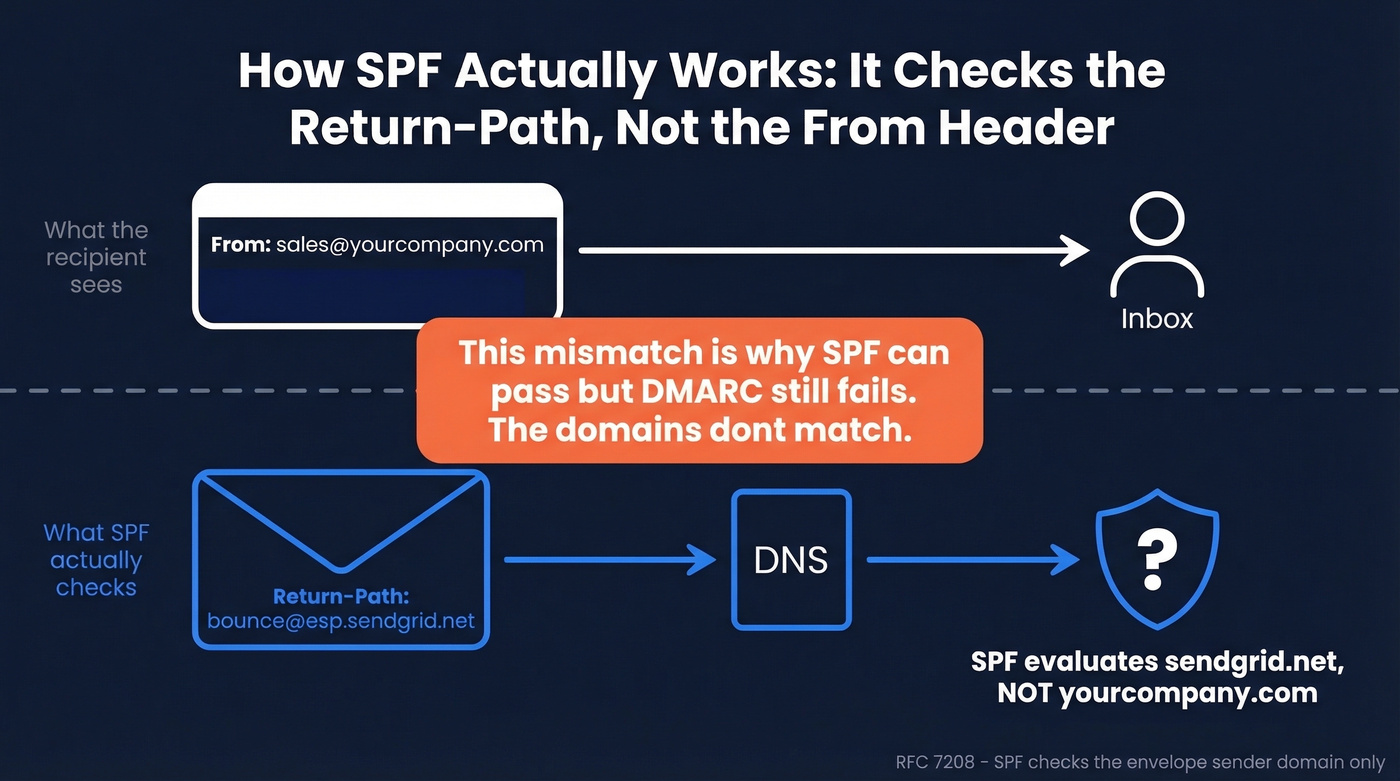
The part that trips up nearly everyone: SPF checks the envelope sender - the Return-Path or MAIL FROM address - not the visible "From" header the recipient sees. These are two different things. The From header is what shows up in your inbox. The Return-Path is a behind-the-scenes routing address that bounces go to. SPF only cares about the Return-Path domain.
This distinction, central to RFC 7208's evaluation model, is the single most misunderstood concept in email authentication. Once you internalize it, every confusing DMARC report starts making sense.
One related misconception worth clearing up: MX records affect inbound mail routing, not outbound SPF evaluation. If someone tells you to check your MX records to fix SPF failures, they're conflating two different systems.
Why SPF Checking Matters in 2026
Email authentication went from "best practice" to "hard requirement" over the past two years. The enforcement timeline has been aggressive, and it's not slowing down.
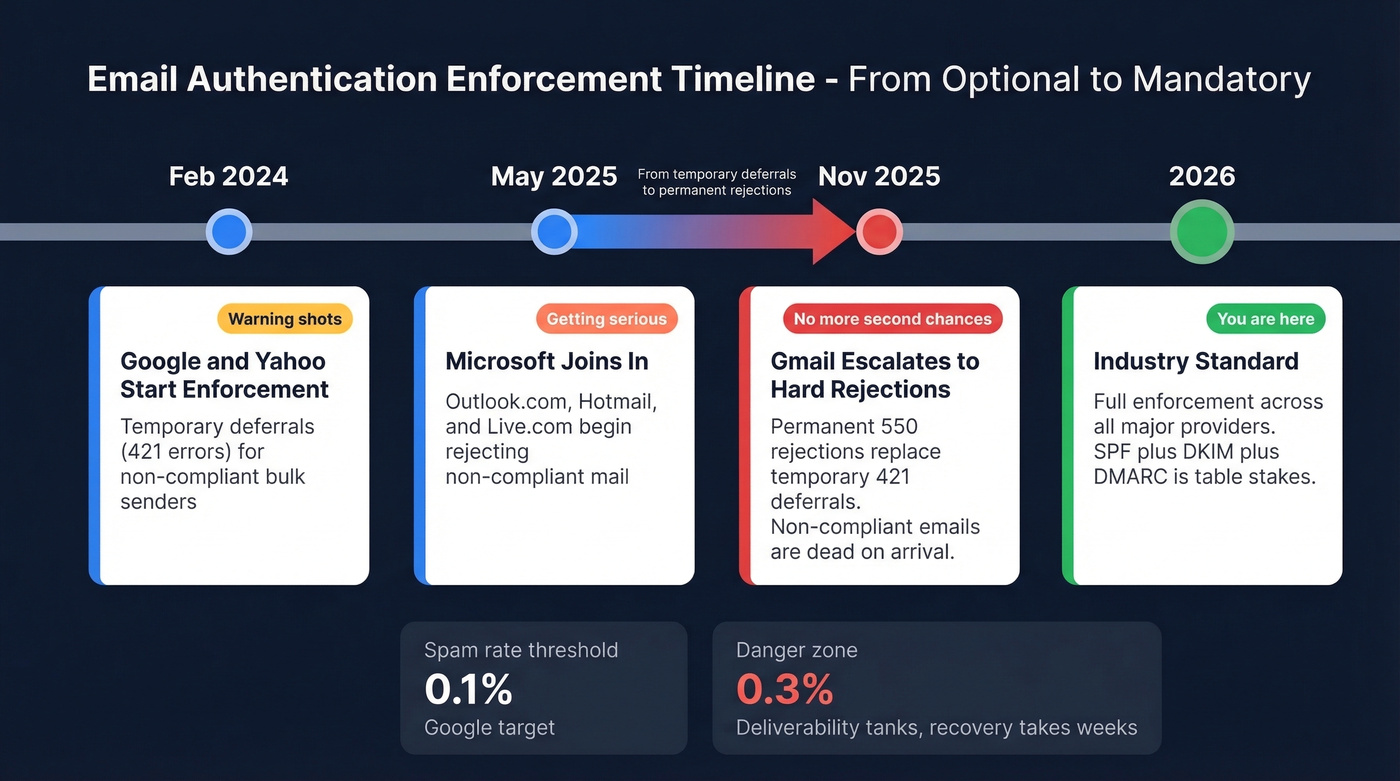
| Date | What Happened | Impact |
|---|---|---|
| Feb 2024 | Google/Yahoo initial enforcement | Temporary deferrals (421 errors) for non-compliant mail |
| May 2025 | Microsoft Outlook.com enforcement begins | Rejections for outlook.com/hotmail.com/live.com |
| Nov 2025 | Gmail ramped enforcement | Permanent rejections (550 errors) for non-compliant mail |
| 2026 | Industry standard | Full enforcement across major providers |
The difference between a 421 and a 550 error matters. A 421 is a temporary deferral - the receiving server tells you to try again later. A 550 is a permanent rejection. Your message is dead. By late 2025, Gmail moved from temporary deferrals to permanent rejections, which means non-compliant senders aren't just delayed anymore - they're blocked.
Spam rate thresholds have tightened too. Google wants you under 0.1% complaint rate. Hit 0.3% and you're in the danger zone - deliverability tanks, and recovery takes weeks. SPF is the foundation: without a valid, properly configured SPF record, you can't pass DMARC alignment reliably, and without DMARC, bulk senders get rejected outright.
How to Check SPF Records
There are three ways to verify your SPF configuration, and you should know all of them. Online tools are fastest for quick checks, command line gives you raw data, and email headers show you what's actually happening in production.
Online SPF Checker Tools
The free tools are genuinely good. MxToolbox is the go-to for quick checks - it flags deprecated records, recursive loops, multiple records, and characters after the all directive. EasyDMARC gives you a visual breakdown of each mechanism, which helps when you're parsing a complex record. Kitterman is the most RFC-compliant evaluator if you need a strict pass/fail against the spec. PowerDMARC shows your void lookup count.
All four have free checker tools. Run your domain through at least two of them - they occasionally flag different issues.
Command Line (dig / nslookup)
For the raw record, nothing beats the terminal:
dig TXT example.com +short
You'll get back something like:
"v=spf1 include:_spf.google.com include:sendgrid.net ip4:203.0.113.0/24 -all"
On Windows, use nslookup:
nslookup -type=txt example.com
The output is the same SPF record, just formatted differently. What you're looking for: does the record start with v=spf1? Does it end with -all or ~all? Are all your sending services listed? If any of those answers are "no," you've found your problem.
Reading Email Headers
This is how you verify SPF in production - not what your record says, but what actually happens when a real email arrives. In Gmail, open a message, click the three dots, and select "Show original." Search for spf=, dkim=, and dmarc=. You'll see pass, fail, softfail, or neutral next to each one.
This is the only method that shows you the receiver's actual evaluation. A record can look perfect in MxToolbox and still fail in headers because of alignment issues or forwarding chains.
How to Read SPF Results
SPF evaluation produces seven possible result codes. Each one means something different, and receivers handle them differently.
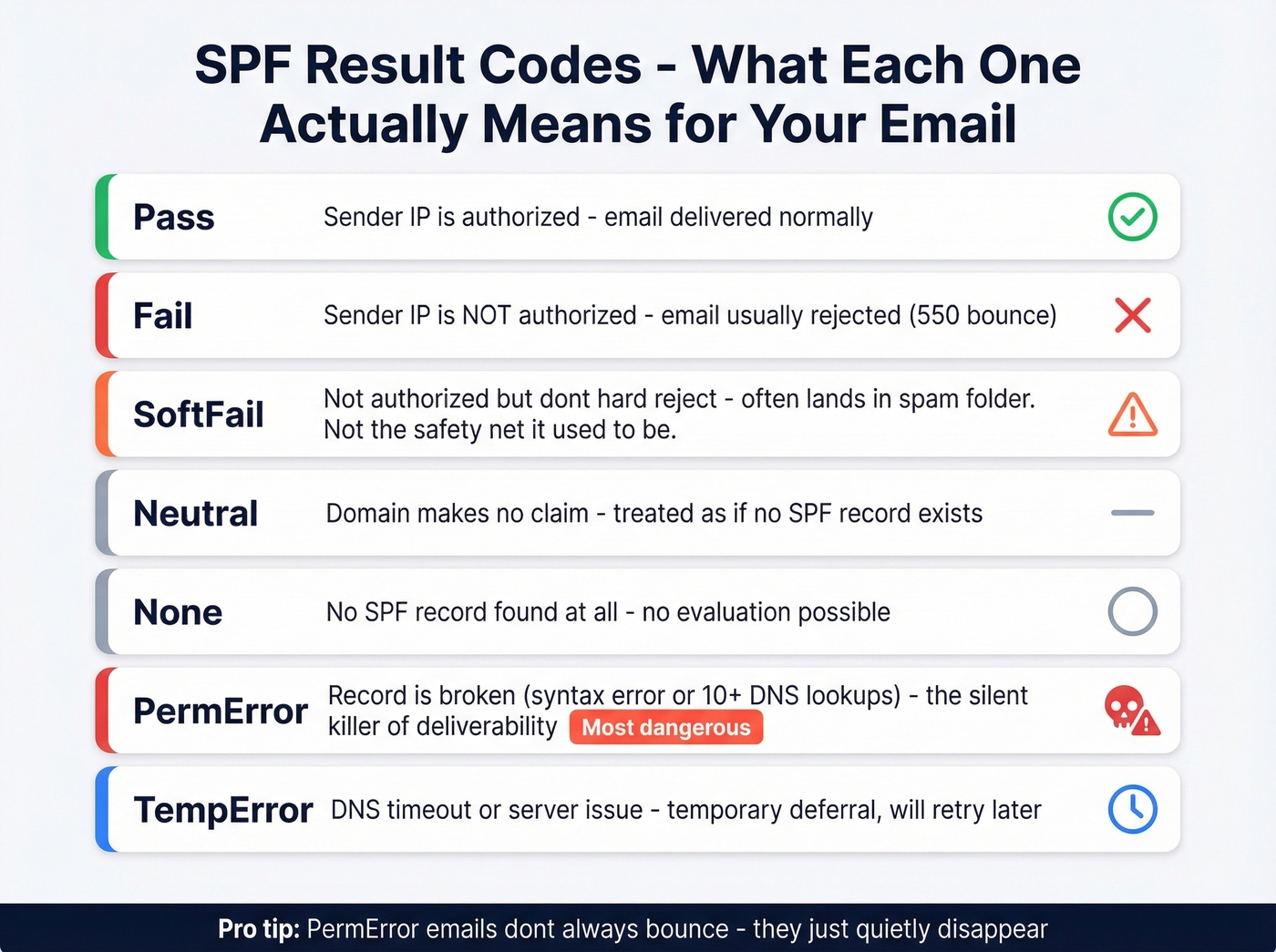
| Result | Meaning | What Happens |
|---|---|---|
| Pass | Sender IP is authorized | Delivered normally |
| Fail | Sender IP isn't authorized | Usually rejected |
| SoftFail | IP not authorized, but don't hard-reject | Accepted but often spam-foldered |
| Neutral | Domain makes no assertion | Treated as if no SPF exists |
| None | No SPF record found | No SPF evaluation possible |
| PermError | Record is broken (syntax, too many lookups) | Most providers reject or spam-folder |
| TempError | DNS timeout or server issue | Temporary deferral, retry later |
SoftFail and PermError cause the most confusion.
SoftFail (~all) was originally meant as a transitional state while you're still setting up SPF - "we're not sure this is authorized, but don't reject it." In practice, most providers now treat SoftFail similarly to Fail when combined with a DMARC policy. It's not the safety net it used to be.
PermError is the silent killer. If your SPF record has a syntax error or exceeds the 10 DNS lookup limit, receivers stop evaluating and return PermError. Different providers handle this differently - some reject outright, others treat it as neutral - but the net effect is reduced deliverability and damaged sender reputation. You won't always get a bounce notification. The emails just quietly disappear.
SPF Syntax Reference
Every SPF record is built from mechanisms and qualifiers. Here's the complete reference:
| Mechanism | What It Does | DNS Lookup? | Example |
|---|---|---|---|
| ip4 | Authorize an IPv4 range | No | ip4:203.0.113.0/24 |
| ip6 | Authorize an IPv6 range | No | ip6:2001:db8::/32 |
| a | Authorize domain's A record IPs | Yes | a:mail.example.com |
| mx | Authorize domain's MX hosts | Yes | mx |
| include | Include another domain's SPF | Yes | include:_spf.google.com |
| exists | Pass if domain resolves | Yes | exists:%{i}.spf.example.com |
| redirect | Use another domain's SPF entirely | Yes | redirect=_spf.example.com |
| ptr | Reverse DNS check (deprecated) | Yes | ptr:example.com |
| all | Catch-all at end of record | No | -all |
Qualifiers modify how each mechanism is interpreted:
+(pass, default if omitted) - authorized~(softfail) - probably not authorized-(fail) - definitely not authorized?(neutral) - no opinion
One critical warning: +all means every IP on the internet is authorized to send as your domain. Never use it.

Fixing SPF errors only matters if the emails you're sending to are real. Prospeo's 5-step verification - including catch-all handling, spam-trap removal, and honeypot filtering - delivers 98% email accuracy. Bounce rates under 4% across 15,000+ companies.
Stop perfecting your SPF record just to bounce off bad data.
The 10 DNS Lookup Limit
The 10-lookup limit isn't a suggestion. It's a hard wall defined in RFC 7208, and most domains hit it the moment they add their third SaaS tool.
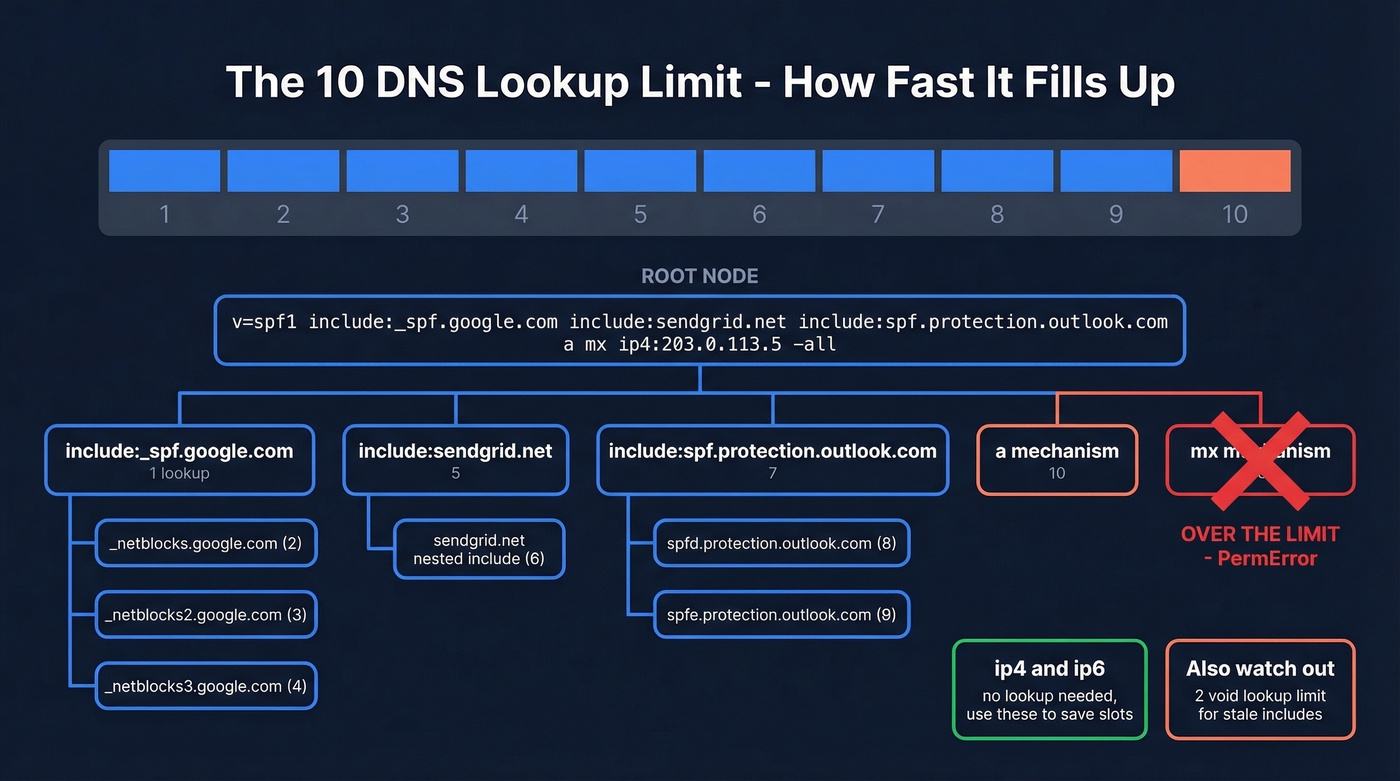
SPF evaluation can't exceed 10 terms that require DNS lookups. The initial TXT record lookup doesn't count. What counts: include, a, mx, ptr, exists, and redirect. What doesn't count: ip4, ip6, and all. Note the distinction - the limit is 10 terms, not 10 DNS queries. An mx mechanism triggers multiple DNS queries to resolve each MX host, but it only counts as one term toward the limit.
A real-world example:
v=spf1 include:_spf.google.com include:sendgrid.net include:spf.protection.outlook.com a mx ip4:203.0.113.5 -all
Counting:
include:_spf.google.com→ 1 (plus nested includes inside that record)include:sendgrid.net→ 2 (plus nested)include:spf.protection.outlook.com→ 3 (plus nested)a→ 4mx→ 5ip4:203.0.113.5→ doesn't count-all→ doesn't count
Looks like 5, right? But nested includes add up fast - and you haven't added your marketing automation platform, your transactional email service, or your helpdesk yet.
There's also a lesser-known 2-void-lookup limit. Void lookups are DNS queries that return empty results (NXDOMAIN or no records). Exceed two void lookups during evaluation and you get a PermError. This catches domains with stale includes pointing to services they no longer use.
Common SPF Errors and Fixes
These are the five errors we see most often, with before-and-after examples for each.
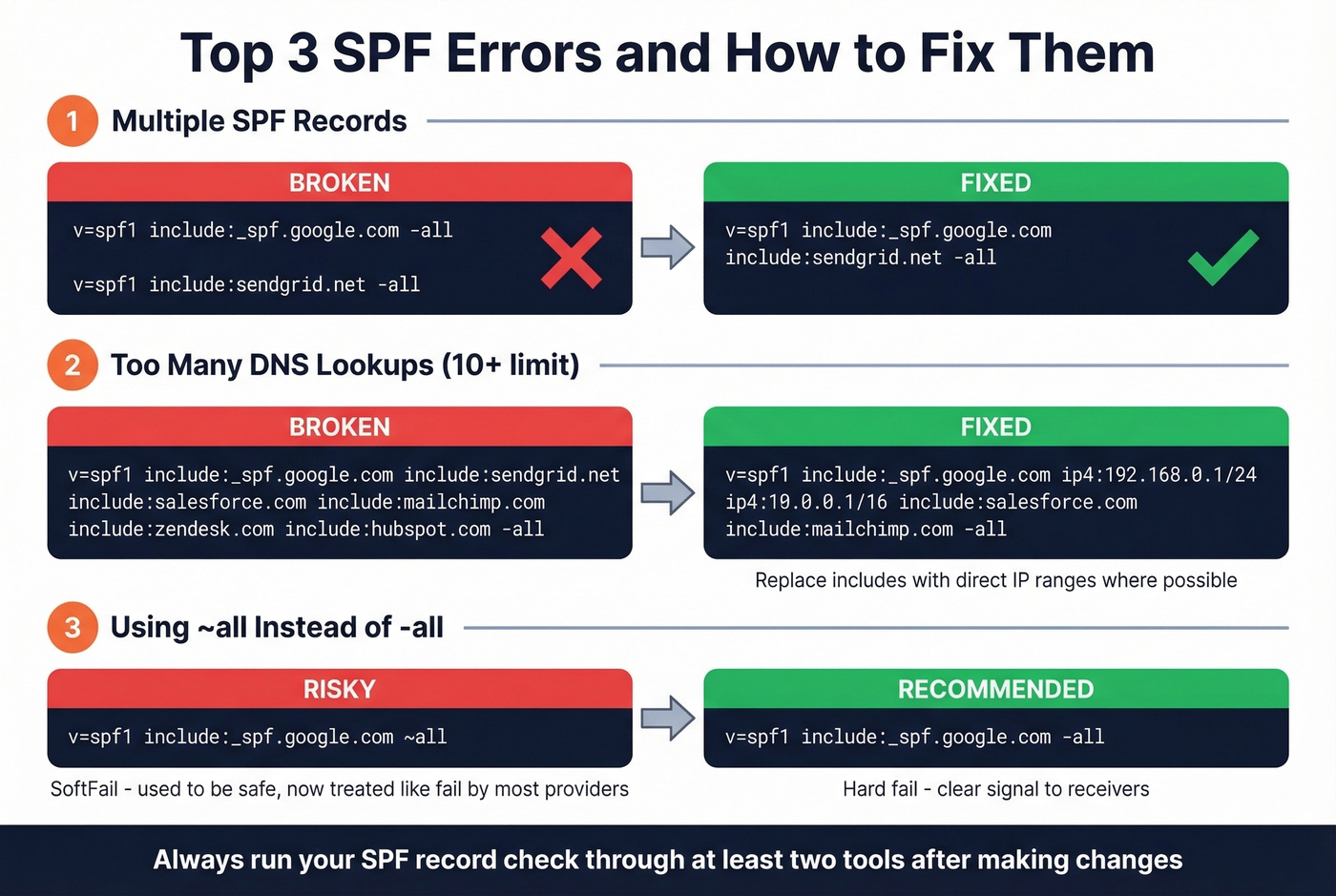
Multiple SPF Records
DNS allows only one SPF TXT record per domain. Two records? PermError.
Before (broken):
"v=spf1 include:_spf.google.com -all"
"v=spf1 include:sendgrid.net -all"
After (fixed):
"v=spf1 include:_spf.google.com include:sendgrid.net -all"
Merge them into a single record. This sounds obvious, but it happens constantly - usually when a new ESP gets added by someone who doesn't check the existing record first. We've seen it at companies with 200+ employees where three different teams have DNS access.
Too Many DNS Lookups
This is the most common structural problem. The remediation pattern follows a clear hierarchy:
First, audit your includes and remove services you no longer use. That dormant Mailchimp account from 2022? Kill the include. Second, replace include mechanisms with ip4/ip6 where the sender's IPs are stable and well-documented. Third, move high-volume third-party senders to subdomains with their own SPF records. Fourth, prefer DKIM for DMARC alignment - it survives forwarding and doesn't consume SPF lookups.
Not every sender needs an SPF include on your root domain. If the sender uses its own Return-Path domain (not yours), adding it to your SPF is pointless - SPF is checked against the Return-Path domain, not the From header.
Syntax Errors
Missing spaces between mechanisms, typos in mechanism names, or characters after the all directive. The all mechanism should be the last thing in the record - anything after it is ignored, but some validators flag it as an error.
Before: v=spf1 include:_spf.google.cominclude:sendgrid.net -all
After: v=spf1 include:_spf.google.com include:sendgrid.net -all
Missing Authorized Senders
You added a new ESP but forgot the include. Emails from that service fail SPF silently. Check your DMARC aggregate reports - they'll show which sending IPs are failing.
Before: v=spf1 include:_spf.google.com -all
After: v=spf1 include:_spf.google.com include:sendgrid.net -all
Deprecated PTR Mechanism
The ptr mechanism is deprecated per RFC 7208. It's slow, unreliable, and counts toward your lookup limit. Replace it with ip4/ip6 or an a mechanism pointing to the specific hostname. Skip this fix if you're not seeing ptr in your record - but if you inherited a domain from a previous admin, it's worth checking.
Why SPF Passes but DMARC Fails
This is the section that would've saved you four hours of troubleshooting. You've rewritten your SPF record multiple times, run it through three different checkers, and DMARC reports still show failures. The problem isn't your SPF syntax - it's that nobody explained what SPF actually checks in the context of DMARC alignment.
Return-Path vs From Domain
DMARC requires alignment: the domain that SPF authenticates must match (or be a subdomain of) the domain in the From header. SPF authenticates the Return-Path domain. If your Return-Path is bounces.esp-provider.com and your From is you@yourdomain.com, SPF passes for the ESP's domain - but DMARC alignment fails because the domains don't match.
This is the #1 cause of "SPF passes but DMARC fails." The fix isn't in your SPF record. It's in your ESP's configuration - you need to set up a custom Return-Path domain (sometimes called a custom bounce domain or custom MAIL FROM) that's a subdomain of your From domain. If you want the deeper mechanics, see our guide to DMARC alignment.
Third-Party Sender Gotchas
This pattern shows up on r/DMARC constantly. Someone describes the exact scenario - repeated SPF rewrites for Zoho campaigns, but the DMARC reports keep showing "SPF not aligned." The problem was Zoho's Return-Path configuration, not the SPF record. Until they configured a custom Return-Path domain in Zoho, no amount of SPF editing fixed alignment.
Amazon SES has the same trap. You can configure a custom MAIL FROM domain in SES, but if SES is still using its default Return-Path for certain message types, SPF checks happen against SES's domain, not yours. Verify that the custom MAIL FROM is actually being used in production - check your email headers, not just the SES console.
The pattern applies to Mailchimp, SendGrid, and every other ESP. Before you touch your SPF record, check whether the ESP supports custom Return-Path domains and whether you've actually configured one. For a step-by-step, see Return-Path.
Should You Flatten Your SPF?
SPF flattening replaces include: chains with a static list of IP addresses, eliminating nested DNS lookups. It sounds like a clean fix for the 10-lookup limit.
It's not.
The case for flattening: it immediately solves the lookup limit by converting everything to ip4/ip6 mechanisms, which don't require DNS lookups.
The case against: it creates a snapshot that goes stale. When SendGrid rotates IPs - and they do - your flattened record still points to the old ones. Legitimate mail starts failing, and you won't know until someone complains. Flattening also shifts IP-tracking responsibility from your ESP to you. And because SPF records are public, flattening exposes your full sending infrastructure to anyone who runs a DNS query. Mailhardener's technical analysis goes further, recommending against flattening entirely and arguing that restructuring includes is always the better path.
SPF macros (RFC 7208 SS7) are a more elegant alternative - they dynamically resolve lookups without static IP lists. But they're complex to implement and not widely understood.
Follow this priority order: restructure your includes first (audit, remove dead services, consolidate). If that's not enough, move third-party senders to subdomains with their own SPF records. If you're still over the limit, use an automated flattening service that monitors IP changes. Manual flattening? Never.
SPF + DKIM + DMARC Together
SPF, DKIM, and DMARC form a three-layer authentication stack, and bulk sender rules require all three. Each protocol handles a different layer: SPF authorizes sending IPs. DKIM cryptographically signs messages so receivers can verify they haven't been tampered with. DMARC ties the results together, enforces policy (deliver, quarantine, or reject), and sends aggregate reports back to you.
DKIM is the more reliable alignment mechanism because it survives forwarding. When an email is forwarded, the sending IP changes, which breaks SPF. DKIM signatures travel with the message regardless of how many servers it passes through. That's why the best practice is to rely on DKIM for DMARC alignment and treat SPF as a supporting layer. If you need to validate your setup end-to-end, use this How to Verify DKIM Is Working walkthrough.
Let's be honest about something, though: if you're running outbound at scale, you'll get more deliverability lift from cleaning your contact list than from obsessing over SPF syntax. Authentication is half the equation. The other half is data quality. You can have perfect SPF, DKIM, and DMARC - and still tank your sender reputation by sending to invalid addresses. High bounce rates signal to mailbox providers that you're not maintaining your lists, which triggers spam filtering regardless of authentication status. We've watched teams spend weeks perfecting DNS records while sending to lists with 15%+ bounce rates, and their inbox placement barely moved. Prospeo's 5-step email verification catches invalid addresses, spam traps, and honeypots before you hit send - which is the part of deliverability that DNS records can't fix. If you're troubleshooting performance, start with an email deliverability guide and then benchmark your email bounce rate.
You just spent an hour debugging DNS lookups and Return-Path alignment. Now make sure the contact data powering your outbound is just as clean. Prospeo refreshes 300M+ profiles every 7 days - not every 6 weeks like competitors - so your lists stay deliverable.
Clean authentication deserves clean data. Start at $0.01 per email.
SPF Deployment Checklist
Run through this before you consider your email authentication done:
- ☐ Only one SPF TXT record per domain
- ☐ All authorized senders included
- ☐ Under 10 DNS lookup terms
- ☐ No deprecated
ptrmechanism - ☐ Ends with
-allor~all(never+all) - ☐ Third-party senders use aligned Return-Path domains
- ☐ DKIM configured for all sending services
- ☐ DMARC published (at least
p=noneto start) - ☐ DMARC aggregate reports monitored weekly
- ☐ Recipient email addresses verified before sending
That last item isn't a DNS setting - it's an operational discipline. Perfect authentication means nothing if 15% of your list bounces. Running an SPF record check is the starting point, but pairing it with verified contact data is what keeps your sender reputation intact long-term. If you're building outbound systems, it also helps to control email velocity and run a proper email spam checker before scaling.
FAQ
What does an SPF record check verify?
An SPF record check queries your domain's DNS for the SPF TXT record and evaluates whether the syntax is valid, the lookup count is within the 10-term limit, and all authorized senders are properly listed. Most online tools also flag deprecated mechanisms, duplicate records, and characters after the all directive.
How do I check SPF records for my domain?
Use an online tool like MxToolbox or EasyDMARC - paste your domain and the tool runs a DNS lookup instantly. For a hands-on approach, run dig TXT yourdomain.com +short in a terminal. Either method returns your published record and highlights errors like exceeding the 10-lookup limit or having duplicate records.
How many DNS lookups can an SPF record have?
Maximum 10 terms that require DNS lookups - include, a, mx, ptr, exists, and redirect. The mechanisms ip4, ip6, and all don't count. Exceeding the limit causes a PermError, which most providers treat as a rejection or spam-folder event. There's also a 2-void-lookup limit for queries returning empty results.
Why does SPF pass but emails still go to spam?
SPF is one of three authentication checks. If DKIM fails or DMARC alignment is broken - meaning the Return-Path domain doesn't match the From domain - emails can be spam-foldered despite SPF passing. High complaint rates above 0.3% and poor list hygiene also override authentication signals.
Do I need SPF if I already have DKIM?
Yes. Bulk sender requirements from Google, Yahoo, and Microsoft mandate SPF and DKIM, plus DMARC. They serve different purposes - SPF authorizes sending IPs, DKIM verifies message integrity and survives forwarding. DMARC needs at least one to pass with alignment, but having both provides redundancy and covers edge cases where one fails.