

How to Set Up an SPF Record on GoDaddy (And Fix It When It Breaks)
Your emails are bouncing and you can't figure out why. Odds are, GoDaddy set your SPF record to include:secureserver.net - which made sense when GoDaddy hosted your email. But many GoDaddy email setups now run through Microsoft 365, and that default SPF string can end up pointing at the wrong servers entirely. Domains with properly configured SPF are 70% less likely to appear in phishing attacks, so getting this right isn't optional. It's the difference between landing in the inbox and landing in spam.
Here's the thing: GoDaddy's DNS editor doesn't warn you about malformed or duplicate SPF records. It'll happily accept a broken record and let you wonder why email stops working three days later. Let's walk through setup, merging, the 10-lookup limit, and the mistakes that trip up even experienced admins.
What You Need (Quick Version)
- Identify every service that sends email on your domain's behalf - M365, Google Workspace, Mailchimp, etc.
- Copy the right SPF string for each provider from the provider table below
- Add one TXT record in GoDaddy's DNS with all providers merged into a single line
- Verify with at least two checking tools
Merging multiple senders? Jump to the merge section. Emails failing despite having SPF configured? Skip to [troubleshooting](#troubleshooting - emails-still-failing).
Which SPF String Do You Need?
Every email provider has its own include: mechanism. Here's a copy-paste reference for the most common ones, with approximate DNS lookup counts - this matters, and you'll see why in the lookup limit section:
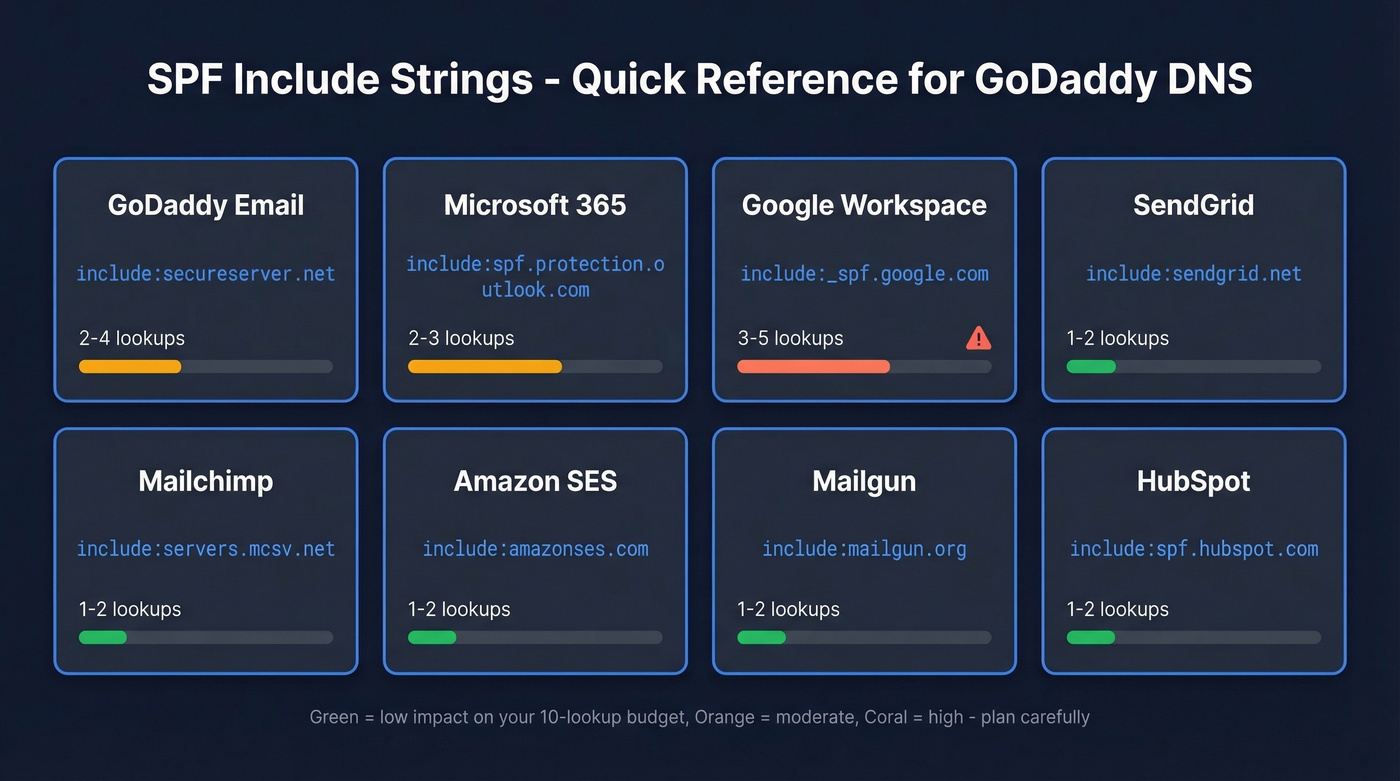
| Provider | SPF Include | ~Lookups |
|---|---|---|
| GoDaddy Email | include:secureserver.net |
2-4 |
| Microsoft 365 | include:spf.protection.outlook.com |
2-3 |
| Google Workspace | include:_spf.google.com |
3-5 |
| SendGrid | include:sendgrid.net |
1-2 |
| Mailchimp | include:servers.mcsv.net |
1-2 |
| Amazon SES | include:amazonses.com |
1-2 |
| Mailgun | include:mailgun.org |
1-2 |
| HubSpot | include:spf.hubspot.com |
1-2 |
A single-provider record looks like this:
v=spf1 [include:spf.protection.outlook.com](https://learn.microsoft.com/en-us/defender-office-365/email-authentication-spf-configure) -all
The biggest confusion we see: GoDaddy-resold Microsoft 365 domains sometimes show include:secureserver.net when they should be using include:spf.protection.outlook.com. Reddit threads on r/godaddy are full of admins wondering why some of their domains use one and some use the other. If you're using Microsoft 365 for outbound mail, use spf.protection.outlook.com. The secureserver.net include is for GoDaddy's legacy hosting email.
Routing mail through Gmail instead? The GoDaddy SPF record for Gmail uses [include:_spf.google.com](https://knowledge.workspace.google.com/admin/security/set-up-spf) - don't mix it up with the M365 include or you'll authorize the wrong servers entirely.
GoDaddy SPF Record Setup Step by Step
Follow these steps based on GoDaddy's current 2026 UI:
- Log in to your GoDaddy account and go to Domain Portfolio
- Select your domain, then click DNS
- Click Add Record
- Set Type to TXT - not SPF. The SPF record type is deprecated per RFC 7208.
- Set Host to @
- Paste your SPF string into the Value field
- Leave TTL at default (often 1 hour) and save
This only works if your domain's nameservers point to GoDaddy. If you've moved nameservers to Cloudflare or another provider, edit DNS there instead - GoDaddy's editor won't control your records.
Two things GoDaddy won't tell you: the editor auto-quotes TXT values, so don't add your own quotation marks or you'll end up with double-wrapped quotes that break parsing in some validators. And if you see an old SPF-type record (not TXT), delete it. It's a relic that causes SPF evaluation issues.
For more syntax patterns and provider variations, see these SPF record examples.
Merge Multiple SPF Records Into One
This scenario plays out constantly. You add Mailchimp for marketing emails, paste in their SPF record, and suddenly ALL email fails - transactional, sales, everything. You now have two SPF records, and that triggers a PermError. Every receiving server sees the conflict and gives up.
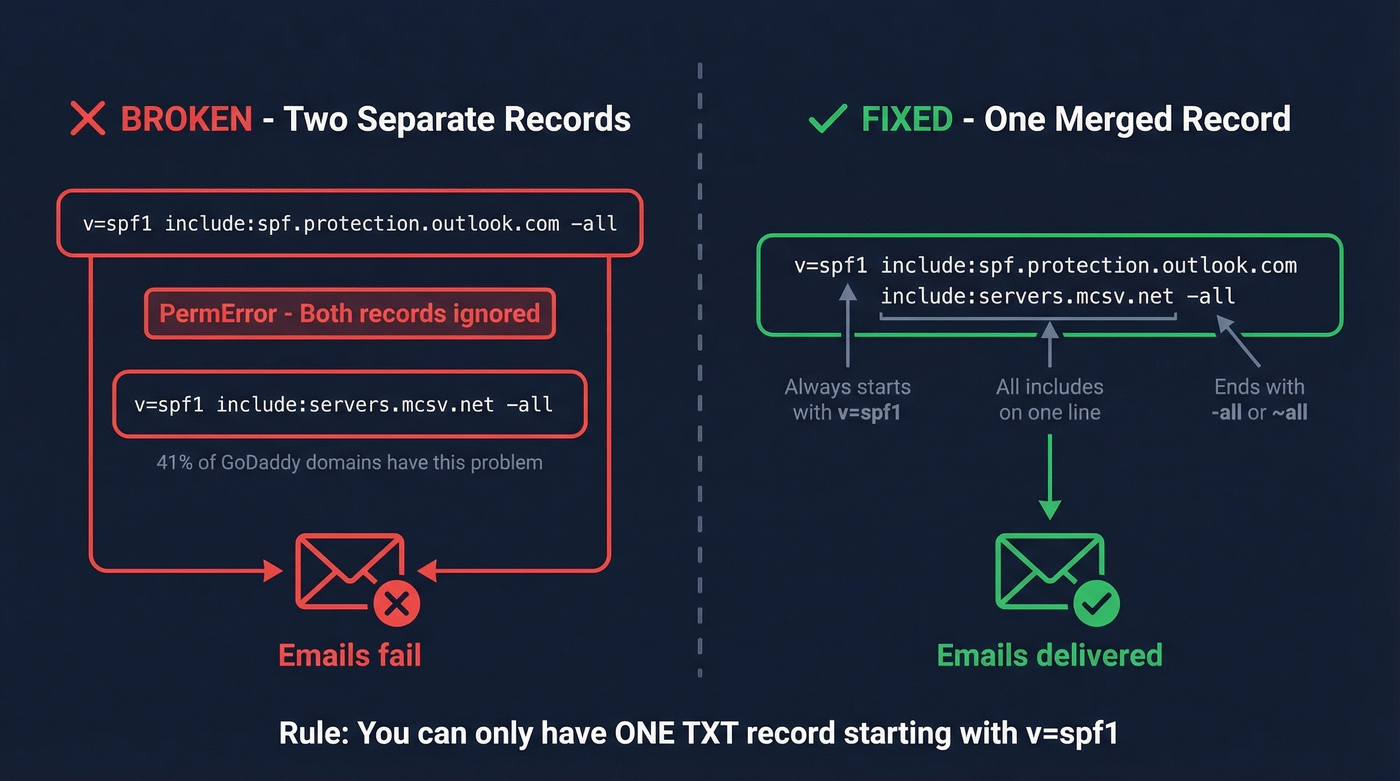
In AutoSPF's sample of 3,200 GoDaddy-hosted domains, 41% had duplicate SPF records. That's not a fringe problem.
You need exactly one TXT record starting with v=spf1, containing all your include: mechanisms, and ending with one -all or ~all.
Before (broken - two separate records):
v=spf1 include:spf.protection.outlook.com -all
v=spf1 include:servers.mcsv.net -all
After (correct - one merged record):
v=spf1 include:spf.protection.outlook.com include:servers.mcsv.net -all
Need M365 + Mailchimp + SendGrid? Same pattern:
v=spf1 include:spf.protection.outlook.com include:servers.mcsv.net include:sendgrid.net -all
Watch the 255-character-per-string limit in TXT records too. Many DNS editors handle chunking automatically, but if you're editing raw zone files elsewhere, long records need to be split into quoted segments.
Delete the old records after creating the merged one. GoDaddy won't stop you from having both sitting there, silently breaking everything.
If you're also trying to protect deliverability beyond DNS, start with your email deliverability fundamentals.

You're merging SPF records so your outbound emails actually land. But bad contact data causes bounces no DNS fix can solve. Prospeo's 5-step email verification delivers 98% accuracy - teams using it cut bounce rates from 35% to under 4%.
Fix your SPF, then fix your contact data. Start free.
The 10 DNS Lookup Limit
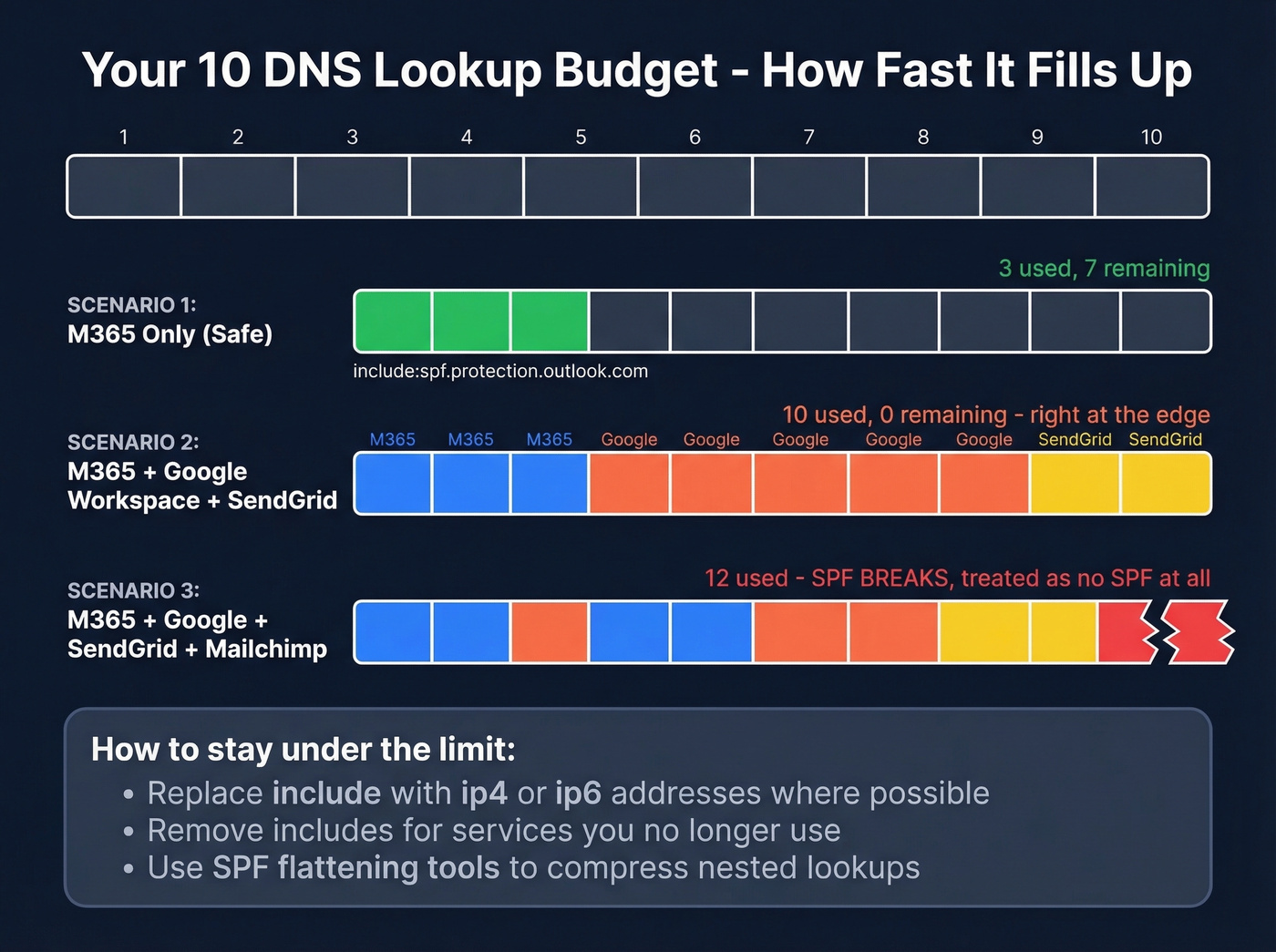
RFC 7208 caps SPF evaluation at 10 DNS lookups. Exceed it and receivers treat your record as invalid - same effect as having no SPF at all. In AutoSPF's GoDaddy domain sample, 29% exceeded the limit.
If you're seeing unexplained bounces, compare against typical email bounce rate benchmarks and causes.
| Counts as a lookup | Doesn't count |
|---|---|
include |
ip4 |
a |
ip6 |
mx |
all |
exists |
|
ptr (deprecated) |
|
redirect |
Nested lookups are where this gets tricky. When you include:_spf.google.com, Google's SPF record itself includes additional domains, and each one burns another lookup. Google Workspace alone can eat 3-5 of your 10. Add M365 (2-3) and SendGrid (1-2), and you're at 6-10 before adding anything else. That's your entire budget gone on three services.
If you're over the limit:
- Replace
include:with explicitip4/ip6addresses where possible - Flatten your SPF record with tools like AutoSPF that automate the process
- Remove services you no longer use - we've seen records with includes for tools the team cancelled two years ago
- Drop the deprecated
ptrmechanism. It wastes lookups and does nothing useful.
If you're already receiving DMARC aggregate reports, check for SPF PermError entries. They're often the first sign you've blown the lookup limit.
If you're running outbound at scale, keep an eye on email velocity too.
Verify Your SPF Record
Don't trust a single checker. We've wasted hours troubleshooting because one tool flagged a failure while another showed a pass. Different tools query different DNS resolvers at different times, and propagation inconsistencies can make a valid record look broken.
Use MXToolbox's SPF lookup to see the full include chain and lookup count. Cross-check with Kitterman's SPF validator for syntax verification. If both pass, you're set. If they disagree, wait an hour and test again - DNS propagation typically takes minutes but can stretch to 48 hours.

Common SPF Mistakes on GoDaddy
GoDaddy's DNS editor is dangerously permissive - it accepts anything without validation. Here are the mistakes we see over and over:
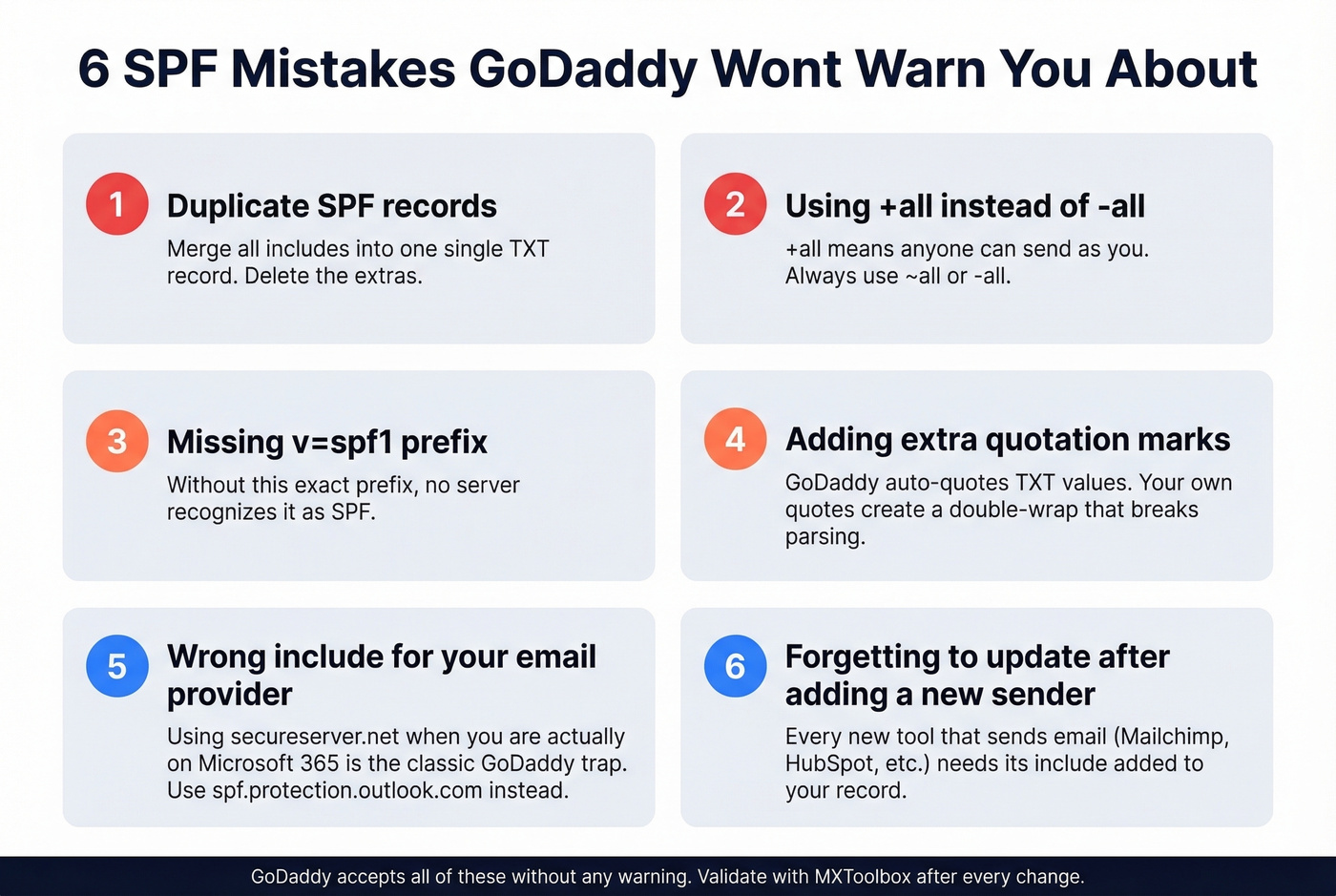
- Duplicate SPF records. Merge all includes into one TXT record. GoDaddy won't flag the conflict.
- Using
+all. This tells the world that anyone can send as your domain. Use~allor-all. - Missing
v=spf1. Without this prefix, the record isn't recognized as SPF. - Adding extra quotes. GoDaddy auto-quotes TXT values. Your own quotes create a double-wrap that breaks parsing.
- Wrong include for your provider.
secureserver.netwhen you're actually on M365 is the classic GoDaddy trap. - Not updating after adding a new sender. Every new tool that sends email needs its include added. Skip this if you only send from one provider and don't use any marketing or transactional email tools - but that's rare in 2026.
If you're trying to improve inbox placement after fixing auth, use a dedicated email reputation tools checklist.
Troubleshooting - Emails Still Failing
You've got SPF configured, it passes validation, but emails still bounce or land in spam. Start here.
Wrong include. If you migrated from GoDaddy email to M365 but never swapped secureserver.net for spf.protection.outlook.com, your SPF is authenticating the wrong servers. This is the single most common issue in GoDaddy/M365 troubleshooting threads.
Missing sender. In one real-world GoDaddy 365 + Proofpoint Essentials case, multiple client domains were publishing SPF that only included mail.protection.outlook.com while also routing through Proofpoint Essentials - a filtering service that sends on the domain's behalf. If you've layered any security or filtering service on top of your email, its include needs to be in your SPF record.
Records disappeared. This sounds paranoid, but it happens. Users on r/godaddy have reported DNS records vanishing after GoDaddy support helped with DNS changes or migrations. If email suddenly breaks after a support ticket, check your TXT records first.
Propagation lag. Most DNS changes show up within an hour or two, but it can take up to 48. Test at 30 minutes, then again at 24 hours before assuming something's broken.
Real talk: audit your SPF quarterly and after every DNS or email provider change. It takes five minutes and prevents the kind of silent failures that go unnoticed until a prospect tells you they never got your proposal.
After SPF - Set Up DKIM and DMARC
SPF alone isn't enough. It validates the sending server, but it doesn't verify message integrity or tell receivers what to do with failures.
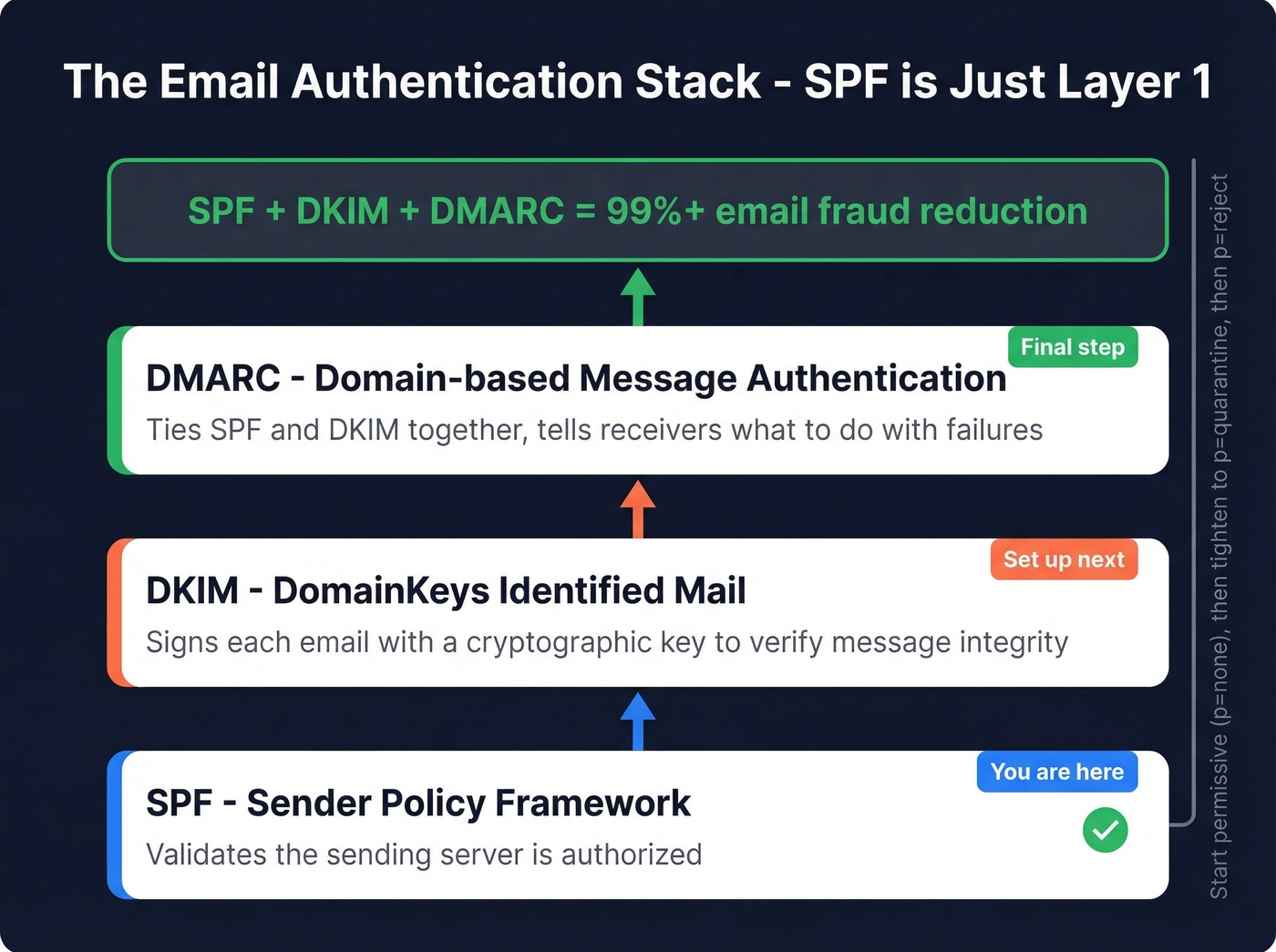
DKIM signs each outgoing email with a cryptographic key. For Google Workspace, the DNS record goes on host google._domainkey as a TXT record with your public key. M365 has its own DKIM signing setup through the admin portal.
If you want a quick checklist to confirm signing is live, follow this guide on how to verify DKIM is working.
DMARC ties SPF and DKIM together and tells receivers how to handle failures. Start permissive while you map all senders:
v=DMARC1; p=none; rua=mailto:dmarc-reports@yourdomain.com
Once everything's passing, tighten to p=quarantine or p=reject. Together, SPF + DKIM + DMARC reduce email fraud risk by over 99%.
If you're unsure why DMARC passes/fails even when SPF looks correct, read up on DMARC alignment.
One thing most guides skip: authentication is half the deliverability equation. The other half is data quality. You can have perfect SPF, DKIM, and DMARC and still tank your sender reputation by emailing invalid addresses. Every bounce chips away at the trust you've built. Prospeo's real-time email verification catches bad addresses at 98% accuracy before they hit your sequences, and there's a free tier of 75 verified emails per month. It's the other side of the deliverability coin.
If you're cleaning lists proactively, add a spam trap removal step to your process.
Every SPF misconfiguration damages your sender reputation. So does emailing invalid addresses. Prospeo verifies every email through proprietary infrastructure with spam-trap removal and catch-all handling - the same rigor you're applying to your DNS records.
Protect the deliverability you just spent an hour configuring.
FAQ
Can I have two SPF records on GoDaddy?
No. Multiple SPF records cause a PermError that breaks authentication for all your email. Merge all include: mechanisms into a single TXT record with one v=spf1 prefix and one -all or ~all ending. GoDaddy won't warn you about duplicates, so check manually.
What's the difference between -all and ~all?
-all (hard fail) tells receivers to reject unauthorized mail outright. ~all (soft fail) marks it suspicious but typically still delivers. Use ~all while you're identifying all your sending services, then switch to -all once every legitimate sender is accounted for.
How long does a GoDaddy DNS change take to propagate?
Most SPF record changes propagate within 30-60 minutes, though full global propagation can take up to 48 hours. Test with MXToolbox after 30 minutes and again at 24 hours. Inconsistent results between tools usually mean propagation is still in progress.
Do I need SPF if I already have DKIM and DMARC?
Yes. DMARC requires either SPF or DKIM to pass, but both should be configured. SPF validates the sending server; DKIM validates message integrity. Together with DMARC, they form a complete authentication stack that reduces email fraud risk by over 99%.
Why do emails still bounce after fixing SPF?
A passing SPF record means your sending servers are authorized - but it doesn't guarantee inbox delivery. Bounces after SPF is fixed usually point to bad recipient data: invalid addresses, abandoned mailboxes, or spam traps. Run your list through a verification tool like Prospeo before sending. Catching invalid addresses at 98% accuracy protects the sender reputation your authentication records are designed to build.