

How to Set Up an SPF Record in Namecheap (2026 Guide)
About 16% of all emails never reach the inbox. That's the Validity benchmark - roughly 84% global inbox placement - and the numbers get worse when you break it down by provider: Gmail sits around 87.2% while Microsoft hovers near 75.6%. If you're running a domain on Namecheap without an SPF record, you're volunteering for the wrong side of those stats.
SPF (Sender Policy Framework) tells receiving mail servers which IP addresses and services can send email for your domain. Without one, anyone can spoof your domain, and inbox providers have zero reason to trust your messages. Let's fix that.
What You Need (Quick Version)
If you just want to copy-paste and move on:
- Navigation path: Domain List → Manage → Advanced DNS → Add New Record
- Record type: TXT Record
- Host:
@ - Value (Google Workspace):
v=spf1 [include:_spf.google.com](https://knowledge.workspace.google.com/admin/security/set-up-spf) ~all - TTL: Automatic
Using a different email provider? Jump to the provider include strings table. Need to authorize multiple services? Jump to merging multiple SPF records.
SPF Syntax Explained
Before you paste anything into your DNS panel, understand what you're actually writing. Knowing how to build an SPF TXT record from scratch means you won't be blindly copying values - you'll understand why each piece is there. An SPF record is a single TXT record that starts with v=spf1, lists the mechanisms defining who can send mail, and ends with an all qualifier that handles everything else. For more patterns you can copy safely, see our SPF record examples.
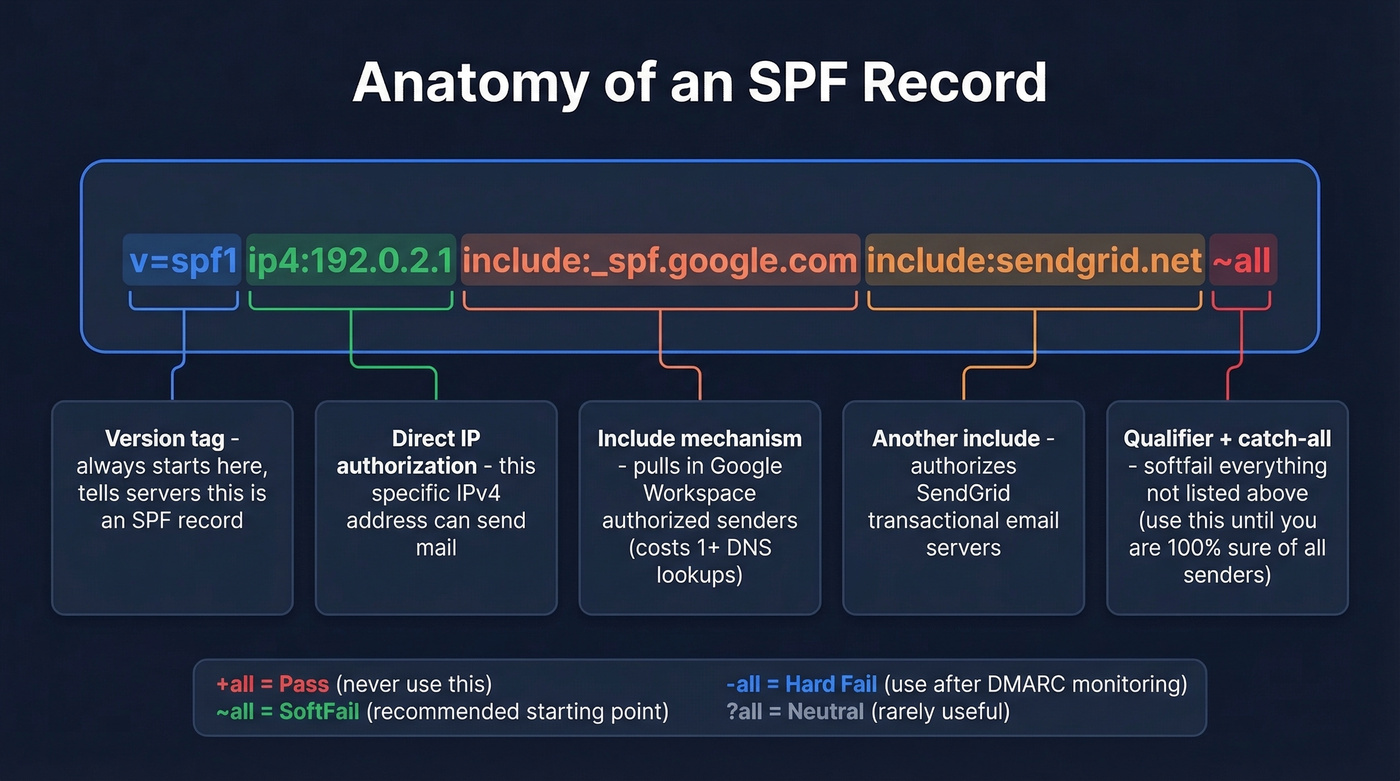
Mechanisms
| Mechanism | What It Does |
|---|---|
ip4 |
Authorizes a specific IPv4 address or range |
ip6 |
Authorizes a specific IPv6 address or range |
include |
Pulls in another domain's SPF record |
a |
Authorizes the domain's A record IP |
mx |
Authorizes the domain's MX record IPs |
all |
Catches everything not matched above |
Two mechanisms you should know exist but avoid: ptr is deprecated per RFC 7208 - it's slow, unreliable, and adds unnecessary DNS load. exists is a macro-based mechanism for advanced setups. You don't need either.
Qualifiers
| Qualifier | Meaning | Example |
|---|---|---|
+ |
Pass (default) | +all (authorizes everyone - never use this) |
~ |
SoftFail | ~all (suspicious but not rejected) |
- |
Fail | -all (hard reject unauthorized senders) |
? |
Neutral | ?all (no opinion - rarely useful) |
Place all at the end of your record. Anything after it gets ignored.
Here's the thing: use ~all unless you've mapped every single sending source for your domain. A softfail tells receivers to treat unauthorized senders with suspicion without hard-bouncing legitimate mail you forgot to include. Switch to -all only after monitoring DMARC reports for 2-4 weeks and confirming nothing legitimate gets flagged. If you want a practical checklist for keeping deliverability stable while you tighten policies, use this email deliverability guide.
How to Add an SPF Record in Namecheap
We'll use Google Workspace as the example since it's the most common setup on Namecheap domains. The process is nearly identical regardless of your registrar - the include string stays the same, only the DNS panel changes.
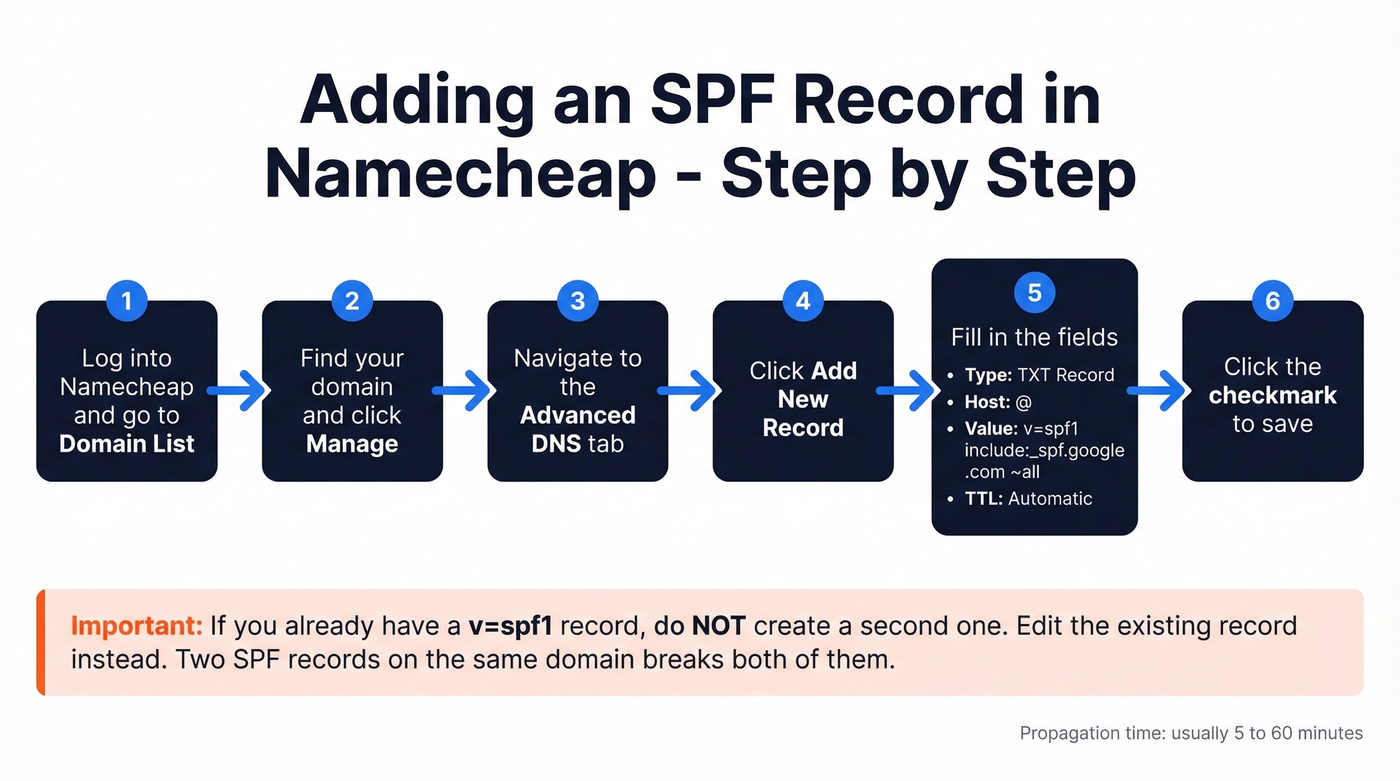
- Log into your Namecheap account and go to Domain List.
- Find your domain and click Manage.
- Navigate to the Advanced DNS tab.
- Click Add New Record.
- Fill in the fields:
- Type: TXT Record
- Host:
@ - Value:
v=spf1 include:_spf.google.com ~all - TTL: Automatic
- Click the checkmark to save.
The record often propagates within 5-60 minutes. If you already have a TXT record starting with v=spf1, don't create a second one - edit the existing record instead. Two SPF records on the same domain breaks both of them.
SPF Include Strings by Provider
Copy the include mechanism for your email service and drop it into your SPF value. The steps follow the same pattern regardless of provider - only the include string differs.
| Provider | Include Mechanism |
|---|---|
| Google Workspace | include:_spf.google.com |
| Microsoft 365 | [include:spf.protection.outlook.com](https://learn.microsoft.com/en-us/defender-office-365/email-authentication-spf-configure) |
| Zoho Mail | include:zoho.com |
| SendGrid | include:sendgrid.net |
| Mailchimp | [include:servers.mcsv.net](https://mailchimp.com/help/set-up-email-domain-authentication/) |
| Amazon SES | include:amazonses.com |
If you're configuring an SPF record for Office 365, Microsoft's include mechanism (spf.protection.outlook.com) already covers Exchange Online, so you don't need to add individual server IPs.
Provider not listed? Check their documentation for the exact SPF include string - every reputable email service publishes one. And if a domain you include: doesn't have a valid SPF record of its own, your record will return a PermError.
How to Merge Multiple SPF Records
This is where most people trip up. Your domain can only have one SPF TXT record. Two v=spf1 records means both are broken - receivers won't know which to evaluate and will return a PermError.
The fix: combine all your include: mechanisms into a single record.
Google Workspace + Mailchimp:
v=spf1 include:_spf.google.com include:servers.mcsv.net ~all
Google Workspace + Microsoft 365 + SendGrid:
v=spf1 include:_spf.google.com include:spf.protection.outlook.com include:sendgrid.net ~all
We see this constantly in growing companies. Marketing adds Mailchimp for newsletters. Engineering uses SendGrid for transactional emails. Sales is on Google Workspace. Each team sets up their own SPF record, and suddenly you've got three competing v=spf1 entries. Merge them into one, or your deliverability tanks across the board. If you're also seeing high bounces, use these bounce rate benchmarks and fixes to diagnose what’s happening beyond authentication.

You're merging SPF records so your outbound emails actually land. But even perfect authentication can't save a campaign built on bad data. Prospeo's 5-step email verification delivers 98% accuracy - teams using it cut bounce rates from 35% to under 4%.
Stop fixing bounces after the fact. Start with emails that are already verified.
The 10 DNS Lookup Limit
Every SPF record is subject to a 10 DNS lookup limit defined in RFC 7208. Exceed it, and receivers return a PermError - which typically means spam.
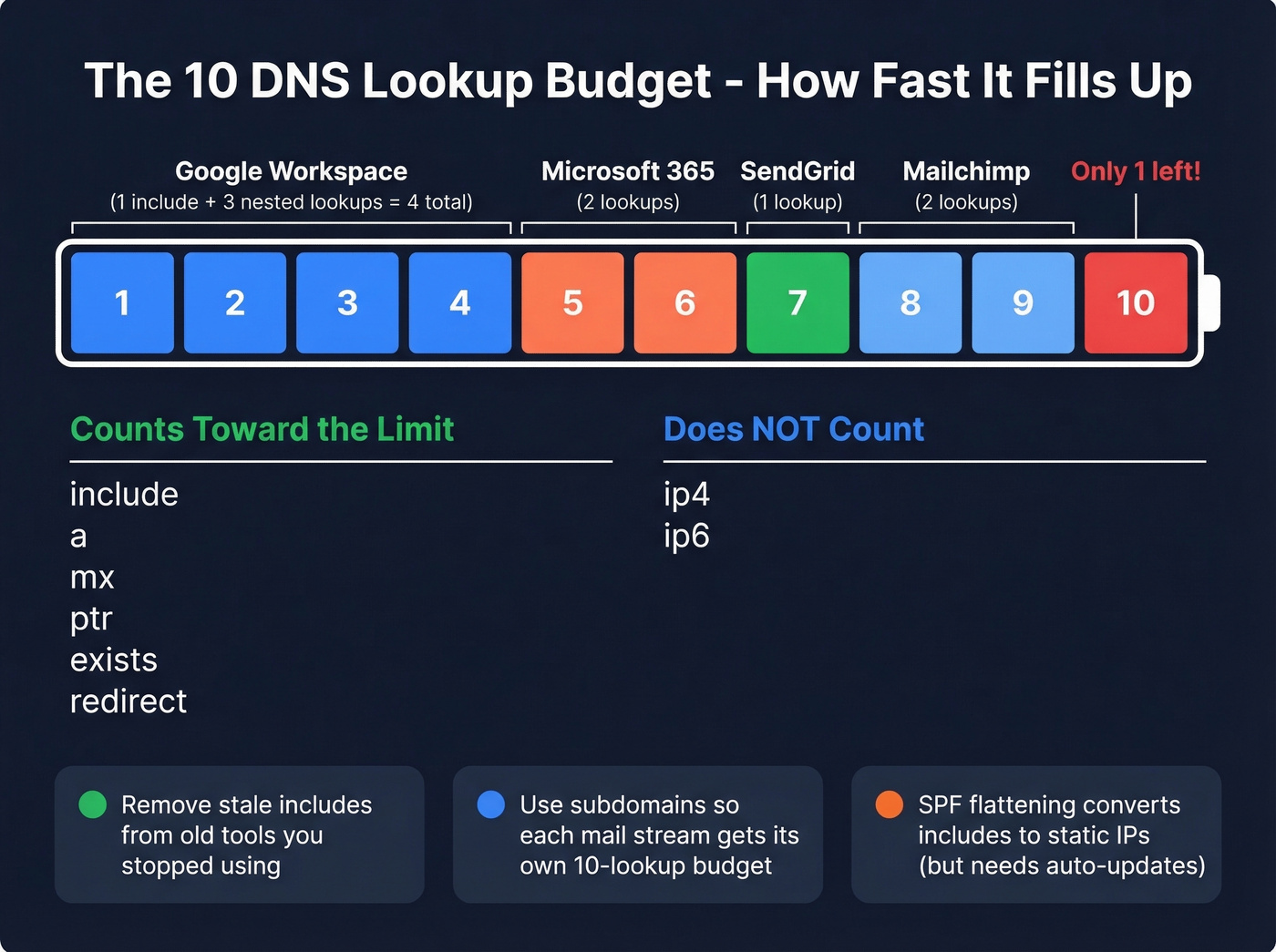
What Counts vs. What Doesn't
| Counts Toward 10 | Doesn't Count |
|---|---|
include |
ip4 |
a |
ip6 |
mx |
|
ptr |
|
exists |
|
redirect |
Each include can trigger nested lookups too. If include:_spf.google.com resolves to a record with three more include: entries, that's four lookups from a single line.
Over the limit? Three fixes:
- Remove stale includes. That email tool you stopped using six months ago? Its include is still eating a lookup.
- Use subdomains. Put marketing email on
mail.yourdomain.comand transactional email onnotify.yourdomain.com. Each subdomain gets its own 10-lookup budget. This is the cleanest long-term solution for companies running more than three or four sending services, because it also gives you separate sender reputations per mail stream. If you’re unsure how this fits into your overall setup, see what a tracking domain is and when to use one. - SPF flattening. Tools like AutoSPF and dmarcian convert includes into static
ip4ranges. This works, but only if the tool auto-updates when providers rotate infrastructure - otherwise you'll silently break your SPF.
How to Verify Your SPF Record
Don't trust that it's working just because you saved it in Namecheap. Verify.
- MXToolbox SPF Lookup - free, instant, flags syntax errors and counts your DNS lookups. This is the one we reach for first.
- Google Admin Toolbox Dig - useful if you're already in the Google ecosystem. Query TXT records directly.
- Command line on Mac/Linux:
dig TXT yourdomain.com +short- returns raw TXT records in the terminal.
Namecheap TXT records typically propagate in 5-60 minutes. You'll still see "up to 48 hours" mentioned as a worst-case window, but in practice you can usually confirm the record much sooner with a live lookup. If you’re doing this as part of a broader cleanup, these email reputation tools can help you spot issues early.
Troubleshooting Common Issues
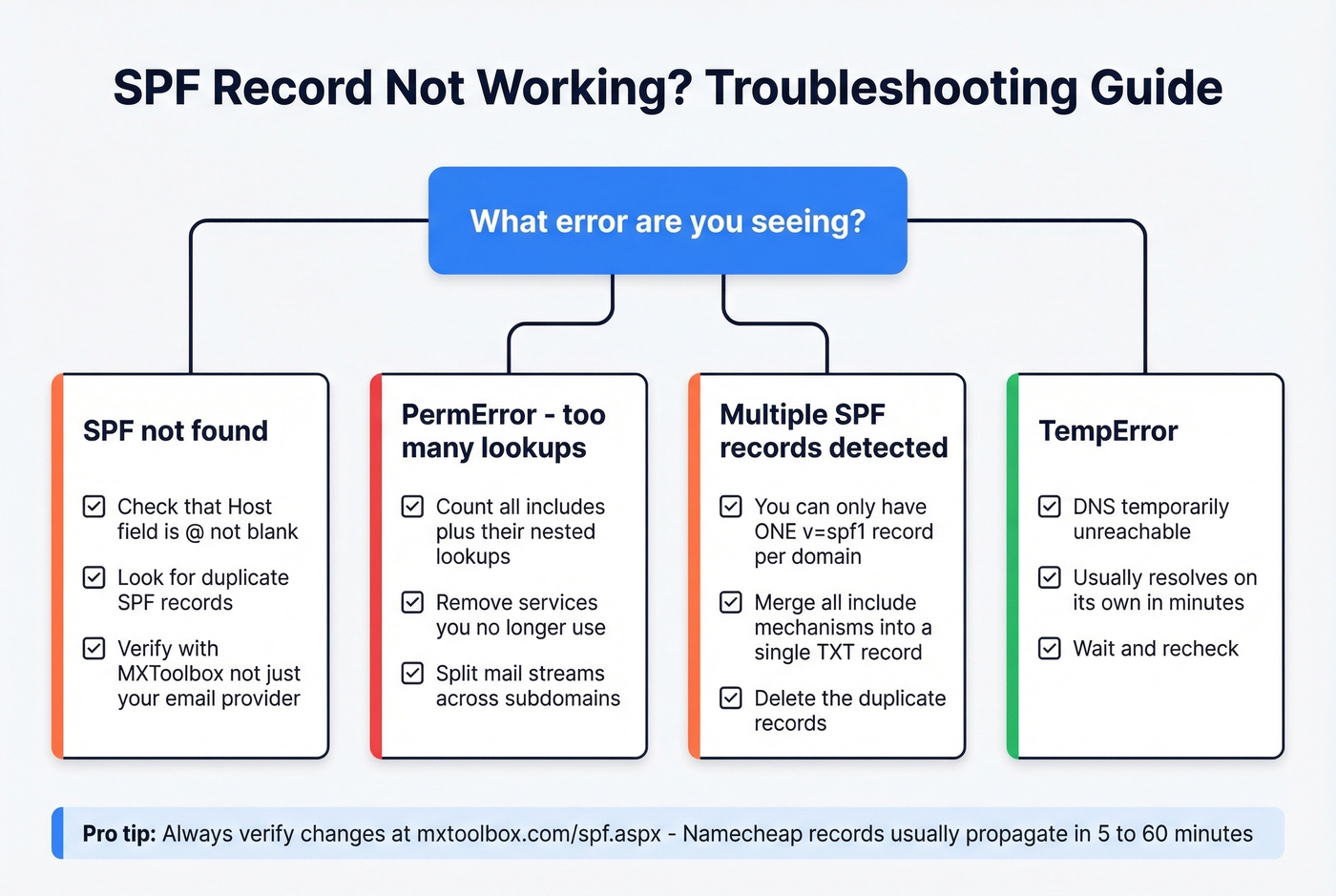
"SPF not found" after setup
Check three things. First, make sure the Host field is @, not blank. Second, look for duplicate SPF records - if you accidentally created a new one instead of editing the existing one, both will fail. Third, verify with MXToolbox, not just your email provider's built-in checker.
There's a Reddit thread where a Namecheap user went back and forth with support for days because Zoho kept saying "SPF not found" even after waiting 48+ hours. Turned out to be a DNS record placement issue with the Host field. Save yourself the headache and double-check that field first.
PermError / too many lookups
Count your includes. Each one costs at least one lookup, and nested includes cost more. Remove services you no longer use, or split mail streams across subdomains.
Multiple SPF records
Merge them into one. No shortcut - go back to the merging section and combine all includes into a single v=spf1 record.
TempError
This happens when DNS is temporarily unreachable. It usually resolves on its own within minutes.
Long TXT record truncation
Namecheap has historically been reported to truncate TXT record values at 256 characters, which can break long authentication records (especially DKIM). If you hit truncation with a long SPF string, the practical fixes are the same: remove unused includes, use subdomains to split mail streams, or flatten SPF so the record stays short enough to publish cleanly.
SPF on Other Registrars
The SPF record workflow we've covered for Namecheap translates directly to other platforms - the DNS panel layout changes, but the record syntax is universal. If you manage a Squarespace domain, for example, you'd navigate to Domains → DNS Settings → Custom Records and add the same TXT entry with @ as the host. The include strings, the one-record-per-domain rule, and the 10-lookup limit all apply identically regardless of where your DNS is hosted.
Complete the Stack: DKIM and DMARC
SPF alone isn't enough. DKIM cryptographically signs your messages so receivers can verify they weren't tampered with. DMARC tells receiving servers what to do when SPF or DKIM checks fail. You need all three. For the DMARC side specifically, this guide to DMARC alignment helps you avoid common policy mistakes.
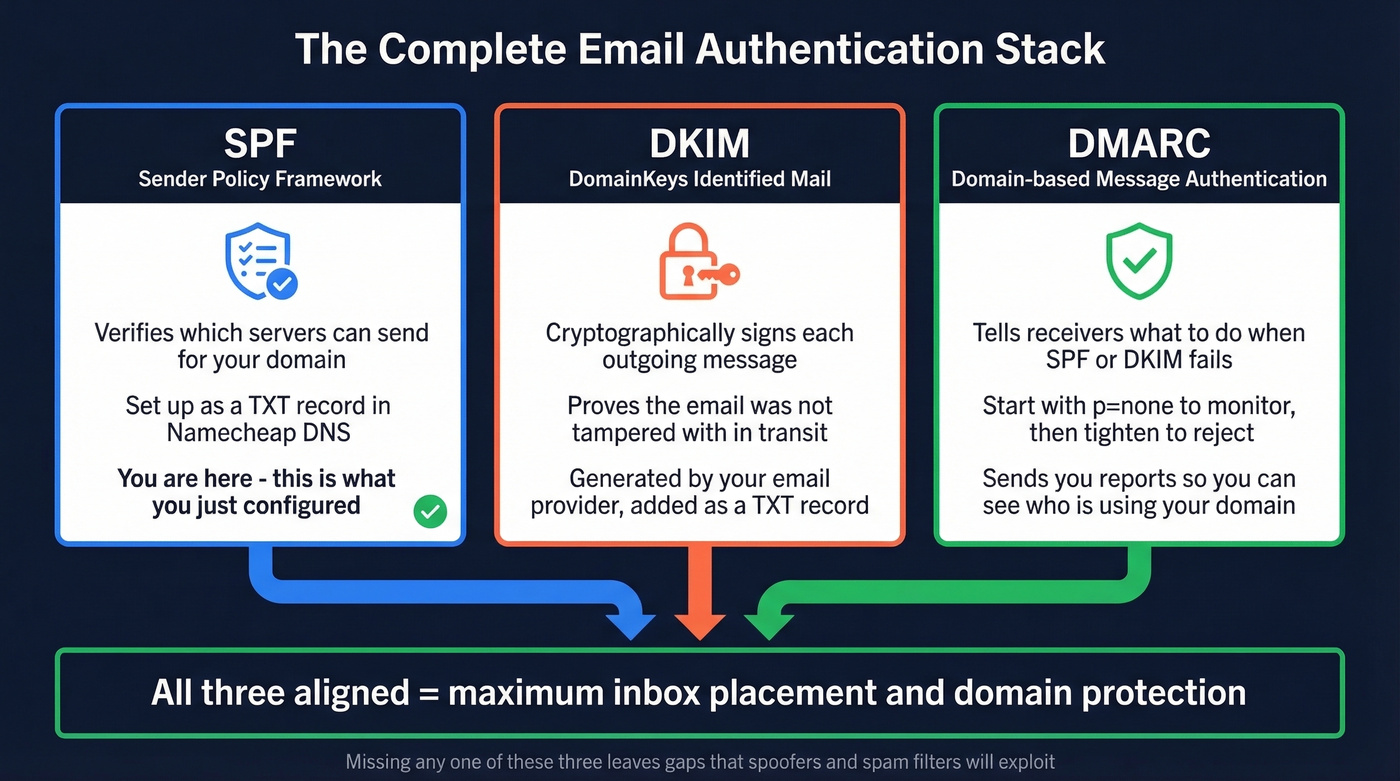
A basic DMARC record to start monitoring:
v=DMARC1; p=none; rua=mailto:dmarc-reports@yourdomain.com
Set p=none initially to collect reports without affecting delivery. Tighten to p=quarantine or p=reject once everything's aligned.
Look, most people obsess over authentication and completely ignore the other half of deliverability - data quality. Bounces destroy the sender reputation you just spent time building. Tools like Prospeo verify B2B emails in real time with 98% accuracy across 143M+ verified addresses, and the free tier lets you check before you send. You've done the DNS work. Don't waste it on dead addresses. If you want a quick workflow for validating lists before outreach, use an AI email checker or learn how to check if an email will bounce.
You're spending time on SPF, DKIM, and DMARC to protect your domain reputation. Don't undo that work by sending to stale or invalid addresses. Prospeo refreshes its 143M+ verified emails every 7 days - not every 6 weeks like other providers.
Protect the domain reputation you just spent an hour configuring.
FAQ
Can I have two SPF records on one domain?
No. One SPF TXT record per domain - this is an RFC requirement, not a Namecheap limitation. Merge all include: mechanisms into a single record. Two separate v=spf1 entries cause a PermError and your emails land in spam.
How long does propagation take?
Typically 5-60 minutes for TXT records on Namecheap's default DNS. Use MXToolbox to check in real time rather than waiting the full 48-hour worst-case window.
Should I use ~all or -all?
Use ~all for most setups. It marks unauthorized senders as suspicious without hard-bouncing mail. Switch to -all only after monitoring DMARC reports for 2-4 weeks and confirming no legitimate sources get flagged.
What's the Office 365 include string?
The Office 365 SPF record uses include:spf.protection.outlook.com. Add it to your existing v=spf1 record alongside any other includes - don't create a separate record for it.
How do I prevent bounces after setting up SPF?
SPF stops spoofing, but it won't fix bad contact data. Verify recipient addresses before sending - Prospeo's free tier includes 75 email verifications per month at 98% accuracy, which catches invalid addresses before they generate bounces and damage your sender reputation.