

SPF Syntax Checker: Find and Fix Every Record Error
You paste your SPF record into a checker, hit validate, and get back "invalid syntax." You stare at the record. It looks fine. Every mechanism is there, the include domains are correct, and ~all sits right at the end. Except it's not ~all - it's ~all. with a trailing period you can barely see. One character, and your entire SPF evaluation breaks.
That's exactly why an SPF syntax checker exists.
This kind of tool validates structure: v=spf1 is present, mechanisms are properly formatted, qualifiers are legal, modifiers appear once and at the end. It doesn't tell you whether your record authorizes the right senders. Syntax checking and full SPF evaluation are different things, and you need both - especially if you're also working through broader email deliverability issues.
The Quick Version
Tools:
- MxToolbox - fast lookups, catches deprecated records, recursive loops, and trailing characters
- Kitterman SPF Validator - RFC 7208-accurate testing with separate syntax-only and full evaluation modes
- dmarcian SPF Surveyor - graphical view of your include chain so you can see where your 10-lookup budget goes
Three fixes that solve most SPF failures:
- Remove trailing characters after
all(especially periods) - Merge multiple
v=spf1records into one - Get under the 10 DNS lookup limit
SPF Record Syntax Rules
Every SPF record starts with v=spf1 and lives in a single DNS TXT record. SPF RR type 99 is deprecated - use TXT only. One record per domain. Publishing two TXT records that both start with v=spf1 violates the standard and commonly triggers PermError.
If you want a few ready-to-copy patterns, see these SPF record examples.
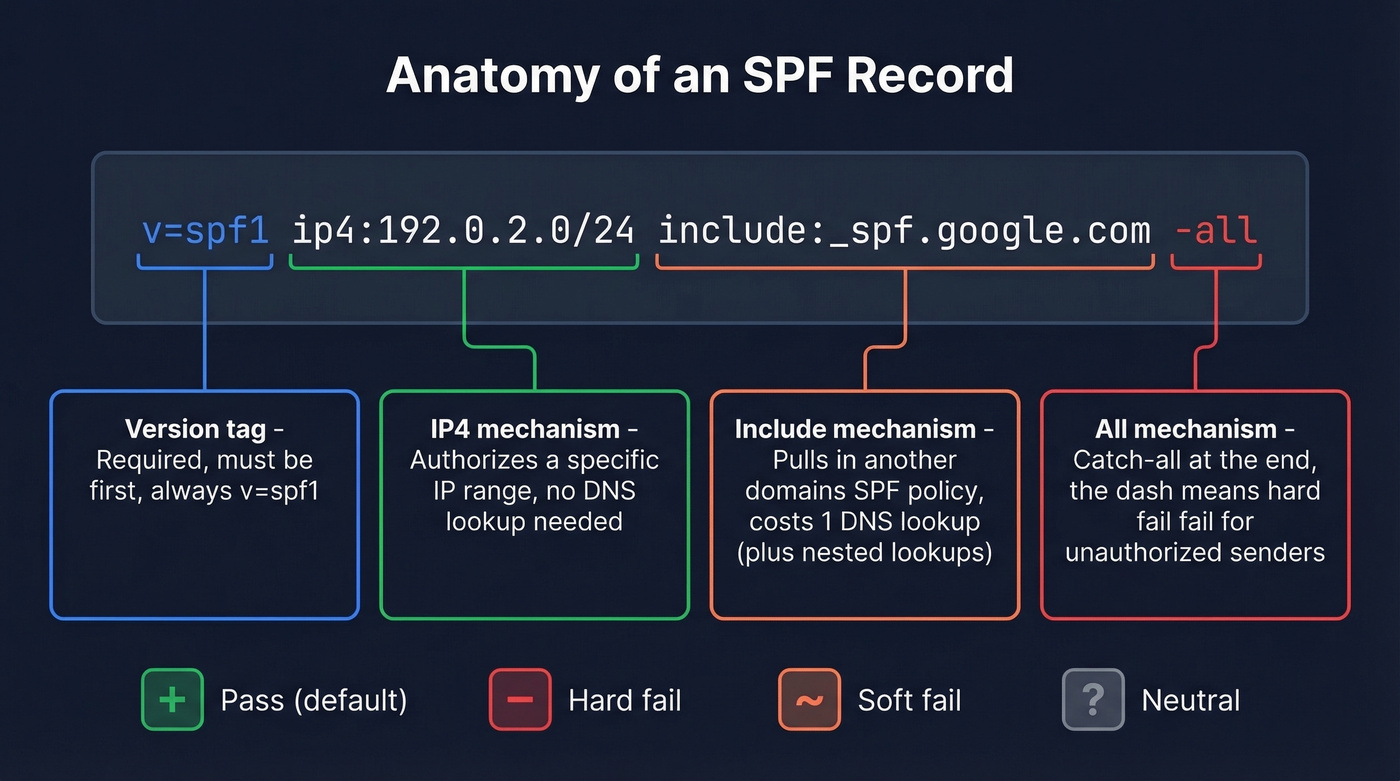
| Qualifier | Meaning | Example |
|---|---|---|
+ |
Pass (default) | +mx |
- |
Hard fail | -all |
~ |
Soft fail | ~all |
? |
Neutral | ?all |
The mechanisms you'll actually use: include:<domain>, a, mx, ip4:<address/cidr>, ip6:<address/cidr>, and all. The exists:<domain> mechanism works but is rare. ptr is officially discouraged by RFC 7208 - don't use it. One detail most guides skip: mx and ptr mechanisms shouldn't trigger querying more than 10 address records each, a guardrail that sits on top of the main 10-lookup limit.
Two modifiers exist: redirect=<domain> replaces your entire policy with another domain's record, and exp=<domain> provides a human-readable explanation when a hard fail is triggered. Both go at the end. Each can appear only once.
A concrete example: v=spf1 ip4:192.0.2.0/24 include:_spf.google.com -all. The ip4 mechanism authorizes a specific netblock, the include pulls in Google Workspace's sending IPs, and -all hard-fails everything else.
Common Syntax Errors (Broken to Fixed)
1. Trailing period after all
BROKEN: v=spf1 include:_spf.google.com ~all.

FIXED:  v=spf1 include:_spf.google.com ~all
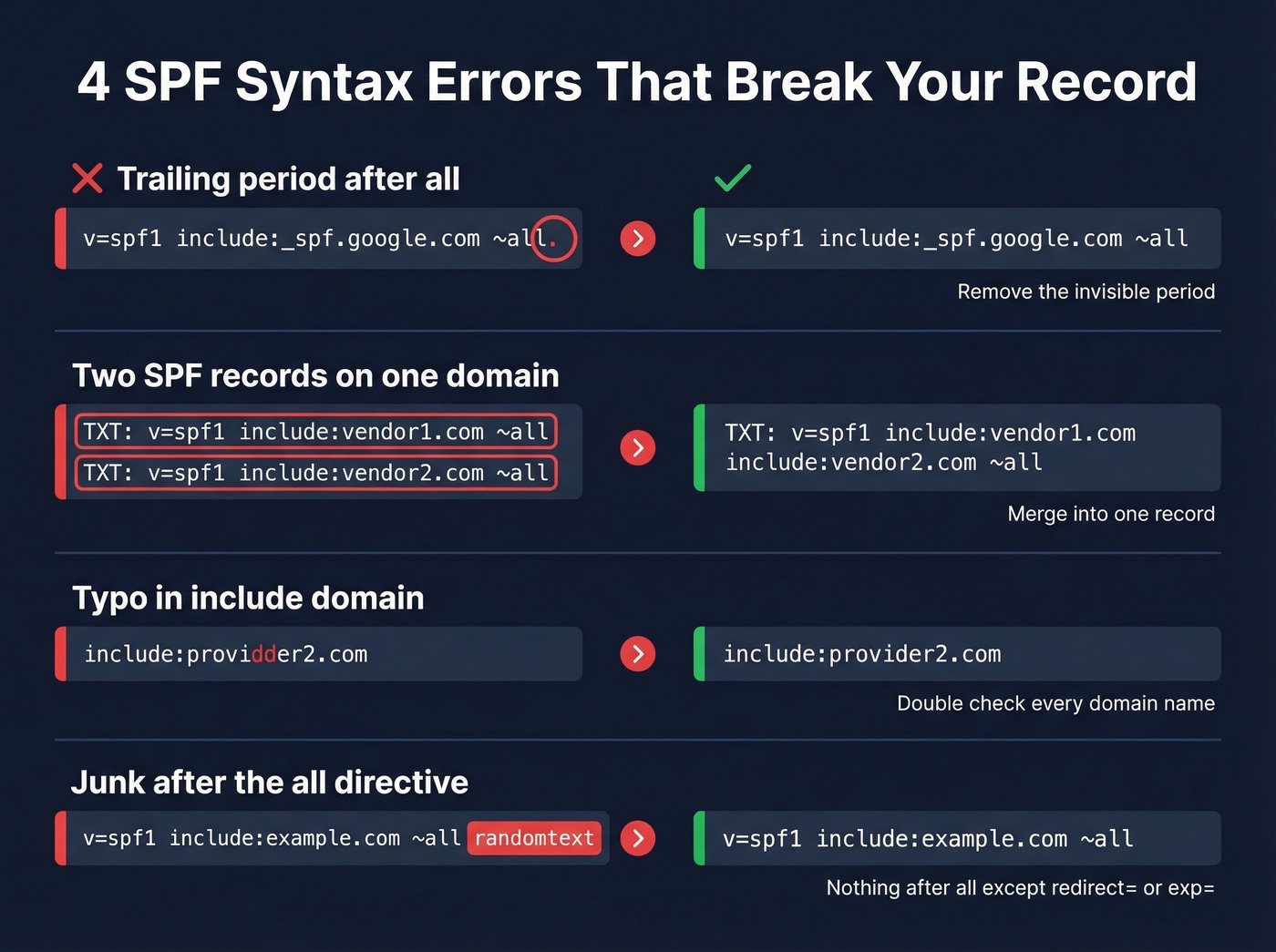
This one shows up on Reddit constantly. The period is nearly invisible in most DNS management UIs, and MxToolbox flags it in a way that often leaves people unsure what's actually wrong.
2. Multiple SPF records on the same domain
Run [dig +short TXT](https://bind9.readthedocs.io/en/stable/manpages.html) example.com and count how many results start with v=spf1. Two records = PermError on most receivers. Merge them into one.
3. Typo in an include domain
BROKEN: v=spf1 include:_spf.google.com include:providdder2.com ~all

FIXED:  v=spf1 include:_spf.google.com include:provider2.com ~all
A malformed or failing include can produce a PermError that tanks your SPF check - even if an earlier include would've authorized the sender. We've seen this exact scenario burn teams in r/DMARC threads, sometimes going unnoticed for weeks.
4. Junk after the all directive
all should be the last mechanism in your record. Anything after it that isn't a valid modifier like redirect= or exp= is invalid. Some DNS editors silently append characters or whitespace. Check the raw TXT record, not just what the UI shows you.

You're fixing SPF syntax to protect deliverability. But bad data causes more bounces than broken DNS records ever will. Prospeo's 5-step email verification delivers 98% accuracy - so your outbound hits real inboxes, not spam traps.
Stop bouncing emails. Start with data that's already verified.
How to Fix PermError
Check for multiple SPF records. Run dig +short TXT yourdomain.com. You need exactly one result starting with v=spf1.
Count your DNS lookups. Mechanisms that trigger lookups: include, a, mx, ptr, exists, and redirect. Nested includes count too. Google Workspace alone consumes 3-4 lookups because of its nested include chain.
Stay under 10 total. Exceeding 10 DNS lookups returns PermError - no grace period, no soft enforcement, just a hard wall.
Prune aggressively. Remove ptr and exists where possible. Replace broad include mechanisms with specific ip4/ip6 ranges when sending IPs are static. In our testing, most PermErrors trace back to stale includes for services the organization stopped using years ago. Here's the thing: nobody remembers to clean up the SPF record when they cancel a SaaS tool.
If you're also seeing deliverability drops, check your email bounce rate and overall sender reputation in parallel - SPF errors rarely happen in isolation.
Beating the 10-Lookup Limit
Consolidate and prune. Use DMARC aggregate reports to identify which sources actually send mail - you'll often find includes for services you retired two years ago. This alone gets most organizations under 10. (If alignment is confusing, this DMARC alignment guide helps.)
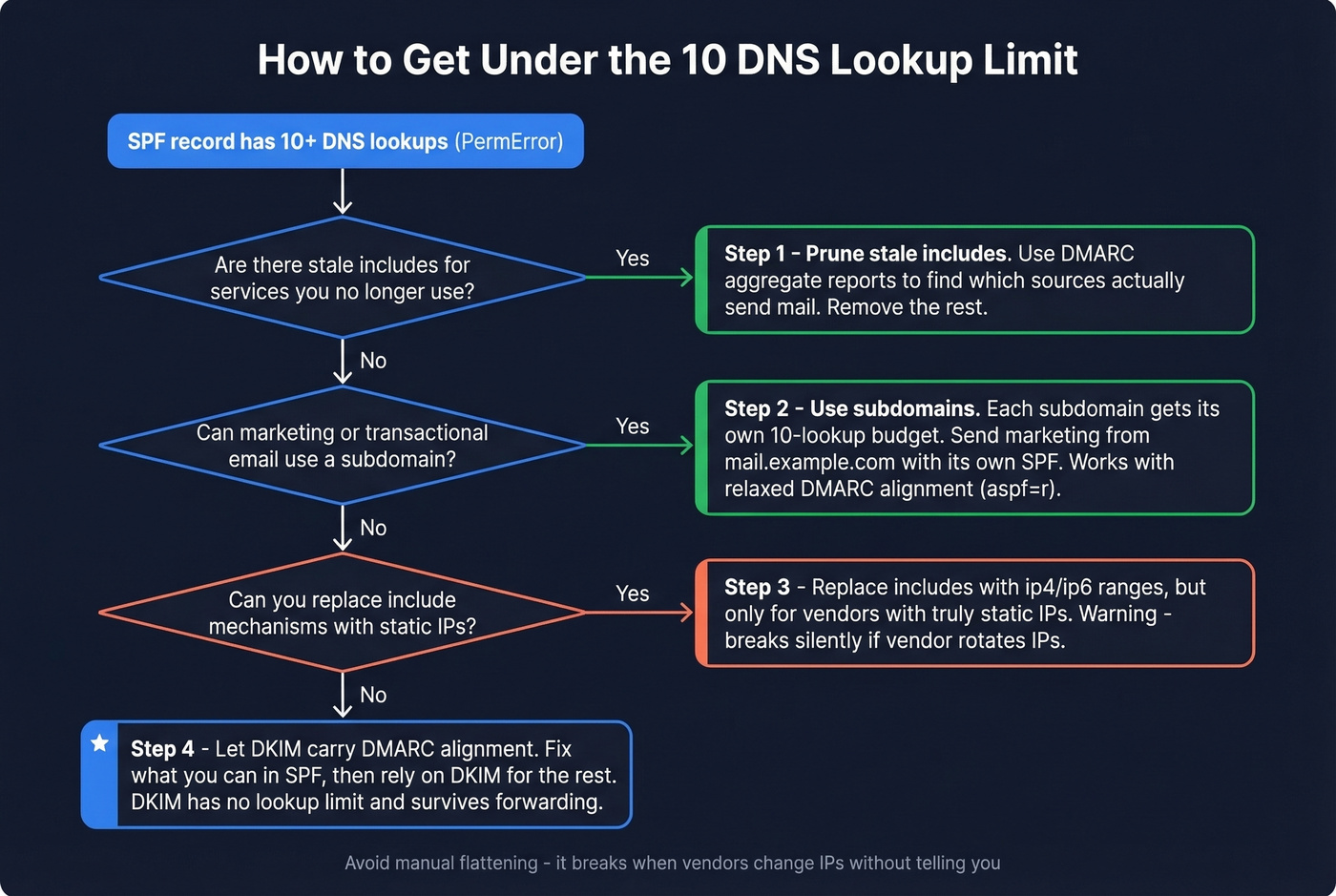
Use subdomains. Each subdomain gets its own 10-lookup budget because SPF evaluates against the RFC5321.MailFrom domain. Marketing emails send from mail.example.com with its own SPF record while example.com stays lean. DMARC passes with relaxed alignment (aspf=r), but strict alignment breaks this approach, so plan accordingly.
One important gotcha: if a third-party service uses its own RFC5321.MailFrom domain, adding their include to your SPF is wasted - your record won't even be checked for those messages. Verify what MailFrom domain each vendor actually uses before adding includes.
Deploy macros. Use %{l} macros to route evaluation per local-part, keeping your root record at 2 lookups regardless of vendor count.
Don't flatten manually. Manual flattening - replacing include mechanisms with hardcoded IP addresses - breaks silently the moment a vendor rotates IPs. We've seen organizations discover months later that their transactional email has been soft-failing because a provider added a new netblock. If none of the above works, let DKIM carry DMARC alignment where SPF is fragile. That's the recommended approach from most deliverability experts, and Google's own documentation backs it up.
Let's be honest: most teams spend hours wrestling SPF into compliance when they should spend 20 minutes pruning stale includes and then let DKIM do the heavy lifting. SPF was designed for a simpler era. DKIM survives forwarding, doesn't have a lookup limit, and doesn't break when a vendor changes IPs. Fix your SPF syntax, yes - but don't build your entire authentication strategy on it.
If you need to confirm your signing is actually working, use this guide to verify DKIM.
Best Free SPF Validation Tools
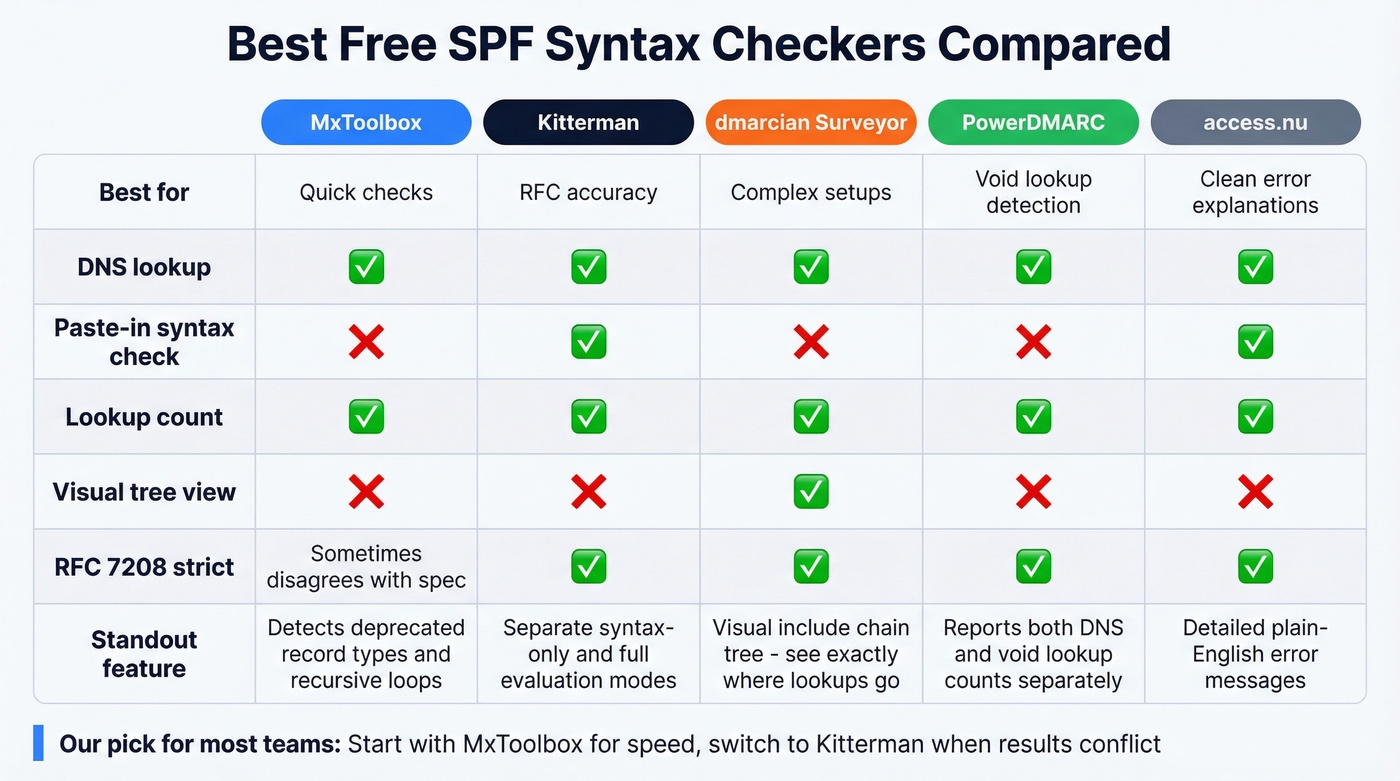
What's the difference between an SPF lookup tool and a pure syntax checker? An SPF lookup tool queries your domain's DNS, retrieves the published TXT record, and analyzes it - combining retrieval with validation in a single step. A syntax checker can validate a record you paste in manually without ever touching DNS. Most tools below do both.
MxToolbox - Quick and Familiar
The tool most admins reach for first. It detects deprecated SPF record types, multiple records, recursive loops, duplicate includes, void lookups, and unnecessary characters after the ALL directive. Fast, reliable, and the default for a reason. Skip this if you need strict RFC compliance testing - MxToolbox occasionally disagrees with the spec on edge cases.

Kitterman - RFC-Accurate Testing
When MxToolbox and Kitterman disagree, we trust Kitterman. Built on an RFC 7208-compliant library (pyspf), it separates "Is this SPF record syntactically correct?" from "Test an SPF record" evaluation - run both. No frills, no visualization, but it's one of the most standards-accurate free options available. If you're debugging a PermError that other tools can't explain, start here.
dmarcian SPF Surveyor - Visualize Your Lookup Tree
Open dmarcian when you're staring at a PermError and can't figure out which nested include pushed you over 10 lookups. It renders your SPF/include chain as a visual tree, making it the go-to for diagnosing complex multi-vendor setups. For organizations with 6+ sending services, this tool pays for itself in time saved within the first five minutes.
Also Worth Checking
PowerDMARC highlights void lookups and reports both DNS lookup count and void lookup count, which is useful if you suspect dead includes are silently eating your budget. access.nu is a newer validator gaining traction in DNS communities for its clean interface and detailed error explanations. Neither replaces the big three above, but both catch edge cases.
After SPF: Protect Your Sender Reputation
SPF, DKIM, and DMARC fix authentication. But bounces and spam traps wreck sender reputation just as fast. Since early 2024, Google and Yahoo require bulk senders to maintain all three authentication protocols and keep spam complaint rates under 0.3%.
Once your SPF record is clean, the next vulnerability is your recipient list. Bad addresses damage your domain reputation just as much as broken authentication - sometimes more, because the damage accumulates silently over weeks. Prospeo handles real-time email verification with 98% accuracy and a free tier of 75 emails/month, which is worth running before any outbound campaign.
If you're scaling outbound, pair DNS hygiene with a consistent email velocity plan so you don’t spike complaints while you ramp.
Stale includes aren't the only thing wrecking your sender reputation. Sending to unverified emails tanks deliverability faster than any SPF PermError. Prospeo refreshes 300M+ profiles every 7 days - not every 6 weeks like competitors.
Clean SPF records deserve clean contact data to match.
FAQ
Can I have multiple SPF records on one domain?
No. More than one v=spf1 TXT record on the same domain violates RFC 7208 and causes PermError. Merge all mechanisms into a single record, delete the duplicate, then re-publish one consolidated TXT entry.
What's the difference between redirect= and include:?
include: adds another domain's SPF policy to your evaluation without replacing yours. redirect= replaces your entire policy with another domain's record - use it only for full delegation when the current domain has no mechanisms of its own.
Why did my SPF suddenly start failing?
A sending service likely rotated its IP addresses or changed its include chain. Check your record against current sender IPs using MxToolbox or dmarcian, and update your include or ip4 mechanisms accordingly.
What does an SPF syntax checker actually validate?
It confirms your record starts with v=spf1, uses legal qualifiers and mechanisms, contains no trailing characters, and follows RFC 7208 formatting rules. It doesn't verify whether the right senders are authorized - that requires a full SPF lookup tool that queries live DNS and resolves every include chain.
How do I protect deliverability after fixing SPF?
Clean authentication is only half the equation. Sending to invalid addresses still damages your domain reputation. Tools like Prospeo and NeverBounce let you verify recipient lists before campaigns so bounces don't undo your SPF work.