

How to Set Up Squarespace DKIM - And Verify It Works
You're staring at a DMARC report, and your Squarespace DKIM setup isn't doing what you think. Order confirmations land in spam. Google Workspace messages get flagged. The record you added last week? It's not signing anything.
Since 2024, Gmail and Yahoo require SPF and DKIM, plus DMARC (at least p=none), for bulk senders hitting 5,000+ messages per day. But even low-volume senders see deliverability penalties without proper authentication. Without DKIM, anyone can spoof your domain - and your customers' inboxes won't know the difference.
Most guides end at "add the record." That's half the job. If you don't verify DKIM is actually passing, you've accomplished nothing.
What You Need
Most Squarespace users need one to three DKIM records depending on how many services send email from their domain.
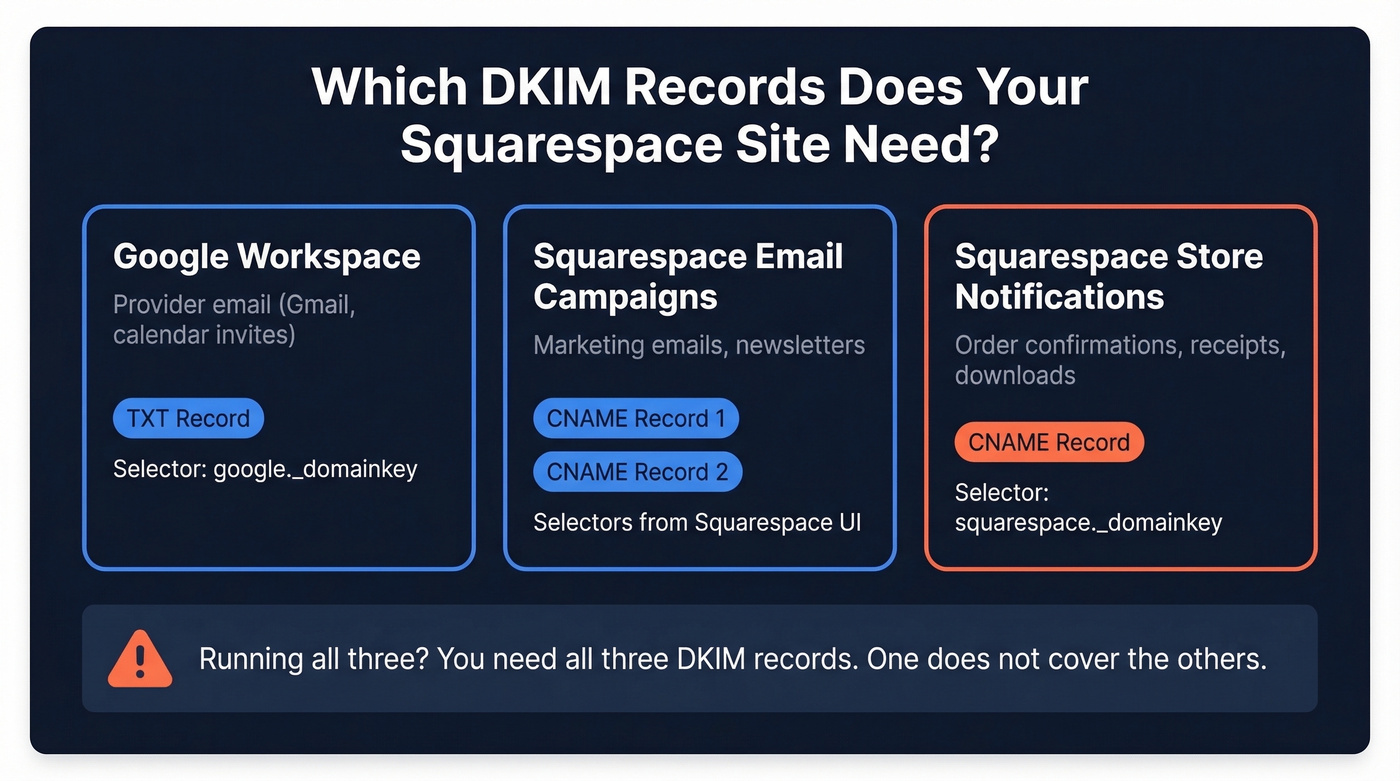
Google Workspace (or another email provider) requires a TXT record with a selector like google._domainkey. Squarespace Email Campaigns uses CNAME records pulled from the Squarespace UI. And store notification emails - order confirmations, receipts, digital downloads - need a separate CNAME record using the squarespace._domainkey selector.
If you're running an e-commerce store on Squarespace with Google Workspace and Email Campaigns, you need all three. Don't assume one DKIM record covers everything. Each sending service needs its own.
How DKIM Works (60 Seconds)
DKIM attaches a cryptographic signature to every outgoing email. Your sending server signs the message with a private key. The receiving server looks up your public key in DNS - published as a TXT or CNAME record at a specific subdomain like google._domainkey.yourdomain.com. If the signature matches, the email passes DKIM.
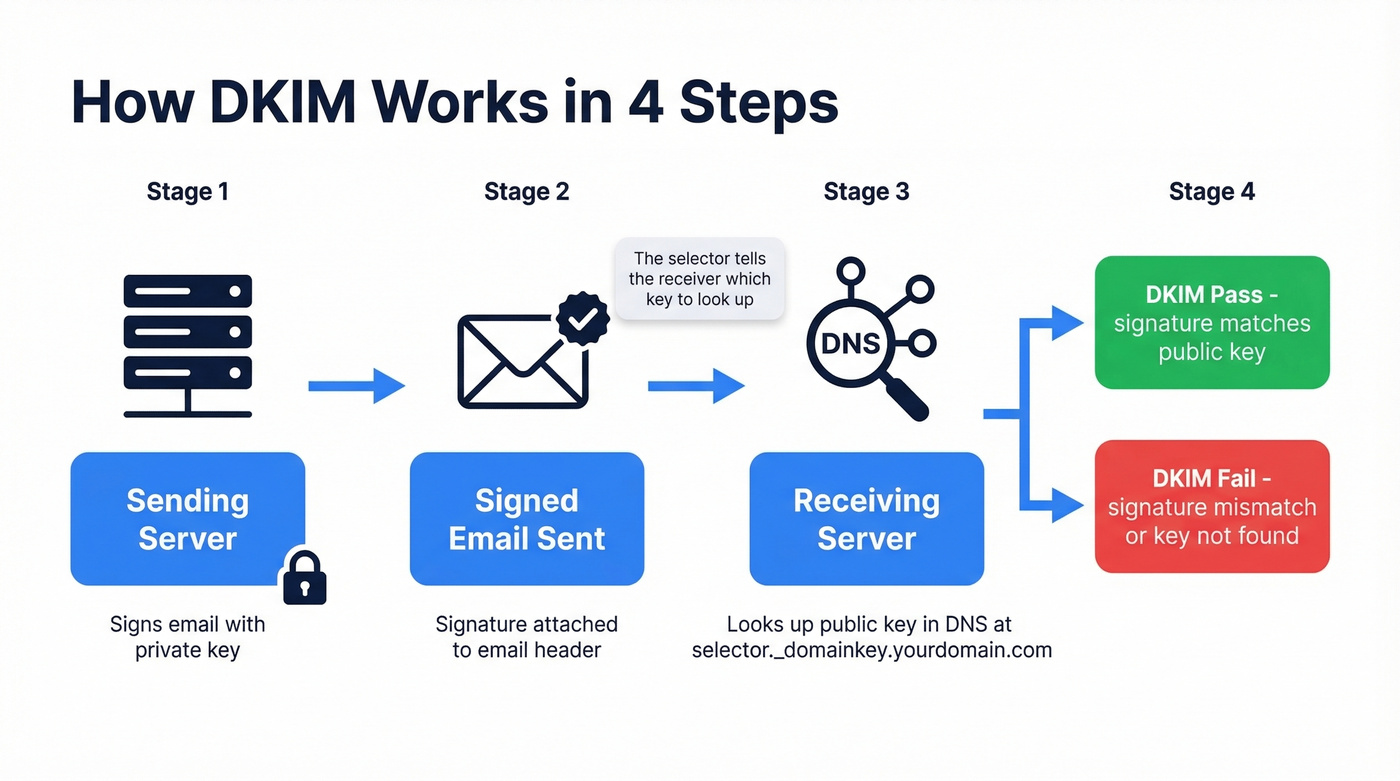
The "selector" tells the receiving server which key to look up. Google uses google._domainkey, Squarespace uses squarespace._domainkey, and multiple selectors coexist without conflict.
Set Up DKIM on Squarespace
Before you touch any DNS records: figure out where to add them. If your domain uses Nameserver Connect - meaning your nameservers point to Squarespace - add DNS records in the Squarespace DNS panel. If you use DNS Connect, where your domain is registered elsewhere and pointed via A/AAAA records, add records at your registrar, not in Squarespace.
Getting this wrong means your records exist in a place no one's looking.
Host field warning: Enter only the subdomain portion, like
google._domainkey- notgoogle._domainkey.yourdomain.com. Squarespace automatically appends your domain. Adding it yourself createsgoogle._domainkey.yourdomain.com.yourdomain.com, and the record silently breaks.
Squarespace Email Campaigns
Squarespace Email Campaigns doesn't send SPF-aligned emails by default - the Return-Path uses Squarespace's own domain, so DKIM is the only alignment mechanism for DMARC. Getting this right isn't optional.
- Go to Email Campaigns > Settings > Sender Details > Verify Domain
- Squarespace displays two CNAME records. Copy both exactly.
- In your DNS panel, add each as a CNAME record. Paste the host and value fields as shown.
- Wait for propagation - often completes in around 15-20 minutes in practice, despite the "up to 48-72 hours" messaging.
- Return to Sender Details and click Authenticate Domain.
If you're also running a store, keep reading. There's a separate problem.
Google Workspace
Google Workspace uses a TXT record instead of CNAME. The setup lives in Google Admin, not Squarespace.
- Open Google Admin Console > Apps > Google Workspace > Gmail > Authenticate email
- Select your domain. Google generates a DKIM key with the default selector
google._domainkey. - Copy the TXT record value. It starts with
v=DKIM1; k=rsa; p=MIIBIjANBgkq... - In your DNS panel, add a new TXT record:
- Host:
google._domainkey - Data: paste the full value from Google Admin
- Host:
- Wait for DNS propagation.
- Return to Google Admin and click Start Authentication. The status changes to "Authenticating email with DKIM."
Don't skip step 6. We've seen teams add the DNS record and assume they're done - Google won't start signing emails until you explicitly flip that switch.
Other Providers
Your provider's admin panel will generate the exact DKIM selector and value for you. Copy them precisely - don't try to construct DKIM records manually.
One example with a documented Squarespace flow is Paubox, which uses paubox._domainkey as the host, a TXT record type, and the DKIM key value copied directly from Paubox's admin panel.

You're setting up DKIM so your emails actually reach inboxes. But authentication only matters if you're emailing real, verified addresses. Prospeo's 5-step verification delivers 98% email accuracy - so the deliverability you just built doesn't get wasted on bounces.
Don't fix DKIM just to send emails that bounce. Verify first.
Fix DKIM for Store Emails
Here's the thing: this is the part most guides skip entirely, and it's the one that causes the most pain.
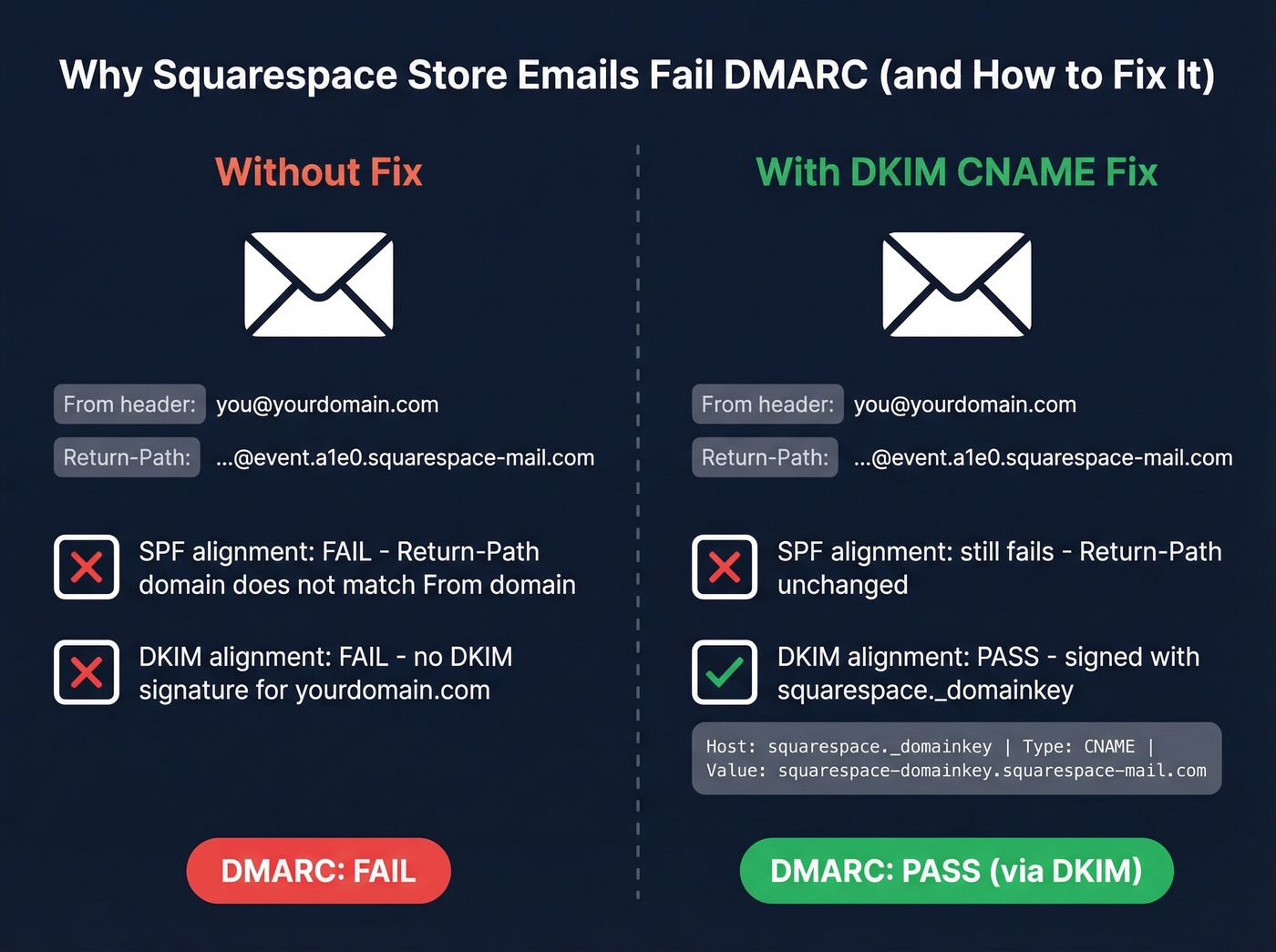
When your store sends order confirmations, receipts, or digital download emails, those messages come from Squarespace's own infrastructure. The Return-Path shows something like ...@event.a1e0.squarespace-mail.com, while the visible From address is your brand domain. SPF can't align for these emails because you can't change the Return-Path in Squarespace, and Squarespace support often redirects users to their email provider - which is unhelpful, since Microsoft 365 or Google can't provide DKIM for mail they didn't send.
The fix is a DKIM CNAME record that lets Squarespace sign these notification emails with your domain:
Host:  squarespace._domainkey

Type:  CNAME

Value: squarespace-domainkey.squarespace-mail.com
This enables DKIM-only alignment for DMARC alignment - the practical way to get store notification emails to pass authentication without keeping your DMARC policy stuck at p=none forever.
Common Errors and Fixes
Double-appended host field. You enter google._domainkey.yourdomain.com as the host. Squarespace appends your domain again, creating google._domainkey.yourdomain.com.yourdomain.com. DKIM silently fails. Only enter the subdomain portion - drop everything after _domainkey.
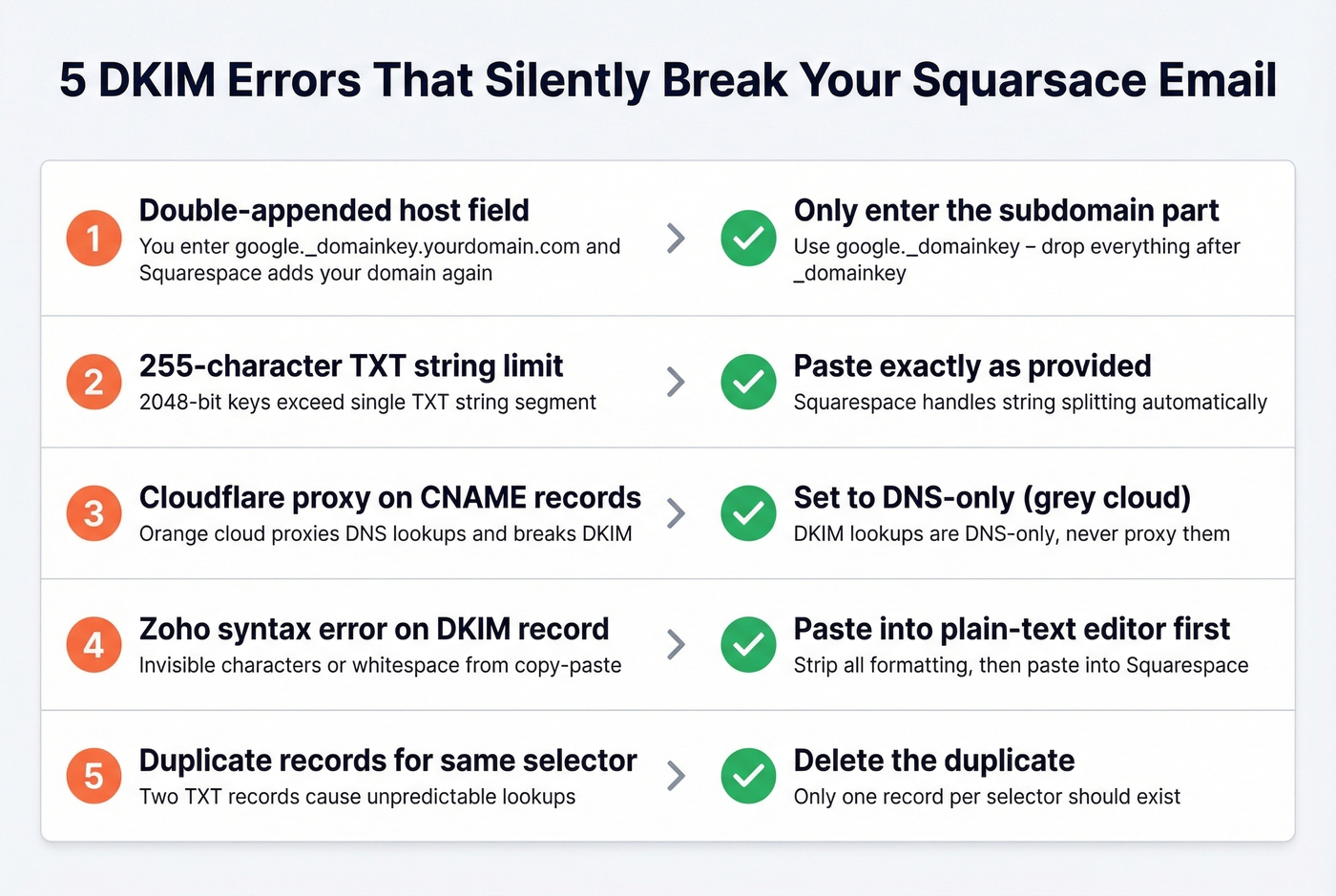
255-character TXT string limit. 2048-bit DKIM keys often exceed the 255-character TXT-string limit per segment. Paste the DKIM value exactly as provided - don't add extra quotes or line breaks. Squarespace handles the string splitting automatically.
Cloudflare proxy on CNAME records. If you're using Cloudflare in front of Squarespace, disable the orange cloud proxy for any CNAME DKIM records. DKIM lookups are DNS-only - proxying them breaks the resolution chain. Set those records to DNS-only (grey cloud). (If you need the full Cloudflare-side checklist, see our SPF Record Cloudflare guide.)
Zoho "Syntax error found in the DKIM record." This one comes up constantly in forums. You copy-paste the DKIM value from Zoho, add it in Squarespace, and Zoho still returns a syntax error. The usual culprit is extra whitespace or invisible characters introduced during copy-paste, or the DKIM string getting mangled. Re-copy the value, paste it into a plain-text editor first to strip formatting, then paste into Squarespace.
Duplicate records for the same selector. If you've added the same selector twice from a failed first attempt, delete the duplicate. Two TXT records for google._domainkey cause unpredictable results - some receiving servers grab one, some grab the other.
How to Verify DKIM Is Working
Adding a DNS record and hoping for the best isn't verification.
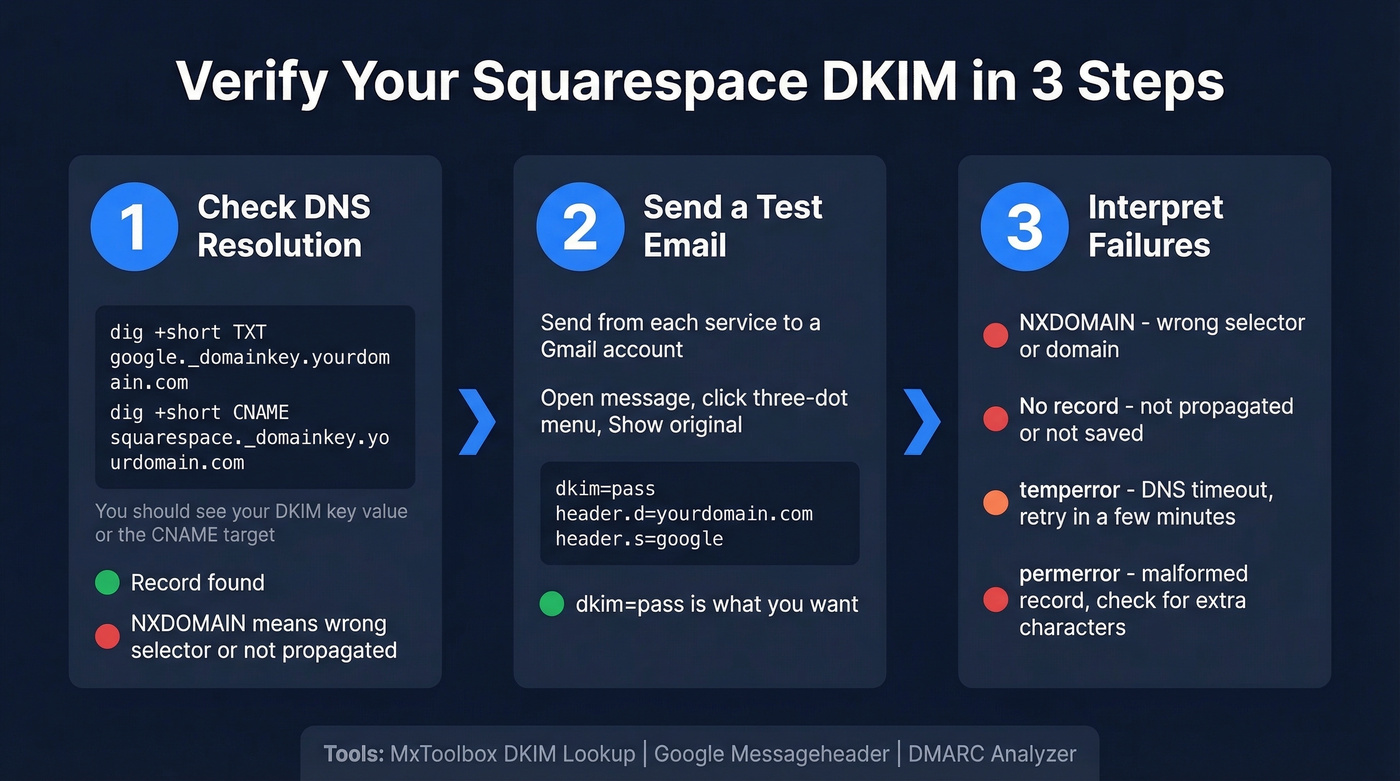
Step 1: Check DNS resolution
For TXT-based DKIM like Google Workspace:
dig +short TXT google._domainkey.yourdomain.com
You should see the full v=DKIM1; k=rsa; p=... value. If you get nothing, the record hasn't propagated or the selector is wrong.
For CNAME-based DKIM like Squarespace store notifications:
dig +short CNAME squarespace._domainkey.yourdomain.com
This should return squarespace-domainkey.squarespace-mail.com.
Step 2: Send a test email and check headers
Send an email from each service - Workspace, Campaigns, store - to a Gmail account. Open the message, click the three-dot menu, and select Show original. Look for the Authentication-Results header:
dkim=pass header.d=yourdomain.com header.s=google
That dkim=pass is what you're looking for.
Step 3: Interpret failures
- NXDOMAIN means wrong selector or domain - double-check the host field
- No record returned means it hasn't propagated yet, or the record wasn't saved
dkim=temperroris a DNS timeout - transient, retry in a few minutesdkim=permerrormeans a malformed record - check for truncation, extra characters, or string-splitting issues
MxToolbox DKIM Lookup offers a quick web-based check. Enter your domain and selector, and it shows you what the receiving world sees. We also recommend Google's Messageheader tool for parsing raw email headers if you're not comfortable reading them directly, and DMARC Analyzer for a second opinion on record validity.
Propagation reality check: Squarespace and many guides quote up to 48-72 hours. In our experience, DNS updates often land within 15 minutes. Check with
digbefore you wait two days.
Set Up SPF and DMARC Too
DKIM alone isn't enough. You need the full authentication stack.
SPF tells receiving servers which IP addresses can send mail for your domain. For Google Workspace:
v=spf1 include:_spf.google.com ~all
Adjust the include: for your provider. Remember: Squarespace Email Campaigns doesn't send SPF-aligned emails by default, so DKIM carries the weight for DMARC on those sends. (If you want the deeper breakdown, see DKIM vs SPF vs DMARC.)
DMARC ties it together. Start with a monitoring-only policy:
v=DMARC1; p=none; rua=mailto:dmarc@yourdomain.com
The rua tag sends you aggregate reports so you can see what's passing and failing. Once you're confident everything's aligned, progress to p=quarantine and eventually p=reject. Going straight to p=reject before confirming all your sending services pass DKIM will bounce legitimate emails - we've watched teams do this and lose two days of order confirmations before they realized what happened.
Let's be honest about something, though: DKIM, SPF, and DMARC protect your sending reputation, but sending to invalid addresses tanks it just as fast. You can have perfect authentication and still crater your domain reputation score by emailing dead addresses. If you're doing outbound from your domain, verify your list before you hit send - Prospeo's email list verification handles this with 98% accuracy and a free tier covering 75 checks per month.
Getting store notifications and outbound emails authenticated is half the battle. The other half is reaching the right buyers. Prospeo gives you 143M+ verified emails refreshed every 7 days - not stale data that tanks the domain reputation you just protected.
You protected your domain. Now fill your pipeline with contacts that connect.
FAQ
How long does DKIM take to propagate on Squarespace?
Most records propagate within 15-20 minutes, despite the official "up to 48-72 hours" estimate. Run dig +short TXT selector._domainkey.yourdomain.com to check immediately instead of waiting days.
Can I have multiple DKIM records on one domain?
Yes. Each sending service uses a unique selector - google._domainkey for Google Workspace, squarespace._domainkey for store notifications, and so on. They don't conflict. Most e-commerce Squarespace users need two or three.
Why does Squarespace say my TXT record is too long?
2048-bit DKIM keys often exceed the 255-character TXT-string limit per segment. Paste the value exactly as your provider generated it - don't manually add quotes or line breaks. Squarespace handles the string splitting automatically.
Do I need DKIM if I only use Google Workspace?
Yes. Gmail and Yahoo require SPF, DKIM, and DMARC for bulk senders. Even low-volume senders benefit from better deliverability and spoofing prevention. There's no scenario where skipping it is the right call.
Should I skip this if I'm not a bulk sender?
No. Even if you send fewer than 5,000 emails a day, missing DKIM means receiving servers have no way to verify your messages are legitimate. Spam filters weigh authentication signals heavily regardless of volume.