

Technographic Segmentation: From Definition to Displacement Campaigns
The most recent martech landscape report counts 15,384 tools - up 100x since 2011. Every one of those tools represents a buying decision someone made, a contract someone signed, and a competitor someone rejected. Technographic segmentation turns that sprawl into pipeline. With an 8.6% annual churn rate across the martech landscape, somebody's always switching. The question is whether you're there when they do.
This approach groups prospects by the software they use - the fastest way to find competitor-displacement and complementary-product opportunities. You need a detection source and verified contact data to reach the right people.
What Is Technographic Segmentation?
Technographic segmentation divides your target market based on the technologies companies use. Firmographic data tells you who a company is - industry, revenue, headcount. Demographic data tells you who the buyer is by title, department, and seniority. Technographic data tells you what tools they've chosen, and that reveals intent, budget, and competitive vulnerability.
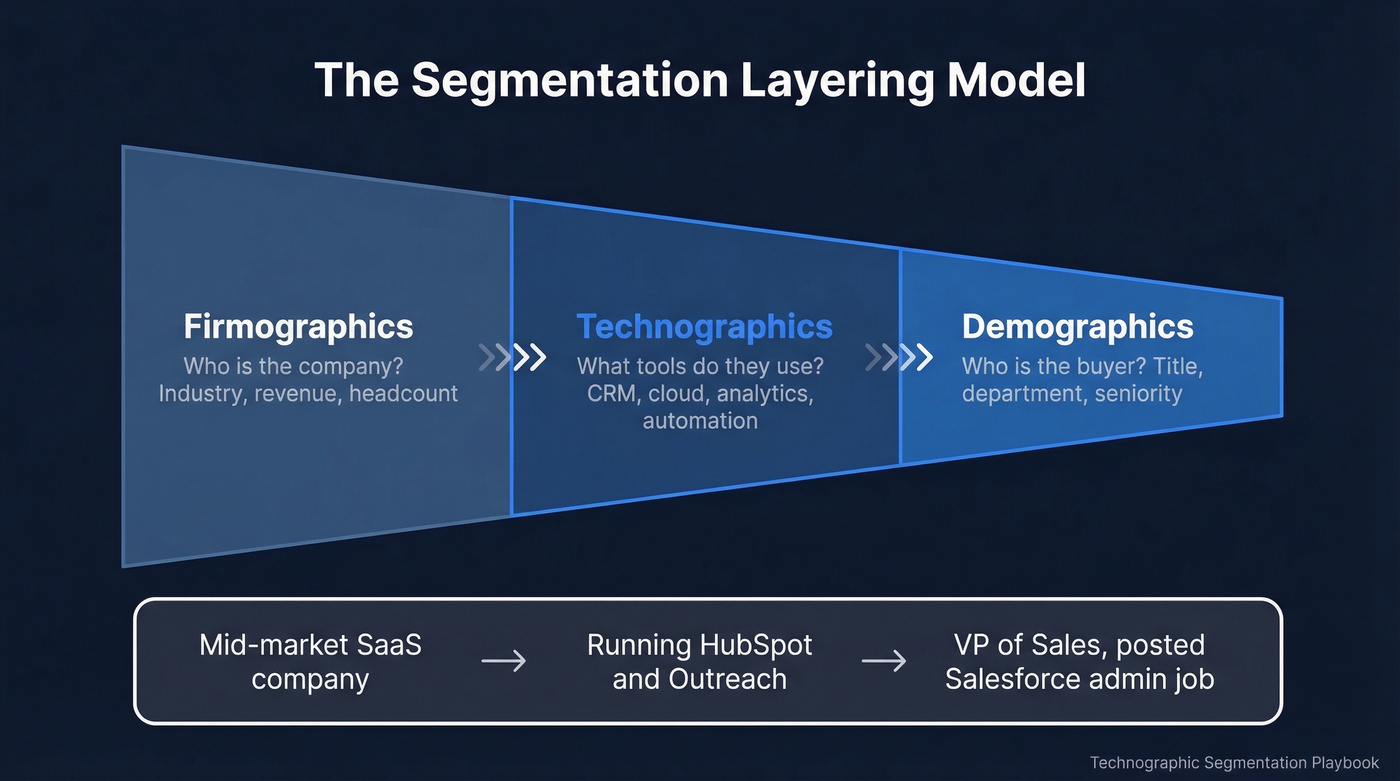
The data points fall into a few categories:
- Software stack - CRM, marketing automation, sales engagement, analytics, ERP
- Cloud infrastructure - AWS, Azure, GCP, Snowflake, Databricks
- Hardware and devices - server environments, mobile platforms
- Adoption stage - new implementation, mature usage, or sunsetting
- Digital maturity - how sophisticated their overall tech ecosystem is
Think of it as the Shapiro-Bonoma layering model in practice: you start broad with firmographics, narrow with technographics, then pinpoint individual decision-makers with demographics. Each layer sharpens your targeting. Technographics sit in the middle - they turn a generic "mid-market SaaS company" into "a mid-market SaaS company running HubSpot and Outreach that just posted a job for a Salesforce admin."
This layering also maps to the Rogers adoption lifecycle. Technographic data reveals whether a company is an early adopter experimenting with new tools or a late majority still running legacy systems. A company that just adopted a new category tool behaves very differently from one that's been on the same platform for five years - and your messaging should reflect that.
Why Tech-Stack Data Matters in 2026
The martech landscape added 2,489 new tools and removed 1,211 in a single year. That's not stability - it's a market in constant motion. Every switch is a sales opportunity if you know it's happening.
Here's the thing: most teams overcomplicate this. They build 47-variable segments with weighted scoring models before they've closed a single deal from technographic data. Stop. We've seen the three-segment approach outperform complex taxonomies every time:
- Competitor users - companies running a tool you directly replace
- Complementary-product users - companies using tools that integrate well with yours
- No-solution-yet - companies in your ICP that haven't adopted any tool in your category
Those three segments cover 90% of the outbound use cases that matter. Everything else - adoption timing, contract renewal windows, Rogers lifecycle positioning - is optimization you layer on after the basics work.
In our experience, tech-fit messaging drives 10-30% higher reply rates compared to generic industry-based targeting. The signal-to-noise ratio is just better when you can say "I noticed you're running Outreach" instead of "I noticed you're in SaaS."
If your average deal size is under $10k, you probably don't need ZoomInfo-level technographic data. A BuiltWith free lookup plus verified contact data gets you 80% of the value at 5% of the cost.
Two Detection Methods
Not all technographic data is created equal. The detection method determines what you can see - and more importantly, what you'll miss.
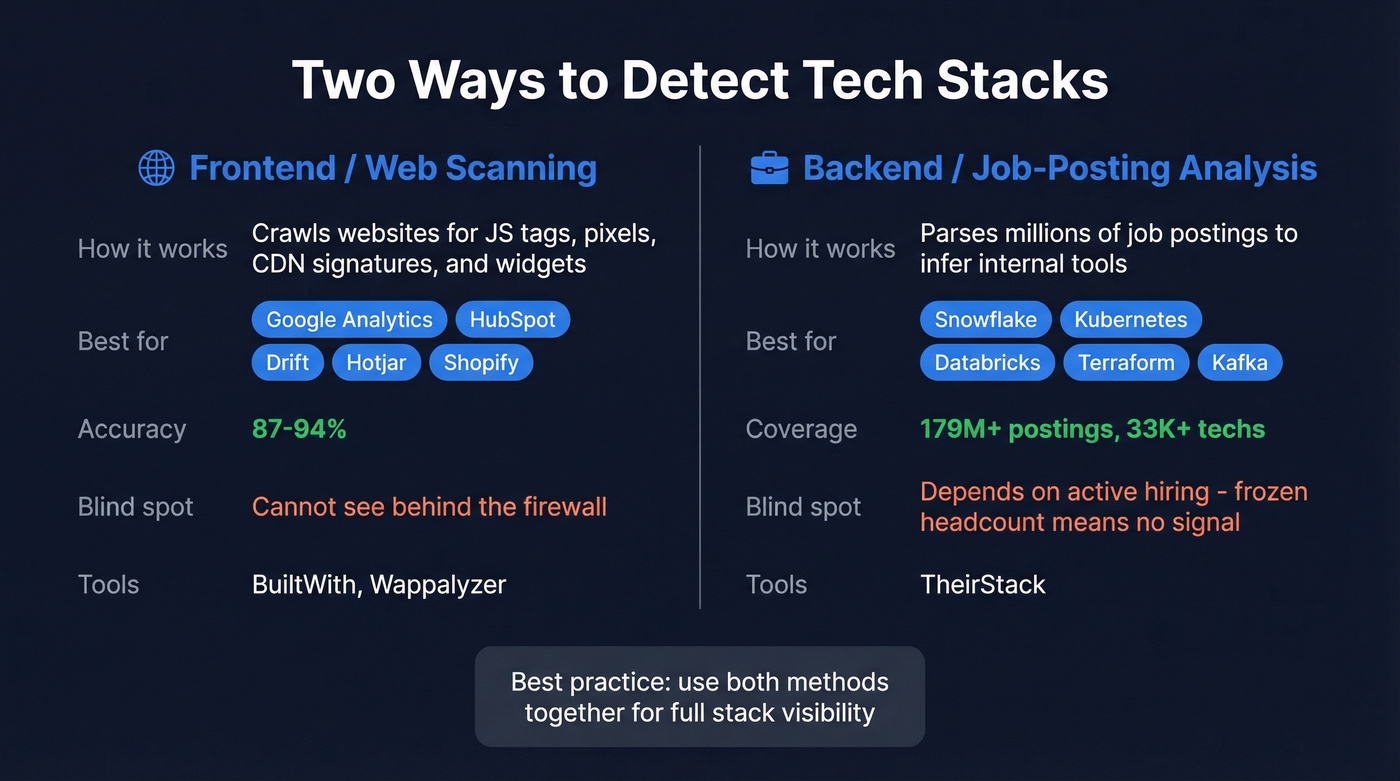
Frontend / client-side scanning is what tools like BuiltWith and Wappalyzer do. They crawl websites and detect JavaScript tags, tracking pixels, CDN signatures, and embedded widgets. Wappalyzer hits roughly 94% accuracy for JavaScript-based technologies in one published test, while BuiltWith scored 87% in the same evaluation, with review sentiment putting its accuracy closer to ~80%. Both are strong for marketing tools like Google Analytics, HubSpot, Drift, and Hotjar, plus ecommerce platforms like Shopify and Magento. But they can't see what's behind the firewall. If a company runs Snowflake, Kubernetes, or Databricks, web scanning won't catch it.
One consistent complaint in BuiltWith reviews: messy exports that need significant cleanup before CRM import.
Backend / job-posting analysis fills the visibility gap. Tools like TheirStack parse 179M+ job postings across 195 countries to infer what technologies companies use internally. If a company is hiring a "Senior Databricks Engineer," that's a strong signal they're running Databricks. TheirStack tracks 33K+ technologies this way. The tradeoff is that job-posting analysis depends on active hiring - a company that froze headcount six months ago goes dark in this dataset.
The practitioner consensus on Reddit is clear: use both methods. Web scanning for marketing and frontend tools, job-posting analysis for infrastructure and backend. Neither alone gives you the full picture.
Technographic Data Providers Compared
| Provider | Method | Coverage | Starting Price | Contact Data? |
|---|---|---|---|---|
| Prospeo | Wappalyzer + job signals | 300M+ profiles, 30+ filters | Free / ~$0.01/email | Yes (98% accuracy) |
| BuiltWith | Web scanning | 673M sites, 111K+ techs | $295/mo | No |
| Wappalyzer | Web scanning (JS) | Strong JavaScript/front-end detection | $250/mo | No |
| TheirStack | Job-posting analysis | 179M+ postings, 33K+ techs | Free / $59/mo | No |
| Datanyze | Web scanning | Basic lookups | $29/mo | Limited |
| HG Insights | Enterprise installs | Enterprise-grade | ~$2,000+/mo | No |
| ZoomInfo | Multi-source | 30,000+ apps tracked | ~$15,000/yr | Yes |
The column that matters most is the last one. Most technographic tools give you company-level data - "Acme Corp uses Salesforce" - but no way to reach the actual humans who made that buying decision. You end up cobbling together BuiltWith for tech detection, then Apollo or ZoomInfo for contacts, then a verification tool to clean the list. That's three subscriptions and a fragile workflow.
Prospeo combines technographic filtering with verified contact data in a single self-serve platform - no annual contracts, no enterprise pricing. You filter by tech stack using 30+ search criteria, get back verified emails and direct dials, and export straight to your sequencer. The 7-day data refresh cycle means you aren't working with stale records.
The Reddit consensus on enterprise providers like HG Insights and ZoomInfo is that they're powerful but expensive. A 10-seat ZoomInfo contract with technographic data runs $15,000-40,000/year depending on modules. For teams that need the full GTM suite, that price tag might make sense. For teams that just need "find companies using X tool and give me verified emails for the VP of Sales," it's overkill.

Stop stitching together BuiltWith for tech detection and a separate tool for contacts. Prospeo combines technographic filters with 143M+ verified emails and 125M+ direct dials in one search - at $0.01 per email, 90% cheaper than ZoomInfo.
Find competitor users and reach decision-makers in a single workflow.
How to Implement Tech-Stack Targeting
1. Define your ICP with technographic criteria. Go beyond "mid-market SaaS." Get specific: "200-500 employees, Series B+, using Salesforce as CRM and Outreach or Salesloft for sales engagement, no existing contract with a competitor in our category." Pull this from your closed-won analysis - look at what your best customers were running when they signed. If you need a starting point, use an ideal customer profile template and add technographic must-haves.
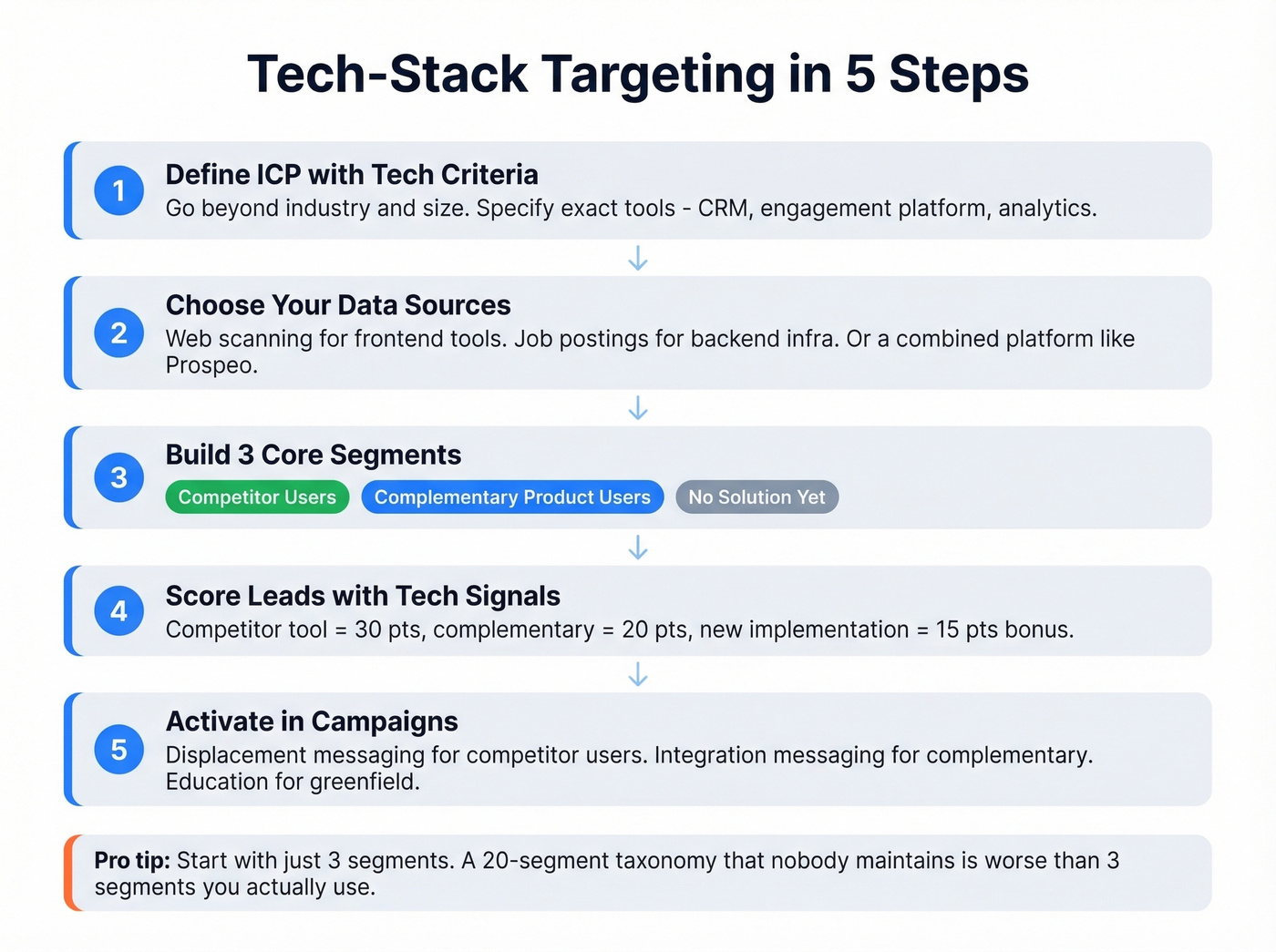
2. Choose your data sources. Frontend scanning for marketing and web-facing tools. Job-posting analysis for backend infrastructure. Or use a combined platform that handles both detection methods and contact data in one workflow.
3. Build your three core segments. Competitor users, complementary-product users, and no-solution-yet. Don't overthink it. These three segments will generate more pipeline than a 20-segment taxonomy that nobody maintains.
4. Score leads with technographic weight. We've used this rubric across multiple campaigns and it consistently separates high-intent from noise:
| Signal | Points | Logic |
|---|---|---|
| Using a competitor tool | 30 | Already in-market, budget allocated |
| Using a complementary tool | 20 | Integration play, lower friction |
| No tool in category | 10 | Greenfield, but needs education |
| New implementation (< 6 months) | 15 | Still evaluating, open to switching |
| Mature usage (1+ years) | 10 | Stable but may have accumulated pain |
| Sunsetting a tool | 5 | Actively looking - highest urgency |
| Sophisticated overall stack | 10 | Tech-forward buyer, faster sales cycle |
| Basic stack | 5 | May need more hand-holding |
Layer these on top of your existing firmographic and behavioral scores. If you want a more formal framework, treat this as a technographic layer on top of your existing lead scoring model.
A 200-person SaaS company that just implemented your competitor's tool and is hiring for the role that owns that tool? That's a 55-point lead before you even look at intent signals.
5. Activate in campaigns. Route competitor-user segments to displacement messaging. Route complementary-product segments to integration-focused messaging. Route no-solution-yet segments to educational content. Each segment gets different copy, different sequences, different CTAs. (If you're building outbound around these segments, start with a proven B2B cold email sequence structure.)
The Competitor Displacement Playbook
Picture this: your sales team just lost a deal to a competitor. Frustrating, sure. But now you know exactly which companies to target - every other company running that competitor's tool. This is where technographic segmentation moves from theory to revenue.
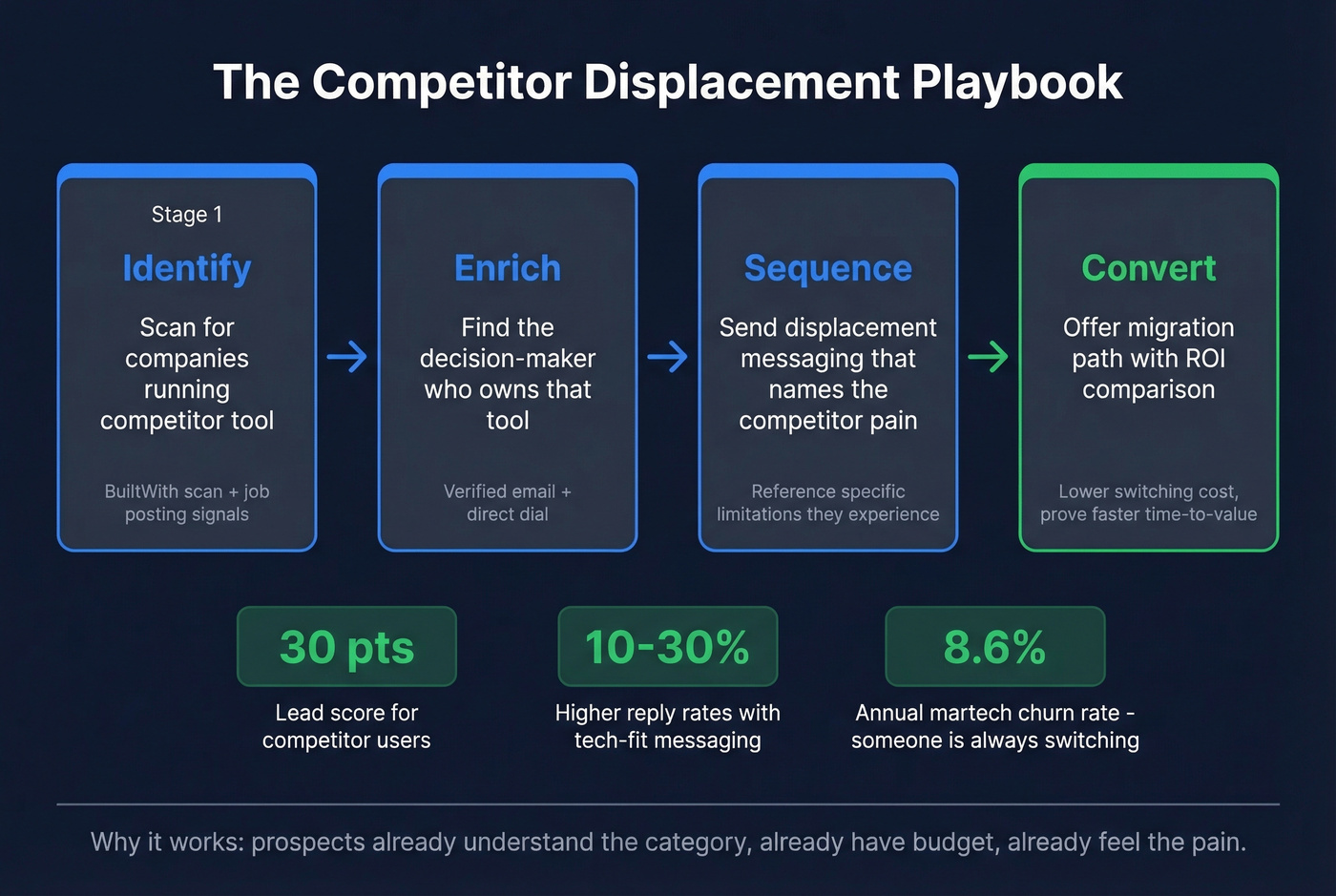
Displacement campaigns are, as one practitioner on r/b2bmarketing put it, "insane" for ROI. The logic is simple: these prospects already understand the category, already have budget allocated, and already experience the pain points your product solves differently. You aren't educating - you're displacing.
We ran a displacement campaign last quarter targeting companies using a competitor's analytics tool. The sequence:
- Identify targets - BuiltWith scan filtered to companies running the competitor's JavaScript tag, narrowed by ICP criteria like headcount, industry, and geography.
- Find decision-makers - Verified emails for the VP of Marketing who owns the analytics contract, the Head of Data who evaluates tools, the CFO who signs renewals.
- Craft pain-specific messaging - "I noticed you're running [Competitor] - teams that switch to us typically see X" lands harder than generic cold outreach. Reference specific limitations the competitor's users complain about on G2 or Reddit.
- Sequence with escalation - Email, then follow-up with case study, then direct dial. Verified mobile numbers matter here because displacement targets are high-value enough to warrant a phone touch.
Let's be honest: if you're sending displacement campaigns to unverified lists, you're gambling with your domain. Burning your sender reputation because you skipped email verification is an expensive mistake. Keep bounce rates under 2% (and use dedicated email reputation tools to monitor the damage before it compounds).
Data Quality and Verification
Always run a separate verification pass on any contact list, regardless of what the source provider calls "verified." The core problem is that "verified" means different things to different vendors.
Apollo's "verified" emails run around 60% actual validity per practitioner reports. BuiltWith gives you company-level technographic data but no contact data at all - so you're sourcing emails elsewhere and hoping they're good.
Skip this step at your own risk: don't trust any single provider's verification label without testing. Don't send to a list of 5,000 contacts without running at least a sample through independent verification. And don't assume that because a tool costs $15,000/year, its data is clean. If you need a deeper operational checklist, follow an email deliverability guide before scaling volume.
A proper verification process means catch-all domain handling, spam-trap removal, honeypot filtering, and infrastructure that doesn't rely on third-party email providers. That's the operational standard that keeps bounce rates under 2% and domains healthy. When you're running displacement campaigns against hundreds of competitor accounts, the accuracy gap between 60% and 98% is the difference between pipeline and a blacklisted domain.

Technographic segmentation only works if you can actually reach the people behind the tech stack. Prospeo's 30+ filters - including Wappalyzer-powered technographics and live job-posting signals - return verified contacts with 98% email accuracy on a 7-day refresh cycle.
Turn tech-stack intelligence into booked meetings, not stale spreadsheets.
Compliance Checklist
Technographic data itself is company-level - it describes what tools an organization uses, not personal information. But the moment you attach a name, email, or job title to that data, you're in personal data territory. Here's what to get right:
- GDPR applies to B2B contact data. Names, direct emails, and job titles are personal data under GDPR, even in a business context. Fines reach EUR 20M or 4% of global revenue.
- Establish a lawful basis. For B2B outreach, legitimate interest under Article 6 is the standard justification - but you need to document it, not just assume it.
- Vet your data vendors. Ask for proof of lawful basis, consent logs where applicable, broker registration status, and DSAR handling procedures.
- Honor opt-outs immediately. Suppression lists aren't optional. If someone requests removal, it needs to happen across all systems.
- Don't forget CCPA/CPRA. California's privacy laws increasingly cover business contact information. For teams targeting US prospects, build opt-out mechanisms into your workflow from day one.
- Document everything. If a regulator asks how you sourced a contact list, "we bought it from a vendor" isn't sufficient. You need to show the chain of lawful processing.
FAQ
What's the difference between technographic and firmographic data?
Firmographic data describes who a company is - industry, revenue, headcount. Technographic data describes what tools they use - CRM, cloud infrastructure, marketing automation. Firmographics define your total addressable market; technographics refine it by revealing technology fit, displacement opportunities, and buying signals like recent tool adoption.
How accurate is technographic data?
Web-scanning tools like Wappalyzer achieve roughly 94% accuracy for JavaScript-based technologies; BuiltWith scores around 80-87% depending on the test. Job-posting analysis captures backend tools web scanning misses but depends on active hiring. Combining both methods and verifying contact data separately gives the most reliable results.
Can I get technographic data and verified emails in one tool?
Most providers - BuiltWith, Wappalyzer, TheirStack - deliver company-level data but no contact information. Prospeo combines technographic search filters with 300M+ verified professional profiles at ~$0.01/email, so you filter by tech stack and export verified emails in one workflow. A free tier with 75 emails/month lets you test the combined approach.
What are common technographic segmentation examples?
The three most actionable: grouping prospects by CRM (Salesforce vs. HubSpot users), segmenting by sales engagement tool (Outreach vs. Salesloft), and identifying companies with no solution in your category. Each segment enables tailored messaging - displacement for competitor users, integration pitches for complementary tools, and educational sequences for greenfield accounts.