

How to Test Email Bounce Before Sending: Complete 2026 Guide
Your last campaign bounced at 6%. Your ESP flagged the account. Now you're scrambling to figure out which addresses are dead, which servers are blocking you, and whether your sender reputation just took a permanent hit. That's the wrong time to learn how to test email bounce handling.
Here's the thing: this phrase means two very different things depending on who you are. If you're a marketer or sales ops person, you want to verify emails before sending so they don't bounce. If you're a developer, you want to simulate bounces to make sure your application handles them correctly. We'll cover both paths - and they're more connected than most people realize.
What You Need (Quick Version)
Want to check if an email will bounce before sending? Use a verification tool. Prospeo, ZeroBounce, or Hunter will validate addresses without sending a single message. Jump to the pre-send verification section.
Need to simulate bounces for your dev/ops pipeline? Postmark's bounce-testing domain and the AWS SES simulator are your best options. Jump to the developer simulation section.
Already getting bounce back emails and need to fix it? Head to the handling section for suppression list logic, retry strategy, and the thresholds that matter.
Bounce Types and SMTP Codes
Not all bounces are equal. Understanding the difference between a dead mailbox and a full one changes how you respond entirely. Bounces fall into three categories: hard (permanent), soft (temporary), and block (policy/reputation).
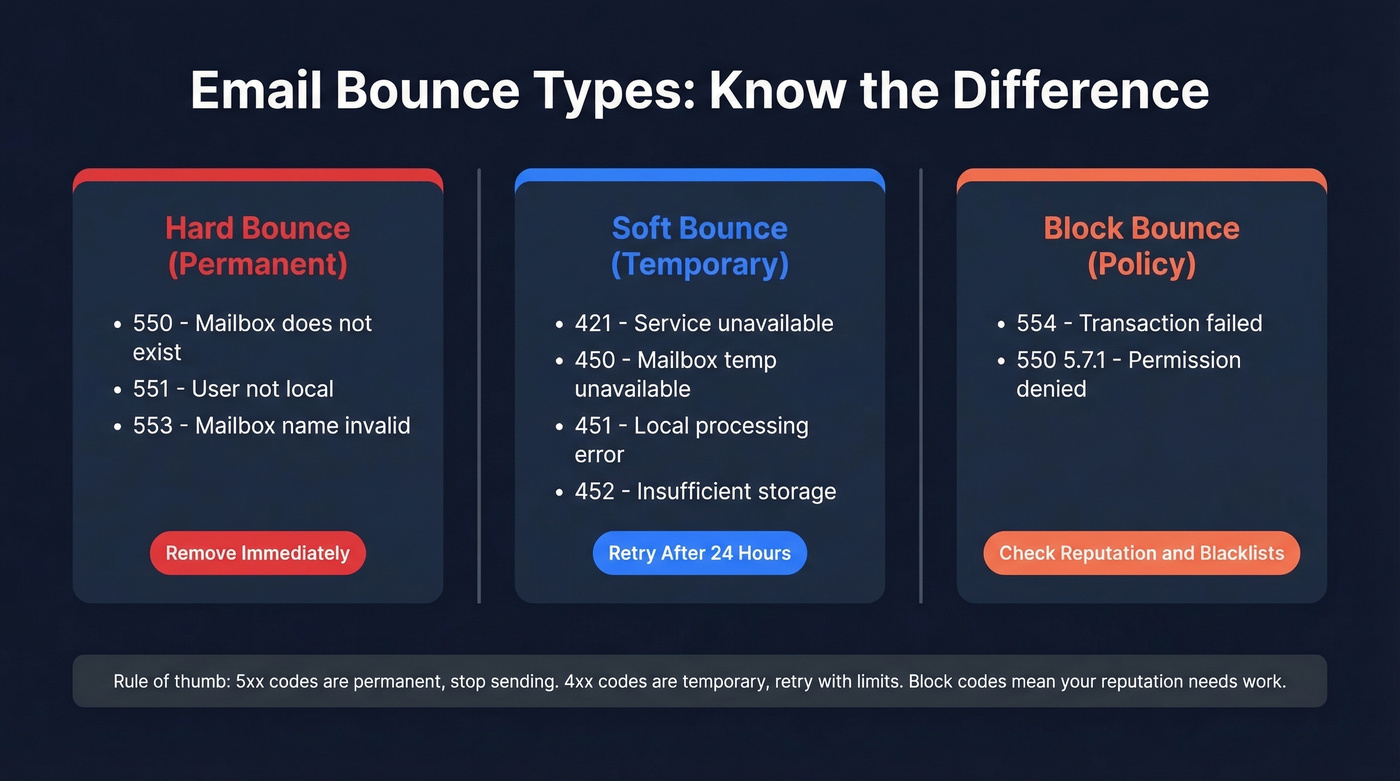
Hard bounces mean the address is gone - remove it immediately. Soft bounces mean something temporary went wrong, so retry, but don't retry forever. Block bounces mean a server or policy rejected you, which is a reputation signal worth investigating.
A common question: will an email bounce back if you're blocked? Yes, but the bounce notification often arrives with a delay and typically carries a 5xx status code referencing a policy or reputation issue. Authentication failures - missing SPF, DKIM, or DMARC records - can also trigger block bounces. That's a domain configuration issue, not a list quality issue, and it requires a completely different fix. (If you need a deeper deliverability checklist, see our email deliverability guide.)
Here's the SMTP code reference you'll want bookmarked:
| Code | Type | Meaning | Action |
|---|---|---|---|
| 550 | Hard | Mailbox doesn't exist | Remove immediately |
| 551 | Hard | User not local | Remove immediately |
| 553 | Hard | Mailbox name invalid | Remove immediately |
| 421 | Soft | Service unavailable | Retry after 24 hrs |
| 450 | Soft | Mailbox temp unavailable | Retry after 24 hrs |
| 451 | Soft | Local processing error | Retry after 24 hrs |
| 452 | Soft | Insufficient storage (mailbox full) | Retry after 24 hrs |
| 554 | Block | Transaction failed | Check reputation |
| 550 5.7.1 | Block | Permission denied | Check blacklists |
Pay special attention to the 5.1.1 enhanced status code - it's the "user unknown" response and the most common reason an email bounces back as a hard bounce. You'll see it in DSN reports from nearly every major mail server when the recipient address simply doesn't exist.
The 5xx class is permanent. Stop sending. The 4xx class is temporary - retry with limits. Block codes like 554 and 550 5.7.1 usually mean your IP or domain has a reputation problem, which is a different fix entirely from list cleaning. (More benchmarks and remediation steps: email bounce rate.)
What's a Good Bounce Rate?
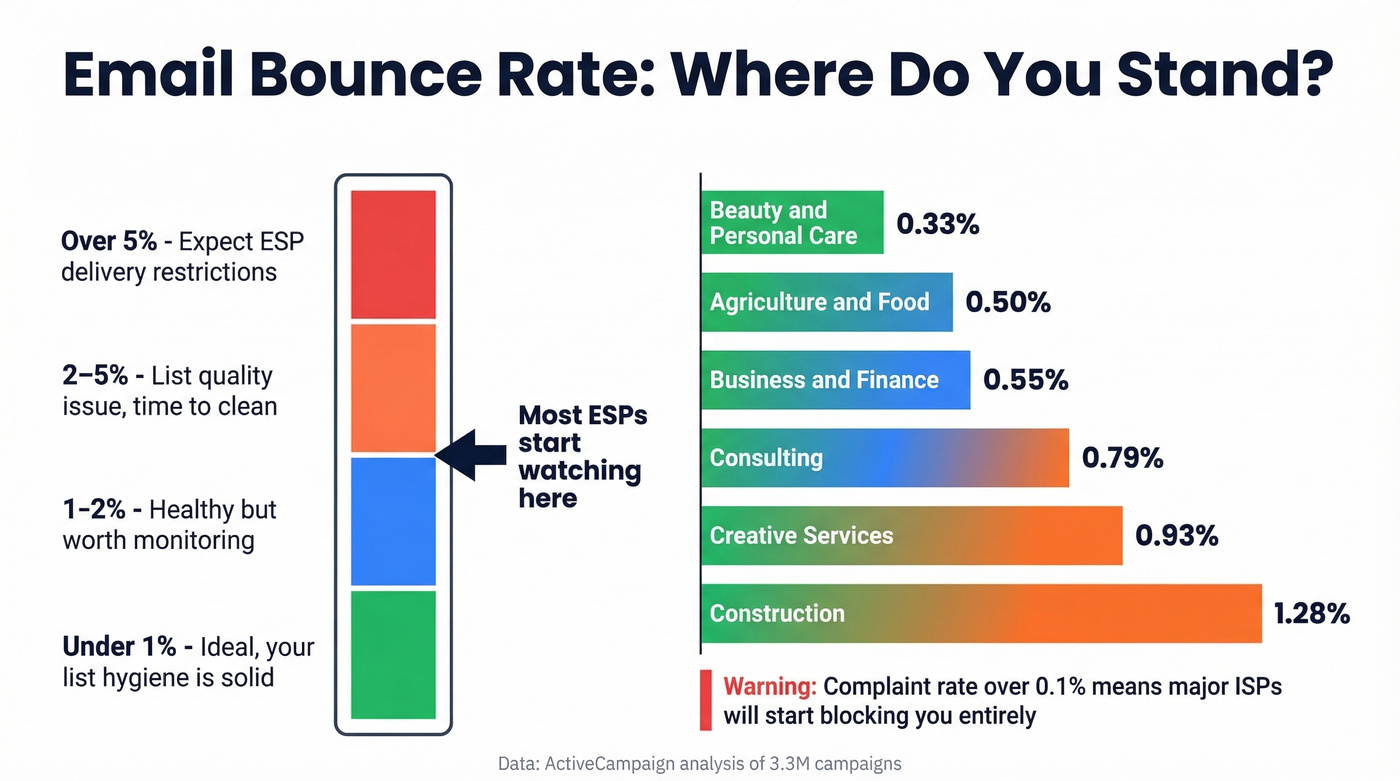
A dataset of 3.3M email campaigns from ActiveCampaign gives us solid benchmarks by industry. Mailchimp's benchmark methodology analyzes billions of emails and breaks out hard vs. soft bounces separately, but the overall picture is the same: healthy programs keep bounces low.
| Industry | Avg Bounce Rate |
|---|---|
| Beauty & Personal Care | 0.33% |
| Agriculture & Food | 0.50% |
| Business & Finance | 0.55% |
| Consulting | 0.79% |
| Creative Services | 0.93% |
| Construction | 1.28% |
Now let's translate those into risk thresholds:
- Under 1%: Ideal. Your list hygiene is solid.
- 1-2%: Healthy but worth monitoring.
- Over 2%: List quality issue. Time to clean.
- Over 5%: Expect delivery restrictions from your ESP.
- Complaint rate over 0.1%: Major ISPs will start blocking you entirely.
If you're running cold outbound, these thresholds are even more punishing. ESPs scrutinize new sender domains aggressively, and bounce rates that'd be tolerable on an established domain can trigger restrictions on a fresh one. We've seen teams with perfectly good copy get throttled for weeks because they launched on a new domain with a 3% bounce rate. (Related: how to improve sender reputation.)

Most verification tools choke on catch-all domains. Prospeo's 5-step verification includes catch-all handling, spam-trap removal, and honeypot filtering - built on proprietary infrastructure, not third-party providers. The result: 98% email accuracy and bounce rates under 1% for 15,000+ companies.
Skip the bounce test. Send emails that actually land.
How to Test Email Bounce Before Sending
Pre-send verification is the single highest-impact thing you can do for deliverability. Here's what actually happens when a verification tool checks an address. (If you want a step-by-step method, see how to check if an email exists.)
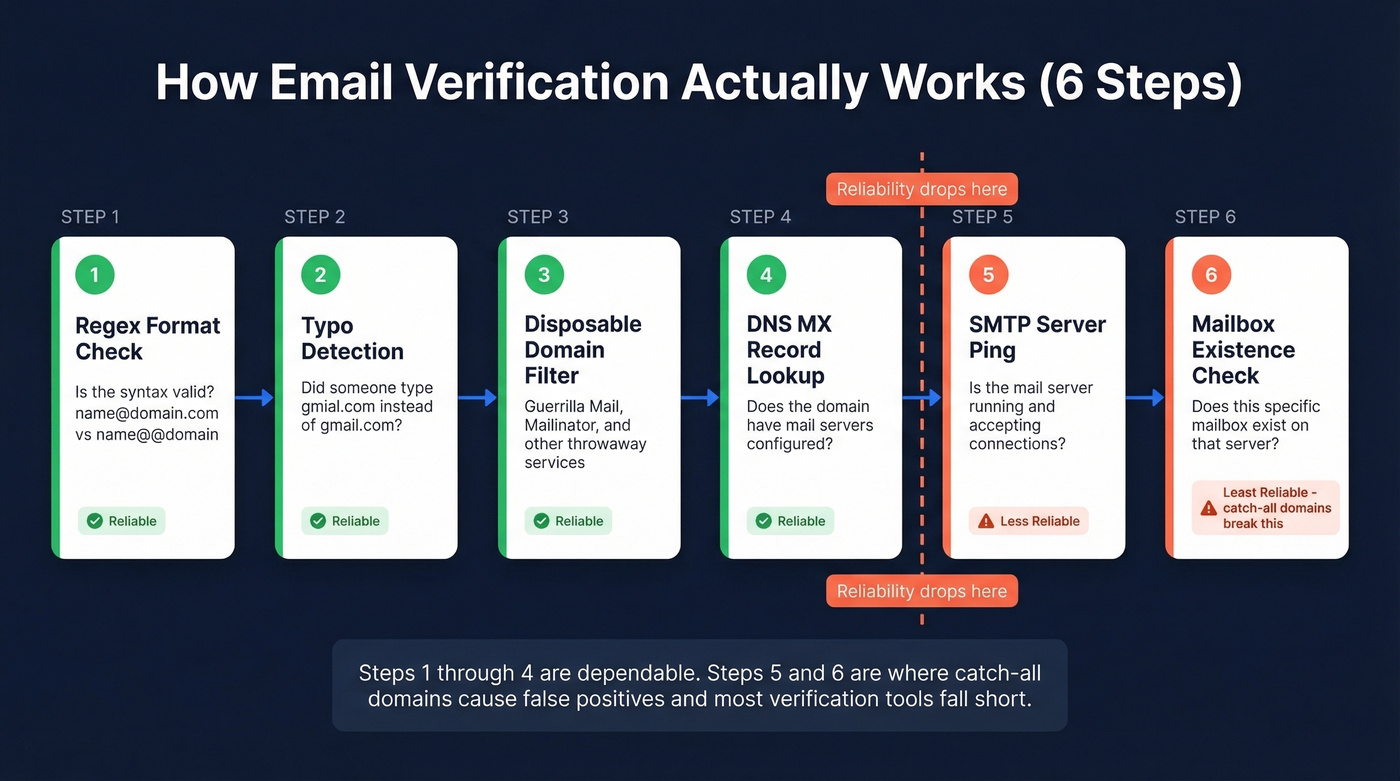
The pipeline has six steps, and understanding them explains why no tool is perfect:
- Regex format check - Is the syntax valid?
name@domain.comvs.name@@domain - Typo detection - Did someone type
gmial.cominstead ofgmail.com? - Disposable domain filtering - Is this a throwaway address from Guerrilla Mail or Mailinator?
- DNS MX record lookup - Does the domain have mail servers configured? Emails bouncing from missing or misconfigured MX records is one of the easiest problems to catch here.
- SMTP server ping - Is the mail server actually running and accepting connections?
- Mailbox existence check - Does this specific mailbox exist on that server?
The open-source library deep-email-validator implements this exact pipeline, and it's a useful reference for understanding the mechanics. Steps 1-4 are reliable. Steps 5-6 are where things get messy.
The "99% Accuracy" Problem
Every verification vendor advertises 99% accuracy. Almost none of them deliver it.
Hunter ran a benchmark of 15 verification tools using 3,000 real email addresses, and the top performers landed at 65-70% accuracy. That's a massive gap between marketing claims and measured results. (If you're comparing options, see Bouncer alternatives and Hunter alternatives.)
The culprit? Catch-all domains. These servers accept mail for any address at the SMTP level, so verification tools mark them "valid." Then the message bounces later - or worse, lands in a honeypot. The consensus on r/coldemail is blunt: validators mark addresses valid that later bounce, and catch-all domains are the main reason. In our testing, catch-all domains account for the majority of "verified but bounced" complaints we hear from sales teams.
"Valid" Doesn't Mean "Safe"
An SMTP server confirming a mailbox exists doesn't mean you should send to that address. Role addresses like info@, sales@, or support@ will pass verification but often route to shared inboxes where your cold email gets flagged as spam. Free email providers like Gmail or Yahoo will verify fine, but if you're doing B2B outbound, hitting a personal Gmail signals you don't have real business data. The best verification isn't just "does this address exist?" - it's "will sending here help or hurt me?" (More on pre-send checks: email spam checker.)
The Smarter Approach
Look, the best pre-send strategy isn't "find emails, then verify them." It's sourcing emails that are already verified at the point of collection. Running a separate verification pass on data you bought from another provider is patching a problem that shouldn't exist. If your data source verifies at collection and refreshes weekly, your bounce problem largely disappears before it starts. (Related: email list providers.)
How to Simulate Bounces for Development
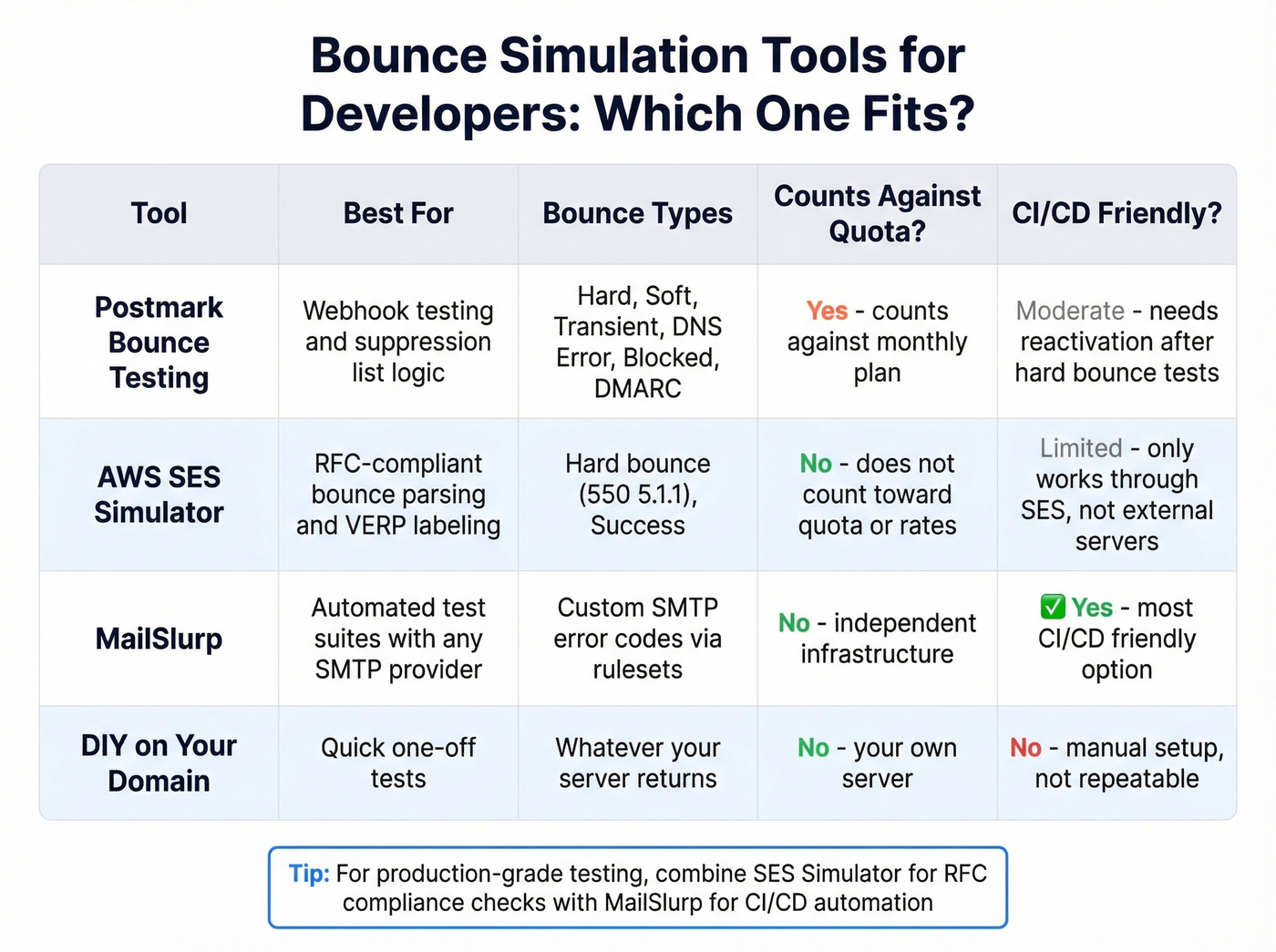
If you're building email infrastructure - handling webhooks, managing suppression lists, or testing retry logic - you need to trigger real bounces in a controlled environment. Here are the best methods, ranked by flexibility.
Postmark's Bounce-Testing Domain
Postmark offers a dedicated "black hole" domain that immediately bounces messages and triggers your webhooks. Send to specific addresses to simulate different bounce types:
HardBounce@bounce-testing.postmarkapp.comSoftBounce@bounce-testing.postmarkapp.comTransient@bounce-testing.postmarkapp.comDnsError@bounce-testing.postmarkapp.comBlocked@bounce-testing.postmarkapp.comDMARCPolicy@bounce-testing.postmarkapp.com
You can also set the X-PM-Bounce-Type: SoftBounce header when sending to the black hole domain via SMTP or API. This gives you fine-grained control without needing a different address for each type.
A few caveats worth knowing. Hard bounces behave like real hard bounces - they're added to Postmark's suppression list, and you'll need to reactivate the address to test again. Spam complaints aren't supported yet and default to hard bounce. Each test send counts against your monthly plan, though bounces via the black hole domain don't count toward bounce limits.
AWS SES Mailbox Simulator
Amazon's SES simulator lets you test sending scenarios without creating fake addresses:
success@simulator.amazonses.com- simulates successful deliverybounce@simulator.amazonses.com- returns SMTP550 5.1.1("Unknown User")
The bounce response is RFC 3464 compliant, which matters if you're parsing bounce notifications programmatically. SES also supports VERP-style labeling - send to bounce+label1@simulator.amazonses.com and bounce+label2@simulator.amazonses.com to correlate bounces back to specific recipients in your system.
One limitation: the SES mailbox simulator only responds when you send through Amazon SES. It won't respond to external mail servers. The upside is that simulator emails don't count toward your sending quota or your bounce and complaint rates.
MailSlurp for CI/CD Pipelines
MailSlurp takes a different approach. Create an SMTP inbox, attach a bounce ruleset with specific SMTP error codes, then send from any SMTP client and observe the response. This is the most CI/CD-friendly option because it works with any mail provider, making it ideal for automated test suites where you need deterministic bounce behavior without depending on a specific ESP.
DIY on Your Own Domain
You can simulate bounces on your own domain by suspending a mailbox or disabling catch-all, then sending to that address. Lowest cost, but requires server access and more manual setup. Useful for quick one-off tests. Skip this if you need anything repeatable or automated.
Watch for Async Bounces
One nuance that trips up developers: some bounces arrive asynchronously. Your system fires a "delivered" event, everything looks clean, and then a bounce notification arrives minutes or hours later.
How long does it take for an email to bounce back? Hard bounces typically return within seconds to a few minutes. Soft bounces and certain policy rejections can take anywhere from a few hours to several days as the sending server retries before giving up. If your webhook handler only processes events in real time and doesn't account for delayed bounces, you'll miss them. Build your bounce processing to handle out-of-order events - a "delivered" status isn't final until a reasonable window has passed, and we generally recommend a 72-hour buffer.
Handling Bounces After Sending
Prevention is better, but you still need a handling strategy.
Hard bounces (5xx codes): Remove the address immediately. Add it to a global suppression list that persists across campaigns. Never send to a hard-bounced address again - ESPs track this, and repeat attempts signal a spammer.
Soft bounces (4xx codes): Wait at least 24 hours before retrying. Limit retries to 3-5 attempts over several days. If the address still soft-bounces after the retry window, suppress it. A persistent soft bounce is functionally a hard bounce - treat it that way.
Action triggers based on thresholds:
- Bounce rate crosses 2% - audit your list sources and verification process
- Bounce rate crosses 5% - pause sending and clean your entire list before resuming
- Complaint rate crosses 0.1% - investigate immediately; ISP blocking is imminent
Process bounces via webhooks, not batch reports. Real-time suppression prevents you from sending to the same dead address twice in the same campaign window.
Real talk: the best bounce handling strategy is never getting bounces in the first place. If you're sourcing pre-verified data with weekly refresh cycles, your suppression list stays short and your sender reputation stays clean. Most teams spend 80% of their deliverability effort on reactive cleanup when they should spend 80% on sourcing better data upfront. (If you're sending at scale, also watch email velocity.)
Best Verification Tools for Prevention
We've tested most of these. Here's what's worth your time.
Prospeo
Prospeo approaches verification differently than standalone checkers. Instead of cleaning a list you got somewhere else, you're sourcing contacts that are already verified through a 5-step process: syntax validation, domain checks, SMTP verification, catch-all handling, and spam-trap/honeypot removal. The 98% email accuracy across 143M+ verified emails is backed by proprietary email-finding infrastructure and a 7-day data refresh cycle - the industry average sits at six weeks.
The proof is in the customer results. Snyk's 50-person AE team went from 35-40% bounce rates to under 5%. Stack Optimize maintains under 3% bounce across all clients with 94%+ deliverability. Those numbers come from sourcing clean data, not from running dirty lists through a validator after the fact.
Pricing runs about $0.01 per email. There's a free tier with 75 emails per month. No contracts, no sales calls required.
ZeroBounce
ZeroBounce is the established player in list cleaning. Their AI-powered scoring system goes beyond simple valid/invalid classifications - you get risk scores, catch-all detection, and abuse email identification. The free tier gives you 100 verifications per month with a business email signup. Paid plans start around $18-20 for 2,000 credits.
Use this if you already have lists from other sources and need a reliable cleaning pass before campaigns. Skip this if you'd rather source verified data from the start and avoid the cleaning step entirely.
Hunter
Hunter's strength is transparency. They published their own benchmark of 15 verification tools - including their own results - which is rare in this space. The free tier offers 100 verifications per month, and paid plans start at $49/mo. Better suited for occasional verification than high-volume prospecting. If you're verifying a few dozen addresses a week, it's a solid pick. For outbound at scale, you'll outgrow it fast.
NeverBounce
Solid bulk verification with around 1,000 free credits to start and roughly $8 per 1,000 verifications after that. A reliable workhorse for teams processing large lists on a budget.
Bouncer
Pay-as-you-go at $7 per 1,000 emails. Reddit users on r/coldemail praise its consistency on obvious invalids but note that catch-all domain results leave too much uncertainty - a common limitation across most standalone verifiers.
Tool Comparison
| Tool | Free Tier | Paid Pricing | Catch-All Handling | Best For |
|---|---|---|---|---|
| Prospeo | 75 emails/mo | ~$0.01/email | Yes (built-in) | Pre-verified sourcing |
| ZeroBounce | 100/mo | $18-20/2,000 | Yes | List cleaning |
| Hunter | 100/mo | From $49/mo | Limited | Light verification |
| NeverBounce | ~1,000 credits | ~$8/1,000 | Limited | Bulk list cleaning |
| Bouncer | None | $7/1,000 | Limited | Budget pay-as-you-go |
A 3% bounce rate on a new outbound domain can tank your sender reputation for weeks. Teams using Prospeo's 143M+ verified emails with 7-day refresh cycles keep bounce rates under 4% - even at scale. Stack Optimize built a $1M agency with 94%+ deliverability and zero domain flags across all clients.
Protect your domain reputation at $0.01 per verified email.
FAQ
Can I test if an email will bounce without sending?
Yes. Verification tools check syntax, DNS, MX records, and SMTP mailbox existence without delivering a message. For developer testing, use Postmark's bounce-testing domain or the AWS SES simulator to trigger controlled bounces in a sandbox. Prospeo's free tier lets you verify 75 addresses per month at no cost.
What SMTP code means a permanent hard bounce?
Any 5xx code indicates a permanent failure. The most common is 550 with enhanced status 5.1.1, meaning "user doesn't exist." Remove these addresses immediately and add them to your suppression list - repeated attempts to hard-bounced addresses damage sender reputation and can trigger ESP restrictions.
How do I get my bounce rate below 2%?
Verify every address before sending, remove hard bounces immediately after each campaign, and source data from providers with built-in verification rather than cleaning dirty lists after collection. Teams that source pre-verified data consistently stay under 1% - Snyk dropped from 35-40% to under 5% by switching their data source alone.
Why do verified emails still bounce?
Catch-all domains are the primary culprit. These servers accept all incoming mail at the SMTP level, so verification tools mark them "valid." The message then silently bounces later. Look for verification tools with dedicated catch-all handling - it's the single biggest differentiator between basic and professional-grade checkers.
How long does a bounce back email take to arrive?
Hard bounces typically return within seconds to a few minutes. Soft bounces - like a full mailbox or temporary server issue - can take hours or even days as the sending server retries before giving up. Build your suppression logic around a 72-hour window to catch delayed notifications.