

How to Track Email Opens - And Why Your Open Rates Are Lying to You
Your SDR dashboard shows 65% open rates. Your reply rate is 2%. Something doesn't add up, and it's not your subject lines.
When you try to track email opens in 2026, you're fighting Apple's privacy features, bot scanners, and Gmail's image caching all at once. That 65% open rate is probably closer to 35% real. Here's what's actually happening, what tools still work, and which metrics deserve your attention instead.
The Short Version
Open tracking still works mechanically - a 1x1 pixel fires when the email client loads images. But Apple Mail Privacy Protection generates fake opens on 30-50%+ of many lists, Gmail caches tracking pixels on its own servers, and corporate security scanners click links before any human does.
Three things to do right now:
- Use open rates only for trend analysis and deliverability monitoring - never as individual-level automation triggers.
- Track replies and clicks instead. Reply rates average 8.5% and click-through rates sit at a 2.05% median. No proxy server can fake those.
- Verify your email list before tracking anything. Opens on bounced emails produce zero data.
How Email Open Tracking Works
The mechanism is dead simple. Every email open tracker - from a free Chrome extension to HubSpot's enterprise suite - uses the same trick: a tiny, invisible image.
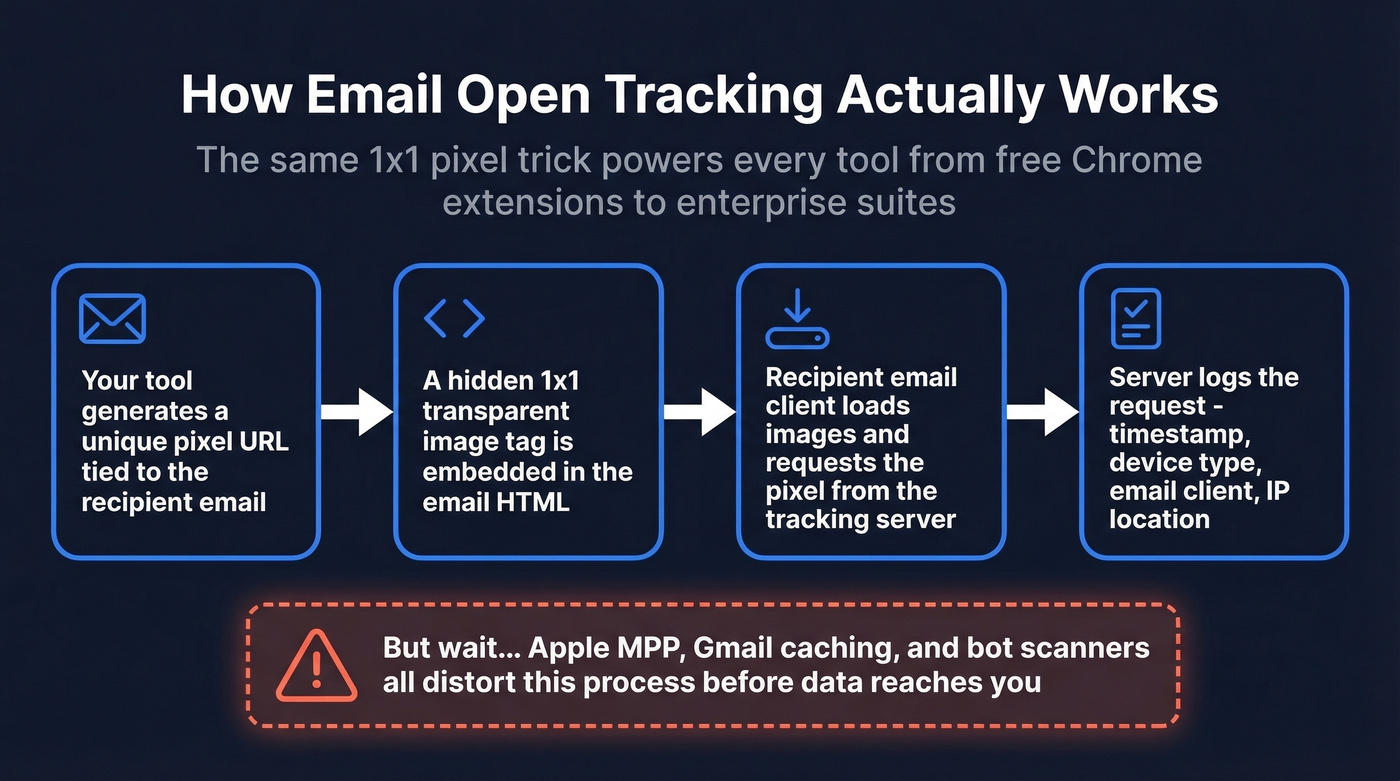
Here's the lifecycle:
- Your tool generates a unique pixel URL tied to the recipient's email address.
- That URL gets embedded as a hidden
<img>tag in the email's HTML - a 1x1 transparent image the recipient never sees. - When the recipient's email client loads images, it requests that pixel from the tracking server.
- The server logs the request, recording a timestamp, device type, email client, and sometimes IP-based location.
One image request equals one "open." Some tools go further - HubSpot uses retroactive inference, logging an open after the fact if a recipient clicks or replies but the pixel never fired. Gmail adds another wrinkle: it caches images on Google's servers after the first load, so subsequent opens don't trigger new pixel requests, and cached requests blur metadata like IP-based location and timing.
The problem isn't the mechanism. It's everything that happens between your server and the recipient's inbox.
Why Open Rates Lie in 2026
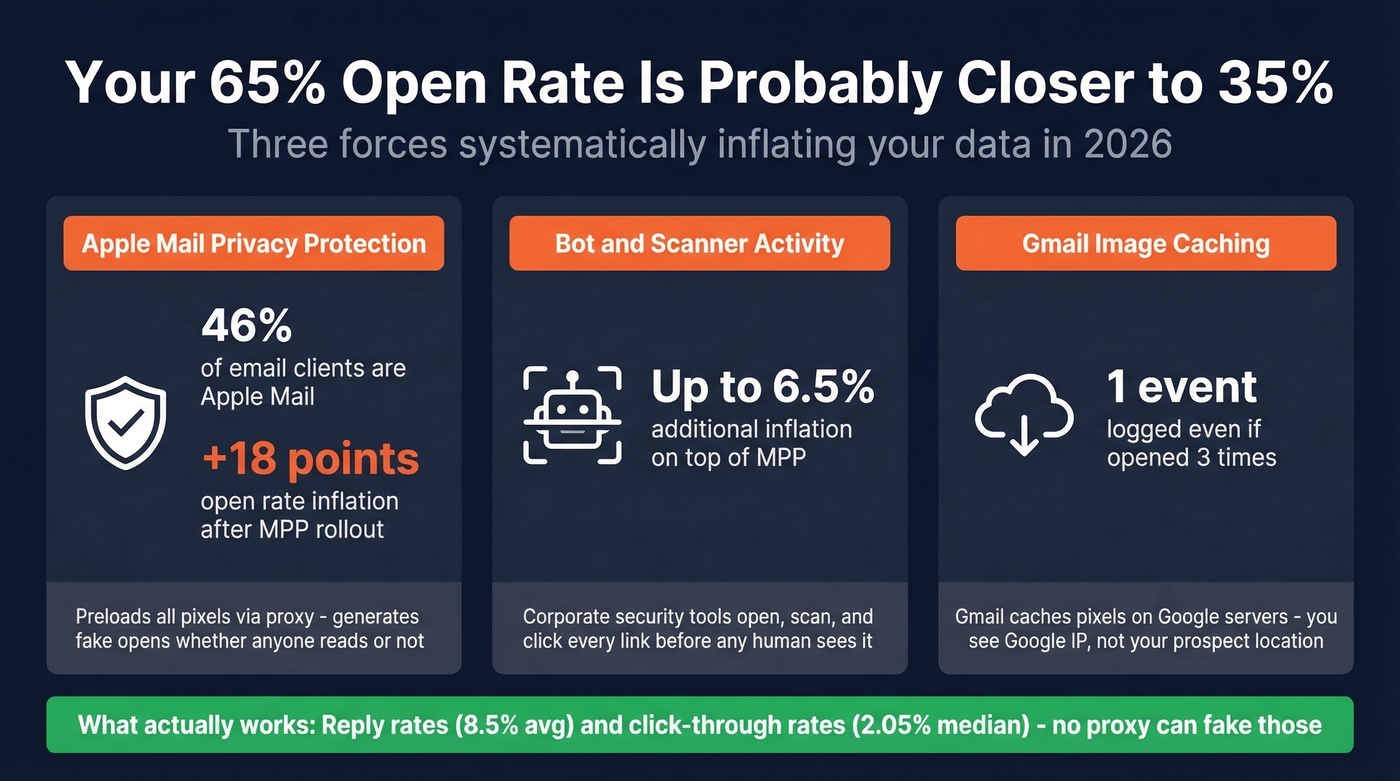
Three forces are systematically inflating and distorting your open data.
Apple Mail Privacy Protection
MPP launched September 20, 2021, and it's been eroding open-rate accuracy ever since. When enabled, Apple Mail preloads all tracking pixels via proxy servers - generating a "machine open" regardless of whether the recipient reads your email. It masks IP addresses and obscures metadata like geolocation and device type, making timestamps unreliable.
Apple Mail accounts for roughly 46% of email clients. A study of 80,000+ email marketing accounts found open rates jumped 18 points to 40%+ within six months of MPP's rollout. That's not more people reading your emails - it's Apple reading them for you. And while MPP requires manual opt-in (77% of marketers incorrectly believe it's activated by default), adoption is still massive.
It got worse recently. Apple added Link Tracking Protection, which strips UTM parameters from links in Mail and Safari - inflating your opens and degrading your click attribution. Some ESPs and sales tools attempt to filter MPP-generated opens, but no method is fully reliable.
One practical tell: MPP-generated opens tend to peak later in the day than traditional human opens. If you see a suspicious cluster of opens at odd hours, that's machine activity.
Bot and Scanner Activity
Corporate security products - email gateways, link scanners, anti-phishing tools - open, scan, and sometimes click every link in an email before a human ever sees it. This inflates open data by up to 6.5% on top of the MPP distortion.
Apollo frames this well: excluding bot events gives you the minimum possible engagement, including them gives you the maximum, and reality sits somewhere between. There's no clean way to separate the two with certainty.
Gmail Image Caching
Gmail caches images on Google's servers after the first load. Subsequent opens don't trigger new pixel requests, and cached requests blur metadata like IP-based location and precise timing. If a recipient opens your email three times, you'll likely see one event - with Google's server IP instead of the recipient's.
Layer VPNs and corporate proxies on top, and IP-based location data becomes useless. You're tracking where a proxy server is, not where your prospect is.
Best Tools to Track Email Opens
Despite the limitations, open tracking still has value for trend analysis and deliverability monitoring. Here's what we've found worth considering in 2026.
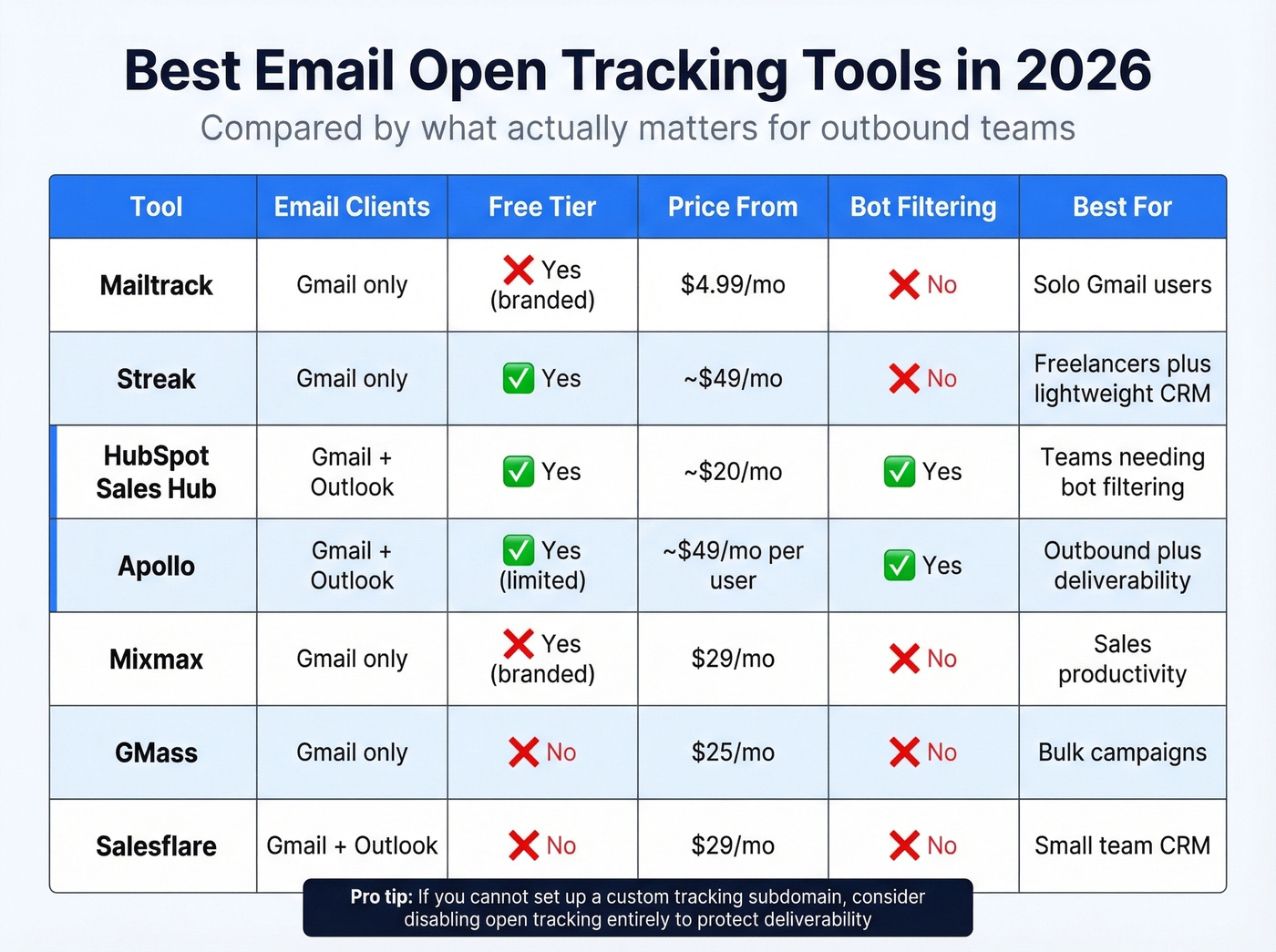
| Tool | Email Clients | Free Tier | Paid From | Best For |
|---|---|---|---|---|
| Mailtrack | Gmail only | Yes (branded) | $4.99/mo | Solo Gmail users |
| Streak | Gmail only | Yes | ~$49/mo (CRM) | Freelancers + lightweight CRM |
| HubSpot Sales Hub | Gmail + Outlook | Yes | ~$20/mo (Starter) | Teams needing bot filtering |
| Apollo | Gmail + Outlook | Yes (limited) | ~$49/mo/user | Outbound + deliverability |
| Mixmax | Gmail only | Yes (branded) | $29/mo | Sales productivity |
| GMass | Gmail only | No | $25/mo | Bulk campaigns |
| Salesflare | Gmail + Outlook | No | $29/mo | Small team CRM |
Mailtrack
The simplest option if you just want to know whether a specific contact opened your message. Mailtrack lives as a Gmail extension and gives you double-checkmark notifications - think WhatsApp read receipts for email. The free tier stamps "Sent with Mailtrack" on every message, which kills credibility in a sales context. PRO at $4.99/mo removes the branding and adds link tracking.
No Outlook support, no bot filtering. Best for freelancers who want basic visibility. Skip it if you're running outbound at any real scale.
HubSpot Sales Hub
HubSpot filters bot activity, uses retroactive inferred opens, supports custom tracking domains for tracked links, and includes legal basis settings for GDPR compliance. Free tools give you basic tracking; Professional plans start around $100/mo per seat for the full suite.
Here's the thing: HubSpot's per-recipient open tracking works best when it's part of the broader CRM workflow. If you're already in the ecosystem, tracking is a natural extension. If you're not, you're buying a CRM to get an email tracker - more than most teams need.
Apollo
Apollo approaches open tracking from a deliverability-first perspective, which is refreshing. They support custom tracking subdomains and explicitly recommend disabling open and click tracking if you can't set one up - because third-party tracking domains trigger spam filters. Their bot filtering lets you toggle between including and excluding bot events, giving you a min/max engagement range.
The free tier includes limited tracking, with paid plans starting around $49/mo per user. Best for outbound teams that prioritize inbox placement over vanity metrics. We've seen teams improve deliverability just by turning off always-on tracking and using it selectively for A/B tests.
Streak, Mixmax, GMass, and Salesflare
Streak is free email tracking inside Gmail with a lightweight CRM bolted on. No bot filtering, no custom domains - but the sweet spot is solopreneurs who want pipeline management alongside open notifications without a full platform. CRM plans run from around $49/mo.
Mixmax bundles tracking with sequences, scheduling, and templates. The SMB plan at $29/mo removes branding and unlocks sequence features. Gmail-only. Good if you want an all-in-one productivity layer; unnecessary if you just need open notifications.
GMass is a bulk email tool built for campaigns, not individual tracking. No free plan - expect $25/mo minimum. Salesflare is a full CRM with tracking baked in, one of the few options supporting Outlook, starting at $29/mo. Salesflare reports a 9.4/10 deliverability score in MailReach testing, which matters if inbox placement is a priority.

You can't track opens on emails that bounce. Prospeo's 5-step verification delivers 98% email accuracy - so every pixel you embed lands in a real inbox, not a dead address. Teams using Prospeo cut bounce rates from 35% to under 4%.
Fix the data before you fix the tracking.
Verify Your List Before You Track
Most tracking guides skip this entirely, and it drives us crazy: if 10-15% of your email list is invalid, your open rates are diluted before Apple MPP even enters the picture. You're monitoring opens on addresses that bounced, producing zero useful data while actively damaging your sender reputation.
Tracking accuracy starts upstream, with list quality. Prospeo's Email Finder delivers 98% verified email accuracy across 143M+ verified addresses, with a 7-day data refresh cycle that keeps contacts current. Before you install any tracking extension, run your list through verification. Clean data in means meaningful tracking data out.
If you're troubleshooting bounces and list decay, start with your bounce rates and work backward into list hygiene.

Open rates are unreliable. Reply rates aren't - but replies only happen when you reach real people at verified addresses. Prospeo gives you 143M+ verified emails refreshed every 7 days, so your outbound hits active inboxes, not stale data.
Stop tracking ghosts. Start reaching real buyers at $0.01 per email.
When to Turn Tracking Off
There are situations where monitoring opens actively hurts you. Apollo's own documentation recommends disabling open and click tracking if you haven't set up a custom tracking subdomain. Third-party tracking domains are a known spam-filter trigger. Your carefully crafted cold email lands in spam not because of the copy, but because of the tracking pixel.
If you want the technical deep dive on how pixels fire (and why they misfire), see our guide to tracking pixels.
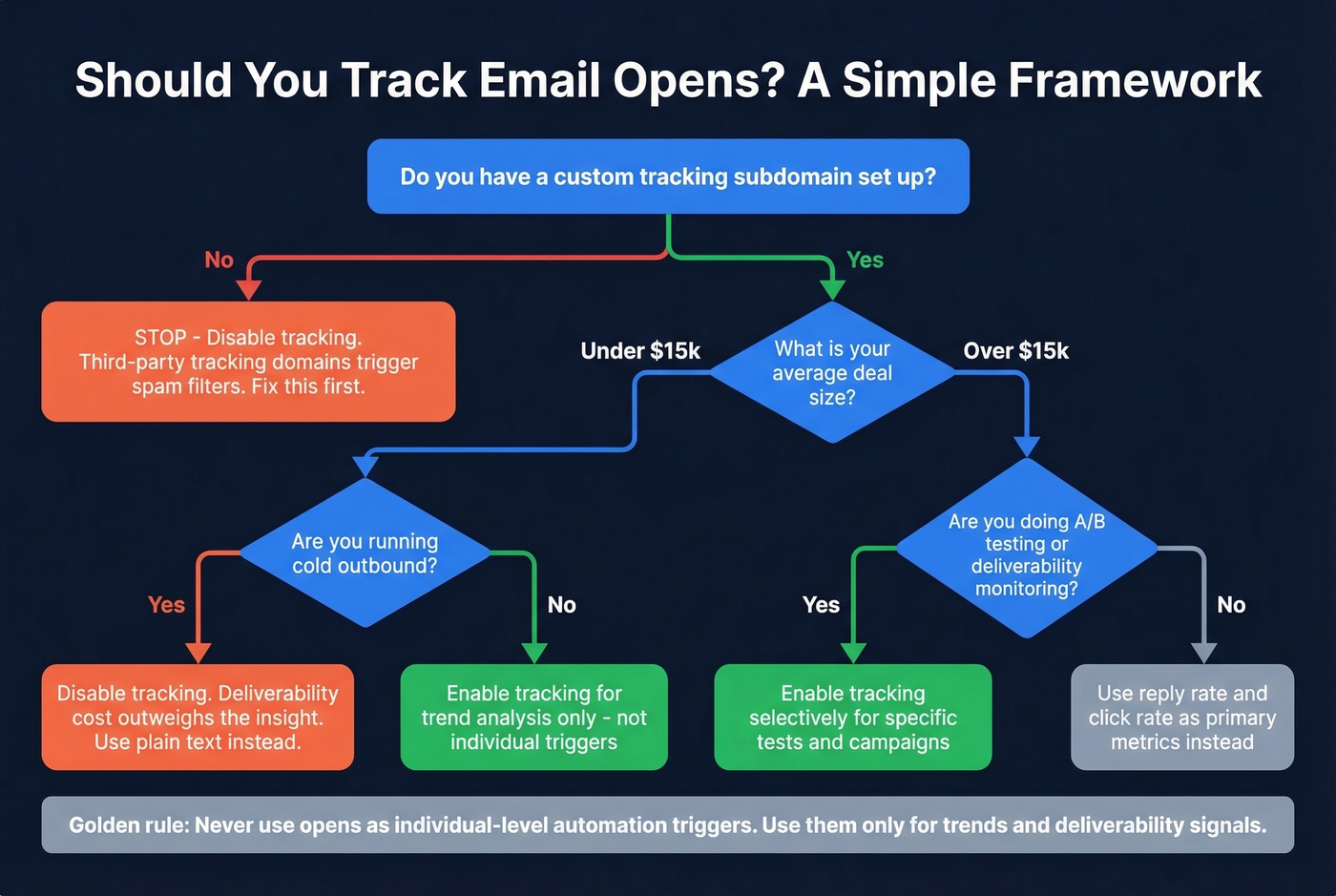
If your average deal size is under $15k and you're running cold outbound, you probably shouldn't be tracking opens at all. The deliverability cost outweighs the insight. A Reddit practitioner thread echoes this - several outbound reps reported better results after disabling tracking entirely, partly because tracking pixels require HTML emails. Plain text often delivers better for cold outreach.
A simple framework:
- Enable tracking selectively for short-term A/B tests when you have a custom tracking subdomain configured. Compare subject lines or send times across campaigns.
- Disable tracking as an always-on default for cold outreach. Deliverability matters more than knowing whether someone opened email #3 in your sequence.
If you're doing cold outreach at scale, it's worth pressure-testing your setup against a full email deliverability guide before you add more tracking.
Deliverability beats vanity metrics every time. A 40% open rate means nothing if half those opens are bots and 15% of your emails went to spam.
What to Measure Instead of Opens
The metrics that matter in 2026 are the ones no privacy feature can fake. No Apple proxy auto-replies to your email. No security scanner books a meeting on your calendar.
| Metric | Benchmark | Why It Matters |
|---|---|---|
| Reply rate | 8.5% avg | Direct engagement signal |
| Click-through rate | 2.05% median | Intent signal |
| Click-to-open rate | 5.3% | Engagement quality |
| Conversions/bookings | Varies | Revenue signal |
Open rates still have two legitimate uses: spotting deliverability problems (if your open rate drops off a cliff, something's wrong with your sending infrastructure) and comparing campaigns against each other on the same list and timeframe. The pattern across Reddit threads is consistent - opens rising while conversions stay flat. That's the clearest sign your open data is being inflated by machine activity.
If you need a clean way to interpret click performance, use a consistent click rate formula across campaigns.
Don't build automation triggers on individual opens. Don't segment your list based on "opened vs. didn't open." Those signals are too noisy to act on at the contact level.
Legal Considerations
Tracking pixels sit in a gray area that's getting less gray every year. GDPR fines can reach EUR 20M or 4% of global revenue, and tracking without proper disclosure or consent is a real risk. Eight new U.S. state privacy laws took effect in 2025, expanding consent requirements well beyond California.
Disclose tracking in your privacy policy, provide opt-out mechanisms, and obtain consent where required by jurisdiction. Authenticate your sending domain with SPF, DKIM, and DMARC - this strengthens both deliverability and your compliance posture in one infrastructure setup.
If you want to sanity-check your authentication setup, start with DMARC alignment and a working SPF record.
FAQ
Do tracking pixels work with Apple Mail?
The pixel still loads, but Apple Mail Privacy Protection preloads it via proxy - generating a fake open regardless of whether the recipient reads your email. You'll see an open event, but it doesn't reflect real engagement. Filter MPP opens where your tool supports it.
Can recipients detect a tracking pixel?
Most tracking pixels are invisible to casual users, but tech-savvy recipients can inspect HTML source code or use browser extensions that flag them. Disclosure in your privacy policy is best practice and increasingly a legal requirement under GDPR and U.S. state laws.
What's a realistic open rate in 2026?
The cross-industry average is 42.35%, but that figure is heavily inflated by Apple MPP. Better benchmarks: click-to-open rate averages 5.3%, reply rates average 8.5% for cold outreach. Use those instead.
Should I use a free email tracker or a paid tool?
Free trackers like Mailtrack work for basic Gmail notifications but lack bot filtering. Sales teams should invest in HubSpot or Apollo for bot filtering, custom tracking domains, and CRM integration. For list verification before tracking, Prospeo's free tier includes 75 credits with 98% email accuracy - enough to clean a starter list.
How do I improve open tracking accuracy?
Start with a verified email list - tracking opens on invalid addresses produces nothing useful. Use a custom tracking subdomain to avoid spam filters. Filter bot activity where your tool allows it. Treat open rates as directional trends across campaigns, not absolute numbers for individual contacts.