

25+ Trade Show Follow-Up Subject Lines That Get Opened (2026)
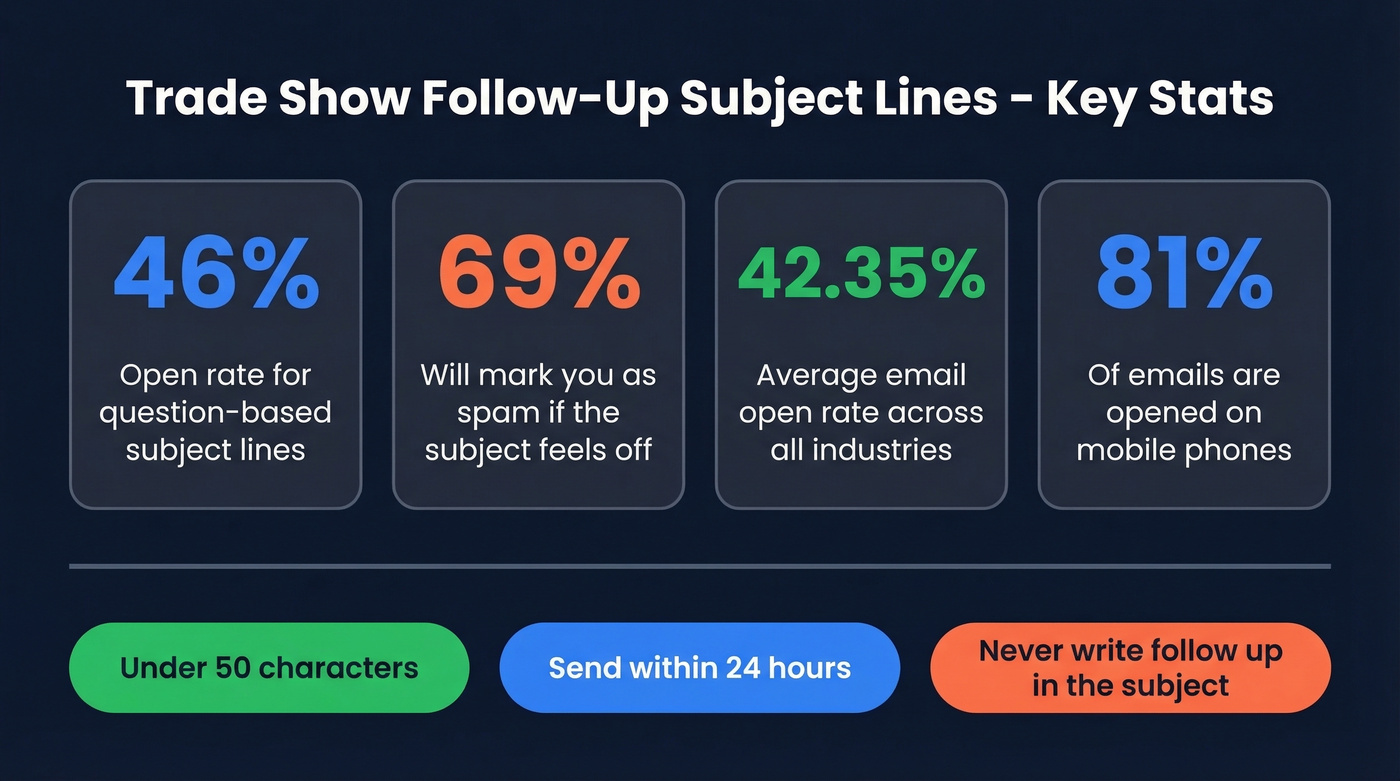
You spent $15,000 on a booth, shook 200 hands, collected a pile of badge scans - and now you're staring at a blank subject line field at 11 p.m. 33% of recipients decide to open based on the subject line alone, and 69% will mark you as spam if it feels off. The average email open rate across industries sits at 42.35%. A sharp post-event follow-up can beat that comfortably.
What You Need (Quick Version)
- Use a question - question-based subject lines hit a 46% open rate.
- Keep it under 50 characters for mobile. 81% of emails are opened on phones.
- Send within 24 hours for hot leads, next business day for everyone else.
- Never put "follow up" in the subject line. It screams mass email and kills open rates.
25+ Subject Lines by Scenario
Every subject line below uses bracket placeholders you can customize in seconds. Where it matters, we've paired a subject line with recommended preview text - the second line on mobile that most senders waste.
After a Booth Conversation
You're referencing a real, shared moment. That's your edge.
- "[Their Name], quick follow-up from [Event]" - The reliable workhorse. Preview text: "Picking up where we left off at the booth."
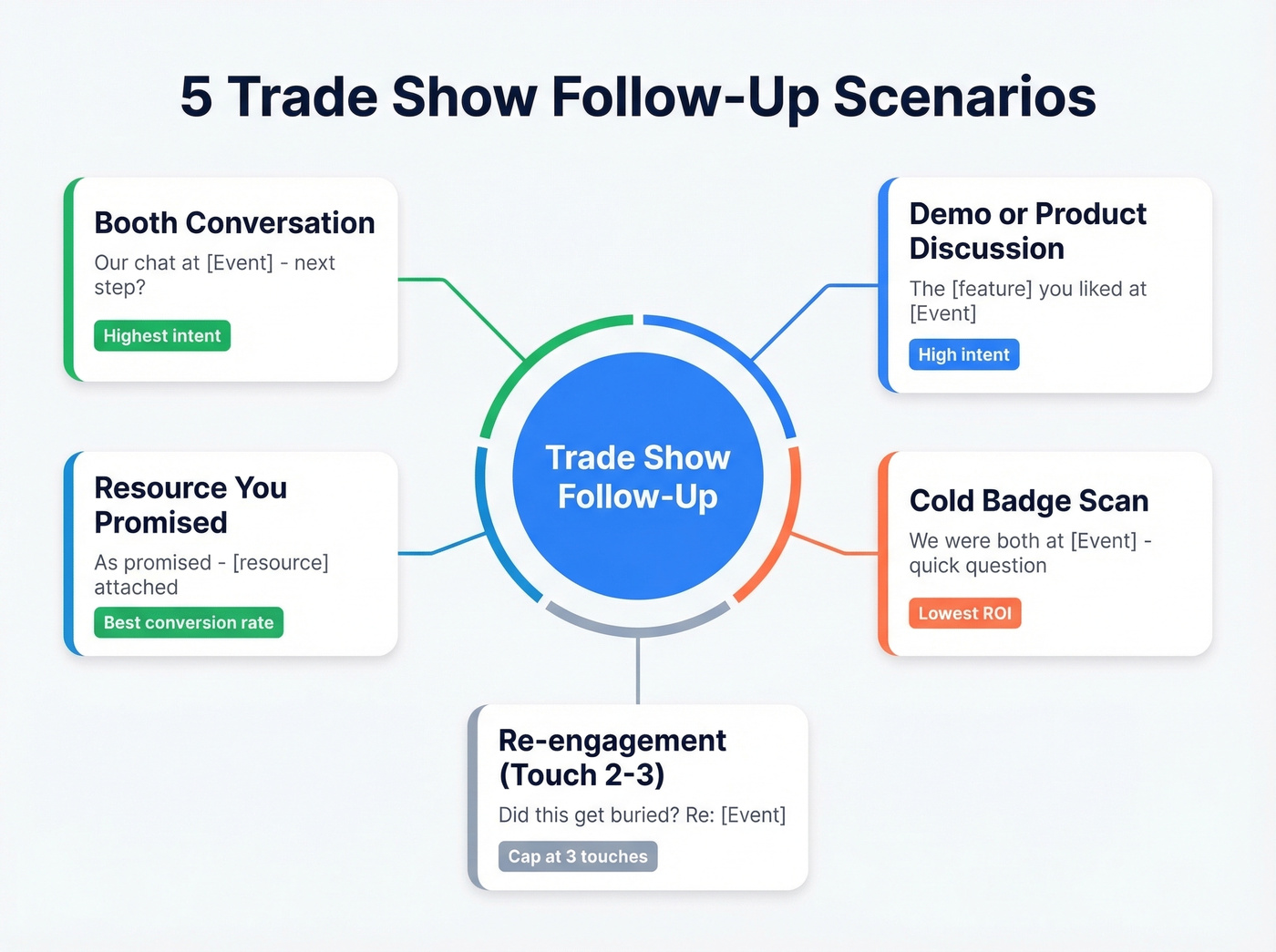
- "Our chat at [Event] - next step?" - Direct, implies momentum.
- "Still thinking about [specific topic discussed]" - Shows you actually listened.
- "[Event] was great - here's what I owe you" - Works when you promised something. Preview text: "The [resource/pricing/case study] we talked about."
- "Question about what you mentioned at [Event]" - Questions drive opens. Use this when they shared a pain point.
In our experience, the "resource you promised" category converts highest because you're delivering, not asking. If you only have time for one follow-up batch, start there.
After a Demo or Product Discussion
- "The [specific feature] you liked at [Event]" - Anchors to their interest, not your pitch.
- "[Product] + [their company] - quick thought" - Feels tailored, not templated.
- "Recap: what [Product] would look like for [Company]" - Preview text: "Based on what you told me about [their challenge]."
- "[Their Name], your [Product] trial is ready" - Only if you actually set one up. Don't bluff.
Resource or Content You Promised
Delivering on a commitment is the highest-converting follow-up there is. Don't overthink the subject line - clarity beats cleverness.
"The [case study/deck/pricing] from [Event]" is simple and delivers. "As promised - [resource name] attached" works because it fulfills an expectation, and the preview text "From our conversation at [Event] on [date]" adds the personal anchor. The strongest version is "[Their Name], here's the [resource] you asked for" - personalized, specific, and nearly impossible to ignore.
Cold Badge Scan (No Meeting)
These are the hardest. There's no shared memory, so you need to manufacture context fast.
Let's be honest: cold badge scans are the lowest-ROI follow-up category. If you're short on time, skip them entirely and focus on booth conversations. But if you're going to send them:
- "We were both at [Event] - quick question" - Establishes common ground without pretending you met.
- "[Event] attendee? Thought this might help" - Preview text: "A [resource type] for [their role/industry]."
- "Missed connecting at [Event]" - Honest framing. People respect it.
- "[Event] wrap-up + something for [their role]" - Role and industry personalization consistently outperforms first-name-only subject lines.
- "From one [Event] attendee to another" - Casual, peer-level. Works for lateral outreach.
Re-engagement (Touch 2-3)
Here's the thing: sending 4+ follow-ups triples your unsubscribe rate based on 16.5 million cold emails analyzed. Cap it at three touches.
- "Did this get buried? Re: [Event]" - Acknowledges inbox chaos without guilt-tripping. We've seen this line rescue sequences that were otherwise dead.
- "[Their Name], one more thing from [Event]" - Add new value, not the same pitch. Preview text: "Different angle on [topic] - 2 min read."
- "Closing the loop on [Event]" - Preview text: "Last note from me - unless you want to keep talking."
- "Still relevant? [Specific topic from Event]" - Gives them an easy out, which paradoxically drives replies.
Speaker or Session Follow-Up
You just watched a killer panel on AI in manufacturing and the person next to you was nodding the whole time. That's your opening. The same principles apply to a webinar follow-up email subject line - reference the specific session content rather than sending a generic "thanks for attending."
- "Your [Event] talk on [topic] - one question" - Flattering and specific. Preview text: "Specifically the part about [detail]."
- "Loved the [session name] panel - quick thought" - Shows you were paying attention.
- "[Speaker Name]'s point about [topic] - agree?" - Works for peer-to-peer outreach after a shared session.
Five Rules That Actually Matter
1. Keep it 6-10 words. Some datasets favor ultra-short subject lines (2-4 words), while other analyses find 6-10 words performs best overall. For event follow-ups, 6-10 words gives you room to reference the event name and a personal detail, which matters more than raw brevity.
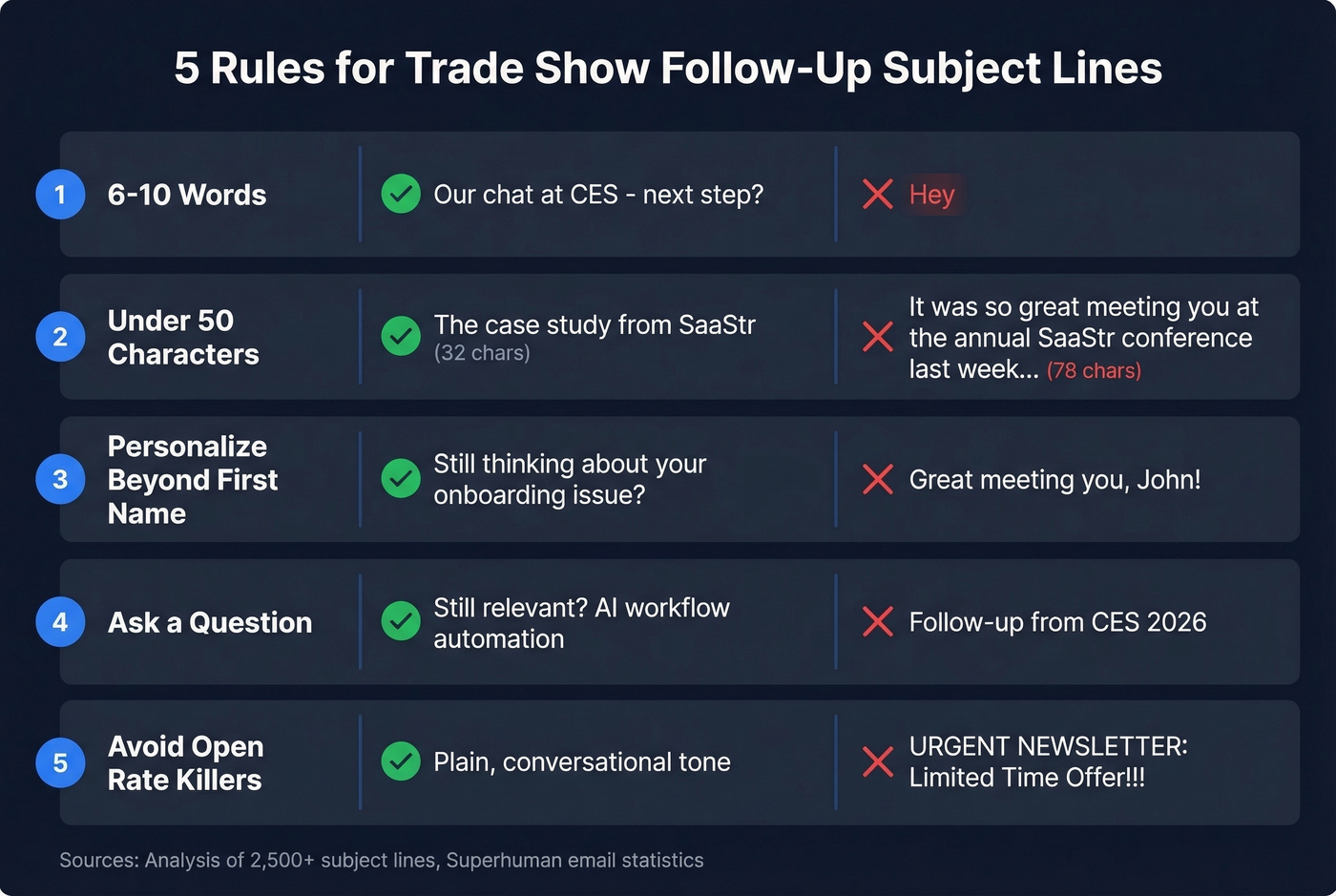
2. Stay under 50 characters. Anything longer gets truncated on phone screens where 81% of opens happen.
3. Personalize beyond first name. Reference the specific conversation, product, or session. "Great meeting you, [Name]!" is the worst subject line you can send - every vendor at the show is sending the exact same thing.
4. Ask a question. People instinctively want to answer questions. "Still thinking about [topic]?" beats "Follow-up from [Event]" every time.
5. Know what kills opens. A practitioner analysis of 2,500+ subject lines on Reddit found the worst performers were ALL CAPS, "Newsletter" in the subject (which drops open rates by 18.7%), and generic promo language. The best? Plain, conversational lines that look like they came from a person. Urgency language boosts opens by 22%, but fake urgency gets you flagged.

A great subject line is worthless if the email bounces. Those 200 badge scans from the trade show? Half the emails are probably outdated. Prospeo verifies every address through a 5-step process - 98% accuracy, refreshed every 7 days.
Stop crafting perfect subject lines for dead inboxes.
When to Send Your Follow-Up
| Lead Temperature | Timing | Subject Line Style |
|---|---|---|
| Hot (demo request, pricing ask) | Same day, within hours | Direct + specific: "Your [Product] trial is ready" |
| Warm (good booth chat) | Next business day | Reference-based: "Our chat at [Event] - next step?" |
| Cold (badge scan only) | Days 3-14 post-event | Context-building: "We were both at [Event] - quick question" |
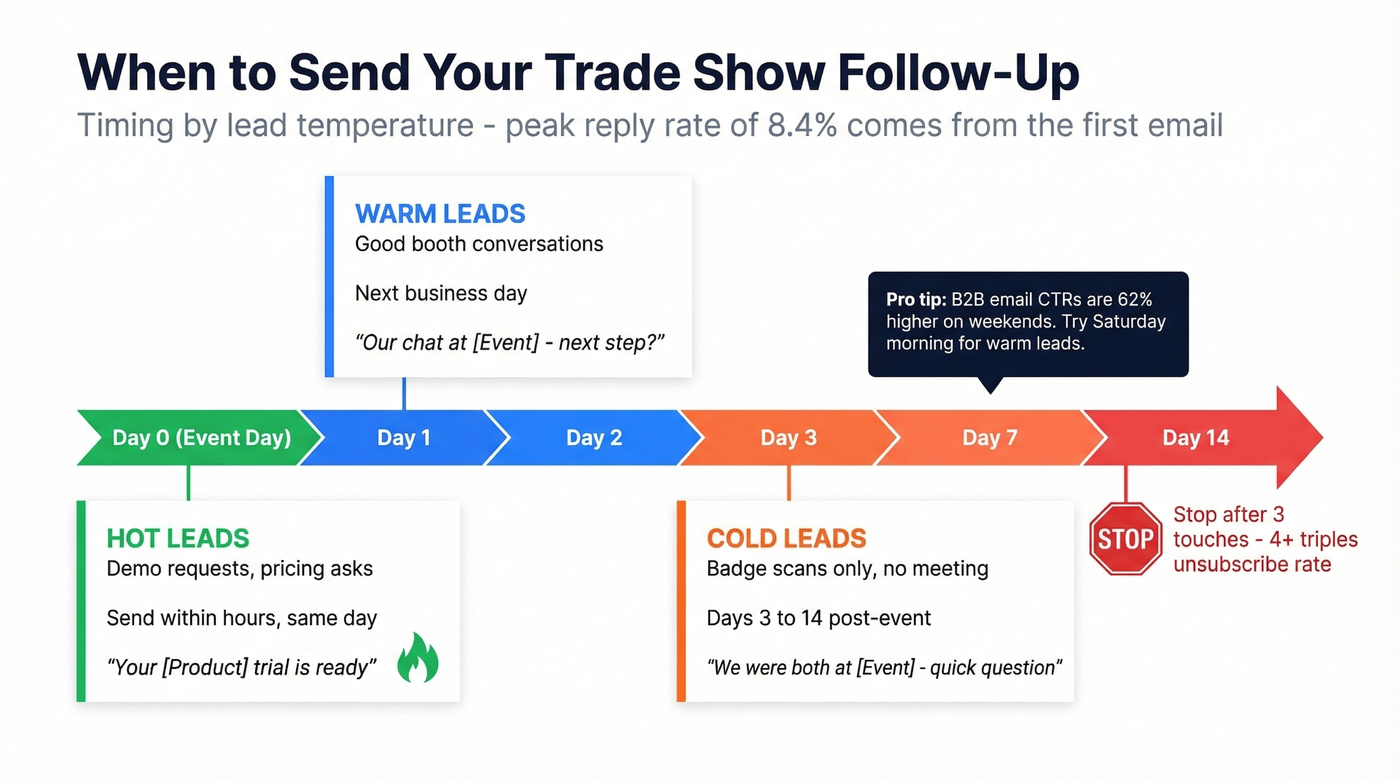
The peak reply rate of 8.4% comes from the first email. Three touches max, then move on or shift channels. One surprising finding: B2B email CTRs are 62% higher on weekends, so consider scheduling your warm follow-ups for Saturday morning.
Verify the List Before You Hit Send
Your subject line doesn't matter if the email bounces. Trade show lists are the dirtiest data in B2B - badge scans pull outdated addresses, business cards have typos, and 17% of emails never reach the inbox due to deliverability issues.
We run every trade show list through Prospeo's email verification before sending. With 98% accuracy across a 5-step verification process, it catches invalid addresses, spam traps, and catch-all domains before they tank your sender reputation. The free tier covers 75 verifications per month - enough to clean a small event list without spending anything.
Badge scans give you names and companies - not verified contact data. Prospeo enriches your trade show leads with 50+ data points, verified emails, and direct dials so your follow-up actually lands. 83% match rate on enrichment, at roughly $0.01 per email.
Turn badge scans into verified contacts before you hit send.
Copy-Paste Template
Subject: Our chat at [Event Name] - next step? Preview text: Picking up where we left off about [specific topic].
Hi [First Name],
Great connecting at [Event Name] yesterday. You mentioned [specific pain point or interest] - I've been thinking about how [your product/solution] maps to that.
Here's the resource I mentioned: [link]
Worth a 15-minute call this week to dig in? [Calendar link]
Best, [Your Name]
One clear reference, one piece of value, one CTA. This template outperforms the generic "great meeting you!" emails because it does three things they don't: references a specific conversation, delivers value, and asks for one thing. Nail the trade show follow-up subject line, verify the list, and send within 24 hours - that's the entire playbook.