

How to Verify Gmail: Account Security & Email Address Validation
Your dad's locked out of his Gmail because Google keeps asking for a phone number he hasn't had since 2019. Meanwhile, you're staring at a prospect list where 40% of the addresses end in @gmail.com, and you've got no idea how many are real. "Verify Gmail" means completely different things depending on which problem you're solving - and the fix for each one is different.
Gmail has over 1.5 billion users. That's a massive pool of accounts that can lock their owners out, and a massive pool of addresses that sales and marketing teams need to validate before hitting send. This guide covers both sides: securing your own account and checking whether someone else's address actually exists.
What You Actually Need
Securing your own Gmail account?
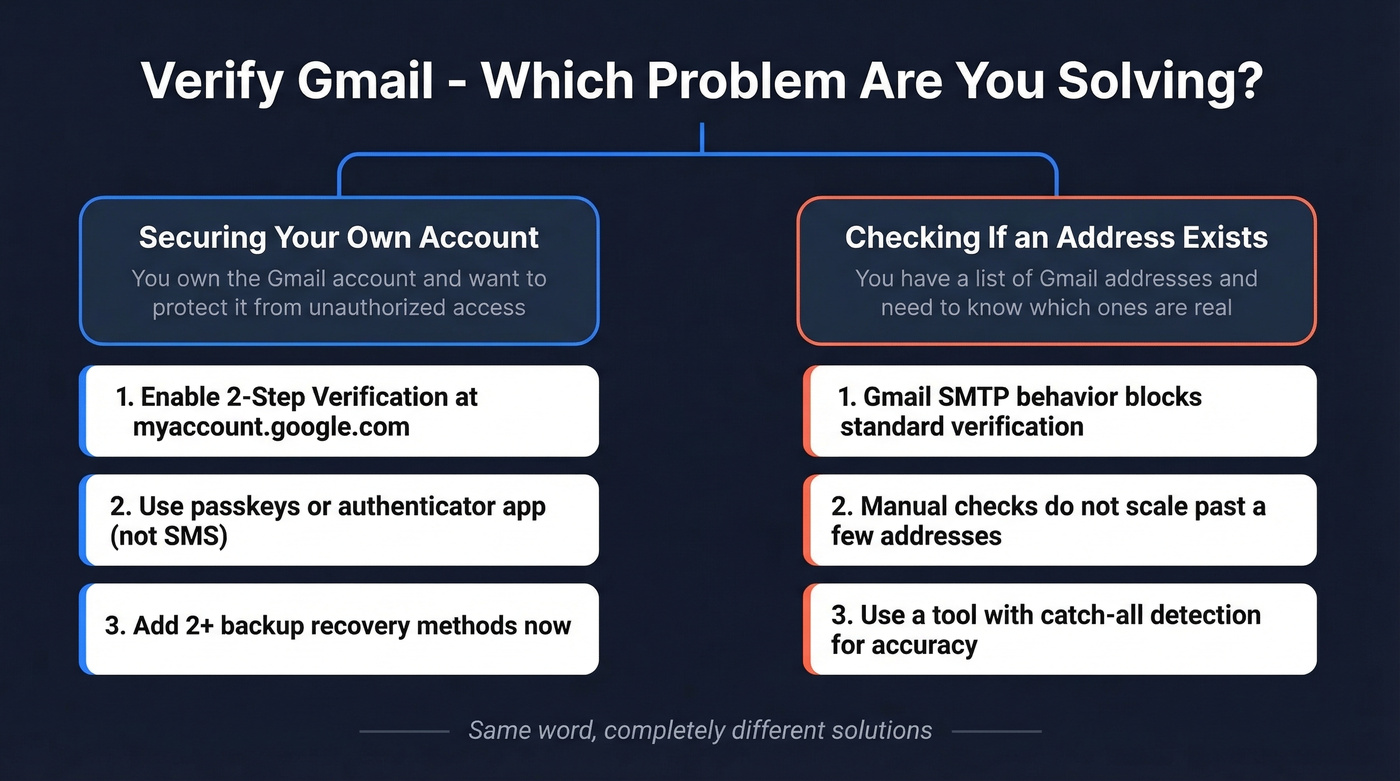
- Go to myaccount.google.com, then Security, then 2-Step Verification
- Use passkeys or an authenticator app - skip SMS, it's vulnerable to SIM-swapping
- Add at least two backup recovery methods right now, before you get locked out
Checking if someone's Gmail address exists?
- Manual checks don't scale, and Gmail's SMTP behavior makes SMTP-only verification unreliable for confirming whether a specific @gmail.com mailbox exists (if you need a deeper walkthrough, see check if a Gmail account exists)
How to Secure Your Gmail Account
Set Up 2-Step Verification
Head to myaccount.google.com, click Security, then 2-Step Verification. Google walks you through choosing a method. On mobile, open the Google app or Gmail, tap your profile picture, then Manage your Google Account, Security, 2-Step Verification.
Here's how the options rank:
- Passkeys - built on FIDO Alliance standards, phishing-resistant, tied to your device's screen lock (fingerprint, face scan, PIN). The strongest option available.
- Google Authenticator (or any TOTP app) - generates time-based codes on your phone. Solid and reliable.
- Google Prompts - tap "Yes" on your phone when prompted. Convenient but requires your phone to be online.
- SMS codes - the weakest option. SIM-swapping attacks can intercept these. Last resort only.
After you pick a primary method, add at least one backup: a second authenticator, backup codes saved somewhere offline, or a recovery email. The people who get locked out are almost always the ones with a single recovery method that went stale.
Locked Out by an Old Phone Number?
This is one of the most frustrating things about Google's security model. You changed your recovery phone months ago, updated your recovery email, maybe even changed your password - and when you try to log in from a new device, Google still asks you to verify via the old number. The one you cancelled.
Reddit threads on r/Gmail are full of this exact scenario. Even after updating recovery details, Gmail login can still prompt verification to the old number instead of the newly added options. It's maddening.
Don't wait until you're locked out. Right now, go to your Google Account security settings and add multiple backup methods - a recovery email, an authenticator app, and backup codes. Print those backup codes and store them somewhere physical. If you're already locked out, Google's Account Recovery flow is your only path, and it's slow. Be patient. There's no shortcut.
Why Gmail Addresses Are Harder to Validate
Most people don't realize this: Gmail is uniquely difficult to validate compared to corporate email domains. It comes down to one technical quirk that breaks the standard verification playbook.
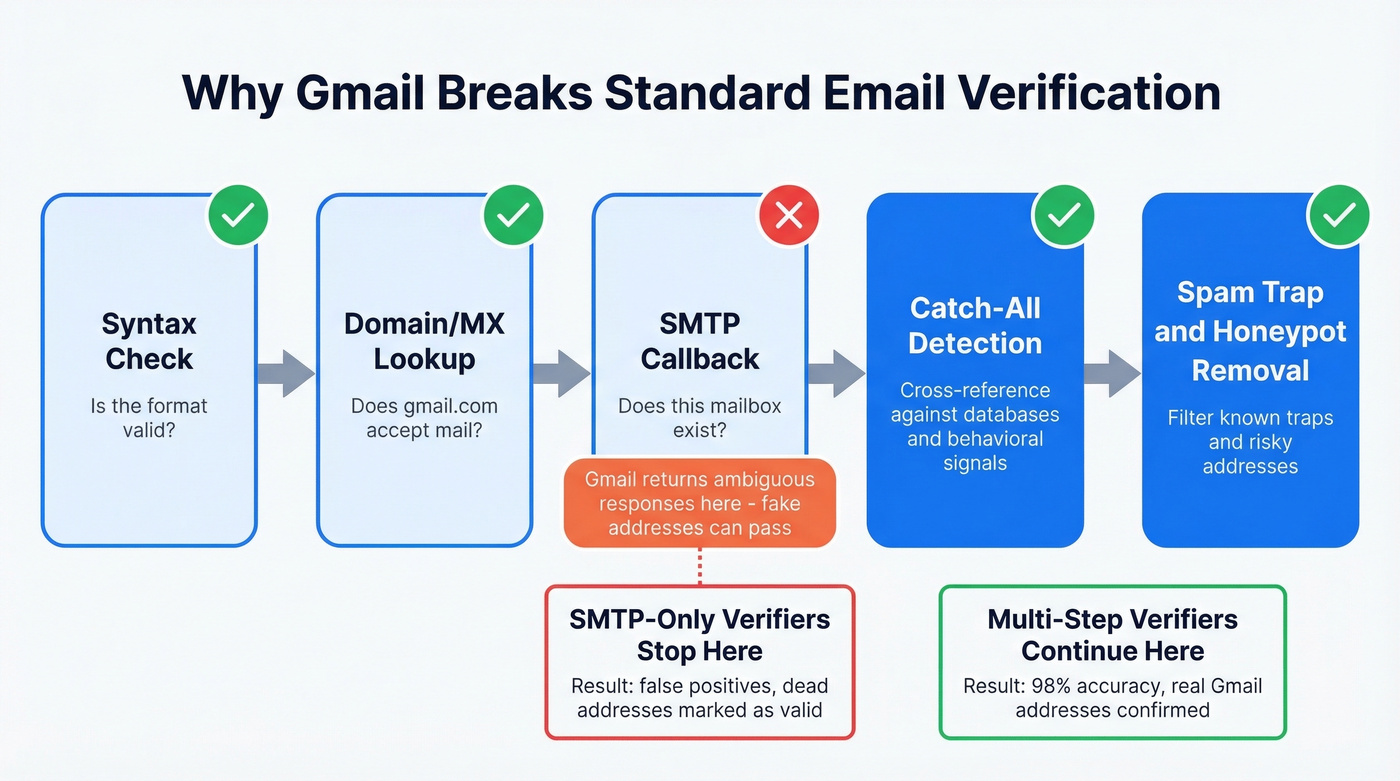
Standard email verification checks the syntax, confirms the domain's MX records exist, then performs an SMTP callback - essentially asking the mail server "does this mailbox exist?" Most corporate mail servers answer honestly. Gmail doesn't.
Gmail's SMTP behavior means callbacks can't reliably confirm whether a specific @gmail.com mailbox exists, which creates false positives for SMTP-only verifiers. Even obviously fabricated addresses can pass a basic SMTP check. This is catch-all-like behavior at the protocol level, and it means any verifier relying solely on SMTP callbacks will rubber-stamp Gmail addresses as valid - making proper address validation essential for anyone running outreach campaigns (more context: email deliverability and email bounce rate).
Developers on r/AskProgramming have flagged this exact issue, questioning how any vendor can confirm Gmail mailbox existence when the protocol itself won't cooperate. The answer: reputable tools go beyond SMTP. They cross-reference results against proprietary databases, behavioral signals, and multi-step validation layers that standard callbacks can't provide.
Here's the thing: if your email list is more than 30% Gmail addresses, a basic SMTP-only verifier is worse than useless. It gives you false confidence. You'll send to dead addresses, tank your domain reputation, and blame your copy when the real problem was your data (see: how to improve sender reputation).

Gmail's catch-all behavior breaks basic SMTP verification. Prospeo's 5-step process - with catch-all detection, spam-trap removal, and honeypot filtering - delivers 98% email accuracy across 143M+ verified addresses. At $0.01/email, bad Gmail data stops tanking your domain reputation.
Stop rubber-stamping dead Gmail addresses. Verify them for real.
How to Check If a Gmail Address Is Valid
Manual Check (Google Account Recovery)
The simplest way to check if a Gmail account exists starts with Google's own recovery page. Go to accounts.google.com/signin/recovery and enter the address. If the account doesn't exist, Google shows "No account found with that email address." If it does exist, you'll see a partial recovery flow.
Use this for one or two quick checks. Google rate-limits this flow aggressively - after a handful of attempts, you'll hit CAPTCHAs, and datacenter IPs get challenged almost immediately.
MX Record Lookup (Command Line)
You can confirm that a domain accepts email by checking its MX records:
Windows:
nslookup -type=MX gmail.com
macOS/Linux:
dig MX gmail.com
This confirms Gmail's mail servers exist and accept mail - which you already knew. MX lookups can't tell you whether a specific mailbox exists. Useful for validating custom domains, not for checking individual @gmail.com addresses (for broader methods, see how to check valid email id).
Verification Tools (The Only Scalable Option)
For anything beyond a handful of manual checks, you need a dedicated verification tool. The good ones run a multi-step process: syntax validation, domain/MX confirmation, SMTP callback, catch-all detection, then spam-trap and honeypot removal. That catch-all detection step is what separates tools that actually work on Gmail from tools that rubber-stamp everything as valid (related: AI email checker).
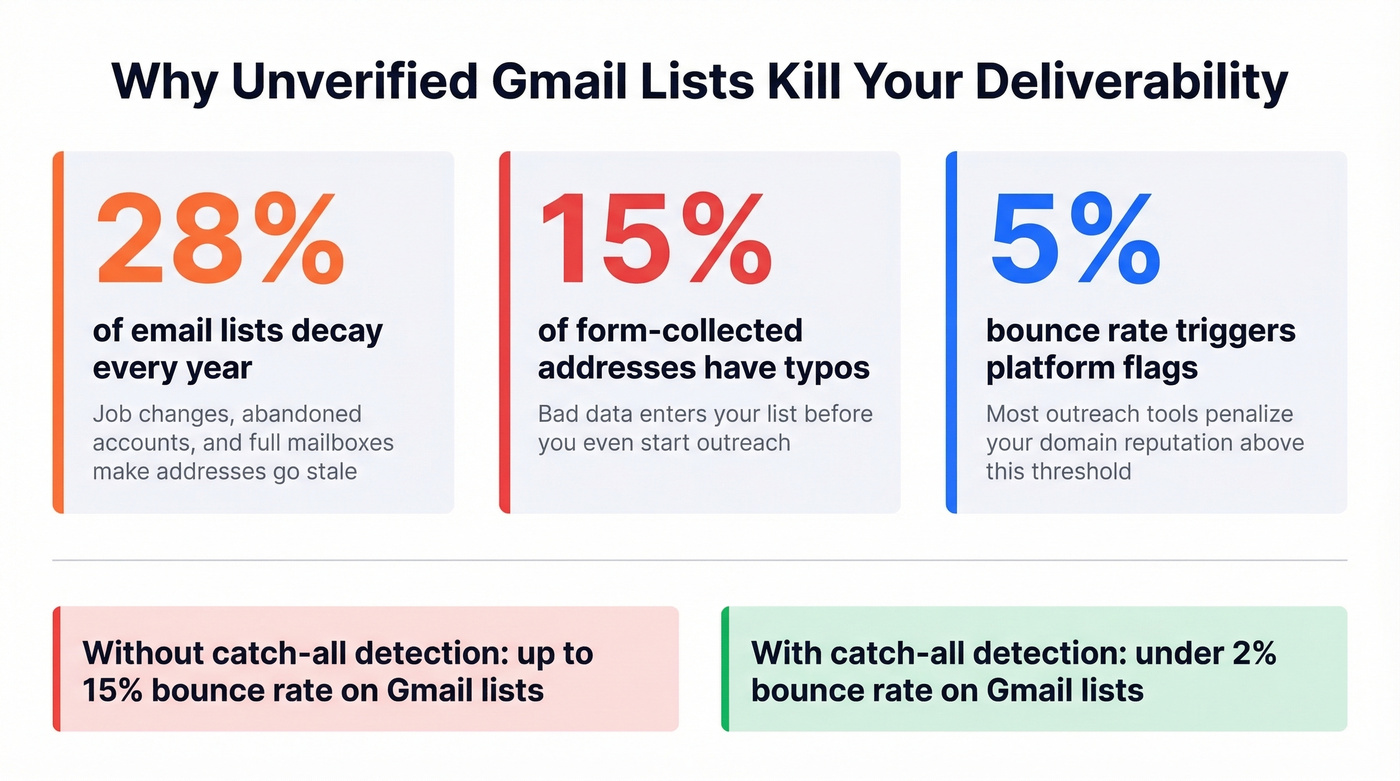
The numbers speak for themselves. Lists decay by about 28% per year due to job changes, abandoned accounts, and full mailboxes. Roughly 15% of email addresses collected through forms contain typos. And most outreach platforms flag you once your bounce rate crosses 5% - at which point your domain reputation is already damaged. The difference between a $0.01/email verifier with catch-all handling and a free SMTP-only check can be the difference between a 2% bounce rate and a 15% one.
Best Tools to Verify Gmail Addresses
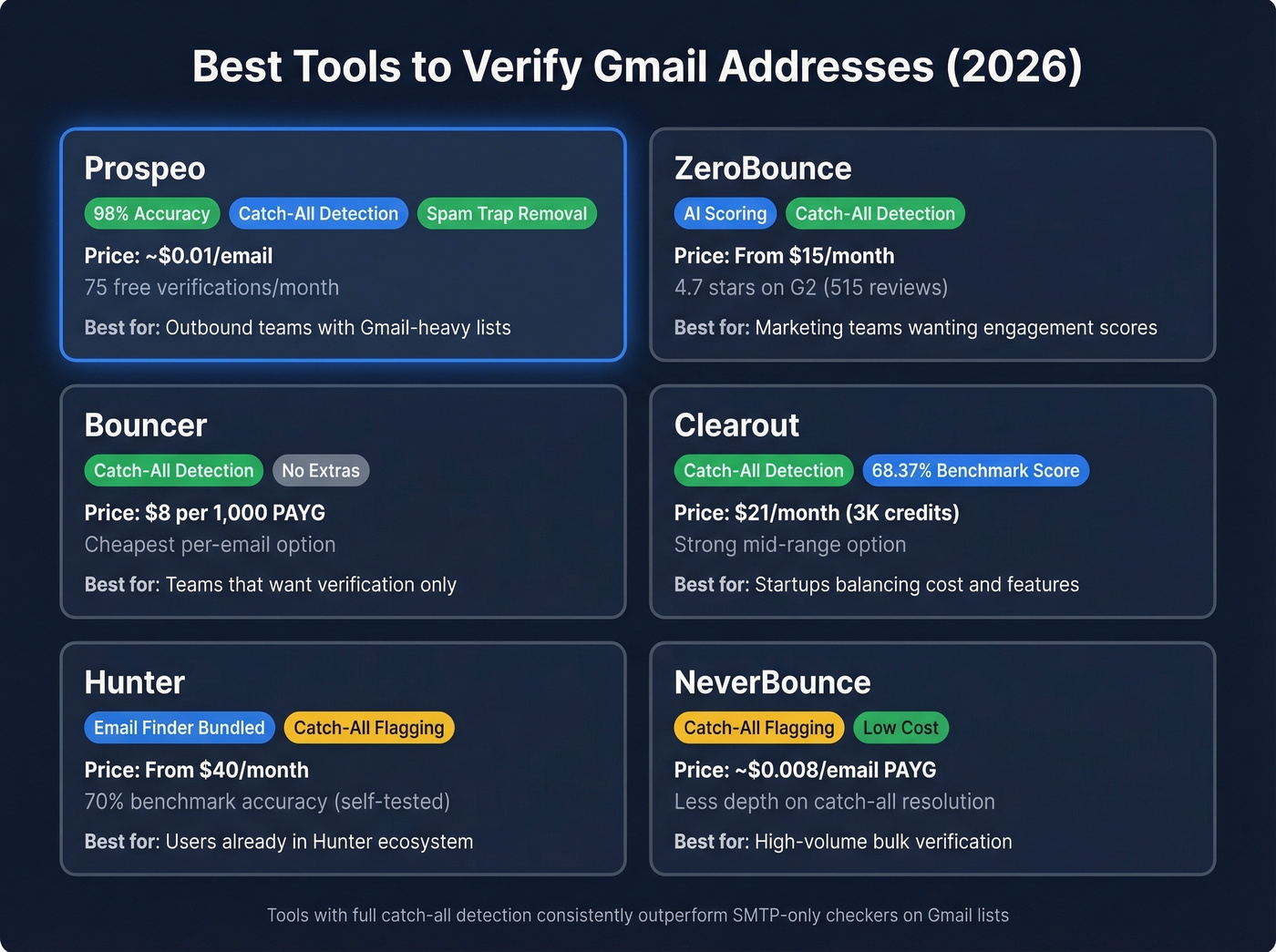
We've tested these tools against Gmail-heavy lists, and tools with catch-all detection consistently outperformed SMTP-only checkers by a wide margin. Here are the six worth evaluating.
| Tool | Starting Price | Gmail/Catch-All | Best For |
|---|---|---|---|
| ZeroBounce | $15/mo | Catch-all included | Marketing teams |
| Bouncer | $8/1,000 PAYG | Catch-all included | Budget PAYG |
| Clearout | $21/mo (3K credits) | Catch-all included | Startups |
| Hunter | $40/mo (w/ finder) | Catch-all flagging | Hunter ecosystem users |
| NeverBounce | ~$0.008/email PAYG | Catch-all flagging | High-volume bulk |
Prospeo
Prospeo runs a 5-step verification process - syntax, domain/MX, SMTP, catch-all detection, and spam-trap removal - using proprietary infrastructure that doesn't rely on third-party email providers. Because it cross-references SMTP results against 300M+ professional profiles and 143M+ verified emails, it distinguishes real Gmail addresses from the false positives that trip up SMTP-only tools.
The accuracy rate sits at 98% across all email types, with a 7-day data refresh cycle. The free tier gives you 75 verifications per month - same 5-step process, same catch-all handling, no credit card required. Paid plans run about $0.01 per email. For outbound teams running Gmail-heavy prospect lists, this is the one we'd test first (if you're comparing options, start with best Bouncer alternatives and best Hunter alternatives).
ZeroBounce
Skip this if you just need pass/fail verification and don't care about engagement scoring.
ZeroBounce takes a different angle - AI-based email scoring that goes beyond binary valid/invalid results. You get a quality score for each address, which helps prioritize outreach rather than just filtering bad emails. Catch-all detection is included across all plans, so you get reliable results even on large Gmail-heavy lists.

Pricing starts at $15/month, with pay-as-you-go working out to about $0.01/email. ZeroBounce holds a 4.7 rating on G2 across 515 reviews. The tradeoff: it's pricier per email than Bouncer, and the AI scoring adds complexity that pure verification users don't need.
Bouncer
Bouncer is the tool for teams that want verification and nothing else. No enrichment, no email finding, no AI scoring - just upload a CSV, get results, move on. Catch-all detection is included, and at $8 per 1,000 emails pay-as-you-go (dropping to $6.40/mo on a subscription), it's the cheapest option on this list. The tradeoff is limited integrations and zero extras.
Clearout
Clearout's starter plan runs $21/mo for 3,000 credits. In Hunter's benchmark of 15 verifiers, Clearout scored 68.37% overall accuracy - second only to Hunter itself. A solid middle ground between Bouncer's budget pricing and ZeroBounce's feature depth.
Hunter
Hunter's paid plans start at $40/month and include verification alongside its email-finding workflow. In their own benchmark, Hunter scored 70% overall accuracy, though they disclose the dataset may have given them an edge. If you're already in the Hunter ecosystem, the bundled pricing makes sense. If you're not, you're paying a premium for finder features you won't use.
NeverBounce
At about $0.008/email pay-as-you-go, NeverBounce is one of the lowest per-email rates here. Best for high-volume bulk jobs processing tens of thousands of addresses. It flags catch-all domains but doesn't resolve them with the same depth as Prospeo or ZeroBounce.
Lists decay 28% per year. Every unverified Gmail address is a bounce waiting to happen. Prospeo refreshes data every 7 days - not 6 weeks - so your prospect lists stay clean and your sender reputation stays intact.
Keep your bounce rate under 2% without manual checks.
How Accurate Are Verifiers on Gmail?
Let's be honest: any tool claiming 100% accuracy on Gmail addresses is lying. Gmail's catch-all behavior means a percentage of addresses will always land in the "unknown" or "accept-all" bucket, regardless of which verifier you use.
Hunter's benchmark of 15 email verifiers - using 3,000 real business emails - found top overall accuracy at 70%. That's across all email types, not just Gmail. Gmail-specific accuracy is almost certainly lower because of the SMTP false-positive problem. Hunter disclosed potential bias in their methodology, which is refreshingly honest for a vendor-run test.
The real differentiator isn't raw accuracy percentages. It's how a tool handles the "accept-all" category. Tools with strong catch-all detection can reclassify a meaningful chunk of unknowns into valid or invalid, reducing ambiguity. Tools relying purely on SMTP mark nearly every Gmail address as valid and call it a day. In our experience, teams often see a major bounce-rate drop just by switching from an SMTP-only checker to a tool with proper catch-all handling - we're talking 15% bounce rates falling to 2-3%.
FAQ
How can I verify a Gmail address without sending an email?
For one-off checks, use Google's Account Recovery page at accounts.google.com/signin/recovery - it confirms whether the account exists without sending anything. For bulk lists, use a tool with catch-all detection like Prospeo (75 free checks/month) or ZeroBounce. Standard SMTP checks won't work reliably because Gmail accepts addresses at the protocol level regardless of mailbox existence.
Why does Gmail always show "valid" in email verifiers?
Gmail's SMTP servers return acceptance responses for addresses in a way that prevents reliable mailbox-existence confirmation. Basic verifiers relying only on SMTP callbacks mark @gmail.com addresses as valid - even fabricated ones. You need a multi-step verifier with catch-all detection to get accurate results.
Is SMS 2-Step Verification safe for Gmail?
It works, but it's the weakest option. SMS is vulnerable to SIM-swapping attacks, where someone convinces your carrier to transfer your number. Use passkeys or Google Authenticator instead - both are phishing-resistant and don't depend on your phone number staying secure.
How often should I re-verify my email list?
Re-verify at minimum every 90 days. Email lists decay by roughly 28% per year due to job changes, abandoned accounts, and full mailboxes. If you're sending weekly campaigns, verify monthly. Consistent re-verification keeps you under the 5% bounce rate threshold that most outreach platforms enforce.
What free tools can verify Gmail addresses?
Prospeo offers 75 free verifications per month with full 5-step processing and catch-all handling - no credit card required. For single-address spot checks, Google's Account Recovery page works but doesn't scale. Free SMTP-only checkers exist but produce unreliable results on Gmail specifically because of the catch-all problem.