

How to Check Valid Email ID: 4 Methods From Quick to Technical
You uploaded 2,000 contacts into your sequencer, hit send, and watched 460 bounce overnight. Domain reputation tanked. Next campaign landed in spam.
That's what happens when you skip verification. Knowing how to check a valid email ID before sending is the simplest way to prevent it, and it takes less effort than most people assume.
Email lists decay by at least 23% per year. Only 62% of emails submitted to ZeroBounce in 2024 were actually valid - the other 38% were a mix of invalid, risky, disposable, and catch-all addresses that'll wreck your sender score. Whether you call it an email address or email ID, the fix is the same: verify before you send.
What You Need (Quick Version)
One email? Paste it into a free verifier like Hunter or Verifalia to confirm validity in seconds.
Want the technical deep dive? Keep reading - we cover syntax checks, MX lookups, SMTP handshakes, and the catch-all problem.
Validation vs. Verification
These terms get swapped constantly, but they're different. Validation checks whether an email could exist based on format rules. Verification confirms whether the mailbox can actually receive mail, typically via MX record lookups and SMTP probes.
Most "email checker" tools combine both steps. When someone wants to verify an email ID, they mean the full pipeline - format, DNS, and mailbox existence. That's what we'll cover.
Four Ways to Verify an Email ID
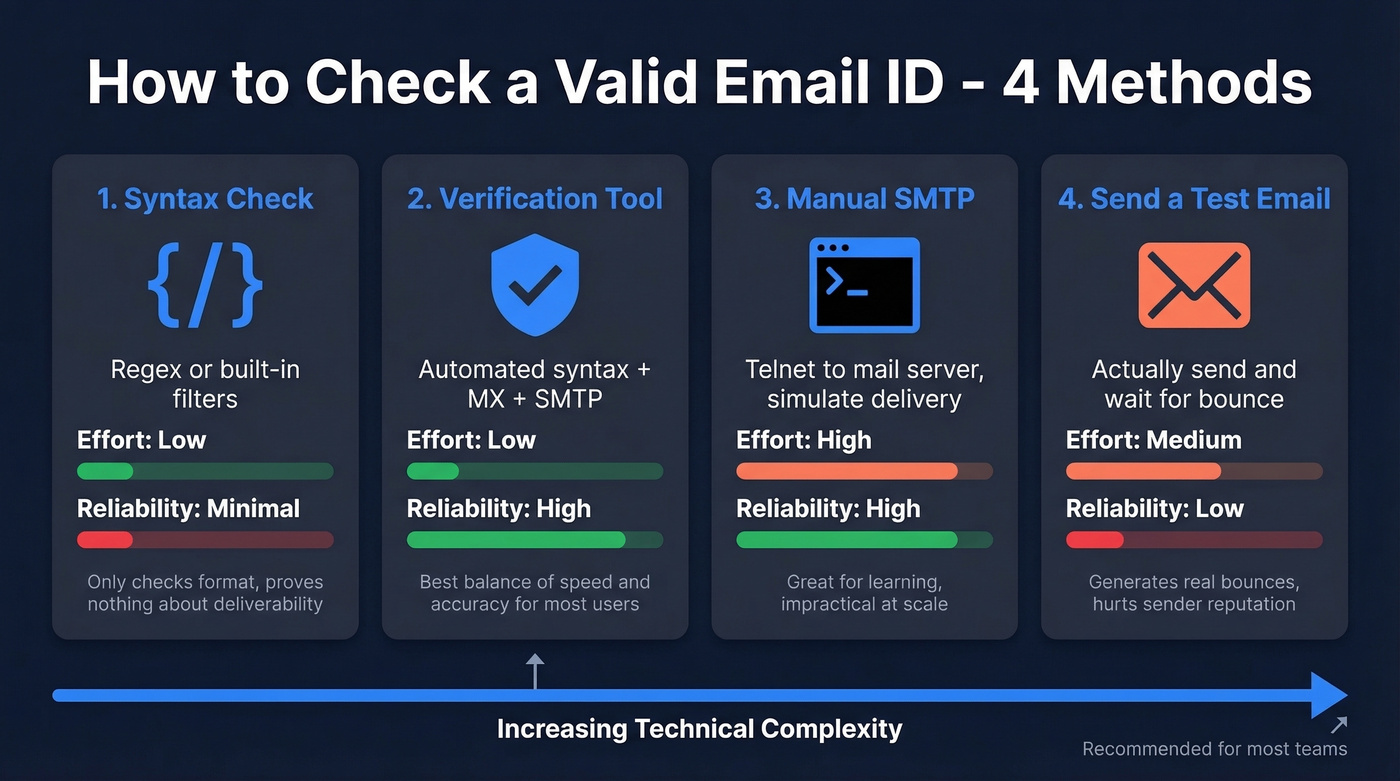
1. Syntax Validation (Bare Minimum)
A pragmatic regex that covers 99% of real-world addresses:
/^[^\s@]+@[^\s@]+\.[^\s@]+$/
This rejects whitespace and requires an @ with something on both sides plus a dot in the domain. In PHP, skip the regex entirely with filter_var($email, FILTER_VALIDATE_EMAIL);.
Length constraints worth enforcing: total email 254 characters max, local part 64 max, domain labels 63 each.
Here's the thing, though - syntax validation alone proves nothing about deliverability. totally.real.person@validlookingdomain.com passes every regex in existence. Doesn't mean anyone's home. A valid format is necessary but nowhere near sufficient.
2. Use a Verification Tool
Skip this if you're a developer building verification into your own stack - jump to method 3.
Use this if you need reliable results without understanding SMTP internals.
Verification tools automate the full pipeline: syntax check, MX record lookup, and an SMTP handshake against the mail server. Results come back as valid, invalid, unknown/unverifiable, or risky depending on the tool. The whole process usually takes under a second per email.
If you're comparing options, start with an AI email checker overview, then narrow down based on your list size and risk tolerance.
Other solid free options: Hunter includes up to 100 verifications per month on its free plan, and Verifalia handles free single checks. Either works well for a quick one-off.
3. Manual SMTP Verification
This is the educational deep dive for anyone who wants to understand what's happening behind the scenes. You query DNS for the mail server, connect via telnet, and simulate delivery - stopping before you actually send anything.
If you're doing this for outbound, pair it with a broader email deliverability checklist so you don't fix one issue and miss three others.
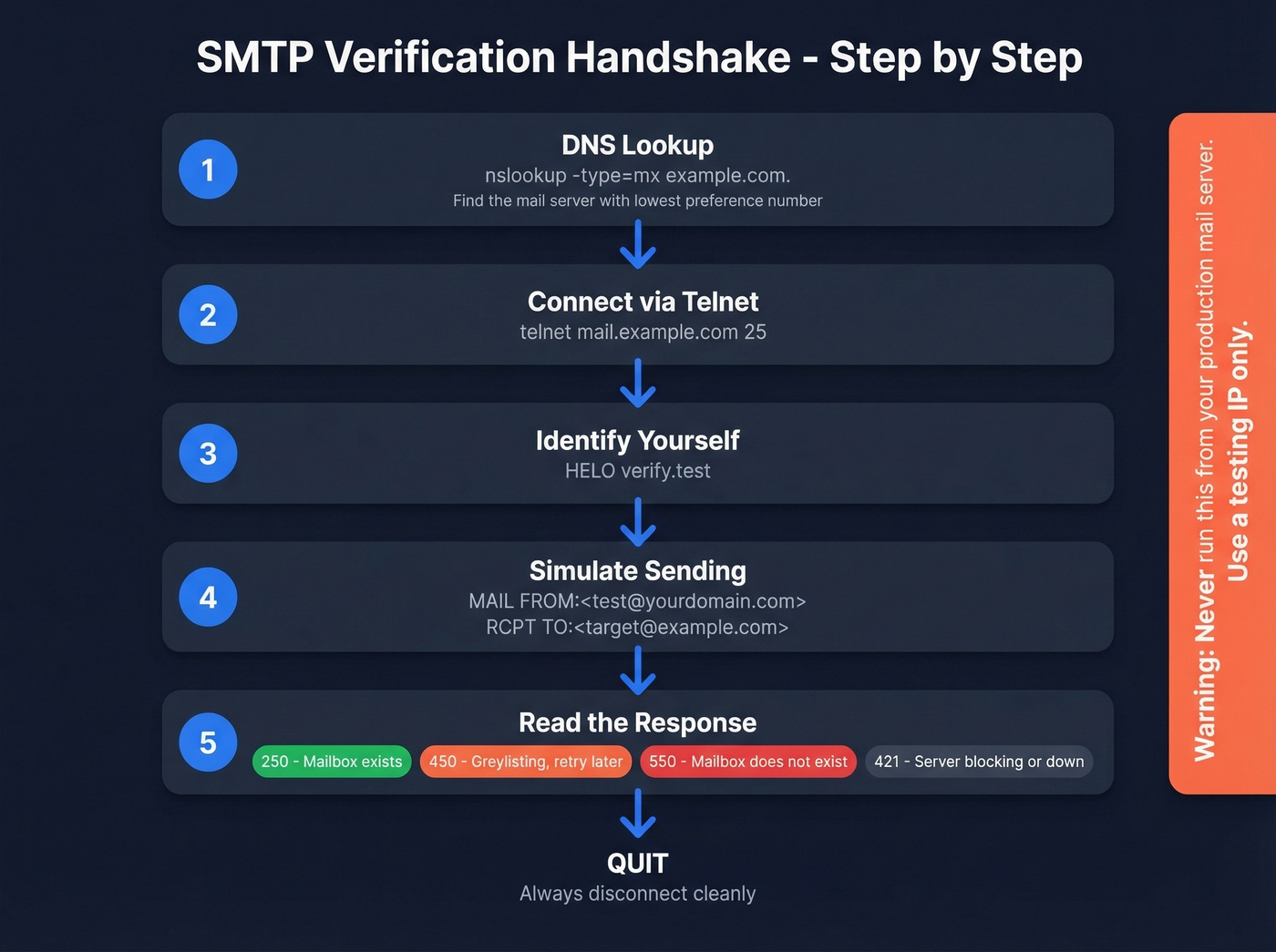
Find the MX record:
nslookup -type=mx example.com.
The trailing dot prevents your DNS client from appending default suffixes. The server with the lowest preference number is the primary MX.
Connect and run the handshake:
telnet mail.example.com 25
HELO verify.test
MAIL FROM:<test@yourdomain.com>
RCPT TO:<target@example.com>
QUIT
The RCPT TO response tells you everything:
| Code | Meaning | Action |
|---|---|---|
| 250 | Accepted | Mailbox exists (or at least the server claims it does) |
| 450 | Temp fail | Greylisting - retry later |
| 550 | Rejected | Mailbox doesn't exist |
| 421 | Unavailable | Server blocking or down |
Fair warning: backspace doesn't work in telnet SMTP sessions. Typo a command and you'll need to retype it. Use this method for debugging and learning, then use a tool for actual work.
4. Send a Test Email (Last Resort)
Just send an email and see if it bounces. This is the worst method: it only works one address at a time, generates real bounces that hurt sender reputation, and results take minutes or hours. Reserve it for a single critical address when absolutely nothing else works.
If you're seeing repeated bounces, check your email bounce rate benchmarks and root causes before you scale sending.

You just read why catch-all domains are the hardest verification problem. Prospeo's 5-step verification process handles catch-all detection, spam-trap removal, and honeypot filtering - delivering 98% email accuracy. No SMTP probing from your own servers. No blacklist risk.
Get verified emails at $0.01 each. Start with 75 free.
The Catch-All Problem
Here's where verification gets genuinely hard.
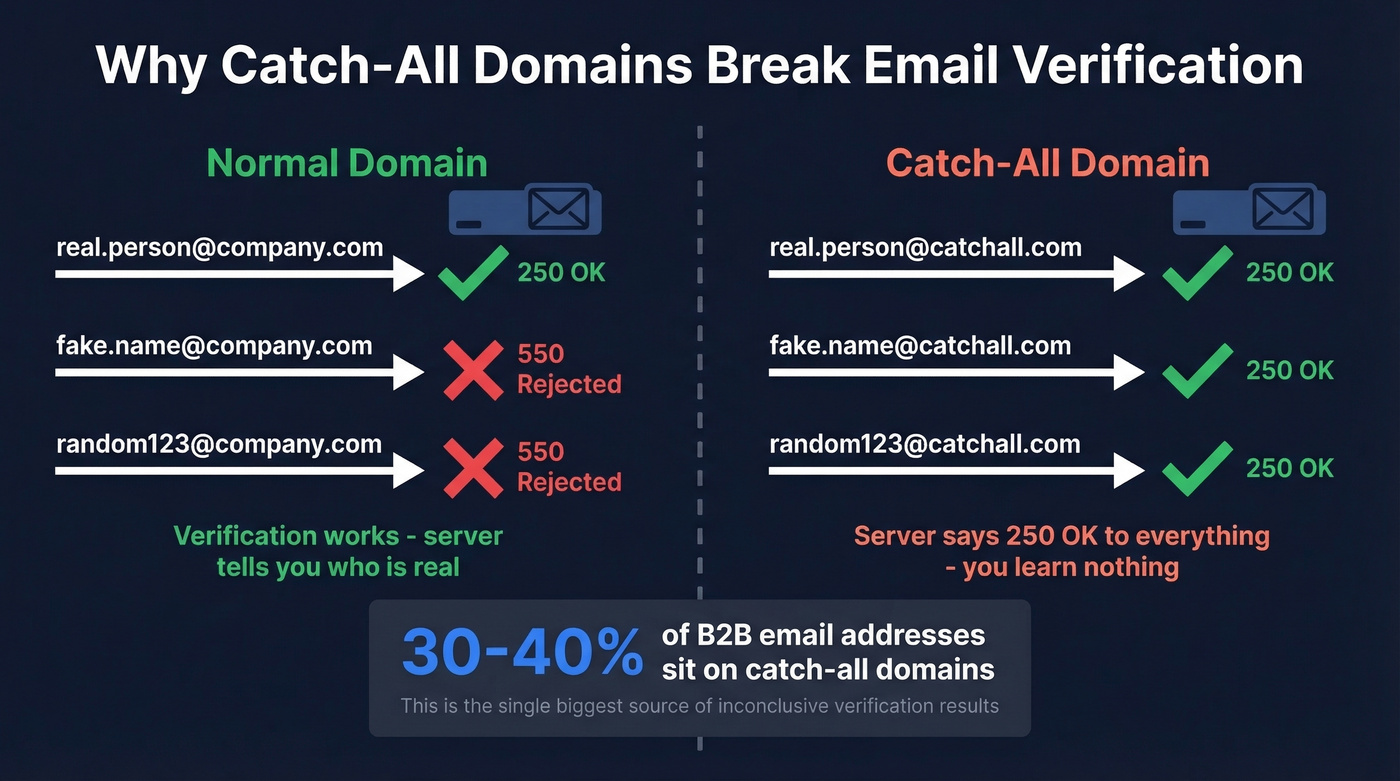
A catch-all domain accepts email sent to any address - real or fake. Send to completely.made.up@catchalldomain.com and the server responds 250 OK like everything's fine. About 30-40% of B2B email addresses sit on catch-all domains, and in one 10K-email B2B comparison test we reviewed, 28% came back as catch-all. That's a massive chunk where standard SMTP verification gives you nothing useful.
If you need a deeper walkthrough, see our guide on how to check if an email exists (including what "unknown" really means).
Detection is straightforward: generate a random fake address at the domain like xq7z9test@domain.com and run the SMTP check. If the server accepts it, the domain is catch-all. But knowing the domain is catch-all doesn't tell you whether your specific contact's mailbox is real. Most tools punt and return "unknown." That's why catch-all handling is the single most important differentiator when choosing a verification tool - and it's the one most buyers overlook.
Enterprise security gateways from Proofpoint, Mimecast, and Microsoft 365 Defender make this worse by actively blocking verification probes via greylisting and rate limiting.
Limitations Worth Knowing
Greylisting is the most common false negative. A mail server returns a 450 temporary failure on first contact, then accepts on retry. If your tool doesn't retry after 15-30 minutes, it misclassifies valid addresses as unknown.
Microsoft 365 often blocks callback verification entirely, so many M365 mailboxes can't be verified via standard SMTP probing. This is one reason confirming email validity requires more than a single technique.
Infrastructure risk is real too. Callback probing can land your IP on reputation blacklists - a risk rarely mentioned in vendor documentation. Run manual SMTP checks from a testing IP, never from the server your sales team uses for campaigns. One blacklist entry and your outbound is toast.
To reduce risk, align verification with your broader sender reputation plan and keep an eye on email reputation tools as you scale.
Five Mistakes That Burn Your Domain
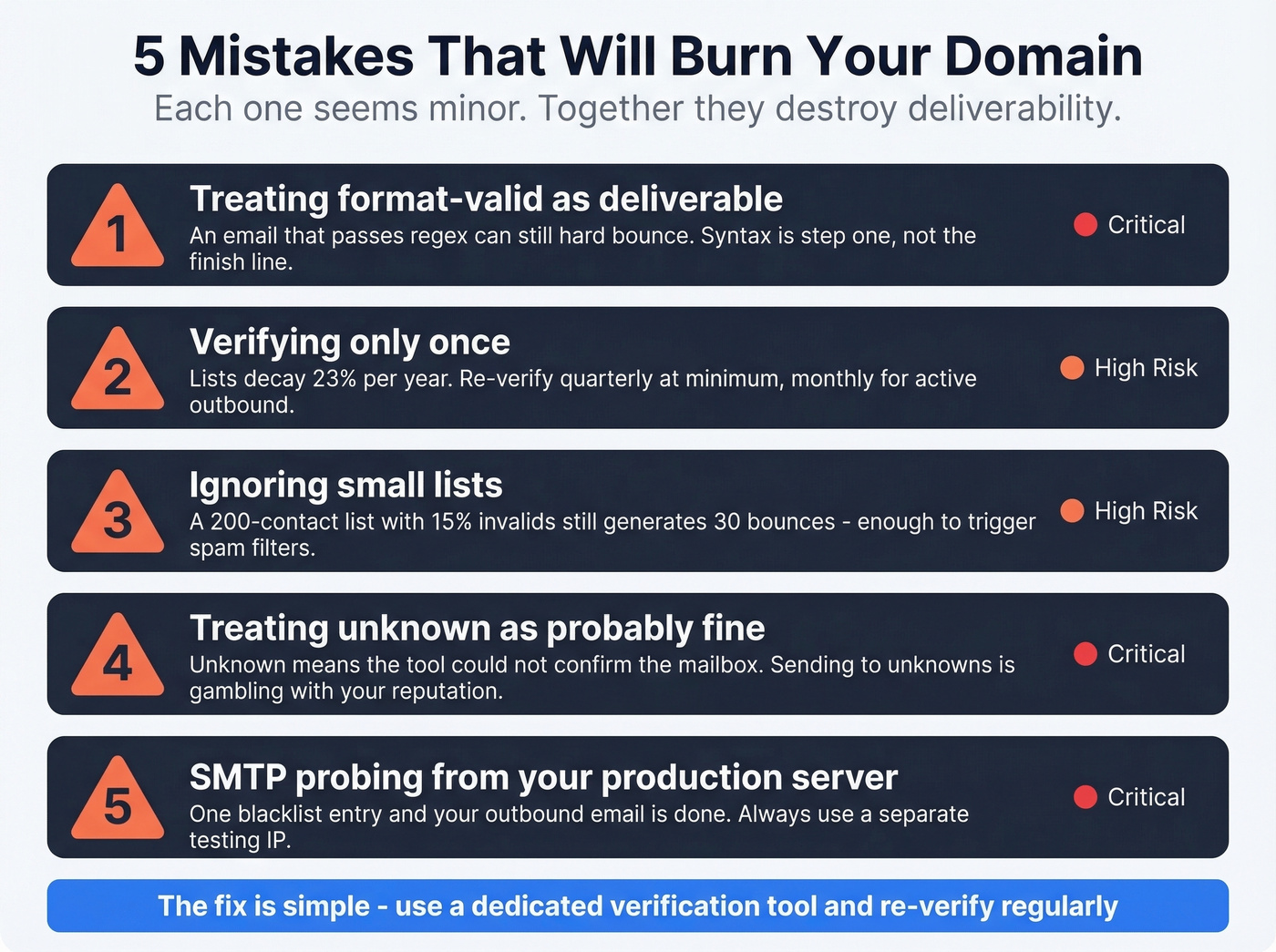
- Treating format-valid as deliverable. An email that passes regex can still bounce hard. Syntax is step one, not the finish line.
- Verifying only once. Lists degrade fast. Re-verify quarterly at minimum.
- Ignoring small lists. A 200-contact list with 15% invalids still generates 30 bounces - enough to trigger spam filters.
- Treating unknown as "probably fine." Unknown means the tool couldn't confirm the mailbox. Sending to unknowns is gambling with your domain reputation.
- Using your production mail server for SMTP probing. One blacklist entry and your outbound is done.
If you're doing cold outreach, also watch your email velocity and follow a safe best way to send bulk email without getting blacklisted playbook.
Let's be honest: if your average deal is under $15K, you don't need the most expensive verification tool on the market. But you absolutely need one that handles catch-all domains. Cheap verification that resolves 5% of catch-alls isn't saving you money when bounces tank deliverability.
Best Verification Tools Compared
We've run lists through multiple tools, and the accuracy gap between cheap and mid-tier is real. Here's how the main options stack up:
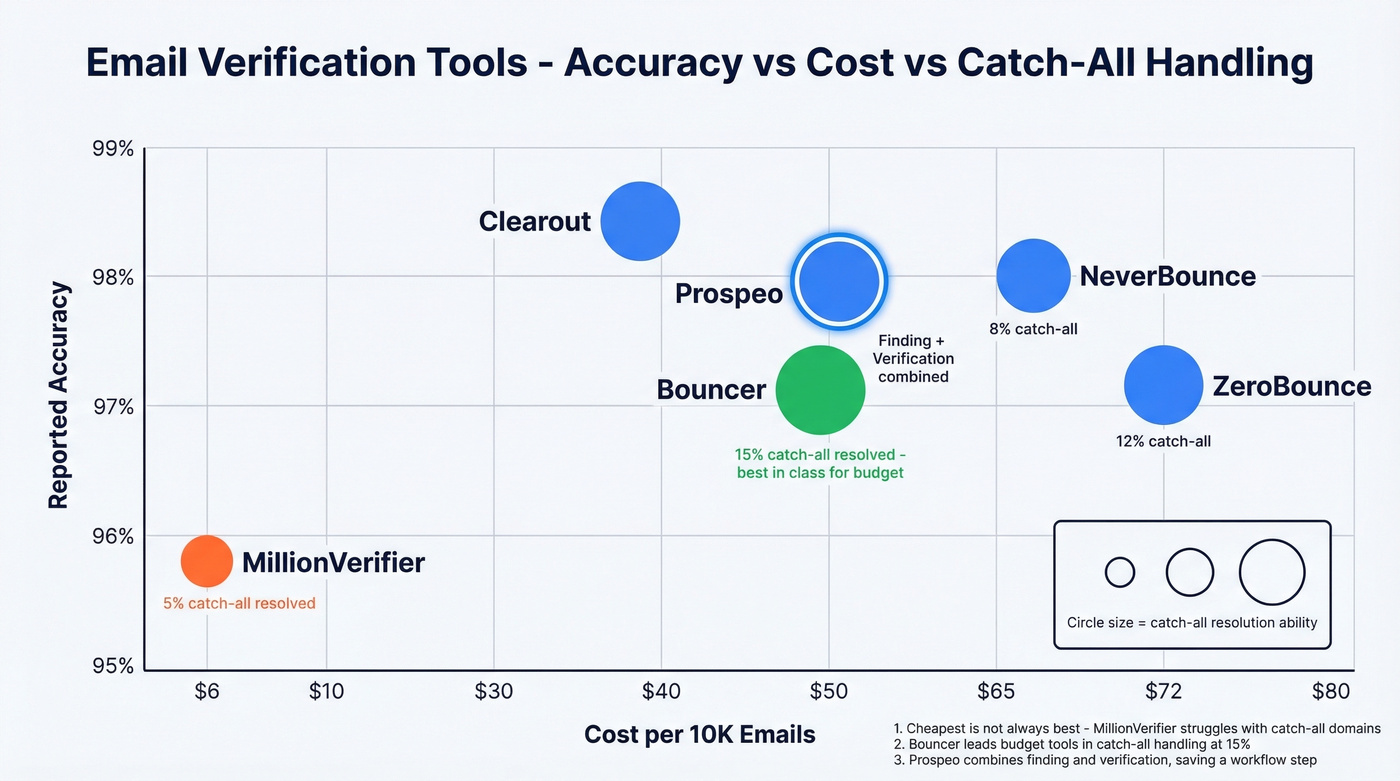
| Tool | Accuracy | Catch-All Resolved | Cost/10K | Free Tier | Best For |
|---|---|---|---|---|---|
| ZeroBounce | 96.5-97.8% | 12% | ~$65-80 | 100/mo | Cleaning large existing lists |
| NeverBounce | 96.9-99.1% | 8% | ~$50-80 | - | High-volume list hygiene |
| Clearout | 98.4% | - | ~$40 | 100/mo | Budget mid-tier option |
| Bouncer | 96.5-97.8% | 15% | ~$49-55 | - | Best catch-all among budget tools |
| Emailable | 97.2% | - | ~$69 | 250/mo | Simple API integration |
| MillionVerifier | 95.8% | 5% | ~$6 | - | Budget-only, low-stakes lists |
| Hunter | - | - | - | 100/mo | Low-volume occasional checks |
| Verifalia | - | - | Free singles | Free singles | One-off manual checks |
\Prospeo's cost includes email finding + verification in one step - verify-only tools require a separate finding tool.*
ZeroBounce is the go-to for cleaning large existing lists - solid accuracy and 100 free monthly checks to test before committing. Clearout is the cheapest mid-tier at ~$40/10K. Bouncer resolves 15% of catch-all addresses, better than most in its price range.
MillionVerifier is dirt cheap at ~$6/10K, but it resolves only 5% of catch-all addresses. For B2B-heavy lists where 30-40% of addresses sit on catch-all domains, that's a dealbreaker. The consensus on r/sales and r/coldemail is pretty consistent: cheap verification works fine for newsletter lists, but outbound sales needs better catch-all handling or you're just burning domains slowly.
If you're evaluating alternatives, our breakdown of Bouncer alternatives can help you shortlist based on accuracy and catch-all performance.
For teams that need both finding and verification in one workflow, Prospeo's combined approach saves a step and keeps bounce rates under control - our team has seen clients drop from 35%+ bounce rates to under 4% after switching.
Bad data cost Snyk's 50 AEs a 35-40% bounce rate before switching. After moving to Prospeo's verified database, bounces dropped under 5% and AE-sourced pipeline jumped 180%. Every email in Prospeo is refreshed on a 7-day cycle - not the 6-week industry average.
Stop verifying emails one by one. Search 300M+ pre-verified contacts instead.
FAQ
Can you verify an email without sending one?
Yes. Verification tools check MX records and probe the mail server via SMTP without delivering a message. Manual telnet verification does the same - connect, issue RCPT TO, read the response code, disconnect. No email ever reaches the inbox.
How often should you re-verify your list?
Quarterly at minimum, since lists decay at least ~23% annually as people change jobs and mailboxes get deactivated. For weekly outbound campaigns, monthly re-verification is safer. In our experience, teams running high-volume sequences benefit from even more frequent checks - stale data compounds fast.
What does "catch-all" mean in verification results?
A catch-all domain accepts email to any address, including fake ones. Standard tools can't confirm whether a specific mailbox exists, so they return "unknown." About 30-40% of B2B addresses sit on catch-all domains, making this the single biggest source of inconclusive results. Tools like Prospeo and Bouncer resolve a portion of these into binary valid/invalid verdicts.
What free tools let you check a valid email ID?
Hunter offers 100 free verifications per month, Verifalia handles free single checks, and Prospeo's free tier includes 75 credits with full 5-step verification including catch-all handling. For occasional one-off checks, any of these work fine.