

Video Email Templates That Actually Work in 2026
You recorded a personalized Loom for a prospect, dropped it in an email, and watched the open rate climb. Then nothing. No click, no reply, no call. The friction between "opened" and "watched" is where most video email template strategies die - and most guides skip right past it.
Here's the thing: the copy around your video matters more than the video itself. We've seen teams record beautiful 60-second walkthroughs, wrap them in generic filler text, and wonder why nobody clicks play. This piece gives you the templates, the technical reality behind why video in email is trickier than it looks, and the mistakes that'll tank your campaign before anyone hits that thumbnail.
The Technical Reality
You can't embed a playable video inside an email. Gmail strips HTML5 <video> tags entirely. Outlook does the same. Apple Mail sometimes renders inline video, but inconsistently enough that you shouldn't bet on it.
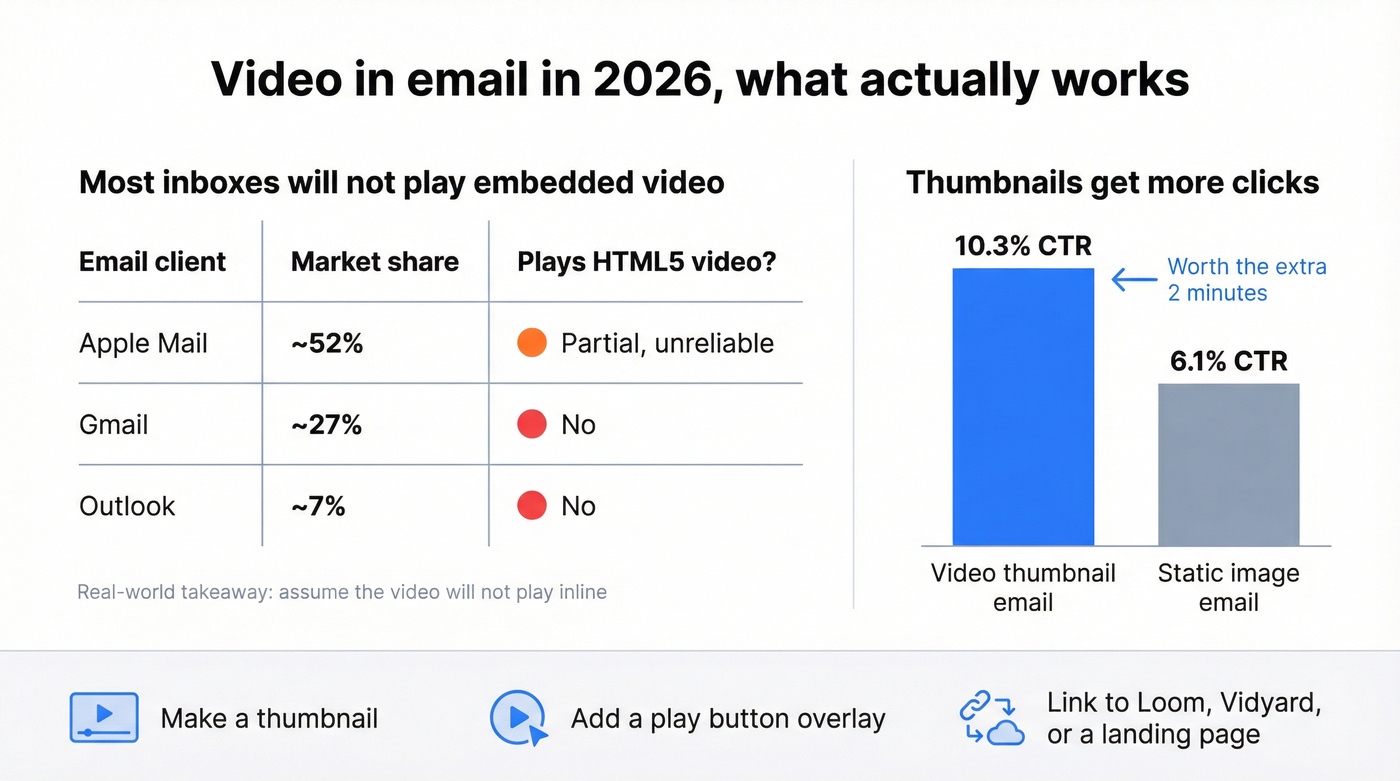
| Email Client | Market Share | Plays HTML5 Video? |
|---|---|---|
| Apple Mail | ~52% | Partial (unreliable) |
| Gmail | ~27% | No |
| Outlook | ~7% | No |
A big chunk of your audience uses email clients that won't play embedded video - they'll only see your fallback thumbnail. The universal fix: a thumbnail image with a play button linking to your video on Loom, Vidyard, or a landing page.
That thumbnail earns its keep. Video thumbnail emails average a 10.3% CTR versus 6.1% for static images, a gap that justifies the extra production effort every time. If you're using GIFs instead of static thumbnails, keep them under 500KB. Outlook only shows the first frame, so make that frame look intentional. And never attach video files directly - more on that below.
Making a Video Thumbnail
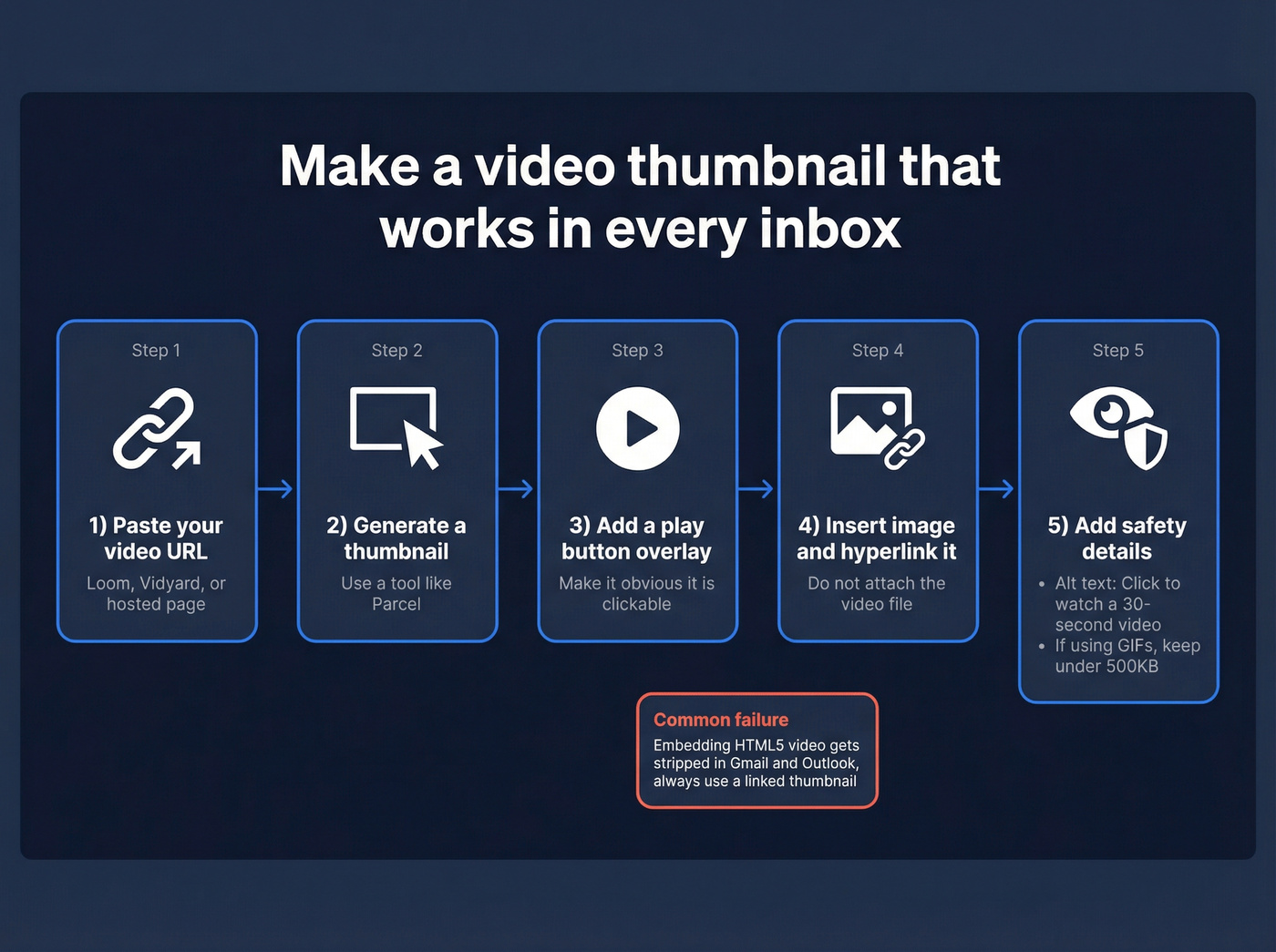
You don't need Photoshop. Parcel's thumbnail generator lets you paste your video URL, pick a play button style, and download the image. Embed it as a standard image hyperlinked to your hosted video. Add alt text like "Click to watch a 30-second video" for recipients whose clients block images by default. The whole process takes 30 seconds.

Every personalized video you record costs real time - 2 minutes filming, 5 minutes editing. Sending that to an invalid address is a total loss. Prospeo verifies emails in real time with 98% accuracy, so every Loom you record actually reaches a real inbox.
Stop recording videos for email addresses that don't exist.
Templates You Can Steal
The Curiosity Gap (Cold Outreach)
This is the only cold video email template worth testing first. A practitioner on r/coldemail shared this approach and pulled a 34% reply rate - 150 emails, 51 replies, 31 booked calls, 8 paying clients, roughly €12K in revenue. The trick: no video link at all.
If you're building a full outbound system (not just a one-off test), pair this with a few proven sales prospecting techniques so the video is the multiplier, not the strategy.
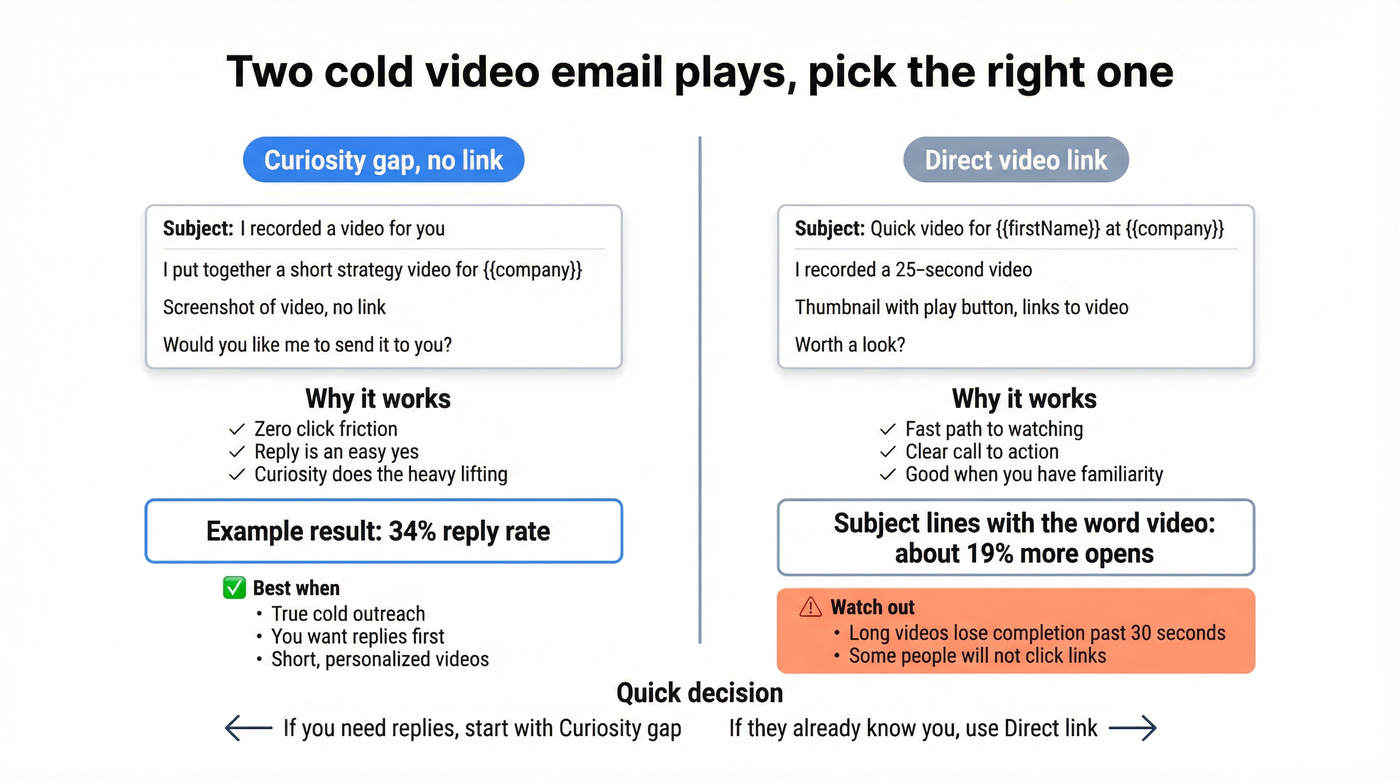
Subject: I recorded a video for you
Hey {{firstName}},
I put together a short strategy video specifically for {{company}} - it covers [one specific insight relevant to their business].
[Screenshot of video - no link]
Would you like me to send it to you?
After prospects replied "yes," the sender followed up with a personalized Loom and reported about 60% conversion from video to call. Zero friction. No link to click, no landing page to load. The screenshot creates curiosity, and the question gives them an easy "yes" to type.
Let's be honest: if your average deal size is under €5K, this template alone - paired with a verified list and a free Loom account - is the entire video email strategy you need. Everything else is optimization.
Direct Video Link (Cold Outreach)
Use this when you've already built some familiarity or when the curiosity gap feels too indirect for your market. Including "video" in your subject line boosts opens by about 19%.
If you want more options beyond "Quick video for...", pull from these email subject line examples and keep the rest of the email simple.
Subject: Quick video for {{firstName}} at {{company}}
Hey {{firstName}},
I recorded a 25-second video walking through [specific observation about their business].
[Thumbnail with play button -> links to video]
Worth a look?
Keep the video under 30 seconds. Anything longer and completion rates crater.
Follow-Up After No Response
If you need a full set of follow-up variations (not just video-specific), use these sales follow-up templates to keep your sequence from sounding repetitive.
Subject: Re: Quick video for {{firstName}}
Hey {{firstName}},
Circling back on the video I sent last week. In case it got buried, here's the 20-second version:
[Thumbnail with play button]
The short version: [one-sentence summary of your value prop]. Happy to walk through it live if it's relevant.
Meeting Recap + Proposal Walkthrough
These two templates serve the same purpose - keeping momentum after a conversation - so we've combined them. Use the recap version after discovery calls, the proposal version when you're sending pricing.
Recap:
Subject: Recap + next steps from our call
Great conversation today. I recorded a quick walkthrough of the action items we discussed: [Thumbnail]. Summary: [2-3 bullet points]. I'll send the proposal by {{date}}.
Proposal:
Subject: Your proposal - with a video walkthrough
Attached is the proposal. I also recorded a 2-minute walkthrough covering pricing and implementation: [Thumbnail]. Feel free to share with {{stakeholder name}} - the video covers everything they'd need.
Skip the proposal walkthrough video if your deal is under $10K. A bullet-point email is faster for everyone involved.
Internal / Onboarding
Employees who go through structured onboarding are 58% more likely to stay, and video is the fastest way to make onboarding feel human rather than bureaucratic.
If you're formalizing onboarding and handoffs, these handoff email templates can help keep internal comms consistent.
Subject: Welcome to {{company}} - a quick intro from the team
Hey {{firstName}},
Welcome aboard! I recorded a short video to walk you through your first week - tools, key contacts, and where to find everything.
[Thumbnail with play button]
This format works equally well for training walkthroughs, leadership updates, and change management comms where tone matters more than a Slack message conveys.
Mistakes That Kill Video Emails
Attaching video files instead of linking. Attachments hit provider size limits (Gmail caps at 25MB, Outlook at 20MB), trip spam filters, and often don't reach the inbox the way you expect. Always host externally and link. If you're scaling outbound, it's also worth understanding email deliverability basics so your videos actually land.
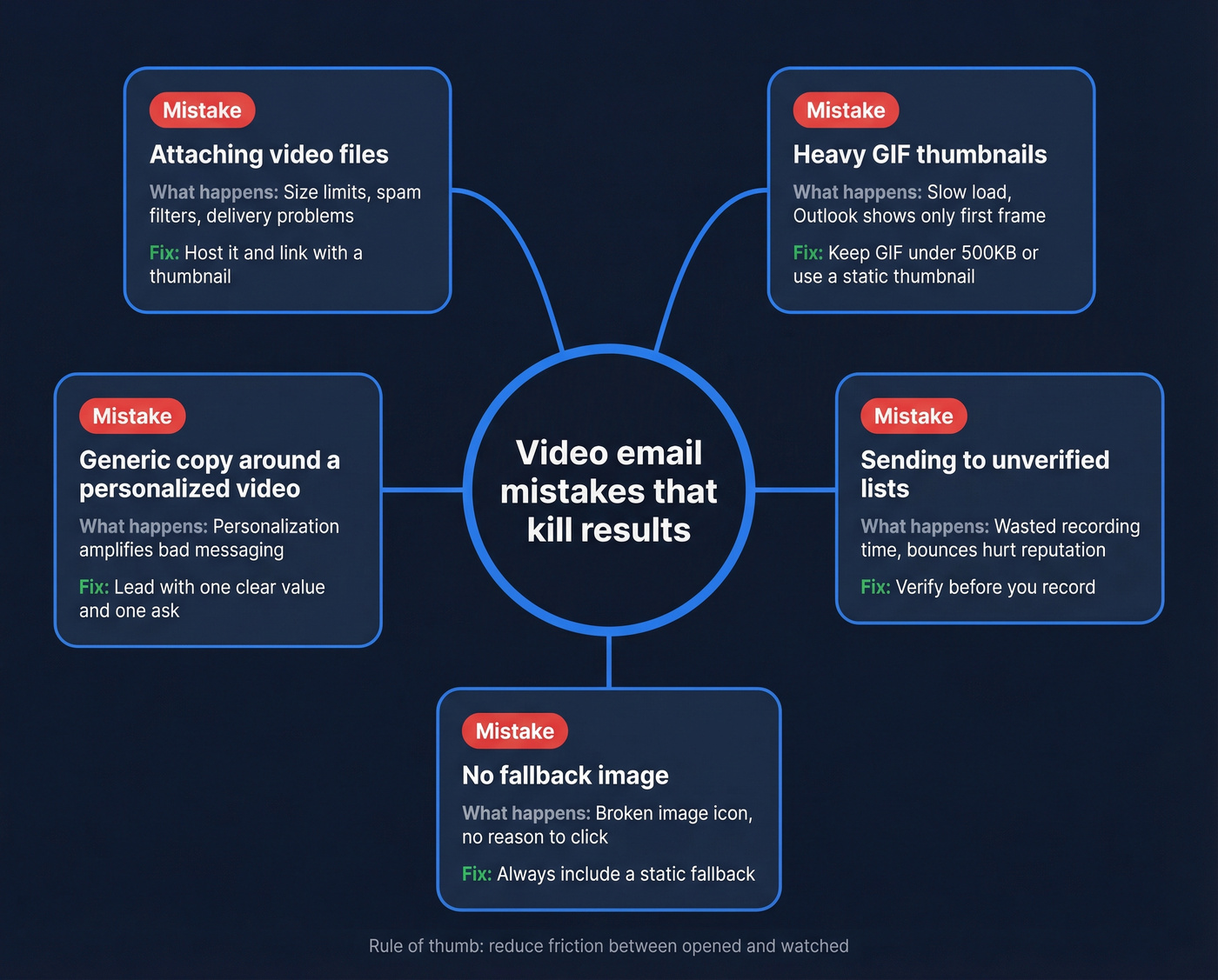
Heavy GIFs that slow everything down. A 3MB GIF thumbnail looks great on your screen and terrible on a mobile connection. Target under 500KB. If you can't compress that far, use a static image with a play button overlay.
Generic copy around a personalized video. One agency owner on Reddit sent about 100 "personalized" cold emails and got zero responses. The emails led with criticism of the prospect's work and buried the actual value. Personalized video doesn't fix bad copy - it amplifies it. If you want a tighter framework, start with email copywriting fundamentals.
Sending to unverified lists. This one drives us crazy. A bounced personalized video email hurts more than a bounced plain-text one because you invested real time recording it, and the bounce still damages your sender reputation the same way. Verify your list before every campaign. Prospeo checks emails in real time with 98% accuracy - the free tier covers 75 emails per month, enough to validate a test batch before you start recording. (If you're troubleshooting list quality, this guide on email bounce rate helps.)
No fallback image. If your GIF doesn't load or your client strips the animation, the recipient sees a broken image icon. Always set a static fallback.

That 34% reply rate template only works if you're sending to verified contacts at real companies. Prospeo's database gives you 143M+ verified emails with 30+ filters to find the exact decision-makers worth recording a personalized video for - at roughly $0.01 per email.
Find the prospects worth recording a video for.
Video Email Tools + Pricing (2026)
| Tool | Starting Price | Best For |
|---|---|---|
| Loom | $15/user/mo | Individual prospecting (free tier is plenty) |
| Hippo Video | $20/user/mo | Budget sales teams |
| HeyGen | $24/mo (annual) | AI-generated videos at scale |
| BombBomb | $36/mo | Relationship selling |
| Sendspark | $39/seat/mo | Personalization at scale |
| Dubb | $42/mo | Video + CRM tracking |
| Vidyard | $59/user/mo | Enterprise analytics |
| Covideo | $69/mo | Full sales cycle video |
In our experience, Loom's free tier handles most use cases. Don't overthink the tool if you're just getting started. HeyGen is the pick when you need AI-generated videos at scale and can't record individually. Vidyard wins for enterprise sales teams that need granular view analytics and CRM integrations. BombBomb at $36/mo is overpriced if you're only doing cold outreach - Loom does the same job for free.
One thing none of these tools solve: whether the email address you're sending to is real. Pair any tool above with a verification step so you're not wasting recordings on dead addresses. If you're building a repeatable workflow, a dedicated SDR tools stack can help you operationalize it.
FAQ
Can you embed video directly in Gmail?
No. Gmail strips HTML5 <video> tags completely. Use a thumbnail image with a play button linking to Loom or Vidyard instead. This thumbnail approach works reliably across every major email client, including Outlook and Apple Mail.
What's the best subject line for a video email?
Including "video" in your subject line boosts opens by about 19%. The highest-performing cold template we've tracked used "I recorded a video for you" - simple, personal, curiosity-driven. Straightforward outperforms clever every time.
How do I prevent video email bounces?
Run your list through a verification tool before recording. A bounced personalized video wastes your recording time and damages sender reputation equally. Even a small test batch of 50-75 verified addresses will tell you whether your list is clean enough to scale.
What's the ideal length for a sales video email?
Keep cold outreach videos under 30 seconds. Completion rates drop sharply past that mark. For proposal walkthroughs or meeting recaps, one to two minutes is the ceiling. If you can't explain it in two minutes, book a call instead.