

What Is a SaaS Product - and How Do You Evaluate One?
Every SaaS explainer on the internet is written by a cloud vendor trying to sell you infrastructure. So what is a SaaS product, really, from the buyer's side? Here's what it costs, what can go wrong, and the evaluation checklist nobody else includes.
What Is a SaaS Product?
SaaS - software as a service - is a cloud-based delivery model where the vendor hosts the application and you access it over the internet, typically through a browser. You don't install anything. You don't manage servers. You create an account, pay a subscription or per-usage fee, and start using it.
The simplest analogy: think of an apartment building. Every tenant lives in the same structure, shares the same plumbing and electrical systems, but has their own locked unit with their own stuff inside. That's multi-tenancy, the architecture that makes SaaS work. One software instance serves thousands of customers, each with segregated data and configurations. The landlord handles maintenance, repairs, and upgrades. You just live there.
The global SaaS market was valued at $399.1 billion in 2024 and is projected to reach $819 billion by 2030. That's not a trend - it's the default way software gets built and sold now.
From Salesforce to Slack to the tool your marketing team signed up for last Tuesday without telling IT, SaaS is everywhere. Which is both its greatest strength and, as we'll get to, one of its biggest problems.
SaaS by the Numbers
A few stats that frame the scale:
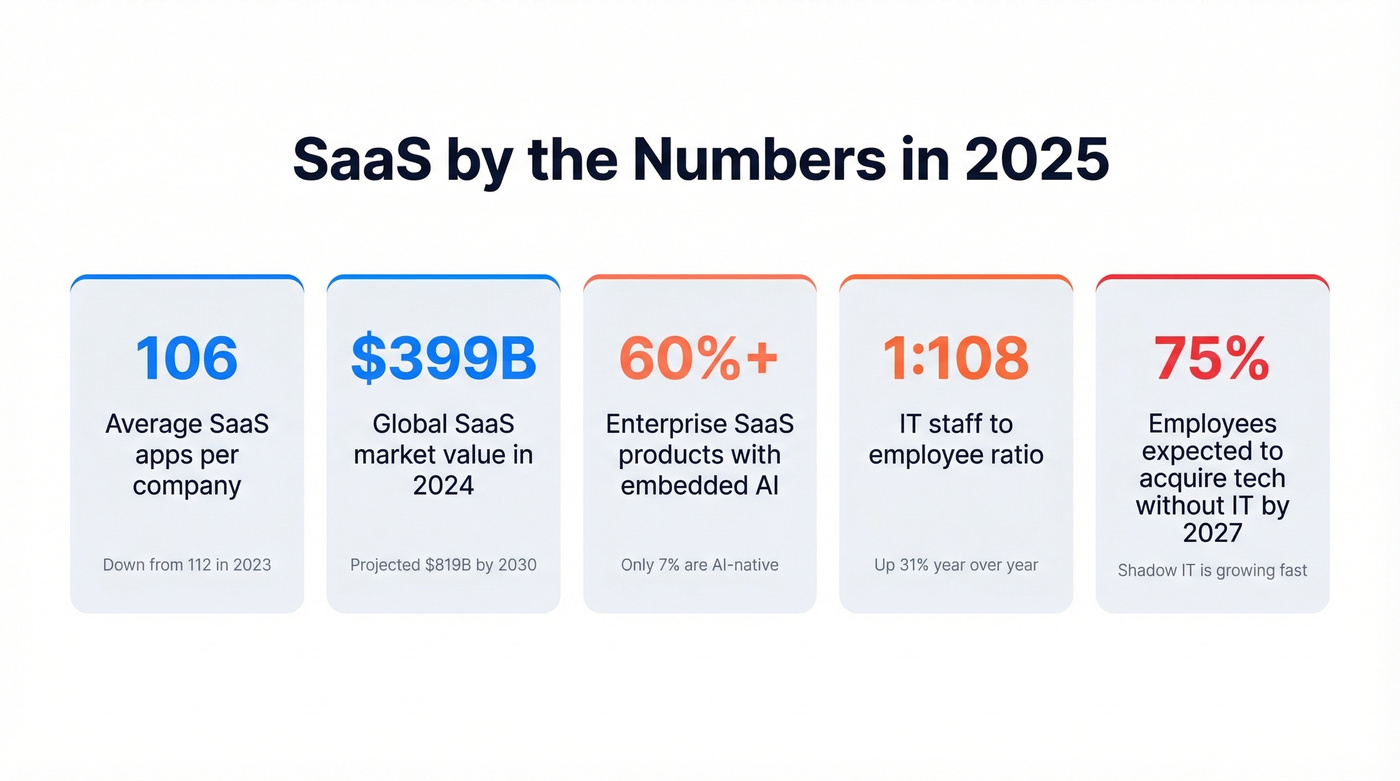
- The average company uses 106 SaaS applications, down from 112 in 2023, yet the pace of consolidation has slowed from 14% to just 5% year-over-year
- Enterprises with 5,000+ employees average 131 SaaS apps
- The IT-to-FTE ratio has climbed 31% year-over-year to 1:108 - fewer IT staff managing more tools per employee
- 60%+ of enterprise SaaS products have embedded AI features, while 7% of total SaaS apps are AI-native
- 95% of companies have invested in AI use cases
Those numbers tell a contradictory story: companies are drowning in SaaS, trying to consolidate and failing, and simultaneously adding AI-powered tools to the stack.
How SaaS Products Work
Under the hood, most SaaS products share four architectural traits.
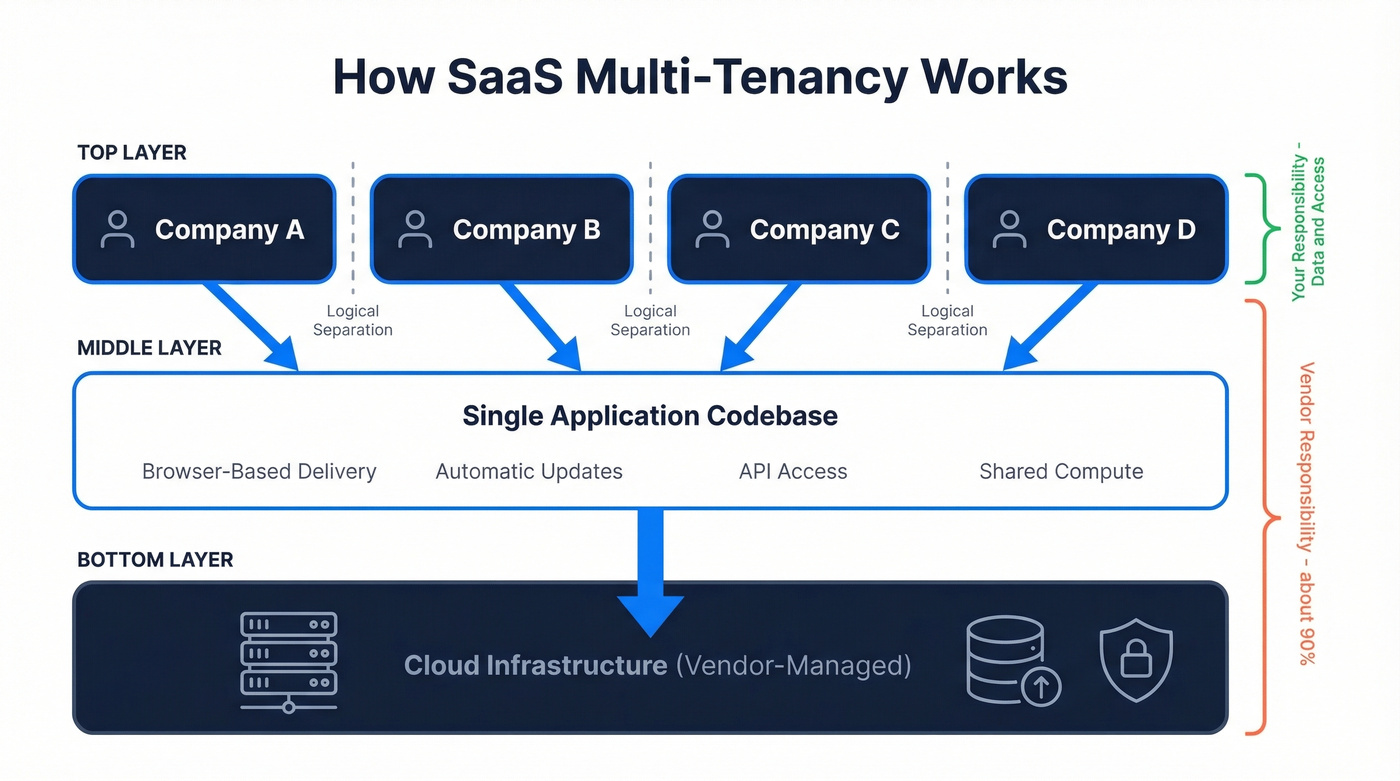
Multi-tenancy. A single codebase and infrastructure serves all customers. Your data is logically separated from everyone else's, but you're sharing compute resources. This is what makes the model economically viable - the vendor amortizes infrastructure costs across thousands of accounts.
Browser-based delivery. No downloads, no installers, no compatibility headaches. If you've got a browser, you've got the app.
Automatic updates. The vendor pushes updates to everyone simultaneously. You don't choose when to upgrade - you're always on the latest version. Mostly a benefit, occasionally an annoyance when your favorite button moves.
API access. Modern SaaS products expose APIs so you can connect them to other tools, build custom workflows, and pull data programmatically. This is table stakes now, not a premium feature - especially if you plan to connect them to other tools.
Benefits of SaaS
- Lower upfront cost. No servers to buy, no IT team to install software. You pay monthly or annually.
- Scalability. Need 5 seats today and 50 next quarter? Just upgrade.
- Access anywhere. Browser + internet = you're in.
- Automatic updates. Security patches, new features, bug fixes - all handled by the vendor.
- Faster deployment. Most tools are usable within hours, not months.
- Built-in collaboration. Real-time editing, shared workspaces, and permission controls are standard.
None of this is controversial. The real conversation starts when you look at the downsides.
Disadvantages Nobody Talks About
SaaS isn't automatically cheaper than on-premises software. A mid-range tool at $50/user/month across 60 people costs $36,000/year. Over five years, that's $180,000 - and you own nothing at the end. A perpetual license with a one-time fee might cost less over the same horizon.
Beyond cost, here are the risks most explainers skip:
SaaS sprawl. The average company runs 106 apps. That's a lot of renewals, permissions, integrations, and spend to keep under control. We've seen teams spend more time managing their stack than actually using it.
Shadow IT. Nearly 60% of IT professionals are concerned about shadow IT risks, and by 2027, 75% of employees are projected to acquire or modify tech without IT oversight. Every department head with a credit card is a potential security hole.
Vendor lock-in. Your data lives on someone else's servers. If they change pricing, sunset features, or get acquired, you're along for the ride. Contracts can include audit clauses and steep penalties for license noncompliance - read the fine print.
Outage dependency. When your CRM goes down, your pipeline goes dark. You're betting on someone else's uptime, and there's nothing you can do about it except wait - so it helps to understand common sales pipeline challenges before they hit.
Here's the thing: a CRM full of bouncing emails is worse than a spreadsheet with 50 verified contacts. The tool doesn't matter if the data inside it is garbage.

You just read that the average company runs 106 SaaS apps. The question isn't how many tools you have - it's whether the data inside them is accurate. Prospeo delivers 98% verified email accuracy on a 7-day refresh cycle, so your CRM never becomes the "spreadsheet with bouncing contacts" problem.
Stop paying for SaaS seats full of dead data. Start with contacts that connect.
SaaS Examples by Category
Software as a service covers virtually every business function:
| Category | Examples |
|---|---|
| CRM | Salesforce, HubSpot, Pipedrive |
| Project Management | Asana, Monday.com, Notion |
| Marketing | Mailchimp, Brevo, ActiveCampaign |
| Sales & Data | Prospeo, Apollo, ZoomInfo |
| HR | BambooHR, Gusto, Rippling |
| Design | Figma, Canva, Adobe CC |
| Communication | Slack, Zoom, Microsoft Teams |
| E-commerce | Shopify, BigCommerce |
| Finance | QuickBooks, Stripe, Chargebee |
If you're comparing CRMs specifically, it helps to look at real examples of a CRM and how they price.
SaaS vs PaaS vs IaaS
These three models sit on a spectrum of control versus convenience. You'll also hear about MaaS (Model as a Service) - AI models delivered via API, often embedded within SaaS products - but the core three are what matter for most buyers.
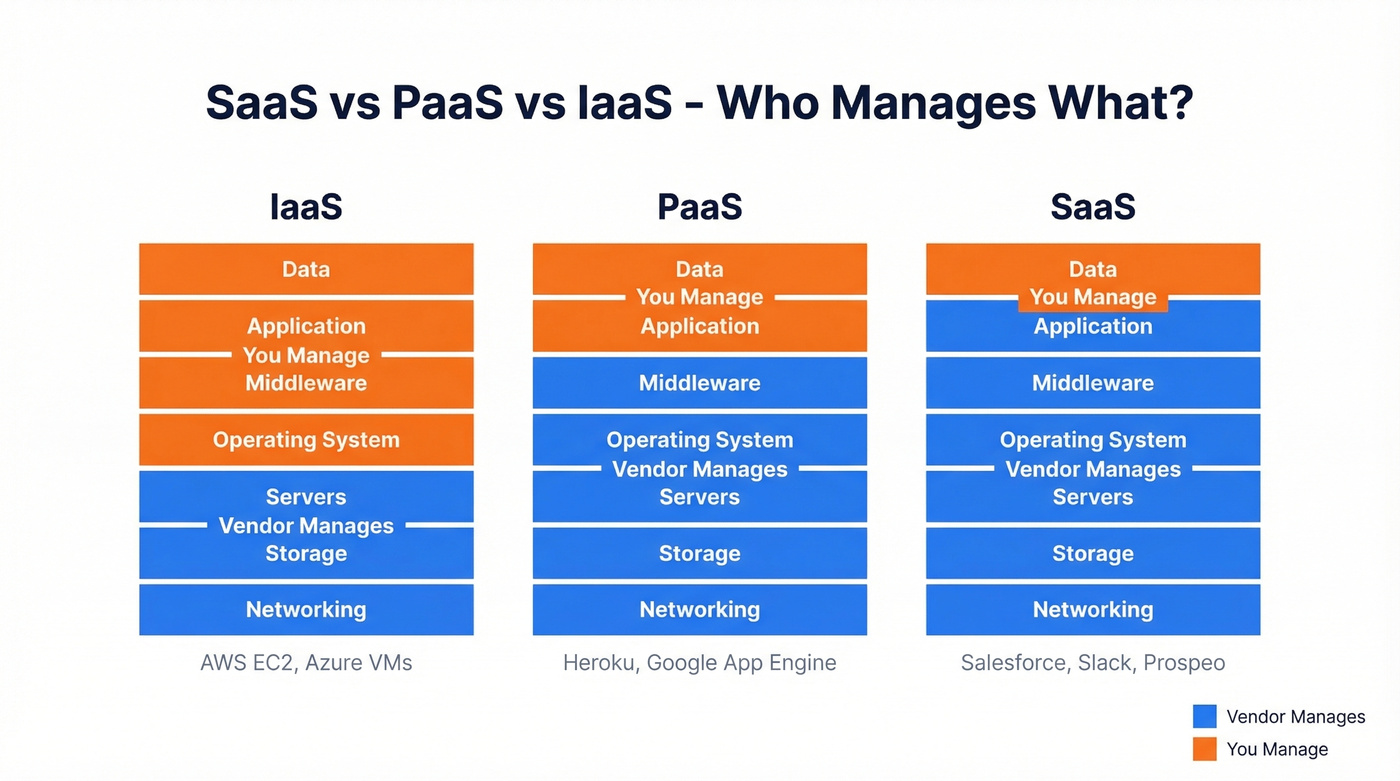
| Dimension | SaaS | PaaS | IaaS |
|---|---|---|---|
| Control level | Low | Medium | High |
| Tech expertise needed | Low | Medium | High |
| Cost predictability | High | Medium | Variable |
| Implementation time | Fast | Moderate | Slow |
| Provider responsibility | ~90% | ~60% | ~30% |
SaaS (Salesforce, Slack): the vendor manages everything, and you manage your data and access controls. PaaS (Heroku, Google App Engine): the vendor manages infrastructure and middleware while you build and deploy your own applications on top. IaaS (AWS EC2, Azure VMs): the vendor provides raw compute, storage, and networking, and you manage everything from the operating system up.
If you're reading this article, you're almost certainly evaluating a subscription product, not building infrastructure. Skip the IaaS rabbit hole.
Common SaaS Pricing Models
Pricing is where vendors get creative - and where buyers get confused:
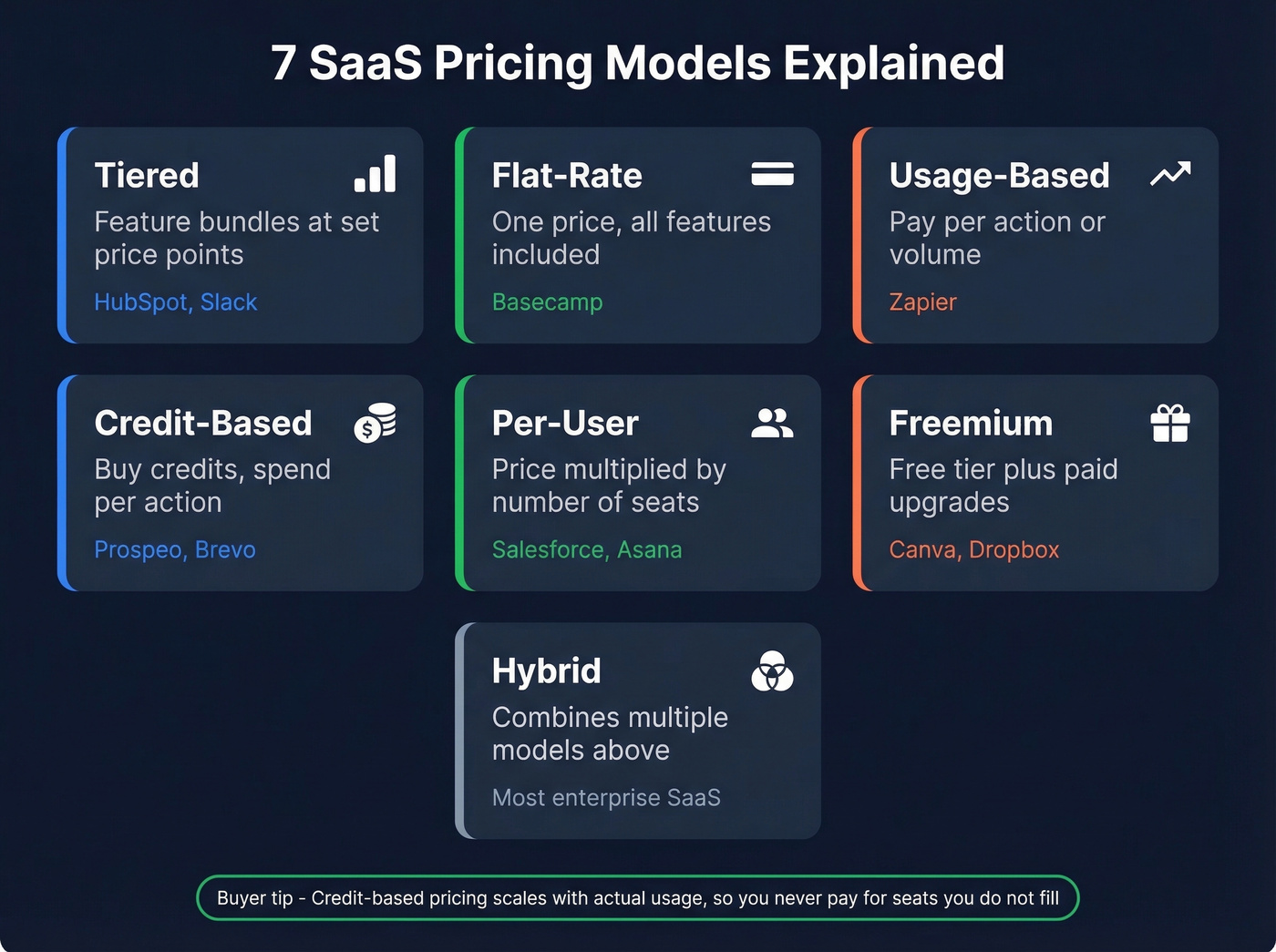
| Model | How It Works | Example |
|---|---|---|
| Tiered | Feature bundles at set prices | HubSpot, Slack |
| Flat-rate | One price, all features | Basecamp |
| Usage-based | Pay per action/volume | Zapier |
| Credit-based | Buy credits, spend per action | Prospeo, Brevo |
| Per-user | Price x number of seats | Salesforce, Asana |
| Freemium | Free tier + paid upgrades | Canva, Dropbox |
| Hybrid | Combines multiple models | Most enterprise SaaS |
Tiered pricing is the most popular model among SaaS companies, but credit-based is the most buyer-friendly in our experience. You pay for what you actually use - no shelf-ware, no wasted seats. If your team runs 500 email lookups one month and 5,000 the next, spending scales with actual usage rather than a tier you might not fill.
If you're evaluating data tools in particular, compare data enrichment services and how they charge (seats vs credits vs usage).
A Brief History of SaaS
Four milestones shaped the model:
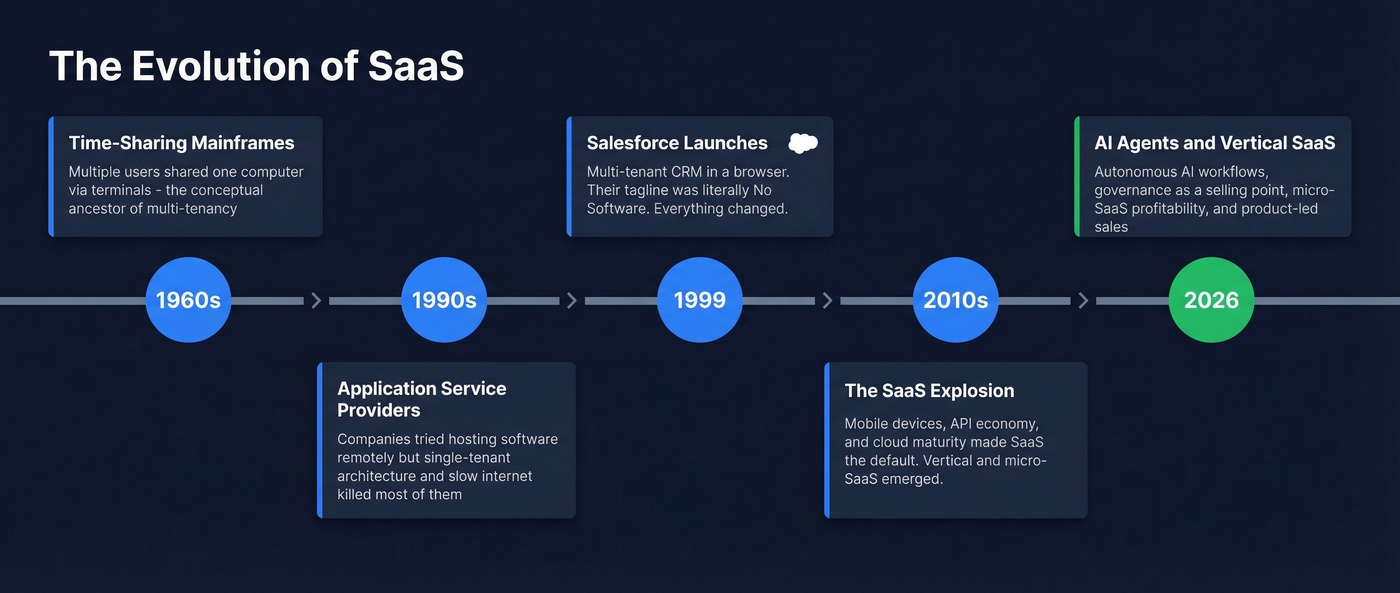
- 1960s - Time-sharing mainframes. Multiple users shared a single computer's resources via terminals. The conceptual ancestor of multi-tenancy.
- Late 1990s - Application Service Providers. Companies tried hosting software remotely, but single-tenant architecture and slow internet killed most of them.
- 1999 - Salesforce launches. Multi-tenant CRM delivered through a browser. "No software" was literally their tagline.
- 2010s-present - The explosion. Mobile devices, the API economy, and cloud infrastructure maturity turned SaaS into the default. Vertical SaaS, micro-SaaS, and AI-native SaaS are the current frontier.
SaaS Trends in 2026
Things are shifting fast. Here's what's actually happening, not just what vendors are pitching.
AI has moved from copilots to autonomous agents. The 2024-2025 wave was "add a chatbot." The 2026 wave is AI executing multi-step workflows - scheduling, routing, data enrichment, follow-ups - without human intervention at each step. Generic horizontal tools are losing ground to vertical SaaS platforms that solve compound, industry-specific workflows. A product built for dental practices or logistics brokers delivers measurable outcomes that a general-purpose CRM never will.
Governance - security, auditability, and compliance - is becoming a go-to-market advantage, not just a checkbox. Buyers ask about SOC 2 and GDPR before they ask about features. Product-led sales is replacing pure PLG: the self-serve product qualifies accounts, then sales engages based on usage signals. And micro-SaaS keeps growing - small, focused tools built by tiny teams for specific niches, with less venture capital, more profitability, and better customer focus.
If you're building pipeline with these tools, keep an eye on broader lead generation trends so your stack matches buyer behavior.
How to Evaluate Any SaaS Product
Everyone explains what SaaS is. Nobody tells you how to evaluate one before you hand over your credit card. Gartner found that B2B buyers spend only 17% of their time meeting with potential suppliers - the rest is independent research. That means the evaluation framework you use matters more than any sales demo.
Here's the checklist we use internally:
Security certifications. SOC 2 Type II and GDPR compliance are the baseline. If a vendor can't show these, walk away.
SLA guarantees. What's the uptime commitment? What happens when they miss it? Get this in writing.
Data export and portability. Can you export all your data in a standard format like CSV, JSON, or via API? If a vendor won't let you leave, they're telling you something about how much they trust their own product.
Integration depth. Native CRM integrations, API access, and connectors through Zapier or Make matter more than a long feature list. A tool that doesn't connect to your stack is a tool you'll abandon within three months.
Pricing transparency. If the pricing page says "talk to sales" with no numbers, expect a long procurement cycle and inflated quotes. The best vendors publish their pricing.
Data freshness and quality. This is the one most buyers skip, and it's the one that matters most. Ask any vendor how often their data updates - the answer tells you a lot. Some refresh every six weeks. Others refresh weekly. That gap is the difference between reaching a prospect at their current company and emailing someone who left three months ago.
If your evaluation includes outbound performance, tie data quality back to sales prospecting techniques and what actually moves replies.
Let's be honest: most teams don't need more SaaS tools. They need fewer tools with better data. If your average deal size is under $15k, you probably don't need a $30,000/year platform. A credit-based tool with accurate data will outperform an enterprise suite full of stale records every time.
Every SaaS product in your stack is only as useful as the data flowing through it. Prospeo enriches your CRM with 50+ data points per contact at a 92% match rate - for roughly $0.01 per email. No annual contracts, no sales calls, no vendor lock-in.
One SaaS tool that actually makes every other tool in your stack work better.
FAQ
Is Netflix a SaaS product?
Yes. Netflix is cloud-hosted, subscription-based, and vendor-managed - architecturally identical to B2B SaaS. It's consumer SaaS rather than business SaaS, but the delivery model is the same: hosted software delivered over the internet for a recurring fee.
What's the difference between SaaS and a web app?
All SaaS products are web apps, but not all web apps are SaaS. SaaS specifically implies subscription pricing, vendor-managed infrastructure, and multi-tenant architecture. A free, open-source tool you host yourself is a web app but not SaaS.
How much does a typical SaaS product cost?
Most B2B SaaS runs $10-$300/user/month depending on category and feature tier. Credit-based tools charge per action instead - so you pay for actual usage rather than seats. Free tiers are common for individual users and small teams.
Can you switch SaaS providers easily?
It depends entirely on data portability. Before committing, verify the export options: can you get a full CSV or API dump in a standard format? If a vendor makes it hard to leave, that tells you everything about their confidence in the product.