

WhatCMS Pricing, Reviews, Pros & Cons (2026)
WhatCMS tells you a prospect's site runs Shopify. Great. Now what? You still don't know who the VP of Marketing is, what their email is, or whether they'll pick up the phone. CMS detection tools answer the "what" but leave you stranded on the "who."
We've spent time testing WhatCMS alongside BuiltWith and Wappalyzer, and the pricing gap between them is wild - WhatCMS costs $1.60 per thousand detections at the 50K tier, while BuiltWith Basic runs $147.50 per 1,000 uploads. That's nearly 100x more expensive. Let's break down whether WhatCMS is actually worth your time in 2026, or if you're better off spending elsewhere.
What Is WhatCMS?
WhatCMS.org is a single-purpose technology detection tool. Point it at any URL, and it identifies the CMS, e-commerce platform, framework, and server technologies powering that page.
The detection algorithm checks thousands of artifacts - HTML meta generator tags, common asset paths, custom headers, session names - across 1,540 tracked technologies. It's not trying to be a sales intelligence platform. It's a detector with an API, batch processing, and browser extensions for Chrome and Firefox. That narrow focus is both its biggest strength and its most obvious limitation.
30-Second Verdict
WhatCMS is the most affordable CMS detection tool available. Not close. The free plan gives you 500 detections per month with API access, no credit card required. Pay only when you need batch processing at scale.
The hard ceiling: WhatCMS tells you what technology a site uses but gives you zero contact data. If you're prospecting, you'll need a separate tool to turn those technology signals into verified decision-maker emails and direct dials.
WhatCMS Pricing Breakdown
Every paid plan includes technology detection plus hosting provider and WordPress theme detection endpoints. That's solid value at these price points.
| Plan | Monthly Cost | Detections | API Rate | Batch Rate | Private |
|---|---|---|---|---|---|
| Free | $0 | 500 | 1/10s | No | No |
| 10K | $20 | 10,000 | 1/5s | 1/2s | No |
| 20K | $40 | 20,000 | 1/2s | 1/s | Yes |
| 50K | $80 | 50,000 | 1/s | 1/s | Yes |
| 100K | $150 | 100,000 | 1/s | 1/s | Yes |
| 200K | $300 | 200,000 | 4/s | 4/s | Yes |
| 500K | $500 | 500,000 | 4/s | 4/s | Yes |
| 1M | $800 | 1,000,000 | 4/s | 4/s | Yes |
"Private" means your detections aren't logged publicly on WhatCMS.org. Yearly billing is available, and you can upgrade or downgrade with prorated changes.
Cost Per Detection Compared
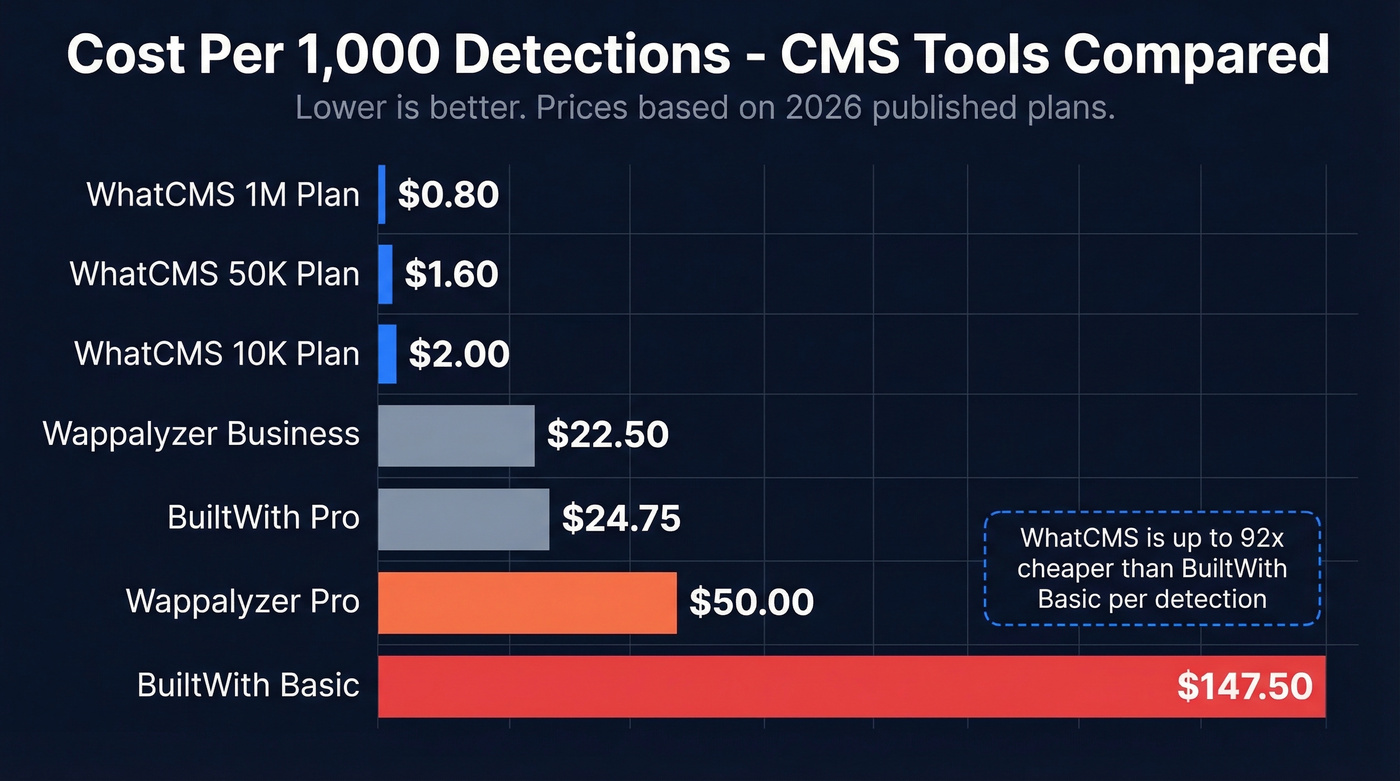
This math rarely gets published, so here it is. Upload and lookup limits aren't perfectly equivalent across tools, but the directional cost comparison tells the story clearly.
| Tool | Plan | Monthly Cost | Detections | Cost per 1K |
|---|---|---|---|---|
| WhatCMS | Free | $0 | 500 | $0 |
| WhatCMS | 10K | $20 | 10,000 | $2.00 |
| WhatCMS | 50K | $80 | 50,000 | $1.60 |
| WhatCMS | 1M | $800 | 1,000,000 | $0.80 |
| BuiltWith | Basic | $295 | 2,000 uploads | $147.50 |
| BuiltWith | Pro | $495 | 20,000 uploads | $24.75 |
| [Wappalyzer | Pro | $250](https://www.wappalyzer.com/pricing/) | 5,000 lookups | $50.00 |
| Wappalyzer | Business | $450 | 20,000 lookups | $22.50 |
At the 50K tier, WhatCMS costs $1.60 per thousand detections. BuiltWith Basic costs $147.50 per 1,000 uploads. If all you need is CMS identification at scale, the pricing gap is enormous.

WhatCMS tells you a site runs Shopify. Prospeo tells you the VP of Marketing's verified email and mobile number. Filter 300M+ profiles by technographics powered by Wappalyzer, then export contacts with 98% email accuracy - all at $0.01 per email.
Turn technology signals into booked meetings, not dead-end spreadsheets.
Pros and Cons
WhatCMS earns its place by doing one thing cheaply and reliably. The free tier alone handles most individual users and small agencies indefinitely. Three detection endpoints on every paid plan, 1,540 tracked technologies with user submissions expanding coverage, and Technology Reports for filtering companies by tech stack, hosting provider, TLD, and traffic rank - it's a surprisingly capable package for the price.
The tradeoffs are real, though.
There's no contact data whatsoever. Detection is a dead end for prospecting unless you pair it with another tool. The technology catalog is small compared to BuiltWith's 113,027 tracked technologies, and you get limited full-stack visibility versus Wappalyzer's deeper JavaScript-level detection. WhatCMS also doesn't offer native CRM integrations, so you'll typically export JSON/CSV and import elsewhere. And compared to bigger tools, WhatCMS has a limited review footprint online - you won't find hundreds of G2 reviews to cross-reference.
Here's the thing: if your average deal size is under $25k, you almost certainly don't need BuiltWith's $495/mo plan. The free tier here plus a dedicated contact data tool will get you 90% of the way there at 5% of the cost.
WhatCMS vs BuiltWith vs Wappalyzer
| Feature | WhatCMS | BuiltWith | Wappalyzer |
|---|---|---|---|
| Free tier | 500/mo | Individual lookups | 50/mo |
| Paid from | $20/mo | $295/mo | $250/mo |
| Tech tracked | 1,540 | 113,027 | Not public |
| Domains scanned | Not public | 414M | Not public |
| Contact data | No | Yes | Yes (Business+) |
| Browser extension | Chrome, Firefox | Chrome | Chrome, Firefox, Edge |
| CRM integrations | No | HubSpot, Salesforce, Dynamics 365 | HubSpot, Salesforce |
| API access | All paid tiers | API credits on Team plan | Business+ ($450/mo) |
| Best for | Budget CMS detection | Full-stack intelligence | Browser detection + leads |
BuiltWith
BuiltWith is the heavyweight. Data from 414 million domains, 113,027 technologies tracked, and history going back over four decades. The Pro plan runs $495/mo and includes unlimited technologies/keywords/retail reports, along with exports in Excel/CSV, CRM integrations for HubSpot, Salesforce, and Dynamics 365, and exportable contact names, emails, and titles with GDPR restrictions.
The tradeoffs: third-party testing puts accuracy around 80%, and users consistently describe exports as messy and hard to ingest. There's a cheaper Advanced tier at $144/year for individual detailed site lookups if you don't need bulk access - worth knowing about if you're on a tight budget but want BuiltWith's depth for occasional research.
Wappalyzer
Wappalyzer uses JavaScript-based detection through a browser extension, with an estimated 94% accuracy for JS-detected technologies. G2 reviewers rate it 4.7/5 across 55 reviews, calling the data "accurate, detailed, and instantly actionable."
The Business plan ($450/mo) bundles email verification and lead lists with 20,000 lookups. One gotcha worth flagging: API credits expire after 60 days on plan-included credits, so use them or lose them.
Quick Mentions
W3Techs publishes CMS market share data - WordPress at 42.4%, Shopify at 5.1% as of early 2026. Useful for market research, not individual site detection. Free to browse.
SimilarTech offers technology tracking with lead generation at $200/mo to $490/mo, occupying similar territory to BuiltWith at a lower price point.
Who Should Use WhatCMS?
Use WhatCMS if you need quick, cheap CMS identification and nothing else. Agencies scoping WordPress migration prospects at volume, developers who want API access without enterprise pricing gates, or anyone who needs batch detection under $100/mo.
If you're using CMS detection for outbound, pair it with a repeatable lead generation workflow and clear sales prospecting techniques so the data actually turns into meetings.
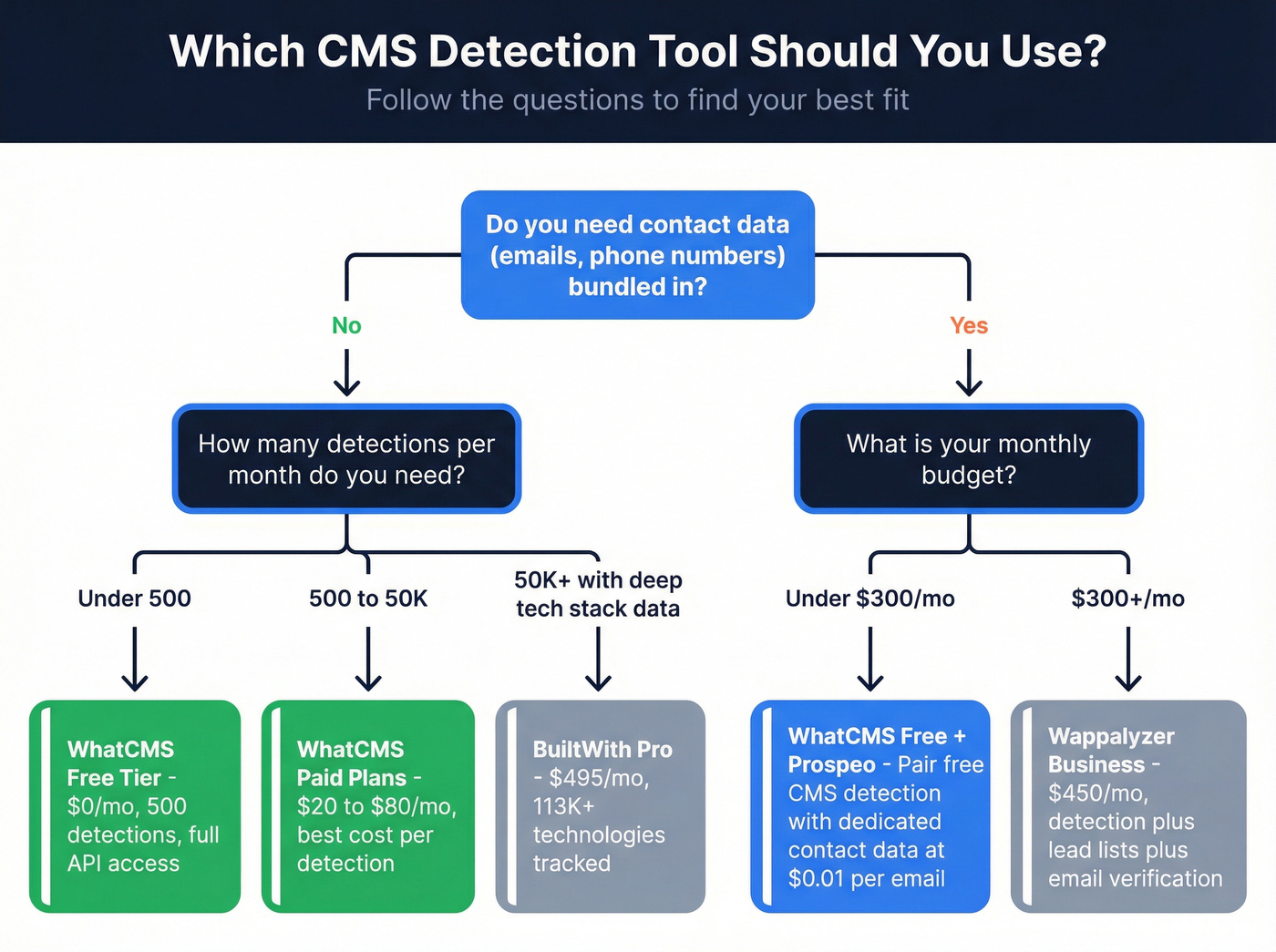
Skip WhatCMS if you need full-stack technology intelligence across hundreds of thousands of technologies - that's BuiltWith territory. Same goes if you want contact data bundled with detection; Wappalyzer Business handles that.
For teams that use WhatCMS's Technology Reports for prospecting and need to actually reach the people at those companies, pairing it with a contact data tool makes the most sense. WhatCMS tells you a site runs Shopify. A tool like Prospeo tells you the VP of Marketing's verified email and direct dial - with 98% email accuracy and a 7-day data refresh cycle, it fills the contact-data gap that every CMS detection tool leaves wide open.
Once you have the right contacts, your next bottleneck is messaging - use proven sales follow-up templates and tighten your email copywriting to lift reply rates.
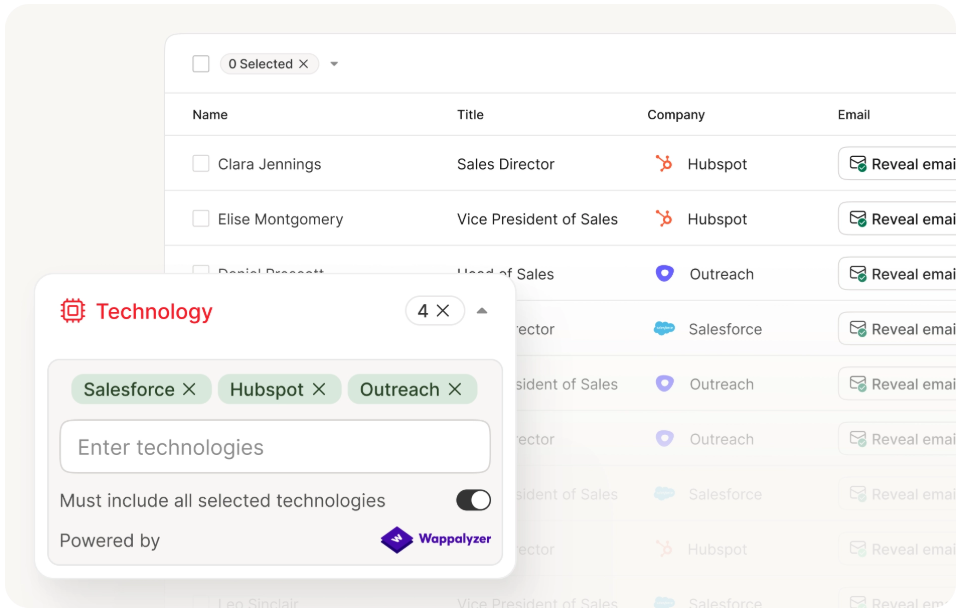
BuiltWith charges $295/mo for contact data bundled with tech detection. Prospeo gives you 30+ filters - including technographics, buyer intent, and job changes - across 300M+ profiles with a 7-day data refresh. Pair WhatCMS's free tier with Prospeo and get better data at a fraction of the cost.
Stop paying $147.50 per 1K for stale contacts when verified emails cost a penny.
FAQ
Is WhatCMS free?
Yes. The free plan includes 500 detections per month with full API access and no credit card required. For most individual users doing occasional CMS lookups, the free tier works long-term without upgrading. Paid plans start at $20/month for 10,000 detections.
How accurate is WhatCMS detection?
WhatCMS doesn't publish accuracy benchmarks. For common platforms like WordPress, Shopify, and Joomla, detection is highly reliable across all tools in this category. Accuracy drops for headless builds, custom frameworks, and heavily cached sites - and that applies equally to WhatCMS, BuiltWith, and Wappalyzer. In our testing, we've found that running a URL through two different detection tools catches edge cases that any single tool misses.
What's the best WhatCMS alternative for sales prospecting?
BuiltWith Pro ($495/mo) includes CRM integrations and exportable contact data with GDPR restrictions. Wappalyzer Business ($450/mo) bundles email verification and lead lists. For a cheaper approach, pair WhatCMS's free plan with a dedicated contact data platform to find verified emails and phone numbers for the companies you identify - the combined cost is a fraction of either alternative.