

Why Emails Bounce - and How to Stop It
You verified your list, got 99% "valid," and still watched 85% of emails bounce with "Message blocked." That's a real scenario from r/Emailmarketing - and it shows why "valid email" and "deliverable email" aren't the same thing. Send 100,000 emails with a 10% bounce rate, assume a 2% conversion rate and $75 AOV, and you've left $15,000 on the table from a single campaign.
In our experience, most bounce problems fall into two buckets. Hard bounces are bad data - invalid addresses, dead domains, disabled mailboxes. Soft bounces are temporary delivery constraints - full inboxes, throttling, greylisting, provider outages, message size limits. Authentication and reputation issues can trigger either type depending on the SMTP code.
If your bounce rate sits above 2%, you almost always have a list quality and sending-practices problem. Not a "buy another deliverability tool" problem.
What Is an Email Bounce?
An email bounce happens when the recipient's mail server rejects your message and returns it. That's it.
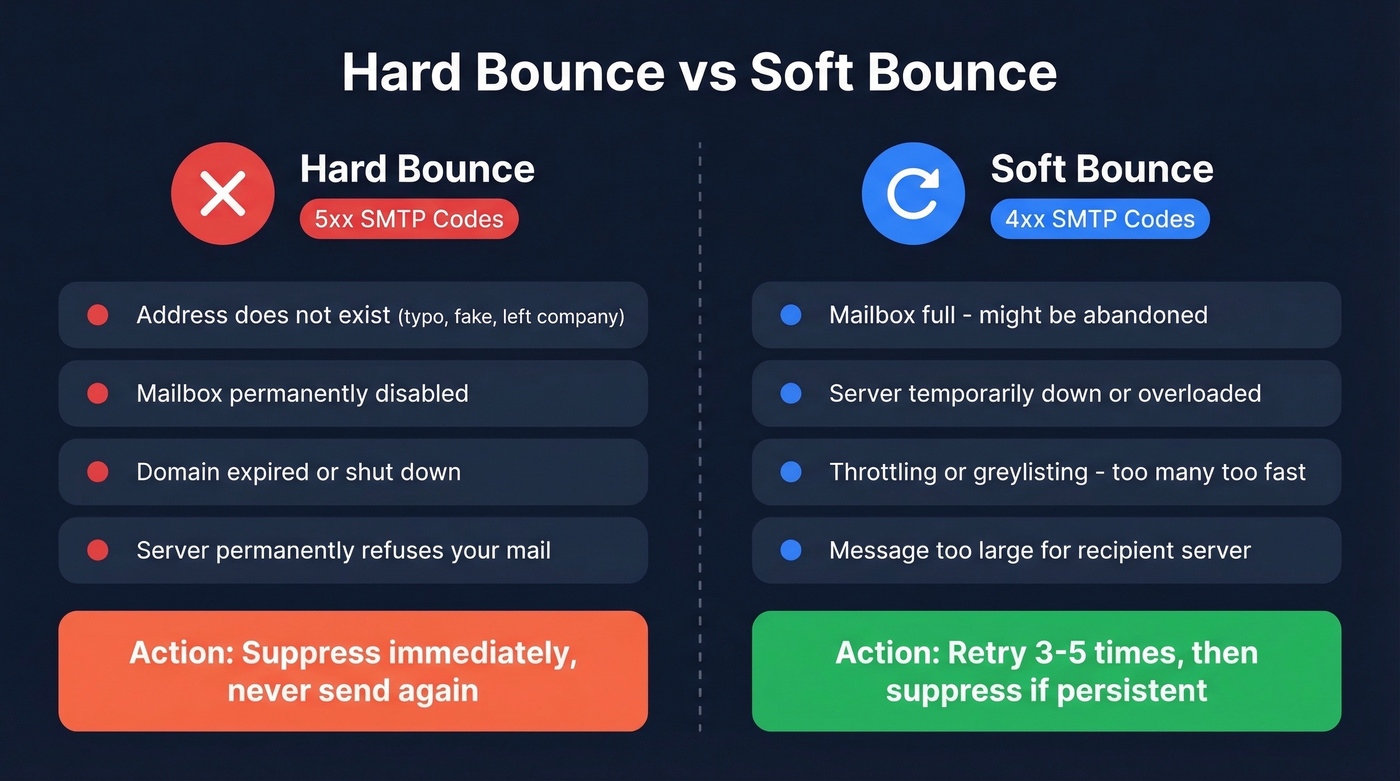
Hard bounces carry 5xx SMTP codes - permanent rejections because the address doesn't exist, the domain is dead, or the server flat-out refuses your mail. Soft bounces carry 4xx codes - temporary issues like a full mailbox, a server hiccup, or throttling that might resolve on retry. Don't confuse email bounce rate with website bounce rate in Google Analytics; they're completely different metrics.
The global average inbox placement rate is 83.5%. Roughly 1 in 6 legitimate emails never reaches the inbox.
Common Reasons Emails Bounce
Hard Bounces
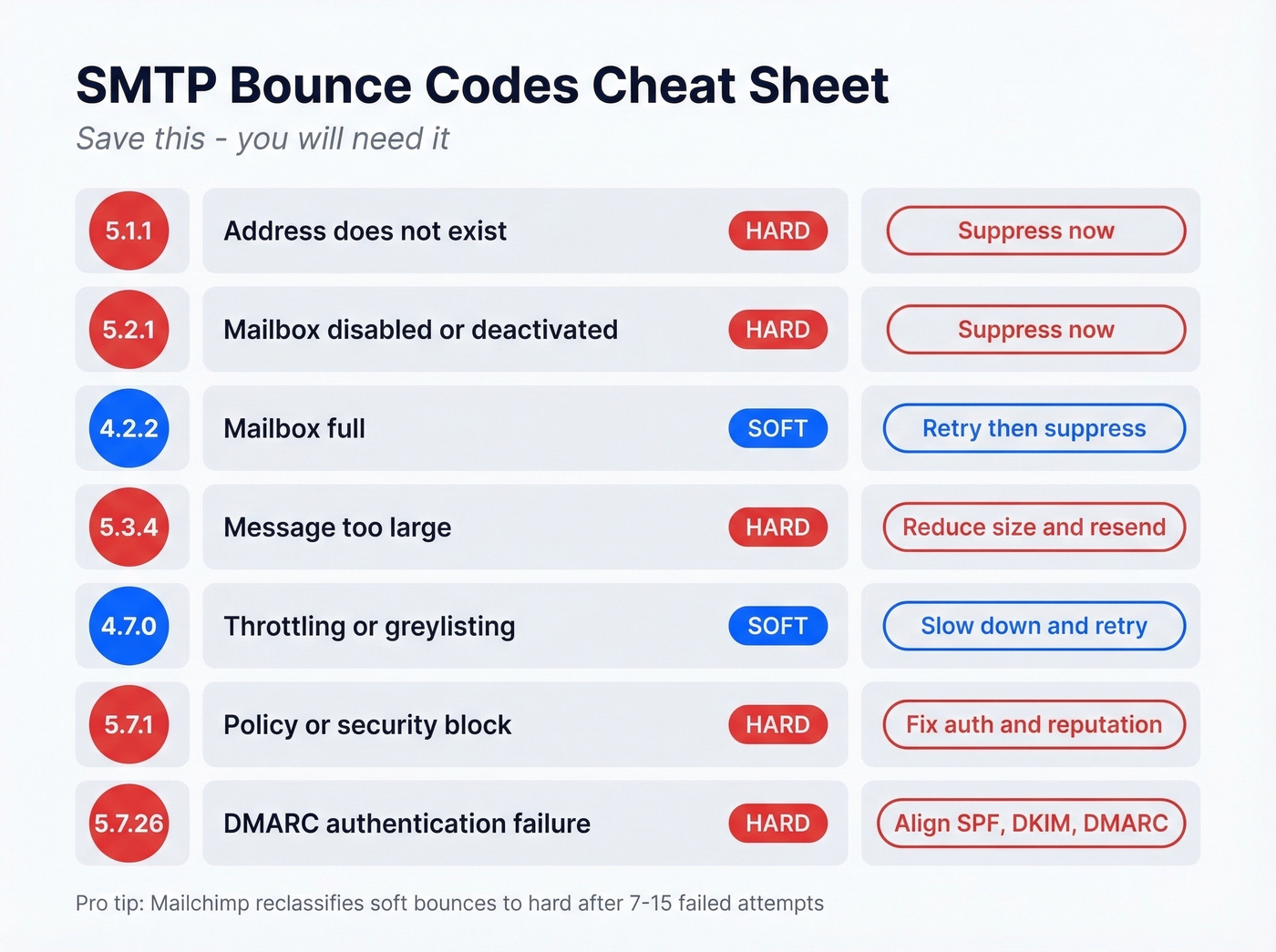
Invalid address is the most common hard bounce. The account doesn't exist - typo, fabricated address, or someone left the company. The server returns 5.1.1. Closely related: disabled mailboxes where the account existed but was deactivated (5.2.1). Both demand the same response - suppress immediately and refresh your data source.
Dead domains mean the domain expired or shut down, which makes every address on it undeliverable. Run domain-level checks during list building to catch these before they cost you.
Sometimes the address and domain are fine, but the recipient's server permanently refuses your mail based on policy, reputation, content, or authentication problems (5.7.1). Here's the thing: if you're sending from a shared IP where other senders have trashed the reputation, you'll eat those rejections too - even with clean data.
Soft Bounces
A full mailbox (4.2.2) sounds harmless, but when it persists across multiple retries it usually signals an abandoned inbox. Retry with backoff, then suppress if it keeps bouncing.
Server outages are genuinely temporary. Apple's servers, for example, sometimes return 451 4.7.1 errors at the top of the hour during volume spikes - most ESPs handle retries automatically.
Throttling and greylisting (4.7.0) happen when you send too many emails too fast to a single domain. Slow down. Space out your sequences. Problem solved.
SMTP Bounce Codes Explained
Most bounce messages look like gibberish. A real Gmail hard bounce reads: 550 5.1.1 "The email account that you tried to reach does not exist." The enhanced status code is what matters.
One detail worth knowing: the envelope sender (Return-Path) receives the bounce notification, not necessarily the header From address. That distinction is where DMARC alignment issues start.
| Code | Meaning | Type | Action |
|---|---|---|---|
| 5.1.1 | Address doesn't exist | Hard | Suppress now |
| 5.2.1 | Mailbox disabled | Hard | Suppress now |
| 4.2.2 | Mailbox full | Soft | Retry, then suppress if persistent |
| 5.3.4 | Message too large | Hard | Reduce size, resend |
| 4.7.0 | Throttling/greylisting | Soft | Slow down, retry |
| 5.7.1 | Policy/security block | Hard | Fix auth & reputation |
| 5.7.26 | DMARC failure | Hard | Align SPF/DKIM/DMARC |
Mailchimp reclassifies soft bounces to hard after 7 attempts for inactive contacts and up to 15 for contacts with previous activity. Don't assume soft bounces are harmless - they compound.

Most bounces trace back to one root cause: bad data. Prospeo's 5-step verification catches invalid addresses, spam traps, and catch-all domains before they ever hit your sending infrastructure. With 98% email accuracy and a 7-day data refresh cycle, you're not sending to people who left the company six weeks ago.
Stop diagnosing SMTP codes and start sending to verified emails.
Authentication Mandates in 2026
Gmail and Yahoo started enforcing in February 2024: anyone sending 5,000+ messages per day needs SPF, DKIM, DMARC, one-click unsubscribe, and spam complaint rates below 0.3%. Microsoft followed with similar requirements for Outlook.com effective May 2025. As of 2026, Gmail actively rejects non-compliant messages with 4xx and 5xx errors.
66% of senders use both SPF and DKIM, but only 37% enforce DMARC with reject or quarantine policies. One gotcha: SPF breaks if you exceed 10 DNS lookups, which is easy to hit with multiple sending tools. And only 12% of senders rotate their DKIM keys - do it every 6-12 months. If your bounces spiked recently and you can't figure out why, start with your authentication records.
What's a Normal Bounce Rate?
The industry-wide average hard bounce rate is 0.21%, with soft bounces averaging 0.70%. Anything above 2% total will get your ESP's attention - and not in a good way.
If you want a deeper benchmark breakdown, see our email bounce rate guide.
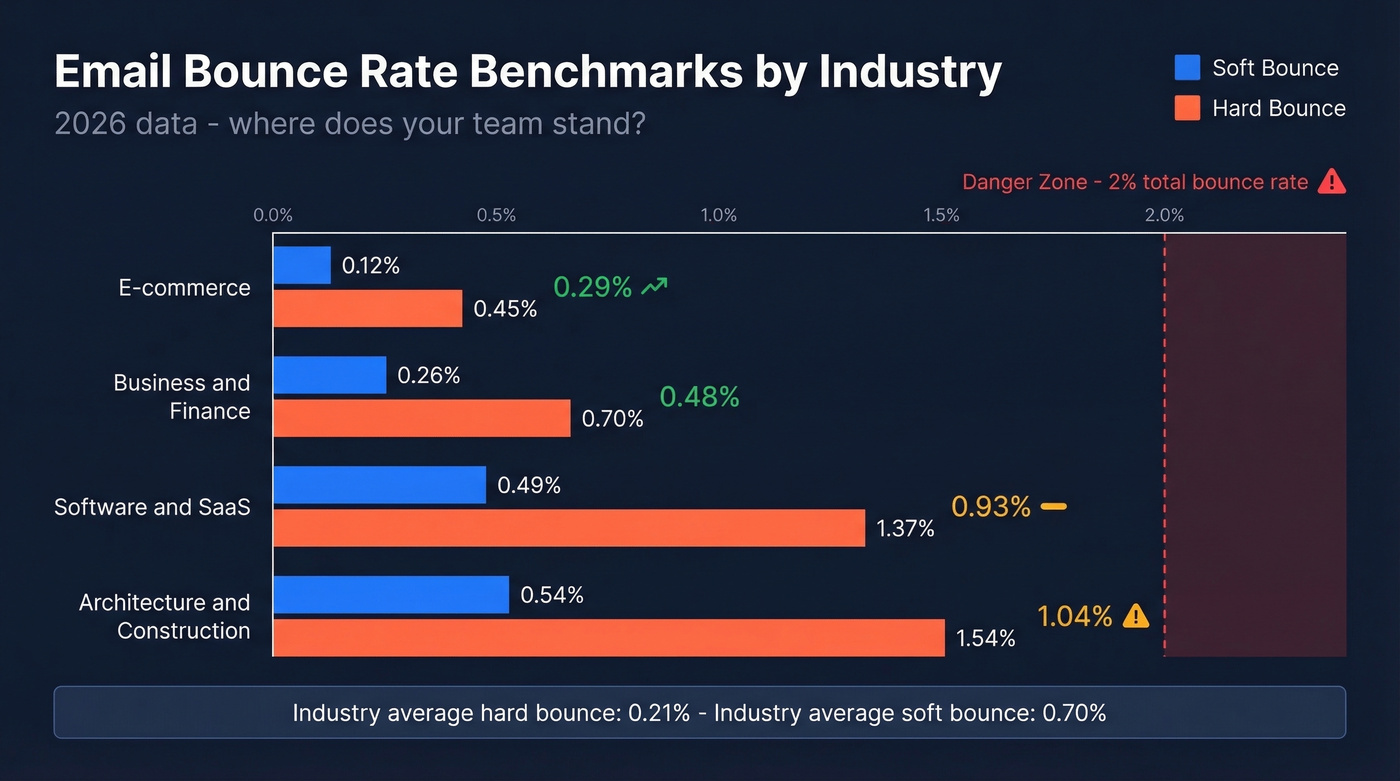
| Industry | Soft | Hard | Average |
|---|---|---|---|
| E-commerce | 0.12% | 0.45% | 0.29% |
| Business & Finance | 0.26% | 0.70% | 0.48% |
| Software/SaaS | 0.49% | 1.37% | 0.93% |
| Architecture | 0.54% | 1.54% | 1.04% |
SaaS and B2B consistently run higher because of job churn, disposable signups, and cold outreach to unverified lists. If you're in those verticals, verification isn't optional.
Let's be honest: most teams obsess over deliverability tools and warm-up sequences when their real problem is garbage data. Fix the input and the output fixes itself.
How to Stop Emails From Bouncing
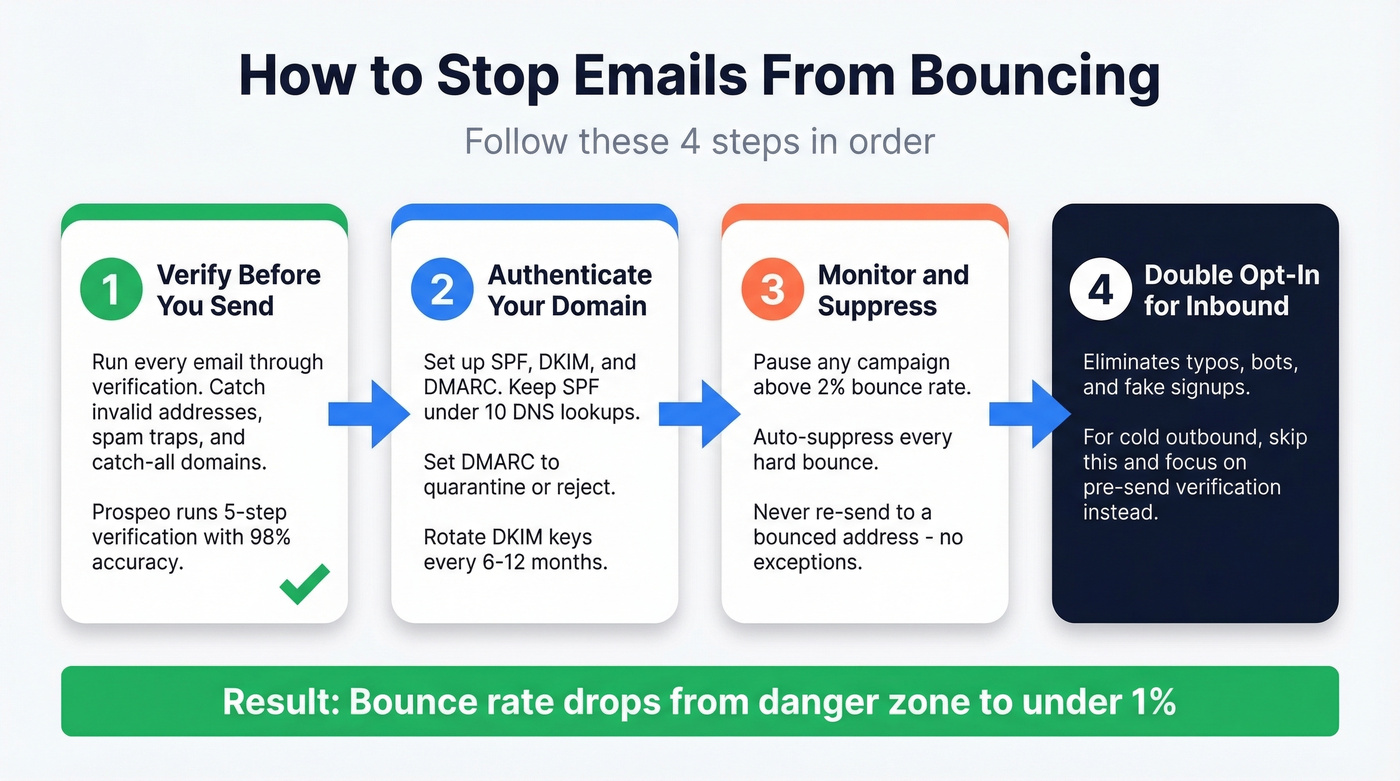
Verify Before You Send
This is the single highest-impact fix. Snyk's 50-person AE squad went from a 35-40% bounce rate to under 5% after switching to Prospeo, which runs 5-step verification with catch-all handling, spam-trap removal, and data refreshed every 7 days. At 98% email accuracy, you're eliminating the root cause - bad data - before it ever touches your sender reputation. We've seen this pattern across dozens of teams: clean the list, and bounce rates drop overnight.
If you're building lists from scratch, pair verification with a repeatable lead generation workflow so bad records don't creep back in.
Authenticate Your Domain
Set up SPF, DKIM, and DMARC. If you've already done this, audit it. Confirm SPF stays under 10 DNS lookups and DMARC is set to quarantine or reject, not just monitor. Free tools like MXToolbox make this a 10-minute check.
If you need a quick sanity check, use these SPF record examples and run a how to verify DKIM is working audit.
Monitor and Suppress Aggressively
If a campaign bounces above 2%, pause and investigate before the next send. Every hard bounce you re-send to damages your sender reputation. Automate suppression - no exceptions.
If you're seeing blocks even with clean data, focus on how to improve sender reputation and consider adding email reputation tools to your monitoring stack.
Use Double Opt-In for Inbound Lists
It adds friction, but eliminates typos, bots, and fake signups at the source. For teams running cold outbound, skip this and focus on pre-send verification instead.

You just read that SaaS and B2B teams average nearly 1% hard bounce rates - and that's the industry average, not the worst offenders. Prospeo refreshes every record every 7 days (the industry average is 6 weeks), so job changes, disabled mailboxes, and dead domains get caught before your next campaign goes out.
Clean data in, zero bounces out - starting at $0.01 per verified email.
FAQ
Why do emails bounce in outbound prospecting?
Bad addresses are the primary cause - contacts change jobs, typos slip in, and domains expire. Throttling and missing authentication (SPF, DKIM, DMARC) account for most remaining bounces. Verify every email before sending and audit your DNS records quarterly.
What's the difference between a hard and soft bounce?
Hard bounces are permanent rejections - the address doesn't exist or the server blocks you outright (5xx codes). Soft bounces are temporary - full mailbox, throttling, or server downtime (4xx codes). Suppress hard bounces immediately. Retry soft bounces 3-5 times, then suppress.
What bounce rate should trigger concern?
Anything above 2% total needs immediate attention. The industry average hard bounce rate is just 0.21%. ESPs like Mailchimp and SendGrid will throttle or suspend accounts that consistently exceed 2%, so treat that as your ceiling, not your target.
How can I reduce bounces without expensive tools?
Start with free DNS checks - verify SPF, DKIM, and DMARC are properly configured using Google's Check MX tool. Clean your list by removing addresses that haven't engaged in 90+ days. For verification, Prospeo's free tier includes 75 email verifications per month with the same 5-step process used by paying customers - enough to test your list quality before committing.