


YouCanBookMe Pricing, Reviews, Pros & Cons (2026)
You're comparing scheduling tools and every pricing page you find for YouCanBookMe shows a different number. One site says $7.20/mo, another says $10.40/mo, a third says $14. They're all technically correct - and all misleading without context.
This breakdown covers YouCanBookMe's actual pricing tiers, what 2,500+ real users think of it, and where it falls short so you can decide whether it deserves your money.
30-Second Verdict
Rating: 4.6/5 across 2,500+ reviews (G2, GetApp, Trustpilot)
Best for: Solopreneurs and small teams who want deeply branded booking pages with Stripe payments built in.
Pricing: $9-$18/mo depending on plan, with discounts for annual and 2-year billing.
One-line take: The Individual plan at $9/mo is overpriced for what you get - the Professional plan at $13/mo is the real product. If you need 100+ integrations or a mobile app, Calendly's the better pick.
Pricing Breakdown
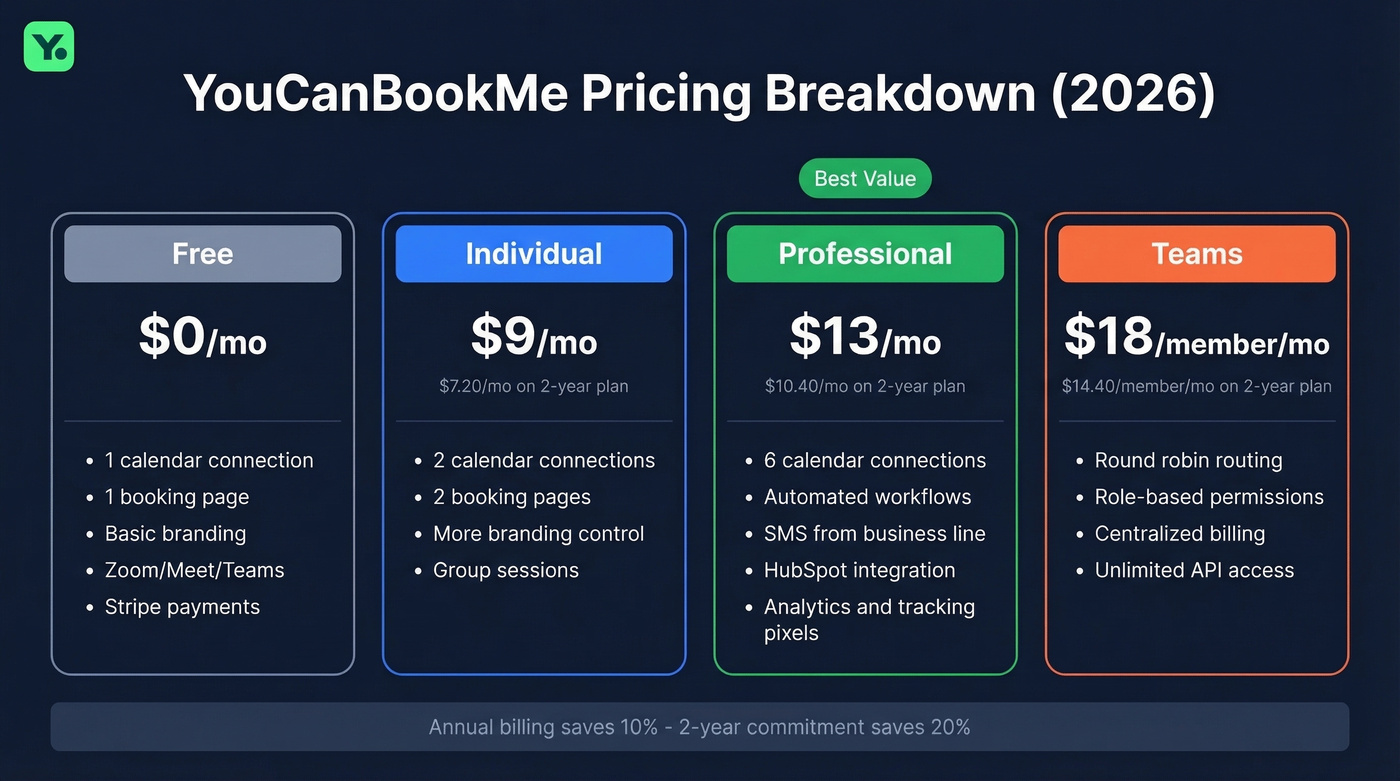
Third-party sites show prices like $7.20/mo or $10.40/mo because they're quoting the 2-year prepaid rate as if it's the standard price. You'll also see "per calendar" pricing in some guides, but YouCanBookMe's official pricing is per plan (the Teams plan is priced per member). Here's what it actually costs, straight from their support docs:
| Plan | Monthly | Annual | 2-Year |
|---|---|---|---|
| Free | $0 | $0 | $0 |
| Individual | $9/mo | $8.10/mo | $7.20/mo |
| Professional | $13/mo | $11.70/mo | $10.40/mo |
| Teams | $18/member/mo | $16.20/member/mo | $14.40/member/mo |
Annual billing saves 10%. A 2-year commitment saves 20%. Those are decent discounts, but you're locking in for two years with a tool that's been raising prices - something GetApp's pricing sentiment summary flags as a recurring complaint.
Free gets you 1 calendar connection, 1 booking page, basic branding (logo/text), and core scheduling. Video meeting integrations (Zoom/Microsoft Teams/Google Meet) and payments via Stripe are included. Functional, but barely.
Individual ($9/mo) bumps you to 2 calendar connections and 2 booking pages, plus more branding control and features like group sessions.
The jump to Professional ($13/mo) is where the real value starts: 6 calendar connections, automated workflows (reminders, follow-ups, no-show management), SMS from a dedicated business line, direct HubSpot integration, analytics, and tracking pixels (see our guide to email tracking pixels). One note - the pricing page lists 10 booking pages for Professional, but the Help Center says 6. Check your account dashboard for the current limit.
Teams ($18/member/mo) adds round robin, role-based permissions, centralized billing, and unlimited API access.
YouCanBookMe was acquired by Capacity in February 2025. Over a year post-acquisition, the product remains largely unchanged, but corporate acquisitions tend to bring pricing adjustments eventually. Worth watching. The platform holds ISO 27001 and SOC 2 certifications and is GDPR compliant - relevant if you're handling client data through booking forms.
What 2,500+ Reviews Say
What users love
Across reviews on G2 (4.7/5), GetApp (4.6/5), and Trustpilot (4.6/5), a few themes come up consistently.

The branding customization is deeper than any competitor at this price point. Logos, colors, backgrounds, custom domains, branded notifications - if your booking page is a client-facing touchpoint, this matters (and it ties directly into B2B brand positioning). In our testing, YCBM's booking page editor gives you noticeably more control than Calendly's, and setup is genuinely fast. Reviewers consistently mention going from signup to live booking page in under 30 minutes.
The workflow engine on Professional handles confirmations, reminders, and follow-ups without you touching anything. Multiple reviewers credit this for cutting no-show rates significantly. Calendar sync with Google, Outlook, and iCloud works reliably and prevents double bookings. Stripe payments at booking - credit/debit, Apple Pay, Google Pay, plus promo codes on Professional - eliminate the "chase the invoice" problem for anyone charging for sessions.
Customer support scores 4.5/5 on GetApp. TrustRadius reviews include use cases like multi-timezone e-learning programs, warehouse pickup scheduling, and campus reservation systems, consistently highlighting booking flexibility for specialized operations. The tentative-event handling is another nice touch many competitors skip: it can respect tentative calendar events when calculating availability.
What frustrates users
The free plan keeps getting gutted. Features that were previously free have moved behind paywalls. Trustpilot reviewers are particularly vocal about this - it feels like a bait-and-switch to users who started on the free tier years ago.
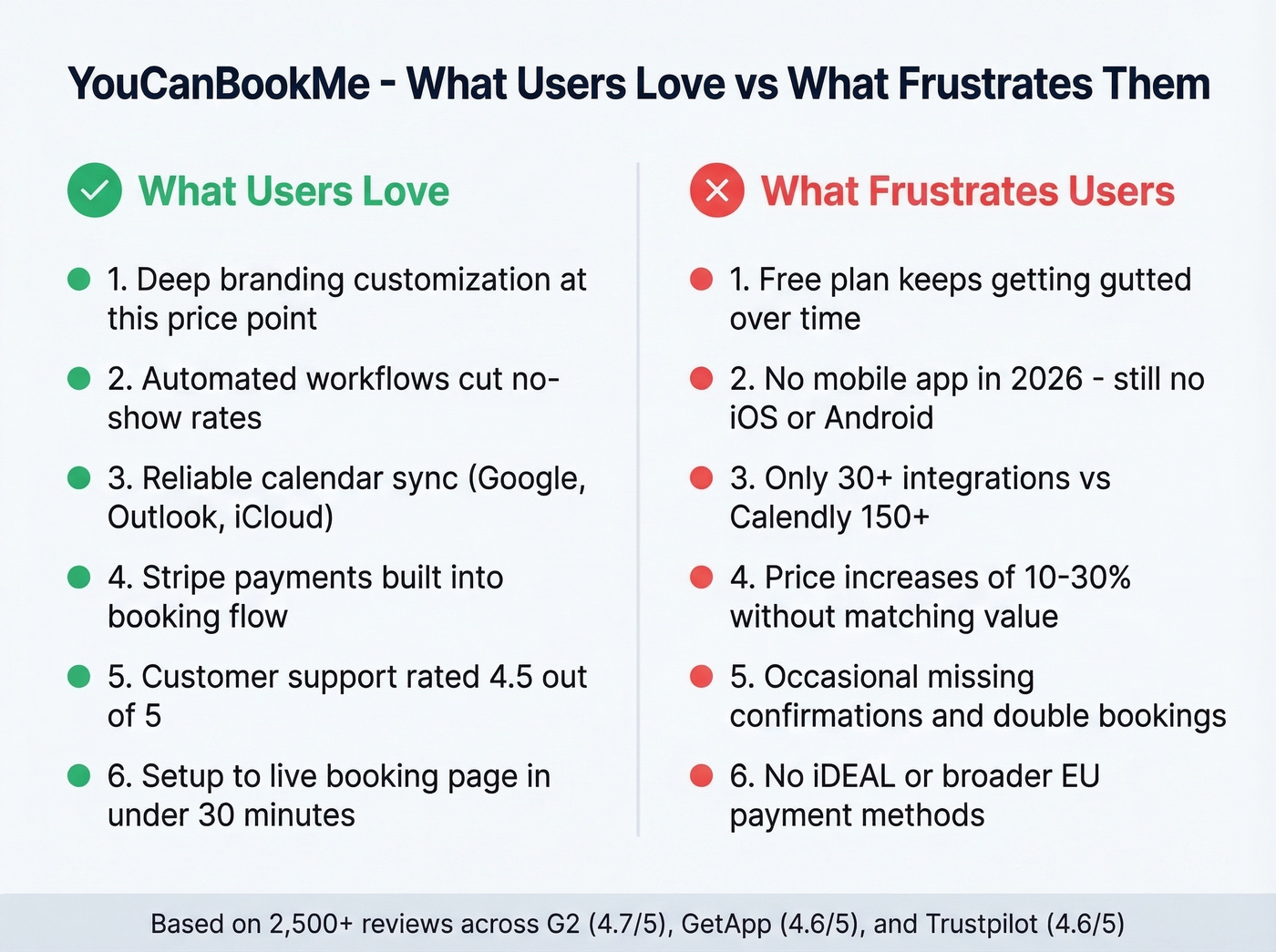
No mobile app. It's 2026 and there's still no native iOS or Android app. Users are posting forum threads about it. The web interface works on mobile browsers, but that's not the same thing.
Smaller integration ecosystem. Around 30+ integrations versus Calendly's 150+. If your stack includes anything beyond the usual suspects - HubSpot, Zoom, Zapier - you'll feel the gap quickly.
Price increases without proportional value. Long-time users describe increases of roughly 10-30% over time without enough new features to justify them.
Occasional reliability hiccups. Trustpilot reviews mention missing confirmation emails and rare double bookings. Not widespread, but when your scheduling tool double-books a client, you remember it. One reviewer also notes YCBM branding can still appear on certain paid plans - check your plan's white-label options before assuming full removal.
No iDEAL or broader EU payment methods. If you're booking paid sessions with European clients, Stripe-only means you're missing a significant chunk of the market. Forum threads have been asking for iDEAL support for years.

A booking page only works when you have the right people to send it to. Prospeo gives you 300M+ professional profiles with 98% email accuracy and 125M+ verified mobiles - so every scheduling link you send lands with a real decision-maker, not a dead inbox.
Stop optimizing your booking page for leads you don't have yet.
YouCanBookMe vs. Calendly
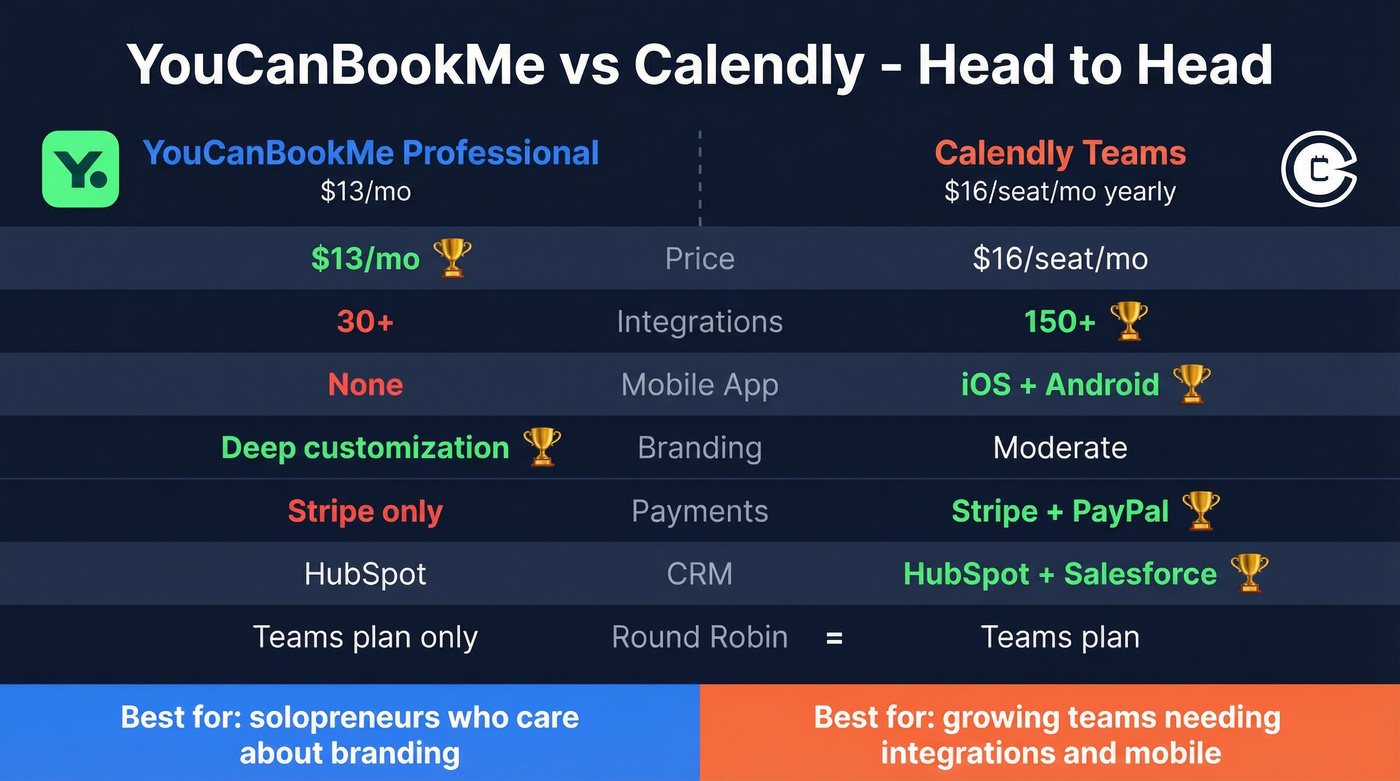
This is the comparison most buyers are actually making. Let's break it down.
| Feature | YCBM Professional | Calendly Teams | Winner |
|---|---|---|---|
| Price | $13/mo | $16/seat/mo (yearly) | YCBM |
| Integrations | ~30+ | 150+ | Calendly |
| Mobile app | No | iOS + Android | Calendly |
| Branding | Deep customization | Moderate | YCBM |
| Payments | Stripe | Stripe + PayPal | Calendly |
| CRM | HubSpot | HubSpot, Salesforce | Calendly |
| Round robin | Teams plan only | Teams plan | Tie |
For solopreneurs, YCBM Individual at $9/mo is cheaper than Calendly Standard at $10/seat/mo on annual billing - a small savings, but the branding gap is significant. If your booking page is a core part of your brand experience (coaches, consultants, agencies), that customization depth is genuinely valuable.
Calendly wins on everything else. For most growing teams, Calendly's broader integration library ends up being the deciding factor. Need Salesforce, a mobile app, or a team larger than five? Calendly Teams at $16/seat/mo yearly is $3/seat/mo more than YCBM Professional - and it's usually worth it.
Here's the thing, though: YouCanBookMe is the better product for solopreneurs who care about presentation. But most buyers don't actually need the branding depth they think they do. If you're spending more than 10 minutes customizing your booking page, you're probably optimizing the wrong part of your funnel. The bottleneck is almost never the booking page itself - it's getting prospects there in the first place (see lead generation workflow).
Who Should Use YouCanBookMe
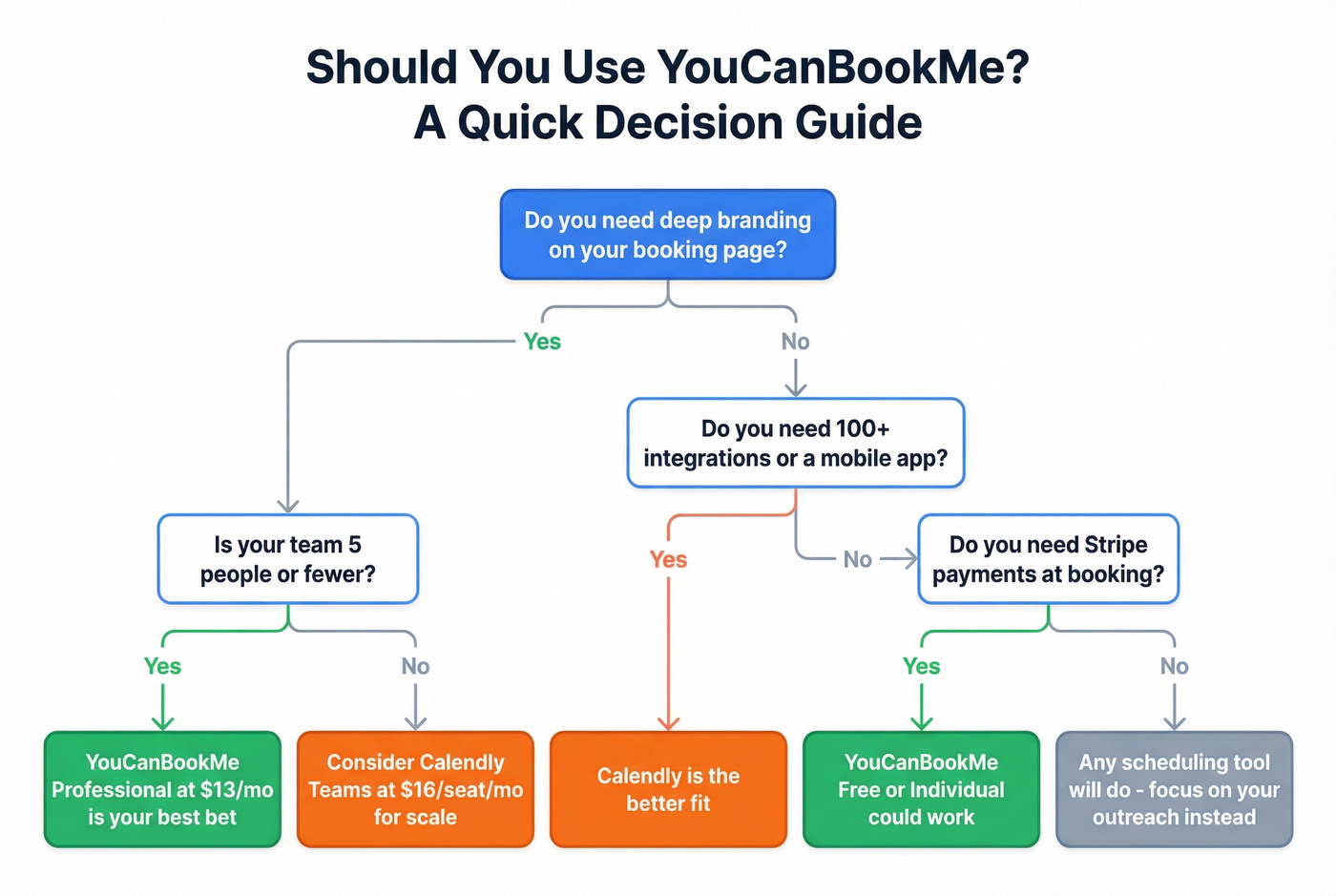
Best for:
- Solo consultants, coaches, and educators who want branded booking pages that look like their own product
- Small teams of 2-5 people who need Stripe payments and automated reminders
- Specialized operations like campus reservations, warehouse scheduling, or multi-timezone e-learning programs
Skip it if:
- You need a mobile app for on-the-go scheduling management
- Your team is 5+ and needs deep CRM routing or 100+ integrations
- You're in the EU and need iDEAL or other local payment methods

A beautiful booking page doesn't help if prospects never see it. Before optimizing your scheduling tool, make sure you've got verified contact data feeding your outreach (use a simple Ideal Customer Profile first). We've seen teams obsess over their booking page design while their outreach emails bounce at 30%+ - that's the real problem (benchmarks and fixes in our email bounce rate guide). Prospeo finds verified emails at 98% accuracy so your booking link actually reaches the right inbox, and the free tier includes 75 verified emails per month to test the workflow.
What's New (2025-2026)
YouCanBookMe has been shipping steadily since the Capacity acquisition. The biggest addition is YCBM Polls, launched in September 2025, which brings group scheduling polls to find the best meeting time - a feature Calendly has had for a while, but welcome nonetheless.
In July 2025, they rolled out enhanced messaging with SMS sent from a dedicated business line rather than a generic short code, available on Professional and above. On the branding front, February 2025 brought duotone and dark themes for booking pages - a small but appreciated update for branding-focused users.
The same month introduced blocking questions, conditional logic that filters out unqualified bookings before they hit your calendar. This is genuinely useful if you're getting a lot of tire-kickers booking discovery calls (pair it with stronger discovery questions). The YCBM community forum remains active, with users regularly requesting features and sharing workarounds for integration gaps.
Final Verdict
YouCanBookMe earns its 4.6/5 rating across 2,500+ reviews. The Professional plan at $13/mo is the sweet spot - it's where you get workflows, SMS, analytics, and HubSpot integration. The free plan is too limited for real use, and the Teams plan only makes sense if you need round robin and role-based access.
If branding control is your top priority and your integration needs are modest, YouCanBookMe is a strong pick. If you need a mobile app, Salesforce integration, or a deep integration ecosystem, Calendly at $16/seat/mo yearly is worth the premium. Weigh the full picture of pricing, reviews, and pros and cons against your actual needs - this tool carves out a clear niche, just make sure that niche matches yours.
You're comparing $9/mo vs $13/mo scheduling plans - but the real cost is sending booking links to prospects who never open them. Prospeo's 7-day data refresh and 5-step email verification mean your outreach hits real buyers, not outdated contacts. At $0.01 per email, filling your calendar costs less than your YCBM subscription.
Fill your calendar with verified prospects for a penny each.
FAQ
Is YouCanBookMe really free?
The free plan exists but caps you at 1 calendar connection and 1 booking page with no workflows, SMS, or analytics. Features that were previously free have migrated to paid tiers over time. For anything beyond basic testing, jump straight to Professional at $13/mo - the Individual plan at $9/mo lacks too many core features to justify the spend.
Is YouCanBookMe better than Calendly?
YouCanBookMe offers deeper branding customization and lower pricing for solo users ($9/mo vs $10/mo). Calendly wins on integrations (150+ vs ~30+), has a mobile app, and scales better for larger teams. For teams over five, Calendly is the more practical choice. For a solo consultant who wants pixel-perfect booking pages, YCBM is the better tool.
How much does YouCanBookMe cost per year?
On annual billing: Individual runs $97.20/year, Professional is $140.40/year, and Teams is $194.40/member/year. The 2-year prepaid option drops those further - $86.40, $124.80, and $172.80 respectively - but that's a long commitment for a scheduling tool that's been raising prices.
How do I get more bookings from my scheduling page?
The scheduling page itself rarely limits bookings - the bottleneck is getting prospects to visit it. Use verified contact data to make sure your outreach actually lands. Prospeo's email finder delivers 98% accuracy across 143M+ verified addresses, and the free tier (75 emails/month) lets you test the full prospecting-to-booking workflow without upfront cost. Try it free here.