

The 14-Day Cold Email Ramp Plan: Exactly What to Do Every Single Day
It's Monday morning. You've got five fresh inboxes, a verified list, and a quota that started yesterday. The temptation is to load 500 contacts into a sequence and hit send. Don't. That's how domains die before they ever build reputation.
A 14-day cold email ramp plan exists because inbox providers scrutinize your first two weeks more closely than any period after. 83.1% inbox placement is the benchmark for properly authenticated, warmed-up domains - meaning roughly 1 in 6 emails miss the inbox even when everything goes right. Most ramp guides give you vague week-based ranges. This one gives you the exact number to send every single day.
What You Need Before Ramping
This plan covers a 7-day pre-ramp infrastructure checklist, then 14 days of graduated sending. Three things determine whether it works: clean DNS, verified data, and patience.
Jump straight to the Day-by-Day Table if you want the calendar.
Your minimum tool stack: a warmup tool like Instantly or MailReach, a sending platform, and email verification. For verification, we use Prospeo - 98% email accuracy with 5-step verification that catches the spam traps and honeypots that kill new domains.
Pre-Ramp Phase (Days -7 to 0)
Everything that happens before Day 1 determines whether your ramp succeeds or stalls. Run through every item here:
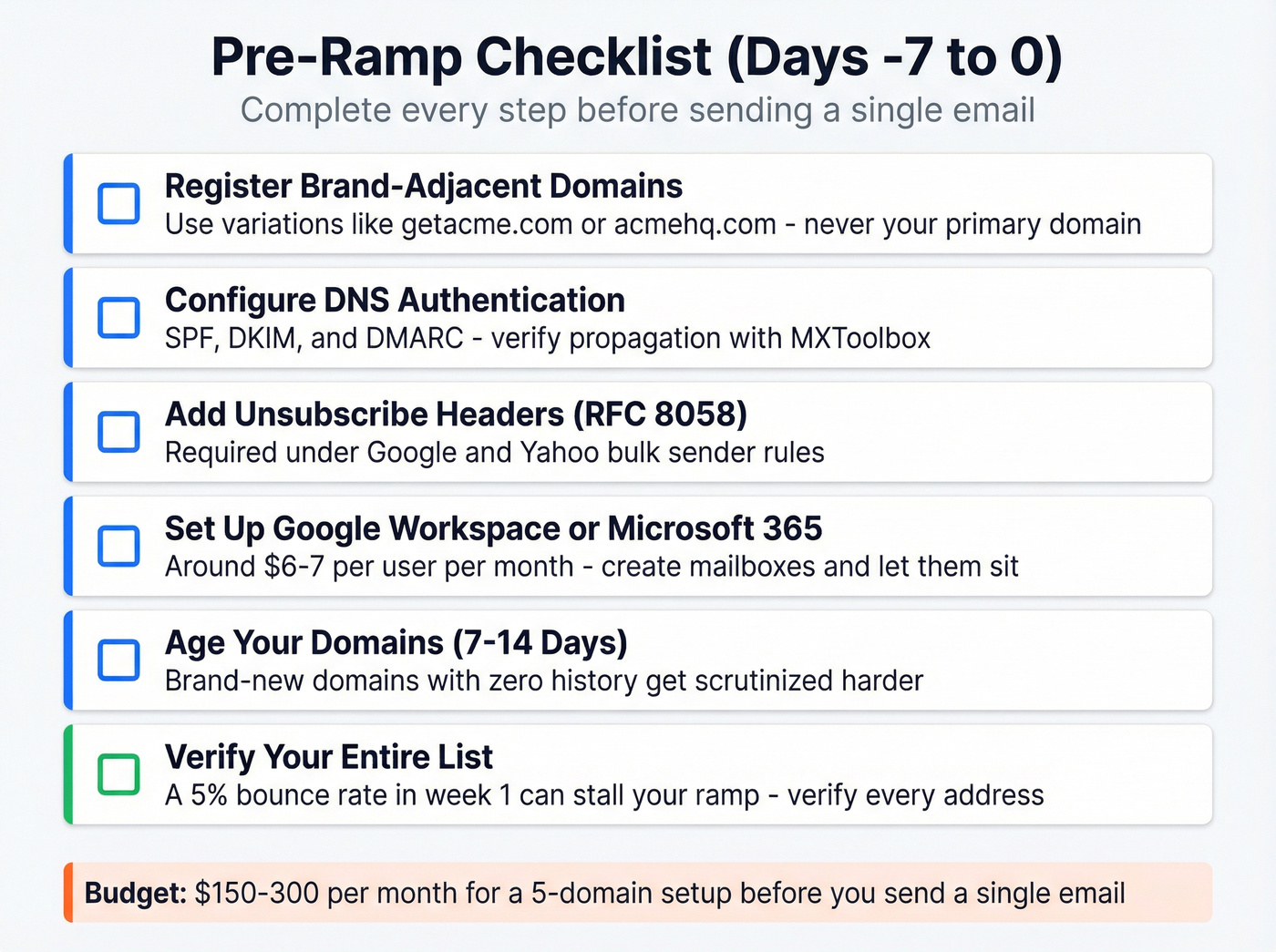
- Register brand-adjacent domains. Not your primary domain - ever. Use variations like
getacme.comoracmehq.com. Prefer .com. Set up 301 redirects to your main site for credibility. - Configure DNS authentication. SPF, DKIM, and DMARC are non-negotiable. If you skip this, nothing else matters. Verify propagation with MXToolbox.
- Add List-Unsubscribe and List-Unsubscribe-Post headers (RFC 8058). Required under Google and Yahoo bulk sender rules. Most sending platforms handle this automatically, but verify it's active before Day 1.
- Set up Google Workspace or Microsoft 365. Around $6-7/user/month. Create your sending mailboxes and let them sit.
- Age your domains. Minimum 7 days before sending anything. 14 days is better. Brand-new domains with zero history get scrutinized harder.
- Build and verify your list. This is where most ramps silently fail. A 5% bounce rate in week 1 can stall your ramp fast.
Verify your entire list before Day 1. Every bounce during ramp damages domain reputation disproportionately because you have no positive sending history to absorb the hit. Prospeo's 5-step verification catches invalid emails, spam traps, and honeypots - the edge cases that kill new domains. With a 7-day data refresh cycle, your list stays current through the entire ramp. Stack Optimize used Prospeo for verification and maintained 94%+ deliverability and zero domain flags across all client accounts.

Budget reality check: expect $150-300/month for a 5-domain setup before you send a single email. That covers Workspace accounts, warmup tools, and verification. Cheap insurance against burning domains.
The 14-Day Cold Email Ramp: Day by Day
Here's the thing about most "ramp plans" online - they give you week-based ranges. That's not specific enough when you're staring at a fresh inbox on Day 4 wondering if you should send 15 or 25 emails. We've synthesized guidance from Instantly, EmailWarmup, and Topo into a single day-by-day calendar.
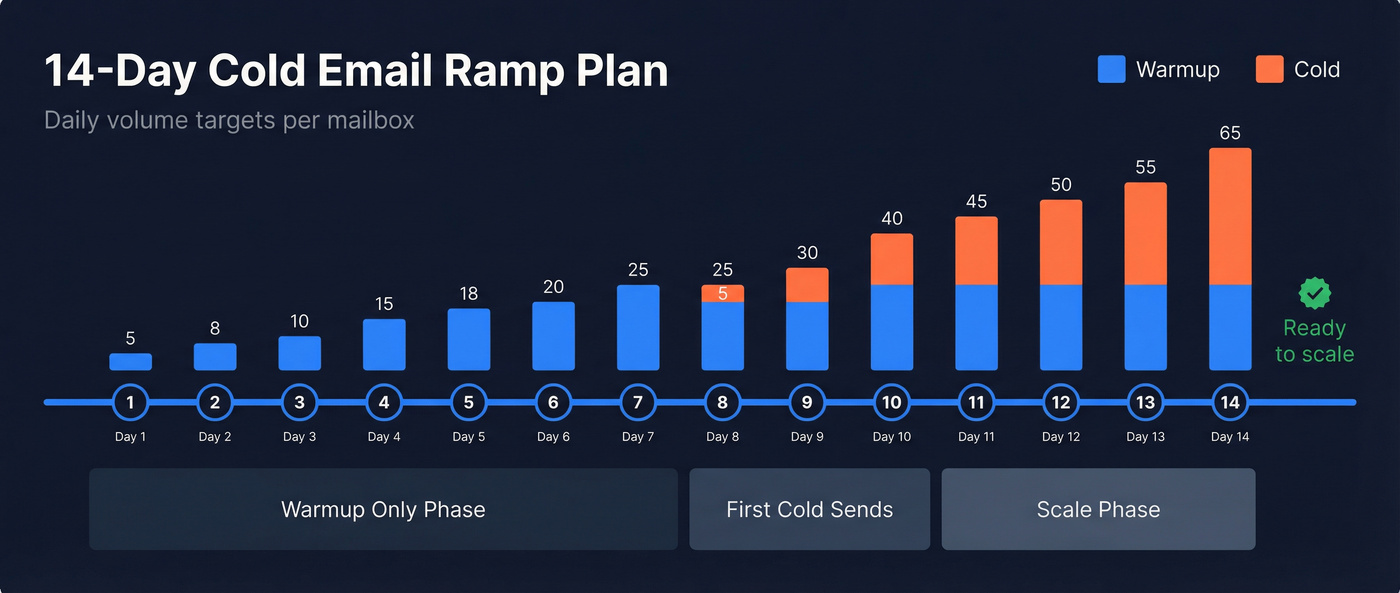
| Day | Warmup | Cold | Action Items | Key Metric |
|---|---|---|---|---|
| 1 | 5 | 0 | Confirm DNS authentication propagation, enable warmup tool | Bounces: 0% |
| 2 | 8 | 0 | Monitor first warmup opens | Open rate tracking |
| 3 | 10 | 0 | Check Gmail Postmaster for flags | Open rate 40%+ |
| 4 | 15 | 0 | Set up custom tracking domain (CNAME) | Bounce rate <2% |
| 5 | 18 | 0 | Verify CNAME confirmed, check blacklists | No spam complaints |
| 6 | 20 | 0 | Review warmup engagement trends | Open rate 40%+ |
| 7 | 25 | 0 | Final pre-cold audit: DNS, blacklists, list | All green to proceed |
| 8 | 20 | 5 | First cold sends - most verified segment only | Bounce <2% |
| 9 | 20 | 10 | Monitor bounce rate obsessively | Open rate 35%+ |
| 10 | 25 | 15 | Run inbox placement test (mail-tester.com) | Placement ≥80% |
| 11 | 25 | 20 | A/B test subject lines on cold sends | Reply rate tracking |
| 12 | 25 | 25 | Add first follow-ups (≥3 days after initial) | Bounce still <2% |
| 13 | 25 | 30 | Review reply quality, adjust targeting | Reply rate ≥3% |
| 14 | 25 | 40 | Full ramp assessment - ready to scale? | Placement ≥80% |
When you introduce cold sends, prioritize Tuesday through Wednesday - Instantly's 2026 data shows these are peak reply days.
Randomize your volume. Sending exactly 25 emails every day at the same time looks automated to inbox providers. Vary by ±10-15% and shift send times by 30-60 minutes daily. Perfectly consistent patterns are a spam signal, not a professionalism signal.
Three Rules That Aren't Optional
Weekend sends. Reduce volume 50-70% on Saturday and Sunday. Don't stop entirely - that creates unnatural sending patterns. Consistency beats volume.
Follow-up cadence. Max 3 touches per prospect. First follow-up at least 3 days after the initial email. Second follow-up 6-7 days after the first. After 3 emails with no response, pause that prospect for 2-3 months.
The rolling 24-hour window. Google Workspace doesn't reset at midnight. Each email's "slot" frees up exactly 24 hours after it was sent. If you sent 25 emails at 2pm yesterday, those slots open at 2pm today. Plan accordingly.
Google Workspace vs Microsoft 365
| Google Workspace | Microsoft 365 | |
|---|---|---|
| Technical limit | 2,000/day | 10,000/day |
| Safe cold limit | 100-150/day | 100-150/day |
| Reset mechanic | Rolling 24-hour window | Per-minute (30/min) |
| Price | ~$6-7/user/month | ~$6/user/month |
For cold outreach, treat them the same: stay under 100/day/mailbox on either and ramp slowly. The provider debate is a distraction - pick whichever your team already uses and move on.

Your ramp plan is only as strong as your list. A single 3%+ bounce rate in week 1 can kill domain reputation before it even forms. Prospeo's 5-step verification catches spam traps, honeypots, and invalid emails - the silent killers of new domains. At 98% accuracy with a 7-day data refresh, your list stays clean through every day of your ramp.
Don't start Day 1 with data that expires by Day 7.
Daily Monitoring Dashboard
During ramp, check these metrics every single day. Not weekly. Daily.
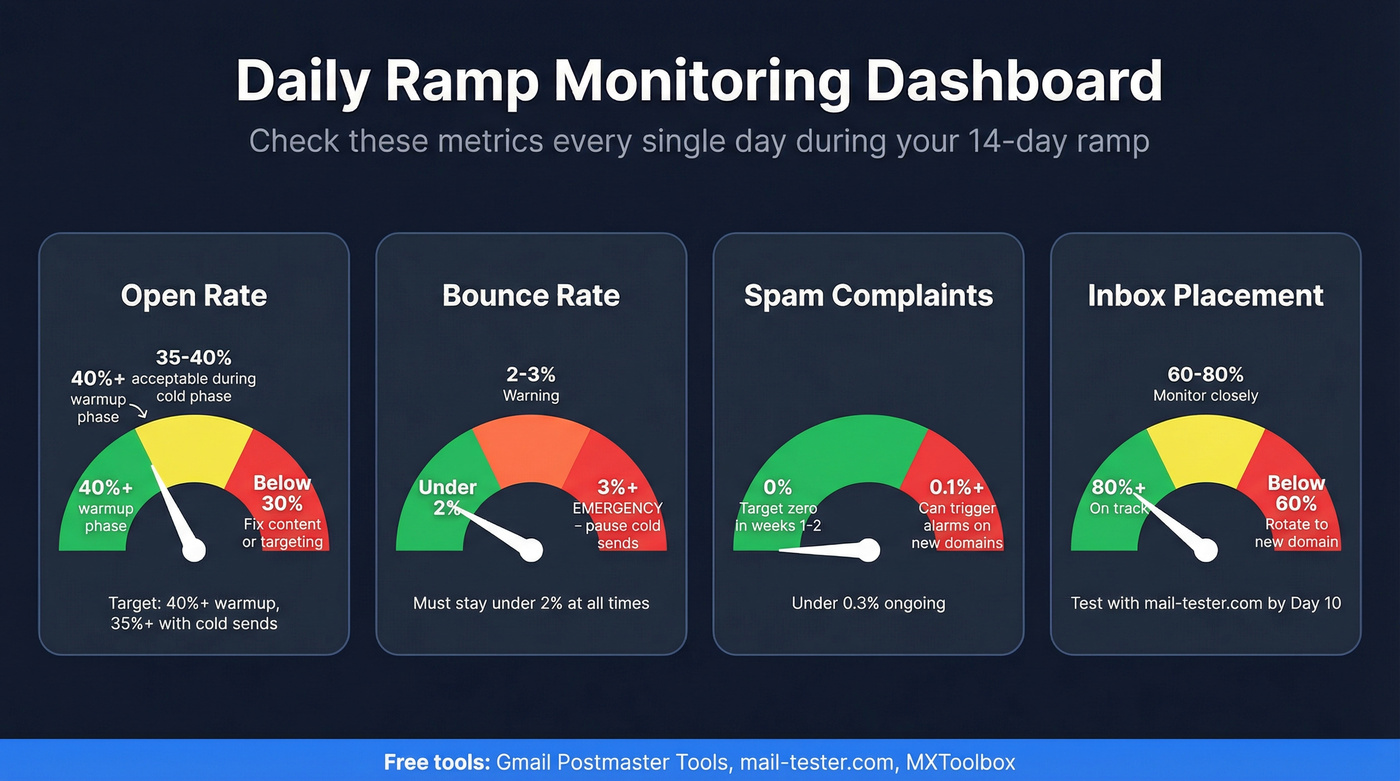
Open rate should hold at 40%+ during the warmup-only phase and 35%+ once cold sends begin. If it drops below 30%, your content or targeting needs work - not your infrastructure.
Bounce rate must stay under 2%. Above 3% is an emergency. Pause cold sends immediately and re-verify your list. During ramp, you have no positive sending history to absorb the hit.
Spam complaints should be zero in weeks 1-2 and under 0.3% ongoing. A single complaint at 0.1% can trigger alarms with inbox providers when your domain has no established reputation. That's not an exaggeration - we've seen it happen.
Inbox placement should reach ≥80% by Day 10+. Test with mail-tester.com.
Reply rate matters from Day 8 onward. The average cold email reply rate is 3.43%, with top quartile campaigns hitting 5.5%+.
Free tools that handle all of this: Gmail Postmaster Tools for domain reputation, mail-tester.com for inbox placement scoring, MXToolbox for blacklist checks. You don't need to pay for monitoring during ramp.
Five Ramp Killers
1. Skipping DNS authentication. SPF, DKIM, and DMARC aren't suggestions. They're the minimum bar for inbox providers to take your domain seriously. Miss one and your warmup is wasted effort.
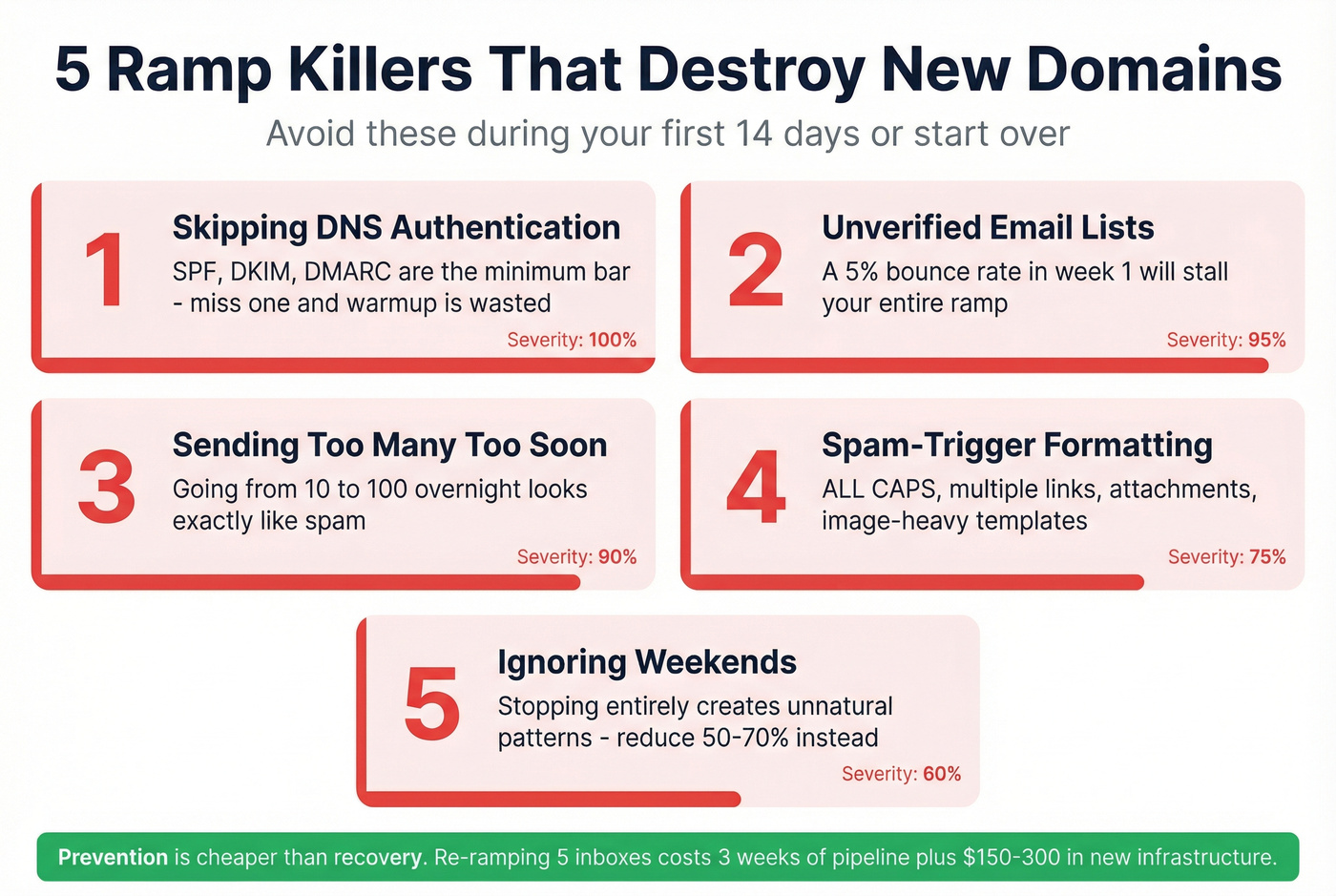
2. Unverified lists. A 5% bounce rate in week 1 will stall your ramp. Verify every single address before Day 1. No exceptions.
3. Sending too many too soon. Going from 10 to 100 emails overnight looks exactly like spam to Google and Microsoft. The graduated schedule above exists for a reason - follow it.
4. Spam-trigger formatting. ALL CAPS subject lines, multiple links, attachments, image-heavy templates - all of these scream "marketing blast" to spam filters. Keep emails plain text, under 80 words.
5. Ignoring weekends. Stopping entirely on Saturday and Sunday creates an unnatural sending pattern. Reduce volume 50-70%, but keep the signal alive.
When the Ramp Goes Wrong
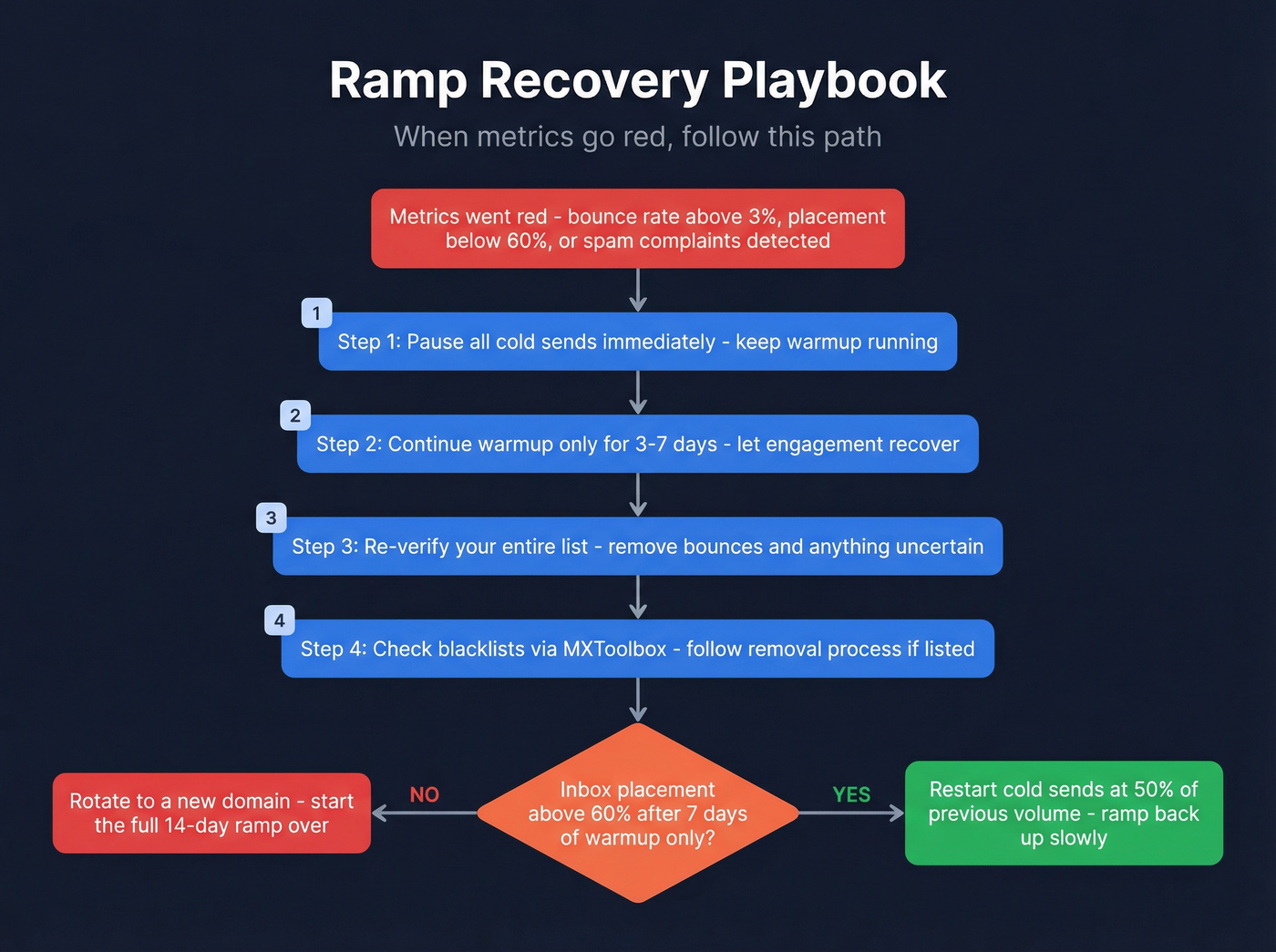
Recovery during ramp is possible. Recovery after your domain is blacklisted is slow and painful.
Look, if your deal sizes sit below five figures, you probably can't afford to lose a domain to bad data. The cost of re-ramping five inboxes - three weeks of lost pipeline plus $150-300 in new infrastructure - dwarfs the cost of verifying your list properly the first time. The consensus on r/coldemail backs this up: most ramp failures trace back to list quality, not strategy.
The recovery playbook:
- Pause all cold sends immediately. Keep warmup running.
- Continue warmup-only for 3-7 days. Let engagement metrics recover.
- Re-verify your entire list. Remove any address that bounced, plus anything you're not 100% confident about.
- Check blacklists via MXToolbox. If you're listed, follow the removal process for each blacklist individually.
- When restarting, cut volume by 50% from where you paused. Ramp back up slowly.
- If inbox placement stays below 60% after 7 days of warmup-only, rotate to a new domain. Start over.
Tools for Your Ramp Stack
Warmup tools range from budget to premium. Warmup Inbox at $15/inbox gets the job done without frills. MailReach at $25/inbox offers strong monitoring and inbox placement testing. Lemwarm at $29/inbox is solid if you're already on Lemlist. Warmy.io at $49/inbox is the premium option with more features than most ramps need. Built-in warmup from Instantly or Smartlead (around $30/month) works fine if you're already on those platforms.
One caveat on warmup pools: not all are equal. Some practitioners see bounces during warmup when a warmup network contains invalid addresses. Stick with tools that use real inboxes, not SMTP-only pools.
Email verification is where you can't afford to cut corners during ramp. Prospeo offers 98% accuracy with 5-step verification including spam-trap removal and honeypot filtering, plus a 7-day data refresh cycle that keeps your list current through the entire ramp and beyond. Around $0.01/email on paid plans, with a free tier covering 75 emails/month - enough for your first ramp batch. NeverBounce typically runs $0.003-0.008/email with solid bulk verification at lower cost. ZeroBounce runs $0.006-0.008/email.
Inbox placement testing is free during ramp: mail-tester.com, Gmail Postmaster Tools, and MXToolbox for blacklist checks.
Sending platforms like Instantly, Smartlead, and Lemlist all integrate natively with Prospeo, so you can verify lists directly before sends.
Scaling Beyond Day 14
Once your ramp is clean - bounce under 2%, placement above 80%, replies coming in - scale carefully. Increase volume by 10-20% per week, not per day. Keep warmup running permanently at 30-40% of total volume.
The smarter scaling move is horizontal, not vertical. Add new mailboxes rather than pushing a single inbox past 100/day. Stagger ramp start dates across mailboxes by 2-3 days to avoid synchronized volume spikes that look suspicious to inbox providers. We've found this approach scales much more reliably than trying to squeeze extra sends out of a single account.
For ongoing benchmarks, 2026 data shows 3.43% average reply rate across campaigns, with the best performers keeping emails under 80 words and sending Tuesday through Wednesday. That's your target to beat. Follow this 14-day cold email ramp plan faithfully, and you'll hit those numbers with domains that actually last.
Stack Optimize ran Prospeo-verified lists across every client ramp and hit 94%+ deliverability with zero domain flags. That's not luck - it's what happens when you eliminate bad data before your first cold send. At $0.01 per email, verification costs less than a single burned domain.
Protect your ramp for a penny per email.
FAQ
How long should I warm up a new email before cold sends?
Minimum 7 days of warmup-only sending before introducing any cold emails. Most practitioners recommend 10-14 days for brand-new domains. Start cold sends only when warmup metrics are healthy - 40%+ open rate, zero bounces, zero spam complaints. Rushing this step is the most common ramp mistake.
Can I skip warmup if I use a reputable sending platform?
No. Even platforms with built-in warmup like Instantly and Smartlead require the warmup period. The tool automates the process, but your domain still needs time to build reputation with inbox providers. The 7-14 day minimum applies regardless of your tech stack.
How many cold emails can I safely send per day per mailbox?
During ramp, stay under 50/day total per mailbox. After a successful 14-day ramp, the safe ceiling is 100-150/day on Google Workspace or Microsoft 365. Don't approach the technical limits of 2,000 or 10,000 - those numbers are irrelevant for cold outreach.
What's the biggest reason ramps fail in the first week?
Bad data. A bounce rate above 2-3% during ramp damages domain reputation disproportionately because you have no positive sending history to offset it. Verify every email before Day 1 - catching spam traps and honeypots is critical for new domains that can't absorb even a handful of bad sends.
Do I need a separate ramp for each new domain?
Yes. Every domain starts with zero reputation, so each one needs its own independent ramp. You can run multiple domains through the plan simultaneously - just stagger start dates by 2-3 days so you aren't spiking volume across all of them at once.