

How to Fix "550 Unrouteable Address - Sender Verify Failed"
You're staring at a bounce log full of 550 Unrouteable address and Sender verify failed rejections, and nothing you've tried is working. We've debugged hundreds of these bounces, and the fix is almost always straightforward once you stop looking in the wrong place.
Here's the thing: this error isn't about SPF or DKIM. It's caused by sender-address verification failing because of DNS/MX routing issues, a phantom "local domain" configuration on the recipient side, or a sender address that simply can't be verified.
Quick Diagnosis
Before you go down a rabbit hole, run three checks:
- Verify your domain's MX records using MXToolbox. If they're correct and publicly reachable, move to step two.
- Ask whether the recipient's server treats your domain as "local." This is extremely common after domain migrations - the receiving server thinks it handles mail for your domain, can't route it externally during verification, and rejects.
- If neither applies, the recipient server is doing sender verification and your DNS changes aren't visible everywhere yet. Wait 24-48 hours or contact their admin.
Stop obsessing over SPF and DKIM for this specific bounce. "Sender verify failed" is a routing/verification problem, not an authentication failure.
What the Error Actually Means
Some receiving mail servers perform Sender Address Verification (also called Callback Verification) as an anti-spam measure. During the SMTP transaction, the recipient server tries to verify the sender by checking DNS and/or verifying the envelope sender domain.
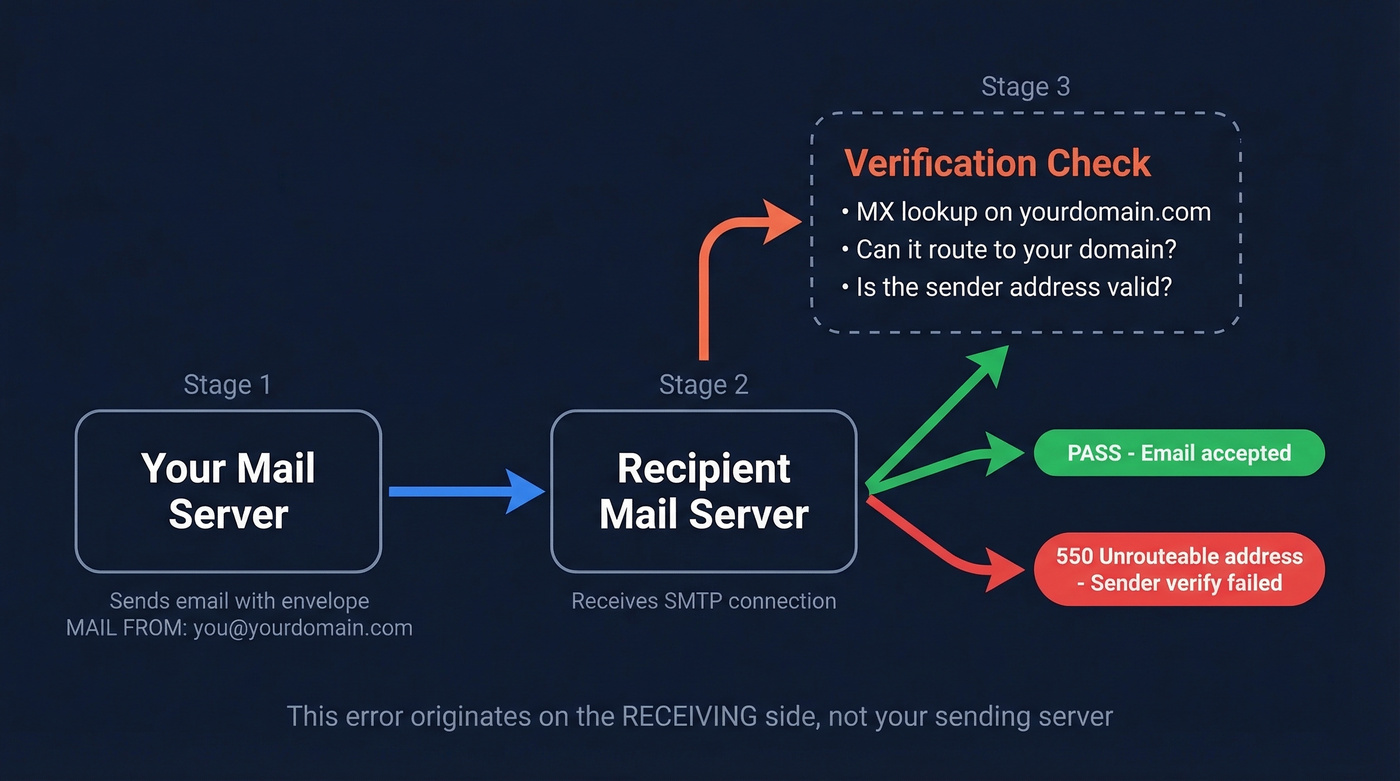
A common mechanism - and one Mailgun documents - is this: the recipient server performs an MX lookup on the envelope MAIL FROM (bounce) domain. If it can't find valid MX records for that domain, it rejects the message with a "Sender verify failed" style error.
The critical detail: this error originates on the receiving side. Your mail server sent the message fine, but the recipient's server refused it because it couldn't verify that your sender domain routes correctly.
Stop Blaming SPF and DKIM
A lot of forum threads about this error send you chasing SPF records and DKIM keys. That's almost always a misdiagnosis.
SPF/authentication problems show up as 5.7.x policy/authentication rejections - for example, a 550 5.7.708 rejection indicates the sender isn't permitted by the domain's authentication records, which is a completely different issue. The 550 unrouteable address and sender verify failed pattern is about DNS/MX resolution, local-vs-remote routing, or a sender address that can't be verified. If you've been tweaking your SPF record for hours, stop. You're solving the wrong problem.
If you want a broader view of bounce patterns and what they mean, see our guide on email bounce rate.
Error Variants You'll See
The exact wording varies by server, but these all point to the same class of problem:
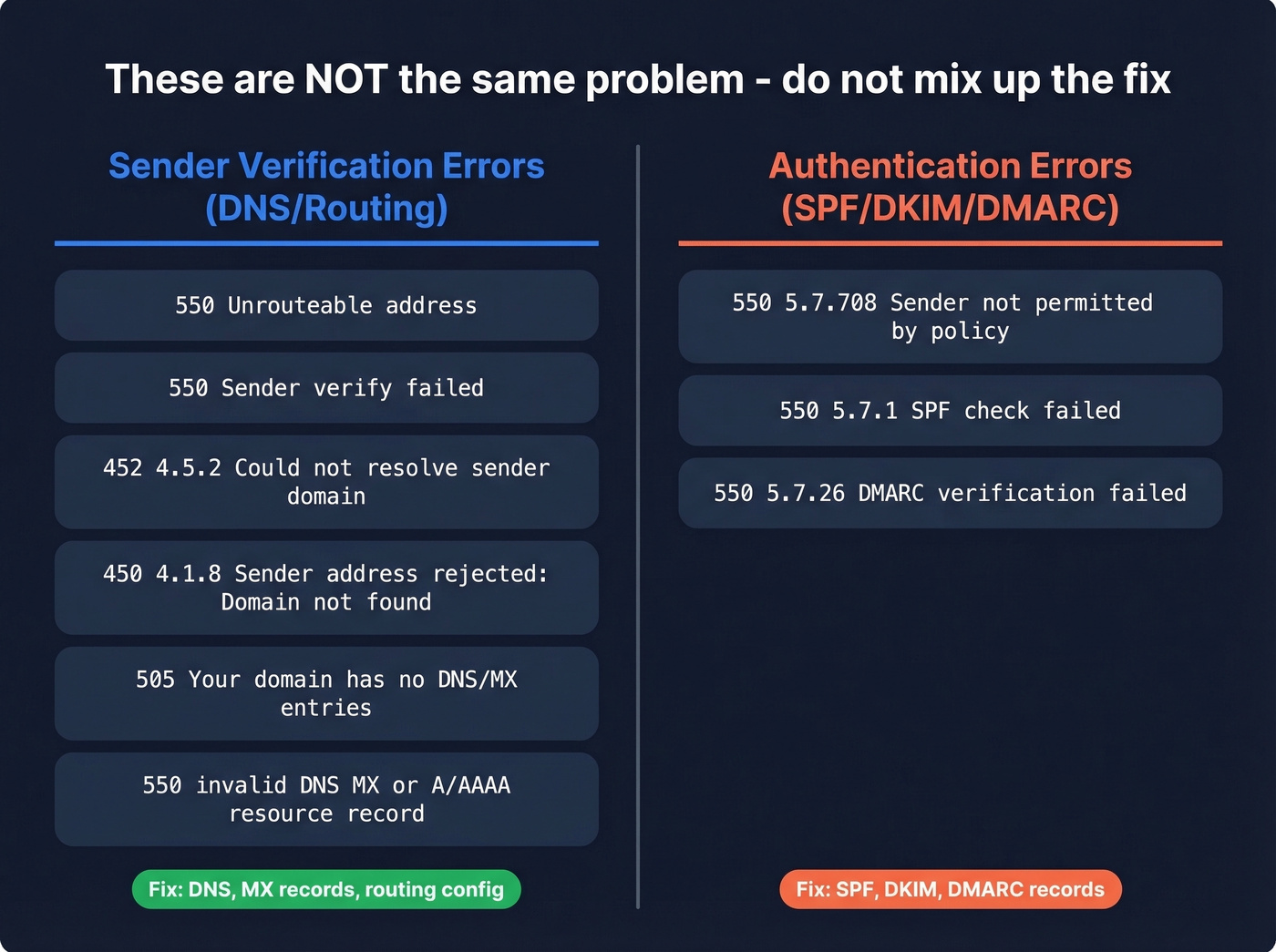
550 Unrouteable address(common on Exim-based servers)550 Sender verify failed452 4.5.2 Could not resolve sender domain450 4.1.8 Sender address rejected: Domain not found505 Your domain has no DNS/MX entries550 invalid DNS MX or A/AAAA resource record
If your bounce message contains any of these, you're dealing with the same underlying category. Don't confuse them with authentication-specific codes like 550 5.7.708, which relate to SPF/DKIM/DMARC policy enforcement rather than sender verification callouts.
For a deeper deliverability baseline (beyond this specific error), use our email deliverability guide.

550 bounces destroy your sender reputation whether the root cause is your DNS or bad contact data. Prospeo's 5-step email verification - with catch-all handling, spam-trap removal, and honeypot filtering - delivers 98% accuracy so you never burn your domain on unverifiable addresses.
Replace bounce-log debugging with emails that actually land.
Root Causes
Work through these in order - they're ranked by how often we see them in practice.
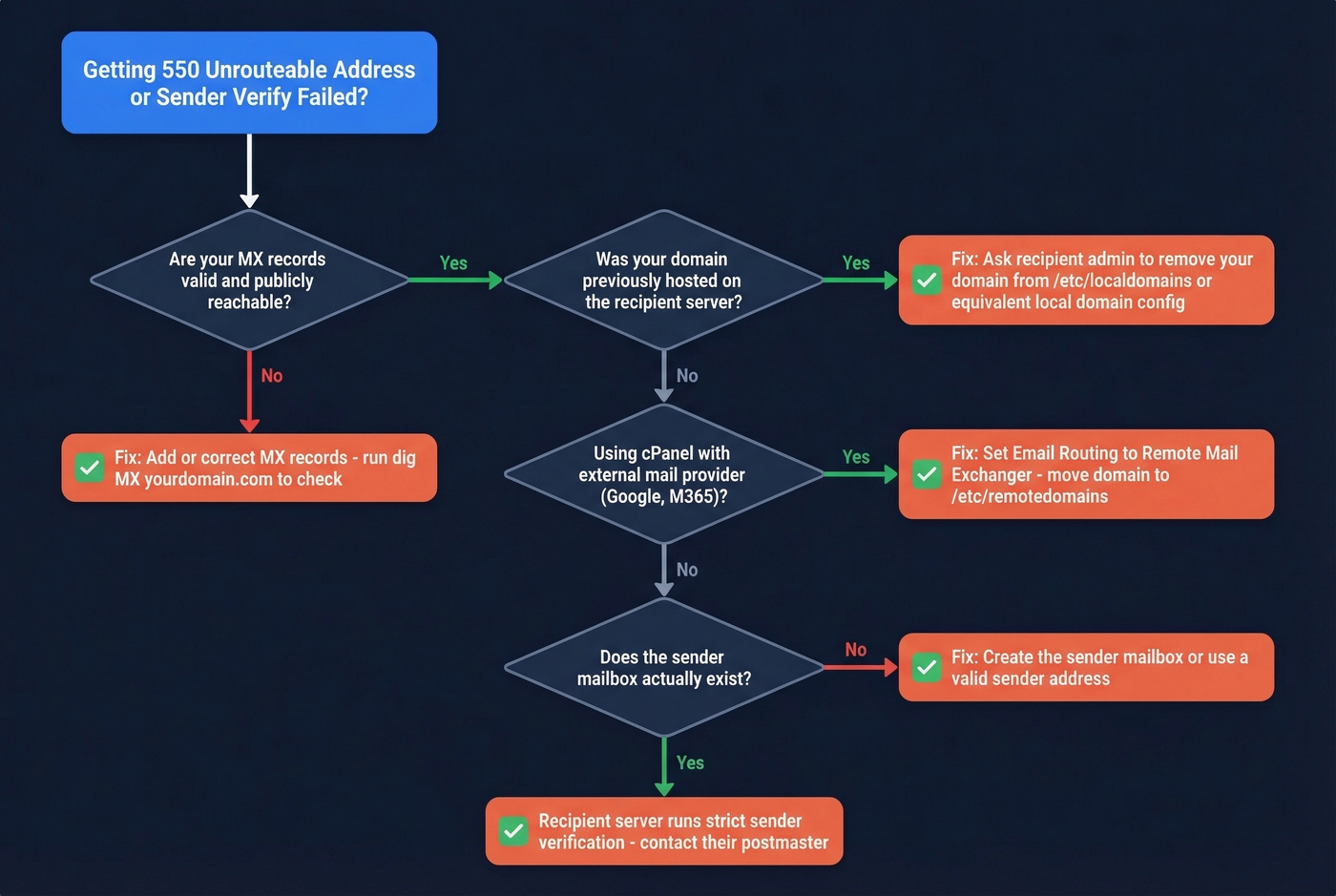
1. Domain treated as "local" on the recipient's server. This is the sneaky one. Your domain used to be hosted on the recipient's server (or another server in their environment). Someone migrated the domain but didn't clean up the old configuration. During sender verification, Exim treats the domain as local based on its config files, can't route it externally, and fails with "Unrouteable address." We've seen this cause weeks of frustration for teams who had no idea a stale config existed on someone else's server.
2. Missing or broken MX records. If the recipient server can't find valid MX records for the envelope sender domain, verification fails. Run dig MX yourdomain.com or use MXToolbox. Also watch for MX records pointing to an IP address instead of a hostname - you can't use an IP address in an MX record per RFC 5321.
If you're also trying to validate whether specific addresses exist before sending, see how to check if an email exists.
3. Email routing set to "Local" instead of "Remote." If you use cPanel/WHM and your mail is handled by Google Workspace or Microsoft 365, but cPanel's email routing is set to "Local Mail Exchanger," the server will try to handle mail locally. Simple fix, maddening to diagnose.
4. Sender mailbox doesn't exist. Some environments reject when the sender address can't be verified as a real mailbox - for example, when the sender account doesn't exist in the hosting panel.
5. Recipient server runs sender verification rules.
On Exim, ACL rules like verify = sender cause "Sender verify failed" during the SMTP transaction. On Postfix, reject_unverified_sender does similar probing. In rarer cases, forwarding rules or device-level issues create confusing symptoms - rule those out if the problem is isolated to one device or account.
If you're seeing repeated bounces across campaigns, it can also help to review how to improve sender reputation and your email velocity.
How to Fix It
cPanel / WHM
Go to Zone Editor and confirm your MX records point to the correct mail server. If you use Google Workspace or M365, the MX records should point to Google's or Microsoft's servers, not your hosting server.
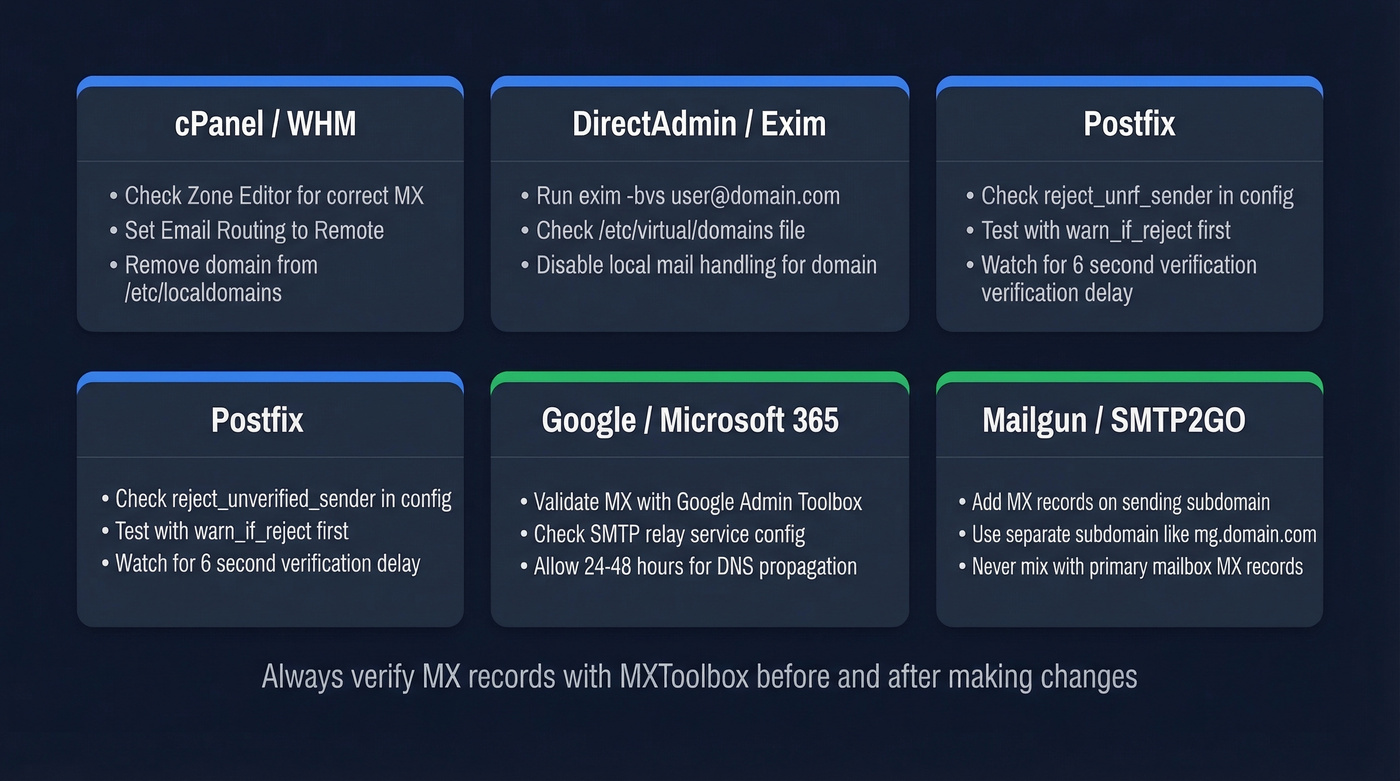
Next, check Email Routing and set it to Remote Mail Exchanger if an external provider handles your mail.
On the server side, check these files:
/etc/localdomains- your domain shouldn't be here if mail is handled externally/etc/remotedomains- your domain should be here instead
To watch for errors in real time:
tail -f /var/log/exim_mainlog | grep "550"
DirectAdmin / Exim
Run the diagnostic command first:
exim -bvs user@yourdomain.com
For verbose debug output:
exim -d -bvs user@yourdomain.com
If it returns failed to verify: Unrouteable address, check whether the same domain is configured across multiple servers. In DirectAdmin/Exim environments, Exim treats the domain as local based on files like /etc/virtual/domains and domainowners, not only DNS.
Quick workaround: Add the sender IP to /etc/virtual/whitelist_hosts_ip to bypass sender verification.
Proper fix: On any server that doesn't handle mail for the domain, disable the option equivalent to "use the local server to handle emails" for that domain. Make sure DNS MX records point to the one server that actually manages the mailboxes. The workaround gets you unblocked; the proper fix keeps you unblocked.
Postfix Servers
If you admin the receiving Postfix server, the relevant directive is reject_unverified_sender in your smtpd_sender_restrictions block.
Before enabling it in production, test without actually blocking mail:
warn_if_reject reject_unverified_sender
Postfix address verification adds up to 6 seconds of delay on first-time verification while it probes the nearest MTA for that address. That latency compounds fast under load, so consider whether the tradeoff is worth it for your environment. The Postfix documentation on address verification covers the caching and performance implications in detail.
Google Workspace / Microsoft 365
Use Google Admin Toolbox Check MX to validate your domain's MX and overall email posture.
If you're sending via SMTP relay, verify the config at: admin.google.com > Apps > Google Workspace > Gmail > Routing > SMTP relay service.
MX record changes can take 24-48 hours to propagate fully. Check with MXToolbox before assuming the change failed.
Transactional Senders (Mailgun, SMTP2GO)
If you're sending from a subdomain via Mailgun and hitting this error, adding MX records on that sending subdomain prevents sender verification failures from recipient servers that check MX on the envelope MAIL FROM domain:
mxa.mailgun.org- priority 10mxb.mailgun.org- priority 10
Don't mix these MX records with your primary mailbox provider's records. If your root domain already points to Google or Microsoft for inbound mail, set up Mailgun on a separate subdomain like mg.yourdomain.com. Mixing MX records can redirect inbound mail to the wrong place or cause mail loss entirely.
If you're doing outbound at scale, also review the best way to send bulk email without getting blacklisted.
Should Servers Still Use Sender Verification?
Let's be honest: if you're a server admin still running sender verification callouts in 2026, you're rejecting legitimate mail.
Sender verification backfires in practice. Excessive probing gets your server blacklisted. Each verification adds noticeable delay. Callouts fail when the sender side uses greylisting or greet delays, or when port 25 is blocked by a firewall. It was a reasonable idea in the early days of spam filtering, but most teams now rely on SPF/DKIM/DMARC plus reputation and content signals instead.
If you encounter this error repeatedly from the same recipient domain, don't waste hours debugging on your end. Email their postmaster and tell them to disable sender verification or fix their local-domain/routing configuration.
Prevent Bounces Before They Happen
Sender verification exists because bad email data is everywhere. If you're running outbound campaigns, the best defense is making sure your own house is clean: send from a domain with valid, publicly reachable MX records, and use real sender addresses that can be verified.
For the list itself, Prospeo's 5-step email verification catches invalid addresses, spam traps, and honeypots with 98% accuracy - and the free tier covers 75 verifications per month, enough to test before committing.
If you're building lists from scratch, start with how to generate an email list and consider using free lead generation tools to validate your workflow.
Teams using Prospeo cut bounce rates from 35%+ down to under 4%. Every email in our 143M+ verified database is refreshed every 7 days - not the 6-week industry average - so stale MX records and dead mailboxes never reach your outbox.
Stop chasing routing errors. Start with data that's already verified.
FAQ
Is "550 Sender Verify Failed" the same as an SPF failure?
No. SPF failures produce 5.7.x policy/authentication rejections. "Sender verify failed" means the recipient server couldn't resolve or route the envelope sender domain - typically due to missing MX records or a stale local-domain configuration. It's a DNS/routing issue, not an authentication problem.
Can I fix this without access to the recipient's server?
You can fix your side - ensure your domain has valid MX records and a reachable mail server, and that your sender address is verifiable. If the recipient's server has a stale config treating your domain as local, you'll need to contact their postmaster to remove the phantom domain entry. There's no way around that.
How long do MX record changes take to propagate?
Typically 24-48 hours for full global visibility, though many providers update within a few hours. Use MXToolbox to confirm your new records are resolving before assuming the change failed.
Should I enable sender verification on my own server?
Skip it. Callback verification adds up to 6 seconds of delay per message in Postfix, risks getting your server blacklisted from excessive probing, and fails silently when the sender side uses greylisting. SPF/DKIM/DMARC-based filtering with modern reputation scoring is more reliable and far less disruptive.
How do I prevent outbound emails from triggering this error?
Send from a domain with valid, publicly reachable MX records and a real sender address that resolves. Before launching campaigns, verify your list to catch invalid addresses, catch-all domains, and spam traps - bad data is the most common cause of bounces across outbound email.