

The Best AI Email Writing Tools in 2026 - And the Ones to Skip
Send 500 cold emails. 180 bounce. That's not a copy problem - it's a data problem, and it's the gap nobody talks about when recommending AI email writing tools. The writing is the easy part. Getting your message to the right inbox is where most teams fail.
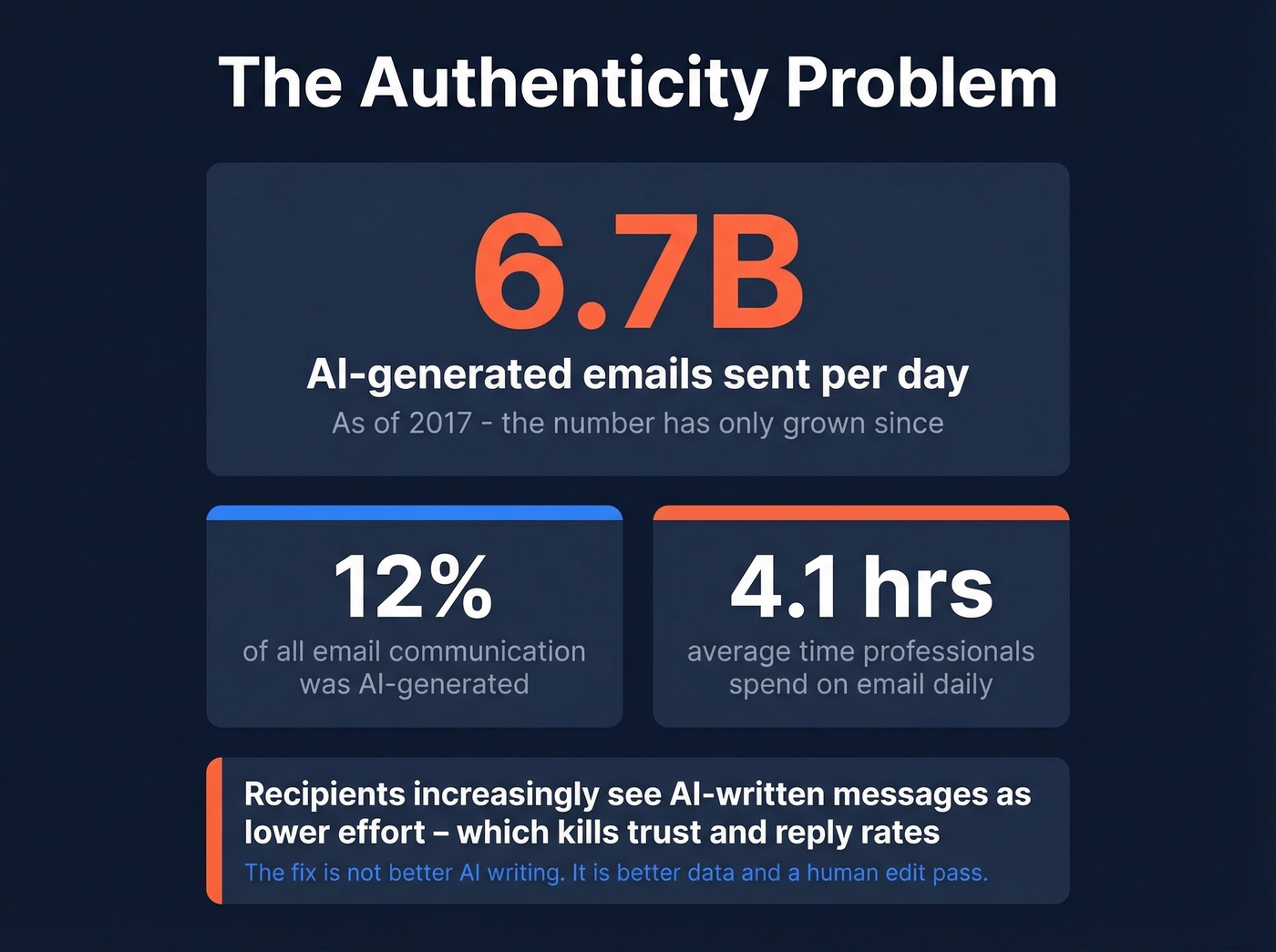
The average professional spends 4.1 hours per day managing email. AI tools promise to cut that in half. Some deliver. Most are GPT wrappers charging $30+/mo for something ChatGPT already does. Here's what's actually worth your money.
Our Picks (TL;DR)
| Pick | Tool | Price | Why |
|---|---|---|---|
| Best free drafter | ChatGPT / Claude | $0-20/mo | Other tools are just wrappers of these |
| Best for verified contacts | Prospeo | Free tier, ~$0.01/email | 98% accuracy - drafts actually land |
| Best for editing & tone | Grammarly | Free-$12/mo | Catches what AI drafters miss |
| Best for sales coaching | Lavender | From $29/mo | Real-time scoring, better reply rates |
Three Types of AI Email Tools
The market breaks into three categories. Knowing which type you need eliminates 80% of the options.
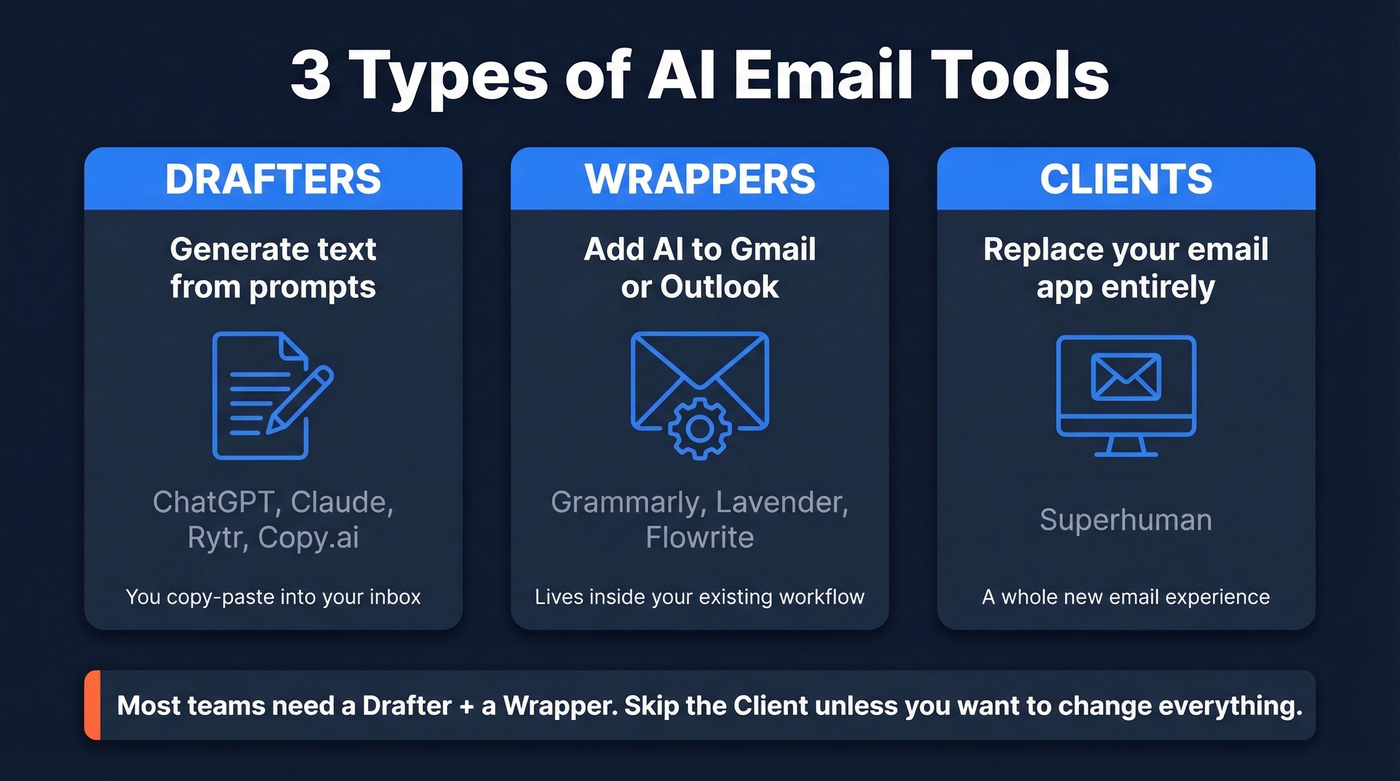
Drafters generate text. ChatGPT, Rytr, Copy.ai - you give them a prompt, they give you copy. They don't live inside your inbox and they run on raw LLMs like GPT-4 or Claude. Any standalone AI email writer falls into this bucket.
Wrappers sit on top of Gmail or Outlook, adding AI features to your existing workflow. Many use techniques like Retrieval-Augmented Generation to ground outputs in company context, which reduces hallucinations and keeps messaging on-brand.
Clients replace your email app entirely. Superhuman is the prime example.
Most teams need a drafter plus a wrapper. The client category is a different buying decision altogether.
Best Tools for Drafting and Sending
ChatGPT & Claude - Best Free Drafters
Use this if: You want a capable email drafting AI without paying for a dedicated product. ChatGPT's free tier handles most everyday drafting. Claude often reads more naturally for longer-form emails.
Skip this if: You need inbox integration, email scoring, or sequence automation. These are standalone drafters - you'll copy-paste into your email client.
Here's the thing: most dedicated AI email generators are just GPT wrappers with a nicer UI. They take the same underlying models, add a few "cold email" templates, and charge $30+/mo. Before you pay for any drafter, test whether ChatGPT Plus ($20/mo) or Claude Pro ($20/mo) already does what you need. For most teams, it does.
A prompt tip that outperforms most templates: feed the model your prospect's company description, their role, and your value prop. Ask for three variations under 80 words each. Pick the best one and edit for voice. Two minutes, zero cost.
Prospeo - Best for Verified Contact Data
The best AI-drafted email in the world is worthless if it bounces. We've seen teams pour hours into sequence copy only to watch 30%+ of their sends fail because the underlying data was stale - and that's the fastest way to torch your sender reputation.
Prospeo's database covers 300M+ professional profiles with 143M+ verified emails. The 98% email accuracy rate comes from a proprietary 5-step verification process that catches spam traps, honeypots, and catch-all domains before you ever hit send.

Data refreshes every 7 days - the industry average is closer to 6 weeks, which explains why so many teams see accuracy degrade mid-campaign. The free tier gives you 75 verified emails per month, enough to test data quality before committing. Paid plans run about $0.01 per email with no annual contracts, and native integrations with Instantly, Smartlead, Lemlist, HubSpot, and Salesforce mean verified contacts flow straight into your sequences.
If you're comparing providers, start with accuracy-first lists like the B2B database rankings.
Grammarly - Best for Editing & Tone
Grammarly isn't trying to write your emails. It's trying to make them better after you've written them. That distinction matters.
The free tier catches grammar, spelling, and basic clarity issues. The $12/mo premium tier adds tone suggestions and more advanced rewrites, which is genuinely useful for sales emails where a single awkward phrase can kill a reply. The Chrome extension and Gmail/Outlook integrations mean zero workflow disruption.
Where Grammarly falls short: it's an editor, not a strategist. It won't tell you your email is too long for cold outreach, or that your CTA is buried in paragraph three. For that, you need Lavender. The best setup for most teams is ChatGPT plus Grammarly for polish - $0-32/mo covering 80% of use cases.
If you want the personalization side to convert, pair drafting with a real AI email personalization workflow.
Lavender - Best for Sales Email Coaching
Lavender does something none of the other tools on this list do: it scores your email in real time and tells you why it'll underperform. Subject line too long? Body copy reading at a 12th-grade level when 5th-grade converts better? Too many "I" statements? Lavender flags all of it.

Pricing runs $29/mo for Starter, $49/mo for Pro, and $69/user/mo for Teams. The free tier caps at 5 emails per month - that's a demo, not a product.
One frustration worth flagging: sales communities on Reddit consistently mention G-Suite UI glitches where Lavender icons disappear or become unclickable. Not a dealbreaker, but annoying enough that we wanted to mention it before you commit.
Instantly - Best for Outreach Sequences
Use this if: You need AI-generated multi-step campaigns with built-in deliverability infrastructure - warm-up, spam word checking, and sender reputation monitoring.
Skip this if: You only write one-off emails. Instantly is built for volume outreach, not individual messages.
Plans start around $30/mo and scale into the $100+/mo range as you add sending volume. Instantly also offers a lead database with 450M contacts, though in our experience you'll get better results verifying contacts through a dedicated data tool before sending. The real value is the sending infrastructure - unlimited email accounts, automated warm-up, and inbox placement monitoring that standalone writing tools don't touch.
If you're building a stack, compare options in our guide to outbound email automation.
Apollo - The Credit Trap
Here's the warning nobody gives you upfront: Apollo's AI features burn through credits fast. Lead scoring, company-data-informed email drafts, sequence building - they're all solid. But the free plan's 100 credits/month evaporate in a single prospecting session. Paid starts at $59/mo per user, and the Organization plan runs $149/mo with a minimum of 3 seats.
Apollo works best for teams that want one tool for everything - database, sequencer, dialer, AI writing assistant - and are willing to invest the setup time. If you only need email writing and personalization, it's overkill.
Rytr - Best Budget Drafter
Use this if: You need a cheap, fast AI email generator for non-sales use cases - internal comms, customer support templates, routine follow-ups.
Skip this if: You're writing cold outreach that needs to convert. Rytr's $7.50/mo gets you quick drafts from templates and multiple tone options, but it won't replace a skilled writer or coach you on reply rates. Think of it as ChatGPT with training wheels and a lower price tag.
For a broader shortlist, see our full AI email writer rankings.
Quick Mentions
Flowrite ($5/mo) turns short instructions into full emails using keyboard shortcuts. Niche but fast if you live in Gmail and write repetitive messages.
Copy.ai starts around $24/mo, with higher tiers running ~$49/mo. It's primarily a marketing copy tool that happens to have email templates. Overkill if email is your only use case, worth it if you also need landing page copy and ad variants.
Superhuman (~$30/mo) isn't an AI writing tool - it's an AI email client that replaces your usual Gmail/Outlook interface. The AI features like auto-drafts, summaries, and triage are impressive, but you're buying a whole new email experience, not just a writing assistant.
Saleshandy (from $25/mo) combines AI writing assistance with built-in spam-trigger detection and bounce monitoring. A solid middle ground between Instantly and Apollo if you want writing plus deliverability without the complexity.

Your AI-drafted emails are only as good as the data behind them. Prospeo's 98% email accuracy and 7-day refresh cycle mean your carefully crafted sequences actually reach real inboxes - not spam traps.
Stop perfecting copy that bounces. Start with verified contacts.
Pricing Comparison
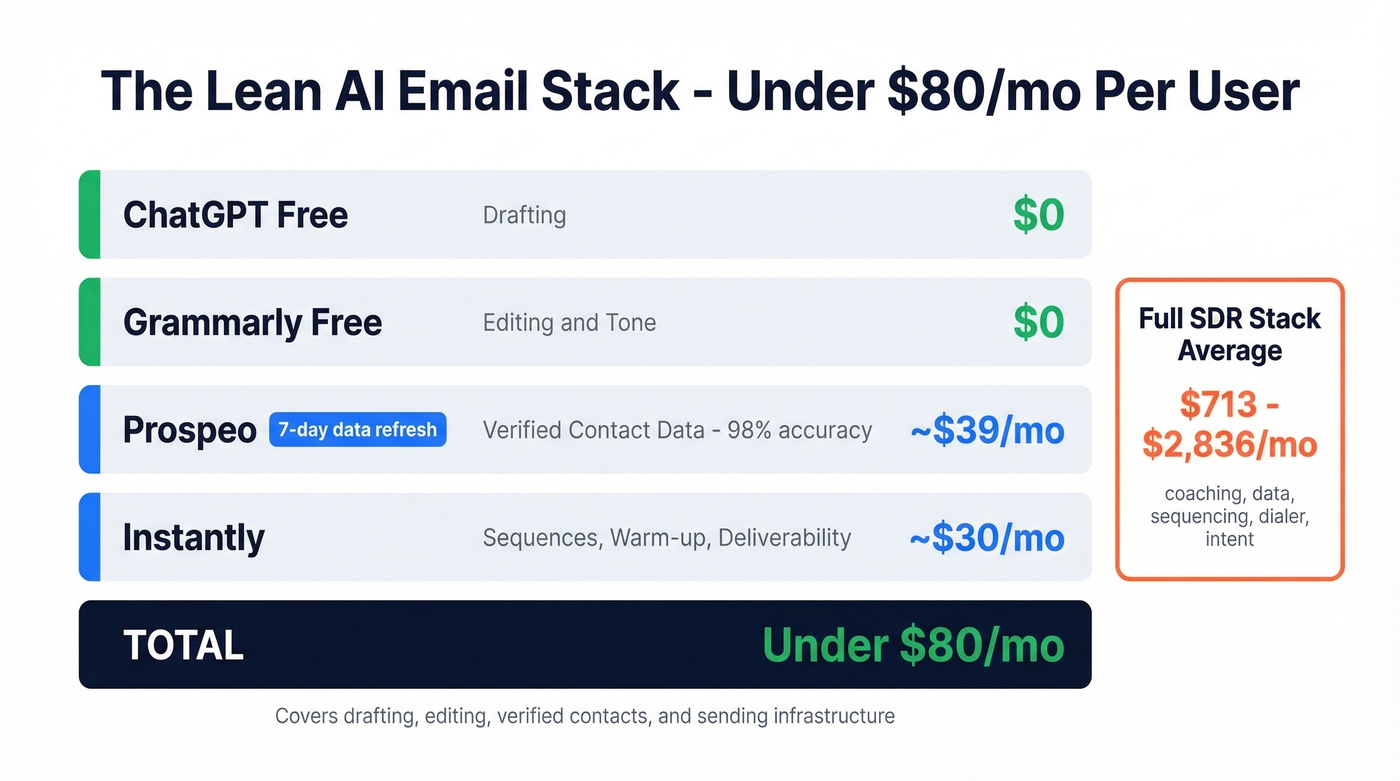
A full SDR stack - coaching, data, sequencing, dialer, intent - can run $713-$2,836/user/month. Here's what the individual pieces cost so you can build lean.
If you're trying to reduce tool sprawl, map it against a clean RevOps tech stack.
| Tool | Starting Price | Free Tier | Best For |
|---|---|---|---|
| ChatGPT | $0 (Plus: $20/mo) | Yes | General drafting |
| Prospeo | ~$0.01/email | Yes (75/mo) | Verified contact data |
| Grammarly | $12/mo premium | Yes | Editing & tone |
| Lavender | $29/mo | Yes (5/mo) | Sales email coaching |
| Instantly | ~$30/mo | No | Outreach sequences |
| Apollo | $59/mo | Yes (100 credits) | All-in-one platform |
| Rytr | $7.50/mo | Yes | Budget drafting |
| Flowrite | $5/mo | No | Shortcut-style drafts |
| Copy.ai | $24/mo | Yes | Marketing copy |
| Superhuman | ~$30/mo | No | AI email client |
| Saleshandy | $25/mo | Yes | Writing + deliverability |
| Gmass | $25/mo | No | Gmail-based outreach |
| Reply.io (Jason AI) | $500/mo | No | Autonomous SDR |
Our recommended lean stack - ChatGPT free + Grammarly free + Prospeo for verified data + Instantly - runs under $80/mo per user. That covers drafting, editing, verified contacts, and sending infrastructure.
Teams using stale data watch 30%+ of their AI-generated emails bounce, torching sender reputation and wasting hours of work. Prospeo verifies 143M+ emails through a 5-step process - at $0.01 per email, no contracts.
The best AI email tool is useless without accurate data underneath it.
Tools to Avoid
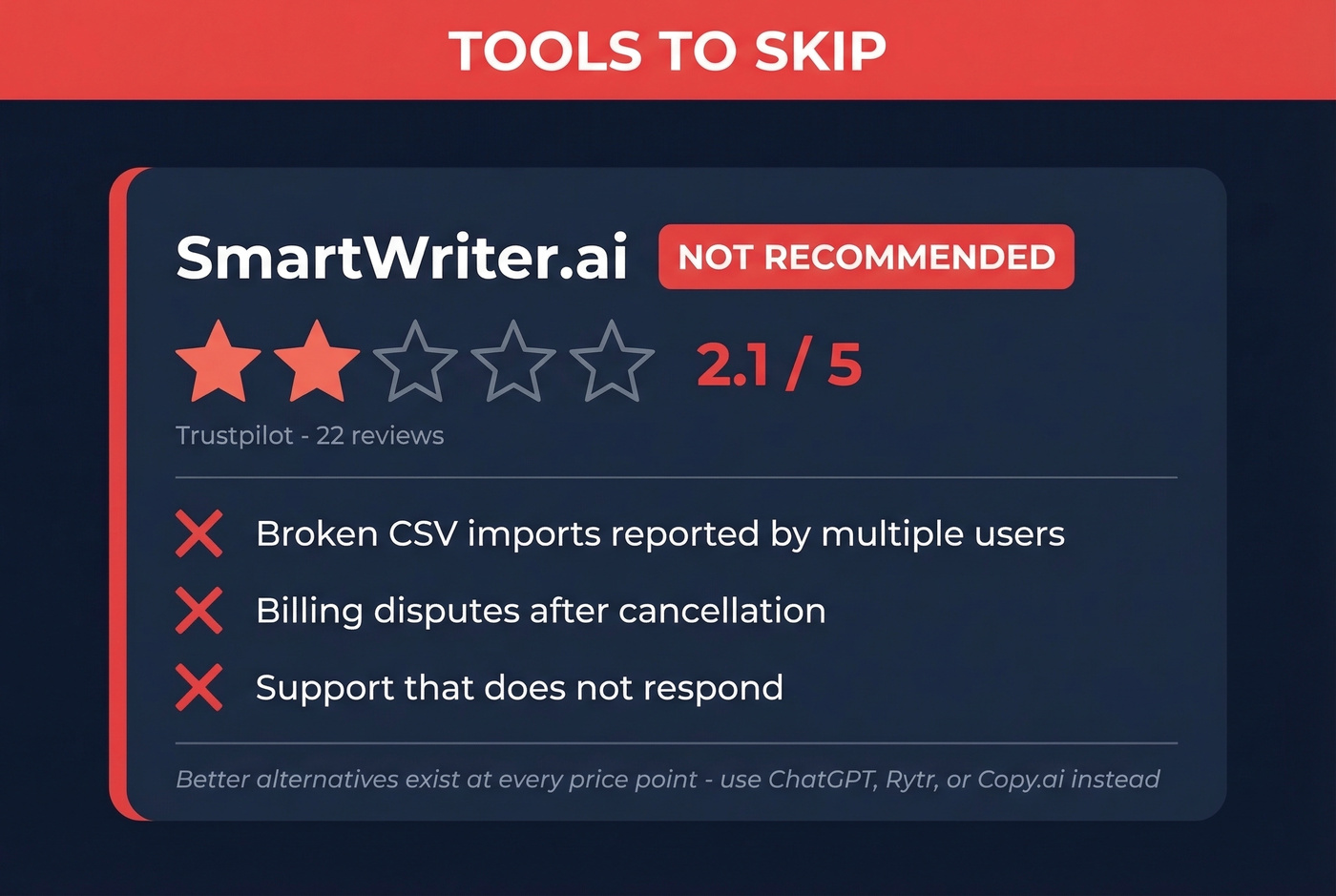
SmartWriter.ai carries a 2.1 out of 5 on Trustpilot across 22 reviews. The complaints are consistent: broken CSV imports, billing disputes after cancellation, and support that doesn't respond. A minority of users say it helps with writer's block, but the operational risks aren't worth it when better alternatives exist at every price point. Skip it.
If you're shopping for contact sources instead, use this list of B2B list providers to avoid low-quality data.
The Authenticity Trap
By 2017, AI-generated smart replies already accounted for 6.7 billion emails per day - 12% of all email communication. That number has only grown. The problem isn't that AI writes bad emails. It's that recipients increasingly perceive AI-written messages as lower-effort, which damages trust and reply rates.
There's also the automation bias trap: you spend 5 minutes prompting, 10 minutes iterating, and 15 minutes editing - and the final email takes longer than if you'd just written it yourself. For high-stakes outreach to a VP you've researched, writing the email yourself in 3 minutes will outperform 30 minutes of prompt engineering every time.
Let's be honest about something: if your deal sizes are modest - say, sub-$10k contracts - you probably don't need anything beyond ChatGPT's free tier and clean contact data. The tools that charge $50+/mo for AI email composition are optimizing the wrong variable. Deliverability and personalization drive reply rates. Fancy AI phrasing doesn't.
Most "free tiers" across this market are demos, not products. Five emails per month tells you nothing about whether a tool works at scale. AI email writing tools work best for volume: first drafts of sequences, template variations, routine replies. For the emails that actually matter - the ones where a deal is on the line - use AI as a starting point and your judgment as the finish line.
Deliverability Checklist
No AI email assistant will fix bad deliverability. Before you optimize copy, make sure the infrastructure is solid.
- SPF, DKIM, DMARC authentication - non-negotiable. If these aren't configured, your emails hit spam regardless of content quality. (If you need a walkthrough, start with sender authentication.)
- Spam complaint rate under 0.3% - that's Gmail's threshold. Exceed it and you're flagged. Monitor this actively.
- One-click unsubscribe - required by Gmail for commercial and high-volume senders. Process requests within 2 days.
- Verified contact data - fix this before worrying about copy. A 98% accuracy rate means fewer than 2 in 100 addresses are invalid, protecting your sender reputation from the spam traps and honeypots that destroy inbox placement. (If you're troubleshooting, see our guide to inbox placement.)
- Warm up sending domains - new domains need 2-4 weeks of gradual volume increases before running full campaigns. Use a dedicated Gmail warm up plan.
- Check your domain's spam score at mail-tester.com before launching campaigns. A score below ~7/10 means something in your setup needs fixing. Our Mail Tester guide explains what the score misses.
FAQ
What's the best free AI email writer?
ChatGPT's free tier is the most capable free drafter available - it handles cold outreach, follow-ups, and internal comms without paying a cent. Pair it with Grammarly's free plan for editing and tone.
Do AI-written emails trigger spam filters?
Not inherently. Deliverability depends on authentication (SPF, DKIM, DMARC), sender reputation, and list quality - not whether AI wrote the copy. The bigger risks are always infrastructure and data quality.
Can AI email tools replace a human writer?
For routine replies and first drafts, yes. For high-stakes outreach - board-level prospects, partnership proposals, sensitive negotiations - AI works best as a co-pilot. The best-performing cold emails still have a human fingerprint.
How much does an AI email stack cost?
A full SDR stack runs $713-$2,836/user/month. A lean stack - ChatGPT free + Grammarly free + a verified data tool + Instantly for sequences - costs under $80/mo and covers drafting, editing, contacts, and sending.
How do I make sure AI-written emails actually reach inboxes?
Verify contact data before sending. Then configure SPF, DKIM, and DMARC, warm up new sending domains, and keep spam complaint rates below 0.3%. The copy matters less than the infrastructure underneath it.