

AI Mail Generator: 10 Best Tools in 2026 (Tested)
It's 4:47 PM. You're staring at a blank compose window, trying to write a follow-up to a prospect who ghosted your last two emails. You know what you want to say - you just can't make the words sound right. Meanwhile, 14 unread threads need replies before end of day.
SDRs spend 21% of their day writing repetitive emails. Across all roles, email eats 28% of the average workday. And with 49% of B2B marketers already using generative AI to draft emails, the people who aren't using an AI mail generator are falling behind on speed and volume. These tools have gotten genuinely good. But there are dozens of them, most "free" tiers are barely functional, and picking the wrong one adds friction instead of removing it.
Quick Picks
| Use Case | Pick | Why |
|---|---|---|
| Best free standalone | Mailmeteor | 50 emails/day free |
| Best inbox-native | Spark +AI | Learns your writing style |
| Already have a tool | ChatGPT | 3 good prompts is all you need |
How AI Email Generation Actually Works
Most AI mail generators run on large language models - typically GPT-class or similar LLMs. They're not filling in templates. They predict what a well-written email should say based on your prompt, thread context if inbox-native, and whatever tone parameters you set.
The practical difference from old-school templates: LLMs adapt. Give a mail writer AI a three-sentence prompt about a pricing objection, and it drafts a reply that sounds like a human wrote it. Give a template engine the same input, and you get "Dear [FIRST_NAME], thank you for your interest in our pricing..."
Garbage in, garbage out still applies. Vague prompts produce generic fluff. Specific prompts - with context, tone, and objective - produce emails you'd actually send.
Three Types of AI Email Tools
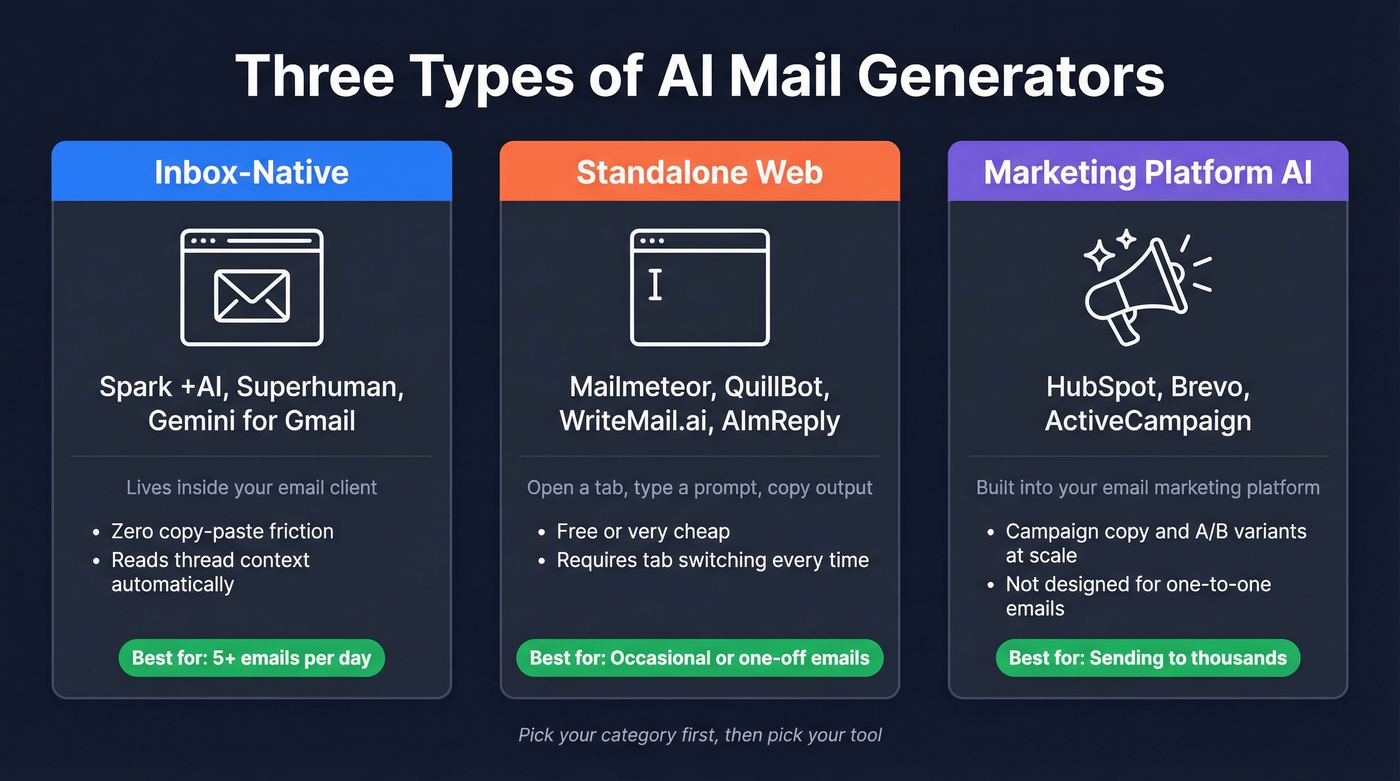
Not all AI email tools solve the same problem. Before you pick one, figure out which category fits your workflow.
Inbox-Native Tools
These live inside your email client. Spark +AI, Superhuman, and Gemini for Gmail read your threads, understand context, and draft replies without you switching tabs. The biggest advantage: zero copy-paste friction. It addresses the universal complaint about standalone generators - constantly switching tabs kills your flow.
If you write 5+ emails a day, inbox-native is the way to go.
Standalone Web Generators
Mailmeteor, QuillBot, AImReply, and WriteMail.ai are browser-based tools. You open a tab, type a prompt, copy the output, and paste it into your email client. They're free or cheap, and they work fine for one-off emails. The tradeoff is friction - every email requires a context switch.
Best for occasional use, or when you need to draft something specific like a tricky apology or a cold outreach opener and want AI help without a subscription.
Marketing Platform AI
HubSpot, Brevo, and ActiveCampaign have built AI directly into their email marketing platforms. These tools generate campaign copy, subject lines, and A/B variants at scale. They're not designed for one-to-one emails - they're designed for sending to segments of thousands.
If you're already on one of these platforms, their built-in AI email assistant is good enough that you don't need a separate tool for marketing emails.
10 Best AI Mail Generators in 2026
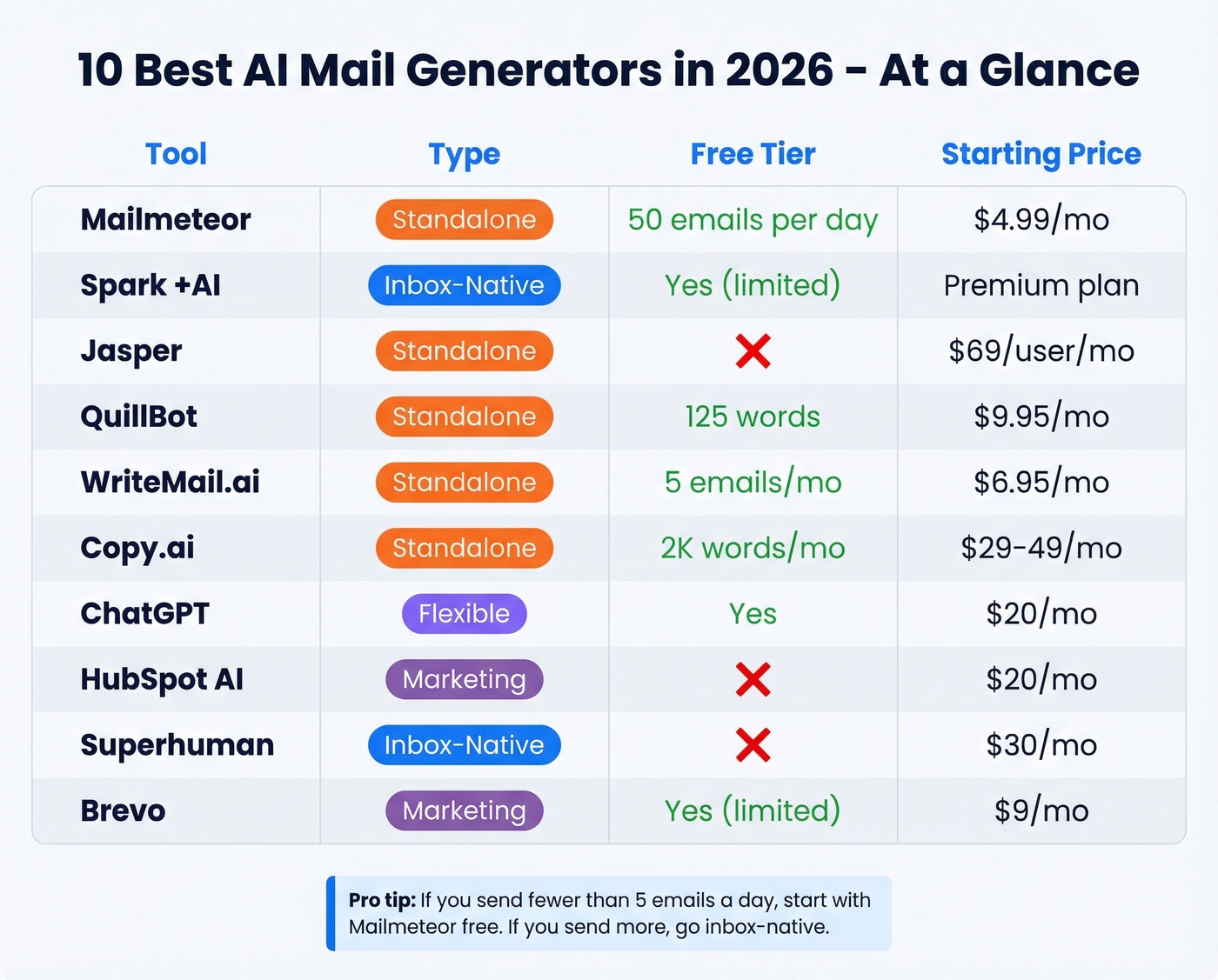
| Tool | Best For | Free Tier | Paid From | Differentiator |
|---|---|---|---|---|
| Mailmeteor | Quick one-offs | 50/day | $4.99/mo | Fast, simple standalone generator |
| Spark +AI | Daily writers | Yes (limited) | Premium plan | Learns your style |
| Jasper | Sales teams | No | $69/user/mo | Brand voice |
| QuillBot | Rewriting | 125-word cap | ~$9.95/mo | Editing, not generating |
| WriteMail.ai | Budget users | 5 emails/mo | $6.95/mo | 320K users |
| Copy.ai | Marketing copy | 2K words/mo | ~$29-$49/mo | Template library |
| ChatGPT | Max flexibility | Yes | $20/mo | No email-specific UI |
| HubSpot AI | CRM teams | No | $20/mo | Built into CRM |
| Superhuman | Premium UX | No | ~$30/mo | Tone adjustment |
| Brevo | Budget marketing | Yes (limited) | $9/mo | Full ESP included |
Mailmeteor - Best Free Standalone
Mailmeteor is the obvious starting point if you just need to write one email right now. The free plan includes 50 emails per day, it's recognized by Google, and over 6M professionals use it.
Paid plans start at $4.99/mo with higher daily limits, mail merge, and tracking. For a solo founder or freelancer who sends a handful of important emails per week, Mailmeteor handles the job without overhead. The limitation: you'll be copying and pasting into your email client. For 20+ emails a day, you'll want something inbox-native.
If you're pairing this with outbound, make sure you have email verification in place before you scale volume.
Spark +AI - Best Inbox-Native
Spark's "My Writing Style" feature is the reason this tool stands out. It learns from your sent emails and adapts its drafts to match how you actually write. After a week of use, the output genuinely sounds like you - not like a robot pretending to be you. One Reddit user described it as a "prompt-first workflow that changed how I work."
It reads thread context, so replies are relevant without you re-explaining the conversation. We've seen teams cut drafting time roughly in half after switching to inbox-native tools like Spark, and the quality of first drafts improves noticeably because the AI already knows the conversation history.
Skip this if you primarily send marketing campaigns or cold outreach at scale. Spark is built for one-to-one communication.
Jasper - Best for Brand Voice
Jasper costs $69/user/mo. That's expensive for personal use, and I wouldn't recommend it for individuals. But for a sales org running 10+ reps on outbound sequences, brand voice consistency across the team is worth every dollar.
You train Jasper on your company's tone, messaging guidelines, and product language. Every rep's emails sound on-brand without a manager reviewing every draft. The output quality for cold outreach is noticeably better than generic LLM tools because the model has context about your product, not just general email conventions.
Use this if you're running outbound at scale. Skip this if you're a solo operator - ChatGPT with good prompts gets you 80% of the way there for free.
QuillBot - The Polishing Tool
QuillBot isn't an email generator. It's a rewriter. The free tier caps at 125 words for paraphrasing, barely enough for one paragraph. Premium runs around $9.95/mo. Useful when you've already written something and want to tighten the language or adjust the tone, but don't expect it to generate emails from scratch.
WriteMail.ai
WriteMail.ai is trusted by over 320,000 users, with pricing from $6.95-$19.95/mo and a free plan limited to 5 emails per month. That free tier is essentially a demo. The tool is straightforward and budget-friendly, but it's a standalone generator - not an inbox-native tool that reads your threads and drafts replies in place.
Copy.ai
Copy.ai gives you 2K words/mo free, with paid plans starting around $29-$49/mo. It's marketing-focused - the template library covers everything from product launch emails to re-engagement sequences. For a content marketer who also writes email campaigns, Copy.ai consolidates two workflows. For pure email generation, it's more than most people need.
ChatGPT - Most Flexible, Worst UX
Here's the thing: ChatGPT is the most powerful email generation tool available, and also the worst email experience. No email-specific UI, no thread context, no send button. Every email is a copy-paste job. The free tier works. Plus costs $20/mo.
But if you master 3 good prompts, you probably don't need a dedicated tool at all. More on that below. If you want to go deeper on personalization, see AI email personalization.
HubSpot AI
If you're already on HubSpot, the built-in AI email features are solid and getting better fast. Starter plans run $20/mo. HubSpot's AI drafts emails inside the platform, which is convenient when your contacts and activity already live there. Don't switch CRMs for the AI alone. If you're evaluating platforms, compare CRM automation software before you commit.
Superhuman
Around $30/mo for a premium inbox experience with real-time tone adjustment. Superhuman works natively in Gmail and Outlook and feels polished. It's the luxury option - fast, beautiful, and expensive for what it does.
Brevo
Brevo starts at $9/mo with AI email generation built into the ESP. Best for marketing teams on a budget who need campaign-level AI without paying HubSpot or ActiveCampaign prices.
AImReply is another solid standalone option worth mentioning. It offers tone customization and multi-language support at a similar price point to WriteMail.ai - worth checking if neither Mailmeteor nor the inbox-native tools fit your workflow.
Prompt Templates That Work
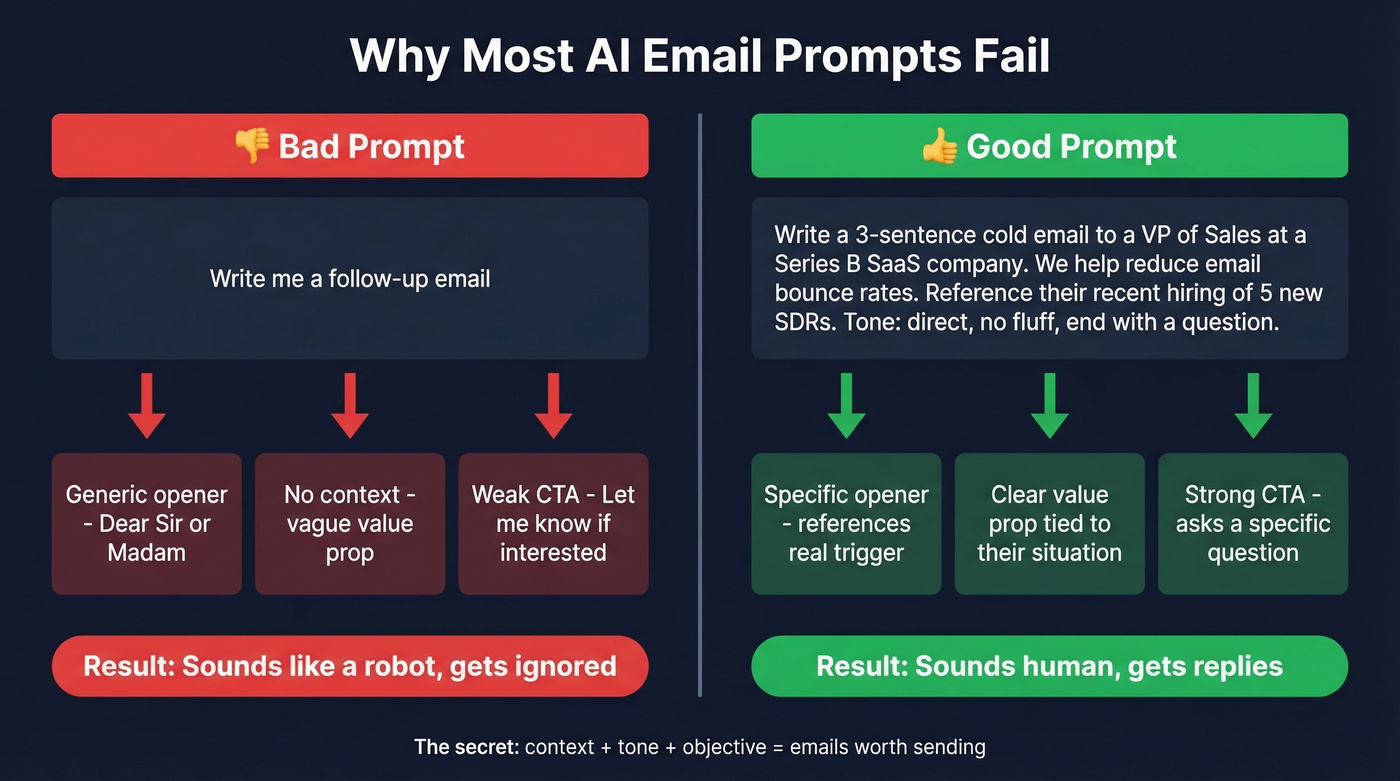
Most AI-generated emails sound terrible because the prompts are terrible. "Write me a follow-up email" gives you garbage. Here are five templates you can paste into any LLM or email drafting tool.
Cold outreach:
Write a 3-sentence cold email to [JOB TITLE] at [COMPANY]. We help [WHAT YOU DO]. Reference [SPECIFIC TRIGGER - e.g., their recent funding round, job posting]. Tone: direct, no fluff, end with a question.
Follow-up after no reply:
Write a 2-sentence follow-up to someone who didn't reply to my cold email about [TOPIC]. Add one new piece of value - [SPECIFIC STAT OR INSIGHT]. Tone: casual, not pushy.
Customer support reply:
Draft a reply to a customer frustrated about [ISSUE]. Acknowledge the problem, explain the fix, give a timeline of [X DAYS]. Tone: empathetic but confident.
Meeting request:
Write a short email requesting a 15-minute call with [NAME] about [TOPIC]. Suggest [2 SPECIFIC TIMES]. Tone: professional, brief.
Internal update:
Summarize this project status for my team: [PASTE BULLET POINTS]. Keep it under 100 words. Tone: upbeat but honest about blockers.
The key is specificity. Professionals get interrupted roughly 275 times per day by email and message alerts. Your AI-generated email is competing for attention against all of that noise. If you're building a cadence, use a proven follow up email sequence strategy instead of improvising every touch.

An AI mail generator drafts the words. But words don't matter if they bounce. Prospeo gives you 143M+ verified emails at 98% accuracy - so every AI-crafted email actually lands in a real inbox. At $0.01 per email, bad data stops being the bottleneck.
Generate the email with AI. Find the recipient with Prospeo.
Can People Tell It's AI-Written?
A Hunter.io survey of 200 decision-makers and 300 B2B professionals found that the best-performing industries guessed correctly only about half the time. That's a coin flip.
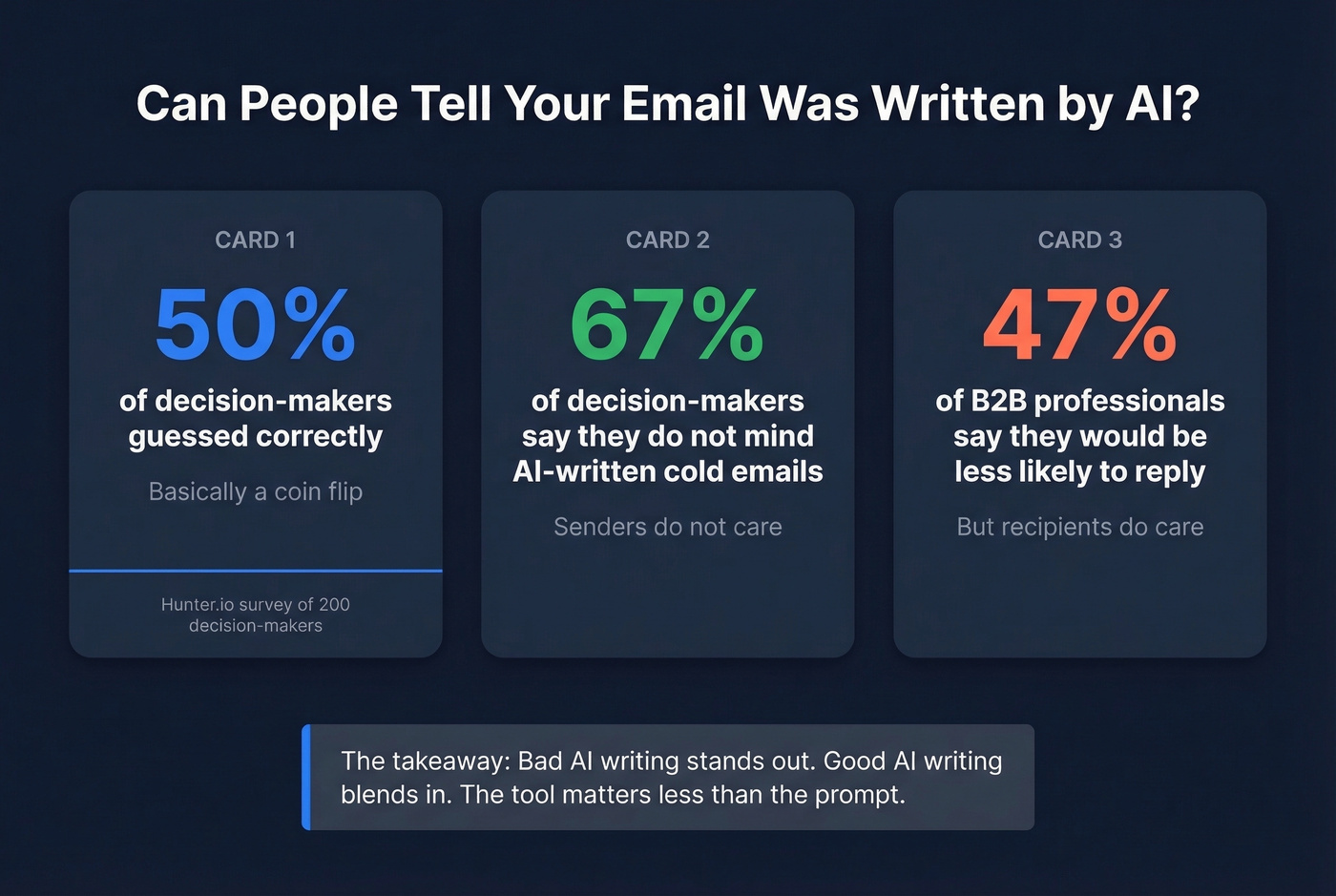
But here's the tension: 67% of decision-makers say they don't mind if GenAI wrote a cold email, while 47% of B2B professionals say they'd be less likely to reply if they thought it was AI-generated. Senders don't care. Recipients do - at least some of them.
Bad AI writing stands out. Good AI writing blends in. If your emails sound like a robot - repetitive, overly formal, stuffed with filler - people notice. If they sound like a competent human who happens to write efficiently, nobody cares how the words got there.
Subject Lines - Where AI Helps Most
Subject lines deliver the highest ROI per keystroke. 47% of recipients decide whether to open based on the subject line alone, and 69% mark emails as spam based on it.
The data on length is clear: 6-10 words hit a 21% open rate. Stretch to 11-15 words and you drop to 14%. Personalized subject lines lift opens by 26-29%. The formula: keep it short, make it personal, and let AI generate 5-10 variants so you can A/B test.
Let's be honest - most people spend 30 seconds on a subject line and 10 minutes on the body. Flip that ratio. If you want more formulas, borrow from these professional email subjects.
The Step Everyone Skips
You just used AI to craft 500 perfectly personalized cold emails. You load them into your sequencer, hit send, and... 23% bounce. Your domain reputation tanks. The next batch lands in spam even for valid addresses.
17% of cold emails never reach the inbox. Roughly 95% go unanswered even when they do arrive. And here's a stat that should change your approach: smaller targeted campaigns of under 200 prospects see ~18% response rates, compared to ~8% when blasting 1,000+. Quality over quantity wins, but only if those 200 addresses are real.
If you're scaling, you also need to protect inbox placement and run an email reputation check before volume spikes.
AI writes the email. Prospeo makes sure it reaches someone. With 143M+ verified emails and 98% accuracy, real-time verification catches invalid addresses, spam traps, and honeypots before they damage your sender reputation. The workflow: generate your email with whatever AI tool you prefer, find and verify the recipient's address through Prospeo's Chrome extension or API, then send. The free tier covers 75 emails per month - enough to test the workflow before committing.
Where Does Your Data Go?
Before you paste a sensitive email thread into any AI tool, ask these five questions.
Does the tool process data on their servers or on-device? Most consumer tools decrypt your data on their servers, meaning your email content lives on someone else's infrastructure.
Does the provider use your data to train their models? Google clarified that Gmail doesn't use personal emails for AI training - but not every provider has made the same commitment.
What's the data retention policy? Some tools store your inputs indefinitely. Others delete after processing.
Has the tool had security incidents? Microsoft acknowledged a bug in Microsoft 365 Copilot that allowed the AI assistant to access confidential emails. Know the track record.
Are you compliant with applicable regulations? The EU AI Act became applicable in August 2025. GDPR, CCPA, and HIPAA all have implications for AI-processed email content. Gartner predicts that by 2028, 40% of large enterprises will use AI to monitor employee moods and behaviors - the privacy picture is shifting fast. If you're building a compliant stack, start with a GDPR compliant database.
When NOT to Use AI for Email
By 2017, AI-generated smart replies already accounted for 12% of daily Gmail communication - roughly 6.7 billion AI-generated emails per day. That number has only grown. We're approaching a world where AI writes emails to other AI systems that summarize them for humans who never read the original.
There are moments when that efficiency is exactly wrong. A condolence email to a colleague. A difficult conversation with a direct report. An apology to a customer you personally let down. Perceived effort signals perceived authenticity - and recipients can feel when something important was outsourced to a machine.
For deals under $15k, you probably don't need Jasper-level tooling, but you absolutely need the email to sound human. I've watched people spend 15 minutes iterating on a prompt to generate a 3-sentence email they could've written in 2 minutes. If you're using AI as a crutch for emails you could write faster yourself, the tool is making you less productive, not more.
FAQ
Are AI mail generators really free?
Most "free" tools cap usage aggressively. Mailmeteor allows 50 emails per day, QuillBot limits paraphrasing to 125 words, and Prospeo's free tier includes 75 email verification credits per month. These free tiers work for light, occasional use - anyone sending daily will hit the wall within a week.
Can AI write effective cold emails?
Yes, but the copy is rarely the bottleneck. Cold email reply rates average 1-5% regardless of who - or what - wrote them. Targeting accuracy and email verification matter far more than word choice. A mediocre email sent to the right person at a verified address outperforms a brilliant email sent to a dead inbox every time.
Is it safe to paste confidential emails into AI tools?
It depends entirely on the tool's processing model. Cloud-based tools decrypt your data on their servers, meaning your content is accessible to the provider's infrastructure. Ask about data retention policies and whether your inputs train their models before pasting anything sensitive. On-device processing tools are safer for confidential content.
What's the best AI email tool for sales teams?
Jasper wins for brand-voice consistency at scale - every rep sounds on-message without manual review. For smaller teams, Spark +AI's style-learning feature gets you surprisingly close at a fraction of the cost. Either way, pair your generator with email verification so the copy actually reaches real inboxes.
Do AI-generated emails get flagged as spam?
The email content itself rarely triggers spam filters. Bad sender reputation, unverified addresses, and mass-sending without proper warm-up are the real culprits. If your emails are landing in spam, the problem is almost certainly your sending infrastructure - not the words the AI chose.
Running outbound at scale with Jasper or ChatGPT? The emails are only as good as the contacts behind them. Prospeo's 300M+ profiles with 30+ filters - buyer intent, technographics, job changes - let you target the right people before your AI writes a single word.
Stop sending perfect emails to the wrong people.