

How to Set Up Automated Follow-Up Emails That Don't Sound Robotic
A RevOps lead we know built a 500-contact sequence last quarter. Beautiful copy, tight targeting, solid offer. Eighteen percent of the emails bounced, the domain got flagged within a week, and the entire campaign was dead before a single prospect replied. The sequence wasn't the problem - the data was.
With 392.5 billion emails sent daily in 2026, your automated follow-up emails are fighting for attention against hundreds of other messages in every inbox. The difference between sequences that book meetings and sequences that burn your domain comes down to three things: how many you send, when you send them, and whether the emails actually arrive. This guide covers sales and outreach follow-ups specifically, though the same principles apply to onboarding, document collection, and approval workflows.
The Short Version
- Send 2-3 follow-ups max. A study of 16.5M cold emails found the highest reply rate - 8.4% - comes from the first email. Four or more follow-ups more than triple unsubscribe and spam complaint rates.
- Use graduated spacing (2 > 4 > 7 > 14 days). Static intervals scream "automation." Graduated spacing mimics how a real person would follow up.
- Verify your list before automating anything. Bounces destroy sender reputation faster than bad copy ever will.
How Many Follow-Ups Should You Send?
The conventional wisdom says "follow up until they say no." The data says something different.
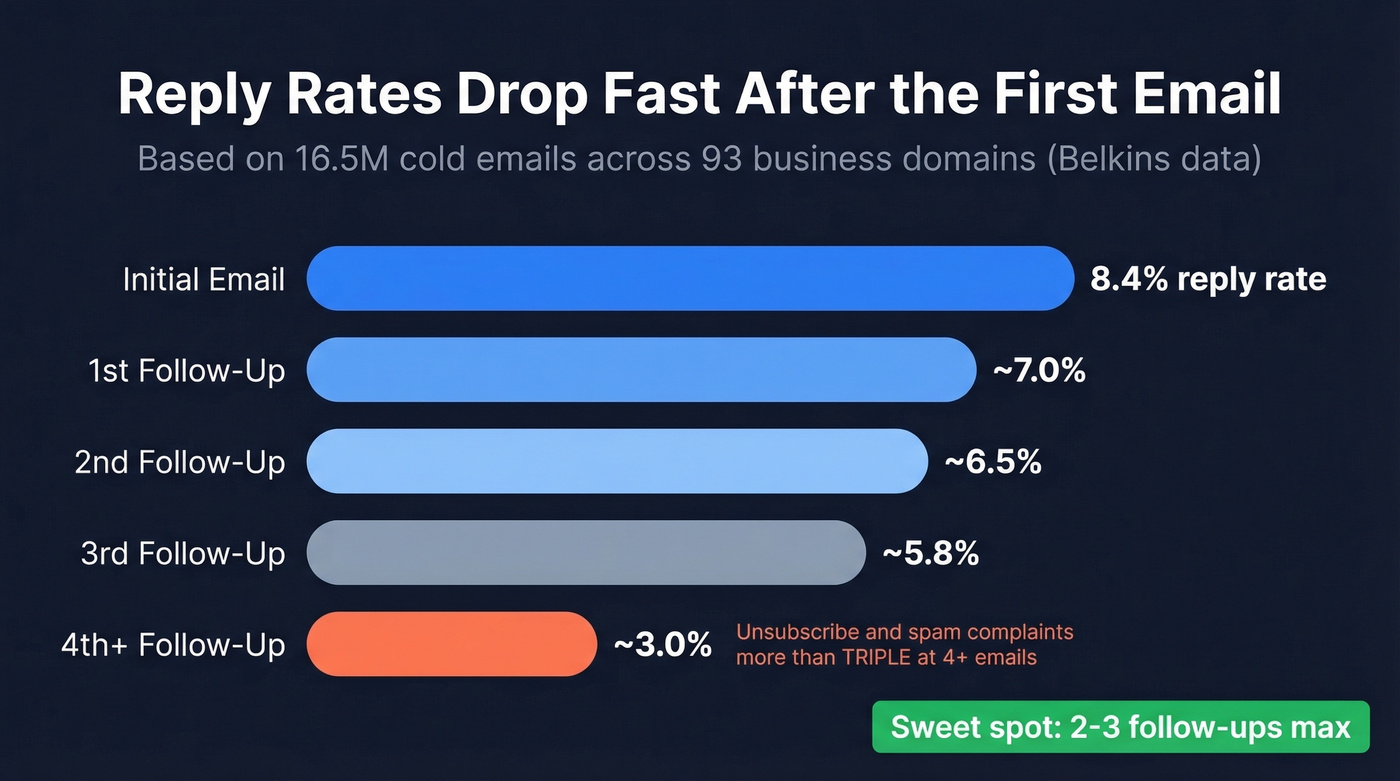
A dataset of 16.5M cold emails across 93 business domains, analyzed by Belkins, tells the real story. The highest reply rate - 8.4% - came from the initial email. Every follow-up after that produced diminishing returns, and sending four or more emails in a sequence more than tripled unsubscribe and spam complaint rates. Let's be honest: most teams are over-following-up and wondering why their email deliverability is tanking.
Tolerance for persistence varies by audience. Small businesses (2-50 employees) are relatively forgiving: reply rates start at 9.2%, dip to 8% on the first follow-up, then actually tick back up to 8.4% on the second. Enterprises with 1,000+ employees are allergic to persistence - rates drop fast and stay down.
The founder persona pattern is especially telling: 6.64% initial, 6.66% first follow-up, 6.94% second, 5.75% third, 3.01% fourth. That fourth follow-up cuts your reply rate nearly in half. And once you're at 4+ emails in a sequence, unsubscribe and spam complaint rates more than triple. The math doesn't work.
In our experience, three follow-ups is the ceiling for cold outreach. After that, you're burning sender reputation for marginal returns. If you need more touches, switch channels - in the same dataset, a LinkedIn message plus profile visit combo pulled an 11.87% reply rate, higher than any email-only sequence measured.
Some industries hold up better through early follow-ups. Manufacturing maintains 6.67%-6.77% through the first two. Solar actually sees a slight bump on the first follow-up, from 6.73% to 6.83%. But even in these sectors, the fourth and fifth emails crater performance.
Here's the thing: most teams don't have a follow-up problem. They have a first-email problem. If your initial email isn't pulling at least a 5% reply rate, adding more follow-ups won't save the sequence. Fix the offer and targeting first.
Timing and Spacing
55% of cold email replies come from follow-ups, not the initial email. So timing isn't optional - it's where most of your results live.
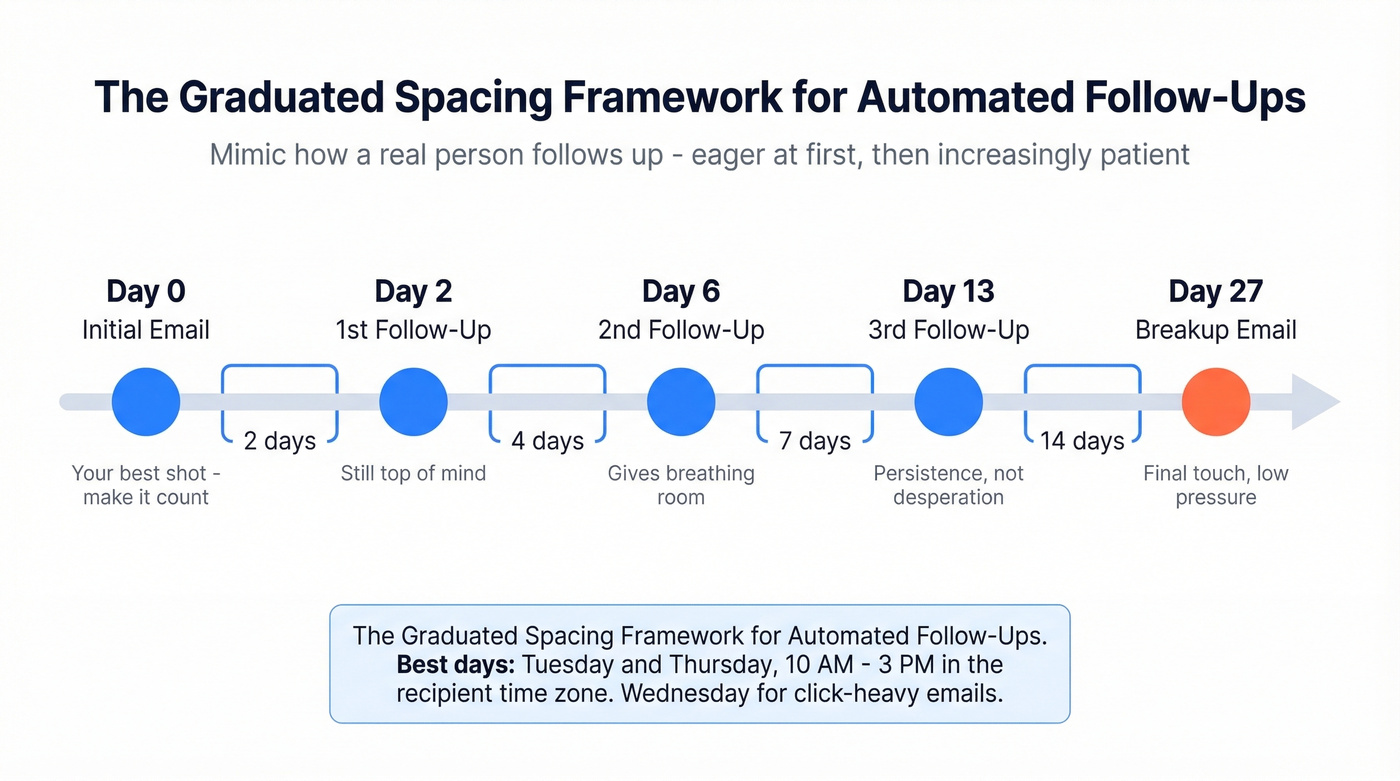
Static spacing - sending every two days like clockwork - is a dead giveaway you're using automation. Graduated spacing mimics how a real person would follow up: eager at first, then increasingly patient.
| Follow-Up # | Wait Time | Why |
|---|---|---|
| 1st | 2 days | Still top of mind |
| 2nd | 4 days | Gives breathing room |
| 3rd | 7 days | Persistence, not desperation |
| Breakup | 14 days | Final touch, low pressure |
For cold outbound, the optimal gap between your initial email and first follow-up is 2-5 days.
Brevo's research points to Tuesday and Thursday between 10 AM and 3 PM in the recipient's time zone. Wednesday edges out the other days for click-throughs specifically, so if your follow-up includes a link to a case study or resource, Wednesday is worth testing.
For inbound leads, the calculus is completely different. Responding within five minutes makes you 100x more likely to connect than waiting an hour. If someone fills out a form on your site, that first auto follow-up should fire nearly instantly - automate it with a trigger, not a timed sequence.
One detail most guides skip: always send in the recipient's local time zone, not yours. A 10 AM email that arrives at 7 AM Pacific gets buried before they open their laptop.
Fix Your Data Before Automating Anything
Every guide about automated follow-up emails skips the step that matters most: making sure your emails actually arrive. Email verification isn't a nice-to-have. It's the prerequisite. Without it, your automation is just an efficient way to destroy your domain reputation.
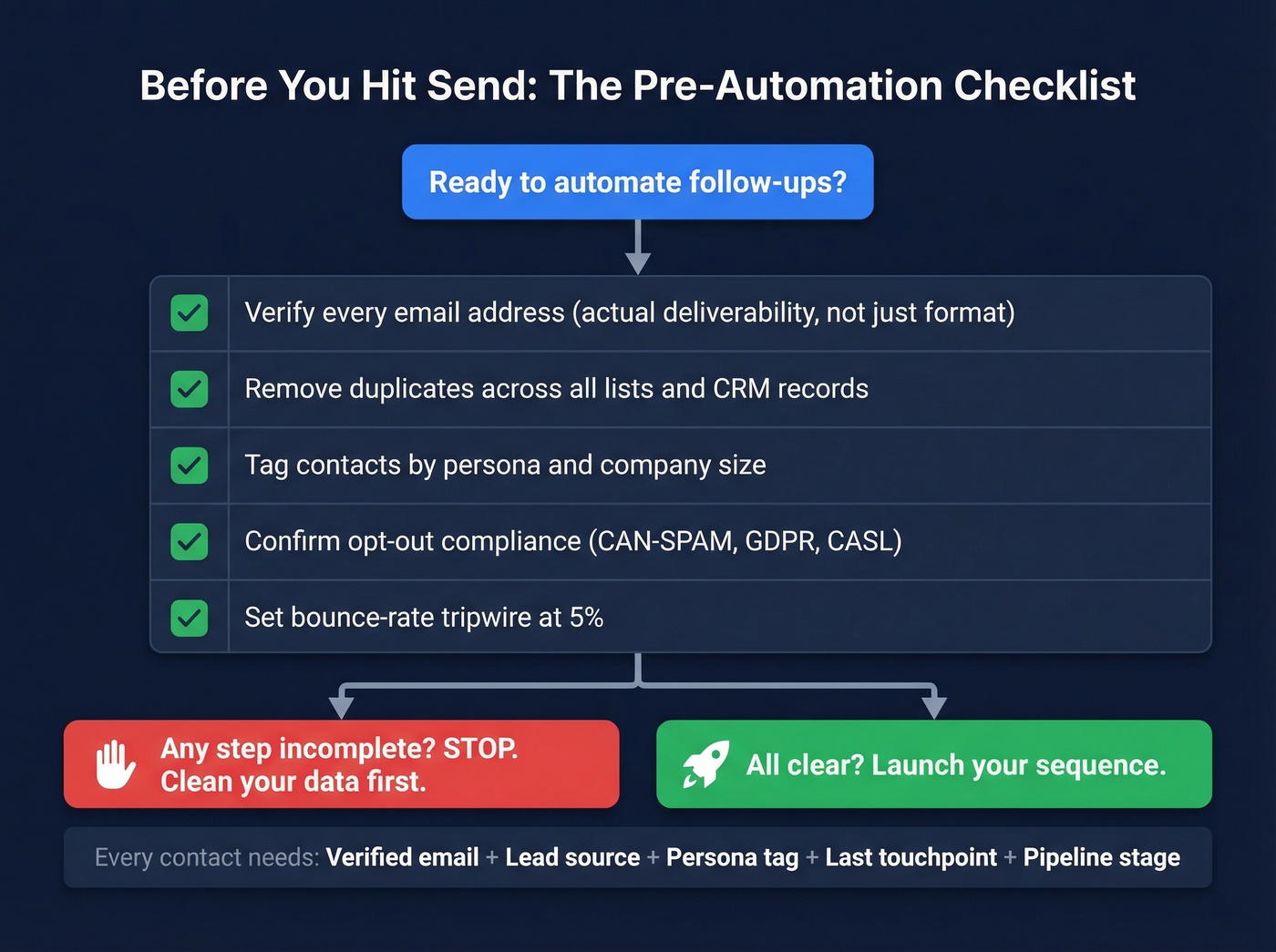
Your CRM needs clean, complete records before any sequence fires. At minimum, every contact should have a verified email, lead source, persona tag, last touchpoint, and pipeline stage. Behavioral signals - opens, clicks, site visits, content downloads - make your sequences smarter, but they're useless if the underlying email address is dead.
Before you prioritize which follow-ups to automate, map your opportunities by interaction volume, revenue impact, and manual processing time. A high-volume, high-revenue sequence that currently eats two hours of manual work per week is the obvious first candidate. A low-volume nurture drip can wait.
Here's the checklist before you launch any automated sequence:
- Verify every email address (not just format - actual deliverability)
- Remove duplicates across lists and CRM records
- Tag contacts by persona and company size for segmentation
- Confirm opt-out compliance (CAN-SPAM, GDPR, CASL)
- Set a bounce-rate tripwire: if any sequence exceeds 5%, pause and clean

Bounces killed that 500-contact sequence before a single reply came in. Prospeo's 5-step verification catches spam traps, honeypots, and catch-all domains - delivering 98% email accuracy on a 7-day refresh cycle. At $0.01/email, cleaning your list costs less than one bounced follow-up.
Stop automating follow-ups to dead inboxes. Verify first.
Mistakes That Kill Your Follow-Ups
Do this: Each follow-up adds something new - a case study, a data point, a different angle on the problem. Map each email to a different buyer objection. The five core objections are: no need, not worth the cost, no urgency, don't want it, and don't trust you. Your sequence should address at least three across your follow-ups. A concrete example: instead of "just checking in," try "we added 10-15 warm leads for [similar company] in January using [specific approach]." That's a proof point, not a ping.
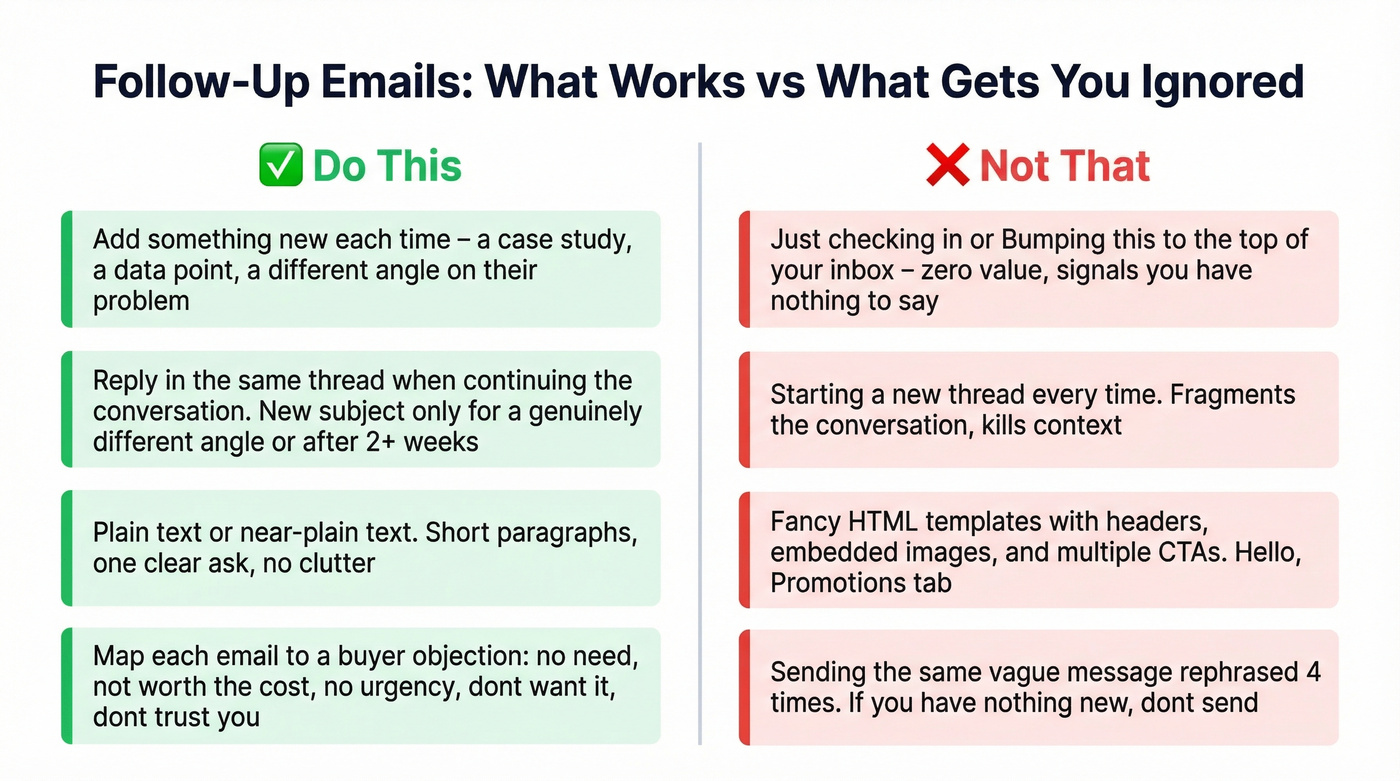
Not that: "Just checking in" or "bumping this to the top of your inbox." These add zero value and signal you have nothing new to say. If you can't add something worth reading, don't send.
Do this: Send follow-ups as replies in the same thread when you're continuing the conversation. Use a new subject line only when you're introducing a genuinely different angle or it's been more than two weeks since your last touch.
Not that: Starting a new thread every time. It fragments the conversation and makes it harder for the prospect to see context.
Do this: Keep formatting plain or near-plain text. Short paragraphs, one clear ask, no HTML templates with headers and images.
Not that: Sending follow-ups with fancy formatting, embedded images, or multiple CTAs. Every design element you add moves you further from "real person writing a real email" and closer to the promotions tab.
The consensus on r/coldemail is brutal - horror stories about burning through 145 email accounts, cold-emailing their own customers, and sending emails with broken merge tags. Most of these failures trace back to the same root cause: automating before the data and copy were ready. Over on r/smallbusiness, teams talk about wanting to save roughly an hour per day per rep on follow-ups. The time savings are real, but only if the foundation is solid.
Three follow-ups is the ceiling - which means every send has to count. Prospeo gives you 50+ data points per contact so you can personalize each follow-up by persona, company size, and tech stack. 83% enrichment match rate means your sequences actually have something real to say.
Better data makes fewer follow-ups work harder.
Follow-Up Templates
Quick rule: reply in the same thread if you're continuing the conversation. Start a new thread only when you're introducing a completely different angle or it's been more than two weeks. 35% of recipients open emails based on the subject line alone, so keep yours under 50 characters and specific to the recipient's situation.
If you want more options beyond these examples, pull from a dedicated library of sales follow-up templates.
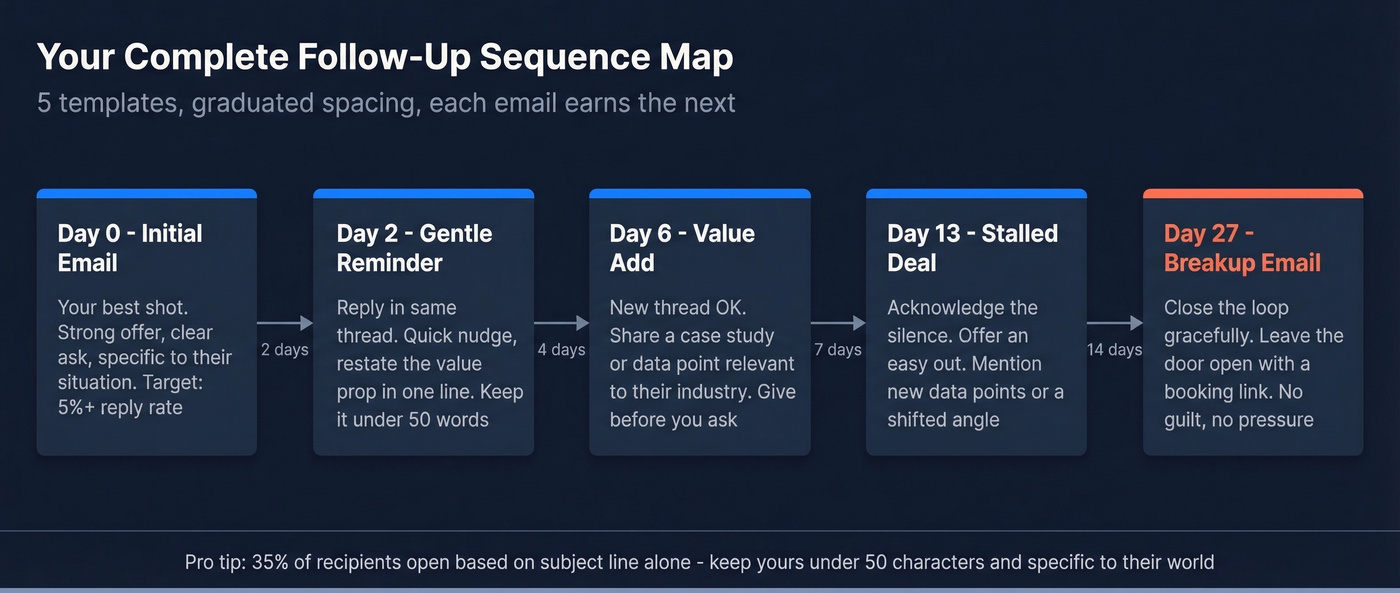
Gentle Reminder (2 Days)
Subject: Re: [Original Subject]
Hi {{firstName}}, wanted to make sure this didn't get buried. We help {{companyType}} teams [specific outcome] - would a 15-minute call this week make sense to explore fit?
Value-Add (4 Days)
Subject: Thought you'd find this useful
{{firstName}}, we just published a case study on how [similar company] [achieved specific result]. Figured it was relevant given [their challenge]. Here's the link: [URL]. Happy to walk through how it'd apply to {{company}}.
Post-Demo Follow-Up
Subject: Re: [Demo Subject]
{{firstName}}, great speaking with you on [day]. You mentioned [specific pain point] - I pulled together a quick breakdown of how [feature/approach] addresses that for teams like yours. Here's the one-pager: [URL]. Let me know if you want to loop in [stakeholder they mentioned] for a deeper dive.
Stalled Deal
Subject: Did priorities shift?
{{firstName}}, I know things get busy. Last we spoke, you were evaluating [solution area]. If timing's changed, no worries - just let me know and I'll follow up when it makes more sense. If you're still exploring, I have a few new data points that might help the decision.
Breakup Email (14 Days)
Subject: Closing the loop
{{firstName}}, I've reached out a few times and haven't heard back, so I'll assume the timing isn't right. I'm going to close out this thread, but if [problem] comes back up, my calendar's always open: [booking link]. Wishing you and the {{company}} team a strong quarter.
Setting Up Your Sequence
Gmail (Native + Extensions)
Gmail's built-in "Schedule Send" lets you time individual emails, but it doesn't support conditional logic - there's no "if no reply, send follow-up" option. For true automation, you need an extension like GMass. Install it, compose in Gmail, set your follow-up sequence with conditions (no reply, no click), and GMass handles the rest. It runs as a Chrome extension, so there's no separate platform to learn.
Outlook (Rules + Power Automate)
Outlook's rule system handles basic automation. On desktop, go to File > Manage Rules & Alerts > New Rule, then set your trigger and action. On the web, it's Settings > View all Outlook settings > Mail > Rules > Create new rule. For multi-step follow-up sequences with conditional branching, Power Automate connects Outlook with the rest of the Microsoft ecosystem. It's more setup than Gmail extensions, but it's powerful for teams already in the Microsoft stack.
Dedicated Outreach Tools
Graduate from email-native tools when you're prospecting more than 50 contacts per week, need conditional logic beyond "no reply," or want multi-step sequences with A/B testing. This is where sequence management becomes essential: stop the sequence on reply, branch when a prospect clicks a specific link, trigger a different path based on CRM status changes, or pause when a meeting is booked.
Platforms like Instantly, Apollo, and Mailshake handle sequence building, send-time optimization, and deliverability monitoring in one place. The tradeoff is cost and complexity - but if you're running real outbound, the investment pays for itself in time saved and domains not burned.
Best Tools for Automated Follow-Up Emails
| Tool | Best For | Starting Price | Key Feature |
|---|---|---|---|
| Prospeo | Verification before sequencing | Free (75 emails/mo) | 98% accuracy, 7-day refresh |
| GMass | Gmail users on a budget | $25/mo | Chrome extension, mail merge |
| Instantly | Cold outreach at scale | ~$30/mo | Graduated spacing, warmup |
| Apollo | Sales teams + CRM | Free (100 credits); $59/mo | Database + sequences |
| ActiveCampaign | Marketing follow-ups | $15/mo | Visual automation builder |
| Brevo | Budget marketing automation | Free tier; $8.08/mo | Generous free plan |
| HubSpot | CRM-native sequences | Free CRM; ~$20/mo paid | All-in-one ecosystem |
| Mailshake | Sales engagement | ~$59/mo | Phone + email combined |

Skip this section if you already have a sequencing tool you're happy with - the real bottleneck for most teams isn't the sequencer, it's the data feeding into it.
If you're running everything from Gmail and don't want another platform, GMass at $25/month is your best bet. You get conditional follow-ups, mail merge from Google Sheets, A/B testing, and a Spam Solver feature that tests whether your email lands in inbox, promotions, or spam. The Professional plan runs $55/month for deeper reporting, and teams can get five users for $120/month.
Instantly has become the default for dedicated cold outreach. The graduated spacing framework we discussed earlier is built into the platform, along with inbox warmup and multi-account rotation. At around $30/month, nothing else matches it for pure outbound volume. We've seen teams pair Prospeo for verification with Instantly for sequencing - the native integration means verified contacts flow directly into campaigns without manual exports.
Apollo combines a B2B database with sequencing, which is useful if you don't have a separate data source. Free plan includes 100 credits per month, and paid starts at $59/month per user. ActiveCampaign ($15/mo) and Brevo (free tier) are better fits for marketing follow-ups than sales outreach. HubSpot works best when your whole team already lives in the HubSpot ecosystem. Mailshake at around $59/month combines phone and email for teams that want both channels in one platform.
You don't need a $500/month sales engagement platform to automate follow-ups. GMass at $25/month handles 90% of use cases for small teams.
Using AI to Personalize at Scale
AI can write opening lines based on a prospect's recent company announcement, adjust tone based on persona - founders get direct language, VPs get ROI framing - and dynamically swap content blocks based on what a prospect clicked in previous emails. The output is what matters: icebreakers that feel hand-written at a scale no human can match.
Here's where most teams get burned: AI personalization requires accurate data. If your CRM fields are stale, your merge tags are wrong, or your email addresses are invalid, AI just personalizes the garbage faster. I've watched teams invest in AI-powered sequencing tools while sitting on contact lists with 20%+ bounce rates. The AI can't fix bad data - it amplifies it. Clean your list first, then let AI do its work.
If you're evaluating tooling, compare options built for AI sales follow-up and AI for sales emails before you commit.
Deliverability Checklist
Before launching any automated follow-up email sequence, run through this:
- Keep subject lines under 50 characters
- Authenticate your domain: SPF, DKIM, and DMARC all configured
- Verify every email before it enters your sequence - use a tool with a weekly refresh cycle, not one that checks once and forgets
- Include an opt-out link and sender details (CAN-SPAM, GDPR, CASL)
- Warm up new domains for 2-3 weeks before running outbound sequences
- Monitor bounce rates in real time - if any sequence exceeds 5%, pause and clean your list immediately
- Send in the recipient's time zone, not yours
- Limit daily send volume per mailbox: 50-100 for new domains, scale gradually
If you want to go deeper on the mechanics (limits, ramp schedules, and monitoring), see our guide to email velocity.
FAQ
How many follow-up emails should I send?
Two to three for cold outreach. A 16.5M-email study shows that four or more follow-ups more than triple unsubscribe and spam complaints while delivering sharply diminishing reply rates. Founders tolerate slightly more persistence - reply rates hold through the second follow-up - but even there, the fourth email cuts performance nearly in half.
What's the best time to send follow-ups?
Tuesday or Thursday, 10 AM in the recipient's time zone. Wednesday edges out other days for click-through rates specifically, so test it if your follow-up includes a link. Avoid weekends and early mornings - emails sent before business hours get buried.
Should I reply in the same thread or start a new one?
Same thread if you're continuing the conversation - it preserves context and feels natural. Start a new thread only when you're introducing a completely different angle, sharing an unrelated resource, or it's been more than two weeks since your last touch.
How do I keep automated follow-ups from sounding robotic?
Each email must add something new: a case study, a data point, a different angle on the prospect's problem. Map each follow-up to a different buyer objection - no need, not worth the cost, no urgency, don't want it, don't trust you. If you can't add new value, don't send.
What free tools work for automated follow-up emails?
Prospeo's free tier (75 verifications/month) handles list cleaning before you sequence. GMass offers a free plan for basic Gmail follow-ups. Apollo gives 100 free credits monthly with built-in sequencing. For marketing workflows, Brevo's free tier covers up to 300 emails/day with basic automation triggers.