

Barracuda Reputation Block List: 2026 Removal Guide
You submitted the removal form three days ago. No confirmation email. No change in your bounce logs. Your sales team's outbound sequences are still bouncing off every prospect running Barracuda, and you're about to submit the form again - don't. That'll make things worse.
Here's the complete playbook for diagnosing, fixing, and preventing Barracuda Reputation Block List listings, including the phone escalation path that actually works.
What You Need (Quick Version)
- Check: Look up your IP at barracudacentral.org/lookups and run a DNS query against
b.barracudacentral.org. - Fix: Submit the removal form once - never twice. If nothing changes in 12 hours, call 408-342-5400.
- Prevent: Authenticate with SPF, DKIM, and DMARC, and verify every email address before sending. Bad data feeding spam traps is one of the biggest preventable causes of BRBL listings.
What Is the BRBL?
The Barracuda Reputation Block List is a free, public DNS-based blocklist maintained by Barracuda Networks since 2008. It catalogs IP addresses associated with spam activity and makes that data available to any mail server that chooses to query it - not just Barracuda appliances.
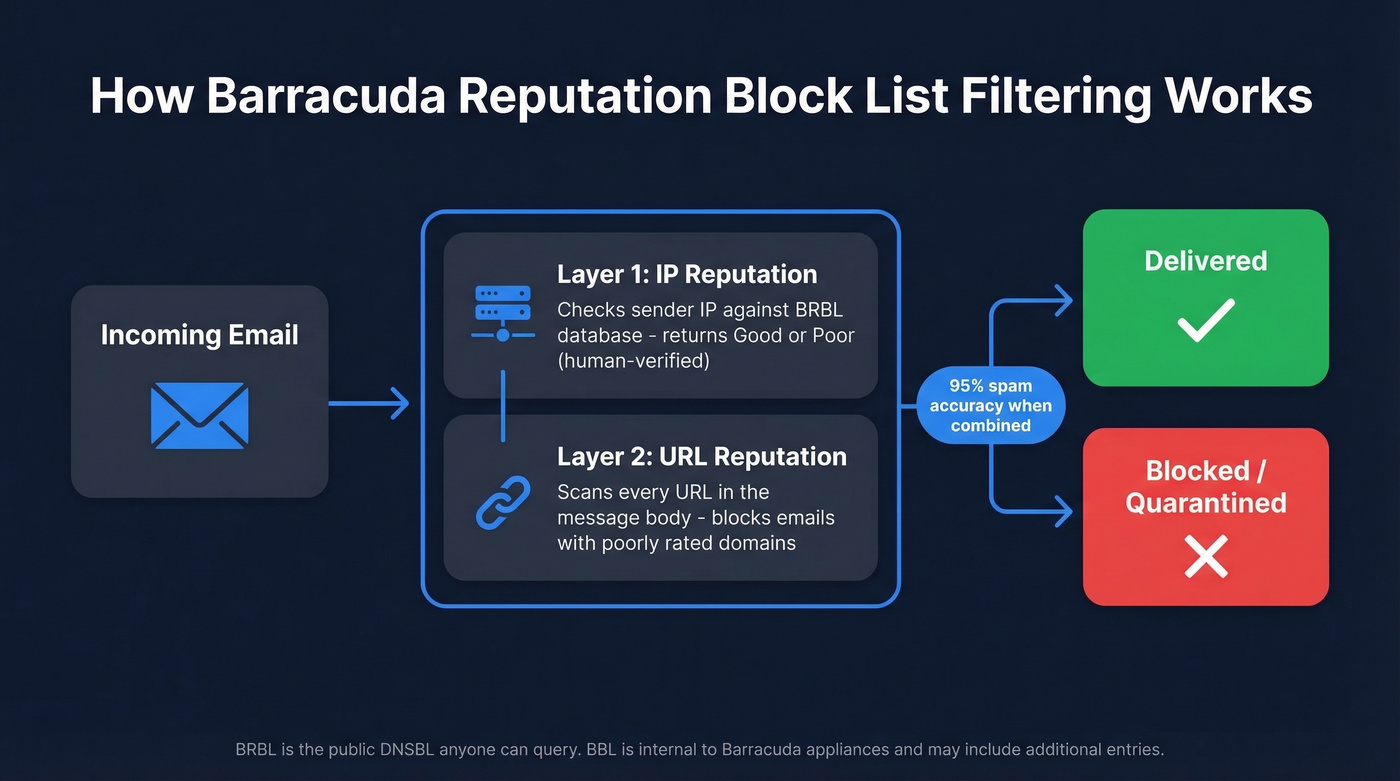
What makes Barracuda's filtering different from a simple IP blacklist is that it combines multiple reputation signals. IP reputation is one layer, the "Good" vs "Poor" result you see in Barracuda Central lookups. Barracuda also maintains URL reputation, which can block emails based on a poorly-rated URL contained in the message body regardless of who sent it. Barracuda reports a 95% spam accuracy rate when combining these layers.
A few things worth knowing:
- Listing is automated, but all IPs marked as "poor" are manually verified by Barracuda Central staff - so the "poor" designation is human-confirmed.
- "BRBL" and "BBL" aren't the same thing. BRBL is the public DNSBL anyone can query. BBL is used internally alongside Barracuda appliances and can include additional entries.
- Barracuda asks users to register the IP addresses they plan to query so they're authorized to use the system.
How Serious Is a BRBL Listing?
Let's put this in perspective. Spamhaus is the blocklist that'll crater your deliverability across Gmail, Microsoft 365, and virtually every major mailbox provider. If you're on Spamhaus, stop reading this article and go fix that first.
BRBL's impact is narrower but still meaningful. It primarily affects organizations whose recipients run Barracuda security products - and that's a lot of mid-market and enterprise companies. If your outbound targets include healthcare systems, law firms, financial services, or manufacturing companies, there's a good chance many of them sit behind a Barracuda gateway.
A BRBL listing won't tank your entire email program the way Spamhaus will. But it can silently kill deliverability to a meaningful segment of your prospect base.
How to Check If You're Listed
There are two ways to check, and you should use both.
Web Lookup
Go to barracudacentral.org/lookups, enter your sending IP, and check the result. The interface returns a simple "Good" or "Poor" rating with a timestamp of the last check. "Poor" means you're listed. "Good" means you're clean - at least on IP reputation.
Command-Line DNS Query
For a faster, scriptable check, reverse your IP and query the BRBL zone directly. If your sending IP is 192.0.2.1:
dig +short 1.2.0.192.b.barracudacentral.org A
Or with nslookup:
nslookup 1.2.0.192.b.barracudacentral.org
If you're listed, you'll get back an A record of 127.0.0.2 with a TTL of 900. You might also see a TXT record pointing to a reputation URL like http://www.barracudanetworks.com/reputation/?pr=1&ip=192.0.2.1.
No 127.0.0.2 A record? You're not listed. One note: Barracuda asks users to register their querying IP addresses, and unregistered IPs can get rate-limited or blocked from lookups entirely.

Most BRBL listings start with bad data - spam traps, honeypots, and stale addresses hiding in your list. Prospeo's 5-step verification removes them before they torch your sender reputation. 98% email accuracy, 7-day data refresh, and built-in catch-all handling.
Stop feeding spam traps. Send to verified emails only.
Why Your IP Got Listed
Most BRBL listings trace back to one of these causes:
- Spam traps and honeypots. This is the big one for B2B senders. Purchased, scraped, or stale email lists inevitably contain addresses that exist solely to catch spammers. Hit enough of them and you're flagged. We've seen teams get listed within days of sending to a purchased list.
- Open relays. If your mail server accepts and forwards mail from any sender, spammers will exploit it - and your IP takes the blame.
- Compromised accounts. A single compromised mailbox sending spam through your infrastructure can get your entire IP range listed.
- Shared or dynamic IPs. Hosting and NAT environments mean you might inherit someone else's bad reputation through no fault of your own.
- High complaint rates. Even legitimate email that generates enough "mark as spam" clicks will trigger listing.
Verifying every address before sending eliminates the spam trap problem at the source. Prospeo's 5-step verification catches spam traps, honeypots, and catch-all domains with 98% email accuracy and records refreshed every 7 days - the exact data quality issues that trigger BRBL listings in the first place.

How to Get Delisted
Submit the Removal Request
Go to the removal request form and fill in three required fields: your email server IP address, your email address, and your phone number. The "Reason for Removal" field is optional but strongly recommended - requests with a valid explanation are typically investigated and processed within 12 hours.
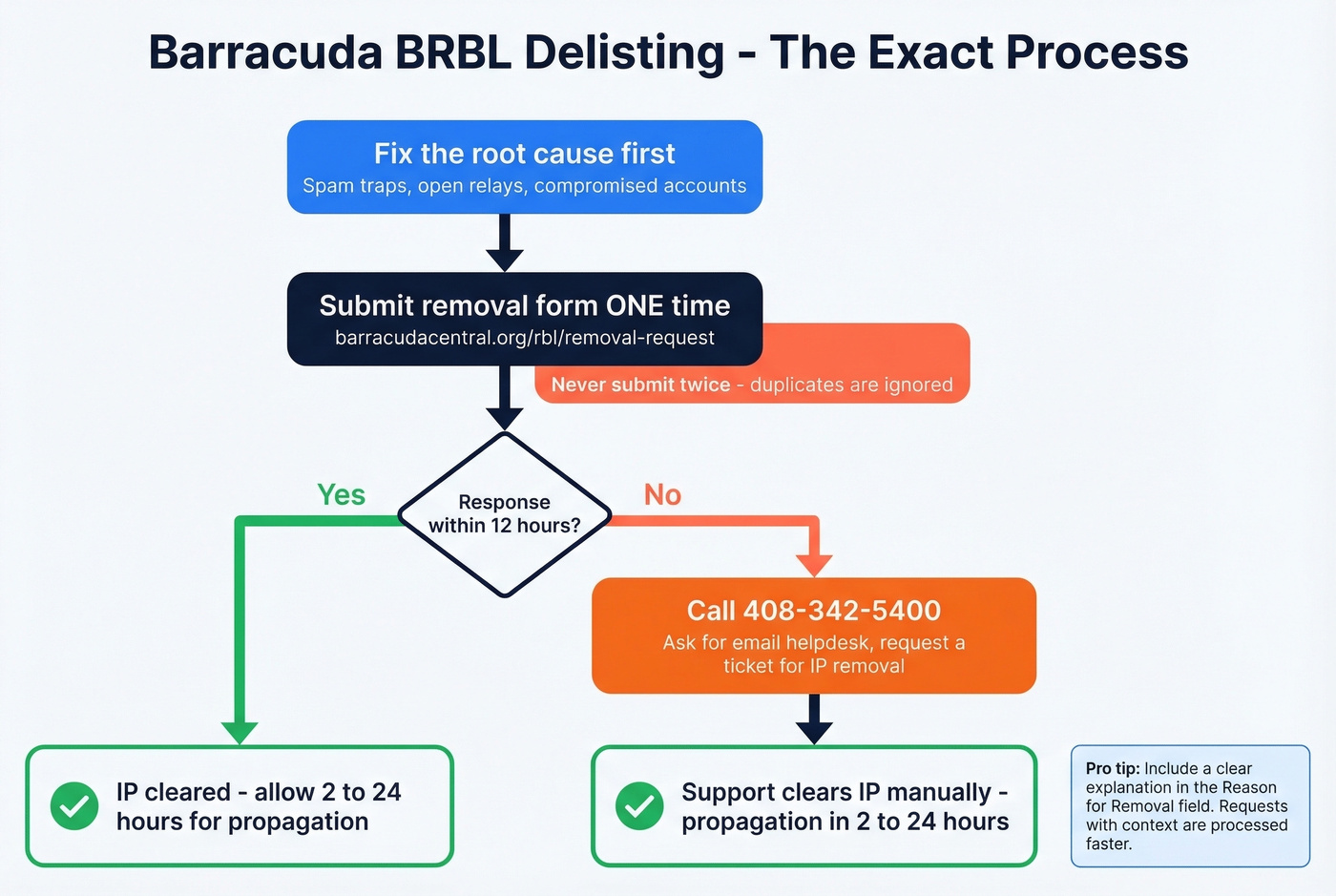
Here's the critical part: do NOT submit multiple requests. Barracuda explicitly states that duplicate submissions are ignored. One submission. Then wait.
Before you submit, make sure you've actually fixed the underlying problem. If you delist without addressing the root cause, you'll end up right back on the list - and repeat offenses take longer to resolve.
If the Form Doesn't Work - Call
You submitted the form. Days pass. Nothing. The consensus on r/sysadmin is that the form sometimes produces zero response, and the workaround is straightforward.
Call 408-342-5400. Ask for the email helpdesk. Request that they open a ticket for your IP removal. One admin who went through this process reported that Barracuda support cleared the IP from their intent block-list and advised allowing 2-24 hours for propagation. The listing was gone shortly after.
Look, the fact that a phone call is sometimes the only reliable escalation path for a free public blocklist is genuinely annoying. But it works. Save yourself the stress of resubmitting the form and just pick up the phone.
Not Listed but Still Blocked
Your IP shows "Good" in the Barracuda lookup, but your emails are still bouncing. Two scenarios explain this.
Recipient-Side Quarantine
If you're seeing bounce codes like 550 permanent failure ... : quarantined with a Remote-MTA of mail.ess.barracuda.com, the problem isn't your BRBL listing - it's the recipient organization's Barracuda gateway enforcing its own quarantine policies. Individual appliances have configurable thresholds, allowlists, and quarantine rules that operate independently of the public blocklist. Your SPF, DKIM, and DMARC can all pass, and the gateway can still quarantine your message based on content scoring or custom rules.
The fix is to contact the recipient's IT team directly and ask them to whitelist your domain or IP. There's nothing you can do from your side to override their local policies.
URL Reputation Blocks
This one's trickier. You're seeing 554 5.2.0 rejections, your IP doesn't show "Poor" in the lookup, and you can't even submit a removal request because there's technically nothing to remove.
The culprit is usually URL reputation. If any URL in your email body has a poor reputation score, Barracuda can block the entire message. One r/sysadmin thread documented a case where a previously-owned domain that had been dropped and abused by spammers triggered blocks even though the current owner's sending infrastructure was clean. One admin described the system as "hair-triggered" - and they're not wrong.
Your only real option here is to contact Barracuda support directly and explain the situation.
Delisting Timelines Compared
| Blocklist | First Offense | Repeat Offense | Auto-Delist? | Self-Service? |
|---|---|---|---|---|
| Barracuda BRBL | 12-24 hrs | 24-72 hrs | No | Yes |
| SpamCop | 24-48 hrs | 24-48 hrs | Yes (auto-expire) | N/A |
| Spamhaus SBL | 24-48 hrs | 1-2 weeks+ | No | Yes |
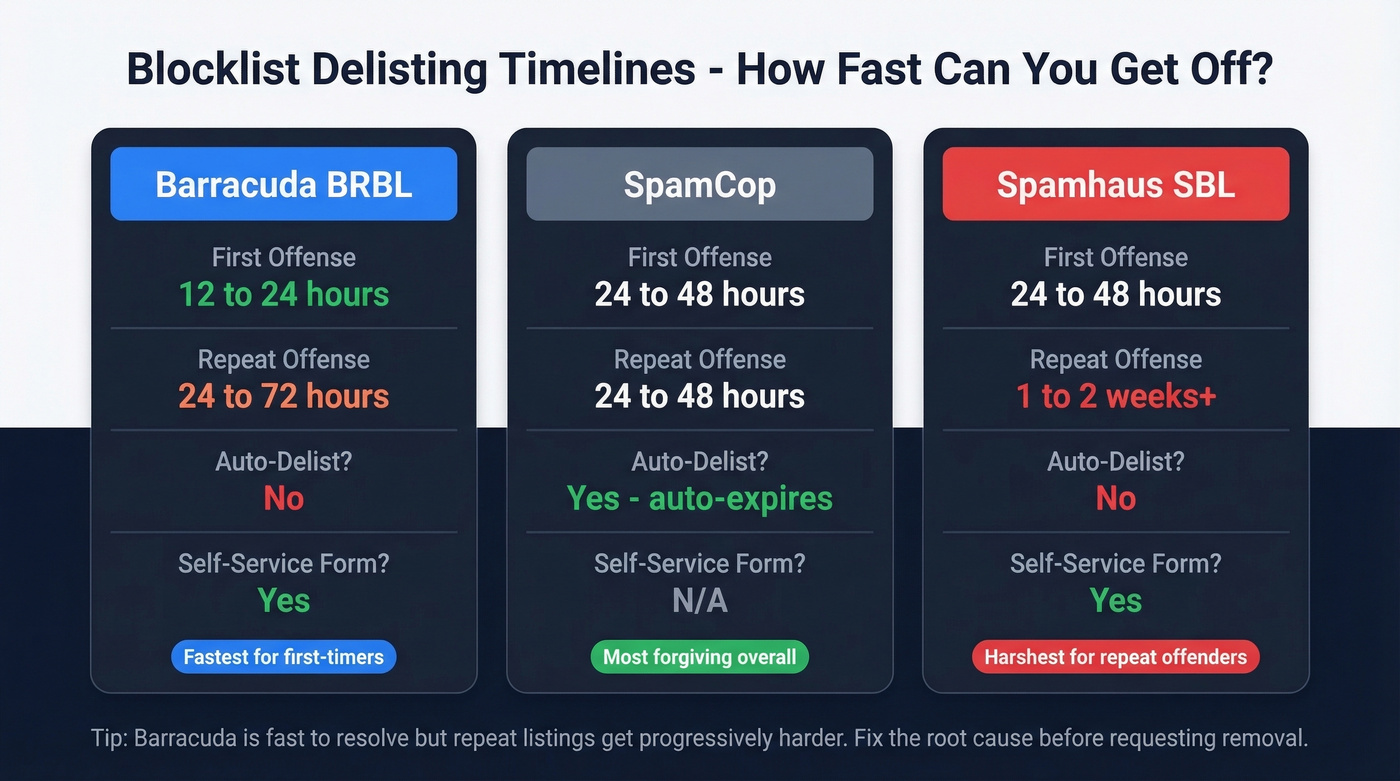
Barracuda is one of the fastest to resolve for first-time offenses - 12 hours is realistic with a good explanation. Where it gets painful is repeat listings, though even then it's often faster than Spamhaus, which can hold repeat offenders for weeks. SpamCop is the most forgiving since listings auto-expire once new spam reports stop coming in.
Prevention Checklist
Getting delisted solves today's problem. Staying off the Barracuda Reputation Block List requires ongoing hygiene.
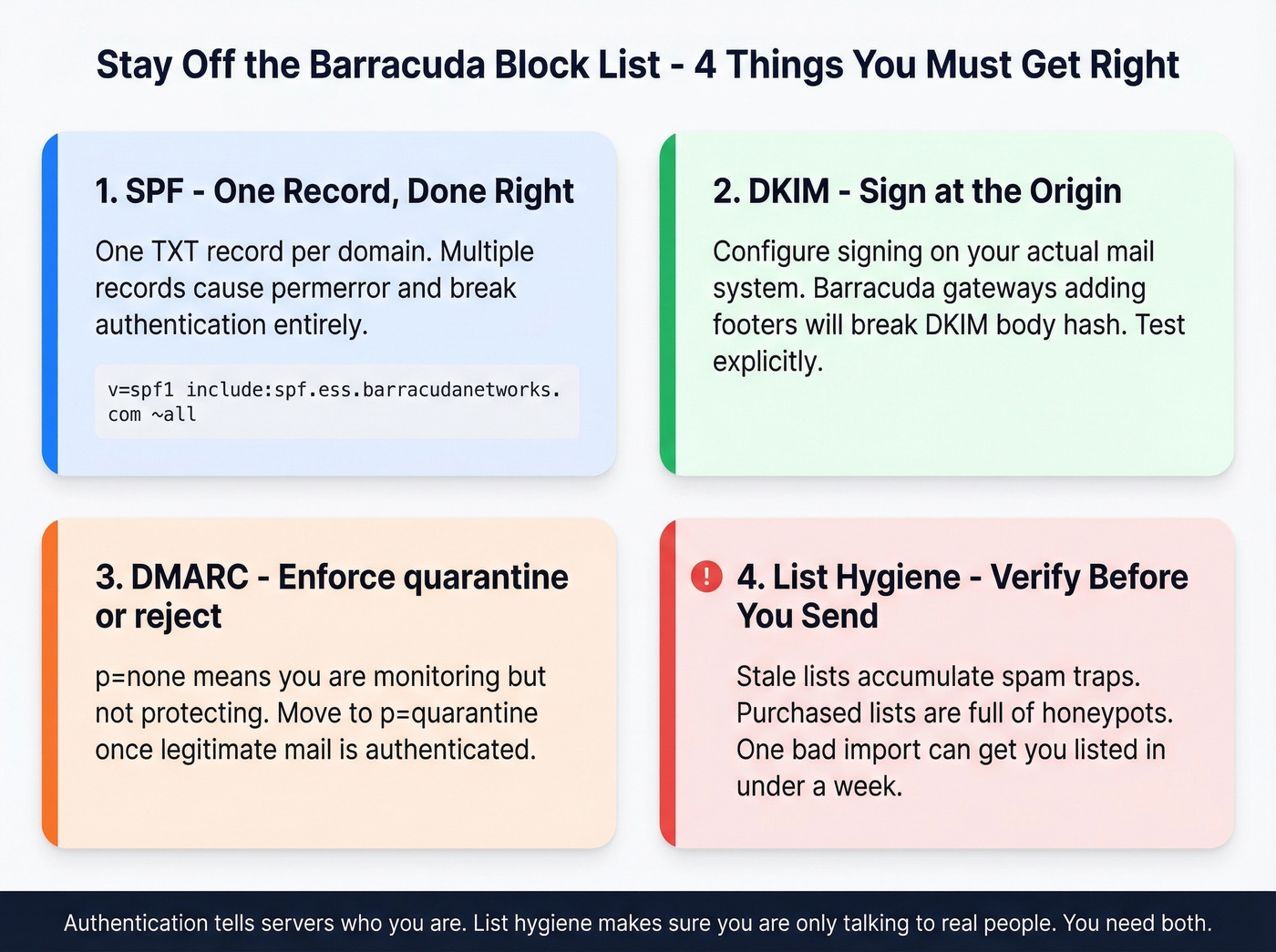
1. SPF - one record, done right. Your domain gets exactly one SPF TXT record. Multiple records cause a permerror that breaks authentication entirely. If you're routing through Barracuda ESS, include their SPF mechanism:
v=spf1 include:spf.ess.barracudanetworks.com ~all
If you’re unsure whether your record is valid, run an SPF record check before you send again.
2. DKIM - sign at the origin. Configure DKIM signing on your actual mail system (Microsoft 365, Google Workspace, or your SMTP provider). Here's the thing: many Barracuda appliances don't DKIM-sign outbound mail automatically, and if your Barracuda gateway adds footers or disclaimers to messages, it'll break existing DKIM signatures because the body hash changes. Test this explicitly. (If you need a refresher, see DKIM.)
3. DMARC - enforce at least p=quarantine. A p=none policy tells receiving servers you're monitoring but not enforcing. Move to quarantine or reject once you're confident your legitimate mail is properly authenticated. Use a DMARC record guide if you’re not sure what to publish.
4. List hygiene - verify before you send. This is where most B2B senders fail. Stale lists accumulate spam traps. Purchased lists are riddled with honeypots. Every email that bounces or hits a trap chips away at your sender reputation. We've watched teams go from clean to listed in under a week because they skipped verification on a single imported list. Verify everything, every time. (If you want the deeper breakdown, read about types of spam traps.)

5. Infrastructure hygiene. Close open relays. Monitor for compromised accounts. If you're on shared or cloud-hosted IPs, check your IP's reputation regularly with MxToolbox - you might be inheriting someone else's mess. If you’re doing this routinely, set up blacklist monitoring so you catch issues early.
If your deal sizes are under $15k, you probably don't need to panic about a BRBL listing the way you would about Spamhaus. Fix it, yes. But the real ROI move is preventing it - clean data and proper authentication will keep you off every major blocklist, not just Barracuda's.
Getting delisted from Barracuda is step one. Staying off is step two. Teams using Prospeo's verified contact data keep bounce rates under 4% - because every email is validated against spam traps, honeypots, and dead addresses on a 7-day refresh cycle.
Verified data at $0.01/email beats a BRBL removal request every time.
FAQ
Is the BRBL free to use?
Yes, the Barracuda Reputation Block List is a free public DNSBL. Checking your IP and submitting removal requests cost nothing. Barracuda asks users to register their querying IP addresses if they want to run programmatic DNS lookups at scale.
How long does BRBL delisting take?
First-time removal requests with a valid explanation are typically processed within 12 hours. Repeat listings can take 24-72 hours. If the web form produces no response after 12 hours, call 408-342-5400 and ask the email helpdesk to open a ticket.
Why am I blocked by Barracuda if my IP isn't listed?
Two common causes: the recipient's Barracuda appliance has its own quarantine policies independent of the public blocklist, or a URL in your email body has a poor URL reputation even if your sending IP is clean. Contact the recipient's IT team or Barracuda support directly.
What's the difference between BRBL and BBL?
BRBL is the public DNS-based blocklist anyone can query by reversing an IP and looking it up against b.barracudacentral.org. BBL is used internally alongside Barracuda appliances and can include additional entries not present in the public BRBL.
How do I prevent future BRBL listings?
Authenticate email with SPF, DKIM, and DMARC. Verify every address before sending to eliminate the data quality issues that cause most listings. Never send to purchased or scraped lists, close open relays, and monitor sender reputation regularly with MxToolbox.