

Blacklist Monitoring: What It Is, Why It Matters, and How to Stay Off Every List
A RevOps lead we know watched reply rates on a high-performing sequence drop 40% overnight. No copy changes, no list swap, no domain age issue. A single spam trap hit landed their sending IP on Spamhaus SBL/XBL, and Gmail started silently rejecting half their outbound. The fix took three weeks. The pipeline damage took longer.
That's what happens without blacklist monitoring - and it's entirely preventable.
What you need (quick version):
- Check right now: MXToolbox - free, instant, checks 100+ lists
- Automated monitoring: HetrixTools - free tier covers 32 monitors
- Stop getting listed in the first place: Verify your email lists before sending. Bad data is the #1 trigger.
What Is Blacklist Monitoring?
It means regularly checking whether your sending IPs and domains appear on DNS-based blocklists (DNSBLs, also called RBLs). These are real-time databases that mailbox providers and spam filters query before accepting inbound email. If your IP or domain shows up, your mail gets rejected or routed to spam - often without any notification to you.
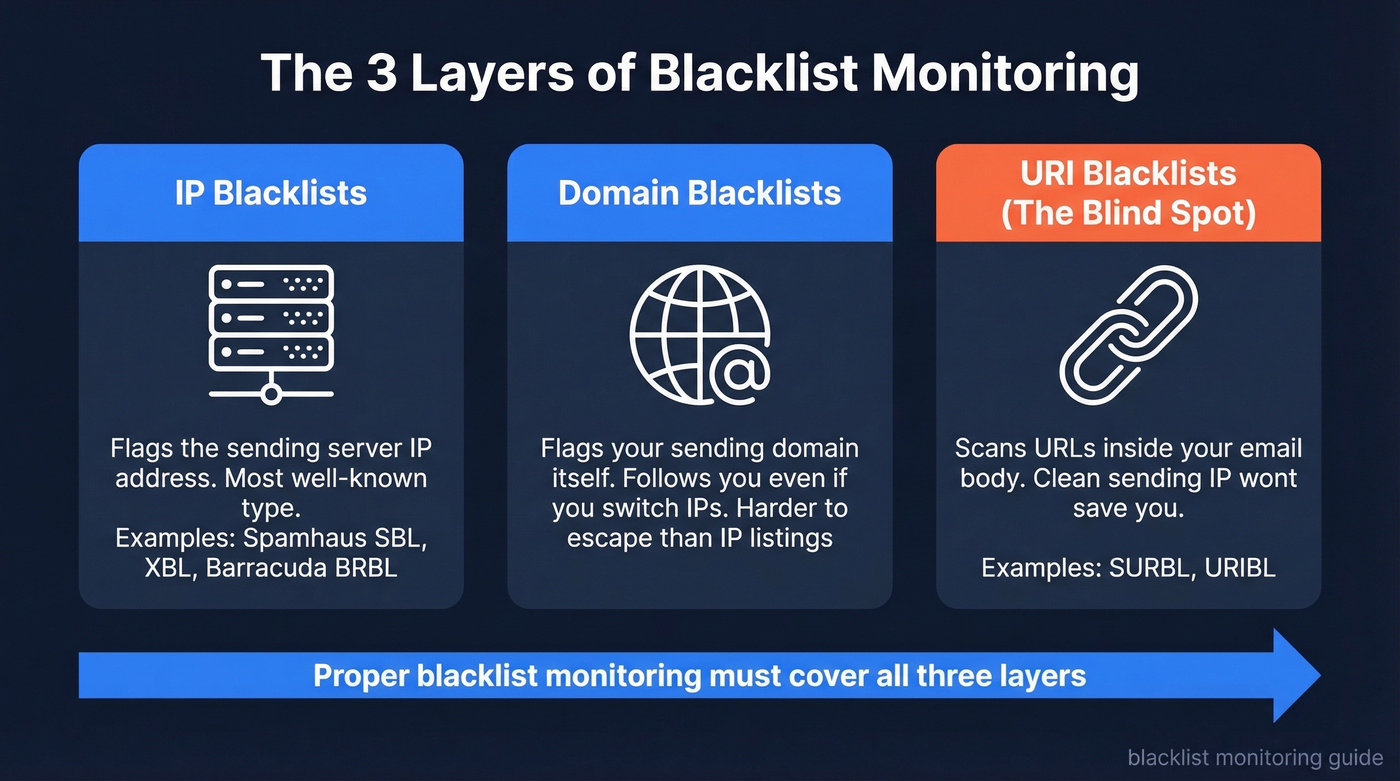
Most people think of IP blacklists, and those are the big ones. But three distinct types matter. IP blacklists like Spamhaus SBL/XBL flag the server sending the mail. Domain blacklists flag your sending domain itself, even if you switch IPs. And then there's the blind spot most teams miss entirely: URI blacklists like URIBL and SURBL, which scan the URLs and domains inside your email body. You can have a clean sending IP and still get filtered because a link in your signature points to a flagged domain.
Proper blocklist monitoring covers all three layers - not just the one you've heard of.
Why Deliverability Is Harder in 2026
Gmail, Yahoo, and Microsoft now enforce a strict "no auth, no entry" policy. If SPF, DKIM, and DMARC aren't passing, bulk mail simply doesn't arrive. That's table stakes now, not a best practice.
What changed more recently: Google added SMTP rejection reporting to DMARC reports in mid-2025, which exposed how many senders had broken reverse DNS (PTR records) without knowing it. Teams that treated DNS as "set it and forget it" suddenly saw rejection spikes they couldn't explain. Beyond email DNSBLs, security reputation lists like Google Safe Browsing can flag your domain for website visitors too - a different kind of blocklist, but worth watching if you rely on web traffic alongside email outreach.
Here's what makes blacklisting particularly dangerous right now:
- Spamhaus protects 3+ billion mailboxes. A listing there can cut deliverability by 90% within hours.
- A single spam trap hit can take 6-12 months to fully recover from.
- Fewer human escalation paths exist at major providers. You can't call someone at Gmail to fix this. Remediation is self-serve or nothing.
The window between "listed" and "pipeline damage" has shrunk to hours. Checking your blocklist status can't be a monthly afterthought.
Which Blacklists Actually Matter
Stop checking 100 blacklists. Start checking 5.
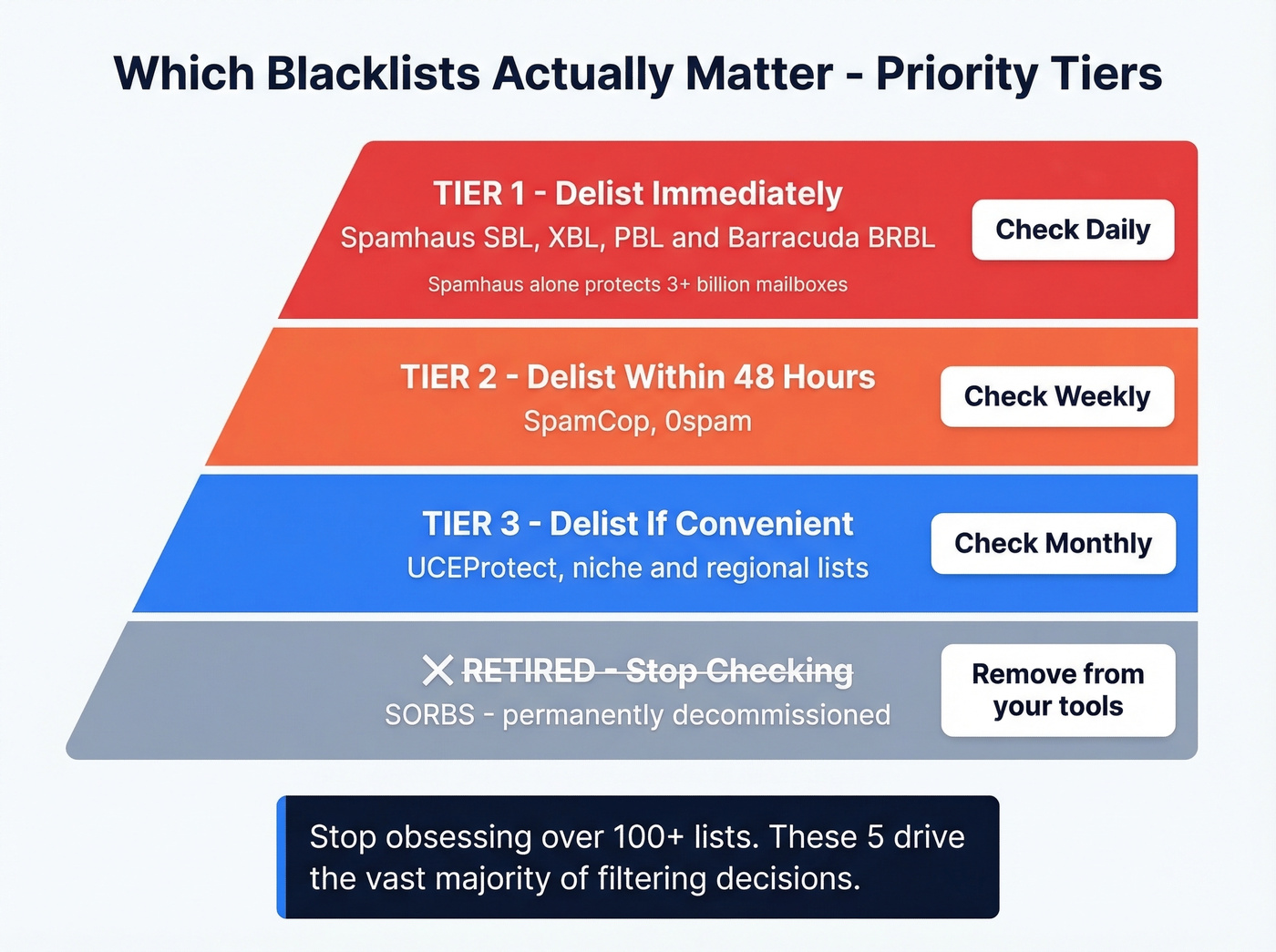
Most tools brag about scanning hundreds of lists. A handful drive the vast majority of filtering decisions, and the rest are noise. Here's how to prioritize:
| Tier | Blacklists | Frequency | Action |
|---|---|---|---|
| Tier 1 | Spamhaus (SBL/XBL/PBL), Barracuda | Daily | Delist immediately |
| Tier 2 | SpamCop, 0spam | Weekly | Delist within 48h |
| Tier 3 | UCEProtect, niche/regional | Monthly | Delist if convenient |
| Retired | SORBS | Never | Stop checking it |
Spamhaus is the one you can't ignore - it's the most influential blocklist in the world, widely used across major mailbox providers and enterprise spam filters. Barracuda BRBL matters heavily in enterprise environments where Barracuda appliances are common. SpamCop is user-report driven and auto-delists once reports stop, so it's less catastrophic but still worth watching.
SORBS has been permanently decommissioned. If your monitoring tool still checks it, remove it. You're wasting a check.
The teams that obsess over being listed on some obscure regional blacklist while ignoring their Spamhaus status are solving the wrong problem.
How DNSBL Lookups Work
Every DNSBL query follows the same mechanism. To check whether 192.0.2.1 is listed on Spamhaus ZEN, your mail server or monitoring tool reverses the IP octets and appends the blacklist's domain: 1.2.0.192.zen.spamhaus.org.
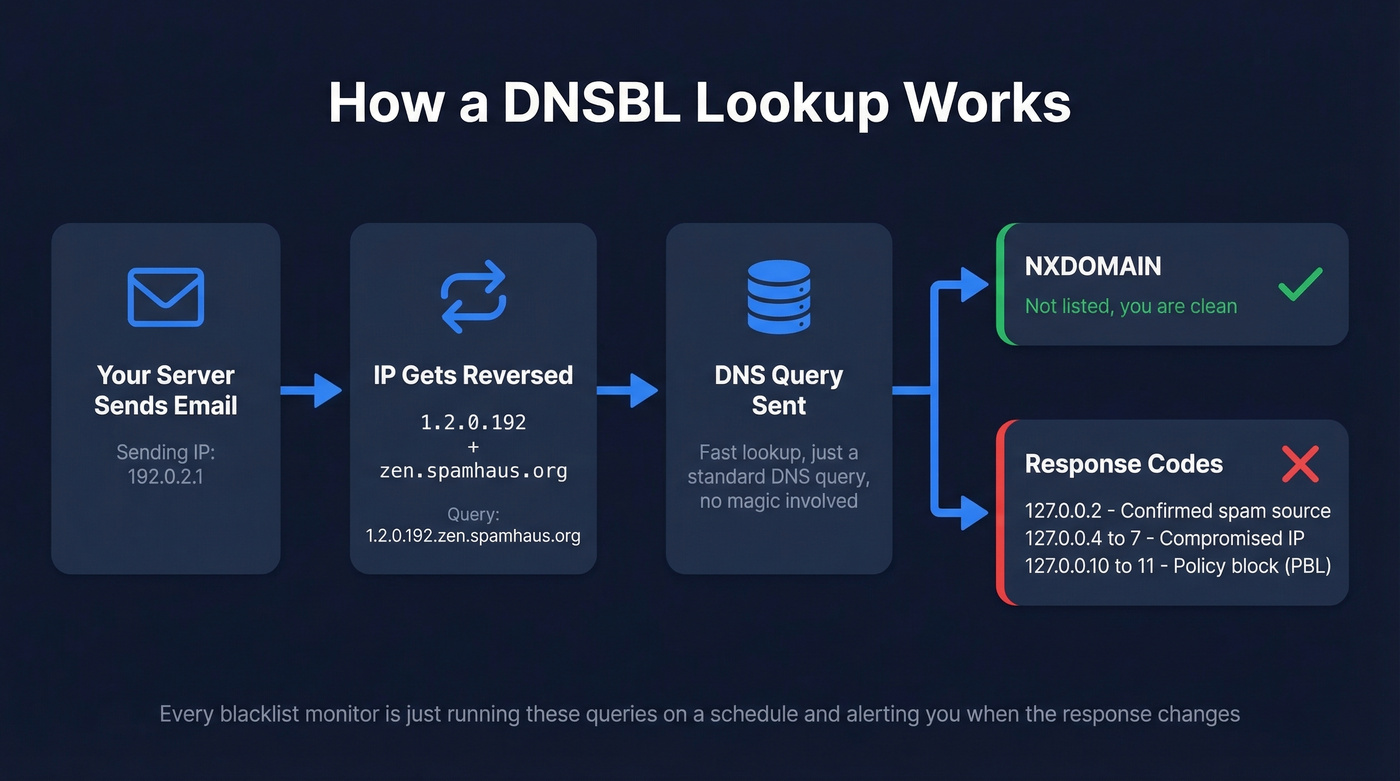
The DNS response tells you everything:
- NXDOMAIN - not listed, you're clean
- 127.0.0.2 - confirmed spam source
- 127.0.0.4-7 - compromised or exploited IP
- 127.0.0.10-11 - dynamic/policy block (PBL)
Lookups are fast because they're just DNS queries. Any monitor is essentially running these queries on a schedule and alerting you when the response changes from NXDOMAIN to something else. That's it - there's no magic.

Bounce rates above 5% get you blacklisted. Prospeo's 98% verified emails and 5-step verification - including spam-trap removal and honeypot filtering - keep your outbound clean. One agency cut bounce rates from 35% to under 3% across every client.
Stop fixing blacklist damage. Start sending to verified addresses.
Why You Get Blacklisted
Spam Traps and Bad Lists
This is the #1 cause we see. Sending to purchased or unverified email lists means you're almost certainly hitting spam traps - addresses that exist solely to catch senders who don't practice list hygiene. One trap hit on Spamhaus, and you're looking at weeks of recovery.
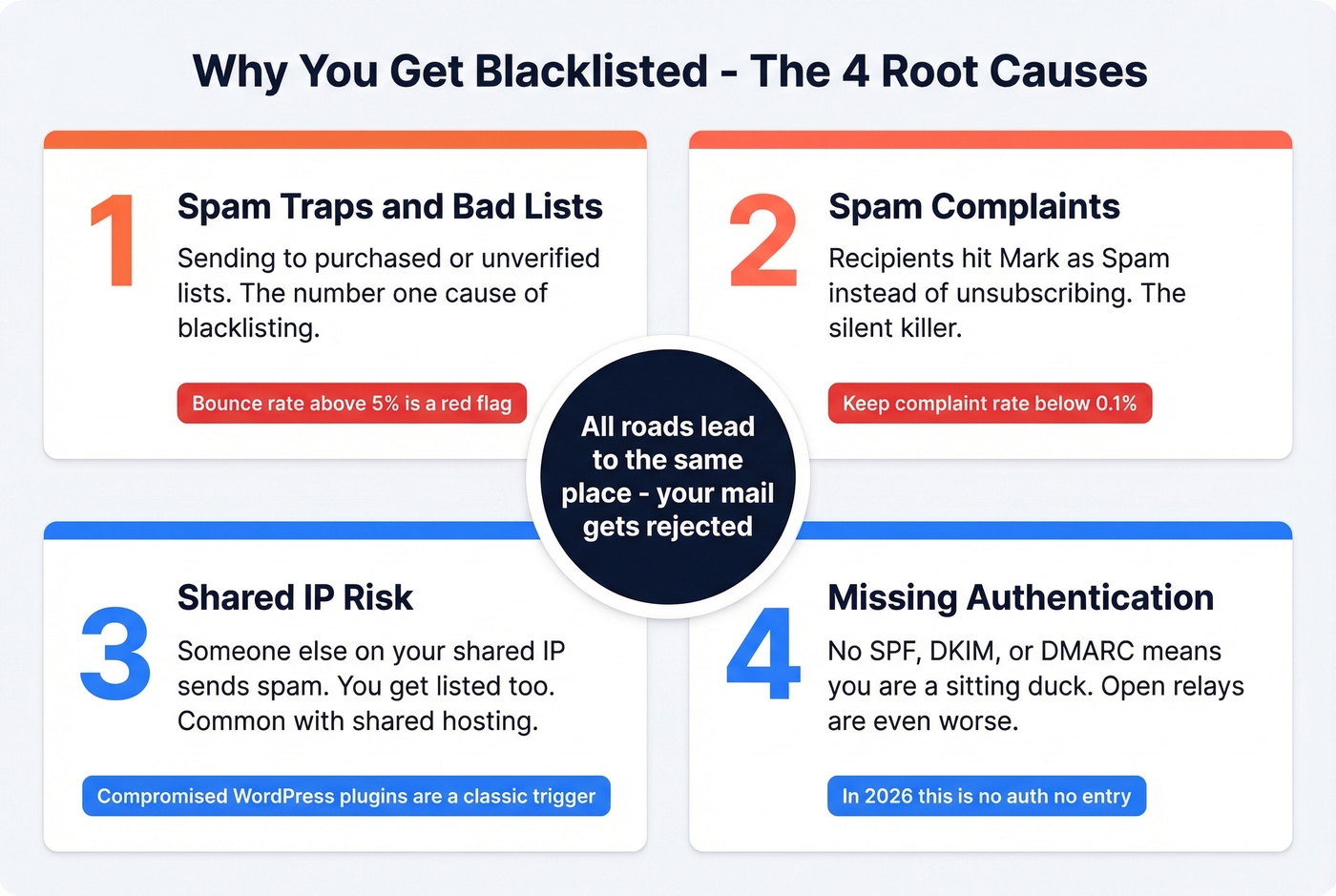
Bounce rates exceeding 5-10% are a major red flag for blacklist operators. Even if you don't hit a trap, consistently high bounces signal that you're not verifying your data. We've seen teams with "clean" lists still get flagged because they hadn't re-verified addresses in months and decay had pushed their bounce rate past the threshold.
One cold email sender on r/coldemail reported finding an older domain listed on both Spamhaus and Barracuda after sending to an unverified list. After cleaning the list, requesting delisting, and warming back up, deliverability recovered within days. The lesson: the fix is usually straightforward, but the damage compounds every hour you don't catch it.
Spam Complaints
Even legitimate senders get listed when recipients hit "mark as spam" instead of unsubscribing. This is the silent killer - you're sending wanted email, but enough people use the spam button as an unsubscribe shortcut that blacklist operators take notice. Keep complaint rates below 0.1%. Above that, you're on borrowed time.
Shared IP Risk
If you're on shared hosting or a shared sending IP, someone else's bad behavior can take you down. The classic pattern: a compromised WordPress plugin sends spam through a shared IP, the IP gets listed, and every tenant's mail starts bouncing. Support tickets flood in, and nobody knows why until someone checks the blocklists.
Missing Authentication
No SPF, no DKIM, no DMARC? You're a sitting duck. In 2026, missing authentication doesn't just hurt deliverability - it actively invites blacklisting. Open relays are even worse. If your SMTP server accepts and forwards mail from unauthenticated sources, it's only a matter of time before someone exploits it. (If you want a quick checklist, start with email deliverability basics and then validate your DKIM setup.)
How to Set Up Blocklist Monitoring
Five steps, and you can have this running in under an hour:
- Pick a monitoring tool. HetrixTools (free tier) for automated checks, or MXToolbox for manual spot-checks.
- Add your sending IPs and domains. Every IP you send from, every domain in your From address and email body links.
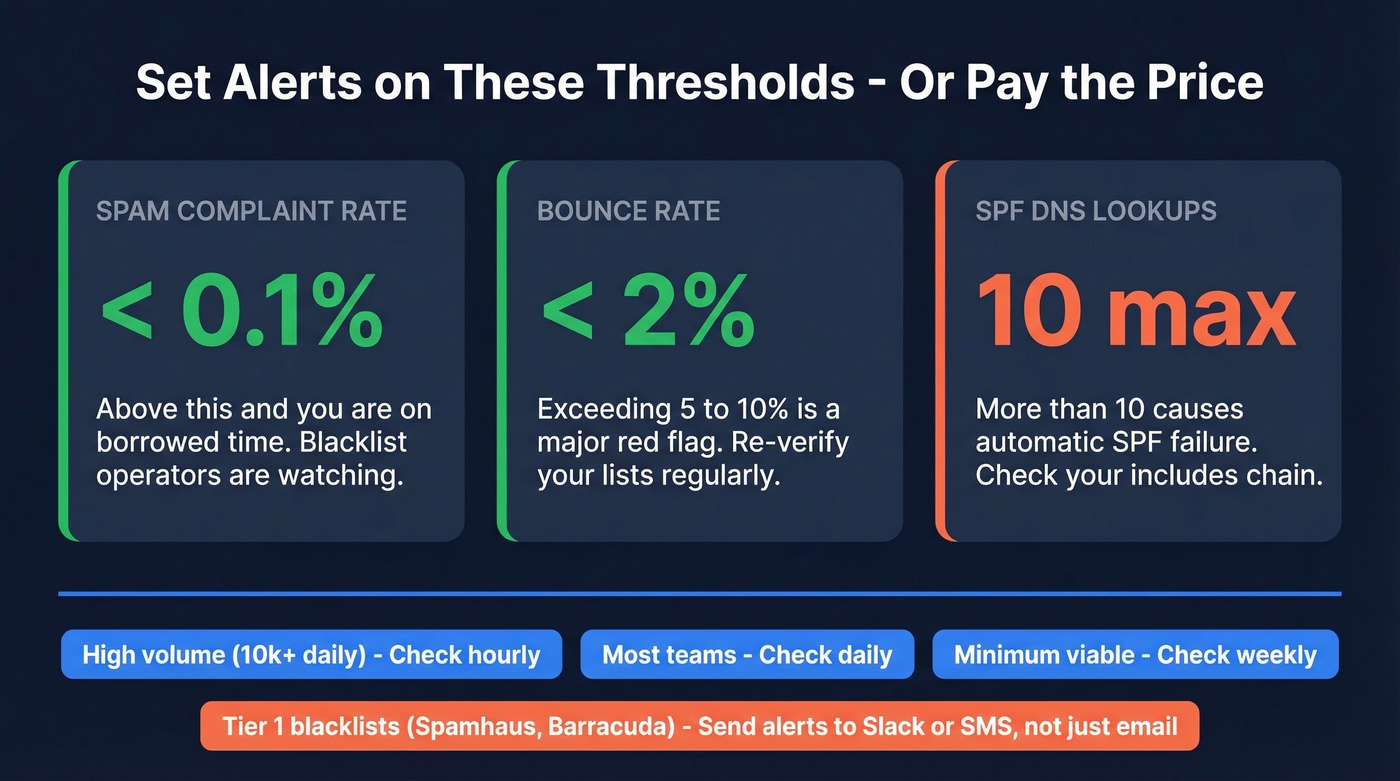
- Set check frequency. Hourly for high-volume senders pushing 10k+ emails/day. Daily for most teams. Weekly at absolute minimum.
- Configure alerts. Email alerts are baseline. Slack or SMS for Tier 1 blacklists so you catch Spamhaus listings within minutes, not days.
- Complement with reputation tools. Google Postmaster Tools and Microsoft SNDS give you reputation signals that blocklist monitors miss - spam rates, authentication pass rates, and domain reputation scores. Pair this with ongoing email reputation tools so you can spot issues before a listing.
Thresholds to set alerts on:
- Spam complaint rate: keep below 0.1%
- Bounce rate: keep below 2% (see email bounce rate benchmarks and fixes)
- SPF DNS lookups: stay at or under 10 (more causes auto-fail)
Best Tools for Checking Blacklists
Here's the thing: most teams don't need a paid monitoring tool. The free tier of HetrixTools plus a weekly MXToolbox spot-check covers 90% of use cases. Save your budget for the thing that actually prevents blacklisting - clean data.
| Tool | Best For | Lists Checked | Auto Alerts | Pricing |
|---|---|---|---|---|
| MxToolbox | One-time checks | 100+ | Paid plans | Free manual; paid plans available |
| HetrixTools | Automated monitoring | Hundreds+ | Yes (email/Slack/SMS + more) | Free (32 monitors)-$99.95/mo |
| MailMonitor | Enterprise remediation | 100+ | Yes | From $99/mo |
| MultiRBL | Quick multi-checker | Many | No | Free |
| WebSitePulse | Per-monitor pricing | Varies | Yes | $3-$19/mo depending on monitor type |
MxToolbox
The default starting point. Paste an IP or domain, get results across 100+ blacklists in seconds. It's the tool everyone reaches for first, and for good reason - free, fast, and thorough for spot-checks. Use it for triage and one-off checks, then move to a dedicated monitor if you need scheduled alerts.
HetrixTools - Set This Up Today
The best free option for automated IP and domain monitoring, and it isn't close. The free tier gives you 32 monitors with hourly-capable checks and multi-channel alerts. Paid plans start at $9.95/mo for more monitors and faster check intervals. Alerts can go to email, Slack, SMS, and a long list of other channels.
If you're running outbound at any scale, set this up today. It takes five minutes, and the first time it catches a listing before your sales team notices pipeline drying up, you'll be glad you did.
Skip MailMonitor Unless You Need Managed Remediation
Built for high-volume senders and enterprise teams who need hands-on remediation, not just alerts. MailMonitor tracks 100+ blocklists and offers delisting support when things go wrong. Plans start at $99/mo. Worth it if blacklist downtime is extremely expensive for your business. For everyone else, it's overkill.
Other Checkers Worth Knowing
MultiRBL runs quick multi-list checks but doesn't offer monitoring or alerts - good for a second opinion alongside MxToolbox. WebSitePulse takes a different approach with per-monitor pricing, which works if you only need to watch a few specific IPs. CleanTalk maintains its own DNSBL and offers downloadable blocklist datasets, useful for engineering teams building custom filtering.
How to Get Delisted
When you find a listing, here's your first-15-minutes triage:
- Read the bounce-back message. It almost always names the exact blacklist and reason.
- Scan with MxToolbox + MultiRBL. Confirm which lists you're on - there's often more than one.
- Pause bulk sending immediately. Continuing to send while listed makes everything worse.
- Identify and fix the root cause. Spam trap? Compromised account? Missing auth? Fix it before requesting delisting.
- Request delisting, then resume sending slowly. Don't blast your full volume on day one. Warm back up (and keep an eye on email velocity so you don’t re-trigger filters).
Delisting timelines by blacklist:
| Blacklist | Timeline | Process |
|---|---|---|
| Spamhaus SBL | 24-72h | Manual request + explanation |
| Spamhaus XBL/CBL | ~24h | Auto after cleanup |
| Spamhaus PBL | Immediate | Request if legitimate sender |
| Barracuda BRBL | 12-24h | Web form submission |
| SpamCop | 24-48h | Auto-delists when reports stop |
| UCEProtect L1 | 7 days | Free auto-removal |
| 0spam | 24h | Auto-removal only, no manual option |
One detail people miss with 0spam: their manual removal tool is rate-limited to 1 IP every 3 hours. For long-term listings, you need 60 days clean before they'll consider manual removal. Plan accordingly.
If you're dealing with Spamhaus specifically, follow a dedicated Spamhaus blacklist removal playbook so you don’t miss required remediation steps.
How to Prevent Blacklisting
The best strategy is never getting listed. Let's break this down by layer.
Authentication (non-negotiable in 2026): SPF with -all (hard fail for unauthorized senders), DKIM with 2048-bit keys, DMARC starting at p=none and moving to quarantine then reject, and reverse DNS (PTR) aligned with your sending domain. (If you need syntax help, use these SPF record examples.)
Infrastructure hygiene: Close open relays by limiting SMTP to authenticated users and approved IPs. Test relay configuration regularly - a simple telnet SMTP test catches most issues. Use dedicated sending IPs if you're sending more than a few thousand emails daily.
Ongoing reputation monitoring: Google Postmaster Tools + Microsoft SNDS for reputation signals. HetrixTools or equivalent for blocklist checks. Watch complaint rates below 0.1% and bounce rates below 2%.
Data quality - the upstream fix:
The fastest way to land on a blacklist is sending to invalid addresses and spam traps. Before any campaign goes out, run your list through verification. Prospeo's 5-step verification catches spam traps and honeypots before they reach your sending queue, with every record refreshed on a 7-day cycle. The free tier gives you 75 verified emails per month - enough to test the workflow before committing. If you're scaling outbound, align this with the best way to send bulk email without getting blacklisted.

Every unverified list is a spam trap waiting to happen. Prospeo refreshes 300M+ profiles every 7 days - not every 6 weeks - so you're never sending to decayed data that triggers Spamhaus or Barracuda listings.
Clean data at $0.01/email is cheaper than three weeks of delisting.
FAQ
How do I check if my IP is blacklisted?
Go to MxToolbox or MultiRBL, paste your sending IP address, and you'll get results across 100+ blacklists in seconds. Both are free and don't require an account. Check every IP you send from, not just your primary.
What's the difference between an RBL and a DNSBL?
They're the same technology under different names. Both use DNS queries to check IPs or domains against blocklists. RBL (Realtime Blackhole List) is the older term; DNSBL (DNS-based Blocklist) is more precise. Use them interchangeably.
How long does blacklist removal take?
SpamCop auto-delists in 24-48 hours once reports stop. Spamhaus SBL takes 24-72 hours with a manual request and proof of remediation. Barracuda typically processes removals in 12-24 hours via their web form.
Can I get blacklisted for sending to purchased email lists?
Yes, and it happens constantly. Purchased lists are full of spam traps and invalid addresses - exactly the triggers blacklist operators look for. Verify every address before sending. Tools like Prospeo, ZeroBounce, and NeverBounce all offer spam-trap removal and verification workflows that catch these before they damage your reputation.
Is SORBS still active?
No. SORBS has been permanently decommissioned. If your monitoring tool still checks it, remove it from your configuration. It's returning stale data and wasting a check that could go toward a list that actually matters.