

Best Email Tracking for Gmail in 2026 (Honest Guide)
You sent 50 cold emails yesterday. Your tracker says 38 were opened. Three people replied. So what happened with the other 35 "opens"?
Most weren't real. Apple Mail Privacy Protection generated machine opens, corporate security scanners pre-fetched your tracking pixel, and at least a few of those emails bounced to invalid addresses you never should've sent to in the first place. That's the state of open tracking in 2026 - a metric that looks actionable but is mostly noise, inflated by systems designed to protect recipients from exactly the kind of surveillance you're relying on.
Here's the uncomfortable truth: finding the best email tracking for Gmail isn't about picking the fanciest tool. It's about understanding that you probably don't need a better tracker - you need better data feeding into the one you've got. Most "best tracker" roundups are written by tracker companies ranking themselves first (Salesflare gives itself a 9.9/10). This guide isn't that.
Our Picks (TL;DR)
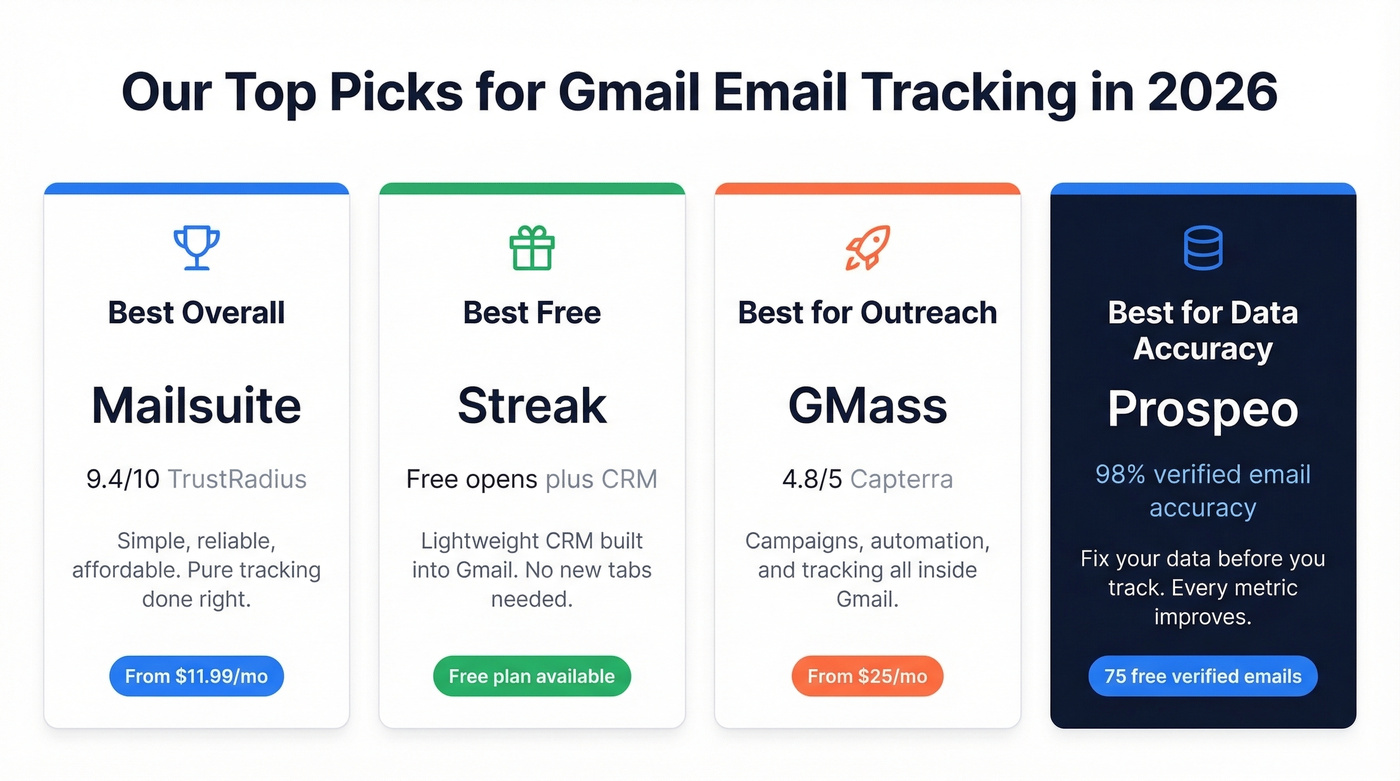
- Best overall tracker: Mailsuite - simple, reliable, affordable. TrustRadius shows a 9.4/10 Likelihood to Recommend from 50 ratings.
- Best free tracker: Streak - free open tracking plus a lightweight CRM built into Gmail.
- Best for outreach + tracking: GMass - campaigns, automation, and tracking all inside Gmail. Capterra 4.8/5.
- Best for data accuracy before you track: Prospeo - 98% verified email accuracy so your tracking data reflects real engagement, not bounces.
Why Open Tracking Is Broken
Apple Mail Privacy Protection launched in 2021 and has been quietly destroying open-rate accuracy ever since. When it's enabled, Apple masks IP addresses and generates machine opens - your Gmail email tracker sees an "open" that was actually Apple's servers pre-loading the pixel. The recipient never looked at your email.
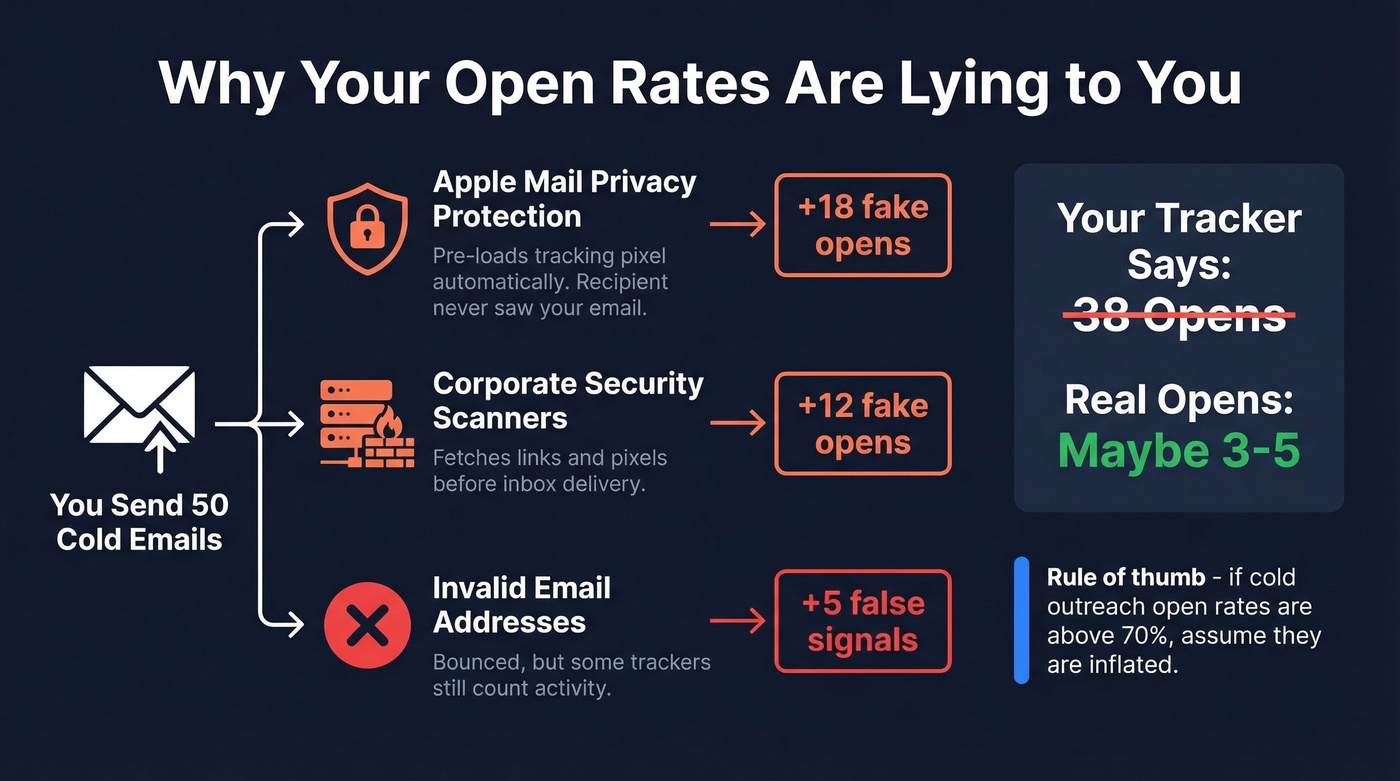
Corporate security scanners do the same thing. They fetch links and pixels before the message hits the inbox, inflating your open rates with phantom engagement. Litmus found that 70% of emails show at least one spam-related issue, and 60.3% of email marketers cite spam filtering as their top deliverability barrier. Your tracking data is swimming in noise.
Here's a rule of thumb: if you see open rates above 70% on cold outreach, assume they're inflated.
The signals that actually matter? Click tracking is far more reliable. Someone clicking a link is a real action. Reply tracking is even better - it's unambiguous intent. Open tracking is directionally useful at scale (trends over hundreds of emails) but meaningless for individual sends.
Every tool on this list handles open tracking. The ones worth your money also handle click tracking. Prioritize accordingly.
What to Look For in a Gmail Tracker
Not all trackers are built the same. These are the features that separate useful tools from expensive noise.
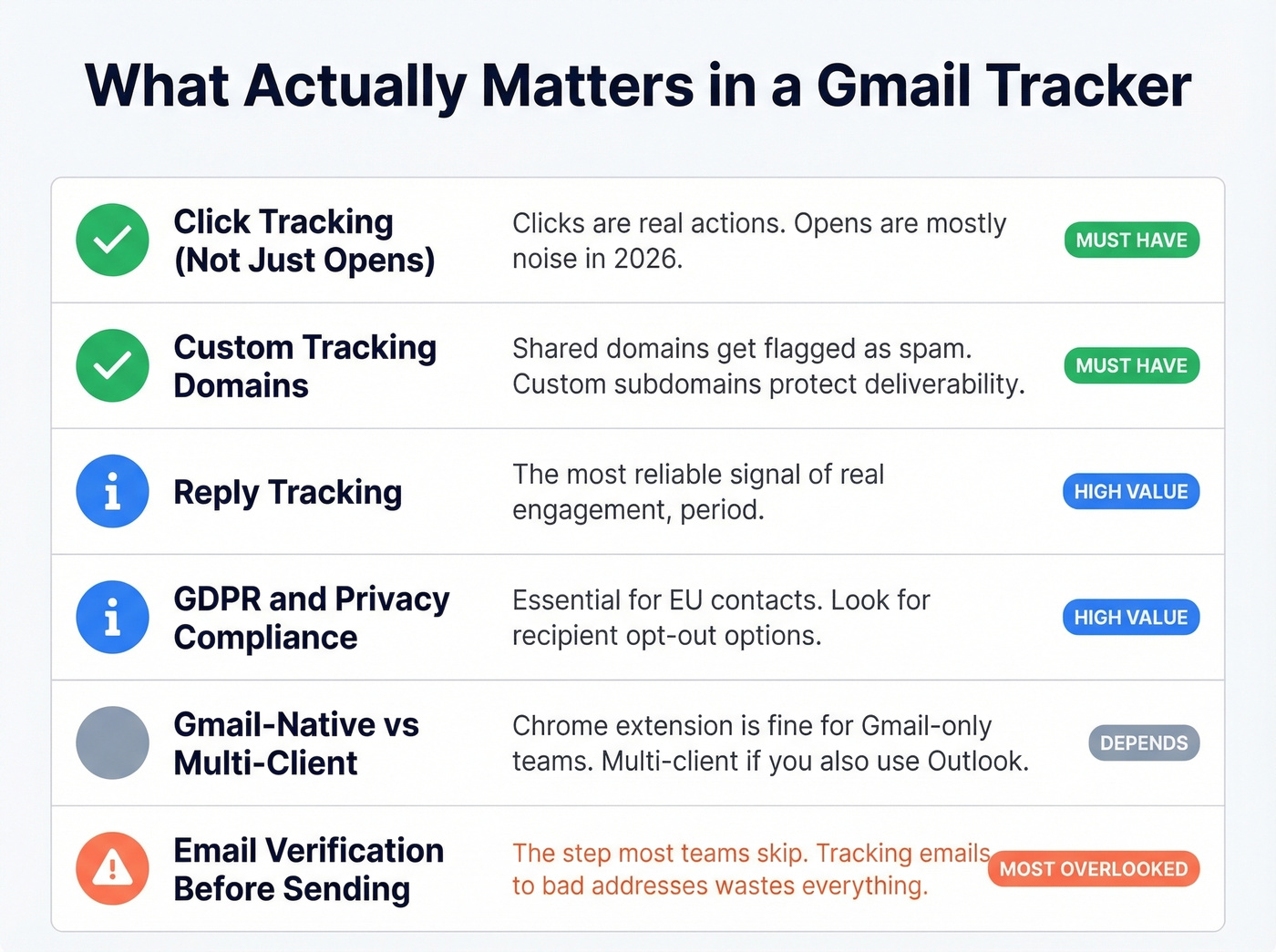
Click tracking, not just opens. If a tool only tracks opens, it's giving you data you can't trust. Clicks are the signal that matters.
Tracking-domain architecture. Tools using shared tracking domains get flagged more often. Custom subdomains per customer reduce the risk of your tracked emails landing in spam. Litmus research shows successful email programs are 22% more likely to actively monitor deliverability - and domain setup is a big part of that. (If you want the technical setup details, start with a tracking-domain architecture checklist.)
Free-tier limitations. Most free plans cap analytics, add branding to your signature, or limit data retention. Know what you're giving up before you commit.
Gmail-native vs. multi-client. If you live in Gmail, a Chrome extension is fine. If your team splits between Gmail and Outlook, you'll want something like Mailbutler that supports multiple email clients.
GDPR and privacy compliance. If you're sending to EU contacts, some trackers offer recipient opt-out or transparent tracking. Others don't mention it at all.
Email verification before sending. This is the step most teams skip, and it's the one that makes every other investment in tracking pay off. Tracking emails to bad addresses wastes credits and tanks sender reputation. We've seen teams fix their bounce rate first and suddenly their tracking data starts telling a coherent story. (If you’re troubleshooting bounces, use this email bounce rate guide.)

Tracking opens on invalid emails is like counting applause in an empty room. Prospeo's 98% email accuracy and 5-step verification eliminate bounces before you hit send - so every open, click, and reply your Gmail tracker reports reflects a real person.
Fix your data first. Your tracking metrics will finally make sense.
Best Email Tracking Software for Gmail
Mailsuite (Formerly Mailtrack)
Mailsuite is one of the simplest Gmail trackers you can use. Install the Chrome extension, send an email, get a notification when it's opened. TrustRadius shows a 9.4/10 Likelihood to Recommend across 50 ratings, and the praise is consistent: fast setup, does exactly what it says.
Use this if you want pure email tracking without a bigger platform. Solo salespeople, freelancers, and founders who just need to know when someone reads their proposal.
Skip this if you need sequences, a CRM, or deeper outreach workflows - you'll outgrow it fast.
Pricing: Free plan tracks unlimited emails but limits open analytics and click tracking to 10 emails each, and adds Mailsuite branding to your signature. Advanced runs $11.99/user/month for unlimited analytics, click tracking, and branding removal.

Streak
Streak is the best free Gmail tracking app if you want a built-in CRM alongside open notifications.
It lives inside Gmail. There's no separate app, no new tab, no context-switching. You get open tracking on the free plan plus a lightweight CRM that lets you manage deals without leaving your inbox. The tradeoff is that Streak's tracking is basic - open tracking works well, but click tracking and deeper analytics require paid plans. TrustRadius gives it a 7.0/10 from 13 ratings, lower than Mailsuite, largely because users want more flexibility outside Gmail.
Pricing: Free plan includes open tracking (no click tracking) and basic CRM. Pro is $49/user/month (annual), Pro+ is $69, and Enterprise hits $129/user/month.

GMass
| Strength | Detail |
|---|---|
| Campaign sending | Mail merge, automated follow-ups, A/B testing - all inside Gmail |
| Tracking | Per-recipient open and click tracking with campaign-level analytics |
| Price | $25-$55/month per user |
| Weakness | Not a CRM - built for sending and tracking, not pipeline management |
GMass turns Gmail into a full outreach platform. Capterra users rate it 4.8/5, and in our experience it's the strongest option for teams running cold email who don't want to pay Outreach or Salesloft prices. You get mail merge, automated follow-ups, A/B testing, and per-recipient tracking all without leaving your inbox. (If deliverability is your bottleneck, see our GMass email deliverability breakdown.)
Use this if you're running cold email campaigns from Gmail and want sending, tracking, and automation in one tool.
Skip this if you need CRM sync, team-level reporting, or enterprise compliance features.
Pricing: Standard at $25/month, Premium at $35/month, Professional at $55/month. All plans are per-user, billed monthly. No free plan, but there's a free trial.
Yesware
Use this if your team runs on Salesforce and needs bi-directional activity sync. Enterprise at $65/seat/month (annual) is the sweet spot for that workflow.
Skip this if you're considering the free plan. Yesware's free tier limits tracking to emails sent less than 24 hours ago - basically useless for any real analysis. Pro at $15/seat/month removes that limit and adds unlimited link tracking. Premium at $35/seat/month adds team features like branding removal and team reporting.
Boomerang
Boomerang is the privacy-conscious pick. It offers a transparent read-receipt model where recipients are notified and can opt out of tracking - unusual in this space and genuinely useful if you're emailing prospects who care about privacy. Think European markets or security-conscious industries.
It's best known for scheduling and response management rather than campaign-style analytics, but the read receipts and link-click notifications work well for individual sends.
Pricing: Free plan covers 10 emails/month. Personal is $4.98/month, Pro is $14.98/month, and Premium runs $49.98/month on annual billing.
Mixmax
Mixmax is powerful and expensive. The full suite runs $89/user/month on annual billing ($105 monthly), which puts it in a different league from Mailsuite or GMass. (If you’re price-shopping, compare Mixmax alternatives before committing.)
You get sequences, scheduling, open and click tracking, and team analytics. But let's be honest - if you only need tracking, you're paying for a lot of features you won't use. After the 14-day trial, the free tier includes email tracking, meeting scheduling, and basic sequences.
Use this if you're already running multi-step sequences and need tracking baked into that workflow. For teams that just want to know who opened what, there are tools at a quarter of the price.
HubSpot Sales Hub
If you already use HubSpot CRM, the free plan gives you 200 open-tracking notifications per month. Open and click tracking are both available on paid plans. Starter is $45/month for 2 users. Professional jumps to $450/month for 5 users.
Don't buy HubSpot just for email tracking. But if you're already in the ecosystem, it's there. (For broader context, see our examples of a CRM guide.)
Mailbutler
Mailbutler works across Gmail, Outlook, and Apple Mail - one of the few options that genuinely supports multi-client workflows. Plans start at $4.95/month, and it's a solid fit for people who switch between email clients regularly.
Right Inbox
A lightweight Gmail extension for basic tracking and send-later scheduling at $7.95/month. Budget option for solo users who need the essentials and nothing more.
Gmail Tracker Pricing Compared
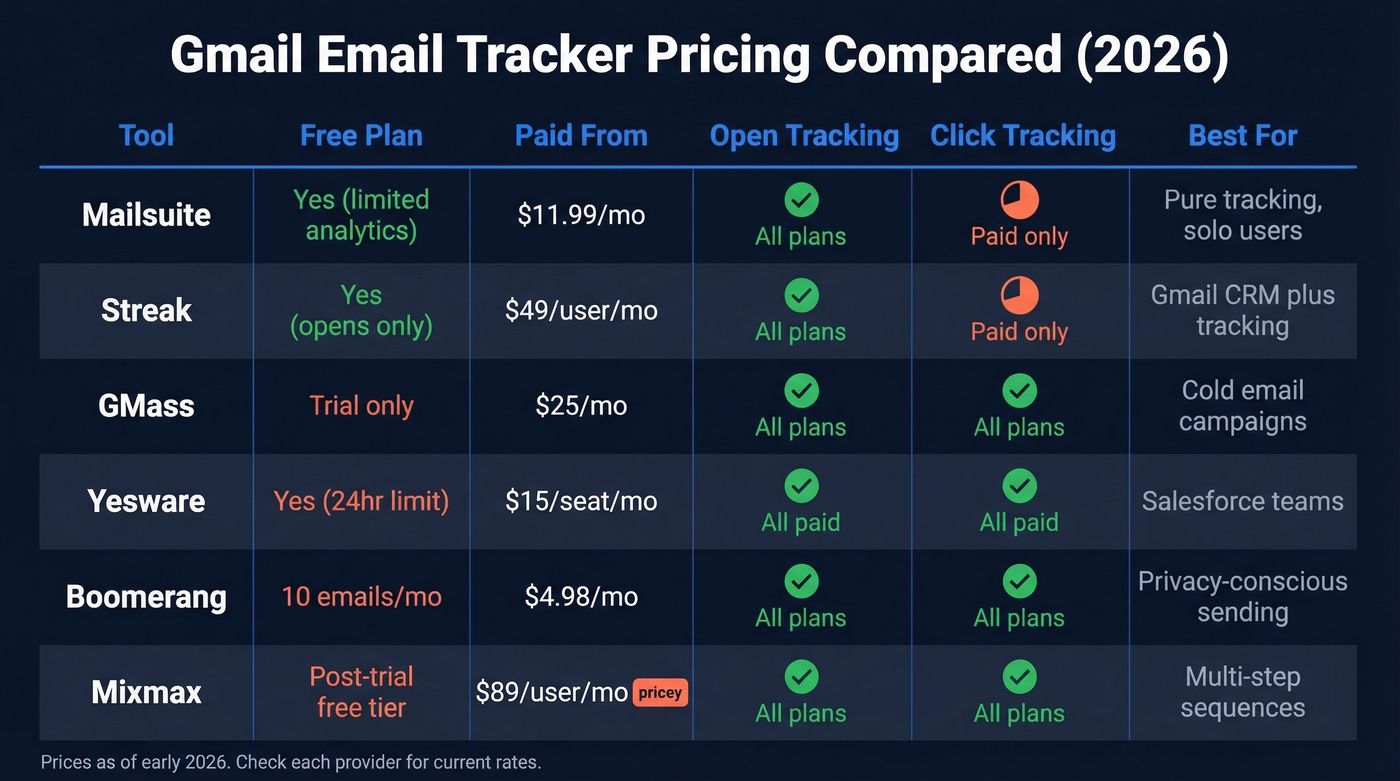
Every tool on this list has different pricing logic. Here's how they stack up side by side.
| Tool | Free Plan | Paid From | Open Tracking | Click Tracking | Best For |
|---|---|---|---|---|---|
| Mailsuite | Yes (limited) | $11.99/mo | All plans | Paid only | Pure tracking |
| Streak | Yes (opens) | $49/user/mo | All plans | Paid only | Gmail CRM + tracking |
| GMass | Trial only | $25/mo | All plans | All plans | Outreach campaigns |
| Yesware | Yes (24hr limit) | $15/seat/mo | All paid | All paid | Salesforce teams |
| Boomerang | 10 emails/mo | $4.98/mo | All plans | All plans | Privacy-conscious |
| Mixmax | Post-trial free | $89/user/mo | All plans | All plans | Sequences + tracking |
| HubSpot | 200 notifs/mo | $45/mo (2 users) | All plans | Paid only | HubSpot CRM users |
| Mailbutler | Limited | $4.95/mo | Paid plans | Paid plans | Multi-client |
| Right Inbox | Limited | $7.95/mo | All plans | Basic | Budget tracking |
| Prospeo | 75 emails/mo | ~$0.01/email | N/A (verification) | N/A (verification) | Verify before tracking |
If your average deal size is under $5k, Mailsuite or Streak will cover everything you need. The teams paying $89/month for Mixmax or $65/seat for Yesware are paying for CRM integration and sequences, not better tracking. Don't confuse platform features with tracking quality.
Tracking Mistakes That Waste Your Time
Treating every open as a buying signal. An open means a pixel loaded. It doesn't mean someone read your email, cared about it, or is ready to buy. We've seen reps fire off aggressive follow-ups based on a single "open" that was clearly a security scanner. Use opens as one data point among many - never as a trigger for immediate outreach.
Ignoring click data. Clicks are the strongest engagement signal most trackers provide. If someone clicks a link to your case study, that's real intent. If you're only watching opens, you're missing the signal that matters. (To benchmark and calculate this properly, use our click rate formula in email marketing guide.)
Overtracking every email. Not every email needs a tracking pixel. Internal messages, quick replies, scheduling confirmations - tracking these creates noise that buries the data you actually care about. Track strategically: outreach, proposals, follow-ups. (If you want the technical deep dive, read our email tracking pixel guide.)
Trusting open rates when Apple MPP inflates them. If you're making decisions based on inflated open rates, you're optimizing for phantom engagement. Look for patterns - multiple opens plus a click or reply - rather than single-open signals.
Sending tracked emails to unverified addresses. This is the mistake that compounds everything else. About 9% of webform emails are invalid - roughly 1 in 10. Send to those addresses and you're not just wasting credits; you're actively damaging your sender reputation, which tanks deliverability for the emails that do reach real people. The consensus on r/coldemail is pretty clear: verify your list before you send, or don't complain about deliverability. Prospeo's 5-step verification catches invalid addresses, spam traps, and honeypots at 98% accuracy, with data refreshed every 7 days versus the 6-week industry average. Verify first, track second. (If you’re building a safer outbound system end-to-end, start with our email deliverability guide.)

Teams using bad data see 35%+ bounce rates that destroy sender reputation and poison every tracking metric downstream. Prospeo refreshes 300M+ profiles every 7 days - not every 6 weeks - so the addresses you load into GMass, Streak, or any Gmail tracker are verified and current.
Stop tracking emails that never reached a real inbox.
FAQ
Does Gmail have built-in email tracking?
No. Gmail doesn't include native open or click tracking. You'll need a third-party Chrome extension like Mailsuite, Streak, or GMass for engagement data. Each installs in under two minutes and starts tracking immediately on new sends.
Can recipients see I'm tracking their email?
Most tools use invisible tracking pixels that typical recipients won't notice. Tech-savvy users can spot them by inspecting email source code or using pixel-blocking extensions. Boomerang is the notable exception - it uses a transparent model where recipients are notified and can opt out.
Should I verify emails before sending tracked campaigns?
Yes. About 9% of webform emails are invalid, and sending to bad addresses wastes tracking credits while damaging sender reputation. Cleaning your list first means your tracking data reflects real engagement rather than bounces to dead inboxes.
What's the most reliable tracking signal in 2026?
Click tracking. Open tracking has been degraded by Apple Mail Privacy Protection and corporate security scanners that pre-fetch tracking pixels. A link click represents a deliberate action - prioritize tools offering click-level analytics over those that only report opens.