

Blacklist Checker Guide: Check, Delist & Stay Clean in 2026
Your open rates just cratered. Yesterday you were running 45% opens on a warm sequence - today you're staring at 12% and a growing pile of bounces. Somewhere between your last campaign and this one, a blacklist caught your IP or domain, and now major inbox providers are quietly rejecting your mail. You need a blacklist checker to figure out which list flagged you - and fast. Email still generates $36 for every $1 spent, but only if it actually lands.
What You Need (Quick Version)
If you're in a hurry, here's the three-step workflow:
- Quick check: Run your IP and domain through MxToolbox - it scans 100+ blacklists in seconds and gives you a clean pass/fail.
- Deep check: Follow up with MultiRBL for coverage across hundreds of lists. Then check Spamhaus directly - it's the blocklist that matters most.
- Prevent the next one: Verify every email address before you send. High bounce rates are the #1 trigger for blacklisting, and they're entirely preventable with proper list hygiene (see Email Bounce Rate).
The rest of this guide covers which blacklists actually matter, how to read your results without panicking, how to get delisted from each major list, and how to stop the cycle for good.
How Blacklist Checkers Work
A blacklist checker queries DNS-based blocklists - DNSBLs, also called RBLs - to see if your sending IP or domain appears on any of them. Your mail server's IP gets checked against databases maintained by anti-spam organizations, and if you're listed, receiving mail servers can reject or filter your messages before they ever hit the inbox.
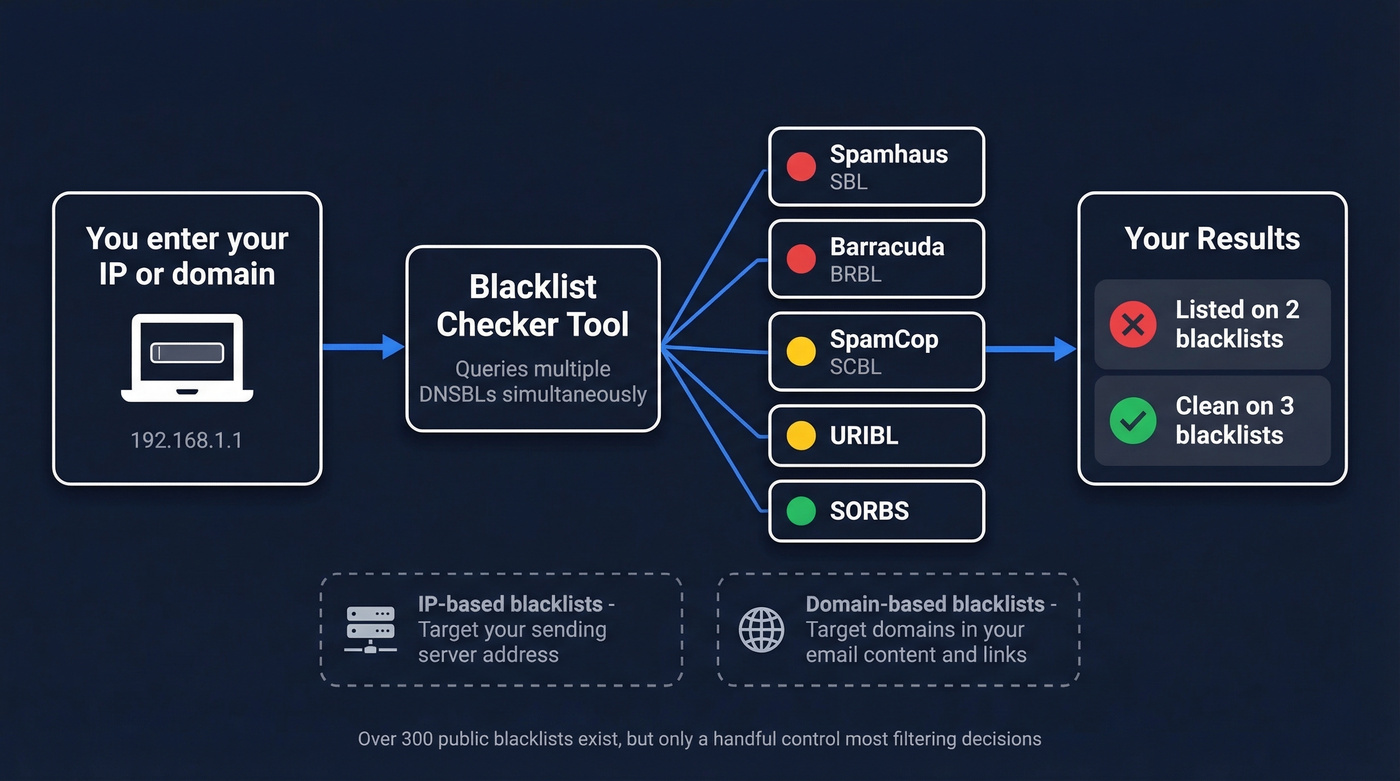
There are over 300 publicly available spam blacklists. Most are small and niche. A handful control the vast majority of filtering decisions. A good blacklist checker queries dozens or hundreds of these in a single lookup and tells you which ones flagged you.
Two categories drive most filtering decisions. IP-based blacklists target the sending server's IP address - these catch the infrastructure. Domain-based blacklists like Spamhaus DBL, URIBL, and SURBL target domains found in your email content, links, or headers. You can be clean on one type and listed on the other, so checking both is essential.
One more distinction that trips people up: if you're on a shared IP through your ESP, someone else's bad behavior can get that IP blacklisted and drag your deliverability down with it. Dedicated IPs give you full control over your reputation - but also full responsibility (more context in our Email Deliverability Guide).
Which Blacklists Actually Matter
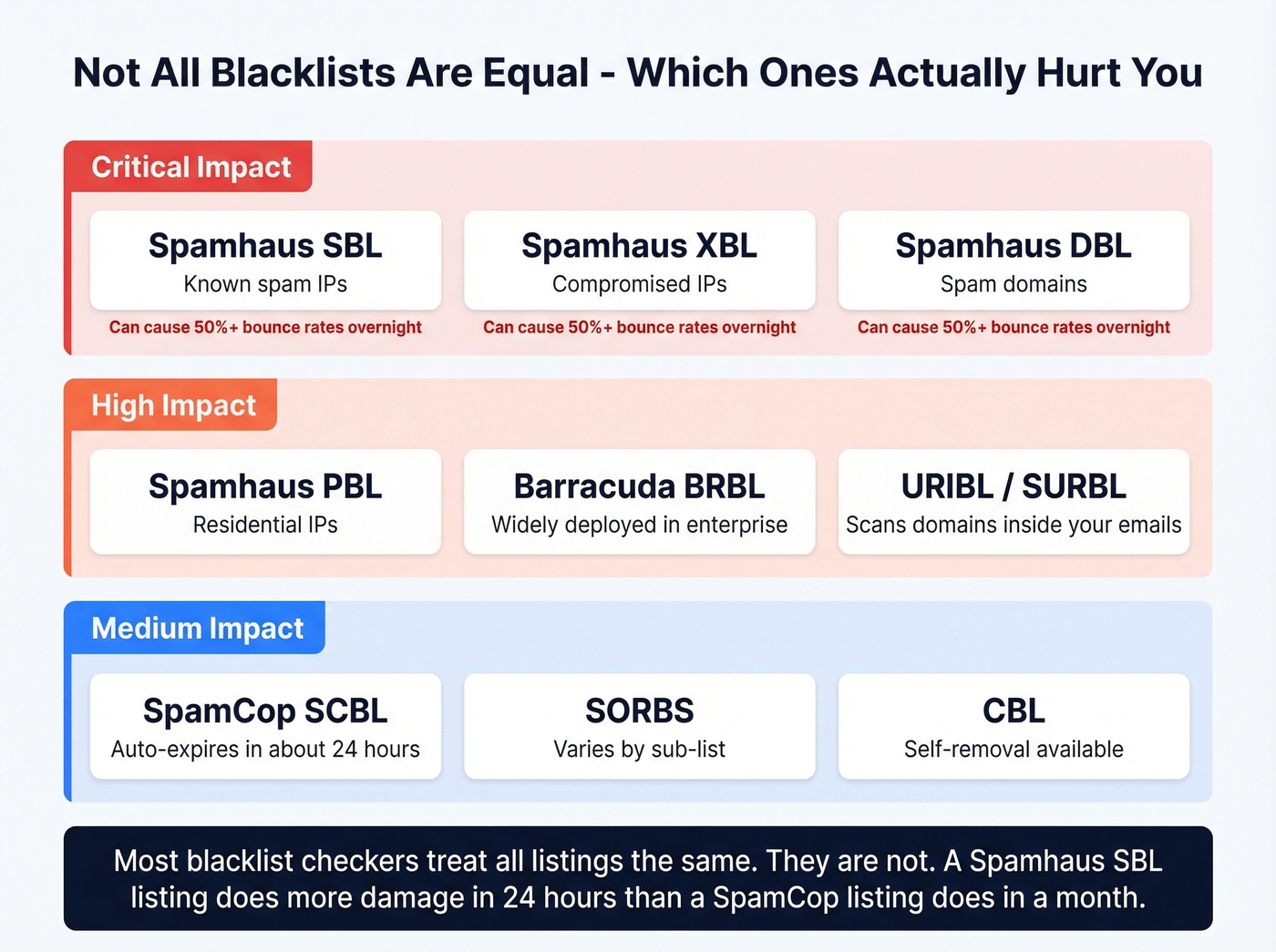
Not all 300+ blacklists carry equal weight. Getting listed on an obscure hobbyist-run list won't touch your deliverability. Getting listed on Spamhaus will destroy it (and if that’s your case, follow our Spamhaus Blacklist Removal walkthrough).
| Blacklist | Targets | Impact | Delisting |
|---|---|---|---|
| Spamhaus SBL | Known spam IPs | Critical | ISP must submit |
| Spamhaus XBL | Compromised IPs | Critical | Fix security issue |
| Spamhaus DBL | Spam domains | Critical | Domain owner request |
| Spamhaus PBL | Residential IPs | High | Self-removal |
| Barracuda BRBL | Spam IPs | High | Request via form |
| SpamCop SCBL | Reported spam IPs | Medium | Auto-expires ~24h |
| SORBS | Open relays, dynamic | Medium | Varies by sub-list |
| CBL | Proxy/virus behavior | Medium | Self-removal |
| URIBL | Spam content domains | Medium-High | Request removal |
| SURBL | Spam content domains | Medium-High | Request removal |
Spamhaus is the one that matters most. It's widely used by large inbox providers and enterprise mail gateways. In our experience, a Spamhaus SBL listing causes more damage in 24 hours than a SpamCop listing causes in a month - we're talking bounce rates over 50% almost overnight. Barracuda BRBL is also highly impactful, widely deployed across organizations running Barracuda security products.
SpamCop is worth monitoring but less alarming - it's driven by user reports and auto-delists within 24 hours once reports stop. URIBL and SURBL are sneaky. They don't care about your sending IP at all. They scan the domains inside your email body and links. If a domain you're linking to has been flagged, your otherwise clean message gets filtered.
Here's the thing: most tools don't distinguish between these tiers. They'll show you 100 results and treat a SpamCop listing the same as a Spamhaus SBL listing. They're not remotely equivalent. Use this table as your severity guide before you do anything rash.
Best Free Blacklist Checker Tools
| Tool | Lists Checked | IP/Domain | Features | Price |
|---|---|---|---|---|
| MxToolbox | 100+ | Both | Monitoring, API | Free / $129-$399/mo |
| MultiRBL | Hundreds | Both | None | Free (donation-based) |
| Spamhaus Lookup | Spamhaus only | Both | None | Free |
| DNSChecker | 50+ | Both | MX mapping | Free |
| ZeroBounce | 300+ | Both | Monitoring, API | Free check / paid from ~$15/mo |
| BlacklistChecker.com | 100+ | Both | Monitoring, API | Free tier (50 API requests/mo) / paid |
| DMARCLY | 100+ | Both | Monitoring | Paid plans available |

MxToolbox is the default starting point, and for good reason. It checks 100+ lists, returns results in seconds, and the free tier includes weekly monitoring for one domain across the top 30 blacklists. For continuous monitoring with alerts, their Delivery Center plans run $129/mo or $399/mo for the full suite.
MultiRBL goes wider - hundreds of blocklists in a single query, making it the most thorough free option available. No monitoring or alerting, so it's a manual check. But for a one-time deep scan when you suspect something's wrong, nothing else comes close.
Spamhaus Lookup only checks Spamhaus's own lists, but since Spamhaus is the most consequential operator, going direct makes sense as a targeted check. Free, no account needed.
DNSChecker covers 50+ lists and can map a domain to the relevant IPs via MX records - handy if you don't know your sending IP offhand. ZeroBounce's tool bundles monitoring into their broader email verification platform. BlacklistChecker.com and DMARCLY round out the field with monitoring options at modest monthly costs.
Let's be honest: most teams don't need a paid monitoring tool. MxToolbox's free weekly scan plus a manual MultiRBL check after every major campaign catches most problems. Save the budget for email verification, which prevents listings in the first place (see Email Reputation Tools).

High bounce rates are the #1 trigger for blacklisting - and they start with bad email data. Prospeo's 5-step verification process delivers 98% email accuracy, keeping your bounce rate under control and your IPs off blocklists. One customer dropped from 35% bounces to under 4% after switching.
Stop fixing blacklist damage. Start preventing it at the source.
How to Read Your Results
The biggest mistake people make is panicking over every red flag. Not all listings are equal, and some aren't even real problems.
MultiRBL is especially prone to causing unnecessary alarm. It explicitly warns that "neutral list entries are informational only and don't mean your mail is being blocked." These informational lists track IP metadata - they're not blocklists in any meaningful sense. Don't waste time submitting removal requests to them. Focus on your status across the major lists in the table above.
Then there's the opposite scenario: your checker shows clean across the board, but emails still bounce or get filtered. We've seen this pattern repeatedly, and the cause is almost always URL reputation rather than IP blacklisting. A thread in r/sysadmin captured this perfectly - an organization had a compromised WordPress site that injected a scam page. Their IP was clean on every scanner, but recipients' security filters were blocking emails containing their domain URL. Removing the domain link from their email signature fixed delivery immediately.
A clean blacklist result is necessary but not sufficient for deliverability. These tools test DNSBLs. They don't cover recipient-side security filters, safe browsing databases, URL reputation services, or internal allow/deny lists maintained by individual organizations.
What Causes Blacklisting
Most blacklistings aren't random - they're the predictable result of sending patterns that look like spam. A cold emailer on Reddit described the exact pattern: deliverability dipped, they ran a scan on Spamhaus and Barracuda, found an older sending domain listed, and cleaned up within days. The triggers are consistent:
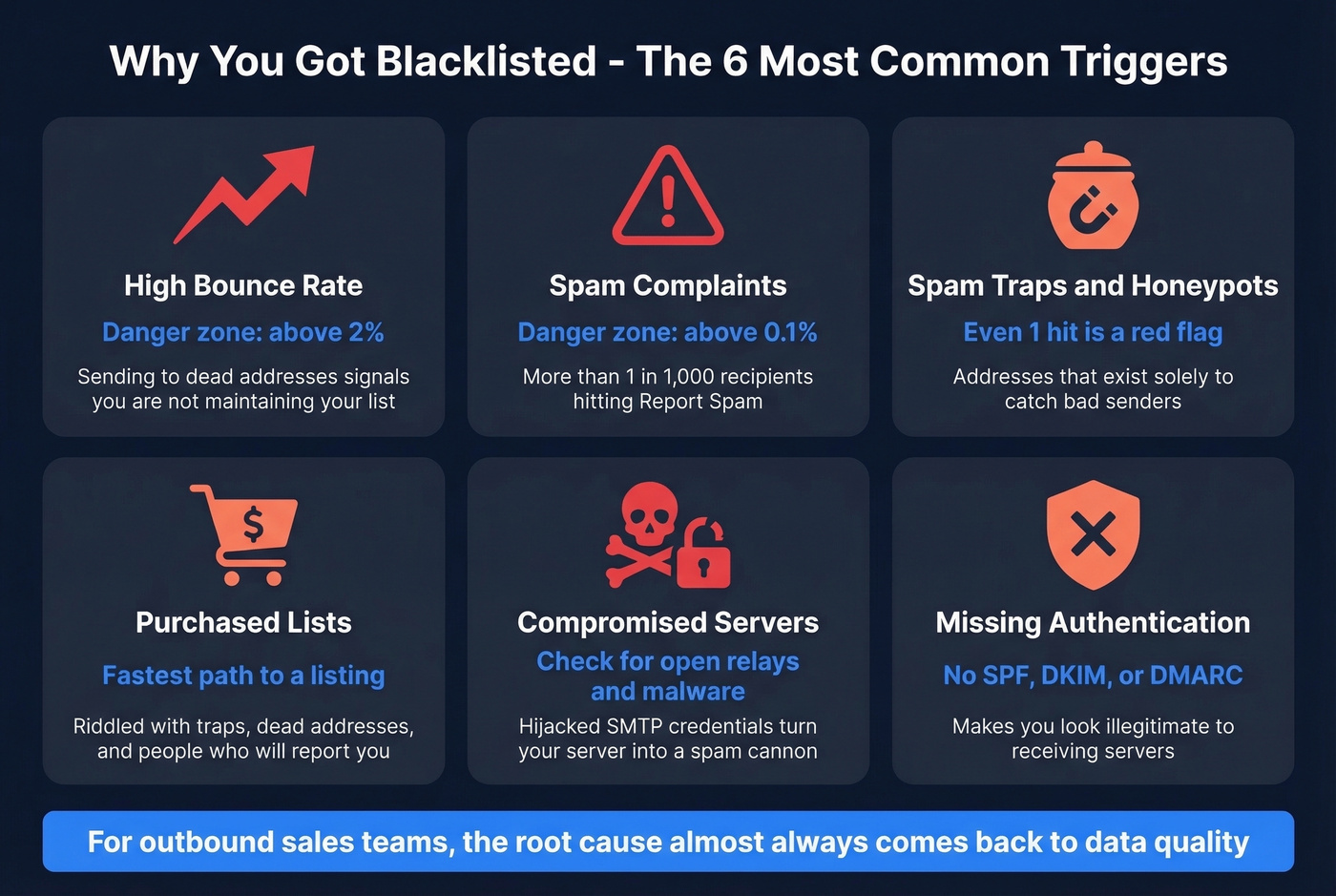
- Bounce rate above 2%. This is the threshold where blocklist operators start paying attention. Sending to dead addresses signals you're not maintaining your list.
- Complaint rate above 0.1%. More than 1 in 1,000 recipients hitting "report spam" puts you in danger territory.
- Hitting spam traps and honeypots. Email addresses that never opted in to anything, existing solely to catch senders using purchased or scraped lists (see Spam Trap Removal).
- Sending from purchased or unverified lists. The single fastest path to a listing. Purchased lists are riddled with traps, dead addresses, and people who'll report you.
- Compromised servers. Open relays, malware, or hijacked SMTP credentials can turn your infrastructure into a spam cannon without your knowledge.
- Missing authentication. No SPF, DKIM, or DMARC records make you look illegitimate to receiving servers and blocklist operators alike (use our SPF Record Examples and DMARC Alignment guides).
Look, for outbound sales teams the root cause almost always comes back to data quality. You're sending to addresses that bounce, and those bounces accumulate until a real-time blocklist operator flags your IP. If you're building outbound lists, use a platform with built-in verification that removes spam traps and honeypots before you ever hit send (or follow the safer workflow in Best Way to Send Bulk Email Without Getting Blacklisted).
How to Get Delisted
The general framework is the same regardless of which list caught you:
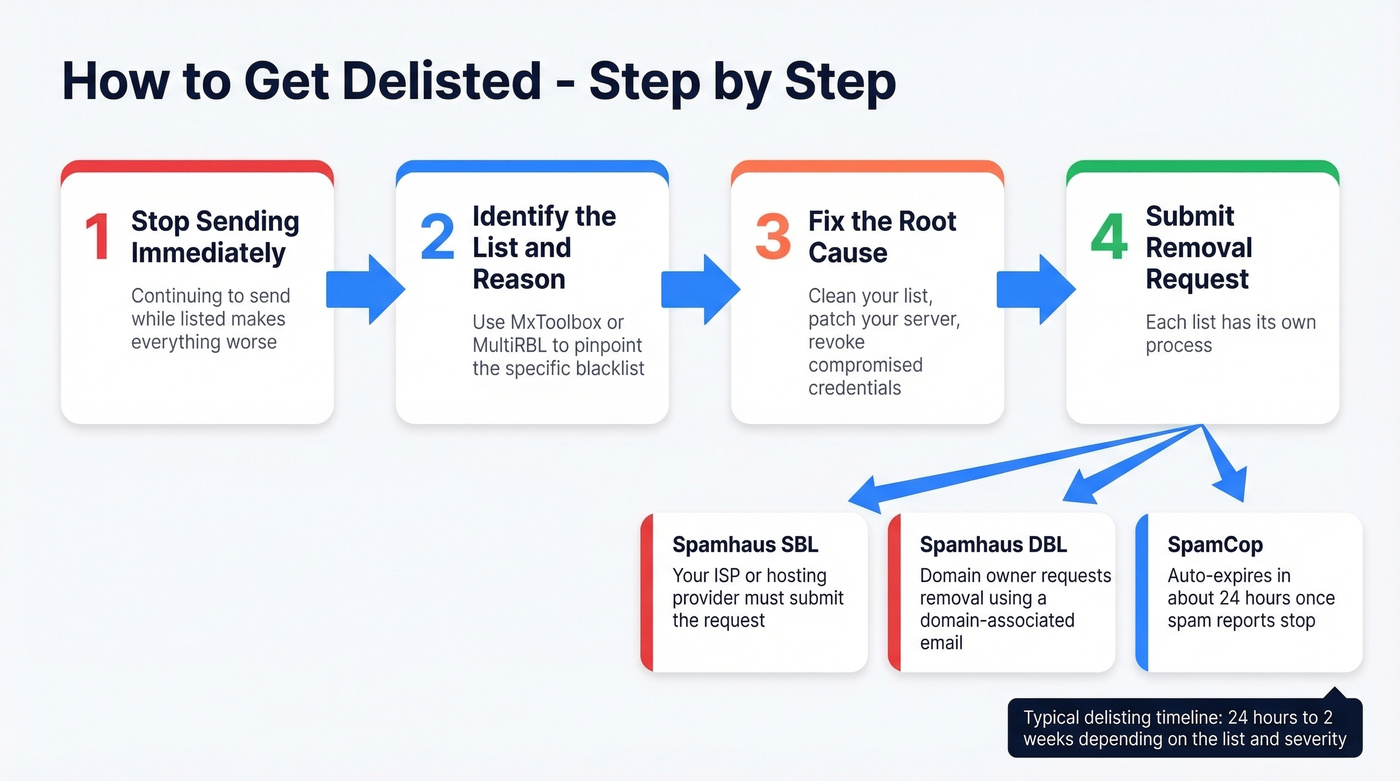
- Stop sending immediately. Continuing to send while listed makes everything worse.
- Identify which list and why. Use MxToolbox or MultiRBL to pinpoint the specific list and reason code.
- Fix the root cause. Clean your list, patch your server, revoke compromised credentials - whatever triggered the listing.
- Submit a removal request. Each list has its own process.
Spamhaus
Spamhaus is the most important and the most structured. Which list you're on determines who can request removal:
- SBL (Spamblock List): Your ISP or network owner must submit the request - end users can't do it directly. Contact your hosting provider.
- DBL (Domain Block List): Domain owners can request removal using an email address associated with the domain, not a free webmail account.
- PBL (Policy Block List): Self-removal is available for single static IPs through the Spamhaus lookup tool.
- XBL (Exploits Block List): Fix the security issue first - close open proxies, remove malware - then the listing typically clears automatically.
Spamhaus doesn't charge for delisting. They often respond within a day or two once a valid request is submitted. The key is demonstrating you've actually fixed the underlying problem, not just asking nicely.
Barracuda BRBL
Barracuda has a straightforward removal process. Submit your request through their online form at barracudacentral.org. You'll need to explain what caused the listing and what you've done to fix it. Turnaround is typically 24-48 hours.
SpamCop
SpamCop is the easiest to resolve. Listings auto-expire after 24 hours once spam reports stop coming in. No manual removal process exists - just stop the behavior that triggered reports and wait.
0spam
0spam requires you to create an account and submit a removal request after you've stopped the spam source. Removal is free but rate-limited: one IP per three hours. Their rbl.0spam.org sub-list auto-removes within 24 hours and doesn't accept manual requests.
CBL
CBL offers straightforward self-removal through their website. Fix the compromised behavior - usually proxy or virus-like activity - then submit the removal. One of the more forgiving lists.
IP Reputation vs. Domain Reputation
This distinction matters more than most people realize, and modern inbox providers are shifting the balance.
Traditionally, email filtering was almost entirely IP-based. Your sending server's IP had a reputation score, and that determined whether mail got through. DNSBL databases were the primary gatekeepers. That's still true, but inbox providers increasingly prioritize domain reputation. Your domain reputation follows you across IP changes and ESP migrations - it's portable in a way IP reputation isn't.
The recovery timelines are dramatically different. IP reputation can be rebuilt in 2-4 weeks of clean sending behavior. Domain reputation takes 6-12 weeks. That's a quarter of the year where your outbound is compromised.
If you run both transactional and marketing email, separate them onto different IPs and subdomains. A spam complaint on your outbound stream shouldn't tank password-reset delivery. And if you're on a shared IP through your ESP, understand that you're sharing reputation risk with every other sender on that IP - you have zero control over their behavior.
How to Prevent Blacklisting
Prevention is cheaper than remediation in every possible way. It comes down to five practices:
Authenticate everything. SPF, DKIM, and DMARC should be configured and passing before you send a single outbound email. This is table stakes in 2026 (see How to Verify DKIM Is Working).
Verify before sending. Every email address in your list should be verified in real time or within the last 7 days. Stale data decays fast - people change jobs, domains expire, mailboxes get deactivated. Regular infrastructure monitoring should complement address-level verification.
Monitor continuously. Set up weekly monitoring through MxToolbox or a similar tool. Catching a listing early means less damage.
Keep bounce rates under 2%. If you're consistently above this threshold, your list hygiene has a problem. Skip any workflow that doesn't include verification as a default step.
Never send to purchased lists. Full stop.
We've tested dozens of verification workflows, and the pattern is always the same - teams that verify before sending don't end up on blacklists. Prospeo runs a 5-step verification process with catch-all handling, spam-trap removal, and honeypot filtering on a 7-day data refresh cycle versus the 6-week industry average. Stack Optimize built to $1M ARR using Prospeo-verified data, maintaining 94%+ deliverability and under 3% bounce across all clients with zero domain flags.

Every unverified email you send is a coin flip with your sender reputation. Prospeo verifies 143M+ emails with catch-all handling, spam-trap removal, and honeypot filtering - the exact threats that land you on Spamhaus. At $0.01 per email, clean data costs less than one hour of delisting headaches.
Clean lists don't get blacklisted. Build yours with 98% accuracy.
FAQ
How long does blacklist delisting take?
SpamCop auto-delists within 24 hours. Spamhaus typically responds in 1-2 days, though SBL listings require your ISP to submit. IP reputation rebuilds in 2-4 weeks of clean sending; domain reputation takes 6-12 weeks.
Can I check if my email address is blacklisted?
Blacklist checkers test IPs and domains, not individual email addresses. DNSChecker can map a domain to the relevant IPs via MX records and run a DNSBL query on those - that's the closest you'll get to checking whether your email is affected.
What's the difference between an IP blacklist and a domain blacklist?
IP blacklists block the sending server's IP address. Domain blacklists block domains found in email content and links. You can have a clean IP and still get filtered because a domain in your message body is flagged. Run checks against both your sending IP and domain for the full picture.
Why does my checker show clean but emails still bounce?
Blacklist checkers only query public DNSBLs. They don't cover recipient-side security filters, URL reputation databases, or internal block lists. A clean result is necessary but not sufficient - investigate URL reputation and content filtering next.
How can email verification prevent blacklisting?
Verifying every address before sending keeps bounce rates under 2% and removes spam traps that trigger listings. Teams running real-time verification consistently avoid blacklist issues entirely - the data speaks for itself when bounce rates stay below 3% and domain flags drop to zero.