

Boomerang vs Mixmax: Different Tools, Different Jobs
Boomerang and Mixmax both live in your Gmail workflow, but comparing them is like comparing a Swiss Army knife to a power drill. One helps you manage your personal inbox. The other runs multi-channel sales sequences with CRM automation and can bolt on a dialer for teams. Here's the thing: they're not really competitors, and picking the wrong one wastes money either way.
30-Second Verdict
Boomerang wins if you're a freelancer, solopreneur, or anyone who just needs send-later, reminders, and meeting scheduling. It starts at $4.98/mo and does those things well.
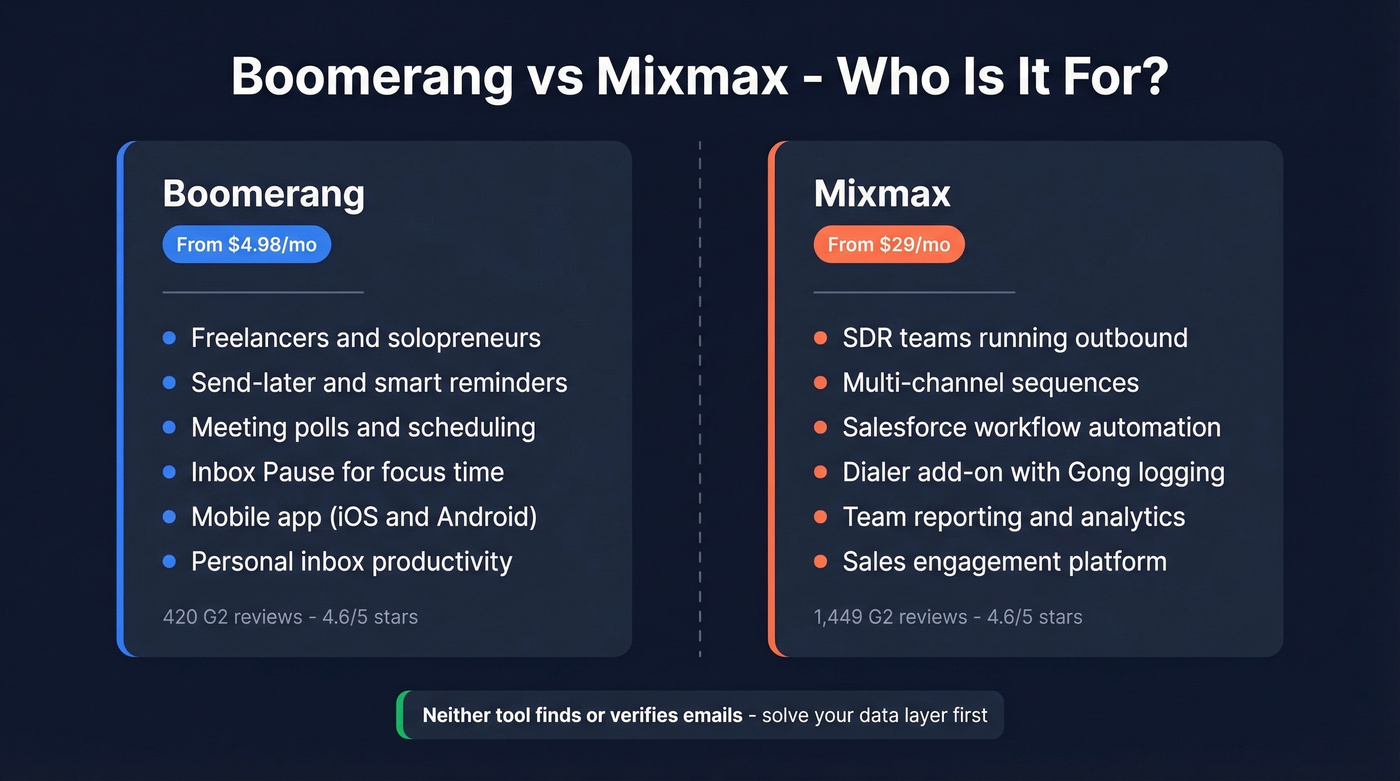
Mixmax wins if you're running outbound sales - sequences, call tasks, CRM automation, and team reporting. It starts at $29/mo per user and earns it with workflow depth.
Skip both if your real problem is bad contact data. Neither tool finds or verifies emails. If your prospect list bounces at double-digit rates, no amount of scheduling or sequencing fixes that. (If you’re diagnosing deliverability, start with bounce rates.)
Both tools carry a 4.6/5 on G2, but Mixmax has 1,449 reviews to Boomerang's 420. That review gap tells you something about their respective user bases.
2026 Pricing Compared
Most comparison pages ranking right now have outdated pricing. Here's what the tools actually cost on annual billing in 2026:
| Plan | Boomerang | Mixmax |
|---|---|---|
| Free tier | Basic (10 credits/mo) | Mixmax Free (after 14-day trial) |
| Entry paid | $4.98/mo (Personal) | $29/mo (Inbox Copilot) |
| Mid-tier | $14.98/mo (Pro) | $49/mo (Engagement Copilot) |
| Full platform | $49.98/mo (Premium) | $89/mo (Mixmax Suite) |
| Teams (5+ seats) | No separate team pricing gate | Talk to sales |
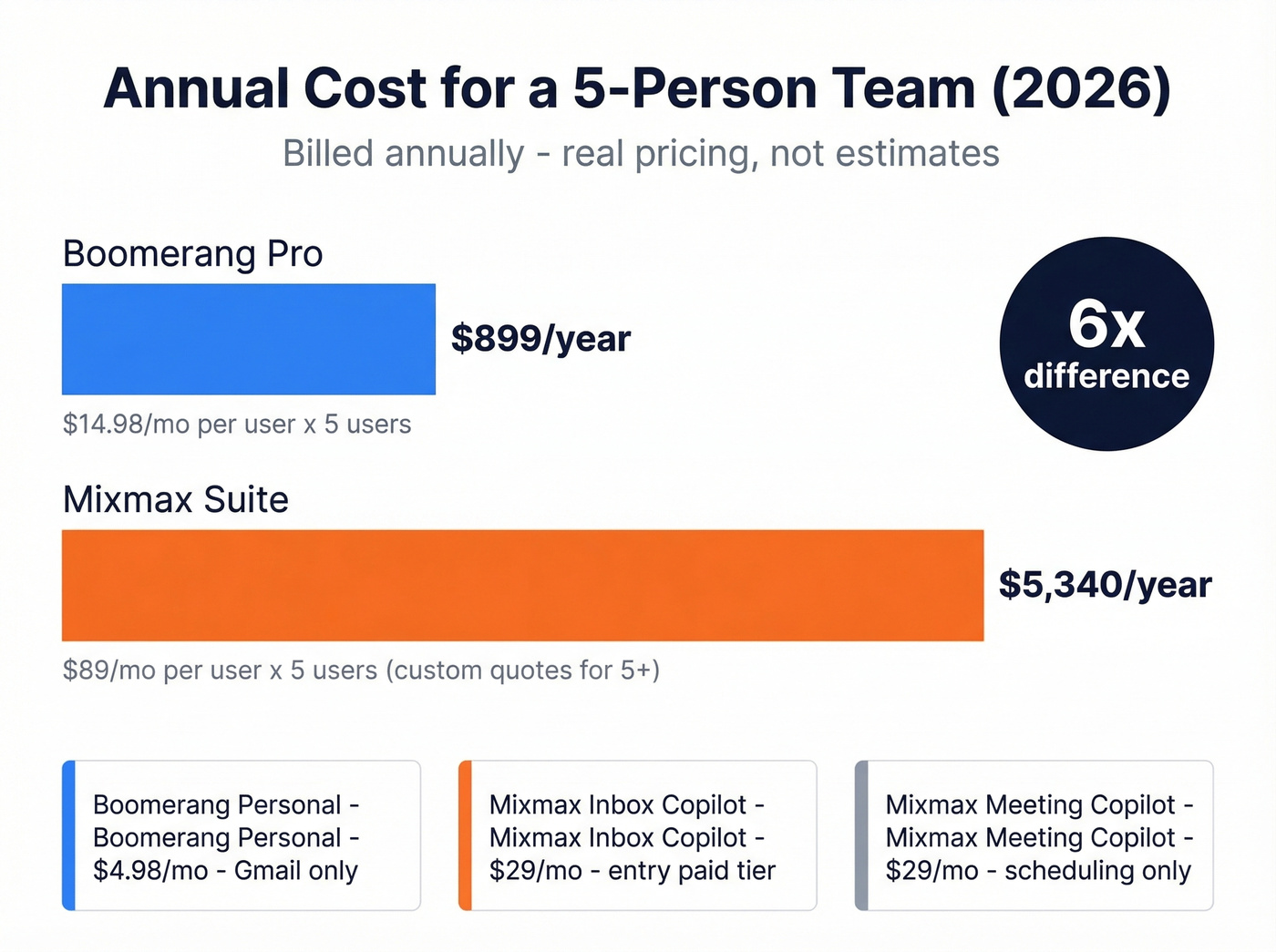
A 5-person team on Mixmax Suite runs $5,340/year - though teams of 5+ are typically routed to a custom quote. That same team on Boomerang Pro? $899/year. That's a 6x difference, justified only if you actually need sequences, a dialer add-on, and deep Salesforce workflows. (If you’re evaluating the broader category, see SDR tools.)
One quirk worth knowing: Boomerang's Personal plan ($4.98/mo) is restricted to @gmail.com addresses. Google Workspace users need Pro at minimum. Mixmax also offers a standalone Meeting Copilot at $29/mo if scheduling is all you're after. Monthly billing is available for both, but expect to pay more.
Feature-by-Feature Breakdown
| Feature | Boomerang | Mixmax |
|---|---|---|
| Email scheduling | ✅ Natural language | ✅ |
| Open/click tracking | ✅ Credit-based on Basic; unlimited on paid | ✅ |
| Sequences | ❌ | ✅ Multi-channel |
| CRM integration | ✅ Premium only | ✅ Salesforce workflows |
| Meeting scheduling | ✅ Polls, bookable pages, round-robin | ✅ |
| Inbox Pause | ✅ | ❌ |
| Mobile app | ✅ iOS/Android | ❌ |
| AI writing assist | ✅ Respondable | ✅ AI Copilot |
| Dialer | ❌ | ✅ Add-on |
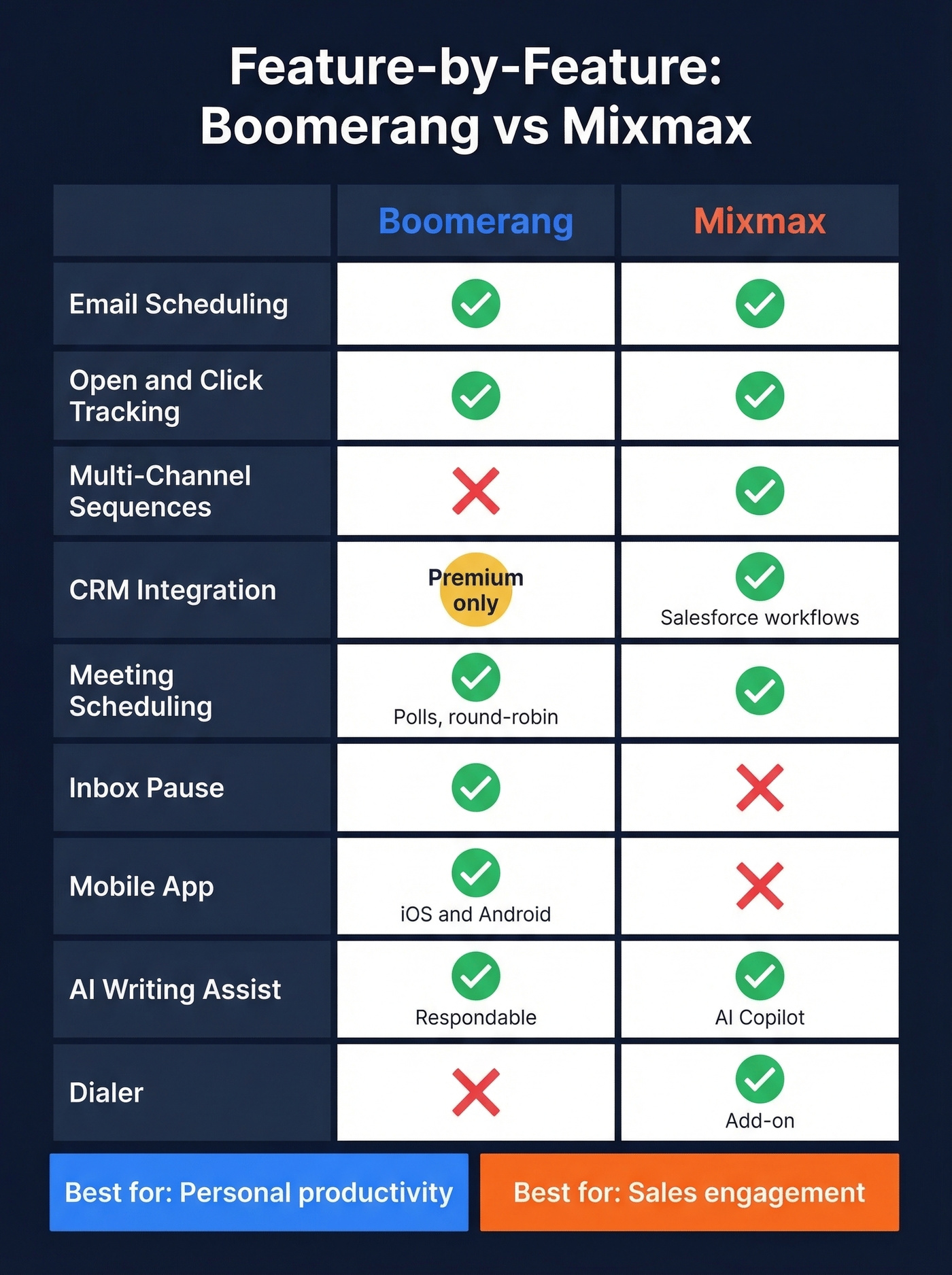
Boomerang's standout feature is "return if no reply" - you boomerang an email back to your inbox only when the recipient hasn't responded. One Reddit user described being "completely dependent" on this for scheduling birthday messages and conditional reminders. The scheduling is surprisingly deep too: meeting polls, bookable calendars, round-robin for teams, and cross-domain availability sharing. With 233M+ messages delivered across 1M+ businesses, it's battle-tested for personal productivity.
Mixmax is built for a different workflow entirely. Its rules engine triggers actions based on Salesforce fields, engagement signals, or date logic. You can add LinkedIn Sales Navigator integration for automated InMail steps in sequences, plus a dialer that logs calls to Gong automatically. It connects to dozens of tools including Salesforce, HubSpot, Gong, Slack, and Zapier. Both tools hold SOC 2 Type II certification, which matters if your security team has opinions. (If you’re shopping beyond Mixmax, compare Mixmax alternatives.)
One caveat for both: Apple Mail Privacy Protection and corporate image blocking make open rates directional at best. Weight click and reply data more heavily. (For the technical why, see email tracking pixels.)

Sequences and scheduling won't save a list that bounces. Teams using Prospeo cut bounce rates from 35% to under 4% - before changing a single workflow. With 300M+ profiles verified on a 7-day refresh cycle, your data stays accurate long after you export it.
Fix the data layer first. Everything downstream gets easier.
What Users Actually Say
On G2, the sub-scores are nearly identical - Boomerang edges Mixmax on Ease of Use (9.1 vs 9.0), while Mixmax takes Quality of Support (9.0 vs 8.8). The real differences show up in qualitative feedback.
Boomerang users love the reminder system and Inbox Pause but acknowledge the interface feels dated. A sales rep on r/sales called it "quite clunky and not efficient" for cold outreach follow-ups - it works, but it wasn't designed for that workflow. We've tested both side-by-side, and the gap is immediately obvious once you try building a multi-step sequence in Boomerang. You can't. (If you need copy that fits follow-ups, use these sales follow-up templates.)
Mixmax earns its 80% five-star rating through time savings on sequences and templates. The complaints cluster around three things: pricing feels steep for small teams, the tracking pixel gets flagged by corporate security systems, and there's no mobile app. That last one is surprising for a tool at this price point. The consensus on r/EmailProspecting is that Mixmax is great for volume outreach when you want tracking, sequences, and scheduling in one place - nobody's recommending it for solo use.
Who Should Pick What
You're a freelancer or solopreneur managing your own inbox, scheduling meetings, and wanting send-later with smart reminders. Get Boomerang at $4.98/mo. You don't need sequences or a dialer. You need your inbox to work harder without adding complexity. (If you’re building a repeatable outbound motion, start with sales prospecting techniques.)
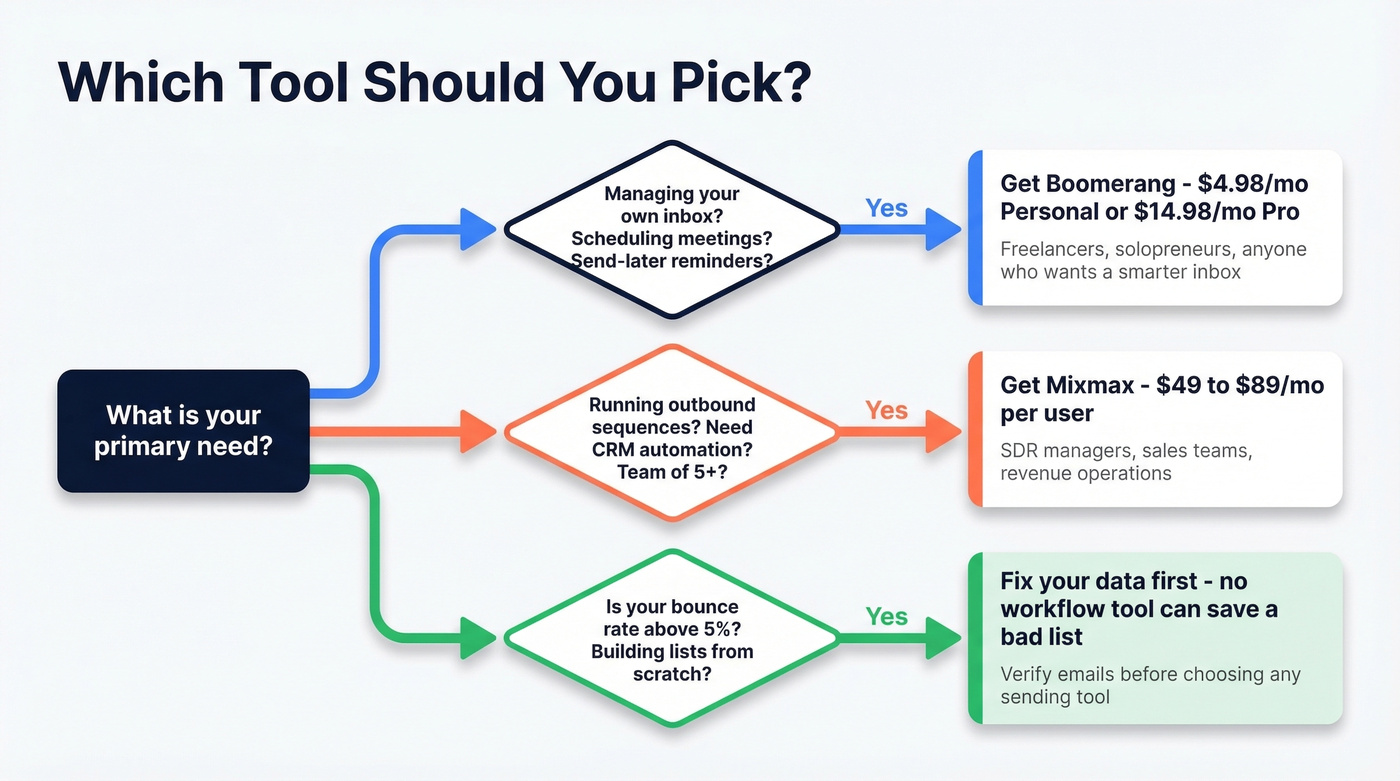
You're an SDR manager building outbound workflows for a team of 5+. Mixmax is the play. Sequences, Salesforce workflows, call logging with the dialer add-on, and team reporting justify the $89/user/mo price tag. Boomerang simply doesn't compete here. (If you’re implementing this category, follow a sales engagement platform rollout plan.)
You need verified contact data first. Neither tool helps you find prospect emails or phone numbers. If you're building lists from scratch or your current data bounces badly, solve the data layer before you pick a workflow tool. (A good next step is data enrichment services.)
The Problem Neither Tool Solves
Boomerang optimizes when you send. Mixmax optimizes how you sequence. Neither one tells you whether the email address you're sending to is real.
We've seen teams cut bounce rates from 35% to under 4% just by switching their data source - before touching a single sequence. The best workflow in the world can't fix a bad list. (For the full checklist, see our email deliverability guide.)

Let's be honest: most teams agonize over Boomerang vs Mixmax when the real ROI is upstream. If your bounce rate is above 5%, you'll get more pipeline lift from fixing your data than from any sequencing feature. Prospeo covers 300M+ professional profiles with 98% email accuracy, refreshed on a 7-day cycle, and the free tier gives you 75 verified emails per month - enough to test before committing. Pick the workflow tool in 20 minutes. Spend the real energy on data quality.
You're comparing $4.98/mo vs $89/mo workflow tools - but bad data costs more than both combined in burned domains and lost pipeline. Prospeo verifies emails at ~$0.01 each with 98% accuracy. No contracts, no sales calls.
Run your prospect list through Prospeo before you hit send.
FAQ
Can I use Boomerang and Mixmax together?
Technically yes - both run as Gmail extensions and don't block each other. But the feature overlap in tracking and scheduling creates redundant notifications. Pick one based on whether you need personal productivity or sales engagement. Running both isn't worth the clutter.
Is there a free plan for either tool?
Both offer free tiers with tight limits. Boomerang Basic gives 10 message credits per month, consumed by scheduled sends, reminders, and tracking. Mixmax moves you to Mixmax Free after its 14-day trial, which includes email tracking, meeting scheduling, and basic sequences. Expect to upgrade quickly if you send more than a handful of emails daily.
What about finding verified prospect emails?
Neither Boomerang nor Mixmax helps you find or verify prospect email addresses. Prospeo's Email Finder covers 143M+ verified emails across 300M+ profiles with 98% accuracy - the free tier includes 75 emails per month, no credit card required. Solve the data problem first, then pick your workflow tool.
Which tool is better for cold outreach?
Mixmax, and it isn't close. It offers multi-channel sequences, Salesforce automation, and an optional dialer add-on. Boomerang lacks sequencing entirely and was designed for personal inbox management, not sales workflows. For teams running 100+ outbound touches per rep per day, Mixmax is the only viable option between the two.