

How to Run a Bulk Domain Reputation Check (and Stop Getting Blacklisted)
Your SDR team's reply rates just cratered. Open rates look fine, but responses dropped 60% in two weeks - and nobody checked whether the sending domains landed on a blacklist until a prospect forwarded a screenshot of your email sitting in their spam folder. Now you need to check reputation across a dozen domains, and half the results you're finding are IP blacklist tools that won't tell you what you actually need to know.
Here's the quick version:
- For bulk checks: BulkBlacklist.com if you want simple, or an API provider like WhoisXML API if you need scale and automation.
- For ongoing monitoring: Google Postmaster Tools (free, Gmail-specific) plus MxToolbox for broader blacklist coverage.
- To stop the problem at the source: Verified emails prevent the bounces that get you blacklisted in the first place.
What Is Domain Reputation?
Domain reputation is a score assigned to your sending domain by mailbox providers and blacklist operators. It determines whether your emails land in the inbox, the spam folder, or get rejected outright.
It's not the same as IP reputation. IP reputation is tied to a specific sending server - switch ESPs and it resets. Domain reputation follows your brand across any IP or ESP. It's persistent, and it's much harder to rebuild once damaged.
Organizations like Spamhaus use a combination of signals intelligence, open-source intelligence, machine learning, heuristics, and manual investigations to score domains. With the sheer volume of new domains created every day, mailbox providers are constantly fighting a worsening signal-to-noise problem, which means they're getting stricter, not more lenient.
Best Tools for Checking Domain Reputation in Bulk
Most "bulk domain reputation" tools are actually IP blacklist checkers. Only a handful handle reputation signals at scale in a way that's useful for outbound teams. We've tested the major options - here's what's worth your time.
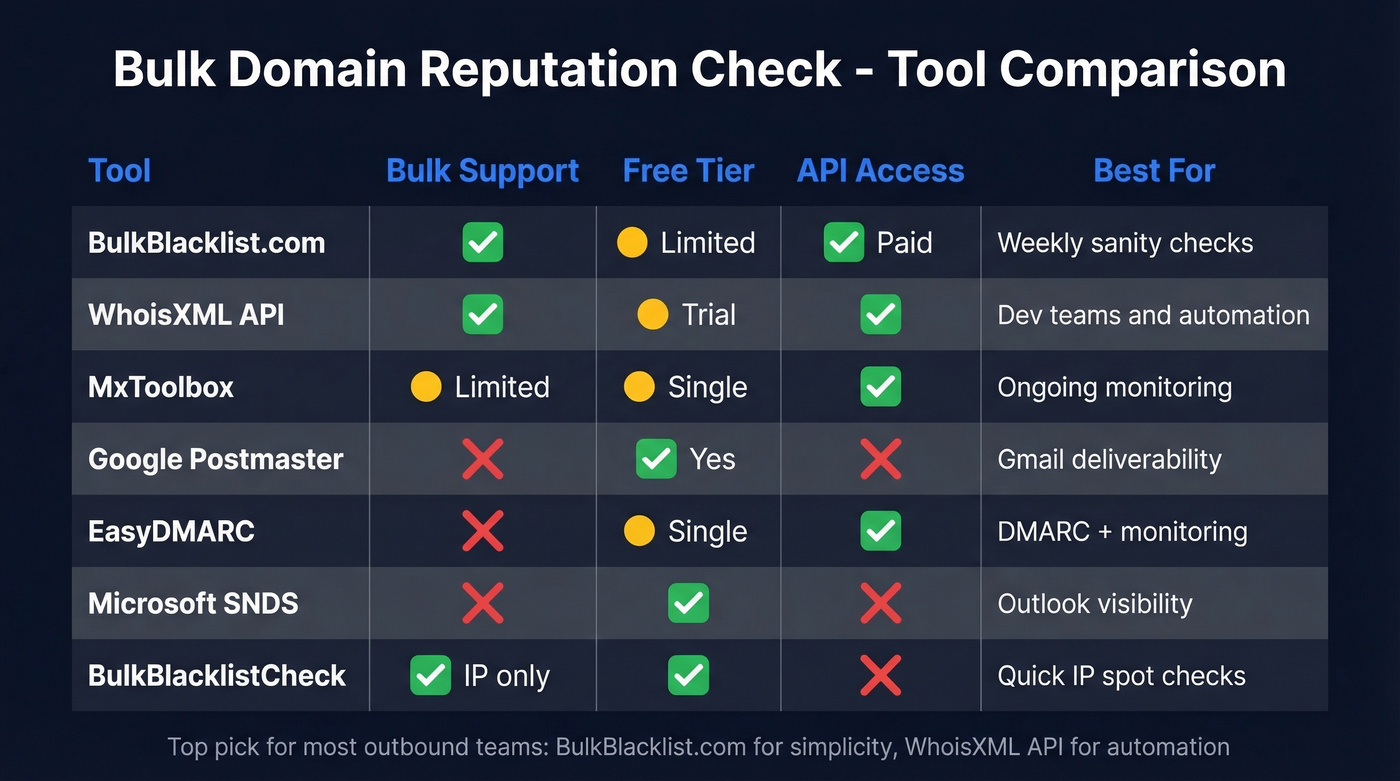
| Tool | Bulk? | Free Tier | API | Best For | Pricing |
|---|---|---|---|---|---|
| BulkBlacklist.com | Yes | Limited | Paid | Weekly sanity checks | Free tools + premium/API options |
| WhoisXML API | Yes | Trial | Yes | Dev teams & automation | ~$20-500/mo depending on volume |
| MxToolbox | Limited | Single | Yes | Ongoing monitoring | ~$100/mo+ depending on plan |
| Google Postmaster | No | Yes | No | Gmail deliverability | Free |
| EasyDMARC | No | Single | Yes | DMARC + monitoring | ~$30/mo+ depending on plan |
| Microsoft SNDS | No | Yes | No | Outlook visibility | Free |
| BulkBlacklistCheck | Yes (IP) | Yes | No | Quick IP spot checks | Free |
BulkBlacklist.com - Best for Most Teams
If you're running 5-10 sending domains for outbound and need a weekly sanity check, start here. Paste your domains, check common blacklist and reputation signals, and get results fast. It's straightforward with no learning curve, and the paid API option is there when you're ready to automate. We use it for quick spot checks before recommending anything more complex to teams we work with.
WhoisXML API
Use this if you're an engineering or RevOps team building reputation monitoring into your stack. An API-based approach is the cleanest way to automate checks, log results, and alert your team when something changes. Skip this if you just need a quick manual check once a week - it's overkill for that use case, and you'll spend more time on setup than you save.
MxToolbox
MxToolbox checks 100+ DNS-based blacklists and doubles as a solid ongoing monitoring platform. Free single checks work for spot testing, but the real value is paid monitoring that alerts you before a blacklisting tanks your deliverability. We've seen teams catch issues within hours instead of weeks by setting up MxToolbox alerts - that kind of speed is the difference between a minor hiccup and a month-long recovery.
Google Postmaster Tools
Free and essential, but limited to Gmail's ecosystem. It shows your domain reputation on a four-tier scale (Bad, Low, Medium, High) and surfaces spam rate, authentication results, and delivery errors. Every team sending outbound should have this running. It just won't tell you anything about Outlook or Yahoo.
Tier 2 Tools
EasyDMARC is a good entry point for teams that also need DMARC monitoring alongside reputation checks. Microsoft SNDS gives you free Outlook/Hotmail-specific data - pair it with Google Postmaster Tools and you've got visibility into two major mailbox ecosystems without spending a dollar. BulkBlacklistCheck.com supports bulk IP range blacklist checks for up to 256 IP addresses and includes a blacklist monitor feature, but it's primarily IP-focused, so don't expect domain-level insights.

Blacklist monitoring tells you after the damage is done. Prospeo's 5-step email verification prevents the bounces that get you blacklisted in the first place - 98% accuracy, 7-day data refresh, and bounce rates under 4% across 15,000+ companies.
Stop treating symptoms. Kill the bad data that's wrecking your domains.
Reading Your Results
SenderScore runs 0-100. Here's what the numbers mean in practice:
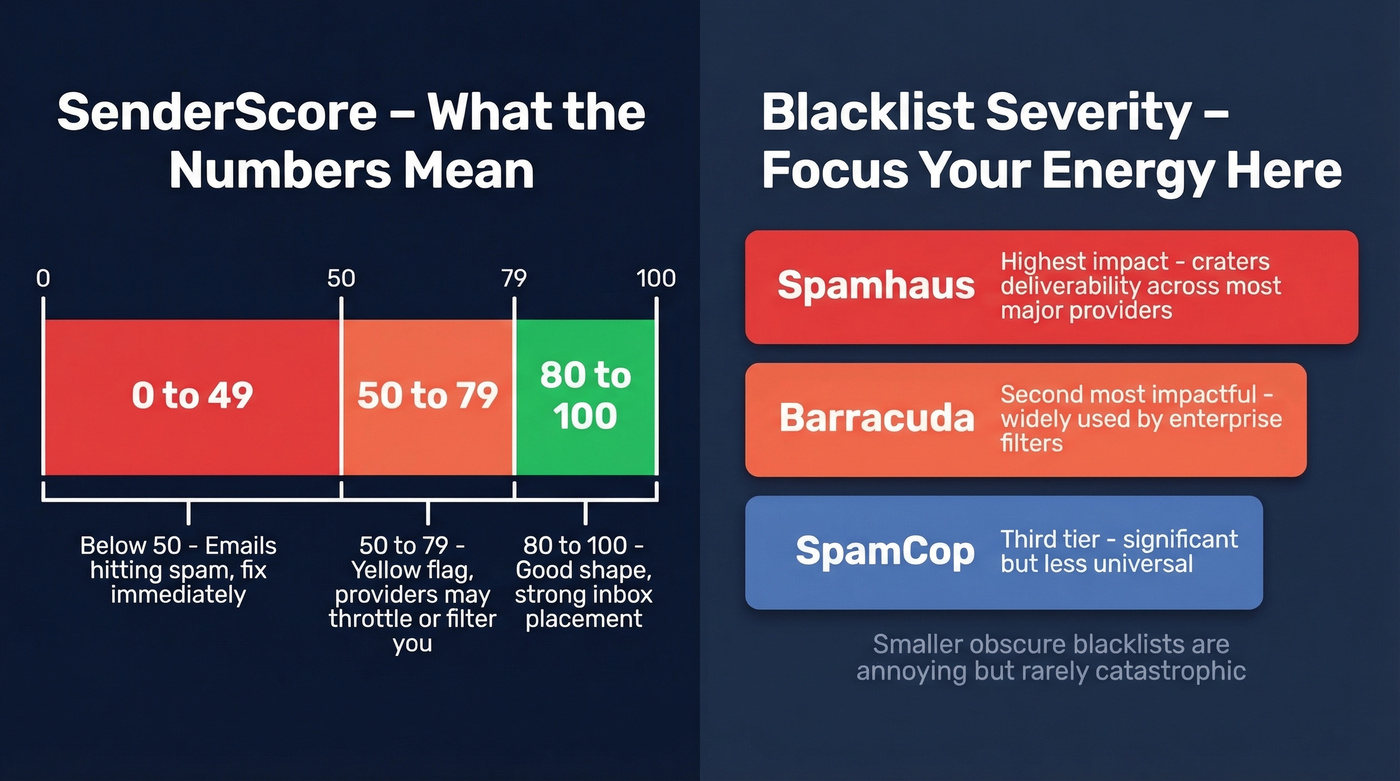
- 80-100: You're in good shape. Inbox placement should be strong.
- 50-79: Yellow flag. Some providers will throttle or filter you.
- Below 50: Your emails are hitting spam. Fix this immediately.
Not all blacklists carry equal weight. Spamhaus is the most impactful - a listing there will crater your deliverability across most major providers. Barracuda comes next, followed by SpamCop. Getting listed on a smaller, obscure blacklist is annoying but rarely catastrophic.
Focus your delisting energy on the big three.
How to Fix a Damaged Reputation
1. Submit delisting requests to every blacklist where you're listed. Spamhaus and Barracuda have self-service removal forms. SpamCop delistings are often automatic after a period of clean sending.
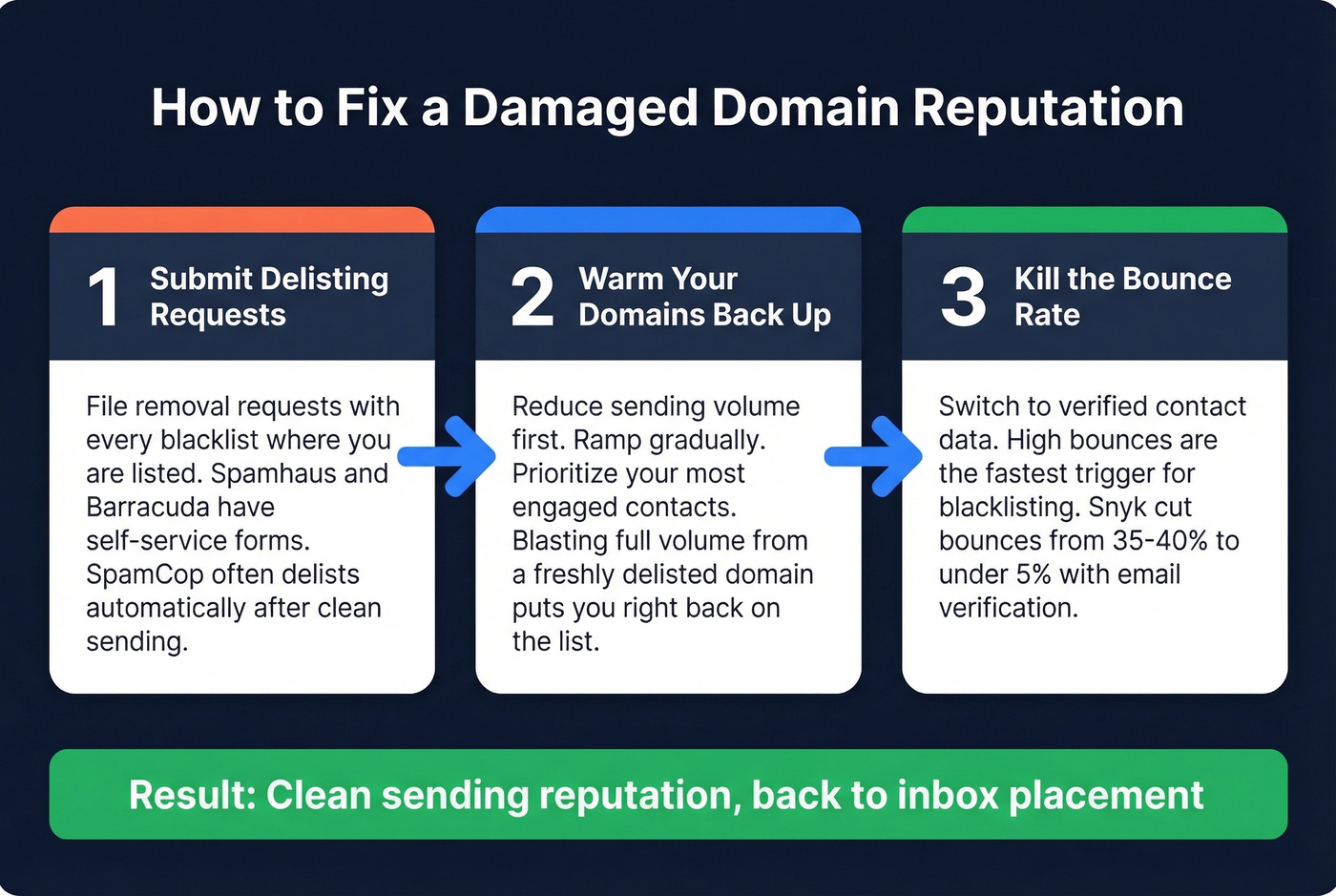
2. Warm your domains back up. Reduce volume, then ramp gradually while prioritizing your most engaged contacts first. This isn't optional - blasting full volume from a freshly delisted domain is how you end up right back on the list.
3. Kill the bounce rate. This is the critical lever. High bounce rates are one of the fastest ways to trigger filtering and blacklist problems, and switching to verified contact data is the fastest way to drop them. Snyk's 50-person AE team cut bounces from 35-40% to under 5% after switching to Prospeo's 5-step verification, and their AE-sourced pipeline jumped 180%.
If you want the full playbook, start with our guide on how to improve sender reputation and then tighten up your email deliverability fundamentals.
You Don't Have a Reputation Problem - You Have a Data Problem
Let's be honest: if you're running domain reputation checks regularly, you're treating a symptom. The root cause chain is simple. Bad data leads to bounces. Bounces trigger blacklisting. Blacklisting destroys domain reputation.
If you're seeing repeated issues, benchmark your email bounce rate and audit your email velocity before you scale volume again.
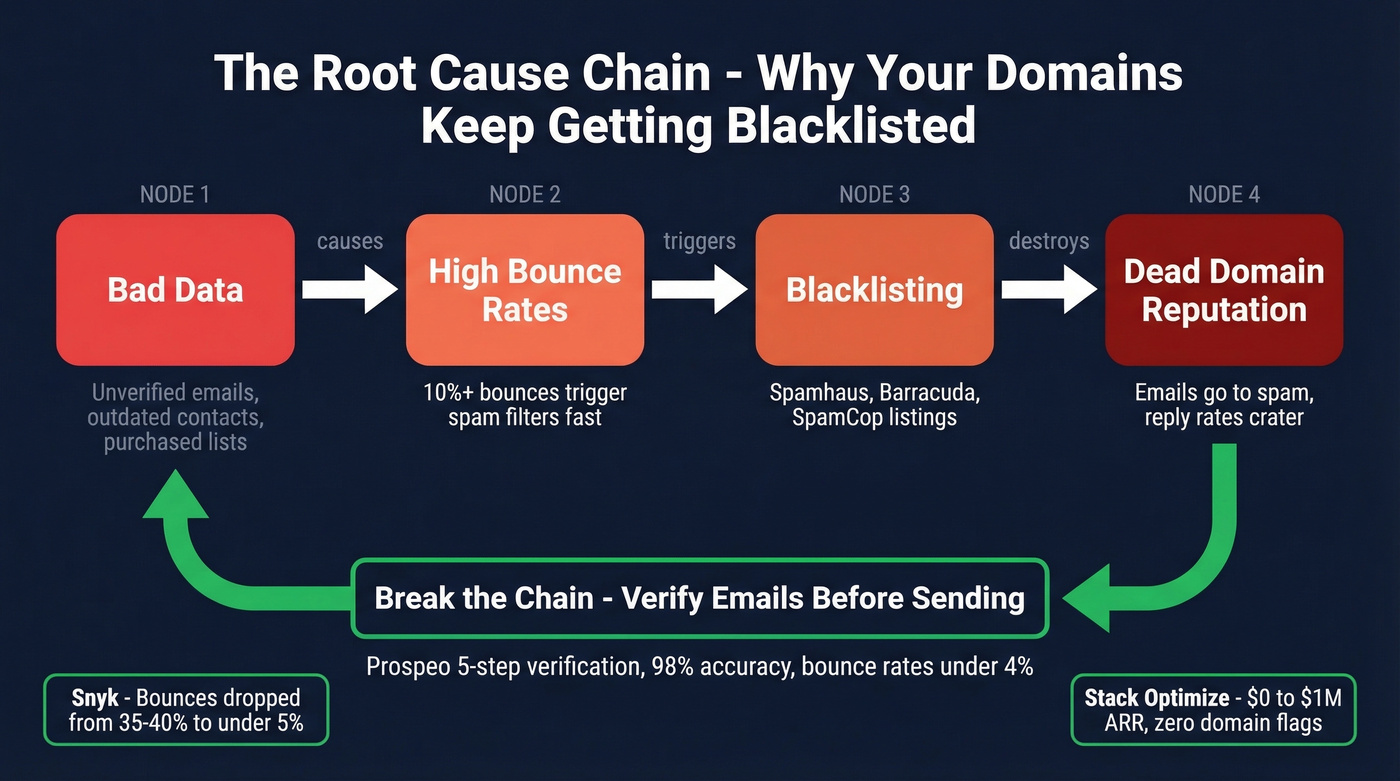
Most teams don't need better monitoring tools. They need to stop sending to garbage data. A monitoring subscription that alerts you after you're blacklisted is less valuable than verified emails that prevent the blacklisting in the first place.
If you're sending at scale, it also helps to run a periodic email spam checker and keep a lightweight spam trap removal process in place.
Stack Optimize built from $0 to $1M ARR running client campaigns through verified data - 94%+ deliverability, bounce rates under 3%, zero domain flags across all clients. That's what breaking the chain looks like in practice.

Running a bulk domain reputation check is reactive. Verified data is proactive. One costs you time every week; the other eliminates the problem.
Snyk cut bounce rates from 35-40% to under 5% and never looked back. Stack Optimize hit $1M ARR with zero domain flags across every client. The difference wasn't better monitoring - it was sending to verified contacts at $0.01 per email.
Protect every sending domain for a penny per verified email.
FAQ
What's the difference between domain reputation and IP reputation?
Domain reputation follows your brand across any server or ESP - switch providers and it comes with you. IP reputation is tied to the specific sending server and resets when you move. Monitor both, but domain reputation is harder to repair and has a longer memory.
How often should I check domain reputation?
Daily if you're sending high-volume outbound at 1,000+ emails per day. Weekly for most teams. Set up monitoring alerts with MxToolbox or Google Postmaster Tools so you catch issues in hours, not weeks.
Can email verification prevent blacklisting?
Yes. Most blacklisting starts with high bounce rates from invalid addresses. Verifying emails before sending eliminates the primary trigger. Prevention beats remediation every time.
Does checking a blacklist affect my domain?
No. Blacklist lookups are read-only DNS queries. Checking your status won't trigger a listing or change your reputation score.