

How to Check Email Deliverability in 2026 (Tools + Fixes)
You send 5,000 emails. Your ESP dashboard says 98% delivered. You feel good - until open rates crater from 35% to 12% overnight. "Delivered" doesn't mean "inbox." It means "not bounced." If you don't check email deliverability beyond what your ESP reports, you're operating on a comforting lie, and the gap between "delivered" and "inboxed" is where campaigns go to die.
The numbers are ugly. Office365 inbox placement crashed from 77% to 51% year-over-year. Gmail dropped from 59% to 54%. Microsoft's consumer mailboxes - Outlook.com and Hotmail - fell to a brutal 27%. Senders pushing 1M+ emails per month fare even worse, averaging just 27.63% inbox placement. Your emails aren't bouncing. They're landing in spam, and your ESP won't tell you that.
What You Need (Quick Version)
- Quick gut check (free): Mail-Tester or MxToolbox - run a one-off test in 30 seconds.
- Real inbox placement data: GlockApps ($59-$99/mo) + Google Postmaster Tools (free) - the only combo that gives you provider-level truth.
Deliverability vs. Delivery Rate
These two terms sound interchangeable. They aren't.
Delivery rate is the percentage of emails that didn't hard bounce. Your ESP reports this. It's almost always above 95%, and it tells you almost nothing useful.
Deliverability is the percentage of emails that actually reached the inbox - not spam, not promotions, not a black hole. Most ESPs don't report this at all. That's why your dashboard says 98% delivered while half your emails sit in a spam folder nobody checks.
What Controls Inbox Placement
Everything that determines whether your email hits the inbox falls into three buckets.
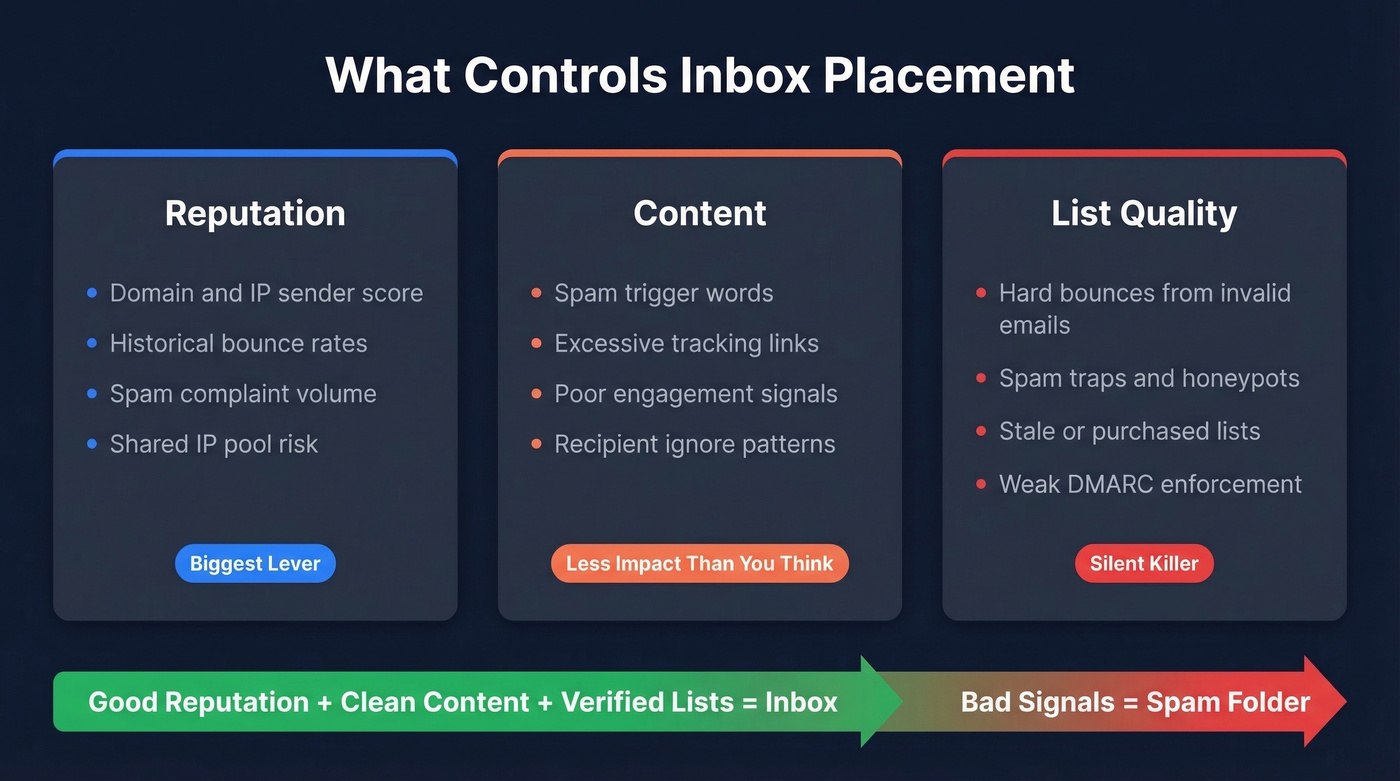
Reputation is the biggest lever. Mailbox providers assign your sending domain and IP a reputation score based on historical behavior - bounce rates, spam complaints, engagement patterns. If you're on a shared IP pool, someone else's bad behavior can drag your reputation down. Blacklists compound the problem: tools like MxToolbox check your domain and IP against known blacklists, but the real damage happens at the provider level, where reputation is invisible without tools like Google Postmaster Tools.
Content matters less than most people think, but it's not irrelevant. Spam trigger words, excessive tracking links, and poor engagement signals all contribute. The bigger factor is engagement history - if recipients consistently ignore your emails, providers learn to deprioritize them.
List quality is the silent killer. Hard bounces from invalid addresses tank your sender reputation faster than anything else. Spam traps and honeypots - addresses planted specifically to catch sloppy senders - can get you blacklisted overnight. While 18.2% of the top 10 million domains have DMARC records, only 7.6% actually enforce them. The authentication ecosystem is still immature, so providers rely heavily on behavioral signals like bounce rates to judge you.

Hard bounces from invalid addresses are the fastest way to destroy sender reputation - you just read why. Prospeo's 5-step email verification catches invalid addresses, spam traps, and honeypots before they ever enter your sequence. 98% email accuracy, refreshed every 7 days.
Stop fixing deliverability problems your data provider caused.
How to Test Deliverability Before Sending
Step 1 - Quick Authentication Check
Use this if: You want a 30-second sanity check before digging deeper. Skip this if: You already know your SPF/DKIM/DMARC are configured and passing.
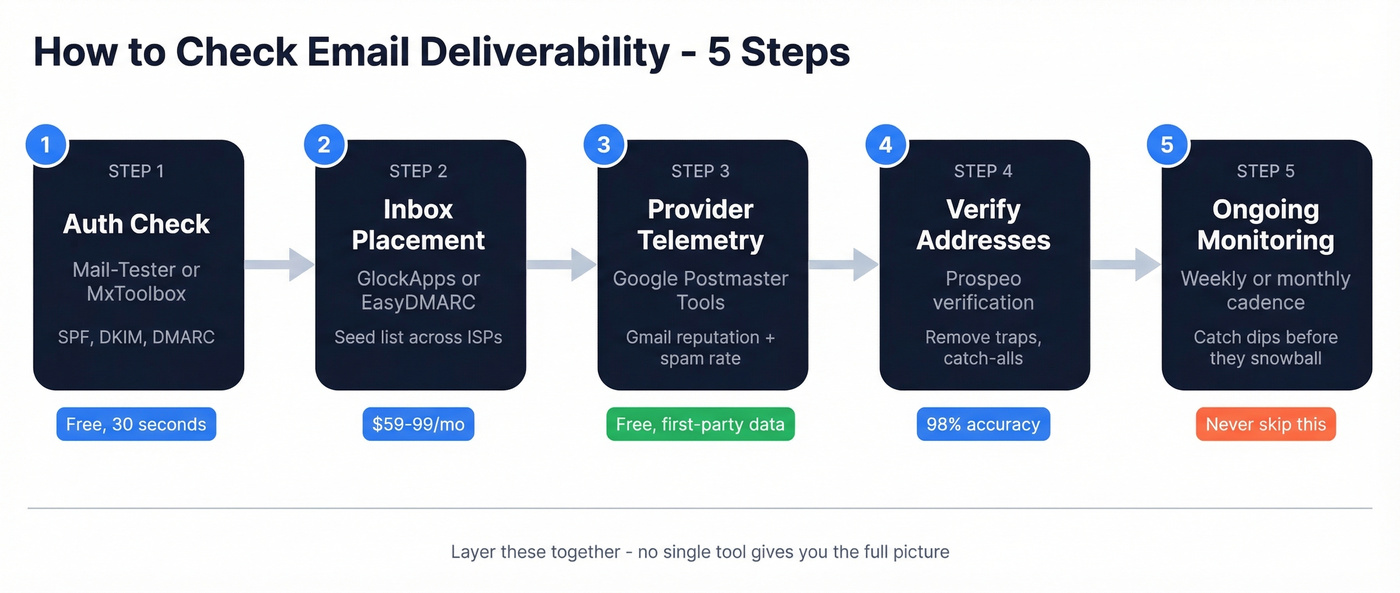
Mail-Tester is the simplest option - send an email to their generated address, get a score out of 10 and a diagnostic report. MxToolbox offers a deliverability report by sending a test email to ping@tools.mxtoolbox.com; it analyzes your email headers, outbound IP blacklist reputation, and SPF records. Both are great gut checks. Neither tells you where your emails actually land.
Step 2 - Test Inbox Placement
This is where you move from "is anything obviously broken?" to "where are my emails actually going?"
GlockApps sends your email to a seed list spread across major ISPs and shows you exactly which ones land in inbox, spam, or promotions. It checks against 50+ blocklists and can show Gmail placement by Primary vs. secondary tabs. EasyDMARC offers a free inbox placement test with a daily limit, including Gmail tab placement.
One caveat: seed list tests use roughly 100 mailboxes with zero engagement history. They're directional, not definitive. Your real-world deliverability will be higher for campaigns going to engaged recipients.
Step 3 - Check Provider Telemetry
No third-party seed test is as reliable as data straight from the mailbox provider.
Google Postmaster Tools is free and gives you first-party Gmail data - domain reputation on a four-tier scale, spam rate, and authentication success. If you're not checking it, you're flying blind on Gmail. Microsoft SNDS does the same for Outlook and Hotmail. Yahoo Sender Hub covers Yahoo Mail.
These three tools are free, first-party, and more trustworthy than any paid testing tool for provider-specific data. The tradeoff: they require consistent sending volume and only cover their own ecosystem.
Step 4 - Verify Addresses Before They Bounce
Invalid addresses generate hard bounces. Hard bounces are the fastest way to tank your sender reputation. If your bounce rate is above 2%, you're damaging your domain reputation with every send.
Run your list through a verification tool that catches invalid addresses, spam traps, and honeypots before they enter a sequence. The goal is to validate addresses proactively - not reactively after bounces have already done their damage. Stack Optimize built to $1M ARR while maintaining 94%+ deliverability with under 3% bounce rates and zero domain flags, precisely because they verify every address before sending. (If you need bounce-rate benchmarks and remediation, start with this bounce rate guide.)
Step 5 - Set Up Ongoing Monitoring
One-off tests catch today's problems. Ongoing monitoring catches tomorrow's.
GlockApps Growth ($99/mo, 1,080 spam test credits) handles regular inbox placement checks. Google Postmaster Tools runs continuously for Gmail telemetry at no cost. Set a monthly cadence at minimum. If you're sending 10K+ emails per month or running cold outreach, check weekly. A single bad list import can undo months of reputation building, and scheduling routine audits is the only way to catch reputation dips before they snowball. (If you're scaling volume, track your email velocity too.)
Why Deliverability Tools Disagree
We've run the same email through three tools and gotten three different verdicts. It's maddening. The consensus on r/Emailmarketing is blunt: getting three different answers from three tests feels laughable. On r/coldemail, practitioners describe tools like Mail-Tester and GlockApps as giving results that feel "vague or even false".
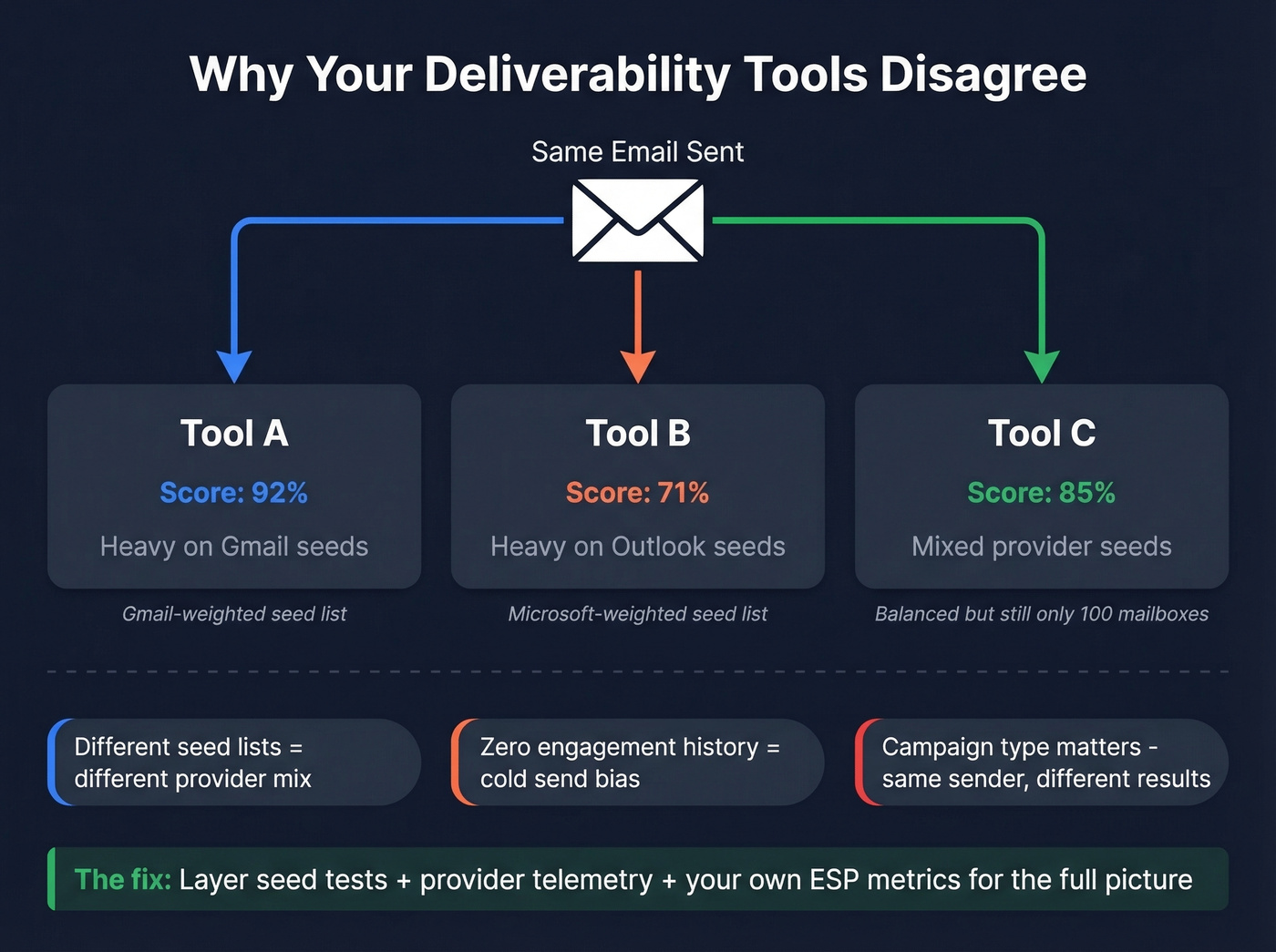
Here's why the numbers diverge.
Each tool maintains its own seed list of roughly 100 test mailboxes across different providers. Different seed lists, different provider weightings, different results. A tool heavy on Gmail seeds gives you a different picture than one weighted toward Outlook. Cold test bias compounds this - emails sent through testing tools have zero engagement history, so providers treat them as cold sends, which means test results underestimate your real deliverability for campaigns going to engaged recipients.
Then there's campaign-type discrepancy. One brand saw post-purchase emails hitting 50% open rates while abandoned cart emails dropped to 10-15%. Free tools reported 95% deliverability. Gmail-specific testing showed 90% landing in spam. Google Postmaster showed "High" reputation and 0% complaints. Every signal pointed in a different direction.
Here's the thing: running three deliverability tests and getting three different answers isn't a bug in one tool - it's a fundamental limitation of seed-based testing. Stop looking for the "right" tool and start layering. Seed tests for directional data, provider telemetry for ground truth, and your own ESP engagement metrics for the full picture. (For a deeper framework, see our email deliverability guide.)
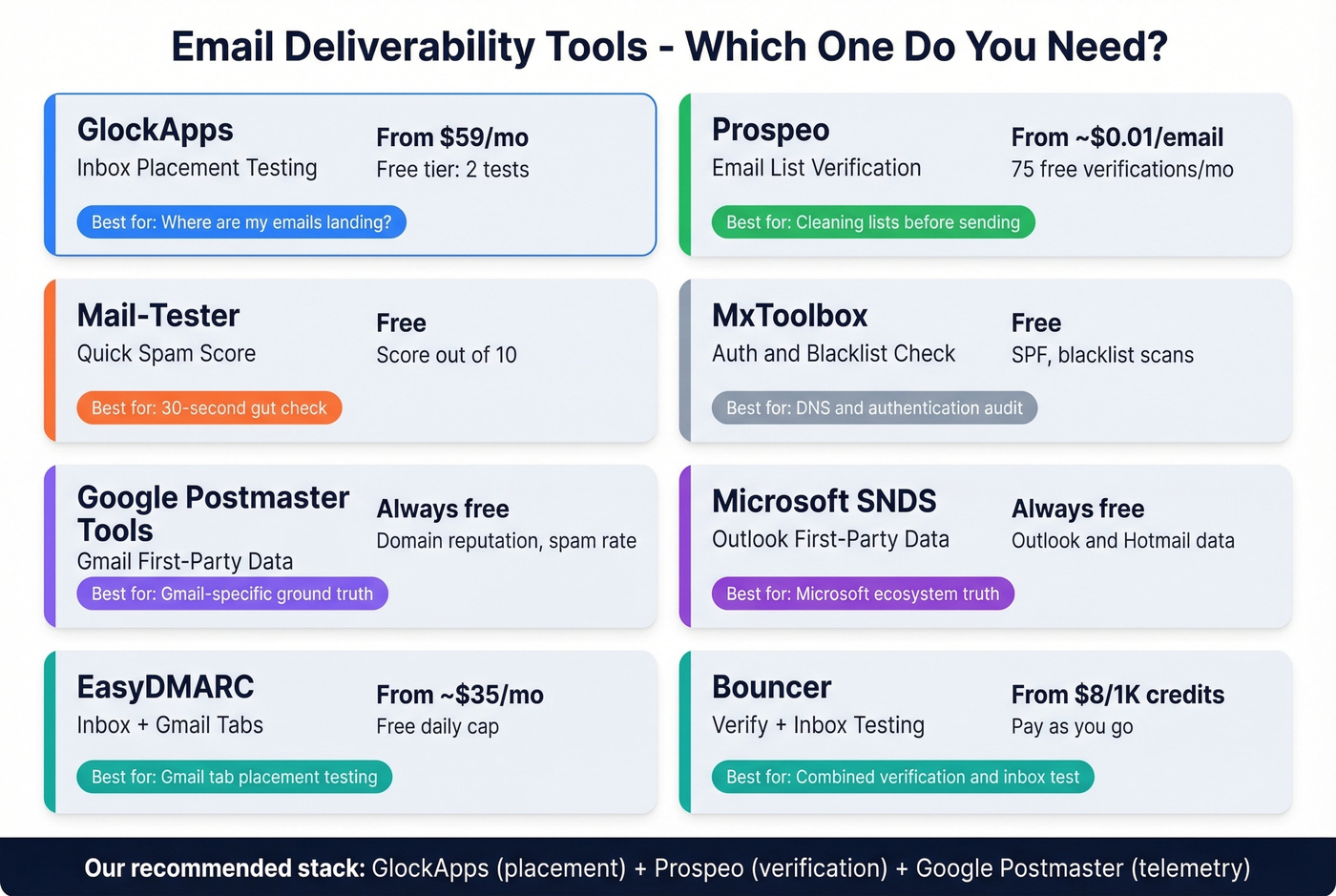
Best Deliverability Tools Compared
| Tool | Best For | Free Tier | Paid From | Key Feature |
|---|---|---|---|---|
| GlockApps | Inbox placement testing | Yes (2 tests) | $59/mo | Multi-ISP seed testing |
| Prospeo | Email list verification | 75 emails/mo | ~$0.01/email | 98% accuracy, trap removal |
| Mail-Tester | Quick one-off check | Yes | - | Simplest spam score |
| MxToolbox | Auth + blacklist check | Yes | - | Blacklist/SPF checks |
| Bouncer | Verify + inbox testing | Pay-as-you-go | $8/1K credits | Combined verify + inbox |
| EasyDMARC | Inbox placement + Gmail tabs | Yes (daily cap) | ~$35/mo | Gmail tab placement |
| Google Postmaster | Gmail telemetry | Always free | - | First-party Gmail data |
| Microsoft SNDS | Outlook telemetry | Always free | - | First-party MS data |
GlockApps - Best for Inbox Placement
GlockApps is the tool we reach for when someone says "my emails are going to spam and I don't know why." It runs your email through seed lists across major global ISPs, then shows you exactly where each one landed - inbox, spam, promotions, or missing entirely. The spam scoring pulls from Google, Barracuda, and SpamAssassin filters simultaneously, and it monitors your domain against 50+ blocklists.
Pricing: Free ($0, 2 spam test credits), Essential ($59/mo, 360 credits), Growth ($99/mo, 1,080 credits), Enterprise ($129/mo, 1,800 credits). DMARC message limits scale by tier. The Growth tier is the sweet spot for most teams running regular outbound.
Prospeo - Best for List Verification
Bad addresses are the fastest path to a wrecked sender reputation. Prospeo's 5-step verification process handles catch-all domains, removes spam traps and honeypots, and delivers 98% accuracy on verified emails. Data refreshes every 7 days - compared to the 6-week industry average - so you're not verifying against stale records.
The free tier gives you 75 email verifications per month with no credit card required. For teams running volume, credits scale to roughly $0.01 per email. Snyk's 50-person AE team dropped bounce rates from 35-40% to under 5% after switching their verification workflow, generating 200+ new opportunities per month.
Mail-Tester - Best Free Spam Test
Send an email to a generated address, get a score out of 10. That's it. Mail-Tester gives you a fast spam/deliverability diagnostic in one pass. Don't use it as your only tool - it can't tell you about inbox placement across providers. (If you want more options, compare tools in our email spam checker roundup.)
Google Postmaster Tools - Best Free Gmail Monitoring
Free, first-party, and the most reliable source for Gmail deliverability data. It shows domain reputation, spam rate, and authentication success rate. The limitation is real: you need consistent sending volume for Google to surface meaningful data. Pair it with GlockApps for providers Google Postmaster doesn't cover. (If you're troubleshooting reputation, this improve sender reputation playbook helps.)
Bouncer - Combined Verification + Testing
Bouncer bundles email verification at $8 per 1,000 credits with a Deliverability Kit at $25/mo for inbox testing across 250 emails plus IP and domain monitoring. The Shield product at $49/mo automates list cleaning on an ongoing basis. Bouncer achieves 95.5% verification accuracy - a solid option if you want verification and inbox testing from one vendor without juggling multiple subscriptions.
Your Test Found Problems - Now Fix Them
Stop obsessing over your spam score. Start obsessing over your bounce rate. Here's the remediation playbook, in priority order.
Fix authentication first. SPF, DKIM, DMARC. This takes 20 minutes and it's non-negotiable. If these aren't green, nothing else matters. HubSpot's deliverability guide walks through the setup. (If you need a technical deep dive, use this DMARC alignment explainer.)
Check blacklists. Run your domain and sending IPs through MxToolbox's free blacklist check. If you're listed, follow the delisting process for each blacklist individually - there's no universal "remove me" button. (If you're dealing with Spamhaus specifically, follow this Spamhaus blacklist removal guide.)
Warm up damaged domains. New domains under 30-60 days old are treated as high risk by default. If your domain reputation has taken a hit, plan for 60-90 days of gradual volume increase. A full authentication + warmup plan can restore 85-95% inbox placement. (For tooling, see our unlimited email warmup picks.)
Segment by engagement. Only send to contacts who opened or clicked in the last 30-90 days. Implement a sunset policy for everyone else. Dead weight on your list actively hurts the emails going to engaged recipients.
Check for shared IP problems. If your authentication is correct but different providers behave differently - Gmail fine, Outlook spam - you're likely on a burned shared IP. Contact your ESP about dedicated IP options.
Reduce tracking temporarily. If inbox placement tests keep landing in spam, try disabling open and click tracking. Tracking pixels and redirect links are signals that spam filters weigh, and removing them can help isolate whether content or reputation is the real issue. (If you want the technical why, read our email tracking pixel breakdown.)

Stack Optimize hit $1M ARR with 94%+ deliverability and under 3% bounce rates - zero domain flags - because every address was verified through Prospeo before sending. At $0.01 per email, clean data costs less than one spam folder disaster.
Send 5,000 emails knowing every address is real.
FAQ
How do I check email deliverability effectively?
Layer multiple tools: run a free authentication check via Mail-Tester, test inbox placement through GlockApps, and monitor provider-level data with Google Postmaster Tools. No single tool gives the full story - combining seed tests with first-party telemetry is the only reliable approach.
What's a good inbox placement rate in 2026?
Aim for 90%+ inbox placement across providers. In recent benchmarks, average Gmail inbox placement was roughly 54% and Office365 dropped to 51%. Consistently hitting above 85% puts you ahead of most senders.
Why do different tools show different results?
Each tool uses its own seed list of roughly 100 mailboxes with zero engagement history, tested against different provider mixes. A Gmail-heavy seed list produces different numbers than an Outlook-heavy one. Layer two or three tools with provider telemetry for the full picture.
What's a free alternative to paid verification tools?
Prospeo offers 75 free email verifications per month with 98% accuracy, spam-trap removal, and catch-all handling - no credit card required. For inbox placement testing, Mail-Tester and Google Postmaster Tools are both free. Paid tools like GlockApps become worth it above 10K sends per month.
How often should I test deliverability?
Monthly at minimum. Weekly if you're sending 10K+ emails per month or running cold outreach. Always test after changing ESPs, sending domains, authentication settings, or email templates.