

How to Check If a Gmail Account Is Active
A user on r/Gmail sent an email to an old address, watched it sail off without a bounce, then noticed the profile avatar change from a default silhouette to a letter icon. They took that as a sign of life. It wasn't. That's peak Google Support energy - no clear answer, no official tool, just tea-leaf reading and guesswork.
Google doesn't offer a way to check if a Gmail account is active. But you can get close. If you're checking your own account, use Gmail's "Last account activity" feature. If you're checking someone else's, use an AI Email Checker or an email verification tool rather than sending a test email and hoping for a bounce.
"Exists" vs. "Active"
These two words mean very different things, and conflating them is where most people go wrong.
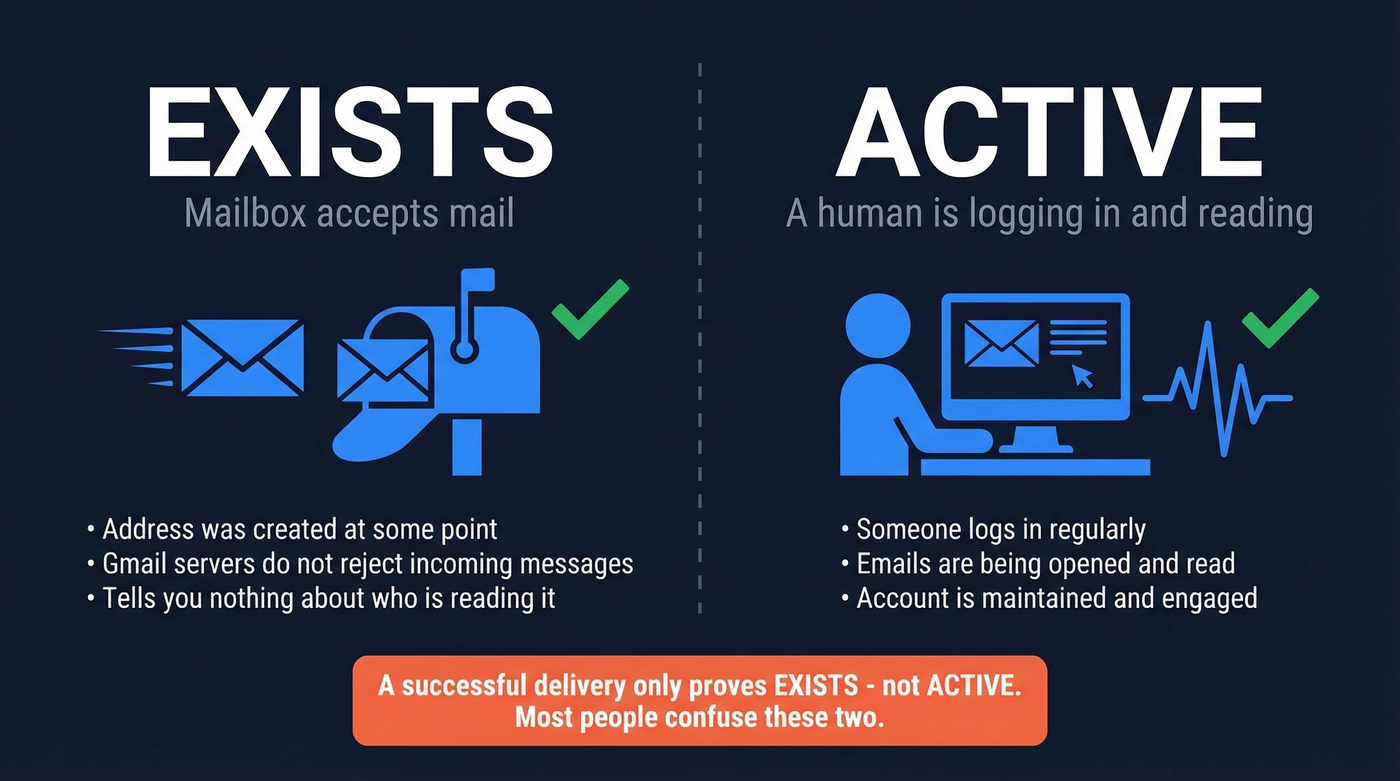
Exists means the mailbox accepts mail. The address was created at some point, and Gmail's servers don't reject incoming messages to it. Active means a human is actually logging in, reading emails, and using the account. Gmail can accept mail even when an account isn't being used, so a successful delivery tells you almost nothing about whether anyone's home.
This distinction matters because every method below answers a slightly different question - and it's especially important when you're trying to determine if a Gmail address is real versus simply deliverable. (If you only need existence, see our guide on how to check if an email exists.)
Check Your Own Account
If you're checking an account you control, this is straightforward:
- Last account activity: Open Gmail on desktop. Scroll to the bottom-right corner and click "Details." You'll see recent account access info - time, IP address, and access type.
- Google account recovery flow: Go to the standard account recovery page and enter the address. If Google walks you through recovery options via phone or backup email, the account exists and is accessible. If it says the account doesn't exist, it's been deleted.
- Google Workspace Admin Console: If you're a Workspace admin, the Admin Console shows user status and audit/activity logs for users in your organization. No guesswork needed.
- The 2-year deletion policy: Google deletes accounts inactive for 2+ years. Warnings started in December 2023, and one practitioner reported receiving a warning with an October 2025 deletion deadline. Once deleted, everything - Gmail, Drive, YouTube - is gone permanently.
Here's the thing: "activity" is ambiguous. Reddit users have reported getting inactivity warnings despite checking their email daily. Google's definition of activity likely involves specific interactions beyond just reading messages, but they don't publish the exact criteria.

Sending test emails to check if a Gmail account is active is guesswork. Prospeo's 5-step verification handles catch-all domains, removes spam traps and honeypots, and returns 98% accurate results - without ever sending a message. 75 free verifications per month.
Stop reading bounce codes. Start getting definitive answers at $0.01 per email.
Send a Test Email
This is the most commonly recommended method and the least reliable for Gmail.
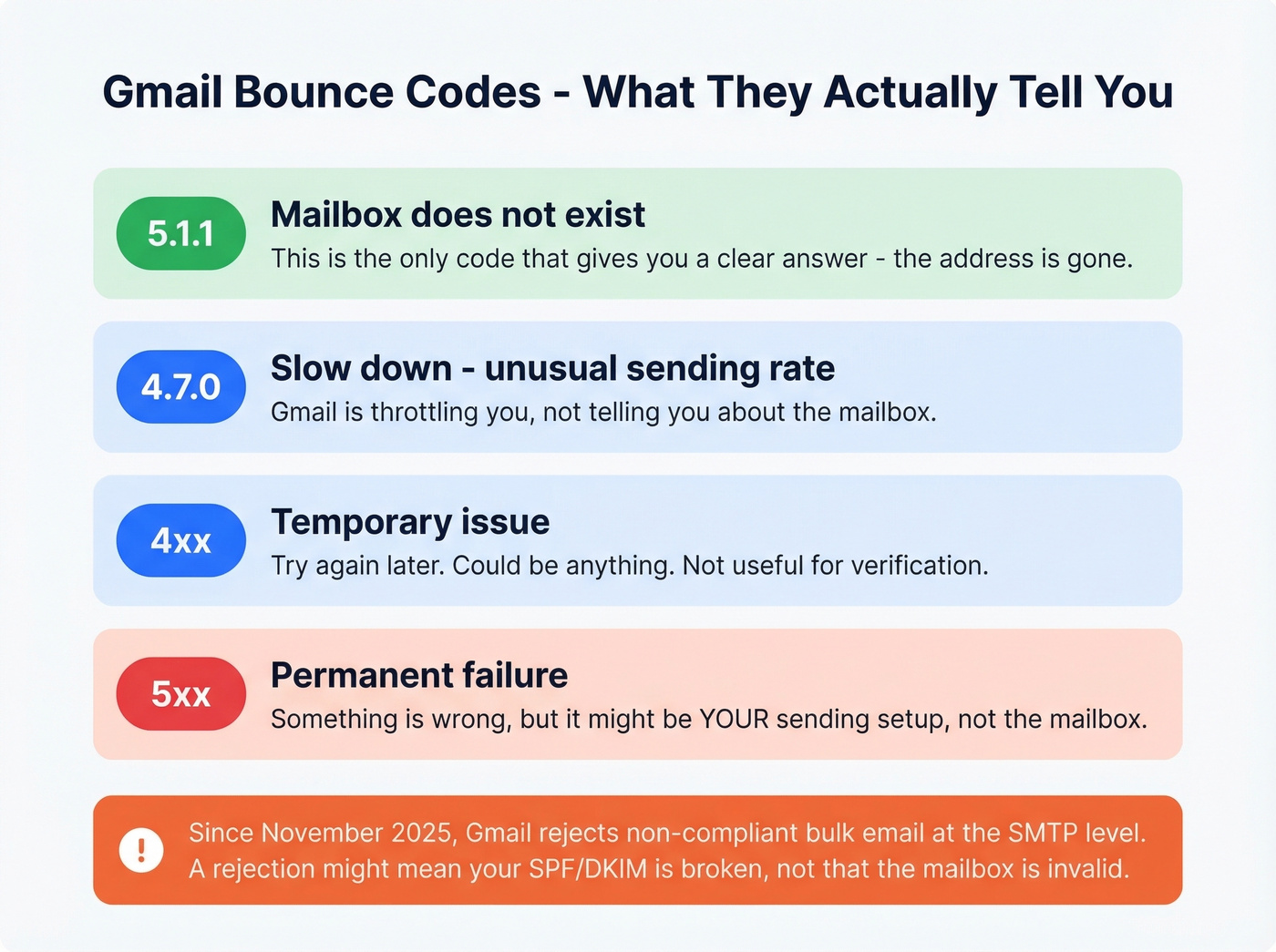
The logic sounds simple: send an email, see if it bounces. But a non-bounce doesn't mean the account is active. All you've confirmed is that Gmail's servers didn't reject your message.
If you do get a bounce, the code tells you something:
| Code | Meaning |
|---|---|
| 5.1.1 | Mailbox doesn't exist |
| 4.7.0 | Slow down - unusual rate |
| 4xx | Temporary issue |
| 5xx | Permanent failure |
But here's the wrinkle: starting November 2025, Gmail began delaying or rejecting non-compliant bulk email (5,000+ messages/day) at the SMTP level. That means SMTP outcomes can be influenced by sender compliance - SPF/DKIM alignment, DMARC, and related requirements - not just mailbox existence. If your sending domain isn't properly authenticated, Gmail may reject or delay your message for compliance reasons, and you'll misread that as a mailbox problem.
If you're relying on "send and see what happens" to determine whether a Gmail address is live, you're guessing. Full stop. (If you're trying to predict outcomes before you send, use a workflow to check if an email will bounce.)
Verify Without Sending an Email
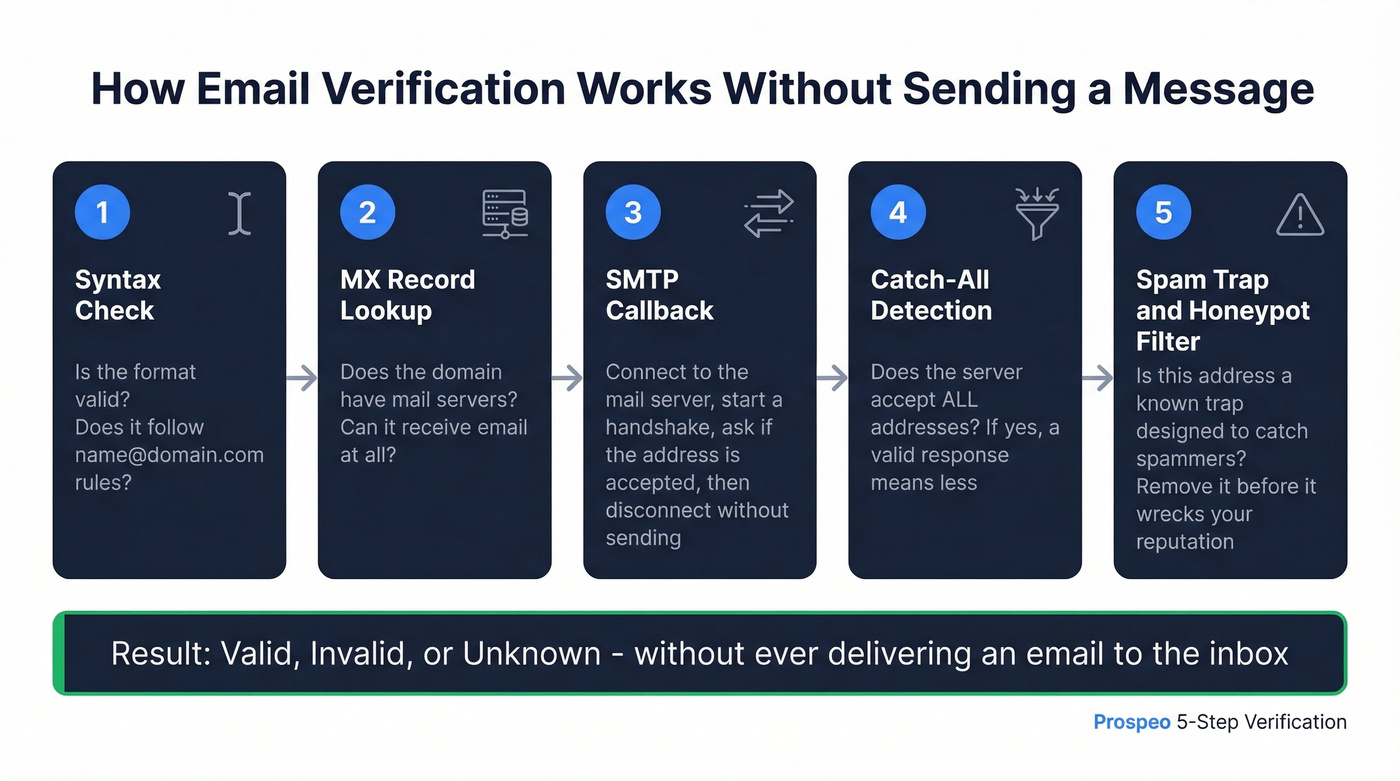
This is where verification tools earn their keep. Instead of sending a real message, they run a layered check - syntax validation, MX record lookup, SMTP callback, and catch-all detection - to determine whether a mailbox exists without ever delivering an email. (For deeper bounce-code context, see Email Bounce Rate.)
You can run the first step yourself. Open a terminal and check the MX records:
- Windows:
nslookup -type=MX gmail.com - macOS/Linux:
dig MX gmail.com
This confirms the domain accepts mail but doesn't tell you whether a specific mailbox exists. That's where SMTP callbacks come in. A verification tool connects to a mail server, initiates a handshake as if it's about to send, checks whether the server accepts or rejects the recipient address, then disconnects without actually sending anything.
Gmail limits this approach through anti-enumeration control. Many verifiers return "unknown" for Gmail-hosted mailboxes because Google deliberately obscures mailbox status to prevent scraping. The best tools layer multiple checks rather than relying on any single signal, and in our experience, that layered approach is the only thing that produces usable results for Gmail addresses specifically.

Prospeo runs a 5-step verification process that handles catch-all domains, removes spam traps and honeypots, and delivers 98% accuracy. For checking Gmail addresses, the catch-all handling matters - it's the difference between a confident "valid" or "invalid" result and a useless "unknown."
Here's how the main tools compare:
| Tool | Price / 1K | Free Tier | Notes |
|---|---|---|---|
| Prospeo | ~$0.01/email | 75 emails/mo | 98% accuracy, 5-step check |
| VerifyEmailAddress.io (EmailHippo) | Free | 100/day | Existence check without sending |
| Bouncer | $7/1K | 1,000 credits | Claims 99.5% accuracy |
| NeverBounce | $8/1K | 1,000 credits | Claims 99.9% accuracy |
| ZeroBounce | ~$7.50/1K (min $15) | 100 credits | Claims 96-98% accuracy |
For one-off checks, the free VerifyEmailAddress.io tool works fine. For anything beyond a handful of addresses - outbound campaigns, list cleaning, CRM hygiene - you need a tool with catch-all handling and multi-step verification. (If you're building lists in the first place, start with how to generate an email list.)
Why No Method Is 100% Reliable
Let's be honest about the limits. A Hunter benchmark tested 15 verifiers against 3,000 real emails. The top scorer hit 70% accuracy. Not 99%. Not 97%. Seventy percent. Vendor-claimed accuracy rates don't hold up on enterprise domains with strict configurations. That benchmark was published by Hunter themselves - about their own tool - which makes the number even more striking.
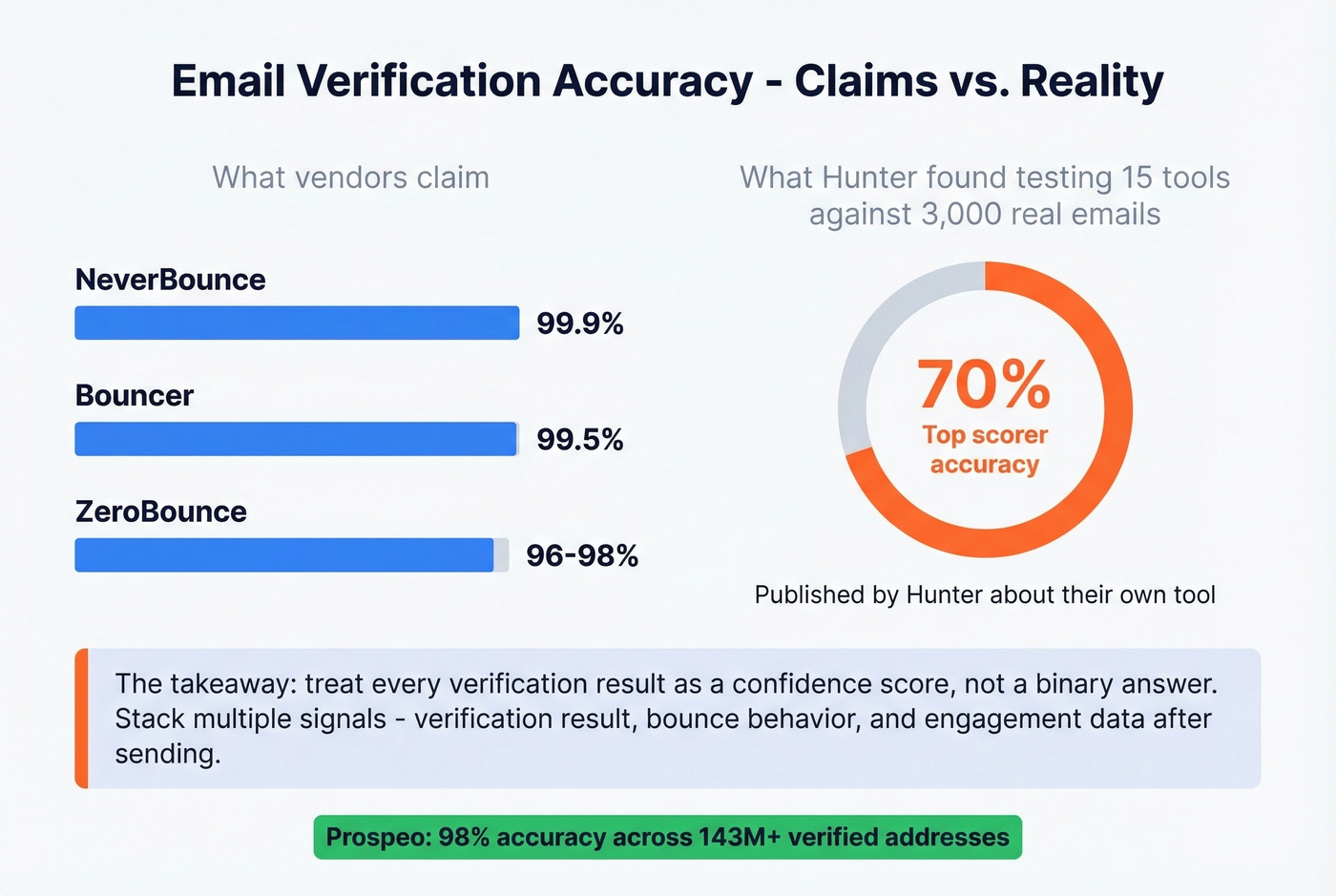
Gmail's anti-abuse infrastructure actively obscures mailbox status. "Unknown" and "accept-all" results are unavoidable, and no tool can tell you with certainty that a human is reading emails at a given Gmail address. The best you can do is stack multiple signals: verification result, bounce behavior, and engagement data after sending.
We've tested dozens of verification workflows across client campaigns, and our take is this: if your use case is "I need to know if grandma still checks her Gmail," just call her. If your use case is "I need to clean 10,000 Gmail addresses before a campaign," verification tools are the only sane option - but treat every result as a confidence score, not a binary answer. We've seen teams burn their sender reputation because they treated a "valid" result as a guarantee and blasted their entire list without monitoring bounces in the first few hundred sends. (If you're sending at scale, follow a playbook for the best way to send bulk email without getting blacklisted.)
Skip the manual SMTP approach entirely if you're checking more than a few dozen addresses. It doesn't scale, Gmail throttles it aggressively, and you'll spend more time debugging connection errors than actually getting answers.
Hunter's own benchmark showed top verifiers hitting just 70% accuracy on real-world emails. Prospeo's proprietary 5-step process - with catch-all handling and honeypot filtering - delivers 98% accuracy across 143M+ verified addresses, including Gmail.
Clean your entire list before your sender reputation pays the price.
FAQ
Does Google delete inactive Gmail accounts?
Yes. Google deletes accounts inactive for 2+ years. Warnings started in December 2023, and enforcement continues through 2026. Once deleted, the account and all associated data - Gmail, Drive, YouTube - are permanently gone and can't be recovered.
Can I check if a Gmail account is active without sending an email?
Use an email verification tool that runs SMTP callbacks without delivering a message. Results aren't guaranteed for Gmail due to anti-enumeration controls, but they're far more reliable than sending a test email and interpreting the bounce. Prospeo's 5-step verification handles Gmail's catch-all behavior and returns a clear valid/invalid result in most cases.
How do you find out if a Gmail account is real?
Run the address through an email verification tool that checks syntax, MX records, and SMTP responses. If the mailbox doesn't exist, you'll get a clear "invalid" result. A "valid" result only confirms the address is real and deliverable - it doesn't prove someone is actively using it.
What does it mean when a Gmail doesn't bounce?
Very little. A non-bounce confirms the address format is valid and the mailbox wasn't rejected at send time - not that anyone's reading it. You'd need engagement signals like opens and replies to confirm actual activity.