


Claritysoft CRM Pricing, Reviews, Pros & Cons (2026)
Two numbers keep floating around for Claritysoft CRM pricing - $39 and $49 per user. TrustRadius still shows $39 per month, but the vendor's current list pricing starts at $49/user/month billed annually. Several software directories also note a 3-user minimum, which means your real floor is $1,764/year - not the $468 a solo user might expect.
We dug into 500+ reviews across G2, Capterra, and Software Advice to figure out what people actually think of this CRM, and whether it deserves a spot on your shortlist.
Quick Verdict
Best for: Teams of 3-25 reps who want a CRM that works out of the box without a dedicated admin.
Skip if: You need serious reporting, deep native integrations, or AI-powered analytics. Claritysoft won't get you there.
Claritysoft CRM Pricing Breakdown
All plans are per user and billed annually. No monthly option is publicly listed.
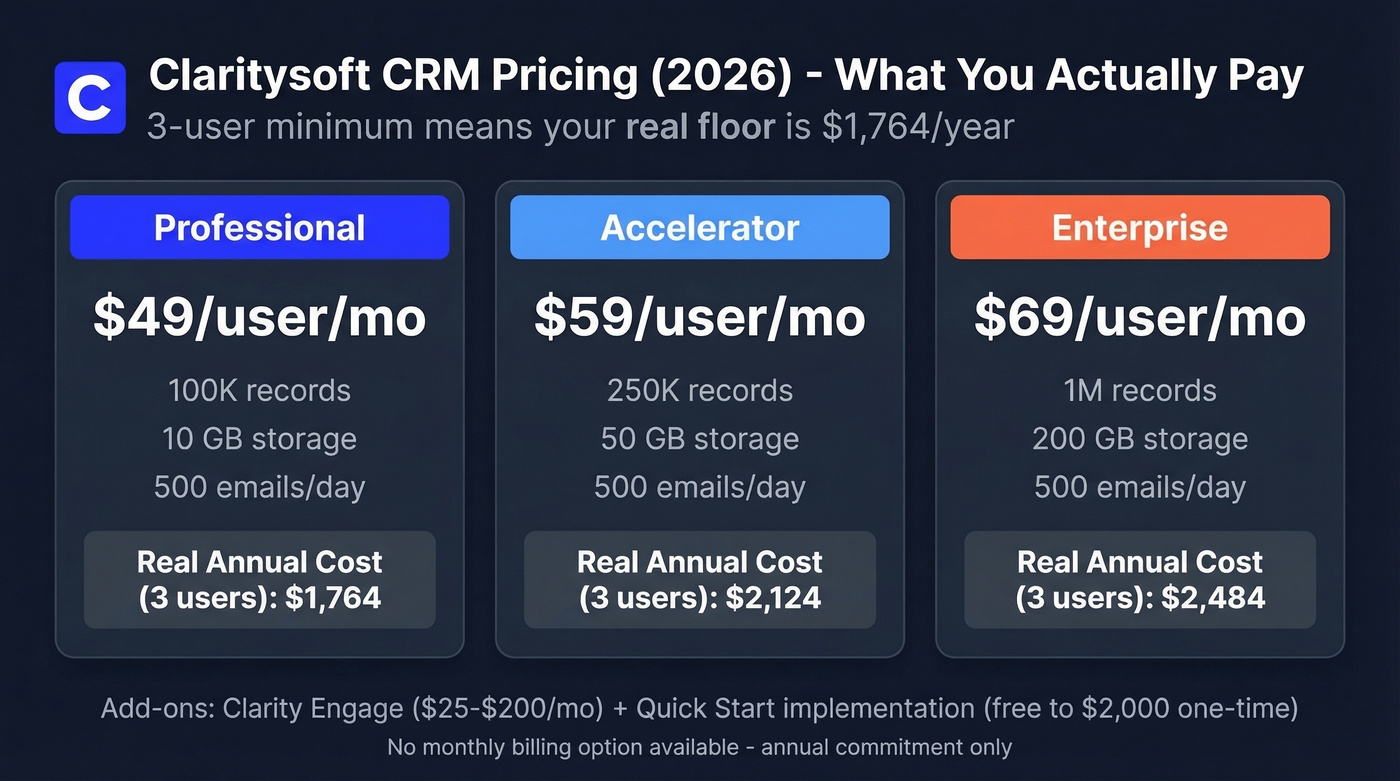
| Professional | Accelerator | Enterprise | |
|---|---|---|---|
| Price | $49/user/mo | $59/user/mo | $69/user/mo |
| Record limit | 100K | 250K | 1M |
| File storage | 10 GB | 50 GB | 200 GB |
| Mass email | 500/day | 500/day | 500/day |
With the 3-user minimum applied, here's what you're actually committing to:
| Professional | Accelerator | Enterprise | |
|---|---|---|---|
| Annual cost | $1,764 | $2,124 | $2,484 |
| Monthly equiv. | $147 | $177 | $207 |
Two costs beyond the base price worth budgeting for. Clarity Engage, their email marketing add-on, runs roughly $25-$200/month depending on send volume. And Quick Start implementation ranges from free to $2,000 one-time depending on data migration and training scope.
Why Some Sites Show $39/Month
TrustRadius still lists $39/user/month. Claritysoft's own pricing page shows $49 as the lowest tier. The $39 figure doesn't match the current pricing grid, so always check the vendor's page directly before budgeting - third-party directories lag behind.
Pros - What Users Like
You'll be live fast. One independent editorial review pegs typical time-to-value at 4-8 hours for many teams, and the broader review consensus backs that up: Claritysoft is easy to pick up compared to heavier CRMs (see more examples of a CRM if you're comparing categories).
Customization without code. Layouts, dashboards, fields, and modules are all configurable, which is a major win for teams without IT support. You don't need a developer to reshape the system around your workflow.
Genuinely good support. Claritysoft offers free, unlimited US-based phone support. On Capterra's Salesforce vs. Claritysoft comparison, Claritysoft scores 4.6 for customer support versus Salesforce's 4.1. That gap isn't trivial when you're stuck at 9 PM trying to fix a broken import.
Predictable pricing. No surprise module fees, no per-API-call charges. You know what you're paying per user, per year. That's it.

Claritysoft's predictable pricing is a win - but a CRM with empty records doesn't close deals. Prospeo fills your pipeline with 300M+ verified contacts at 98% email accuracy, exported straight to CSV or pushed to your CRM. At ~$0.01 per email, it costs less than a single Claritysoft seat to build a month's worth of pipeline.
Stop paying for a CRM your team can't fill. Start with 75 free emails.
Cons - What Holds It Back
These aren't nitpicks. They show up repeatedly across review summaries and excerpts.
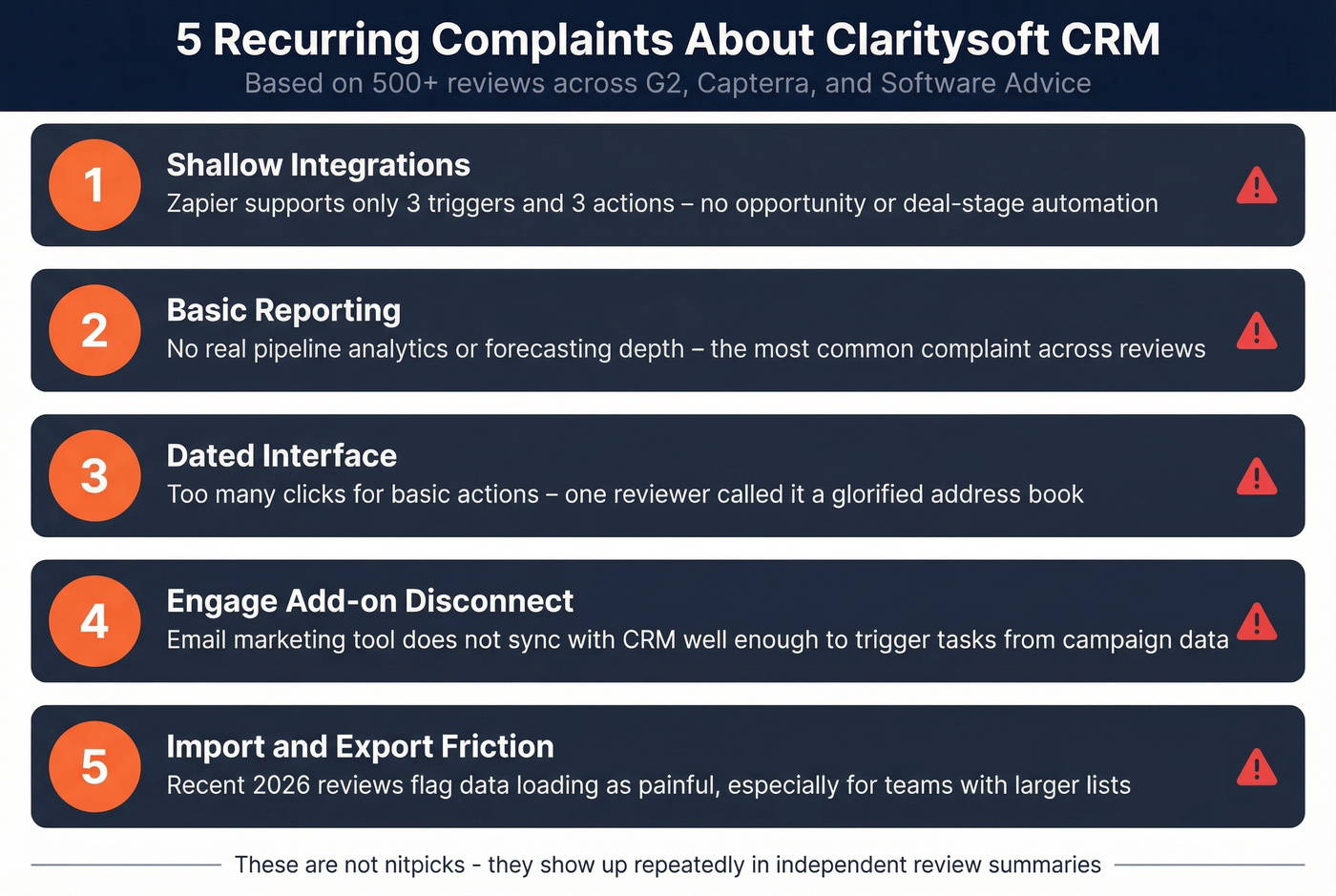
Shallow integrations. The Zapier connector supports 3 triggers (New Lead Created/Edited/Deleted) and 3 actions (Create Lead, Find Lead, Find or Create Lead). No opportunity triggers, no deal-stage automation through Zapier. If you're trying to build CRM-to-sequencer workflows, you'll hit walls fast (this is where a guide on how to connect outreach tool to CRM can help you plan around limitations).
Reporting is basic. This comes up constantly in reviews. If you need real pipeline analytics or forecasting depth, this is the single biggest reason to look elsewhere - especially if you rely on sales forecasting solutions or more advanced pipeline health tracking.
Dated UI. Reviewers mention the interface feels old and that some actions take too many clicks - including creating and deleting records. One Software Advice summary frames it as feeling like a "glorified address book." If that's your use case, you may be better served by dedicated contact management software.
Engage doesn't sync the way teams expect. A Capterra review specifically calls out that Engage doesn't communicate with the CRM in a way that enables workflows like creating tasks based on campaign performance. That's a frustrating gap for anyone trying to close the loop between marketing and sales.
Import/export friction. Recent reviews from early 2026 flag import/export as challenging enough to slow down data management for teams handling larger lists. If you're cleaning and enriching lists before import, consider a workflow that includes data enrichment services.
How Claritysoft Compares
| Claritysoft | Salesforce Starter | HubSpot Sales Hub Pro | |
|---|---|---|---|
| Starting price | $49/user/mo | $25/user/mo | $100/user/mo |
| 10-user annual | $5,880 | $3,000 | $12,000 |
| Ease of use | 4.5 ★ | 4.0 ★ | 4.4 ★ |
| Value for money | 4.6 ★ | 4.0 ★ | 4.2 ★ |
| Functionality | 4.2 ★ | 4.4 ★ | 4.5 ★ |
| Best for | Simplicity + value | Cheapest per seat | Feature depth |
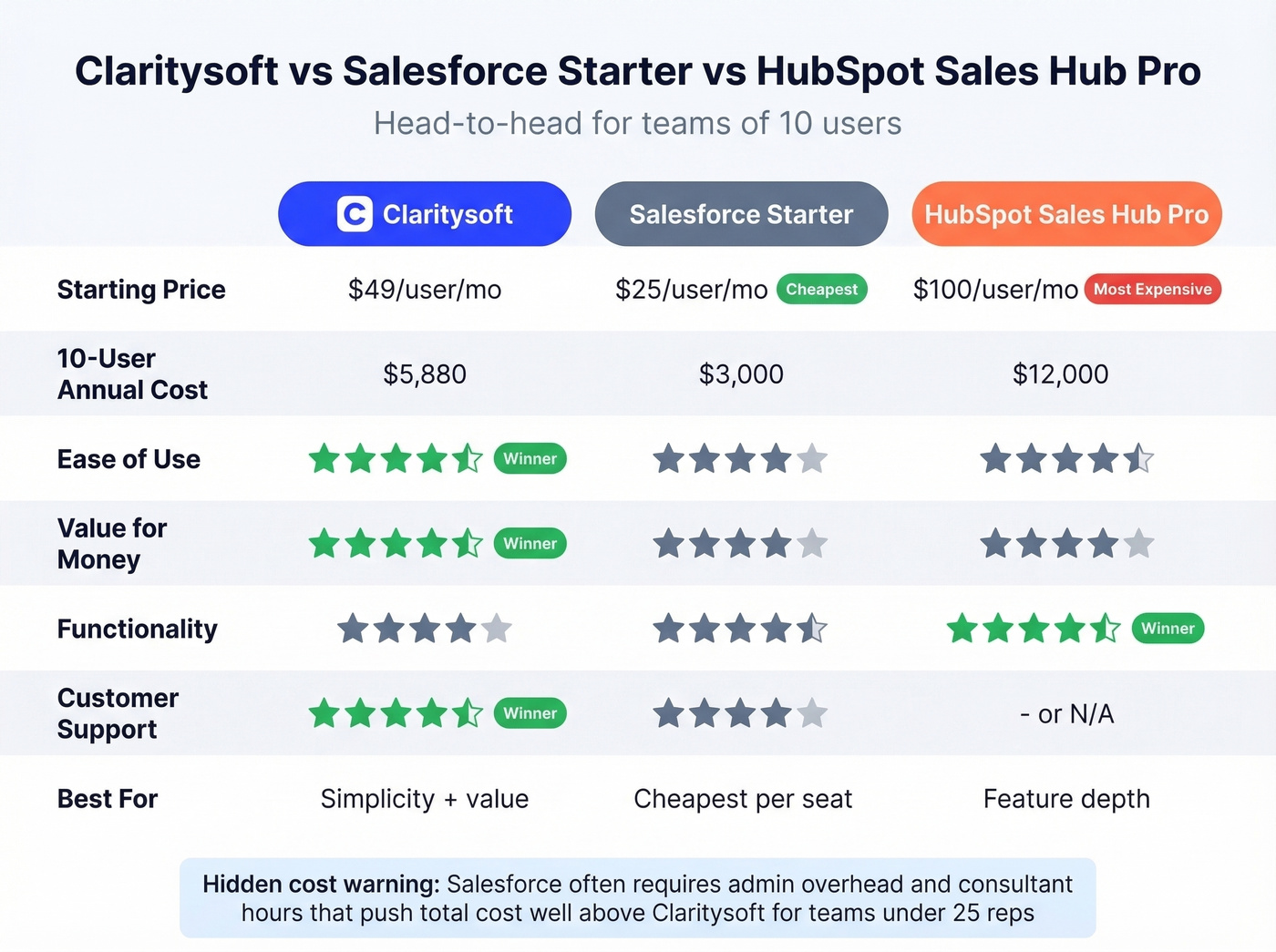
Salesforce Starter is cheaper per seat, but the complexity gap is enormous - you're likely adding admin costs that erase the savings. HubSpot's free tier is genuinely useful, but Professional pricing at $100/user/month adds up fast for growing teams. Claritysoft's sweet spot is straightforward: it's easier to run day-to-day than heavyweight CRMs, and it scores better than Salesforce on ease of use, support, and value for money in Capterra's side-by-side comparison (if you want a deeper cost breakdown, see our Salesforce pricing guide).
Here's the thing: in the Reddit threads we reviewed, Claritysoft barely came up at all compared to HubSpot or Salesforce. That can actually be a plus if you want a simpler CRM that doesn't require constant community troubleshooting to keep basic workflows running. Less buzz, fewer headaches.
Who Should (and Shouldn't) Buy
This makes sense if your team is 3-25 reps and you want clean simplicity, you're migrating from spreadsheets or a CRM nobody actually uses, or you don't want to hire a Salesforce admin just to keep the lights on.
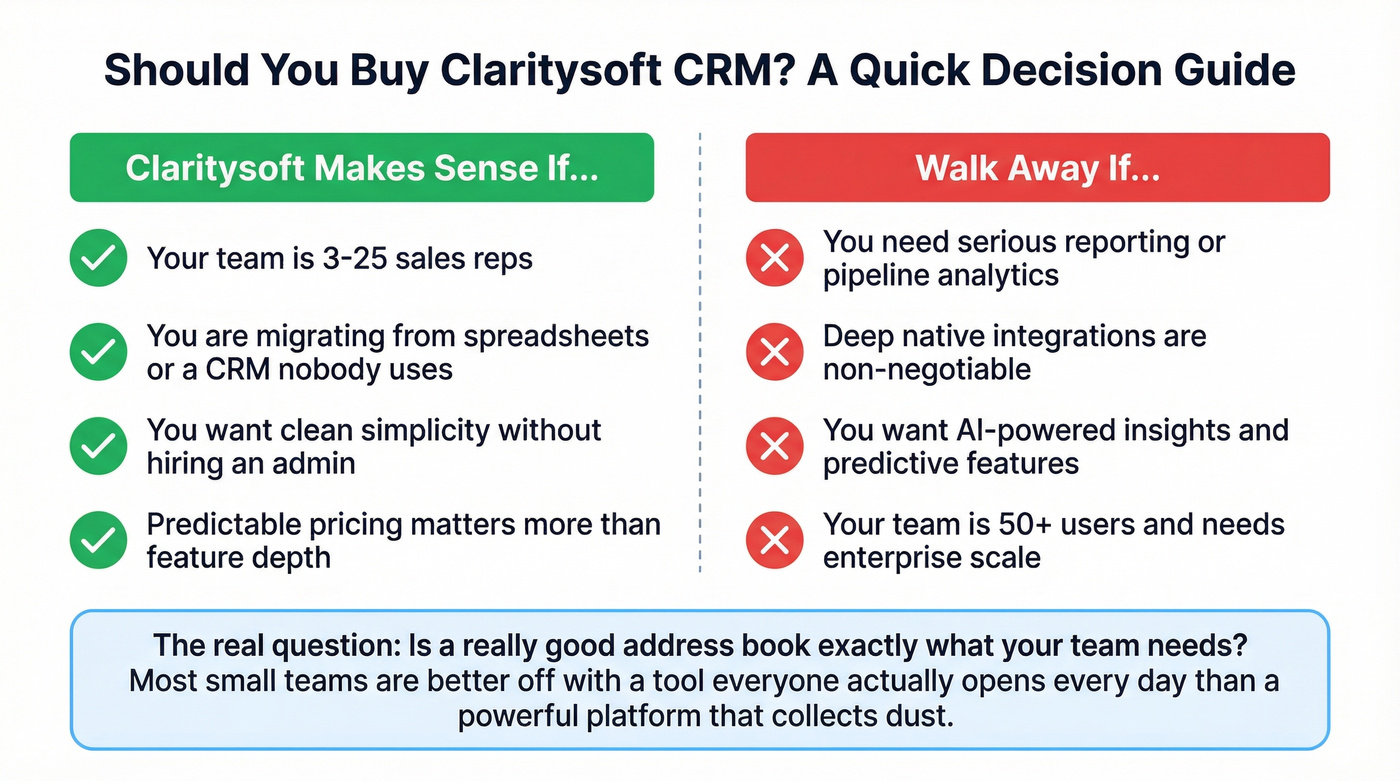
Walk away if you need serious reporting or pipeline analytics, deep native integrations are non-negotiable, or you want AI-powered insights and predictive features. Claritysoft isn't trying to be that tool (for that direction, start with B2B predictive analytics).
One reviewer called it a "glorified address book" - and for power users, that's not far off. The real question is whether a really good address book is exactly what your team needs. We've seen this pattern with mid-market CRMs before: simplicity trades off against depth, and most small teams are better off with a tool everyone actually opens every day than a powerful platform that collects dust.
Getting Data Into Claritysoft
A CRM is only as good as the data inside it. Claritysoft manages contacts well, but it doesn't help you find them. If you're pairing it with a prospecting tool, Prospeo covers 300M+ profiles with 98% email accuracy and plugs into your workflow through CSV exports or direct CRM integrations (see our breakdown of sales prospecting techniques if you're building a repeatable motion).

Claritysoft's shallow integrations and import friction make data loading painful. Prospeo's 30+ search filters let you build targeted lists by job title, intent signals, tech stack, and headcount growth - then export clean CSVs ready for Claritysoft import. No duplicates, no bounces, no wasted seats.
Find decision-makers in minutes, not hours. Free tier, no demo required.
FAQ
Does Claritysoft offer a free trial?
No. They offer a free demo instead of a self-serve trial. You'll need to book a walkthrough with their sales team before committing to the $1,764/year minimum (3 Professional seats).
Can I pay monthly instead of annually?
No monthly billing option is publicly listed. Budget for the full annual commitment: $1,764 minimum for three Professional seats billed at $49/user/month.
How do I get contact data into Claritysoft?
Import via CSV, or use a B2B data platform like Prospeo to build verified prospect lists and push them into your CRM. Thirty-plus search filters let you target by job title, industry, and buyer intent before exporting clean lists.
Is Claritysoft cheaper than Salesforce?
Per seat, no - Salesforce Starter costs $25/user/month versus Claritysoft's $49. But Salesforce typically requires admin overhead, third-party apps, and consultant hours that push total cost well above Claritysoft for teams under 25 reps. The Salesforce pricing page shows the base numbers, but the real cost is always higher.