

Cold Call Sales Email Templates: The Follow-Up Emails You Actually Need
You've copied a "proven" cold email template from a blog and gotten zero replies. The template wasn't the problem. Your infrastructure was - or you grabbed a first-touch template when what you actually needed is the email that follows a phone conversation.
Cold calls convert at roughly 4.8%. Cold emails average a 5.8% reply rate. Neither channel is magic on its own. But when you combine a cold call with the right follow-up email - sent the same day, referencing the actual conversation - you're working a different playbook than the SDR blasting generic templates to a bought list.
What You Need (Quick Version)
Most cold email guides give you first-touch templates. What you actually need are the emails that follow a phone conversation or voicemail. Here's the fast version:
- Verify your list before sending. A few bounces can hurt deliverability fast.
- Set up SPF, DKIM, and DMARC. Warm up your domain. Skip this and your templates land in spam.
- Use the post-call and post-voicemail templates below - they're the ones most guides never include.
Fix Your Infrastructure First
The best template in the world bounces if the email address is bad, and it hits spam if your domain isn't authenticated. One Reddit entrepreneur watched their bounce rate sit at 11% before they fixed list quality - after cleaning up, it dropped below 2% and reply rates doubled.
Before loading a single template into your sequencer, verify every address. Prospeo's 5-step verification catches invalid emails, spam traps, and honeypots at 98% accuracy, and the catch-all handling prevents the bounces most verification tools miss. The free tier gives you 75 email verifications per month.

Authentication checklist (non-negotiable in 2026):
- SPF, DKIM, and DMARC configured and aligned with your From domain
- One-click unsubscribe headers as required by Google and Yahoo for bulk senders
- Spam complaints under 0.3% per Gmail Postmaster thresholds
- Bounce rate under 2% (see bounce rate benchmarks and fixes)
- Warm up new inboxes at 5-10 emails/day, ramp over 4-6 weeks (use safe email velocity limits)
Practitioner rules from r/coldemail threads reinforce this: cap at 20 emails per inbox per day, turn off open tracking, avoid images, and space sends to mimic human behavior.
For compliance, every email needs your physical address, an unsubscribe link, honest From/Reply-To fields, and no deceptive subject lines. That covers CAN-SPAM. For EU prospects, add a legitimate interest basis and clear identification.
Cold Email Benchmarks for 2026
An analysis of 16.5 million cold emails makes the data clear: shorter wins.
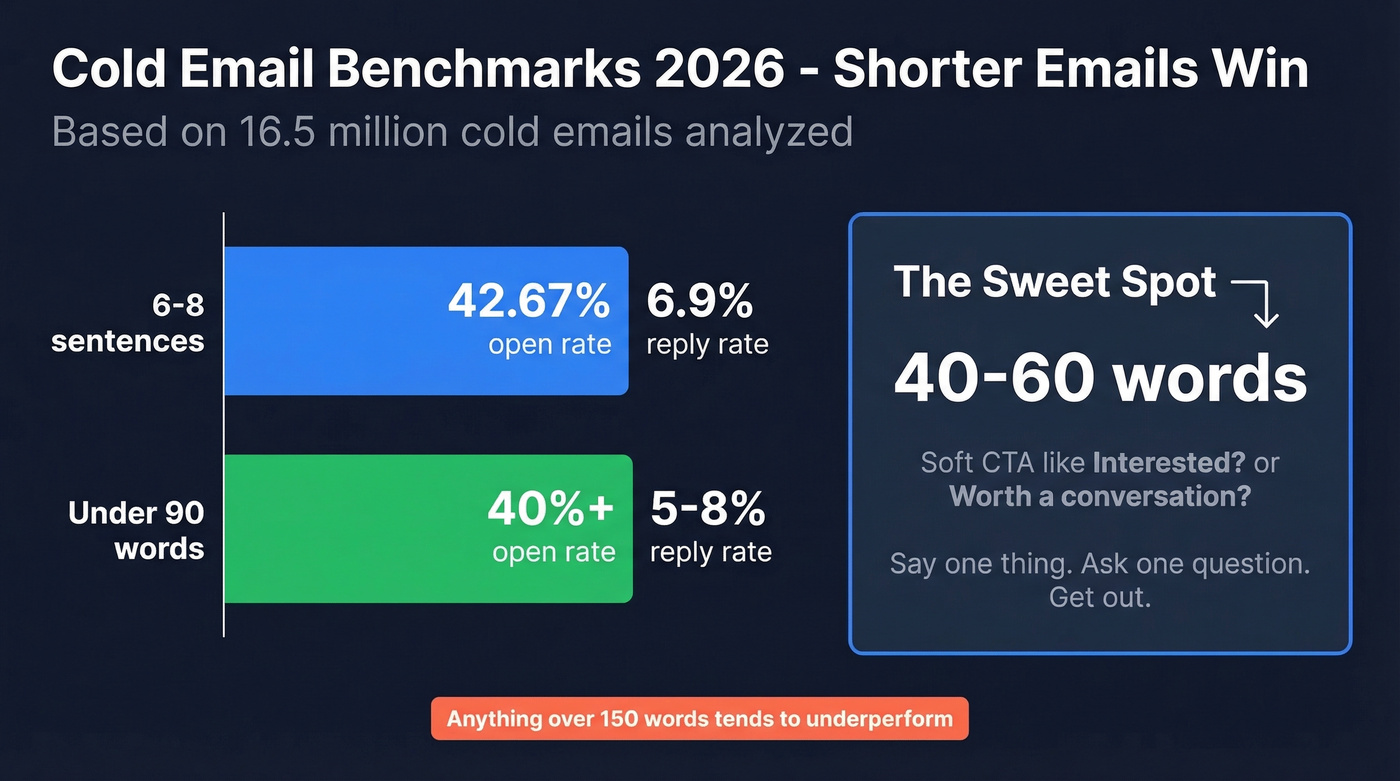
| Format | Open Rate | Reply Rate |
|---|---|---|
| 6-8 sentences | 42.67% | 6.9% |
| Under 90 words | 40%+ | 5-8% |
Practitioners on Reddit push even shorter. The consensus on r/copywriting is that 40-60 word emails with a soft CTA like "Interested?" or "Worth a conversation?" are the format getting replies right now. In our experience, anything over 150 words tends to underperform - say one specific thing, ask one question, and get out. Every template below follows this rule.
Subject Lines That Get Opens
A 5.5 million email dataset tells a different story than most guides:
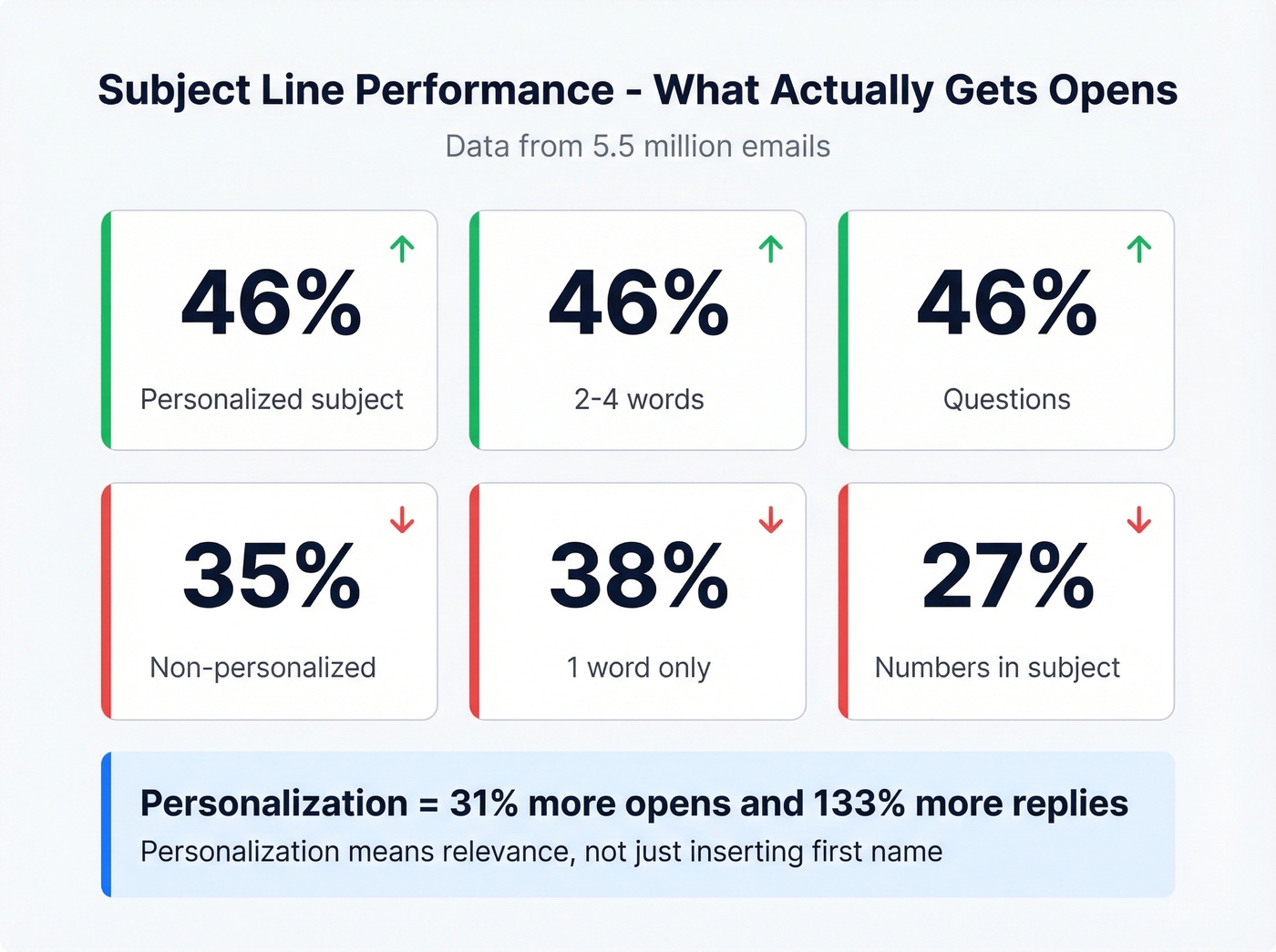
| Subject Line Type | Open Rate |
|---|---|
| Personalized subject | 46% |
| Non-personalized | 35% |
| 2-4 words | 46% |
| 1 word | 38% |
| Questions | 46% |
| Numbers in subject | 27% |
Numbers slightly underperform in this dataset, so they're usually not worth it - they also make emails look like marketing blasts. One-word subjects underperform despite feeling punchy. Personalization is the single biggest lever: a 31% lift in opens and 133% lift in replies.
One Reddit entrepreneur tested "Quick question" and got 39% opens. Company-name subjects hit 33%. "Partnership opportunity" cratered below 19%. Personalization doesn't mean {{first_name}} - it means relevance. (If you want more options, pull from these cold email subject line examples.)

Every template above assumes the email actually lands. One bad bounce tanks your sender reputation and kills the entire sequence. Prospeo's 5-step verification catches spam traps, honeypots, and catch-all domains at 98% accuracy - so your post-call follow-ups hit real inboxes, not void.
Verify 75 emails free and stop bouncing your best follow-ups.
12 Templates for Cold Calls and Outreach
Here's the thing: most competitor guides focus on first-touch templates and rarely include post-call or post-voicemail follow-ups. The first five templates below are the ones you actually came here for - the cold call sales email templates built for real sales conversations.
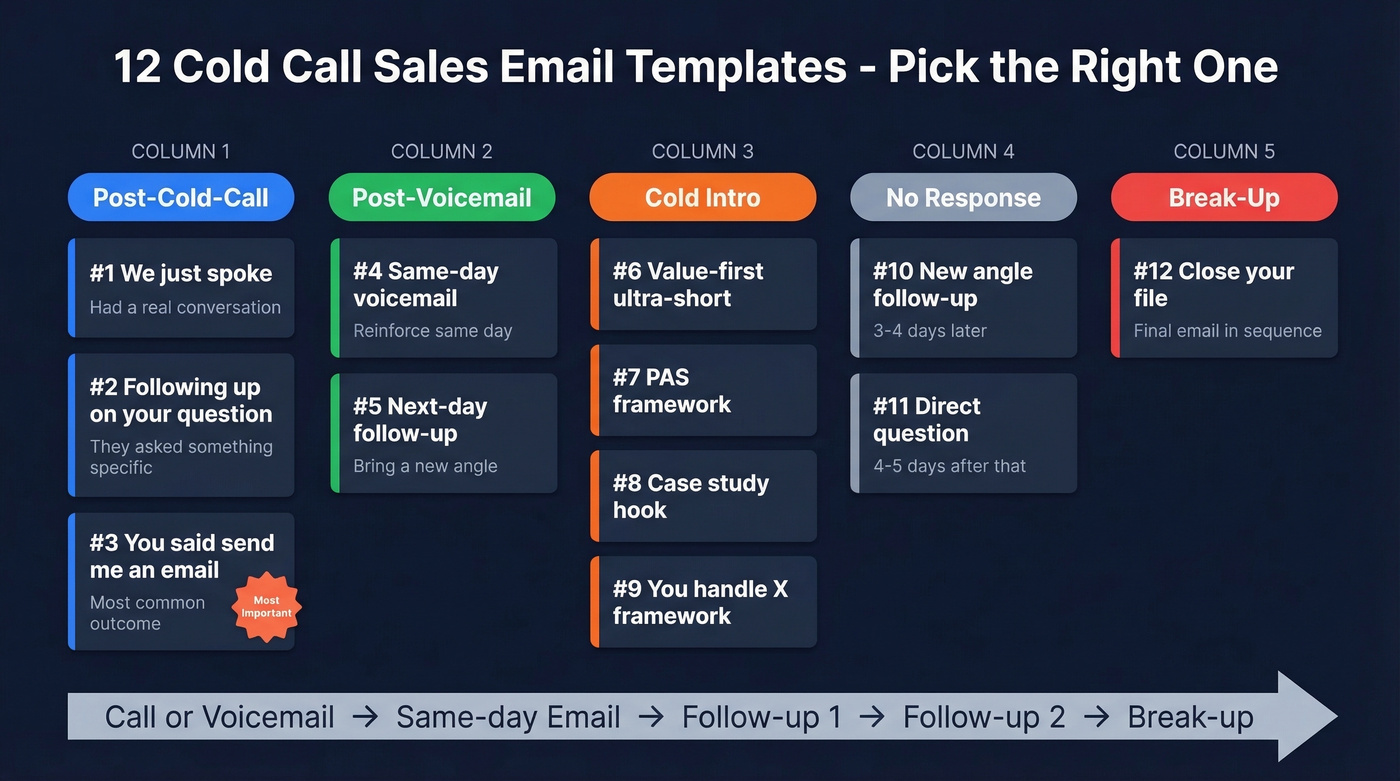
All templates aim for under 90 words, contain one question, and end with a soft CTA. (For more variations, see these sales follow-up templates.)
Post-Cold-Call Follow-Up
Template 1: "We just spoke"
Subject: Good talking earlier
Hi {{first_name}},
Thanks for the few minutes today. You mentioned {{specific pain point from call}} - that's exactly where we've helped teams like {{similar company}}.
I put together a quick summary of how we'd approach it: {{one-sentence value prop}}.
Worth 15 minutes this week to walk through it?
Use when: You had a real conversation and the prospect showed any interest.
Template 2: "Following up on your question"
Subject: Answer to your {{topic}} question
Hi {{first_name}},
You asked about {{specific question from call}}. Short answer: {{direct answer in one sentence}}.
Here's a quick case study showing how {{client}} handled the same thing: {{link or one-line result}}.
Want me to walk you through how it'd work for {{their company}}?
Use when: The prospect asked something specific you can answer in writing.
Template 3: "You said send me an email"
This is the most important template in this entire guide. "Just email me" is the most common cold call outcome, and nobody writes a template for it. We've tested dozens of variations of this one, and the version below consistently outperforms anything that tries to pretend the call was warmer than it was.
Subject: As promised - quick overview
Hi {{first_name}},
You asked me to send this over. We help {{role/team type}} {{specific outcome}} without {{common objection}}.
One example: {{client}} saw {{result}} in {{timeframe}}.
If that's relevant, I'm free {{two specific times}}. If not, no worries at all.
It doesn't pretend the call was warm. It delivers value fast and gives two specific times instead of an open-ended ask, which tends to convert better.
Post-Voicemail Follow-Up
Template 4: Same-day voicemail reinforcement
Subject: Just left you a voicemail
Hi {{first_name}},
I just left a quick voicemail - didn't want to take up your whole afternoon. We help {{their role}} at companies like {{peer company}} {{specific outcome}}.
Thought it might be relevant given {{trigger: hiring, funding, tech change}}. Worth a quick chat?
Use when: You left a voicemail and want to reinforce it same-day with a different angle.
Template 5: Next-day voicemail follow-up
Subject: Quick thought for {{company}}
Hi {{first_name}},
Tried reaching you yesterday. Different angle: {{new value prop or insight they'd care about}}.
{{One-sentence proof point}}. Interested?
Use when: Following up the day after a voicemail. Don't repeat the voicemail - bring something new.
Cold Intro / First Touch
Template 6: Value-first ultra-short
Subject: Quick question
Hi {{first_name}},
Noticed {{company}} is {{trigger event}}. We helped {{similar company}} {{specific result}} in {{timeframe}}.
Happy to share how - interested?
Use when: You have a clear trigger event and a relevant proof point.
Template 7: PAS framework
Subject: {{Pain point}} at {{company}}?
Hi {{first_name}},
Most {{role}} teams at {{company size/type}} struggle with {{problem}}. It usually means {{consequence}}.
We built {{product/feature}} specifically for this. {{Client}} cut {{metric}} by {{result}}.
Worth 15 minutes?
Use when: You understand their pain well enough to articulate it better than they would.
Template 8: Case study hook
Most SDRs write the bad version. Let's break down the difference:
❌ "Hi Sarah, I wanted to reach out because we have a great case study I thought you'd find interesting about improving sales efficiency..."
✅ Subject: How {{client}} {{achieved result}}
Hi {{first_name}},
{{Client}} was dealing with {{same problem your prospect has}}. After switching to {{your solution}}, they {{one specific result}}.
The key was {{one feature or approach}}. Think it could work for {{company}}?
The bad version talks about you. The good version talks about a result they want.
Template 9: "You handle X" framework
Subject: {{Their responsibility}}
Hey {{first_name}}, you handle {{their function}} so I bet you care about {{outcome they want}}.
We do {{what you do in one sentence}}. {{One proof point}}.
Wanna chat?
This framework from r/sales is dead simple and works because it shows you understand their world. Skip it if you can't confidently name what they're responsible for - a wrong guess here kills credibility faster than a generic email would.
Follow-Up After No Response
Template 10: First follow-up (new angle)
Subject: Re: {{original subject}}
Hi {{first_name}},
Different angle - {{new insight, stat, or value prop you didn't mention in email 1}}.
{{One sentence connecting it to their situation}}. Worth a conversation?
Send 3-4 days after your first email. Never write "just checking in" - bring something new. (If you need alternatives, use these cold email follow-up templates.)
Template 11: Second follow-up (shorter, direct)
Subject: Re: {{original subject}}
Hi {{first_name}},
Quick question: is {{problem you solve}} a priority for {{company}} right now?
If yes, happy to share how we've helped. If not, I'll get out of your inbox.
Send 4-5 days after Template 10. Give them an easy out.
Break-Up / Final Email
Template 12: Permission-based close
Subject: Should I close your file?
Hi {{first_name}},
I've reached out a few times and haven't heard back - totally fine. Should I close your file, or is this something worth revisiting next quarter?
Either way, no hard feelings.
"Close your file" outperforms "just following up" because it creates a small urgency without being pushy. We've seen this template pull replies from prospects who ignored the previous three emails.
Follow-Up Timing and Limits
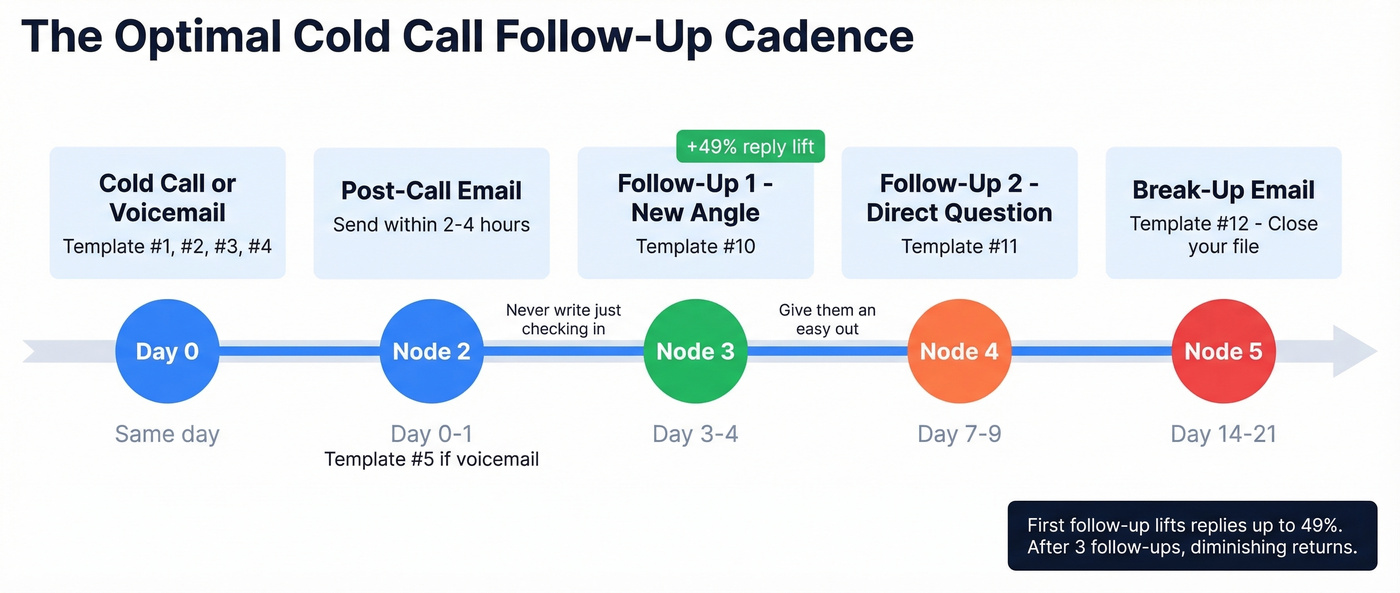
Your first follow-up can lift replies up to 49%. But by email five, replies drop 55% and spam complaints escalate from 0.5% to 1.6%. Unsubscribes spike at rounds three and four.
| Email # | Reply Impact | Spam Complaint Rate |
|---|---|---|
| 1st | Baseline | ~0.5% |
| 2nd | +49% | Low |
| 3rd | -20% | Rising |
| 5th | -55% | ~1.6% |
Three to four follow-ups is a practical ceiling for most campaigns. After that, switch channels - call them, connect on social, or move on. Sending email six isn't persistence; it's spam.
Building a Cold Call + Email Cadence
Here's a 15-day multi-channel cadence adapted from Kondo's enterprise SaaS framework with template numbers mapped to each step:
- Day 1: Research prospect. Identify trigger events and pain points (use these sales prospecting techniques).
- Day 2: Send personalized email using Template 6, 7, 8, or 9.
- Day 4: Engage with their content on social or send a connection request.
- Day 6: Cold call. Reference your email if they opened it (build a repeatable cold calling system).
- Day 7: Send post-call follow-up using Template 1, 2, or 3. If you left a voicemail, use Template 4.
- Day 10: Follow-up email using Template 10 with a new angle.
- Day 13: Final email using Template 12.
- Day 15: Final call attempt.
For teams where the average deal size is under $10k, a lighter cadence usually does the job. A two-email, one-call sequence is often enough. Save the eight-touch enterprise cadence for deals that justify the effort.
Mistakes That Kill Reply Rates
- Writing more than 150 words
- Opening with "I hope this finds you well"
- Burying or skipping the ask entirely
- Emailing the wrong persona - bad targeting wastes everything (tighten your ideal customer profile)
- Zero personalization beyond {{first_name}}
- Sending only one email and giving up
- Talking about yourself for three paragraphs before mentioning them
- Skipping domain authentication and list verification (follow an email deliverability guide)
Number four is the one that frustrates us most. You can nail the copy, the timing, the infrastructure - all of it - and still get nothing because you're emailing someone who doesn't own the problem you solve. Verify the person, not just the address.
3% to 6% in 62 Days
One Reddit entrepreneur shared a detailed rebuild after their reply rate cratered from 8% to 3% over 18 months.
Infrastructure: They expanded from 3 domains to 7, capping each at 26 emails per day. Bounce rate dropped from 11% to under 2% after switching to manual verification.
Copy: Emails went from 141 words to under 56. Subject line "Quick question" hit 39% opens. Sends moved to Tuesday-Thursday, 8-11 AM in the recipient's timezone, improving opens by 16%.
Results: 6% reply rate after 62 days. 16 qualified leads per month. Total stack cost: ~$420/month.
We've seen this pattern repeatedly - infrastructure fixes move the needle more than copy changes. The fastest way to replicate that bounce-rate fix is running your list through a verification tool like Prospeo before every send. At ~$0.01 per email with 98% accuracy, it's cheaper than one bounced email's damage to your sender reputation.
Templates 1-5 only work if you have the right email for the person you just called. Prospeo gives you 143M+ verified emails with 98% accuracy and a 7-day refresh cycle - so the address you pull today is still valid when your follow-up hits tomorrow morning.
Find verified emails for every prospect on your call list for $0.01 each.
FAQ
What should I email after a cold call?
Reference the specific conversation - what you discussed or what they asked. A strong post-call follow-up keeps it under 60 words, restates your value prop in one sentence, and ends with a soft CTA like "Worth 15 minutes this week?" Send it the same day while the conversation's fresh.
How many follow-up emails should I send?
Three to four maximum. The first follow-up lifts replies up to 49%, but by email five, replies drop 55% and spam complaints hit 1.6%. After four touches, switch to phone or social instead of sending another email.
How do I keep cold outreach emails out of spam?
Authenticate your domain with SPF, DKIM, and DMARC. Warm up new inboxes for 4-6 weeks. Keep bounce rates under 2% by verifying every address before sending. Cap sends at 20 per inbox per day and skip open tracking.
What's the best subject line for a cold call follow-up email?
Reference the call directly - "Good talking earlier" or "Answer to your {{topic}} question" both outperform generic lines. Personalized subjects hit 46% open rates versus 35% for non-personalized ones, based on a 5.5 million email study. Keep it 2-4 words.