

Cold Email Prospecting: Infrastructure, Data, and Copy - In That Order
You've read five articles that say "personalize your outreach" and "keep it short." Meanwhile your emails land in spam because you're sending from your primary domain without DMARC. Cold email prospecting in 2026 is an infrastructure problem first, a data quality problem second, and a copywriting problem third.
The average reply rate across 16.5M emails in 2024 was 5.8% - down from 6.8% the year before. You can beat that by nailing the fundamentals below. And yet 61% of decision makers still prefer cold email over calls or social touches, while 43% of executives say they spend too much time on email already. That tension means only infrastructure-sound campaigns get through. The "cold email is dead" crowd on r/SaaS - the ones sending 2,000 emails and getting zero customers - aren't proving the channel's broken. They're proving they skipped the foundation.
The Hierarchy Most Guides Get Wrong
Most cold email guides start with templates. That's like putting a Ferrari engine in a car with no chassis.
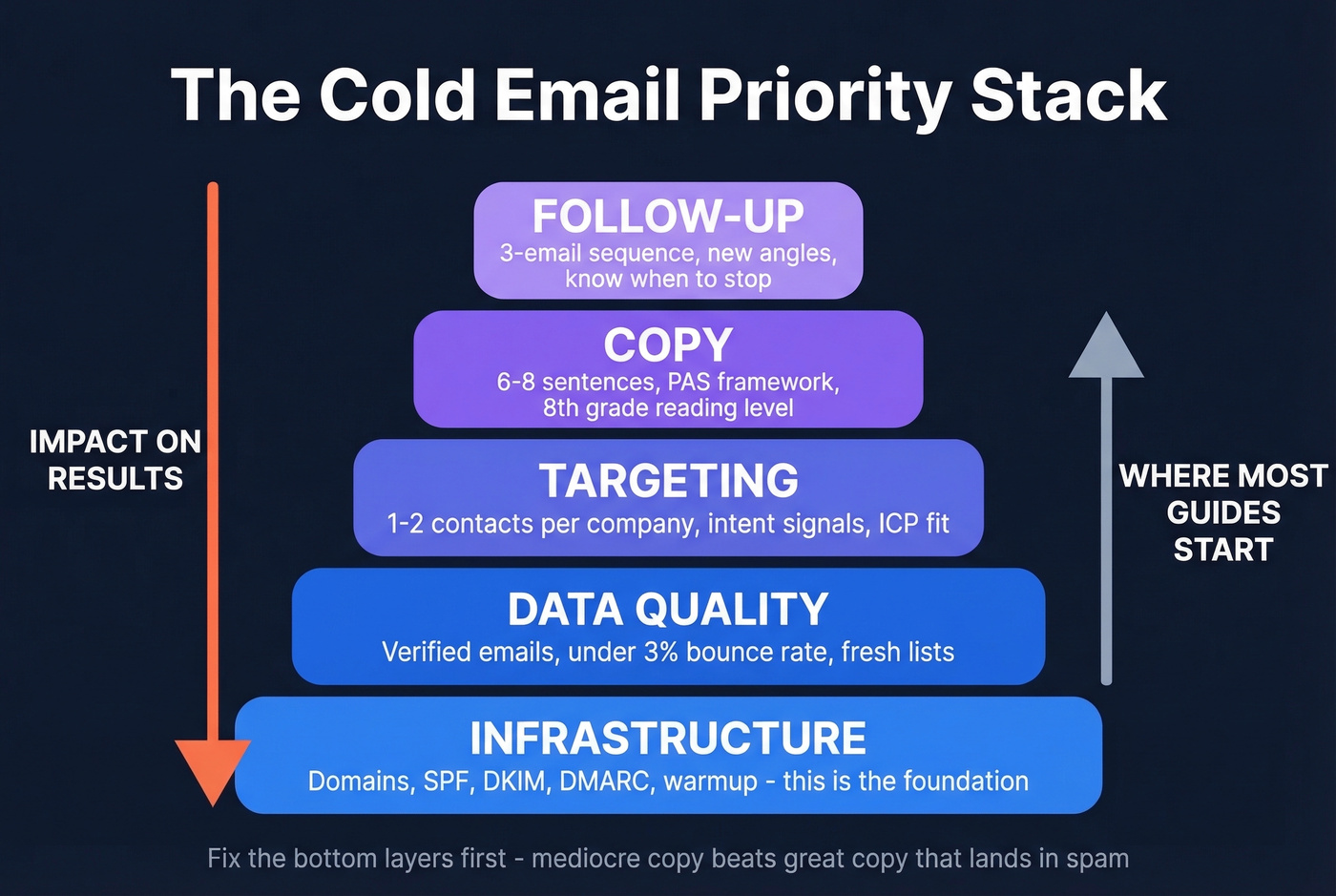
Here's the priority order that actually drives results: infrastructure → data quality → targeting → copy → follow-up. Get the first two right and mediocre copy will outperform a beautifully written email that lands in spam. We've seen teams triple reply rates without changing a single word of copy - just by fixing their sending setup and cleaning their lists. If your sales email prospecting workflow doesn't start with deliverability, you're optimizing the wrong thing.
Sending Infrastructure Setup
Never send cold email from your primary business domain. Buy secondary domains - variations like yourcompany-team.com or getyourcompany.com - and set up dedicated inboxes on each. Sending from your own domain instead of a generic Gmail address can pull nearly 2x the reply rate.
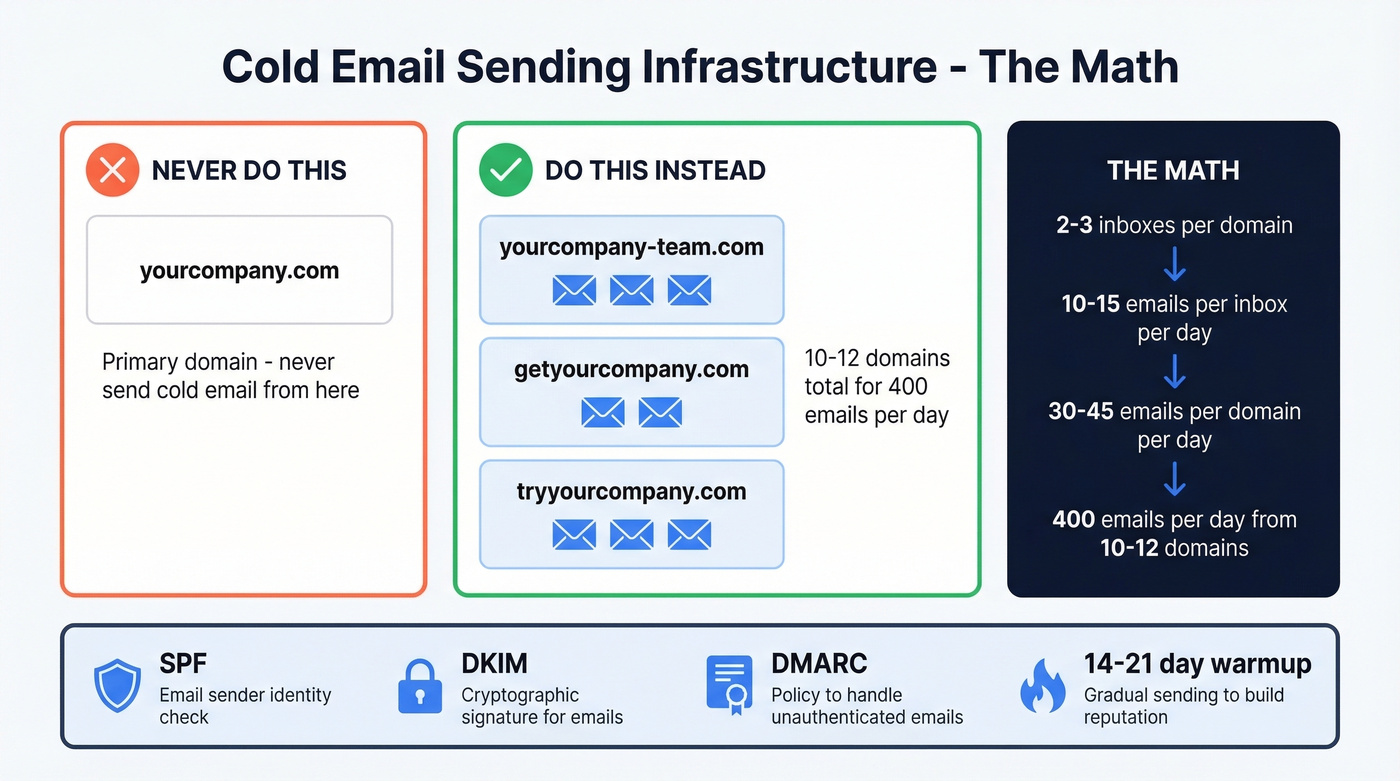
Here's the math:
- 2-3 inboxes per domain, each sending 10-15 emails/day
- That's ~30-45 emails per domain per day
- To send ~400 emails/day, you need ~10-12 domains
Use Google Workspace or Microsoft 365 only. Configure SPF, DKIM, and DMARC on every domain - Gmail and Yahoo now enforce a 0.3% spam complaint threshold, and inbox providers broadly reward authenticated, well-behaved senders.
Warm every new inbox for 14-21 days. Keep warmup running even after you start campaigns. This is the non-negotiable foundation for any email outreach that actually reaches the inbox. (If you want a deeper technical checklist, see our email deliverability guide.)
Data Quality - The Silent Campaign Killer
If your bounce rate crosses 5%, stop sending. Every bounced email damages your domain reputation, and that damage compounds. One bad campaign can poison your sending infrastructure for weeks.
The data shows that targeting fewer contacts per company drives better results: 1-2 contacts per company yields a 7.8% reply rate versus 3.8% when you spray 10+ people at the same org. Tighter lists win. In our experience, most bounce rate problems trace back to stale lists - and precision beats volume every single time.
This is where verification earns its place in the stack. Prospeo's 5-step process - catch-all handling, spam-trap removal, honeypot filtering - delivers 98% email accuracy across 300M+ professional profiles, with data refreshing every 7 days instead of the 6-week industry average. Stack Optimize built to $1M ARR using Prospeo data with 94%+ client deliverability and zero domain flags. Meritt dropped their bounce rate from 35% to under 4%. (If you're comparing vendors, start with our breakdown of data enrichment services and email reputation tools.)

Only 2-3% of buyers are in-market right now. Prospeo tracks 15,000 intent topics so you email prospects who are actively researching your solution - not cold leads who'll never convert. Layer buyer intent with 30+ filters including job changes, headcount growth, and technographics.
Stop guessing who's ready to buy. Let intent data tell you.
Targeting 1-2 contacts per company drives 2x the reply rate - but only if those contacts are real. Prospeo's 7-day data refresh and 5-step verification keep bounce rates under 4% for teams like Meritt and Stack Optimize. At $0.01 per email, clean data costs less than one bounced send costs your domain.
Protect your domains. Verify every email before you hit send.
Copy That Gets Replies
Now - and only now - let's talk about copy. 71% of recipients ignore cold emails because they're irrelevant. You have 5-7 seconds before someone decides to delete or engage.
Keep emails to 6-8 sentences, under 200 words. Write at an 8th-grade reading level - 85% of people comprehend information at this level. Some practitioners on r/coldemail push for under 90 words and 3rd-grade reading level, and the data supports both approaches, but 6-8 sentences is the sweet spot that balances enough context with enough brevity. Subject lines perform best at 6-7 words. One CTA, low friction. (For more options, pull from these subject line examples and cold email subject line examples.)
The PAS framework (Problem → Agitation → Solution) works because it mirrors how busy people process relevance:
Subject: [Specific problem] at [Company]
Hi [Name],
[One sentence naming a problem they likely have - specific to their role or industry.]
[One sentence on what that problem costs them - time, revenue, missed pipeline.]
[One sentence on how you solve it, with a proof point.]
[Single low-friction CTA.]
Here's the thing: the template matters less than the targeting. A generic template sent to a perfect-fit prospect will outperform a hyper-personalized email sent to someone who'll never buy. Only 2-3% of potential buyers are in-market at any given time - finding them matters more than crafting the perfect sentence. Knowing how to write a prospecting email is important, but knowing which prospect to email is what actually moves the needle. (If you need a scoring starting point, use an ideal customer profile template.)
| Element | Best Practice |
|---|---|
| Subject line | 6-7 words, no caps lock |
| Body length | 6-8 sentences, <200 words |
| Reading level | 8th grade |
| CTA | One, low friction |
| Links | 1 max (or zero) |
| HTML/images | Avoid entirely |
Follow-Up Cadence and Timing
A 3-email sequence is a strong default. The first follow-up can lift replies up to 49%, which makes it essential. But returns drop fast after that - by round 4, spam complaints rise from 0.5% to 1.6% and unsubscribes hit 2%. Don't chase diminishing returns.
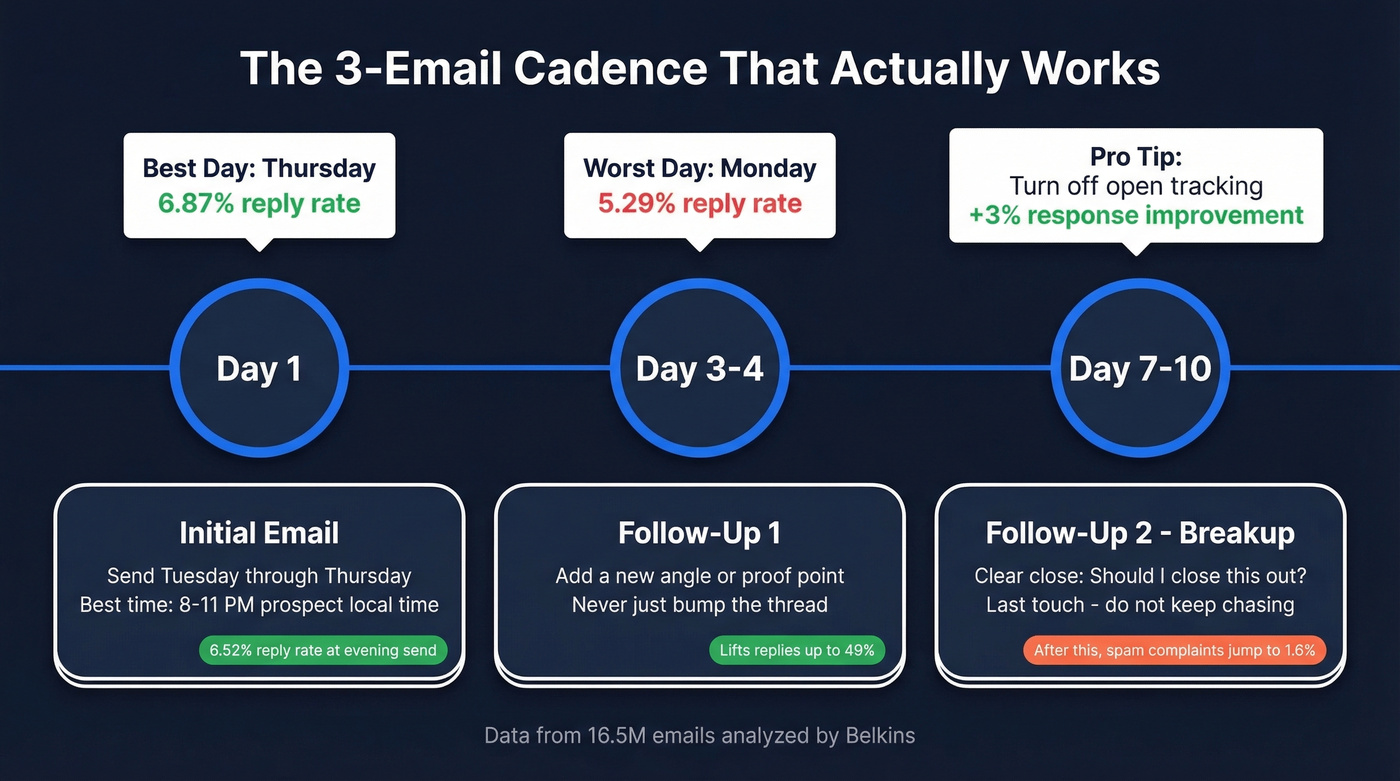
- Day 1: Initial email (Tuesday-Thursday, send in the prospect's evening - 8-11 PM local time pulls a 6.52% reply rate)
- Day 3-4: Follow-up #1 - add a new angle or proof point, don't just "bump" the thread
- Day 7-10: Follow-up #2 - breakup email with a clear close ("Should I close this out?")
Thursday consistently delivers the highest reply rates at 6.87%, while Monday bottoms out at 5.29%. Turn off open tracking pixels - Belkins found this alone improved response rates by ~3%. The tracking data isn't worth the deliverability hit. (If you're building sequences, these cold email follow-up templates help.)
B2B buyers now interact across 10+ channels, up from 5 in 2016. A connection request on a professional network between emails builds familiarity that lifts engagement on the next touch. Email outreach works best as part of a multichannel cadence, not a standalone effort.
Building Your Tool Stack
You need three categories covered: data and verification, sequencing, and CRM. Budget ~$70-100/month to start.
| Category | Tool | Starting Price | Best For |
|---|---|---|---|
| Data & Verification | Prospeo | Free (75 emails/mo), ~$0.01/email | Verified emails, intent data, accuracy |
| Data & Verification | Apollo | Free (100 credits/mo), $59/user/mo | All-in-one data + sequences |
| Data & Verification | Hunter | Free-$99/mo | Quick email lookups |
| Sequencing | Instantly | $37/mo | Solo operators, inbox rotation |
| Sequencing | Lemlist | $55/user/mo | Teams, multichannel |
| Sequencing | Smartlead | ~$29-94/mo | Agency-scale sending |
| CRM | HubSpot | Free-$50/mo | Small teams |
Skip tools that bundle everything into one platform if you're just starting out - you'll pay for features you don't need and get locked into workflows that don't fit. A common theme on r/coldemail is prioritizing deliverability features like warmup, inbox rotation, and blacklist checks over flashy dashboards, because your domain reputation is what's actually on the line. (If you're shopping, compare SDR tools and follow up email software.)
Cold Email Benchmarks for 2026
Key numbers from the Belkins 2026 benchmark report covering 16.5M emails:
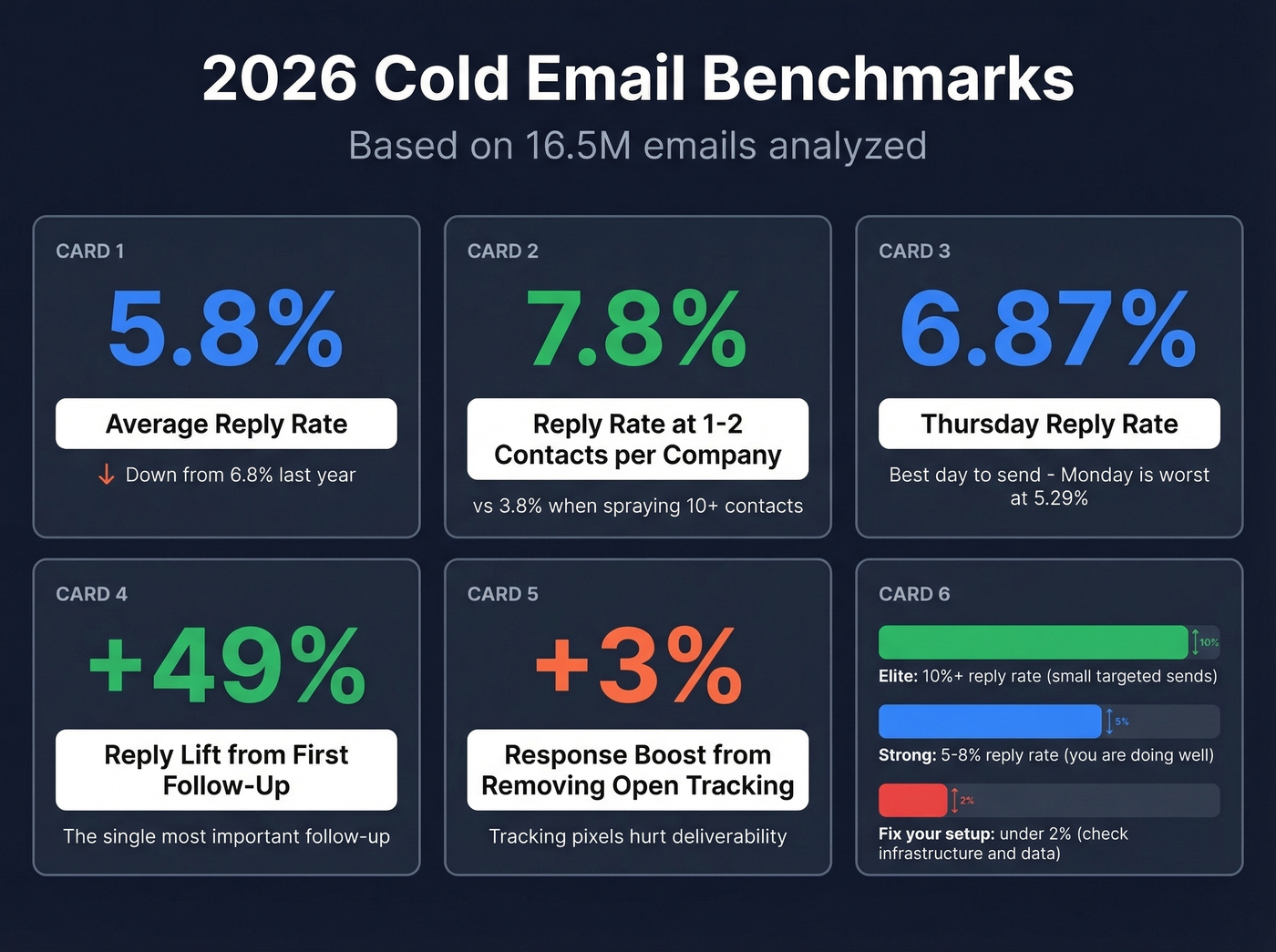
- Average reply rate: 5.8% (down from 6.8% the year before)
- Best email length: 6-8 sentences
- Best day: Thursday (6.87% reply rate)
- Targeting sweet spot: 1-2 contacts/company → 7.8% reply
- Open tracking removal: +3% response improvement
- Realistic at scale: 2-4% reply rate per practitioners running volume
Elite campaigns can exceed 10% reply rates, but that typically reflects small, highly targeted sends - not scalable outbound. If you're consistently above 8%, you're doing something right. If you're below 2%, revisit infrastructure and data before touching copy.
FAQ
Is cold email legal?
Yes. Cold email is legal under CAN-SPAM (US), GDPR (EU, with legitimate interest for B2B), and PECR (UK). Include a clear opt-out, use one-click unsubscribe, and honor opt-outs within 2 days. It's a legitimate sales channel as long as you follow compliance requirements.
What's a good reply rate in 2026?
The 2024 average was 5.8% across 16.5M emails. Practitioners report 2-4% as realistic at scale. Anything consistently above 8% likely reflects small, highly targeted campaigns.
How do I keep bounce rates low?
Verify every email before sending and aim for under 3% bounces. Re-verify any list older than 30 days - data decays faster than most teams realize.
What tools do I need to get started?
Three categories: a verification tool to build clean lists, a sequencing tool like Instantly or Lemlist to automate sends, and a CRM. HubSpot's free tier works. Budget ~$70-100/month total.