

Cold Email Templates for Gmail: Send Without Getting Flagged
At 20 cold emails a day, a single spam complaint puts you at a 5% complaint rate. Gmail's hard cap is 0.3%. That math should scare you - and it's why most advice about cold email templates for Gmail sets you up to fail. You get a pile of templates but zero guidance on the Gmail-specific setup and deliverability rules that keep your account alive.
Here's what you actually need: Gmail's built-in Templates feature enabled, a verified prospect list, and five solid templates. Not twenty-two. More templates create decision paralysis. These five cover every cold outreach scenario worth running - intro, referral, value-first, pain-point, and follow-up.
How to Enable Gmail Templates
- Open Gmail, click the gear icon, then See all settings
- Go to the Advanced tab
- Find Templates and click Enable
- Hit Save Changes
To save a template: compose a new email, write your message, click the three-dot menu, then Templates > Save draft as template > Save as new template.
Gmail Templates work best as simple, low-format emails. For cold outreach, that's a feature, not a limitation. A plain-text style looks like a real 1:1 email, not a marketing blast.
Gmail Sending Limits
| Account Type | Daily Limit | Notes |
|---|---|---|
| Free Gmail | ~500/day | Common practical limit |
| Google Workspace | ~2,000/day | Practical limit for paid accounts |
| Workspace trial | ~500/day | Limited until ~$100 paid + 60 days |
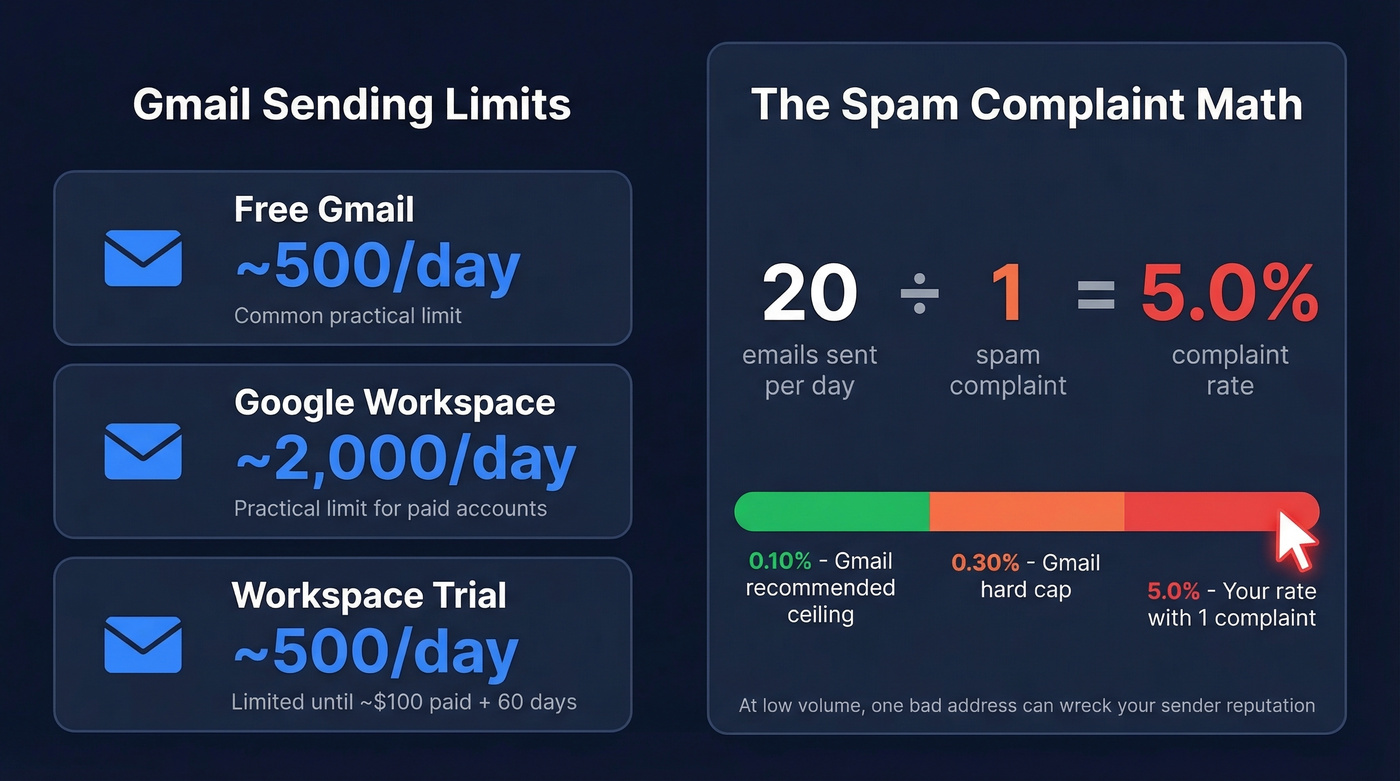
Those are theoretical maximums. For cold outreach, most practitioners run 5-20 emails per day per inbox for manual, personalized sends, and many teams cap cold volume around 50/day per inbox.
At 20 emails/day, one spam complaint puts you at a 5% complaint rate - catastrophic against Gmail's 0.10% recommended ceiling. Hit your daily limit and Gmail temporarily blocks additional sending.
If you're trying to scale beyond that, you need to manage email velocity and keep your list clean to avoid bounces.
5 Templates That Work in 2026
Every template below follows the sweet spot from Belkins' 16.5M-email dataset: 6-8 sentences, under 200 words, single CTA. That length pulls a 6.9% reply rate - the highest of any bracket tested.
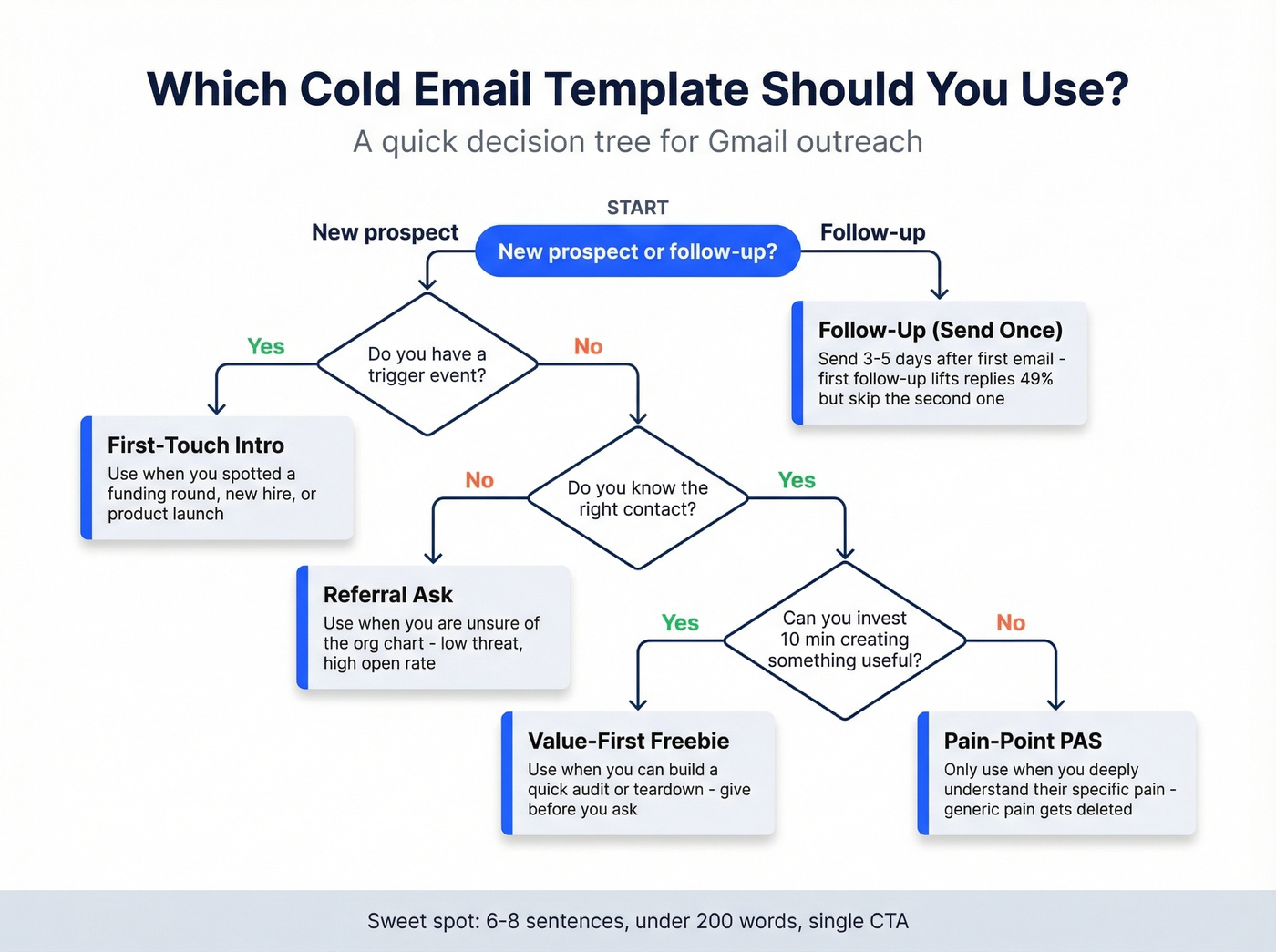
One copywriting rule across all of them: keep your "I/my" to "you/your" ratio at 1:2 or better. The email is about them, not you. (If you want to go deeper on structure, see email copywriting.)
First-Touch Intro
Subject: Quick question about {{company}}'s {{initiative}}
Hi {{first_name}},
I noticed {{company}} recently {{specific trigger - new hire, funding round, product launch}}. That usually means {{related challenge}} is on the radar.
We help teams like yours {{one-sentence value prop}}. {{Specific result - e.g., "We helped a Series B SaaS team cut onboarding time by 40%."}}.
Would a 15-minute call this week make sense?
{{your name}}
Use this when you have a clear trigger event and can personalize the first line. Without a real trigger, it reads generic - and gets deleted.
Referral Ask
Subject: Who handles {{function}} at {{company}}?
Hi {{first_name}},
I'm not sure if you're the right person for this - we work with {{type of company}} on {{problem you solve}}, and I thought someone at {{company}} might be dealing with the same thing.
Would you mind pointing me to the right person? I'll keep it brief with them too.
{{your name}}
The "who handles X" subject line consistently gets opens because it's low-threat and easy to answer. We've seen this outperform direct pitches by a wide margin, especially when you're unsure of the org chart.
Value-First (Freebie)
Subject: {{Resource}} for {{company}}
Hi {{first_name}},
I put together a {{quick audit / benchmark report / teardown}} of {{company}}'s {{relevant area}} - no strings attached. {{One surprising finding, e.g., "Your checkout flow has 3 friction points most competitors have already fixed."}}.
Happy to walk through it if you're curious. If not, the report's yours to keep.
{{your name}}
Use this when you can invest 10 minutes creating something genuinely useful. Avoid the word "free" in subject lines - it triggers spam filters and reads as salesy.
Pain-Point (Problem-Agitate-Solve)
Subject: {{Company}}'s {{specific problem}}
Hi {{first_name}},
Most {{job title}}s at {{company type}} tell us the same thing: {{pain point}}. The downstream effect is usually {{consequence - lost revenue, wasted time, missed targets}}.
We built {{product/service}} specifically for this. {{One proof point}}. Worth a quick conversation?
{{your name}}
This only works when you deeply understand the prospect's pain and can name it specifically. Generic pain gets deleted. If you can't fill in the {{pain point}} variable with something the prospect would nod at, skip this template and use the referral ask instead.
Follow-Up (Send Once)
Subject: Re: {{original subject}}
Hi {{first_name}},
Just bumping this - I know inboxes get buried. The short version: {{one-sentence recap of value prop}}.
If the timing's off, just let me know and I'll circle back later.
{{your name}}
Send 3-5 days after your first email. A first follow-up lifts replies by up to 49%. Don't send a second follow-up - the data says it hurts more than it helps.

At 20 emails/day, a single bounce wrecks your complaint rate. Prospeo's 5-step verification catches invalid addresses, spam traps, and catch-all domains before they torch your Gmail sender reputation. 98% email accuracy. 75 free verifications/month.
Verify every address before you hit send - your Gmail reputation depends on it.
Deliverability Rules for Gmail
Here's the thing: templates don't matter if your emails land in spam.
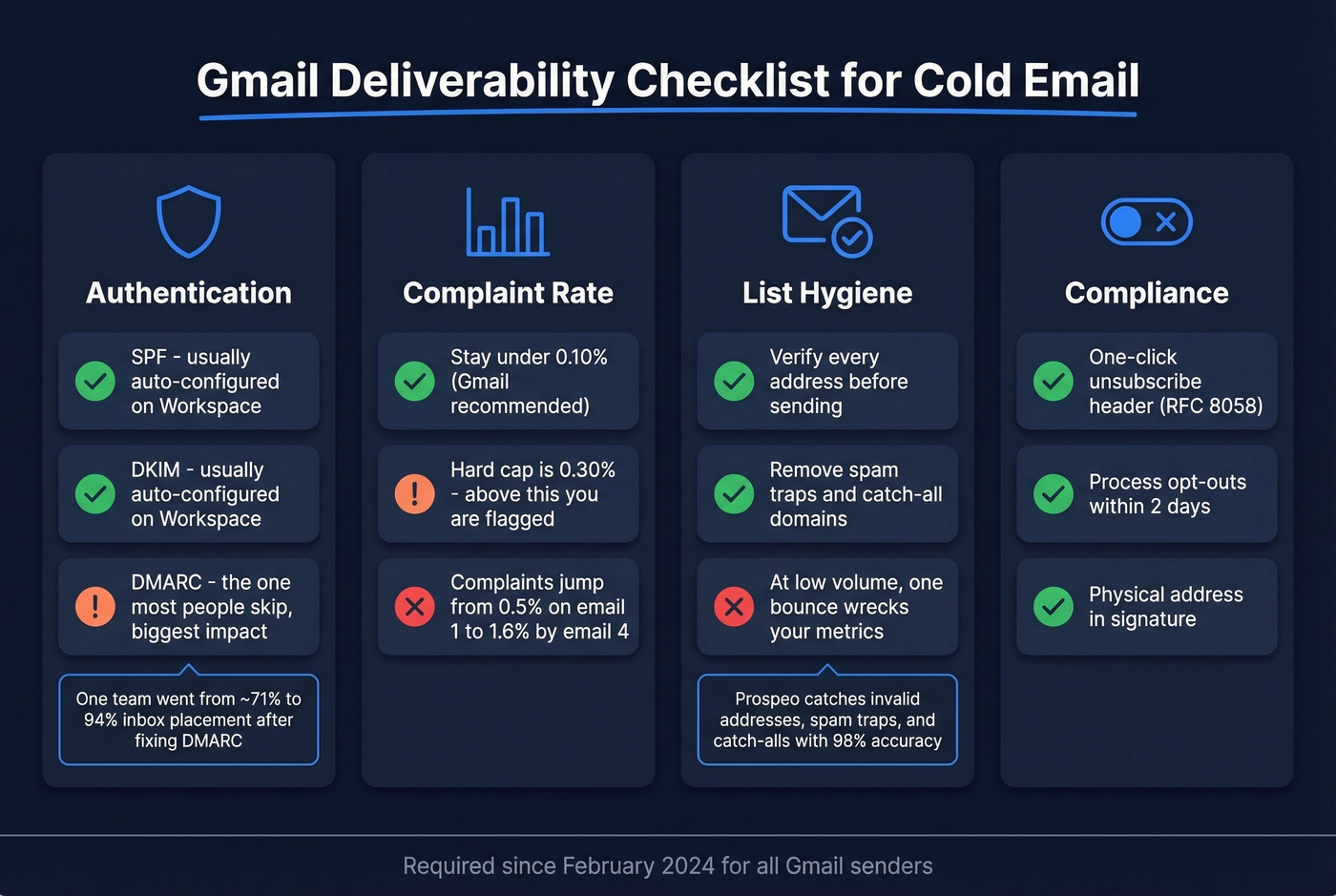
Authentication is non-negotiable. Since February 2024, Gmail requires SPF, DKIM, and DMARC for senders. If you're on Google Workspace, SPF and DKIM are usually configured already. DMARC is the one people skip - and it's the one that makes the biggest difference. One team switched their DMARC policy from "none" to "quarantine/reject" and saw inbox placement jump to 94% within two weeks after losing roughly 23% to spam. (If you need a quick check, use this guide on how to verify DKIM is working.)
Spam complaint math. Gmail recommends staying under 0.10%. The hard cap is 0.3%. Complaints climb from 0.5% on the first email to 1.6% by the fourth. One email has the highest reply rate, one follow-up lifts replies - after that, you're trading sender reputation for diminishing returns.
One-click unsubscribe is now required via List-Unsubscribe header (RFC 8058), with opt-outs processed within 2 days. Most Gmail extensions handle this automatically.
Verify every address before you send. This is the part most people skip, and it's the part that wrecks everything else. At low volume, even a single bounce hurts your metrics. Prospeo's 5-step verification catches invalid addresses, spam traps, and catch-all domains - the three things that destroy Gmail sender reputation when you're sending 10-30 emails a day. The free tier gives you 75 verified emails per month, enough for early campaigns. (More on bounce impact: email bounce rate.)
Current Benchmarks
From the largest recent cold email analysis - 16.5M emails across 93 domains:
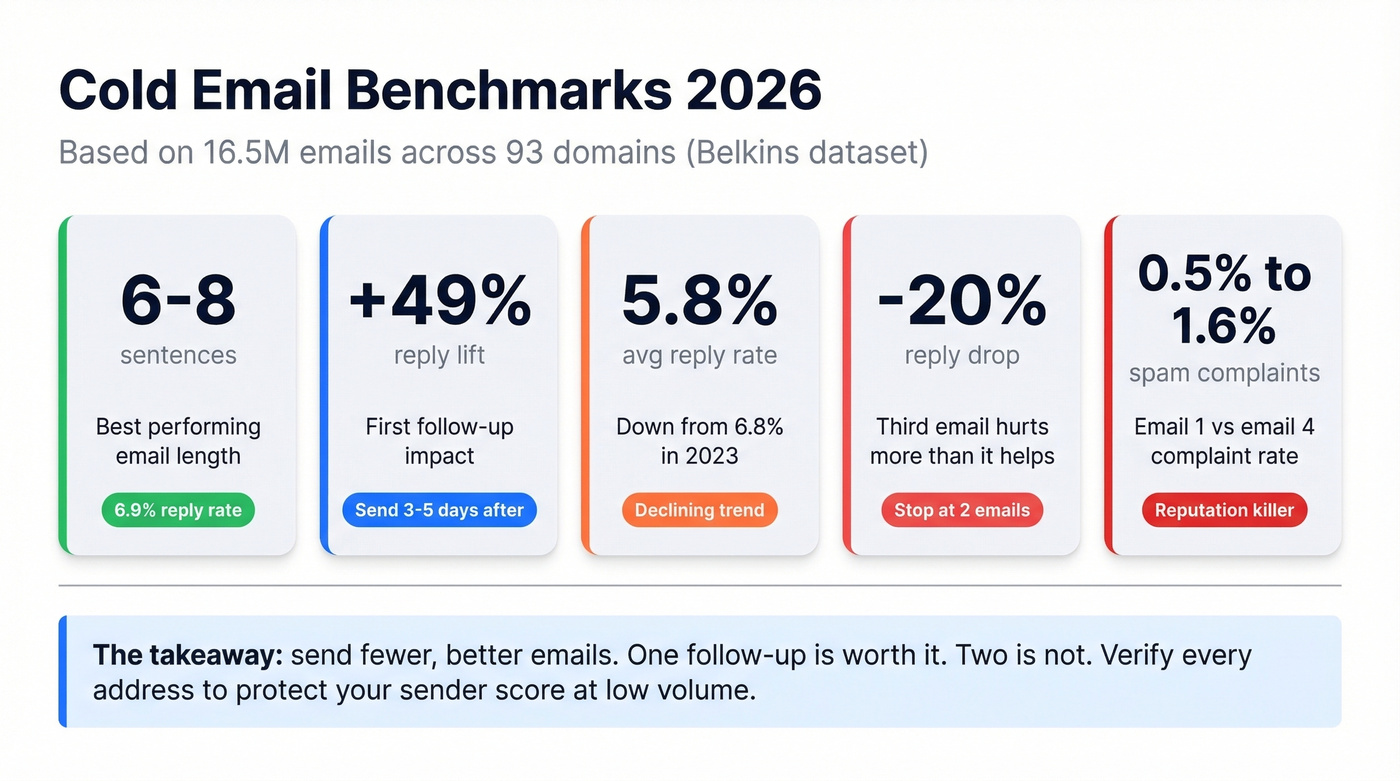
- Best email length: 6-8 sentences, 6.9% reply rate
- First follow-up: lifts replies up to 49%
- Average reply rate: 5.8% (down from 6.8% in 2023)
- Third email: drops replies by up to 20%
- Spam complaints: 0.5% (email 1) to 1.6% (email 4)
Let's be honest: if your average deal size is under five figures, you probably don't need a dedicated cold email platform. Gmail Templates plus verified data will outperform a bloated tool stack with dirty lists every time. We've watched teams spend $500/month on sequencing software while sending to lists full of dead addresses. The tool isn't the problem. The data is. (If you're building lists from scratch, start with how to generate an email list.)
Best Gmail Extensions for Cold Outreach
GMass is the pick if you're scaling past 50 emails/day. It handles sequences, tracking, and automated follow-ups inside Gmail. Over 1.1M Workspace users, 4.8/5 rating. Free tier available, paid plans run roughly $20-$35/month. Skip it if you're sending under 20/day - it's overkill for that volume.
Mailmeteor is better for simple mail merge without complexity. Free tier, paid plans around $10-$30/month. Good for one-off campaigns, less useful for ongoing sequences.
Pair either tool with Prospeo for email verification - sending tools don't tell you whether the address is real. At 98% accuracy with catch-all handling and spam-trap removal, the free tier covers 75 emails/month. For teams sending fewer than 50/day, Gmail's native Templates feature plus verified data is honestly all you need. In our experience, the teams that get results aren't the ones with the fanciest tools - they're the ones with clean lists and decent copy. (For more outreach fundamentals, see sales prospecting techniques.)
These templates only work when they reach real inboxes. Prospeo gives you verified emails for every prospect on your list - 143M+ addresses refreshed every 7 days, not the stale data that triggers bounces and spam flags. At $0.01 per email, protecting your Gmail account costs less than a single lost deal.
Stop sending cold emails to dead addresses. Start with verified contacts.
FAQ
Is cold emailing from Gmail legal?
Yes. In the U.S., CAN-SPAM allows cold email if you identify yourself, include a physical address, and provide a clear opt-out mechanism. In the EU/UK, GDPR and PECR rules apply, requiring a lawful basis plus an easy unsubscribe. One-click opt-outs must be processed within 2 days under current Gmail requirements.
Should I use a separate domain for cold outreach?
Yes. Use a secondary domain so bounces and spam complaints never touch your primary reputation. Warm it for 2-3 weeks before sending any cold messages. Stack Optimize built to $1M ARR using this approach - keeping client deliverability above 94% with bounce rates under 3% across every domain.
How many cold emails can I safely send per day?
Free Gmail caps at roughly 500/day, Google Workspace at roughly 2,000/day. For cold outreach, 5-20 per inbox is common for manual personalization, and most teams cap around 50/day to stay safely below Gmail's 0.3% complaint threshold. Verify every address first - at low volume, even one bounce damages your sender score.
What's the best free tool to verify emails before sending?
Prospeo's free tier includes 75 email verifications per month with 98% accuracy, catch-all handling, and spam-trap removal - enough to cover early Gmail campaigns. Hunter offers 25 free searches monthly but caps enrichment features. For teams sending under 50/day, Prospeo's free plan covers verification without needing a paid tool.