

The 9 Best Company Email Domain Finders in 2026, Compared With Real Data
You upload 5,000 company domains to your shiny email finder before your morning coffee. By lunch, your first sequence has fired - and 18% of those "verified" emails have bounced. Your domain reputation just took a hit that'll haunt you for weeks. This isn't a hypothetical. Reddit threads are full of SDRs reporting 20%+ bounce rates from emails their company email domain finder swore were verified.
The problem is that many tools verify at a surface level, cache stale data for weeks, and call it good enough. The gap between "found an email" and "found an email that won't bounce" is where your deliverability lives or dies. We tested nine tools that approach this differently, and the differences in accuracy, pricing, and credit mechanics are bigger than you'd expect.
Our Top Picks
| Pick | Tool | Why |
|---|---|---|
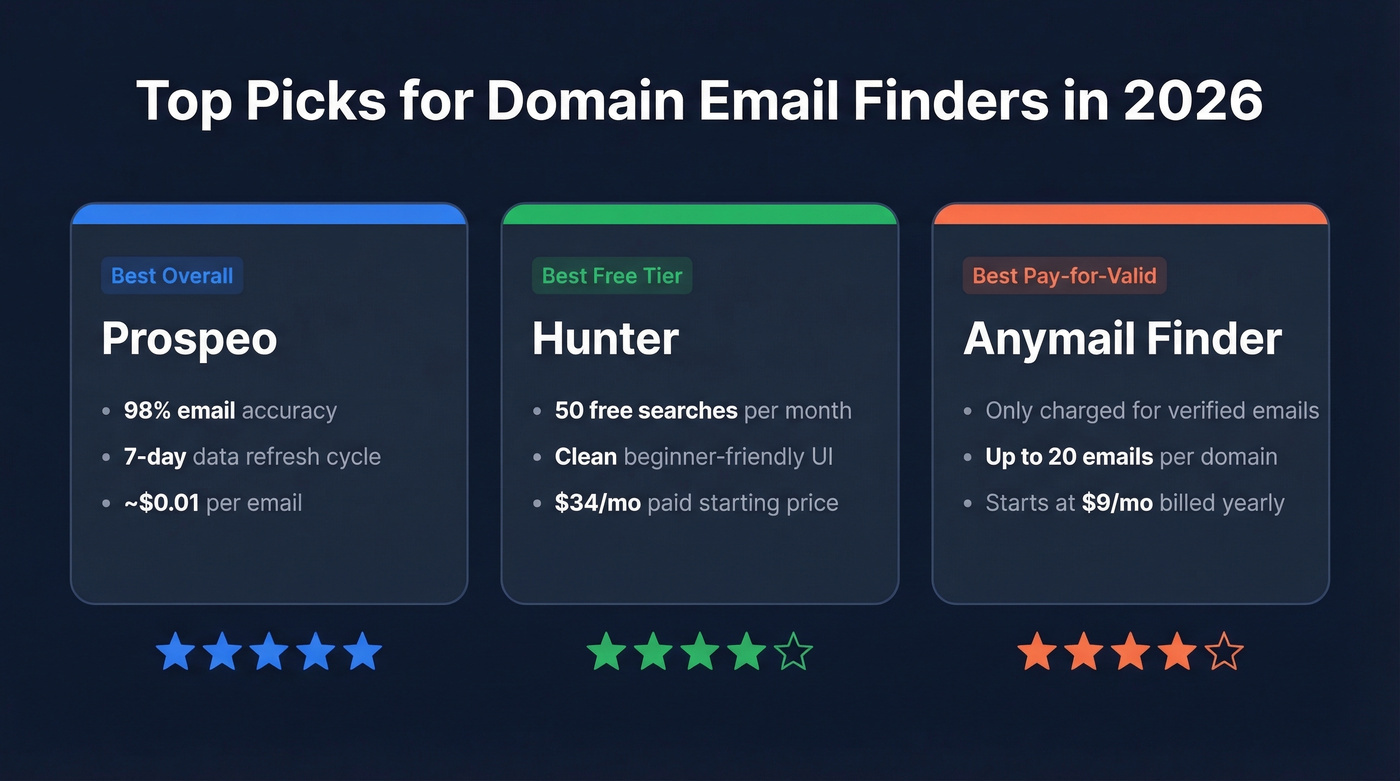
| Best overall | Prospeo | 98% email accuracy, 7-day refresh, ~$0.01/email |
| Best free tier | Hunter | 50 free searches/mo, solid verification |
| Best pay-for-valid | Anymail Finder | Only charged for verified emails, up to 20 per domain |
What Is a Domain Email Finder?
A company email domain finder takes a domain like acme.com and returns the professional email addresses associated with it. You type in the domain, the tool crawls its database and public sources, and you get a list of employees with their verified work emails. Simple concept, wildly inconsistent execution.
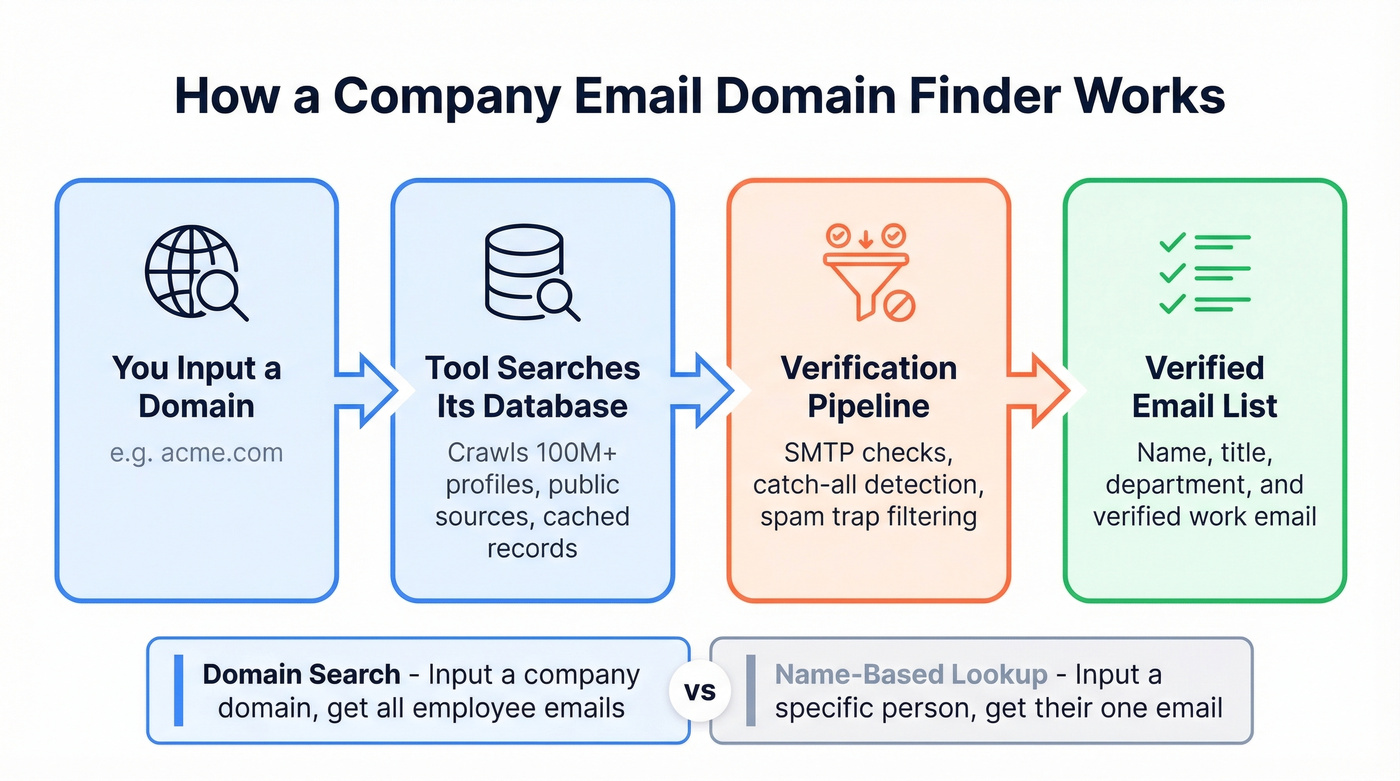
This is different from a name-based email lookup, where you input "Jane Smith at Acme" and get her specific address. A domain email search is broader - you're fishing the whole company at once, which makes it ideal for account-based prospecting where you want to multi-thread into an org.
Most modern domain finders offer bulk CSV upload, API access for programmatic workflows, and a Chrome extension for one-off lookups while browsing. But the real differentiator isn't the search itself. It's what happens after. How does the tool verify results? How fresh is the data? How many credits does a single domain search actually cost? That's where tools diverge sharply.
The 9 Best Tools for Finding Emails by Domain
Prospeo - Best Overall Accuracy
Best for: Teams that can't afford bounces - agencies, high-volume outbound, anyone whose domain reputation matters.
Prospeo's database covers 300M+ professional profiles and 143M+ verified emails, refreshed on a 7-day cycle. That refresh cadence is the headline stat: the industry average sits around six weeks, which means most tools are serving you data that's already stale by the time you send. In our experience, this single difference accounts for more deliverability variance than any other factor.
The verification pipeline runs five steps - SMTP validation, catch-all domain handling, spam-trap removal, honeypot filtering, and a final deliverability check. This proprietary infrastructure, not a third-party verification API bolted on. The result is 98% email accuracy, which Stack Optimize confirmed in production: bounce rates under 3%, zero domain flags across all client campaigns.
Domain search works via the web app, bulk CSV upload, Chrome extension (40,000+ users), or API. Credits run ~$0.01 per email. The free tier gives you 75 emails plus 100 Chrome extension credits monthly - enough to test on real prospects before committing.
Use this if: You're sending 500+ emails daily and need sub-5% bounce rates. Or you're an agency managing multiple client domains where a single deliverability hit costs real money.
Hunter - Best Free Tier
Best for: Solo founders and small teams who need occasional domain lookups without a monthly commitment.
Hunter's free plan gives you 50 searches per month with one connected email account. For light prospecting - checking a handful of target accounts per week - that's genuinely useful. The interface is clean enough that non-technical users can run a domain search in seconds.

Paid plans start at $34/mo (annual) for 2,000 credits, with unlimited users on every tier. One credit gets you up to 10 emails per domain search, which is reasonable math for most SMB prospecting.
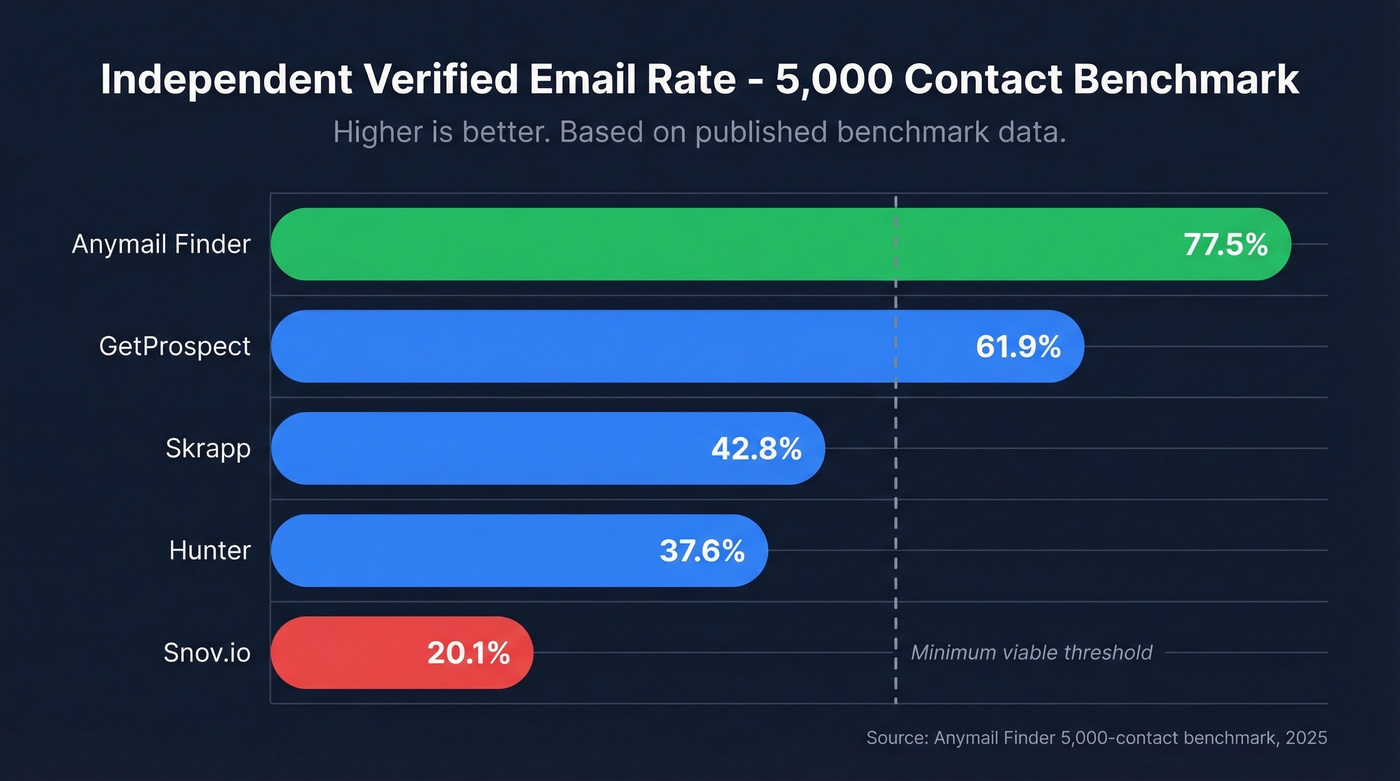
Here's the tradeoff: Hunter's database is small. Reddit users consistently describe it as a "tiny database" that's "best suited for US" targets. In a published benchmark of 5,000 contacts, Hunter hit a 37.6% verified rate - not terrible, but well below the leaders. Clay, a data orchestration platform that tests email providers across regions, tells a similar story: 89.56% data quality but only 47.62% coverage.
Use this if: You need a free or cheap verification layer alongside another data source, or you're doing fewer than 50 domain lookups per month.
Skip this if: You're prospecting internationally or need high coverage rates. The database gaps will frustrate you.
Anymail Finder - Best Pay-for-Valid Model
Best for: Budget-conscious teams who hate burning credits on invalid results.
Anymail Finder's billing model is the cleanest in the category: you only pay for verified emails. A single domain search costs one credit and returns up to 20 valid email addresses. If the tool can't find a verified result, you keep your credit. That's a meaningful difference when you're running thousands of domain lookups and half the results from other tools come back unverifiable.
They publish their own benchmark of 5,000 contacts, and while it's self-serving, the methodology is transparent. Anymail Finder topped that test at 77.5% verified rate - the highest among the eight tools tested. Pricing starts at $9/mo billed yearly ($108/yr) for 600 credits per year, scaling to $200/mo for 300K credits.
Use this if: You're cost-sensitive and want predictable spend. The pay-for-valid model means your effective cost per usable email is lower than tools that charge for every lookup regardless of result.
Skip this if: You need a massive database or all-in-one outreach features. Anymail Finder is a specialist - it finds emails and that's it.
Snov.io - All-in-One With a Catch
Snov.io bundles email finding with drip campaigns and mailbox warm-up, which makes it appealing if you don't want to stitch together three separate tools. The Starter plan runs $29.25/mo (annual) for 1,000 credits - each prospect or verification costs one credit. The platform handles international leads reasonably well, and Reddit users call the credits "affordable."
The catch: LinkedIn automation is a $69/mo add-on per slot, which adds up fast. And in the 5,000-contact benchmark, Snov.io posted a 20.1% verified rate - the lowest among tested tools. That's a stark gap between the accuracy they market on their site and what independent testing shows, which is a good reminder to always test tools against your own data.
| Pros | Cons |
|---|---|
| Finder + sequences + warm-up in one platform | 20.1% verified rate in independent testing |
| Under $30/mo starting price | LinkedIn automation costs $69/mo extra per slot |
| Decent international coverage | Credits burn fast on multi-step workflows |
Bottom line: Good for small teams that want everything under one roof. Not the right pick if accuracy is your top priority.
GetProspect - Bulk Domain Search Champion
50,000 domains via CSV. That's the highest bulk upload capacity we've seen at this price point. GetProspect also lets you paste up to 500 domains directly into the search bar, and results can be filtered by department and role within each domain. For ABM teams targeting specific functions across a long account list, this workflow is hard to beat.
The free tier includes 50 valid emails. Starter runs $49/mo for 1,000 valid emails, and credits roll over. In the same benchmark, GetProspect hit 61.9% verified - middle of the pack, but respectable. You're not charged for duplicates or unfound emails.
Use this if: Your workflow involves uploading large CSV domain lists and you need role-based filtering.
Skrapp - Fair Credit Policy, Modest Database
Skrapp won't charge you for emails that don't work. Their Fair Credit Policy means you only pay for emails marked Valid or Catch-all - invalid and unknown results are free. The free tier offers 100 credits/mo, and Professional starts at $30/mo (annual).
Skrapp claims a 92% search success rate and daily database refreshes, though independent testing paints a different picture: 42.8% verified rate in the 5,000-contact benchmark. That gap between claimed and tested performance is worth weighing.
Use this if: You want fair billing mechanics and don't mind a smaller database. Skip this if: You need verified rates above 50%.
ZeroBounce - Verification-First Workflow
ZeroBounce is a verification company that added an email finder - not the other way around. The finder consumes 20 credits per successful query, which means your effective cost per found email runs ~$0.13-0.39 depending on your credit price tier. ZeroBounce ONE is $99/mo (or $79/mo annually) for 10,000 verification credits plus 10,000 finder searches. Best if you already use ZeroBounce for list cleaning and want to consolidate.
Outscraper - Built for Developers
Outscraper is API-first and developer-oriented. There's a free tier, but this isn't a tool for sales reps clicking through a UI. It's for engineering teams building custom enrichment pipelines who want raw domain-to-email lookups as a building block. API pricing starts around $2 per 1,000 lookups, with moderate usage running ~$20-50/mo.
RocketReach - Best With Limited Input Data
One Reddit user called RocketReach "most accurate so far" - specifically when working with limited info like just a name and company, no domain. That's a niche but real use case: converting a company name to domain and then finding contacts is a two-step process most tools skip. RocketReach handles both steps in one query. Pricing runs ~$50-100/mo depending on the plan. Good as a fallback when your primary tool can't match on domain alone.

Most domain finders serve you emails cached for 6+ weeks - stale data that tanks your deliverability. Prospeo refreshes every 7 days and runs 5-step verification on 300M+ profiles, delivering 98% email accuracy. That's why agencies like Stack Optimize hit sub-3% bounce rates across every client campaign.
Search any company domain and only pay $0.01 per verified email.
Pricing Comparison
You've been on three pricing pages for 20 minutes and still don't know what you'll actually pay. We had the same experience. The credit mechanics were the biggest surprise - what looks cheap on the pricing page can cost 3x more per usable email once you account for invalid results.
If you're comparing tools beyond just domain search, start with email search tools and then map your workflow to outbound lead generation tools.
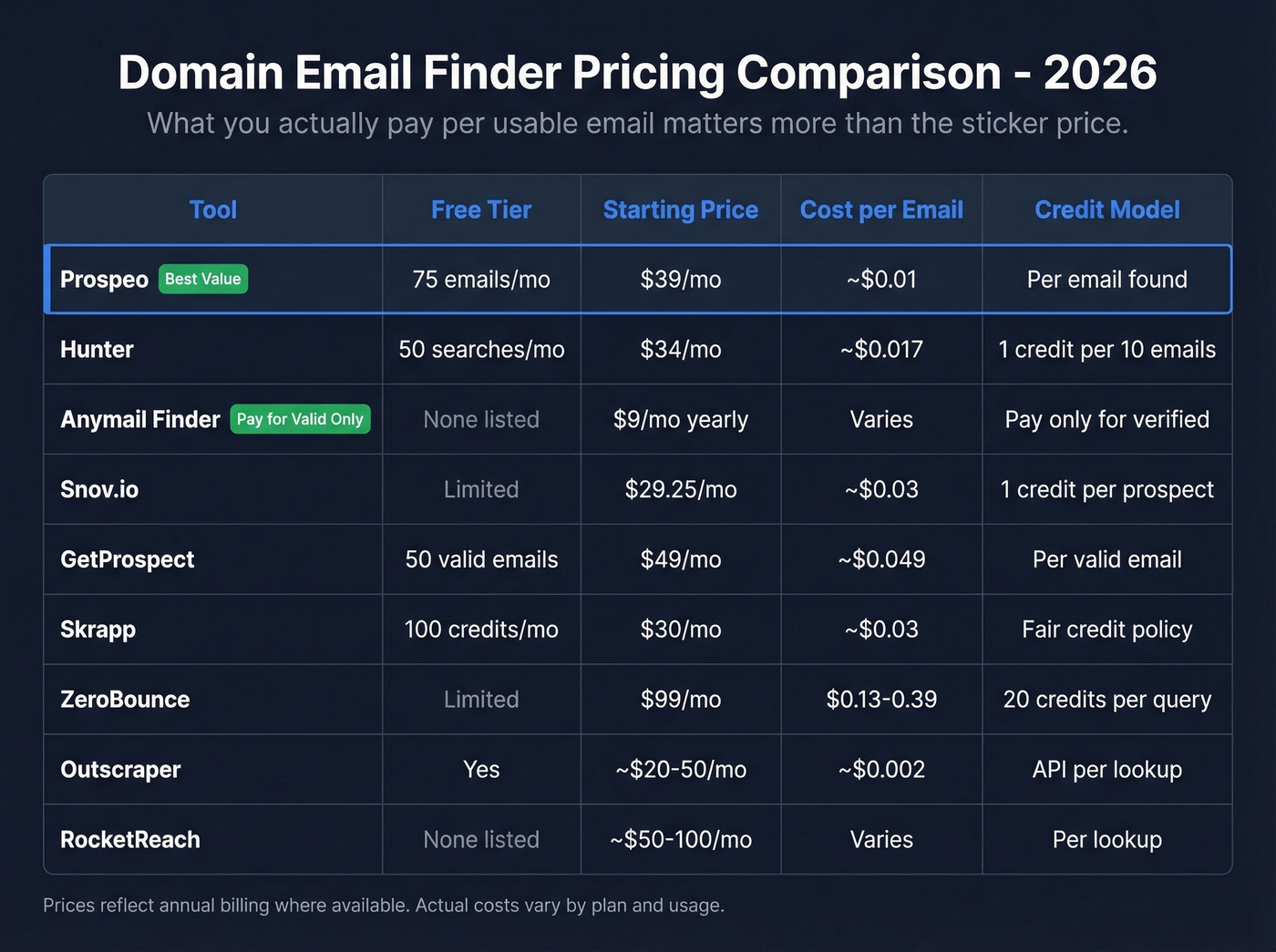
| Tool | Free Tier | Starting Paid | Credit Mechanic | ~Cost/Found Email | Verdict |
|---|---|---|---|---|---|
| Hunter | 50 searches/mo | $34/mo (annual) | 1 credit = up to 10 emails | ~$0.02-0.03 | Best free option |
| Anymail Finder | 100 credits (7-day) | $9/mo (annual) | Pay only for valid | ~$0.02-0.18 | Best budget |
| Snov.io | 50 credits/mo | $29.25/mo (annual) | 1 credit per prospect | ~$0.03 | Best all-in-one |
| GetProspect | 50 valid emails | $49/mo | Pay for valid only | ~$0.05 | Best bulk upload |
| Skrapp | 100 credits/mo | $30/mo (annual) | Free for invalid | ~$0.03-0.04 | Fairest billing |
| ZeroBounce | 10 finder queries + 100 validations | $79/mo (annual) | 20 credits/found email | ~$0.13-0.39 | Best for existing users |
| Outscraper | Free tier | ~$20-50/mo | API-based | ~$0.002-0.05 | Best for devs |
| RocketReach | Limited | ~$50-100/mo | Per lookup | ~$0.10-0.20 | Best with sparse data |

The Hidden Cost Most Teams Miss
You just read that some tools post verified rates as low as 20% on independent benchmarks. Prospeo's proprietary email infrastructure - no third-party providers - hits 98% accuracy with catch-all handling, spam-trap removal, and honeypot filtering built in. Start with 75 free emails to test it on your actual target accounts.
Find every verified email at a company domain in seconds.
How Accurate Are These Tools, Really?
Every email finder claims 95-99% accuracy. The benchmarks tell a different story.
What the Benchmarks Show
The Dropcontact benchmark tested 15 tools on 20,000 real contacts - first name, last name, and company name only. They didn't just check if emails existed; they actually sent to every found address and measured hard bounces and wrong-domain errors. The top "real enrichment rate" topped out at 54.9%, followed by Enrow at 40.9% and Findymail at 39.9%. Most tools landed between 25-45%.
Let that sink in. The best tool in a 20,000-contact real-world test found valid emails for barely half the list.
The 5,000-contact benchmark found verified rates ranging from 16.9% to 77.5%. The spread is enormous. Vendor accuracy claims of 95-99% don't survive contact with reality - they're measured under ideal conditions with cherry-picked datasets. Tomba's February 2026 benchmark post, testing 5,000 searches across 9 tools, shows similar spreads, reinforcing that no single tool dominates across all conditions.
Coverage vs Quality by Region
Clay's regional data adds another dimension. Hunter scores 89.56% on data quality but only 47.62% on coverage - a pattern we see across most tools that prioritize US data.
Apollo is often cited for having a huge database (250M+ is a common figure), but the consensus on r/coldemail is that stale contacts and high bounce rates plague older records. Bigger isn't better if half the data is six months old.
Reddit users consistently flag that most tools fail for EU/international contacts and SMB/local businesses like HVAC companies, law firms, and florists. If you're prospecting into those segments, expect coverage gaps regardless of which tool you pick.
What "Verified" Actually Means
Not all verification is created equal. Most email finders run a basic SMTP check - they ping the mail server and ask "does this mailbox exist?" If the server says yes, the email is marked "verified." That sounds fine until you realize what SMTP checks can't do.

They can't handle catch-all domains, which accept mail for any address whether the person exists or not. They miss spam traps - real-looking addresses set up specifically to catch unsolicited senders. And they can't detect recently deactivated accounts that still pass an SMTP handshake for days or weeks after the person leaves. This is why "verified" doesn't mean "deliverable." Tools with multi-step verification - SMTP validation, catch-all handling, spam-trap removal, honeypot filtering, and deliverability scoring - close these gaps. Combined with frequent data refreshes, they catch the stale contacts that tools refreshing every six weeks miss entirely.
Here's the thing: you don't need to understand the technical details. You just need to know that the word "verified" on your export file means very different things depending on which tool generated it.
If you want to go deeper on the mechanics, read our email deliverability guide and the breakdown of email bounce rate benchmarks and fixes.
How to Choose the Right Tool
You don't need 10 email finders. You need one good one and a verification step. Let's be honest: the tool-hopping costs more in lost time than any subscription costs in dollars. Pick one company email domain finder, run a 500-contact test against your actual ICP, measure the bounce rate, and commit.
Light use / free: Hunter. 50 free searches per month covers casual prospecting. Pair it with a separate verifier if you're sending at volume.
Pay-for-valid on a budget: Anymail Finder. The $9/mo entry point and pay-only-for-verified model make it the lowest-risk option for testing.
Accuracy and freshness at scale: Prospeo. If you're an agency sending 500-1,000 emails daily and need sub-3% bounce rates, the 7-day refresh cycle and 5-step verification pipeline are non-negotiable. The ~$0.01/email math works at volume.
For teams that want prospecting and outreach under one roof without enterprise pricing, Snov.io handles that at under $30/mo - just accept the accuracy tradeoff for workflow simplicity. For EU/UK data specifically, Cognism is the gold standard if you've got the budget at roughly $1,000-3,000/mo for small teams.
SMB/local businesses: Acknowledge the gap. Most domain finders struggle here because their databases skew toward mid-market and enterprise companies. You'll likely need to combine a finder with manual research for local prospecting.
If you're building a broader stack, compare data enrichment services and keep a shortlist of SDR tools that fit your workflow.
GDPR and Cold Email Compliance
Email addresses are personal data under GDPR. Full stop. With ~EUR 5.88B in fines across 2,245 enforcement actions, this isn't theoretical risk.
The key distinction: GDPR operates on an opt-in basis with legitimate interest as a narrow exception for B2B, while CAN-SPAM is opt-out. If you're prospecting into the EU, your email finder needs to handle compliance at the data layer - not just at the sending layer.
The Dropcontact benchmark flagged a real concern: many email finders route data through non-EU servers, exposing you to FISA 702 and Cloud Act risks. Before you pick any tool, ask where it processes and stores the contact data you're pulling. The answer might surprise you.
FAQ
How do I find company emails by domain at scale?
Start with a tool that supports bulk CSV upload - GetProspect handles up to 50,000 domains and Prospeo offers bulk upload via web app or API. Upload your target domains, let the verification pipeline run, then export only verified results. Always run a secondary verification pass before loading contacts into your outreach sequence, especially above a few hundred sends per day.
What's the difference between an email finder and an email verifier?
Finders discover email addresses from a domain or company name. Verifiers check whether an existing email is deliverable. Some tools do both. For best results, always verify found emails before sending, even if the finder labels them "verified" - SMTP-only checks miss catch-all domains and spam traps.
How many emails can I find for free?
Prospeo offers 75 free emails plus 100 Chrome extension credits monthly. Hunter provides 50 free searches. GetProspect gives 50 valid emails. Skrapp offers 100 credits monthly. All enough to test a tool against your actual prospect list before paying.
Why do "verified" emails still bounce?
Most tools run a basic SMTP check, which can't detect catch-all domains, spam traps, or recently deactivated accounts. Tools with multi-step verification catch more of these edge cases. Data freshness matters equally: an email verified six weeks ago might belong to someone who's already changed jobs.
Can domain email finders work for local or small businesses?
Most struggle with SMBs and local businesses because their databases skew toward mid-market and enterprise companies with larger web footprints. Reddit users confirm this gap across Apollo, Hunter, Lusha, and Snov.io. For local prospecting, combine a domain finder with manual research or Google Maps scraping tools like Outscraper.