

ContactOut vs Mailmeteor: You're Comparing Apples to Fax Machines
If you're weighing ContactOut against Mailmeteor, you're comparing two tools that don't compete. ContactOut finds contact data. Mailmeteor sends emails from Gmail. They sit in entirely different categories, and picking one over the other is like choosing between a phone book and a stamp - they do different jobs.
The real question isn't which is better. It's which one you actually need right now, and whether you need something else entirely to bridge the gap between finding contacts and emailing them.
30-Second Verdict
Use ContactOut if you need to find emails and phone numbers for prospects or candidates. It's a contact data platform with 700M+ profiles.
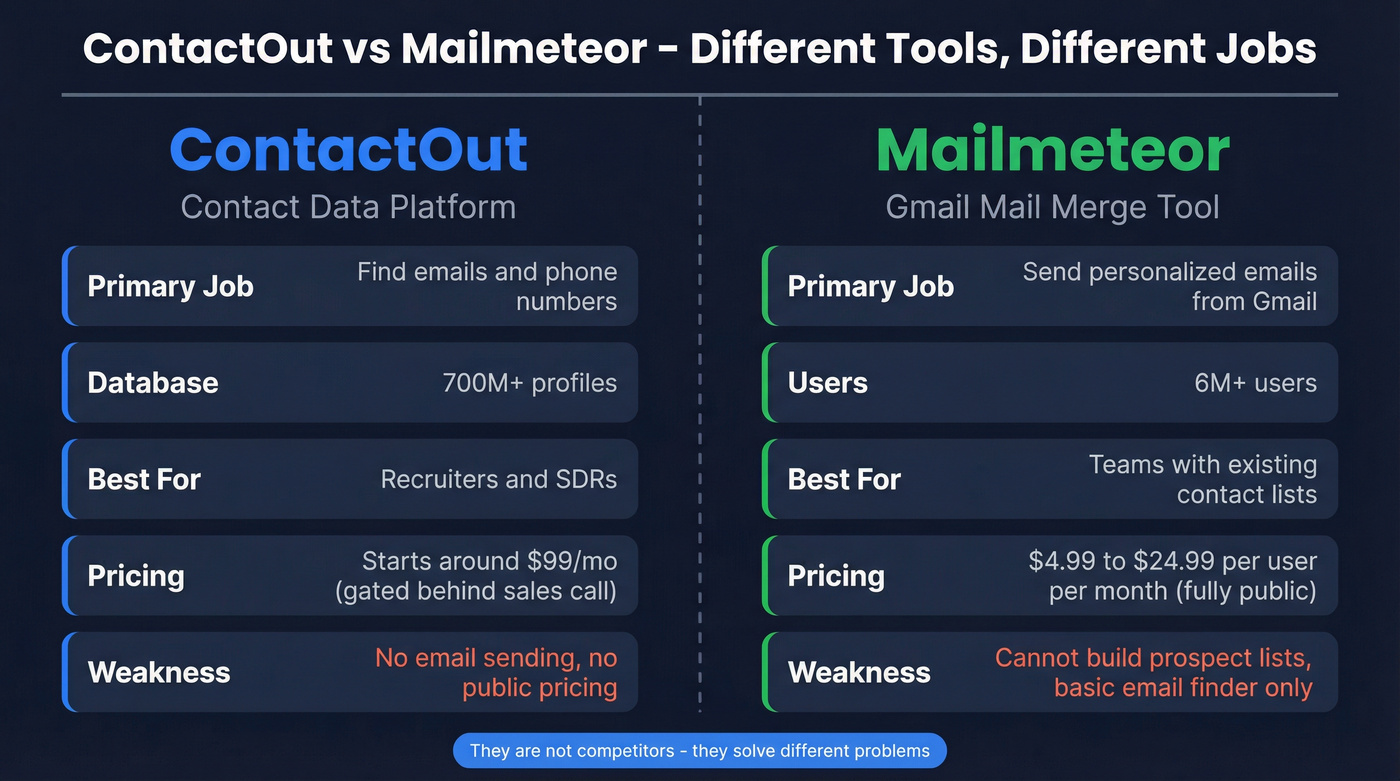
Use Mailmeteor if you need to send personalized email campaigns from Gmail using Google Sheets. It's a mail merge tool with Outlook support too.
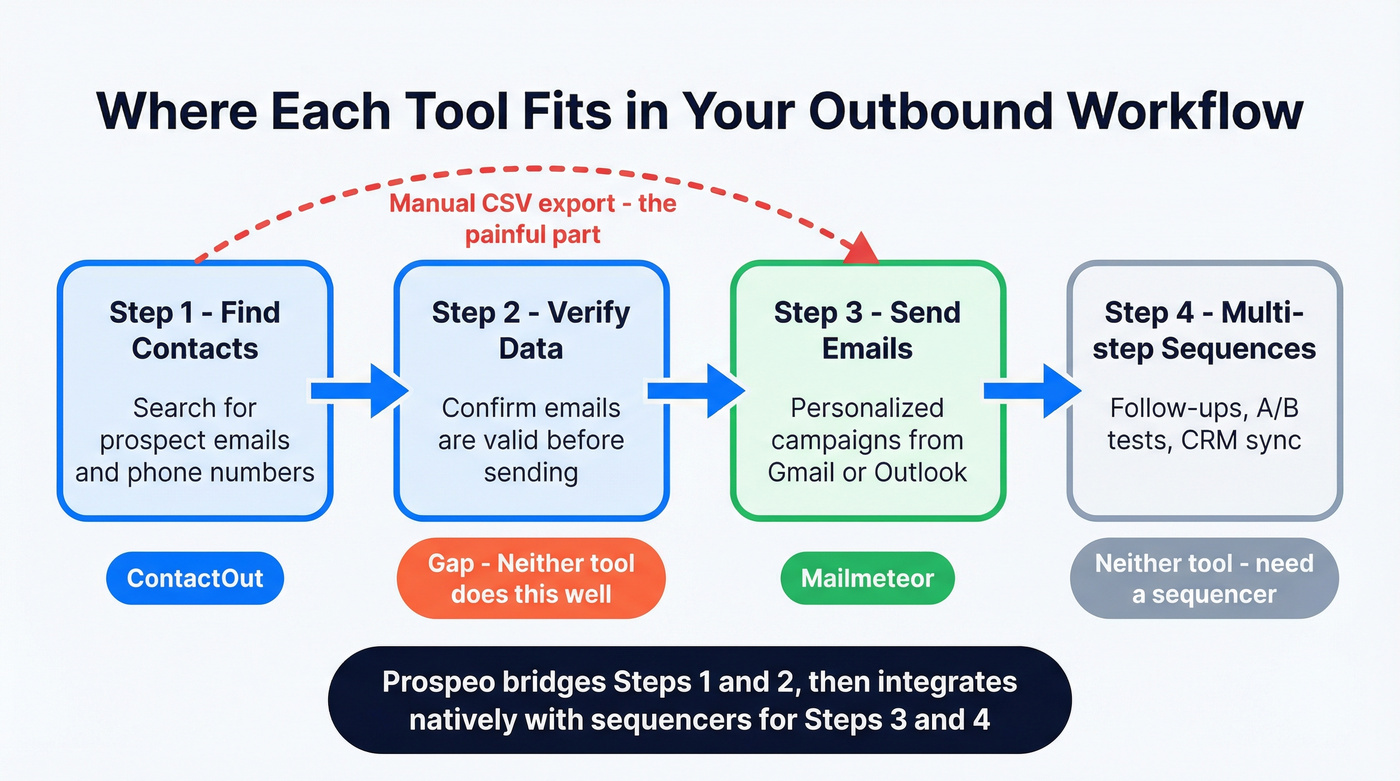
Skip both if you want verified contact data with transparent pricing that plugs directly into your sending tool. Prospeo covers the data side with 98% email accuracy and native integrations with Instantly, Lemlist, and Smartlead - so you find contacts and push them into sequences without duct-taping two unrelated tools together.
Feature Comparison Table
| Feature | ContactOut | Mailmeteor | Winner |
|---|---|---|---|
| Primary function | Contact data lookup | Gmail mail merge | Depends on need |
| Email finding | 700M+ profile database, bulk search | Single-lookup email finder (name + domain), not bulk | ContactOut |
| Email sending | Built-in campaigns | Gmail/Outlook merge, warmup on Pro | Mailmeteor |
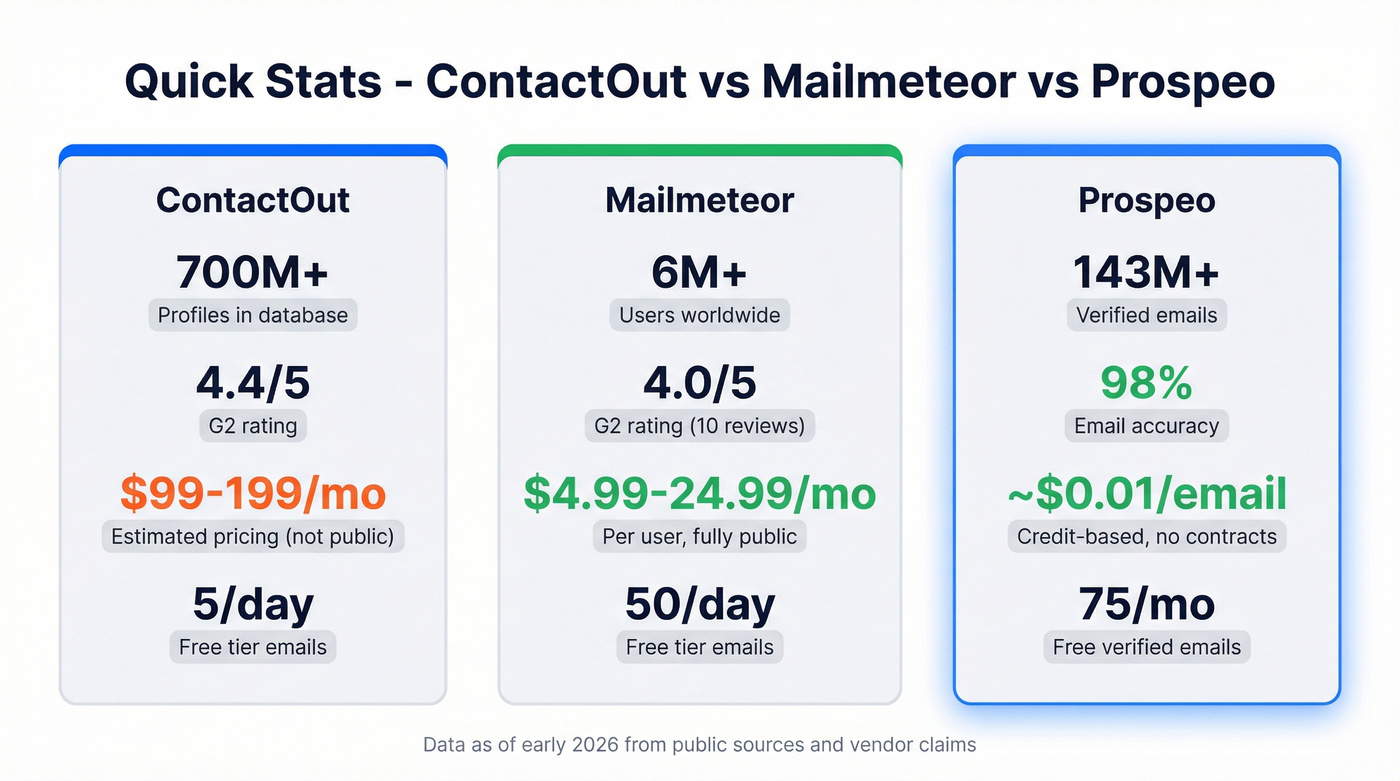
| Free tier | 5 emails/day | 50 emails/day | Mailmeteor |
| Paid pricing | ~$99/mo (Email), ~$199/mo (Email+Phone) | $4.99-$24.99/user/mo | Mailmeteor |
| Email accuracy claim | Triple-verified | 97%+ on single lookups | Neither proven at scale |
| G2 rating | 4.4/5 | 4.0/5 (10 reviews) | ContactOut |
| Pricing transparency | "Talk to us" | Fully public | Mailmeteor |
Here's the thing: most people searching this comparison don't need either tool specifically. They need a reliable data source paired with a reliable sender. Buying these two together still leaves you manually exporting CSVs between platforms. That's a workflow problem, not a tool problem.

ContactOut gates pricing behind sales calls. Mailmeteor can't build prospect lists. Prospeo gives you 300M+ profiles with 98% email accuracy at ~$0.01/email - fully self-serve, no contracts. Native integrations with Instantly, Lemlist, and Smartlead mean no more CSV exports between your data tool and your sender.
Find contacts, verify them, and push to your sequencer in one workflow.
What Each Tool Actually Does
ContactOut - Contact Data Platform
ContactOut is built for recruiters and sales reps who need personal and work emails plus direct dials. The Chrome extension pulls contact details while you browse professional profiles, and fair-use caps - roughly 2,000 emails/month and 1,000 phone numbers/month - can show up sooner than you'd expect on a paid plan.
ContactOut markets its data as triple-verified, but the platform doesn't appear in major independent benchmarks. Recruiters on Reddit praise the hit rate on personal emails, which is a genuine strength if you're sourcing candidates who don't list work addresses publicly. Where it falls short is pricing transparency: you'll need to talk to sales before you know what you're paying, and that's increasingly frustrating in a market where self-serve options exist.
If you're evaluating options in this category, start with a broader view of data enrichment services and sales prospecting databases so you can compare accuracy, coverage, and workflow fit.
Mailmeteor - Gmail Mail Merge Tool
Mailmeteor is a sending tool, not a data tool. Six million users rely on it to send personalized mass emails from Gmail or Outlook using Google Sheets as the data source. It has a basic email finder for single lookups, but it won't build you a prospect list.
Daily sending limits matter here. The free tier caps at 50 emails/day, scaling to 250 (Starter), 500 (Premium), and 1,500 (Pro) on paid plans. The Pro tier at $24.99/user/month includes email warmup and verification - solid value for a Gmail-native sender. That said, G2 reviewers flag upload issues and slow dashboard loading, and a thread on r/Emailmarketing describes merge failures where personalization fields didn't populate correctly. If your workflow depends on flawless merges at volume, test thoroughly before committing.
If you're planning to scale beyond single sends, it helps to understand email velocity and the basics of an email deliverability guide before you ramp volume.

When to Use Which
Pick ContactOut If...
You're a recruiter or SDR who needs bulk contact data - especially personal emails. The Chrome extension is the core product, and the 700M+ profile database is genuinely large. Just know that the pricing page is gated behind a sales conversation, and third-party breakdowns commonly put plans around $99-$199/month with fair-use caps on lookups.
If you're building lists as part of a repeatable outbound motion, you may also want a structured lead generation workflow and a set of sales prospecting techniques to keep targeting consistent.
Pick Mailmeteor If...
You already have a list and need to send it from Gmail. Mailmeteor does one job well: personalized mail merge with Google Sheets. The Pro tier's warmup feature is a nice touch for teams worried about deliverability.
Skip it if you need multi-step sequences, CRM integration, or anything beyond single-send campaigns. And if you're on the free tier, 50 emails/day is tight for any real outbound motion.
If you're looking for other sending options, compare tools in our roundup of the best AI bulk email senders.
Need Both? There's a Better Path
Pricing is credit-based and fully transparent: about $0.01 per email, with a free tier of 75 verified emails per month. No contracts, no sales calls. Find contacts, verify them automatically, then push to Instantly, Lemlist, Smartlead, HubSpot, or Salesforce through native integrations. Pair with Mailmeteor for Gmail sending, or use a dedicated sequencer for multi-step outreach.
If you’re deciding how to connect your data tool to your CRM/sender, this guide on how to connect outreach tool to CRM breaks down the cleanest setups.
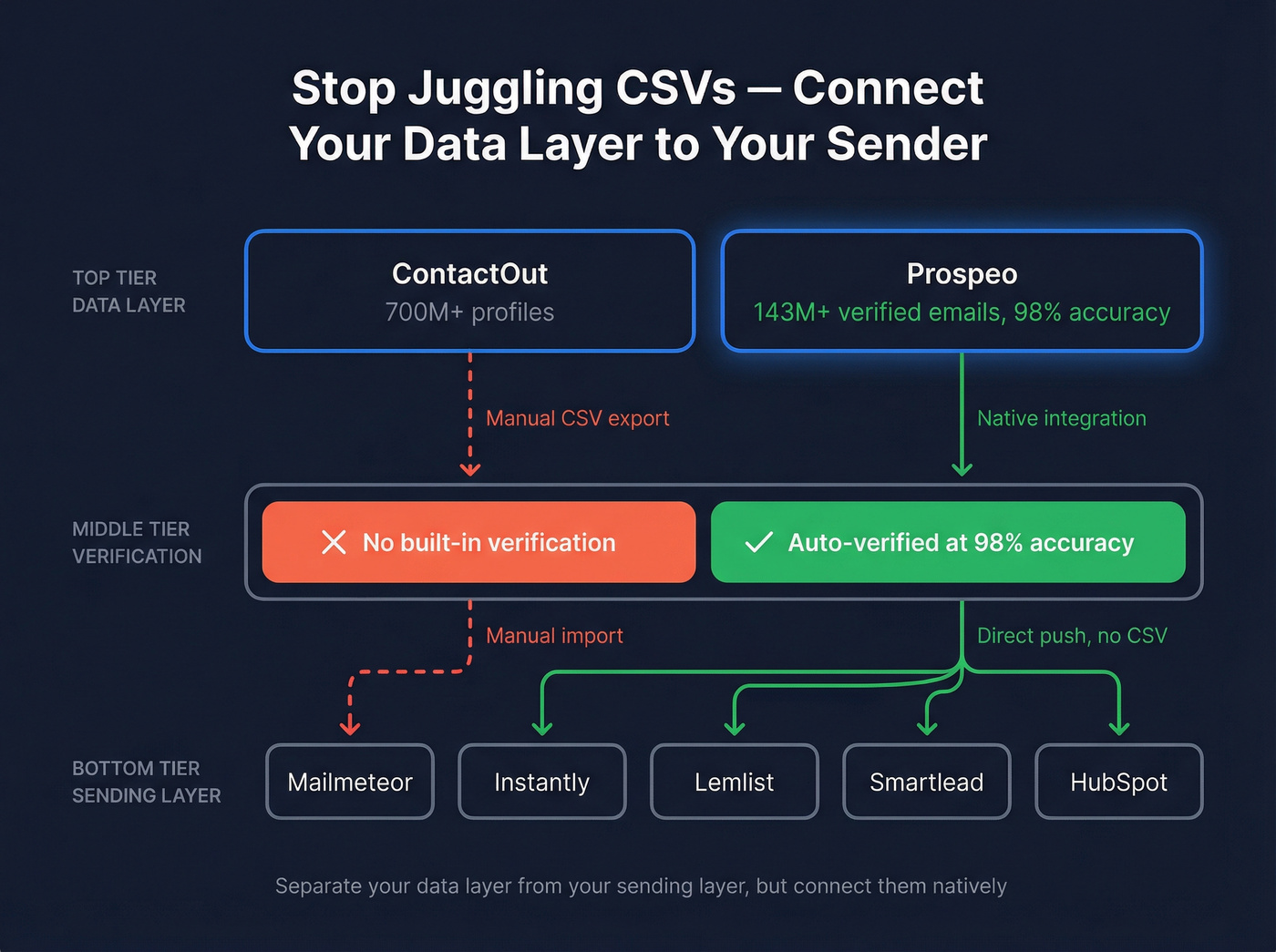
Let's be honest - the "find data in one tool, export CSV, import to another tool, hope nothing breaks" workflow is how most small teams operate, and it's painful. Separating your data layer from your sending layer is the right architecture, but the connection between them shouldn't require manual file juggling every Tuesday morning.
The real problem isn't choosing between a data tool and a sending tool - it's the manual CSV juggling between them. Prospeo bridges that gap: 143M+ verified emails, 30+ search filters, and direct integrations with HubSpot, Salesforce, and every major sequencer. 75 free verified emails/month, no sales call required.
Kill the Tuesday morning CSV export. Connect your data layer to your sender natively.
FAQ
Can Mailmeteor find email addresses like ContactOut?
Mailmeteor has a single-lookup email finder - enter a first name, last name, and company domain to get one result with a verification status. It's not a database or bulk tool. For building prospect lists, you need a dedicated data platform.
Why doesn't ContactOut show pricing publicly?
ContactOut gates pricing behind a sales conversation. Based on third-party breakdowns, expect ~$99/mo for email-only and ~$199/mo for email + phone, with fair-use caps on monthly lookups. Both Prospeo and Mailmeteor publish pricing openly - a growing expectation in 2026.
What if I need to find AND send emails?
No single tool does both well. Use a dedicated data platform to find and verify contacts, then send through Mailmeteor for Gmail campaigns or tools like Instantly and Lemlist for multi-step sequences. Separate your data layer from your sending layer - your deliverability will thank you.