

CRM Data: The Practitioner's Guide to Getting It Right
Your VP of Sales pulls a pipeline report on Monday morning. The number doesn't match what reps said in standup. Marketing's lead count looks different from what ops sees. Nobody trusts the forecast. The problem isn't your CRM - it's the data inside it.
Contact records decay at 22.5% per year. That means roughly one in five records in your database is already wrong, and it's getting worse every quarter you ignore it.
76% of CRM users say less than half their data is accurate and complete. If you're reading this, you feel that in your gut already. Here's what to do this quarter: audit the last 90 days of records for completeness, set up automated enrichment at the point of capture so new records don't arrive stale, and assign a single data steward - not "the whole team."
What Is CRM Data?
CRM data is every piece of information your CRM stores about prospects, customers, and the interactions between them. It's not the software - it's the content. From the first form fill to the closed-won handshake to the renewal conversation three years later, every touchpoint generates data that either helps your team sell or creates noise that slows them down.
Most data quality problems aren't technology problems. They're process problems. You can run Salesforce, HubSpot, or Pipedrive - the challenges are identical if nobody owns the hygiene.
Five Types of CRM Data
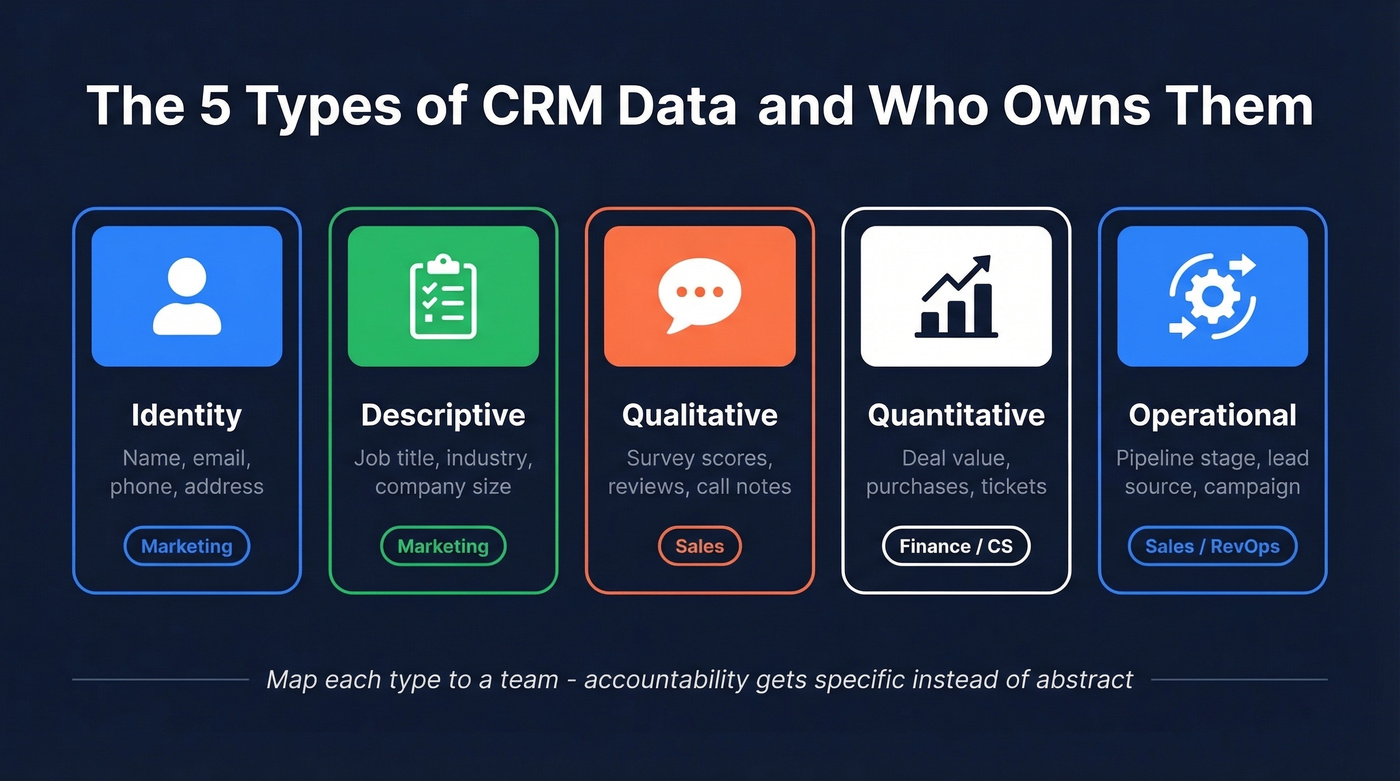
Most guides split records into three buckets. That's too coarse to be useful operationally, and it makes it harder to assign ownership or know what to audit first. A five-type taxonomy gives you clearer accountability.
| Type | What It Covers | Example Fields |
|---|---|---|
| Identity | Who they are | Name, email, phone, address |
| Descriptive | Snapshot context | Job title, industry, company size |
| Qualitative | Sentiment & feedback | Survey scores, reviews, notes |
| Quantitative | Measurable behavior | Purchases, deal value, tickets |
| Operational | Process tracking | Pipeline stage, lead source, campaign |
Identity data tells you who to contact. Descriptive data tells you whether they're worth contacting. Qualitative data captures the "why" behind behavior - what they said in a survey, what a rep noted after a call. Quantitative data measures what actually happened: deal size, conversion rate, time-to-close. Operational data tracks where things stand in your process: which pipeline stage, which campaign sourced them, when the last activity occurred.
The reason this taxonomy matters is ownership. Marketing owns most identity and descriptive data at the top of funnel. Sales owns qualitative and operational data mid-funnel. Finance and CS care about quantitative data post-close. When you map types to teams, accountability gets specific instead of abstract.
To make it concrete: a contact's verified work email is identity data. Their company's headcount range is descriptive. A CSAT score from a post-onboarding survey is qualitative. Their lifetime deal value is quantitative. The UTM source that brought them in is operational.
Why Data Quality Matters
Bad records don't just annoy your ops team. They cost real money - $12.9-$15M per year for the average organization. For a mid-market company, that's headcount you can't hire and campaigns you can't run.
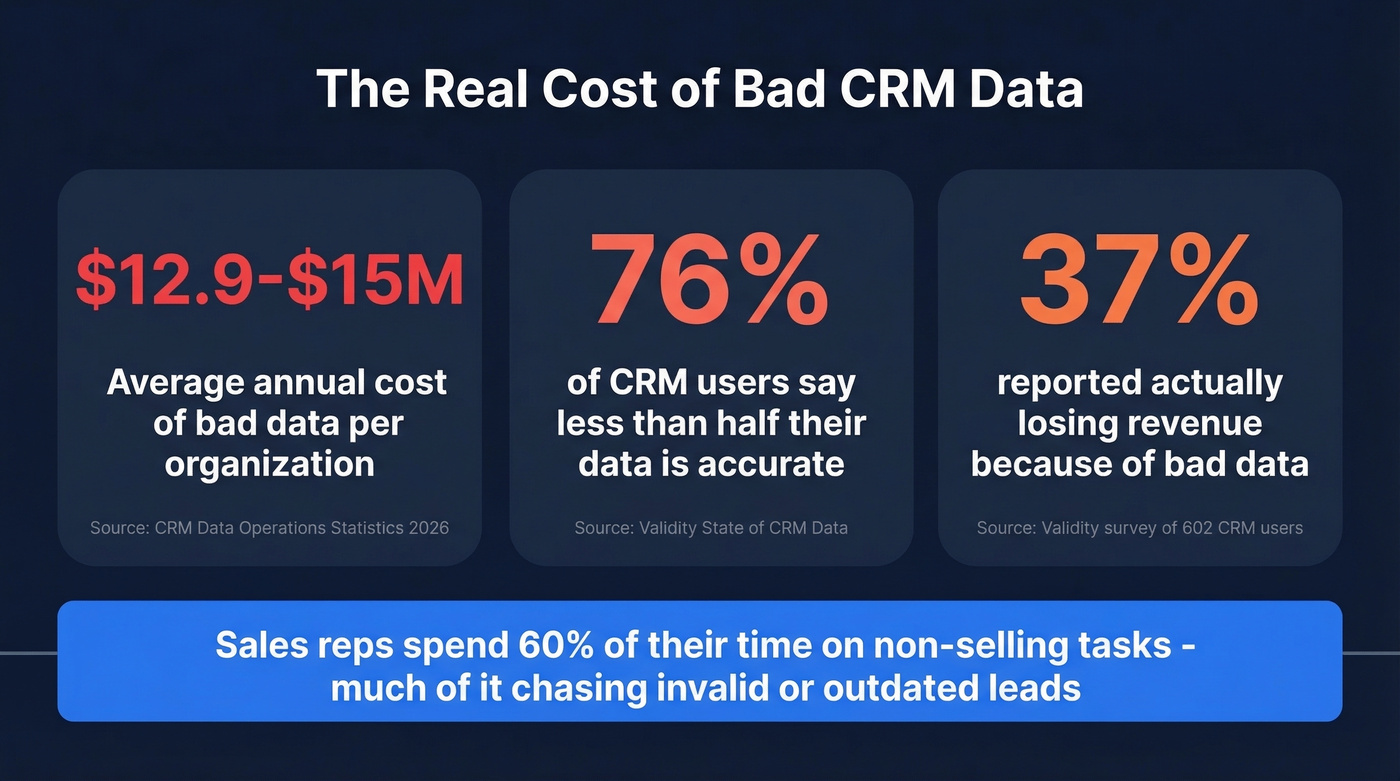
A Validity survey of 602 CRM users found that 37% reported losing revenue directly because of bad data. Not "might lose" - actually lost. Deals fell through because reps called the wrong person. Forecasts missed because pipeline stages were stale. Territories overlapped because nobody deduplicated after the last integration.
Sales reps spend 60% of their time on non-selling tasks, and a significant chunk of that goes to chasing invalid or outdated leads. That's a productivity crisis wearing a data mask. When CRM sales data is unreliable, reps lose confidence in the system and revert to spreadsheets - which only accelerates the decay.
It compounds. When reps don't trust the CRM, they stop updating it. When they stop updating it, the data gets worse. When the data gets worse, leadership stops trusting the reports. We've seen this pattern at companies of every size.
Here's the thing: if your average deal size is under $10K and your CRM has more than 50,000 contacts, you almost certainly have more garbage records than good ones. Most teams would sell better with 10,000 clean records than 100,000 stale ones.
How Fast Records Decay
B2B contact data decays at 22.5% per year, or about 2.1% per month. In high-turnover industries like tech and staffing, decay hits 70.3% annually.
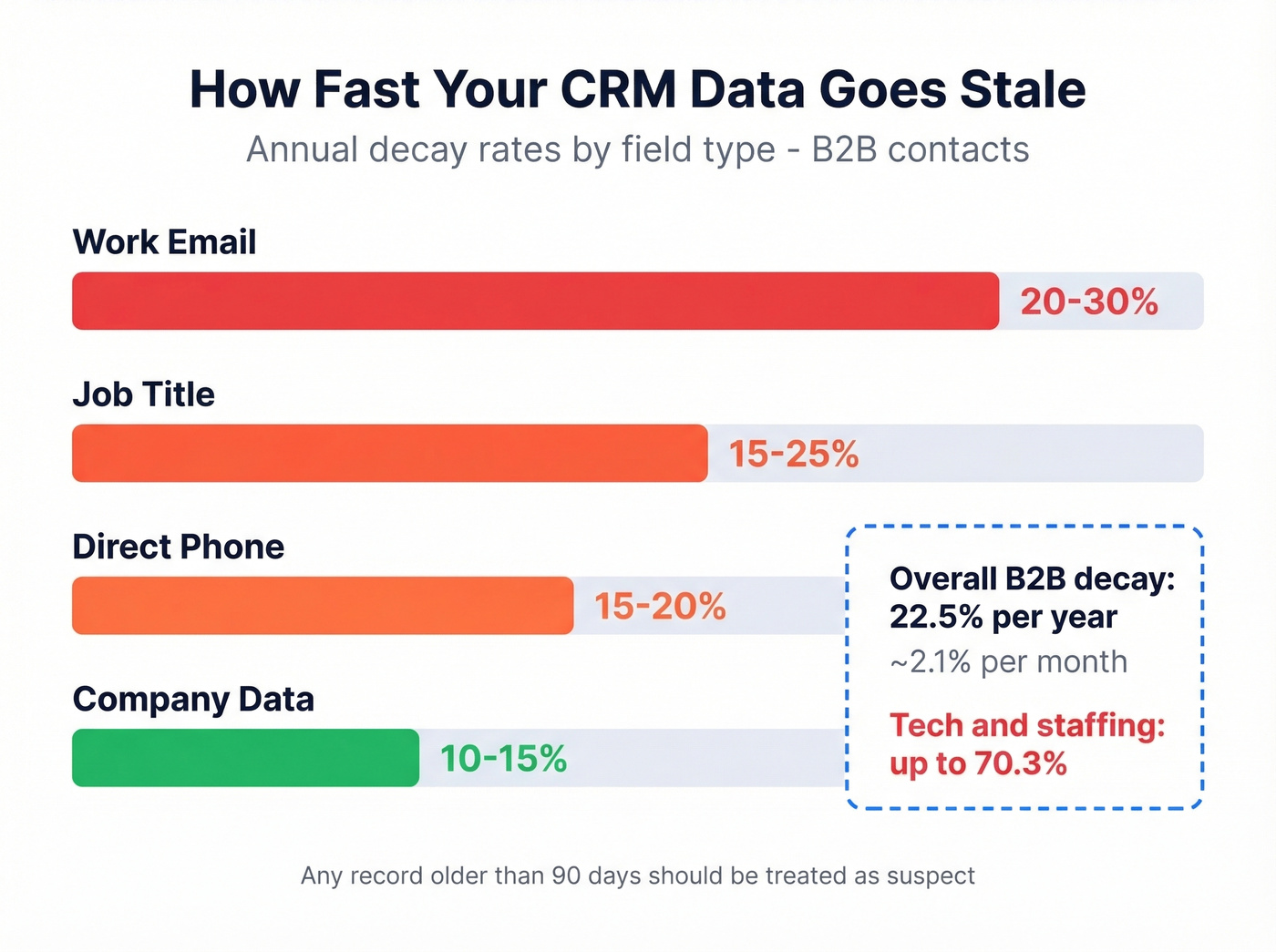
The average masks what's happening at the field level:
| Field | Annual Decay Rate |
|---|---|
| Work email | 20-30% |
| Job title | 15-25% |
| Direct phone | 15-20% |
| Company data | 10-15% |
Work emails decay fastest because people change jobs. Job titles shift with promotions and reorgs. Direct phone numbers go stale when someone switches companies or carriers. Company-level data - revenue, headcount, address - moves slower but still drifts.
The practical implication: any record older than 90 days should be treated as suspect. Quarterly re-enrichment is the minimum cadence. Most enrichment vendors refresh on around a 6-week cycle, which means you're often re-enriching with data that's already a month old. For outbound teams running weekly sequences, the difference between a 7-day refresh and a 6-week refresh is the difference between reaching someone and bouncing.
CRM Data Management Best Practices
These aren't theoretical. They're the practices that separate teams with trustworthy CRMs from teams that treat theirs like a junk drawer.
Standardize entry formats before anything else. Define how phone numbers, company names, and job titles should be formatted. "VP Sales" and "Vice President of Sales" are two records that should be one. Pick a format, enforce it with validation rules.
Assign a data steward - one person, not "everyone." Name a human. Give them authority to reject bad records, merge duplicates, and enforce standards. This is typically someone in RevOps.
Automate enrichment at the point of capture. Don't wait until records are stale. When a lead fills out a form or a rep creates a contact, trigger enrichment immediately. (If you’re comparing vendors, see data enrichment services.)
Deduplicate quarterly at minimum. Duplicates inflate pipeline numbers, create double-outreach, and make reporting unreliable.
Audit with sample-based verification. Pull 100 random records every quarter. Check emails, phones, titles, and company data against reality. Track your data quality score over time.
Be selective about required fields. Every required field you add is a field reps will fill with garbage to move on. Five well-maintained fields beat fifteen half-filled ones.
Set field-level permissions. Lock down fields that feed reports and forecasts - pipeline stage, deal amount, close date - to specific roles.
Back up before bulk operations. Before any merge, import, or enrichment job, snapshot your data. The ability to roll back a bad batch is worth more than any cleanup tool.
Align on field definitions across teams. If marketing calls it "MQL" and sales calls it "Sales Accepted," you need a shared glossary. Write it down somewhere people actually check.
Measure data quality monthly. Track completeness rate, duplicate rate, bounce rate, and enrichment coverage. Put it in a dashboard. What gets reported to leadership gets budget.

Most enrichment vendors refresh on a 6-week cycle - meaning you're re-enriching with stale data. Prospeo refreshes every 7 days across 300M+ profiles, returning 50+ data points per contact at a 92% match rate. Stop filling your CRM with yesterday's data.
Enrich your entire CRM with data that's actually current.
How to Deduplicate Your Records
The naive approach - exact-match on email - catches about 40% of duplicates. The rest are "John Smith" at "Acme Corp" and "Jon Smith" at "Acme Corporation" with two different emails.
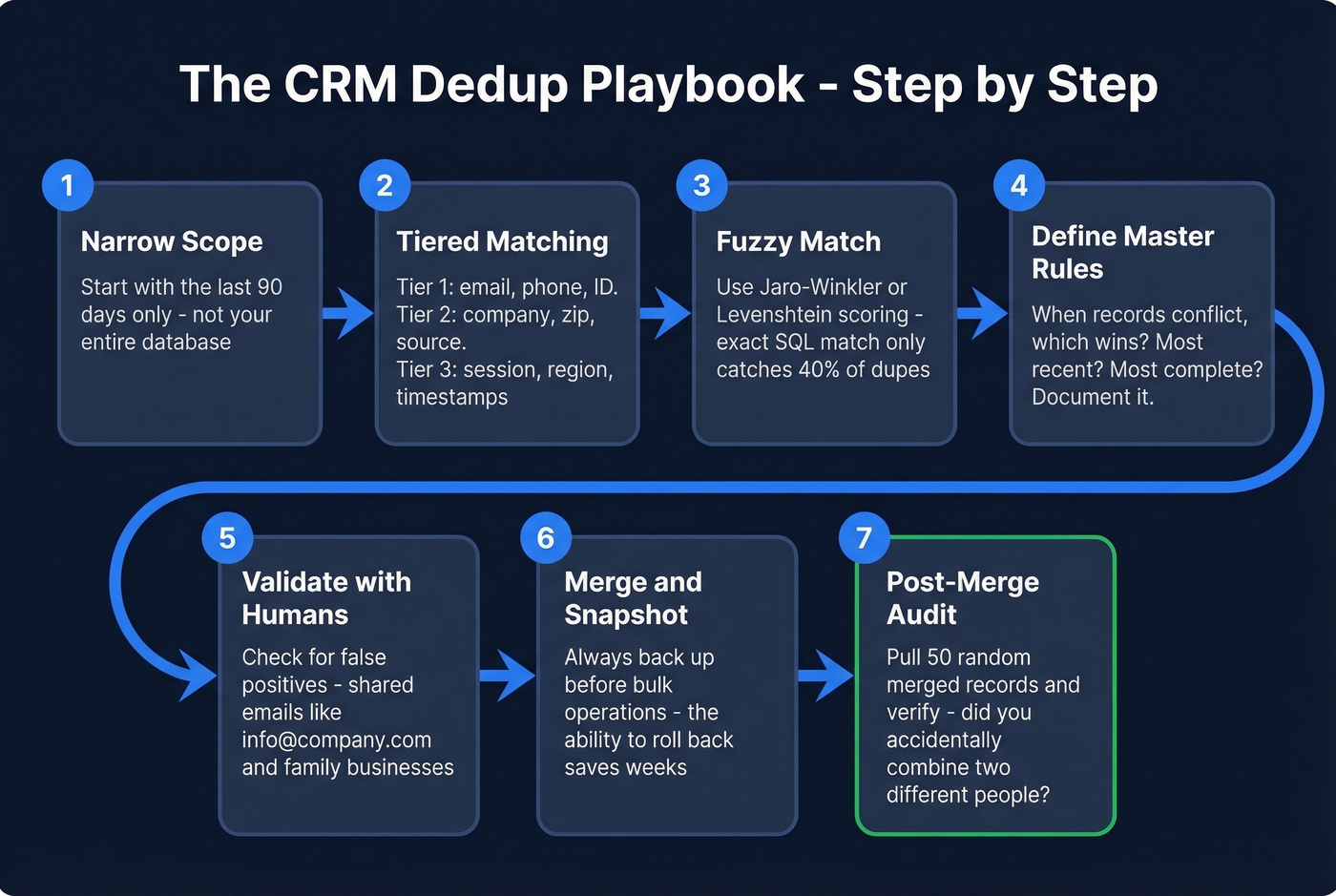
Start by narrowing scope. Don't try to dedupe your entire database on day one. Begin with the last 90 days of records. This limits edge cases and lets you test matching logic before running it against 50,000 contacts.
Use a tiered matching strategy. Tier 1 fields are high-confidence: email address, phone number, customer ID. Tier 2 fields add context: company name, postal code, lead source. Tier 3 fields are tiebreakers: session IDs, region, recent activity timestamps.
Exact-match SQL fails on messy data. You need fuzzy matching - algorithms like Jaro-Winkler or Levenshtein distance that score string similarity. "Acme Corp" and "Acme Corporation" score high on fuzzy match even though they're not identical strings. This is one step in a broader identity resolution pipeline: ingestion, preprocessing, blocking, scoring, classification, clustering, and profile generation. Most dedup tools handle the pipeline natively, but understanding the stages helps you configure thresholds and troubleshoot false positives.
Before merging, define your master record rules. When two records conflict, which one wins? The most recent? The most complete? Document this and apply it consistently. Then validate with business users - shared email addresses like info@company.com and family businesses create false positives that delete legitimate records.
Let's be honest about governance: this is where most teams skip. They run the merge, celebrate the reduced record count, and never check whether they accidentally merged two different "Sarah Chen" records at two different companies. Build in a validation step. It takes an hour and saves a week of cleanup.
CRM Data Enrichment Tools
Enrichment turns a name-and-email record into a complete profile with title, company, phone, technographics, and intent signals. The best time to enrich is at the point of capture. The second best time is now.
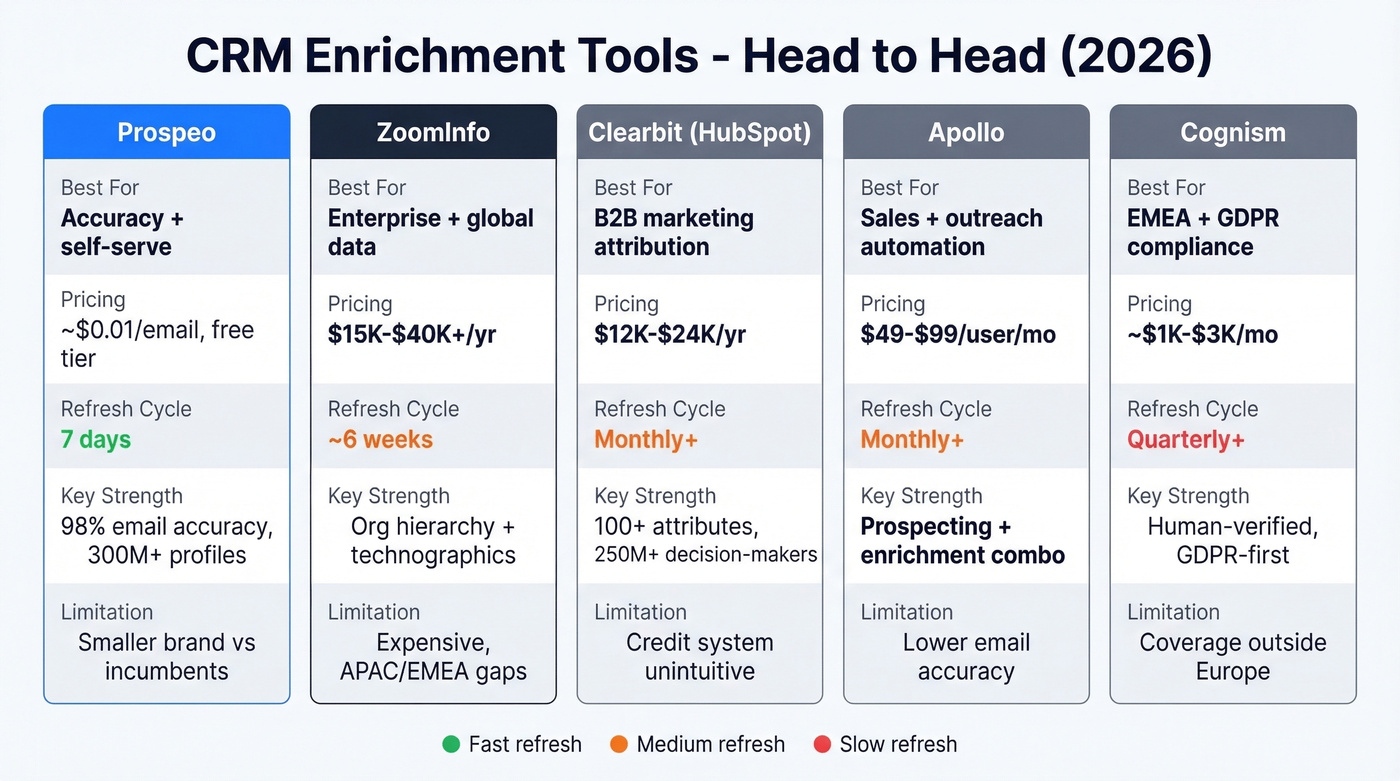
| Tool | Best For | Pricing | Refresh | Key Strength | Limitation |
|---|---|---|---|---|---|
| Prospeo | Accuracy + self-serve | ~$0.01/email, free tier | 7 days | 98% email accuracy, 300M+ profiles | Smaller brand vs. incumbents |
| ZoomInfo | Enterprise bulk | $15K-$40K+/yr | ~6 weeks | Org hierarchy + technographics | Expensive, APAC/EMEA gaps |
| Clearbit (HubSpot) | HubSpot-native teams | $12K-$24K/yr | Monthly+ | 100+ attributes, 250M+ decision-makers | Credit system unintuitive |
| Apollo | Startup all-in-one | $49-$99/user/mo | Monthly+ | Prospecting + enrichment combo | Lower email accuracy |
| Cognism | EMEA compliance | ~$1K-$3K/mo | Quarterly+ | Human-verified, GDPR-first | Coverage outside Europe |
Prospeo
Use this if you need accurate emails and phones without signing an enterprise contract or talking to a sales rep.
Prospeo draws from 300M+ professional profiles to return 50+ data points per enrichment at a 92% API match rate. The 98% email accuracy is the highest we've seen in production, and the 7-day refresh cycle means you're not re-enriching with stale data. Native Salesforce and HubSpot integrations push enriched records directly into your CRM without manual CSV work.

Pricing is straightforward: ~$0.01 per email, 10 credits per mobile number, and a free tier with 75 emails plus 100 Chrome extension credits per month. No annual contracts. For teams under 100 reps who care about data accuracy over feature bloat, it's the clear first choice. Pair it with a sequencer like Instantly, Lemlist, or Outreach if you need built-in dialing and multi-touch orchestration - Prospeo handles the data layer, your sequencer handles the workflow. (If you’re building outbound motions, see sales prospecting techniques.)
Bad CRM data costs organizations $12.9-$15M per year. Prospeo's 5-step verification delivers 98% email accuracy and catches spam traps, honeypots, and catch-all domains before they ever hit your CRM. At $0.01 per email, cleaning your database costs less than one bad forecast.
Replace your junk records with verified contacts - starting today.
ZoomInfo
ZoomInfo's strength is breadth: org hierarchy mapping, technographics, intent signals, and a massive US database. For large sales orgs running ABM programs, it's still the default. But a 10-seat contract with intent data and mobile numbers runs $15,000-$40,000+ per year. That's real money for a Series A company.
APAC and EMEA coverage trails the US database significantly, and the ~6-week refresh cycle means records can be stale before you use them. The consensus on r/sales is that ZoomInfo's data quality has slipped in recent years while pricing keeps climbing. Skip this if your team is under 20 reps or you're primarily selling outside North America.
Clearbit (HubSpot)
Clearbit, now part of HubSpot, adds 100+ verified attributes across 250M+ decision-makers. The native integration means enrichment happens without leaving your CRM workflow. Standalone pricing ran $12,000-$24,000/year before the acquisition; current pricing depends on your HubSpot tier. The honest tradeoff: if you're on Salesforce or another CRM, the HubSpot lock-in makes Clearbit a non-starter.
Apollo
Apollo combines prospecting, enrichment, and job change tracking in one platform. Free tier available, paid plans from $49-$99/user/month. It's best for startups that want a single tool for finding and enriching contacts without managing multiple vendors. Email accuracy runs lower than dedicated enrichment tools, so verify before sending. (If you’re watching deliverability, track your email bounce rate.)
Cognism
Cognism leads with human-verified data and GDPR-first compliance. Pricing runs ~$1,000-$3,000/month for small teams. It's the go-to for EMEA-focused teams where compliance isn't optional. Coverage outside Europe trails competitors, so North America-heavy teams should look elsewhere.
Building a Governance Framework
Governance sounds bureaucratic until you realize it's the only thing preventing your CRM from decaying back to chaos six months after you clean it. Two established frameworks worth referencing: DAMA-DMBOK and COBIT. Neither is CRM-specific, but both provide structure you can adapt.
A practical governance framework rests on five pillars.
Data quality means defining what "good" looks like for each field - completeness thresholds, accuracy benchmarks, freshness windows - and measuring quarterly. Privacy and security covers GDPR, CCPA, field-level access controls, encryption at rest, and documented data processing agreements with every vendor touching your records.
Stewardship and accountability requires a RACI model. The data steward owns quality. Sales ops owns process. Individual reps own their records. Leadership owns budget. Write it down. Gousto, the UK meal-kit company, improved data quality after assigning dedicated data stewards and building automated quality checks into their pipeline - proof that named ownership works even outside B2B SaaS.
Lineage and transparency means knowing where every record came from: form fill, purchased list, enrichment API, or manual entry. Source tracking tells you which channels produce the best data. Policy and standards means documenting field definitions, naming conventions, dedup rules, and retention policies somewhere people actually look - not a 40-page PDF buried on SharePoint.
"Data quality is everyone's responsibility" is the most dangerous sentence in CRM governance. It means nobody has a deadline, nobody has a metric, and nobody gets held accountable when the database rots.
Using CRM Data to Sell Better
Clean data in your CRM only matters if it translates into better selling. The most immediate payoff is territory and account prioritization: when firmographic and intent fields are accurate, reps stop wasting cycles on accounts that were never a fit. In our experience, teams that layer intent data on top of clean firmographics cut their prospecting time by 30-40% within the first quarter. (For a practical setup, use an ideal customer profile and firmographic and technographic data.)
Beyond prioritization, reliable data powers forecasting that leadership can actually trust. When pipeline stages, close dates, and deal amounts reflect reality, your forecast stops being a negotiation and starts being a prediction. That's the difference between a revenue team that plans proactively and one that scrambles at quarter-end. (If you’re evaluating tooling, compare sales forecasting solutions.)
Making Your Records AI-Ready
Every vendor is pitching AI features - lead scoring, forecasting, next-best-action recommendations. The problem: only 4% of organizations say their data is fully prepared for AI use. Gartner predicted organizations would abandon 60% of AI projects by 2026 due to lack of data preparation, and early indicators suggest they were right.
The results are already showing up in revenue. Clari Labs found that 87% of enterprises missed their 2025 revenue targets despite record AI investment, with 48% saying their revenue data wasn't AI-ready. 51% of sales leaders with AI say tech silos delay or limit their AI initiatives. The tools aren't the bottleneck - the data is. (If you’re operationalizing this, start with a clear lead scoring model.)
Here's the scenario that should worry you: your AI lead-scoring model flags your best accounts as low-priority because the firmographic data is two years old. The model isn't broken - it's working perfectly on bad inputs. You won't know it's wrong until pipeline dries up and someone investigates.
Clean doesn't mean AI-ready. Your structured fields might be pristine, but AI models need context from unstructured sources too: call recordings, email threads, meeting notes. The buying signal that matters most might be buried in a rep's note that says "CFO mentioned budget freeze until Q3." No structured field captures that.
The practical path forward: start with structured data hygiene - get fields accurate, complete, and fresh. Then tackle unstructured context capture by logging calls, syncing emails, and encouraging detailed notes. Don't add more required fields hoping to feed the AI. That creates noise, not signal.
FAQ
What is CRM data and why does it matter?
CRM data is every piece of information stored in your CRM about prospects, customers, and their interactions - from contact details and deal values to call notes and campaign attribution. It matters because inaccurate records cost organizations $12.9-$15M per year and erode trust in forecasts, pipeline reports, and AI-driven tools.
How often should you clean CRM data?
Quarterly is the minimum viable cadence. B2B contact records decay at 22.5% per year, so any record older than 90 days should be re-verified. Work email and job title decay fastest at 20-30% and 15-25% annually.
What causes CRM data to go bad?
Job changes are the biggest driver - people switch roles every 2.7 years on average. Beyond that: manual entry errors, duplicate records from multiple integrations, inconsistent formatting, and the absence of a designated data steward who owns quality.
What's a good free tool for CRM data enrichment?
Prospeo offers a free tier with 75 email credits and 100 Chrome extension credits per month - enough to enrich a small pipeline at 98% email accuracy. Apollo also has a free plan, though email accuracy runs lower. For teams running real outbound, Prospeo's free tier delivers more usable contacts per credit.
Is CRM data ready for AI out of the box?
Almost never. Only 4% of organizations say their records are fully AI-ready. Clean structured fields are a start, but AI models also need unstructured context from calls, emails, and meeting notes to generate reliable predictions.