

Customer Data Quality Is Worse Than You Think - Here's How to Fix It
You've got 10,000 contacts in Salesforce. You run a campaign. Half the emails bounce, a third of the phone numbers are disconnected, and your segmentation is useless because "CEO," "C.E.O.," and "Chief Executive Officer / Founder" are three different values in the job title field. One practitioner on r/CRM described their customer data quality as a "total mess" - couldn't even pull an accurate list of who they serve.
That's not an edge case. That's the norm.
The quick version: your contact data is decaying at 22.5%+ per year (https://www.cleanlist.ai/blog/2026-01-22-b2b-data-decay-statistics). The single highest-ROI fix is verifying emails and phone numbers before anything else. We've seen teams cut bounce rates from 35% to under 4% just by running verification before their next campaign.
What Data Quality Actually Means
Data quality has six textbook dimensions: accuracy, completeness, consistency, timeliness, validity, and uniqueness. That's the theory.
In your CRM, it looks like name fields with entries like "jane," "jane2," and "jane!!!234" from sloppy form submissions. Job titles are a disaster - "VP Sales," "Vice President of Sales," and "VP, Sales & Partnerships" all describe the same person, but your automation treats them as three distinct segments. Industry fields toggle between "software," "tech," and "technology" with no standardization. That's why your sequences feel generic and your reporting tells you nothing useful.
How Fast Contact Data Decays
B2B contact data decays at roughly 22.5% per year - about 2.1% per month. And 70.8% of business contacts (https://www.landbase.com/blog/data-decay-rate-statistics) experience at least one material change within 12 months. People change jobs, get promoted, switch phone numbers, and let old email addresses die.
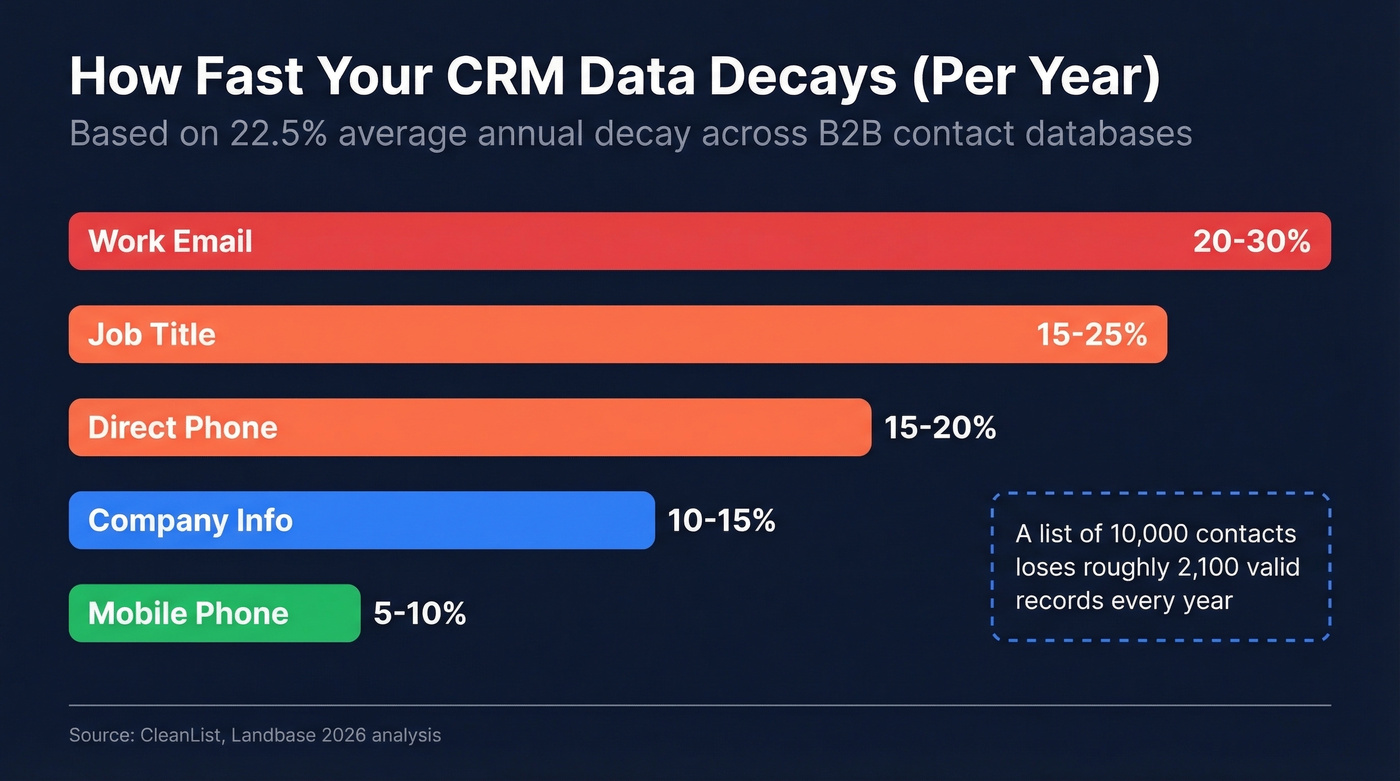
Field by field, the damage breaks down like this:
| Field | Annual Decay Rate |
|---|---|
| Work Email | 20-30% |
| Job Title | 15-25% |
| Direct Phone | 15-20% |
| Company Info | 10-15% |
| Mobile Phone | 5-10% |
Work email is the worst offender. Nearly a third of your email addresses will be invalid within a year, which means that "clean list" you built last January is already missing a huge chunk of reachable contacts.

Your data is decaying at 2.1% per month. Prospeo's 7-day refresh cycle and 98% email accuracy keep your CRM alive - not the 6-week refresh competitors offer. Teams using Prospeo cut bounce rates from 35% to under 4%.
Stop campaigning against a decaying database. Verify before you send.
What Bad Data Actually Costs
Bad data isn't just annoying. It's expensive.
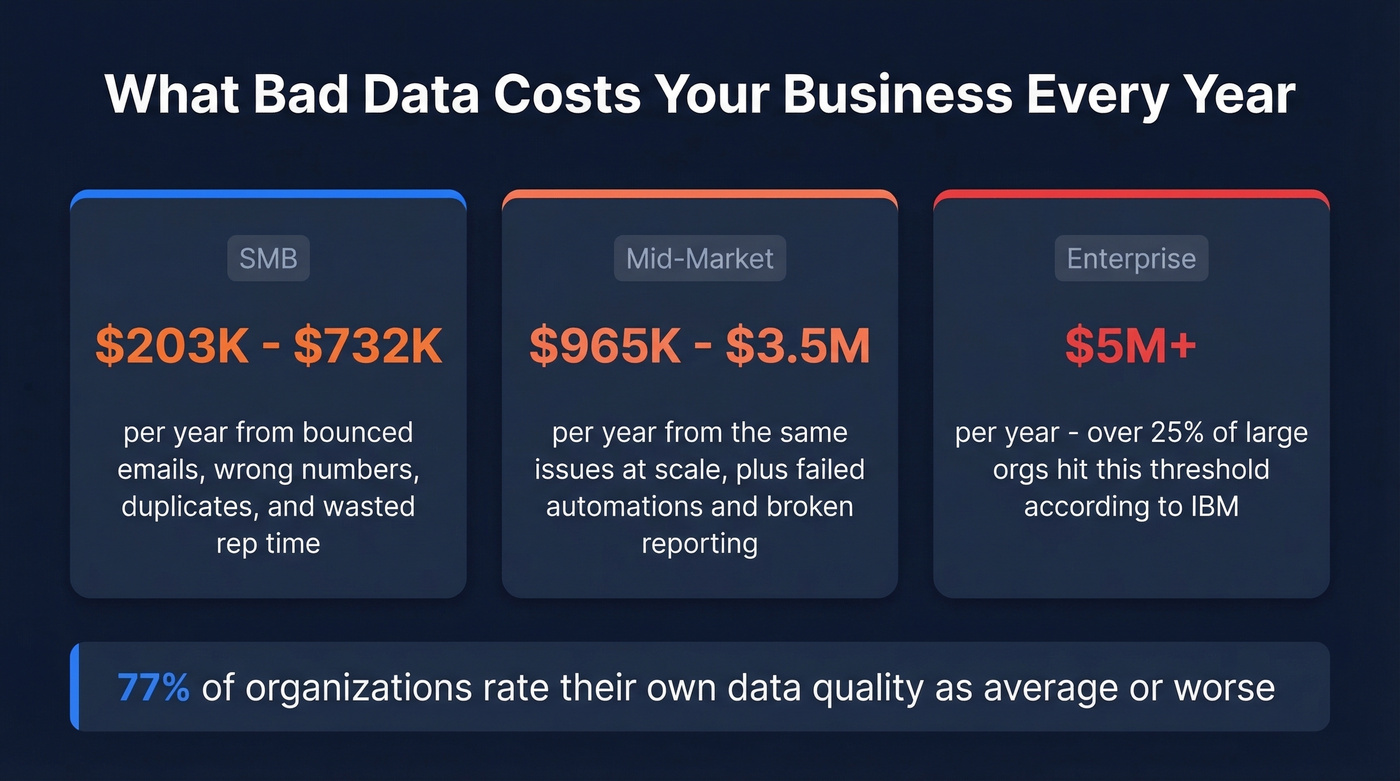
SMBs lose an estimated $203K-$732K per year to bounced emails, wrong phone numbers, duplicates, wasted rep time, and failed automations. Mid-market companies bleed $965K-$3.5M annually. IBM's January 2026 analysis puts it even more starkly: over a quarter of organizations lose more than $5M per year to poor data quality.
Meanwhile, 77% of organizations rate their own data quality as average or worse, and 43% of COOs now cite data quality as a top priority.
It's not just CRM fields either. In the post-iOS privacy era, basic Google tag setups miss up to 40% of actual conversion events - meaning your attribution data is decaying too.
Here's the thing: AI spending is forecast to surpass $2T in 2026, and 45% of business leaders cite data accuracy as the top barrier to scaling AI. Clean customer records aren't a "nice to have" ops project anymore. Every model is only as good as the data feeding it. If your CRM is garbage, your AI outputs will be too - and any customer data orchestration or customer data analysis built on stale records will send reps to the wrong accounts with the wrong messaging.
How to Fix It - A Prioritized Checklist
Every data quality guide tells you to "build a data quality culture." That's not actionable. Here's what to do this week.
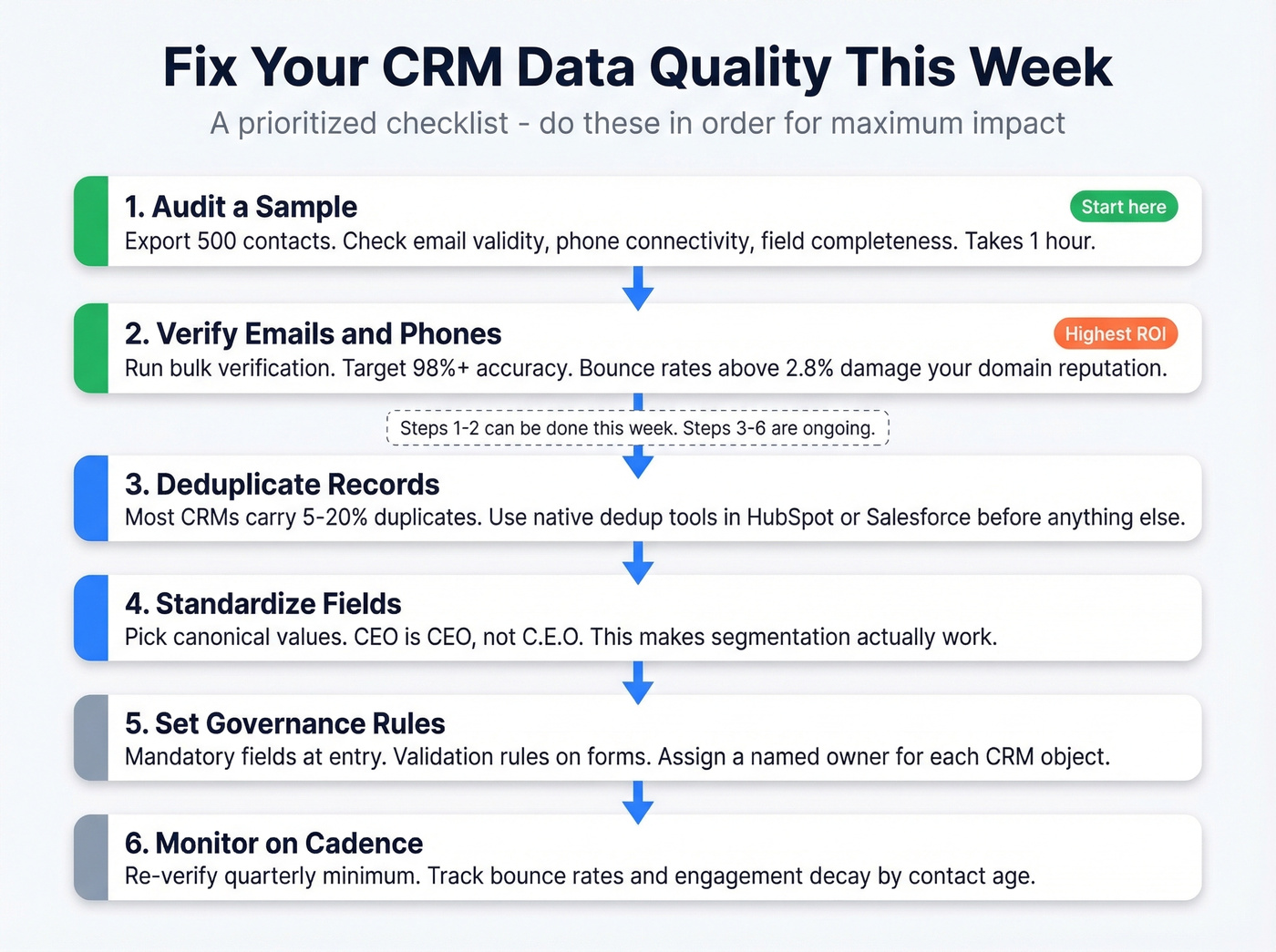
1. Audit a Sample
Export 500 contacts from your CRM. Check email validity, phone connectivity, and field completeness. This takes an hour and tells you exactly how bad the problem is. We did this with a mid-market SaaS company's Salesforce instance last quarter and found 31% of emails were already dead - they'd been sending campaigns to ghosts for months.
2. Verify Contact Data First
Emails and phones decay fastest and hit outreach hardest. Run your CRM export through a bulk verification tool - Prospeo's handles this with 98% email accuracy and a 7-day data refresh cycle, compared to the 6-week industry average most providers operate on. Bounce rates above 2.8% trigger domain reputation damage, so verification isn't optional. It's protective.
If you want to compare options, start with an email verifier and then evaluate best data enrichment tools for ongoing refresh.
3. Deduplicate
Most CRMs carry 5-20% duplicate records. Duplicates break lead routing, inflate reporting, and waste sequence credits. If you're on HubSpot or Salesforce, there are native dedup tools - use them before doing anything else with your data.
This is also where CRM automation software can help enforce cleaner routing and lifecycle rules.
4. Standardize Fields
Pick canonical values for job titles, industries, and company names. "CEO" is "CEO" - not "C.E.O." This is what makes segmentation actually work, and it's the step most teams skip because it feels tedious. Skip it if you don't care about accurate reporting. Otherwise, block out two hours and do it.
If your title taxonomy is a mess, use a reference list like marketing job titles to normalize role naming.
5. Set Governance Rules
Mandatory fields at point of entry. Validation rules on forms. Clear ownership of who maintains what. The consensus on r/salesops is that governance without enforcement is just a wish list - assign a named owner for each object in your CRM.
If you're formalizing this, add a lightweight data validation automation layer so rules actually run.
6. Monitor on Cadence
Re-verify quarterly at minimum. Track bounce rates over time and measure engagement decay by contact age. If contacts older than six months stop responding, your refresh cycle is too slow.
For teams doing high-volume outbound, pair this with outbound email spam prevention so deliverability doesn't collapse as lists age.
KPIs Worth Tracking
| KPI | Target | Why It Matters |
|---|---|---|
| Email accuracy | 95%+ | Below this, campaigns underperform and sender rep degrades |
| Bounce rate | <2.8% | Above this triggers ISP throttling and spam foldering |
| Field completion | 100% | Incomplete records break segmentation and automation |
| Re-verification cadence | Quarterly | Matches the ~2.1%/month decay rate |
| Engagement by contact age | Declining = stale data | Reveals whether your refresh cycle keeps pace with decay |
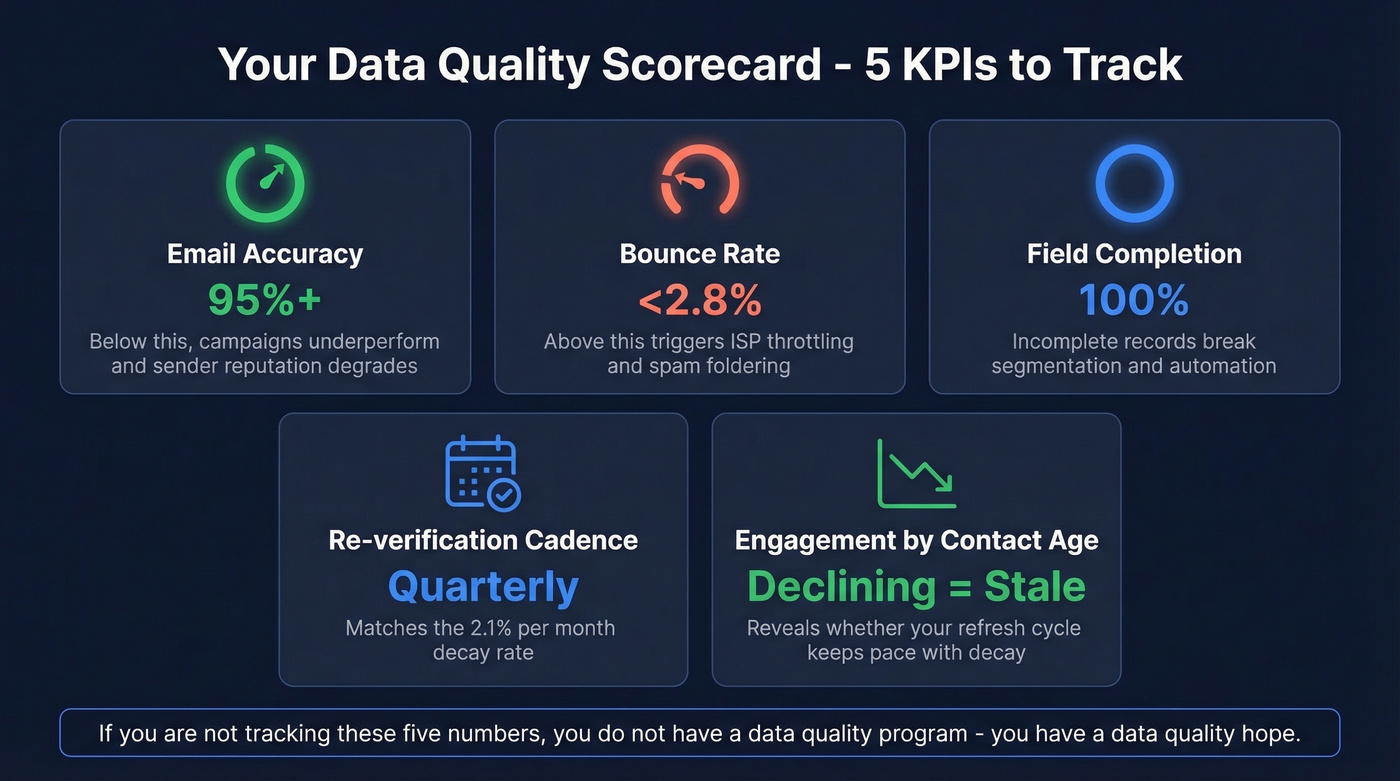
In our experience, the engagement-by-age metric is the most underused one on this list. If you're not tracking these five numbers today, you don't have a data quality program. You have a data quality hope.
If you're tying this back to revenue outcomes, map these metrics into your RevOps tech stack and pipeline reporting.
FAQ
How often should I re-verify CRM contacts?
Quarterly is the minimum viable cadence. At a 2.1% monthly decay rate, waiting six months means roughly 12% of your records are already stale. Teams running weekly outreach should verify monthly - Prospeo's enrichment API, with a 92% match rate and 7-day refresh, makes this automatable via Salesforce or HubSpot integrations.
What's an acceptable email bounce rate?
Keep it under 2.8%. Above that threshold, ISPs start throttling your sending domain and foldering messages to spam. Best-in-class outbound teams maintain bounce rates below 2%, which requires pre-send verification on every campaign.
How much does bad data cost a small business?
SMBs lose an estimated $203K-$732K per year from bounced emails, disconnected numbers, duplicate records, and wasted rep time. The cost compounds fast - reps spend hours chasing wrong contacts instead of closing deals.
Which CRM fields decay fastest?
Work email decays fastest at 20-30% per year, followed by job title at 15-25% and direct phone at 15-20%. Mobile numbers are the most stable at 5-10% annual decay, which is why verified mobile data is increasingly valuable for outbound.
Bad data costs SMBs up to $732K per year. Prospeo's enrichment API returns 50+ data points at a 92% match rate - plugged directly into Salesforce and HubSpot. Automate quarterly re-verification for $0.01 per email.
Replace your data quality hope with a data quality system.