

Domain Blacklist Check: Fix & Prevent Listing (2026)
You ran every blacklist scanner you could find. All green. No flags. And your emails are still bouncing - or worse, silently disappearing into spam folders.
This is the most common deliverability scenario nobody warns you about, and it's where most domain blacklist check advice falls apart. Over 85% of all email traffic gets classified as spam. The filtering infrastructure built to handle that volume is layered, complex, and only partially visible to you. Here's what a blacklist lookup actually reveals, what it misses, and how to fix a listing and prevent the next one.
Quick Version
If you just need to run a check right now, use MXToolbox (100+ lists) or Spamhaus Lookup (the single most influential source). Already listed? Skip to the delisting walkthrough below. Want to prevent blacklisting entirely? The root cause is almost always bad contact data - spam traps, honeypots, and decayed addresses that spike your bounce rate. Prospeo's 5-step verification with spam-trap and honeypot filtering catches that upstream problem before it torches your domain reputation.
What a Blacklist Lookup Actually Reveals
When you enter a domain into a blacklist checker, the tool resolves your domain's MX records to find associated IP addresses, then queries those IPs against public DNS-based blocklists (DNSBLs). Some tools also check the domain itself against domain-specific blocklists like Spamhaus DBL.
There are over 300 publicly available spam blacklists. MXToolbox scans 100+ of them. That sounds thorough - until you realize what it misses.
Public DNSBL scans don't catch provider-specific blocks. Gmail, Outlook, and Yahoo all maintain proprietary reputation systems that operate independently of any public blacklist. URL reputation filters (like Google Safe Browsing) can block your emails based on links in the body, even if your sending IP and domain are clean. A thread on r/sysadmin captures this perfectly: a user removed a website link from their email signature and delivery instantly improved. The domain wasn't on any public blacklist, but URL reputation filtering was killing their messages silently.
Here's the thing: if your check comes back clean and you're still having deliverability problems, the blacklist isn't your issue. Nine times out of ten, it's provider-specific reputation or URL filtering - neither of which any public scanner will show you.
Three Types of Blacklists
Not all blacklists work the same way. They intercept email at different stages, and recovery timelines vary dramatically.
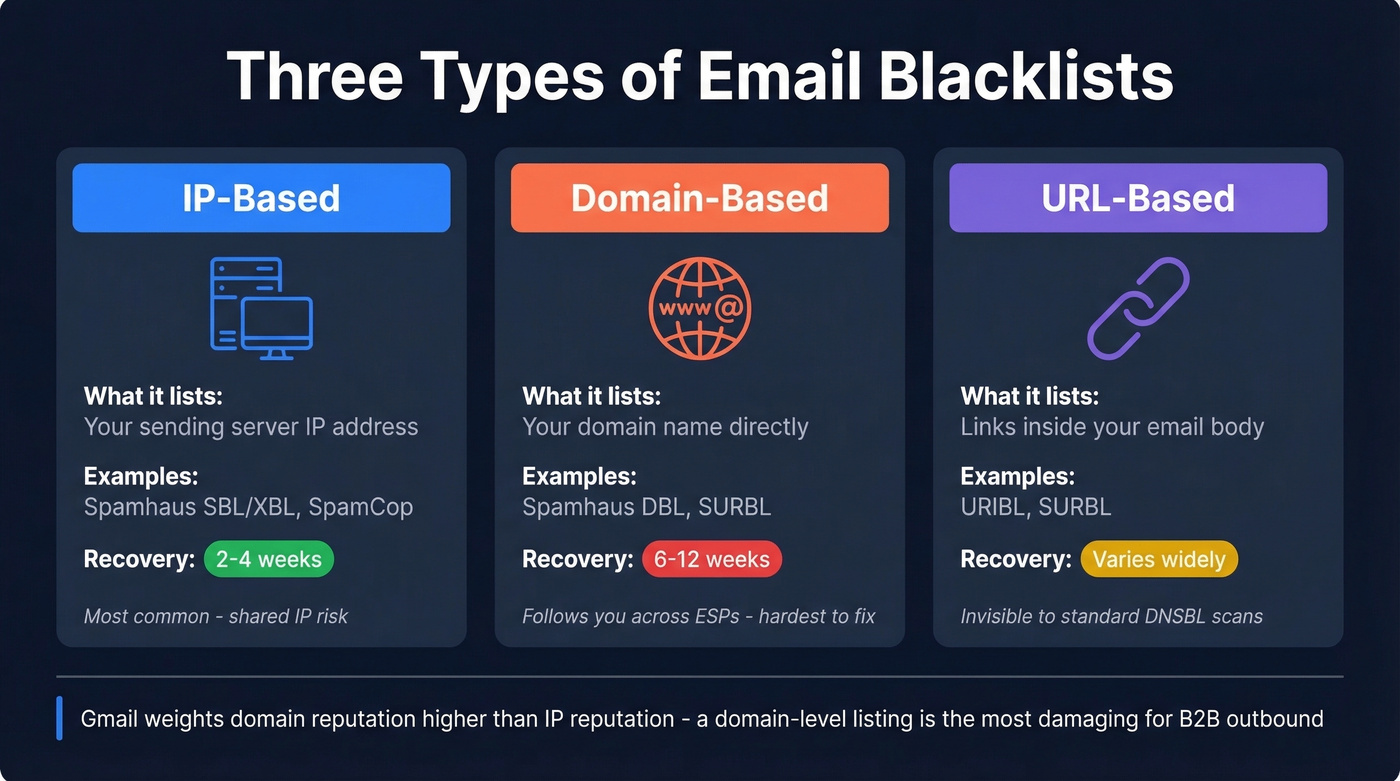
| Type | What It Lists | Example Lists | Recovery Time |
|---|---|---|---|
| IP-based | Sending server IPs | Spamhaus SBL/XBL, SpamCop | 2-4 weeks |
| Domain-based | Your domain name | Spamhaus DBL, SURBL | 6-12 weeks |
| URL-based | Links in email body | URIBL, SURBL | Varies widely |
IP-based blacklists flag your sending server's IP address. These are the most common and fastest to recover from - 2-4 weeks of clean sending typically clears the damage. The catch: on a shared IP, someone else's bad behavior can land you on these lists.
Domain-based blacklists are the ones that actually hurt. They flag your domain name directly, meaning the reputation follows you even if you switch ESPs or IP addresses. Recovery takes 6-12 weeks. Gmail weights domain reputation higher than IP reputation, making a domain-level listing particularly damaging for B2B outbound.
URL-based blacklists scan links inside your email body. You can have a pristine sending IP and a clean domain, and still get blocked because a URL in your signature triggers a filter. This is the scenario that confuses most people running a standard DNSBL scan.
Which Blacklists Actually Matter
Most of those 300+ public blacklists are noise. Reddit threads consistently flag that "super niche" blacklists will flag brand-new domains with zero sending history. Don't waste your time on those.
If you're clean on Spamhaus, Barracuda, and SpamCop, you're fine. Don't lose sleep over a listing on some obscure blocklist that no major provider actually queries.
If you want a broader view beyond public lists, use an email reputation dashboard alongside your blacklist checks.

Most blacklistings trace back to one root cause: sending to unverified contacts. Spam traps, honeypots, and decayed addresses hide in every purchased or scraped list. Prospeo's 5-step verification with spam-trap removal and honeypot filtering catches these toxic addresses before they ever reach your sequencer - delivering 98% email accuracy and keeping bounce rates well under the 2% threshold that triggers blacklist operators.
Stop fixing blacklist damage. Eliminate the bad data that causes it.
Why Domains Get Blacklisted
The path from "clean domain" to "blacklisted" is shorter than most teams realize. Two numbers matter more than anything else.
A bounce rate above 2% raises flags with most blacklist operators. Push past 5%, and you're virtually guaranteed a listing. Complaint rates above 0.1% - one complaint per thousand emails - trigger the same cascade. Blacklisting can slash deliverability by 50% or more, and with email marketing generating $36 for every $1 spent by industry benchmarks, the financial hit compounds fast.
If you’re not sure where you stand, start by tracking your email bounce rate and tightening list hygiene before you scale volume.
We've seen the same pipeline play out dozens of times in B2B outbound: a team buys or scrapes a contact list, loads it into their sequencer without verification, and sends 5,000 emails on day one. Hidden in that list are spam traps (recycled addresses monitored by blacklist operators) and honeypots (fake addresses planted to catch bulk senders). A single spam-trap hit can trigger an immediate listing.
If you suspect traps are involved, follow a dedicated spam trap removal process before you request delisting.
Compromised infrastructure is the other common cause. A hacked WordPress site, an open relay, or a misconfigured mail server can send spam from your domain without your knowledge. By the time you notice, the listing is already active.
Blacklist Checker Tools Compared
| Tool | Lists Checked | Free Tier | Monitoring | Best For |
|---|---|---|---|---|
| MXToolbox | 100+ | Manual lookup | Paid only | One-time checks |
| Spamhaus Lookup | Spamhaus only | Yes | No | Most influential single check |
| HetrixTools | Broad | Free monitoring | Yes | Ongoing monitoring |
| MultiRBL | Hundreds | Yes | No | Deepest coverage |
| DNSChecker | 50+ | Yes | No | Quick IP/domain check |
| Mailtrap | 20+ | Yes (up to 10 checks) | Paid | Developers testing email |

MXToolbox is the default starting point. It scans 100+ blacklists, shows clear pass/fail results, and the free tier handles manual lookups without an account. For continuous monitoring, you'll need their paid plan - but for a quick one-time scan, nothing beats it.
Skip HetrixTools if you only need a one-time scan. Where it shines is ongoing monitoring - the free tier runs automated checks on a schedule and sends alerts when a new listing appears. If you're managing multiple domains or client infrastructure, set it up once and forget about it until you get an alert.
Spamhaus Lookup only checks Spamhaus's own lists. That sounds limited until you remember Spamhaus is the single most influential operator. A clean result there carries more weight than a clean sweep across 50 niche lists.
I'd reach for MultiRBL only when diagnosing a complex deliverability problem. It aggregates across hundreds of blocklists and shows granular statuses - blacklisted, brownlisted, yellowlisted, whitelisted. Overkill for routine checks, invaluable for troubleshooting.
DNSChecker does something useful that others bury: when you enter a domain, it fetches the associated IP addresses based on MX records, then checks those IPs. That domain-to-IP resolution step matters because many blacklists are IP-based even when you're trying to check a domain.
Mailtrap is worth a look if you're a developer testing email flows in staging environments. Its blacklist check covers fewer lists than MXToolbox, but the broader platform handles email testing and sending in one place.
If you’re doing cold outreach at scale, pair these tools with a full email deliverability guide so you’re not guessing.
Before You Request Delisting
Don't submit a delisting request until you've fixed the root cause. Blacklist operators will reject - or re-list - domains that request removal without addressing the underlying problem.
Pre-delisting checklist:
- Identify and fix the root cause. Bad list? Compromised server? Open relay? If you don't know why you were listed, you'll be listed again.
- Configure SPF, DKIM, and DMARC. Every major blacklist operator expects them.
- Verify PTR/rDNS matches your HELO. Your reverse DNS record must match the hostname your server announces - this is the detail most people skip.
- Use postmaster@yourdomain for requests. Spamhaus and other operators expect removal requests from a domain-associated address, not a Gmail account.
- Confirm your mail host and sending infrastructure align. If your MX/hostnames/DNS don't match how you actually send, it signals misconfiguration and can delay delisting.
If you're on a shared IP, "bad neighborhood" effects can extend your listing duration to three months even after you've fixed everything on your end. Shared hosting is a deliverability liability that most teams underestimate.
For SPF syntax and common mistakes, use these SPF record examples as a quick reference.
How to Get Delisted
| Blacklist | Typical Time | Process | Who Submits |
|---|---|---|---|
| Spamhaus SBL | 24-48h | Manual review | ISP/network owner |
| Spamhaus XBL | Hours-24h | Automatic after fix | Self (via CBL process) |
| Spamhaus DBL | 24-48h | Manual review | Domain owner |
| Barracuda BRBL | 12-24h | Removal request | Anyone |
| SpamCop | 24-48h | Auto-delist if reports stop | N/A |
| UCEProtect L1 | 7 days | Auto-expire | Self (or paid) |
Spamhaus
Spamhaus is the most important - and the most nuanced.
SBL: The ISP or network owner must submit the removal request. End-users typically can't do this directly. You'll need identity verification, an explanation of the cause, and a description of corrective measures. Expect 24-48 hours after validation. Spamhaus does NOT accept payment for faster delisting - anyone offering that is running a scam.
XBL: Follows CBL instructions. Fix the compromised system or botnet issue, and delisting happens automatically within hours.
PBL: Not an accusation of spam - it lists IP ranges that shouldn't send email directly. If you run a legitimate mail server on a static IP, self-remove with proper DNS configuration.
DBL: Domain owners can request removal using an email address associated with the listed domain. Gmail addresses won't work. Typically responds within a day or two.
If you need a step-by-step for the most common case, use this Spamhaus blacklist removal walkthrough.
Barracuda BRBL
Submit a removal request through their portal after fixing the root cause. Processing takes 12-24 hours.
SpamCop
The easiest of the major lists. SpamCop offers automatic delisting after 24-48 hours if no new spam reports come in. No manual removal process needed - just stop the behavior that triggered the reports.
UCEProtect
Level 1 listings expire automatically after 7 days. UCEProtect offers a controversial paid express removal option. The consensus on r/selfhosted is to wait it out - the paid option feels like a shakedown, and UCEProtect's influence on major providers is limited anyway.
How to Prevent Future Blacklisting
The best domain blacklist check is the one you never need to run. Prevention comes down to five things.
Verify contact data before sending. Spam traps and honeypots are the fastest path to blacklisting, and they're invisible in an unverified list. Prospeo's 5-step verification removes spam traps, honeypots, and catch-all risks before a single email leaves your server. With 98% email accuracy and a 7-day data refresh cycle, lists don't decay between campaigns.

Maintain SPF, DKIM, and DMARC. These authentication protocols aren't just for delisting - they're your baseline defense. MailMonitor's best practices guide covers setup in detail. If you want to sanity-check your setup, here’s how to verify DKIM is working.
Monitor blacklists weekly. HetrixTools' free tier handles this automatically. Set it and forget it - but when an alert fires, confirm the listing immediately and identify which blocklist flagged you.
Keep bounce rates under 2% and complaints under 0.1%. These are the thresholds that trigger listings. If you're consistently above either number, you have a data quality problem, not a deliverability problem.
Warm new domains and IPs gradually. Sending 10,000 emails from a fresh domain on day one is the fastest way to get flagged. Ramp volume over 2-4 weeks. Let's be honest - we've watched teams skip this step because they're under quota pressure, and the cleanup always costs more time than the warmup would have.
To dial in safe sending limits, use an email velocity framework instead of guessing.
Stack Optimize built a $1M agency sending 4x the volume with bounce rates under 3% and zero domain flags across all clients - powered by Prospeo's verified contact data. When every email costs $0.01 and arrives at a real inbox, your domain reputation stays clean and your pipeline stays full.
Clean data at $0.01 per email beats delisting requests every time.
FAQ
How long does it take to get delisted?
SpamCop delists automatically in 24-48 hours. Spamhaus takes 24-48 hours after manual review. Barracuda processes requests in 12-24 hours. UCEProtect Level 1 expires after 7 days. Domain reputation recovery - the bigger issue - takes 6-12 weeks regardless of how quickly the blacklist entry clears.
Domain blacklist vs. IP blacklist - what's the difference?
IP blacklists flag your sending server's address and typically recover in 2-4 weeks. Domain blacklists flag your domain name and follow you across ESPs, IPs, and infrastructure changes - recovery takes 6-12 weeks. Gmail weights domain reputation higher than IP reputation, making domain listings far more damaging for B2B teams.
Can I check my domain for free?
Yes. MXToolbox, Spamhaus Lookup, DNSChecker, and MultiRBL all offer free manual checks with no account required. HetrixTools offers free automated monitoring with alerts - the best option for continuous coverage.
Clean results but emails still bounce - why?
Public DNSBL scanners only check public lists. Provider-specific blocks from Gmail, Outlook, and Yahoo, plus URL reputation filters and Google Safe Browsing, all operate independently. Your domain can be clean on every public list and still get filtered by proprietary systems. Use Google Postmaster Tools and Microsoft SNDS for provider-specific visibility.
How often should I run a check?
For active sending domains, weekly at minimum. If you're running high-volume outbound campaigns, daily monitoring through HetrixTools is worth the setup time. The goal is catching a listing within hours - not discovering it weeks later when deliverability has already cratered.