Domain Blacklisted Recovery: The Complete 2026 Playbook
Your open rates were 35% last Tuesday. Today they're 4%. Sequences that booked meetings all quarter are bouncing hard, and your ESP dashboard looks like a crime scene. You pull up MXToolbox, run your domain, and there it is - red flags across multiple blocklists.
Domain blacklisted recovery starts now. Every email you send from this point forward makes it worse.
Quick Recovery Sequence
- Stop all sending immediately - every email deepens the damage
- Confirm the blacklisting - run MXToolbox and Spamhaus Lookup to identify which lists flagged you
- Fix the root cause - bad data, broken authentication, or compromised accounts
- Submit delisting requests - each blocklist has its own process
- Warm up gradually - start with your most engaged contacts and ramp slowly
The benchmark: IP reputation recovers in 2-4 weeks, but domain reputation takes 6-12 weeks. Domain reputation repair is the long game.
Are You Actually Blacklisted?
Not every deliverability drop means you're on a blocklist. Sometimes it's a temporary throttle, a DNS misconfiguration, or an ESP-side issue. Confirm before you start the email blacklist removal process.
MXToolbox's blacklist tools track 100+ DNS-based blocklists in one check. Cross-reference with Spamhaus Lookup directly - Spamhaus operates multiple lists (SBL, DBL, PBL, XBL, CSS), each with different delisting paths and different rules about who can request removal. SpamCop is another list worth checking separately.
Here's something most guides skip: there's a difference between domain blacklisting, IP blacklisting, and URL blacklisting. Your domain can be clean while your sending IP is flagged - that's common on shared hosting. Or your domain can land on the DBL while your IP is fine. Run blacklist checks for both your domain and your sending IPs.
Your bounce logs are the fastest diagnostic tool you already have. These codes map directly to specific blocklists:
| Bounce Code | Likely Blocklist |
|---|---|
| 550 SC-001 | Barracuda |
| 550 5.7.606 | Microsoft |
| 5.7.1 + Spamhaus ref | Spamhaus (SBL/DBL) |

Why Domains Get Blacklisted
There's a short list of root causes, and most trace back to the same thing - sending to addresses you shouldn't be sending to.
- Spam traps and honeypots - addresses that exist solely to catch senders with bad list hygiene. Hit enough and you're flagged within hours.
- High bounce rates from unverified data - bought a list, loaded 5,000 contacts into your sequencer, 30% bounced. Fast track to every major blocklist.
- Missing SPF/DKIM/DMARC - without proper authentication, inbox providers can't verify you're legitimate.
- Compromised accounts - someone gained access to your email infrastructure and sent spam through it.
- Shared IP contamination - you did everything right, but another sender on your shared IP didn't.
- Content red flags - URL shorteners, suspicious TLDs (.tk, .ml, .ga), excessive links, and newly registered domains all trigger content-based filters independently of list quality.
We see the same pattern over and over: a team buys contacts from a vendor that doesn't verify addresses, loads them into Instantly or Smartlead, and within 48 hours they're on Spamhaus DBL. The list contained spam traps that no human would ever interact with, but the vendor never filtered them out. Cold email operators running 50+ sending domains report these blacklisting cascades hitting within two days of loading unverified lists.


Most domain blacklistings trace back to unverified contact data loaded with spam traps and honeypots. Prospeo's 5-step verification process - including catch-all handling, spam-trap removal, and honeypot filtering - delivers 98% email accuracy. That's why teams using Prospeo keep bounce rates under 4%.
Stop recovering from blacklists. Start preventing them with verified data.
Domain vs IP Reputation
These are two separate scores that recover on different timelines.
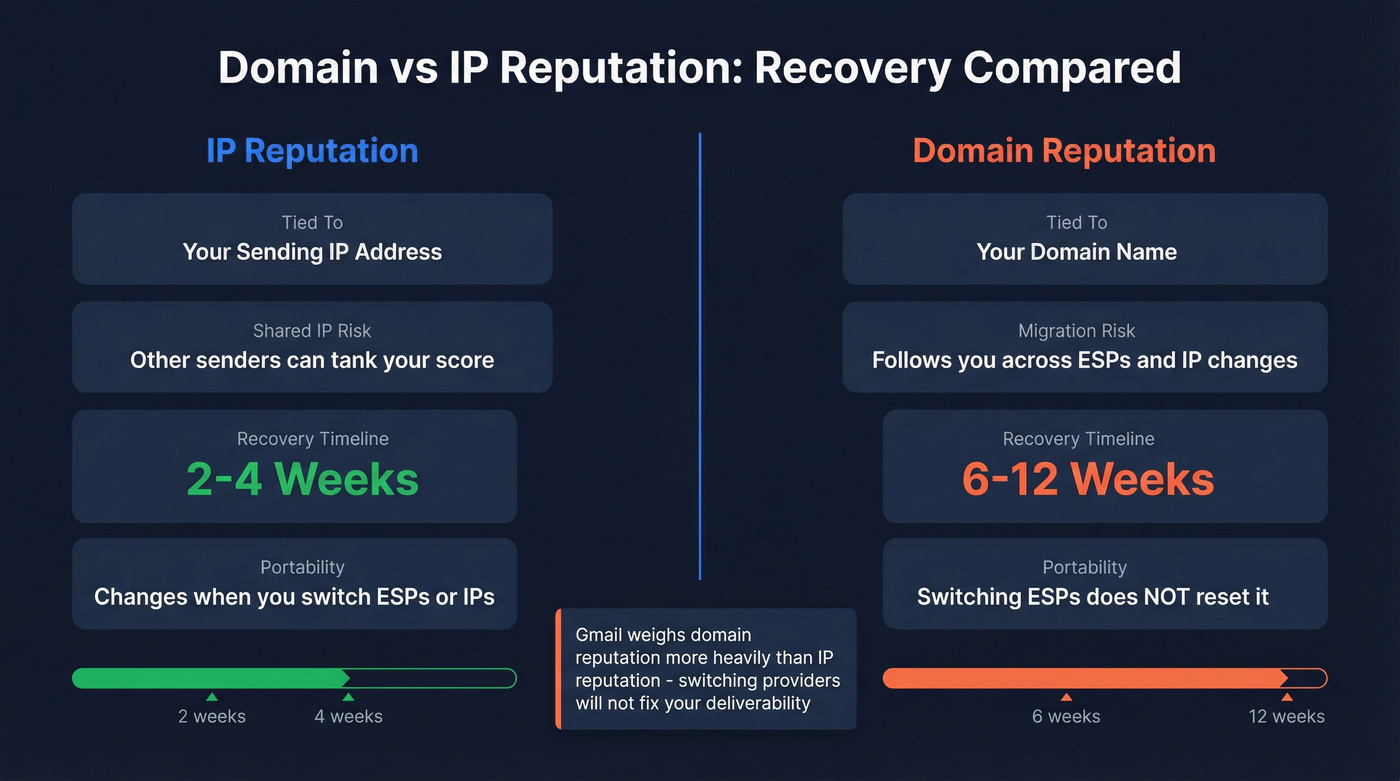
IP reputation is tied to your specific sending IP. On shared IPs, other senders affect your score. On dedicated IPs, it's all you. IP reputation recovers in 2-4 weeks with clean sending behavior.
Domain reputation is stickier. It follows you across IP changes and ESP migrations. Gmail weighs domain reputation more heavily than IP reputation - switching ESPs doesn't magically fix deliverability. Sender reputation recovery for domains takes 6-12 weeks, and there aren't shortcuts.
Let's be honest about what we've seen working with outbound teams: most who get blacklisted don't have a sending problem. They have a data problem. If your bounce rate is above 5%, no amount of automated email warmup tooling or ESP switching will save you. Fix the data first, and half your deliverability issues disappear overnight.
The Full Recovery Playbook
Phase 1 - Stop and Diagnose (0-24 Hours)
Stop all sending from the affected domain and IP. Run MXToolbox and Spamhaus Lookup. Document which blocklists flagged you, which IPs and domains are affected, and save the specific bounce codes. You'll need this for blocklist removal requests.
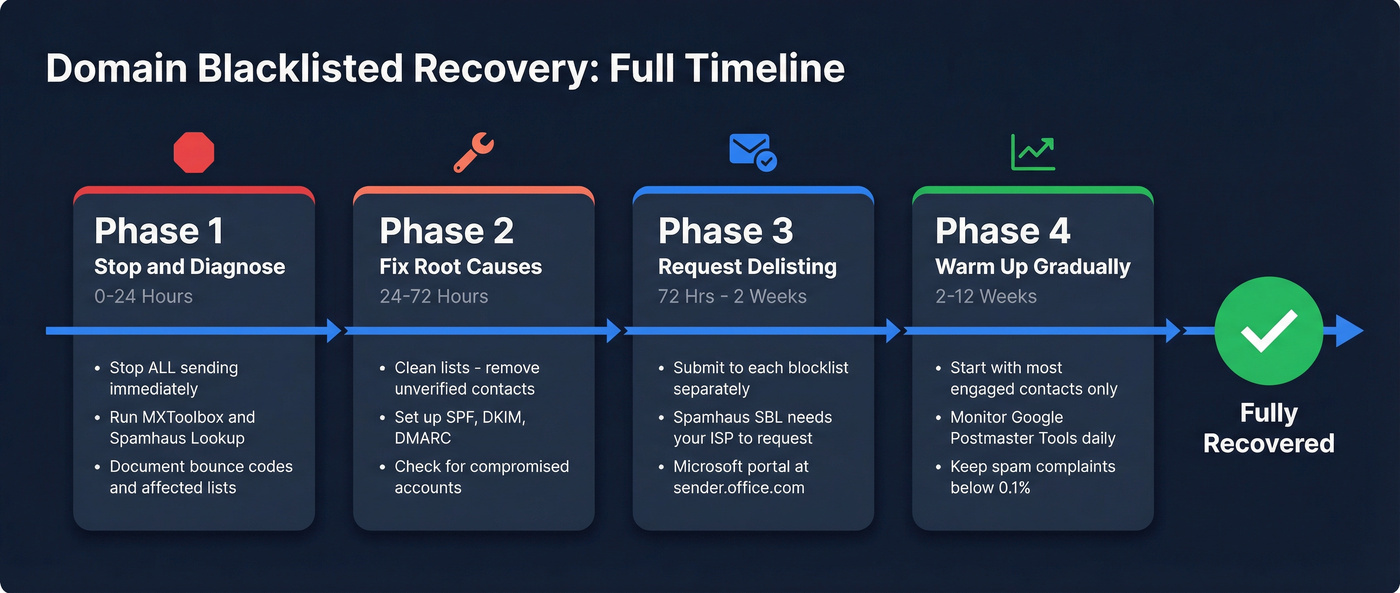
Phase 2 - Fix Root Causes (24-72 Hours)
No blocklist operator will delist you if you haven't fixed what got you listed. Spamhaus is explicit - removal requests without remediation lead to immediate relisting. We've seen teams get relisted within 48 hours because they skipped this step.
Clean your lists aggressively. Remove every unverified contact, every bounced address, and every contact that hasn't engaged in 90+ days. Then lock down authentication:
- SPF:
v=spf1 include:_spf.google.com include:sendgrid.net -all - DKIM: Generate and publish through your ESP
- DMARC:
v=DMARC1; p=quarantine; rua=mailto:dmarc@yourdomain.com
Check for compromised accounts, malware, and open proxies. Verify PTR/rDNS records resolve correctly.
Phase 3 - Request Delisting (72 Hours - 2 Weeks)
Each blocklist has its own process, timeline, and quirks:
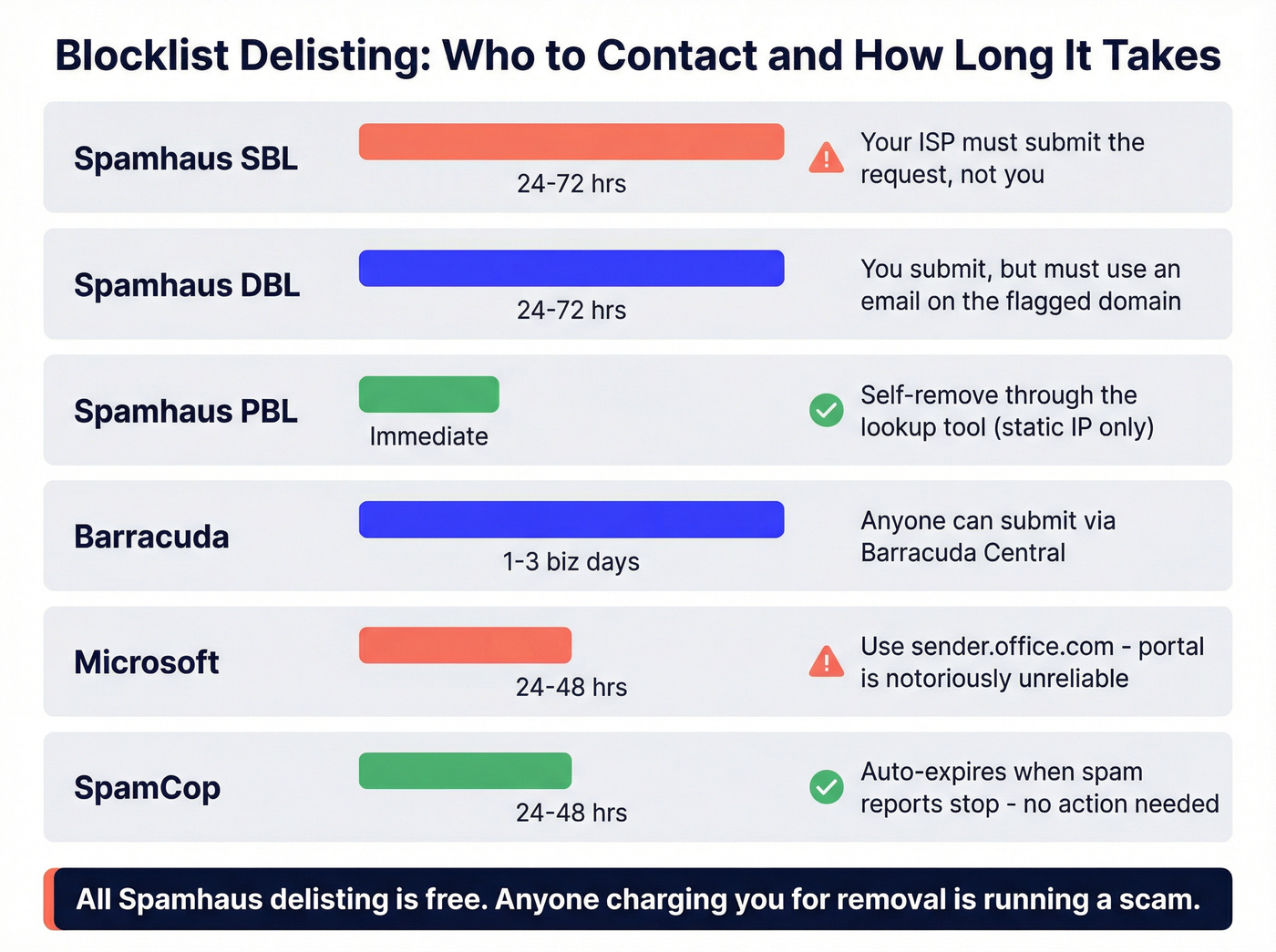
| Blacklist | Who Requests | Timeline | Notes |
|---|---|---|---|
| Spamhaus SBL | ISP/network owner | 24-72 hrs | Free; use the Spamhaus Removal Center |
| Spamhaus DBL | Domain owner | 24-72 hrs | Must use an email on the flagged domain |
| Spamhaus PBL | Self-remove | Immediate | Self-remove for a single static IP via the lookup tool |
| Barracuda | Anyone | 1-3 biz days | Submit via Barracuda Central |
| Microsoft | Anyone | 24-48 hrs | Office 365 Anti-Spam IP Delist Portal (sender.office.com) |
| SpamCop | Auto-expire | 24-48 hrs | Expires when spam reports stop |
| SURBL/URIBL | Domain owner | 2-7 days | Submit via their website |
| UCEPROTECT | Auto-expire or request | 1-7 days | IP-based |
For Spamhaus, the critical detail is knowing which list you're on. SBL requires your ISP or network owner to submit - they won't accept requests from you directly. DBL lets domain owners request removal, but you must use an email address on the flagged domain, not a Gmail or Yahoo address. PBL is the easiest - self-remove through the lookup tool if you're on a static IP.
All Spamhaus delisting is free. Anyone charging you for Spamhaus removal is running a scam.
The Microsoft delisting portal is the most frustrating experience in email deliverability. I'm not exaggerating. The captcha fails intermittently, submissions sometimes vanish into a void, and the consensus across Email Geeks and r/emaildeliverability is that the portal is unreliable at best. If it doesn't work after two attempts, contact Microsoft support directly with your IP and bounce codes.
Phase 4 - Email Warmup After Blacklist (2-12 Weeks)
Don't blast your full list on day one. Start with your most engaged segment - people who opened or clicked in the last 30 days. Ramp volume gradually week over week.
Google Postmaster Tools is free and shows domain reputation, spam rates, and authentication status. Watch for your domain reputation to climb from Bad to Low to Medium to High. You'll need at least 100 emails per day to Gmail before data populates. Keep spam complaint rates below 0.1%.
For Microsoft, set up SNDS (Smart Network Data Services). It requires a dedicated IP and only shows data for IPs sending at least 100 messages in a single day, but it gives you 90 days of history. Red on the Filter Result metric means over 90% of your mail is being filtered as spam - that's your signal to slow down and keep cleaning.
Recover or Start Fresh?
If it's your primary business domain - the one on your website, your contracts, your brand - you recover it. Always. The cost of abandoning an established domain is enormous, and 6-12 weeks of careful warmup is worth it.
For secondary cold email domains, the calculus flips. If you're running outbound from dedicated sending domains (as you should be), rotating to a fresh domain is faster and cheaper than waiting months for reputation repair. New domain, new warmup, clean data from day one. Stack Optimize built to $1M ARR using Prospeo's verified data with 94%+ deliverability, sub-3% bounce rates, and zero domain flags across all clients - proof that starting clean and staying clean works at scale.
Skip the recovery process entirely for throwaway sending domains you've had for less than 90 days. The warmup time alone isn't worth it when a fresh domain costs $12.
Prevention Checklist
Never cold email from your primary domain. Use dedicated subdomains or separate domains for outbound. If they get burned, your main domain stays clean.
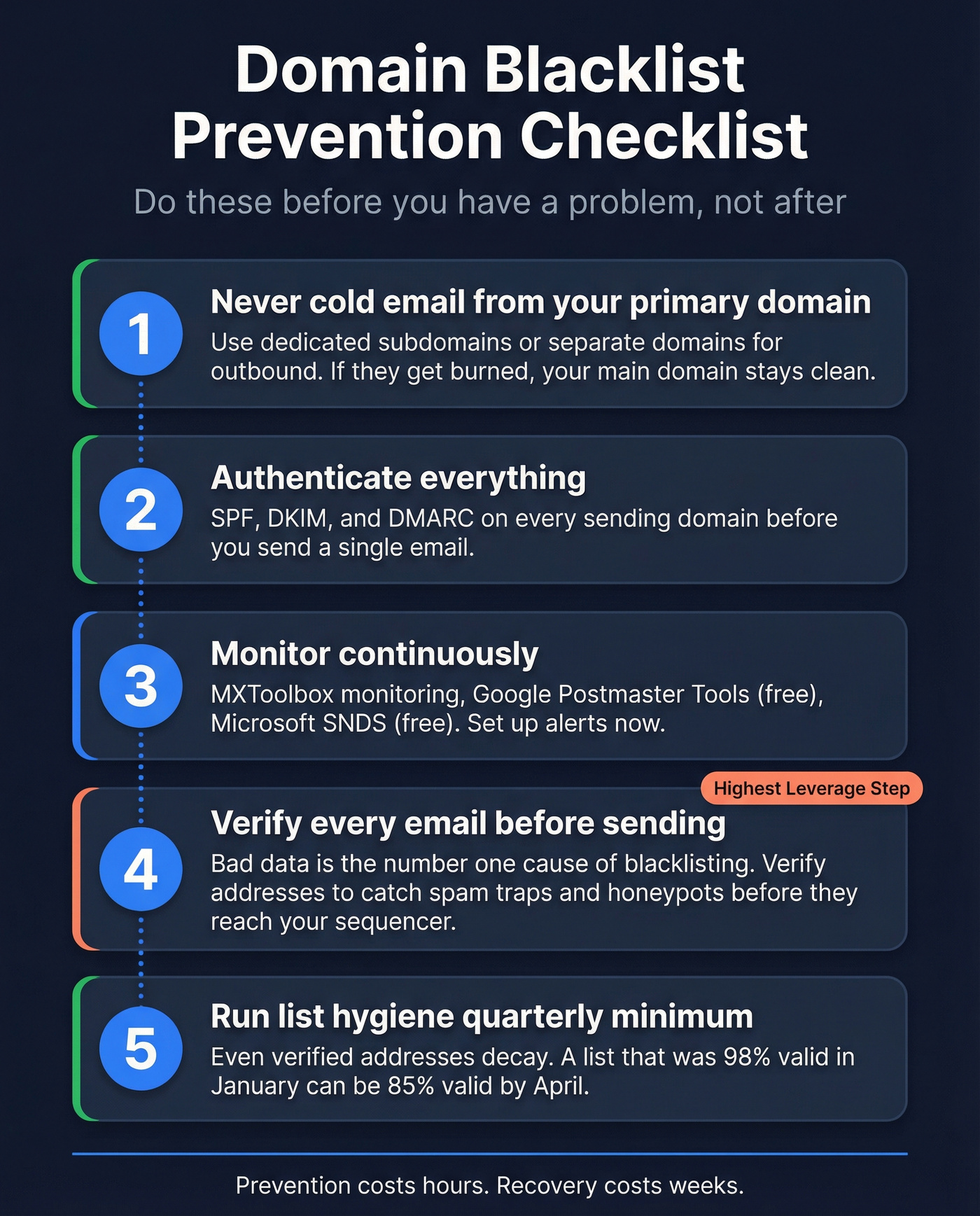
Authenticate everything. SPF, DKIM, and DMARC on every sending domain before you send a single email. Validate records with MXToolbox.
Monitor continuously. MXToolbox monitoring runs around ~$930/year across 100+ blocklists with alerts. Google Postmaster Tools and Microsoft SNDS are free. GlockApps offers a free 14-day trial covering 30+ blocklists. Set these up before you have a problem, not after.
Verify every email before it enters your sending queue. This is the single highest-leverage prevention step. Bad data is the leading cause of blacklisting, and the industry average data refresh cycle is 6 weeks - meaning a lot of databases serve stale data by the time you send. Prospeo refreshes all records on a 7-day cycle, and its 5-step verification catches spam traps and honeypots before they reach your sequencer.
Run list hygiene quarterly at minimum. Even verified addresses decay. People change jobs, companies shut down, domains expire. A list that was 98% valid in January can be 85% valid by April.

You just spent weeks delisting your domain and warming it back up. Don't repeat the cycle with another unverified list. Prospeo refreshes 300M+ profiles every 7 days - not every 6 weeks like the provider that got you blacklisted. At $0.01 per email, clean data costs less than one day of lost pipeline.
Rebuild your sender reputation on data you can actually trust.
FAQ
How do I check if my domain is blacklisted?
Run your domain through MXToolbox - it checks 100+ blocklists instantly. Cross-reference with Spamhaus Lookup to identify the specific list (SBL, DBL, PBL) and the stated reason. Check both your domain and sending IPs separately.
How long does recovery take?
IP reputation recovers in 2-4 weeks with clean sending. Domain reputation takes 6-12 weeks. Individual blocklist delisting is faster - Spamhaus often clears within 24-72 hours, Microsoft within 24-48 hours.
Can I get blacklisted again after delisting?
Yes, and it happens fast. If you don't fix the root cause, most blocklists will re-list you within days. Spamhaus explicitly warns that removal requests without remediation lead to immediate relisting.
Should I abandon a blacklisted domain or recover it?
Recover your primary business domain - always. For secondary cold email domains, rotating to a fresh domain with verified data is often faster than the 6-12 week recovery timeline.
How do I prevent blacklisting from bad contact data?
Verify every email before sending using a provider with spam-trap and honeypot filtering built into the verification process. A 7-day data refresh cycle keeps addresses current - the industry average of 6 weeks means most databases serve stale data that triggers traps.