The Best Email Tracking Apps That Actually Work in 2026
Your email tracking app says 45% of prospects opened your last sequence. Your reply rate tells a different story - 2.3%, same as last quarter. Email marketing still returns $36 for every $1 spent, but that ROI evaporates when you're making decisions on phantom data. Apple Mail now accounts for roughly 46% of email clients and inflates every open rate it touches.
Here's what's actually worth using, what's broken, and what to measure instead.
Our Picks
- Best free Gmail tracker: Mailtrack - unlimited open tracking at $0, with a visible branding stamp on free emails.
- Best for sales teams: Yesware - unlimited tracking plus a real Salesforce workflow from $15/seat/month on annual billing.
- Best for data quality: Prospeo - 98% data quality so your tracking data reflects real engagement, not bounces.
Why Open Rates Are Broken
Apple Mail Privacy Protection preloads tracking pixels via Apple's proxy servers - firing the pixel whether or not anyone reads the email. Phantom opens, inflated dashboards, wasted follow-ups.
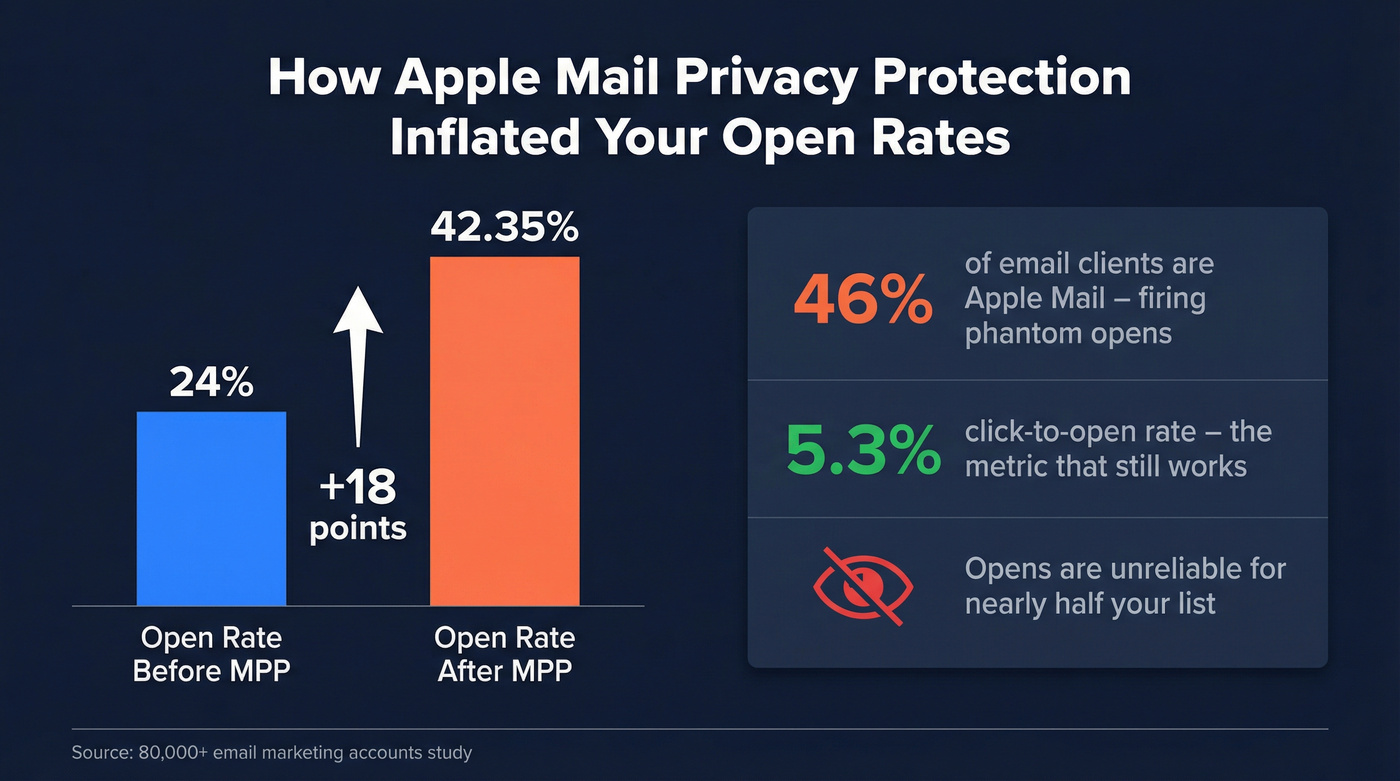
A study of 80,000+ email marketing accounts found open rates jumped 18 points after MPP rolled out, pushing the average to 42.35%. That number looks great in a report. It means almost nothing in practice.
The metric that still works: click-to-open rate sits at 5.3% across industries. Clicks, replies, and conversions are intentional actions MPP can't fake. If your tracker only reports opens, you're flying blind for nearly half your list.
How Email Tracking Works
Open tracking embeds a tiny 1x1 transparent pixel in the email's HTML. When the recipient's client loads images, the pixel fires a request back to the tracker's server, logging the open with a timestamp. Click tracking rewrites every link through a redirect server - when someone clicks, the redirect logs the event and forwards them to the original URL. This is why click data stays reliable even with MPP: it requires a deliberate human action.
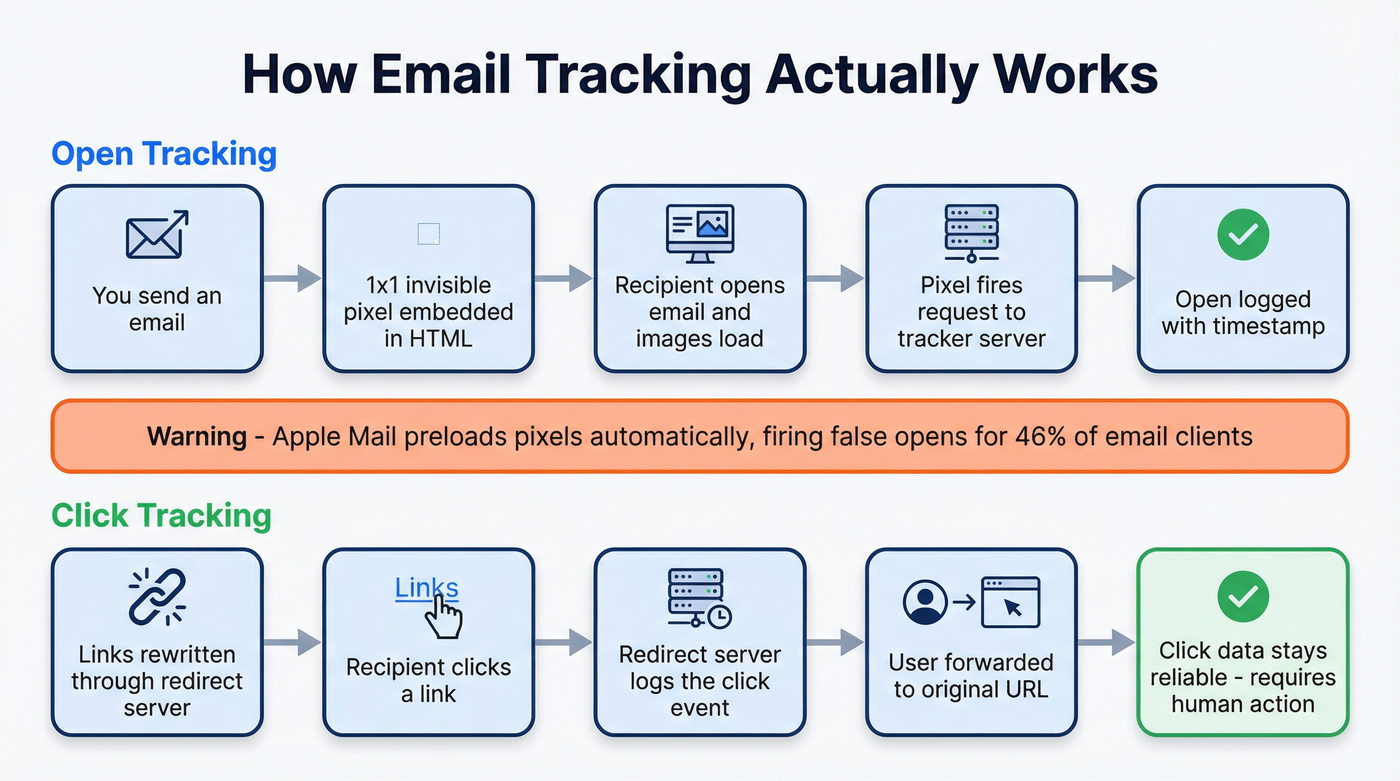
Some tools also offer email logging - recording the email body and metadata via BCC - which is separate from open/click tracking and useful for CRM compliance.
Email Tracking App Comparison
| Tool | Best For | Gmail | Outlook | Free Tier | Paid From |
|---|---|---|---|---|---|
| Mailtrack | Free Gmail tracking | ✓ | ✗ | Unlimited (branded) | $2.99/user/mo (yearly) |
| Yesware | Sales + Salesforce | ✓ | ✓ | Free (24-hr window) | $15/seat/mo (annual) |
| HubSpot Sales Hub | HubSpot CRM users | ✓ | ✓ | Yes | $15/seat/mo |
| SalesHandy | Free Gmail tracking | ✓ | ✗ | Unlimited | $36/mo |
| Right Inbox | Budget Gmail add-on | ✓ | ✗ | Limited | $7.95/mo |
| Mailbutler | Cross-client teams | ✓ | ✓ | 14-day trial | $4.95/mo |
| Streak | Gmail CRM | ✓ | ✗ | Yes | $59/user/mo |
| Boomerang | Scheduling-first | ✓ | ✓ | 10 emails/mo | $4.98/mo |
| Mixmax | Gmail sequences | ✓ | ✗ | Yes | $12-29/mo |
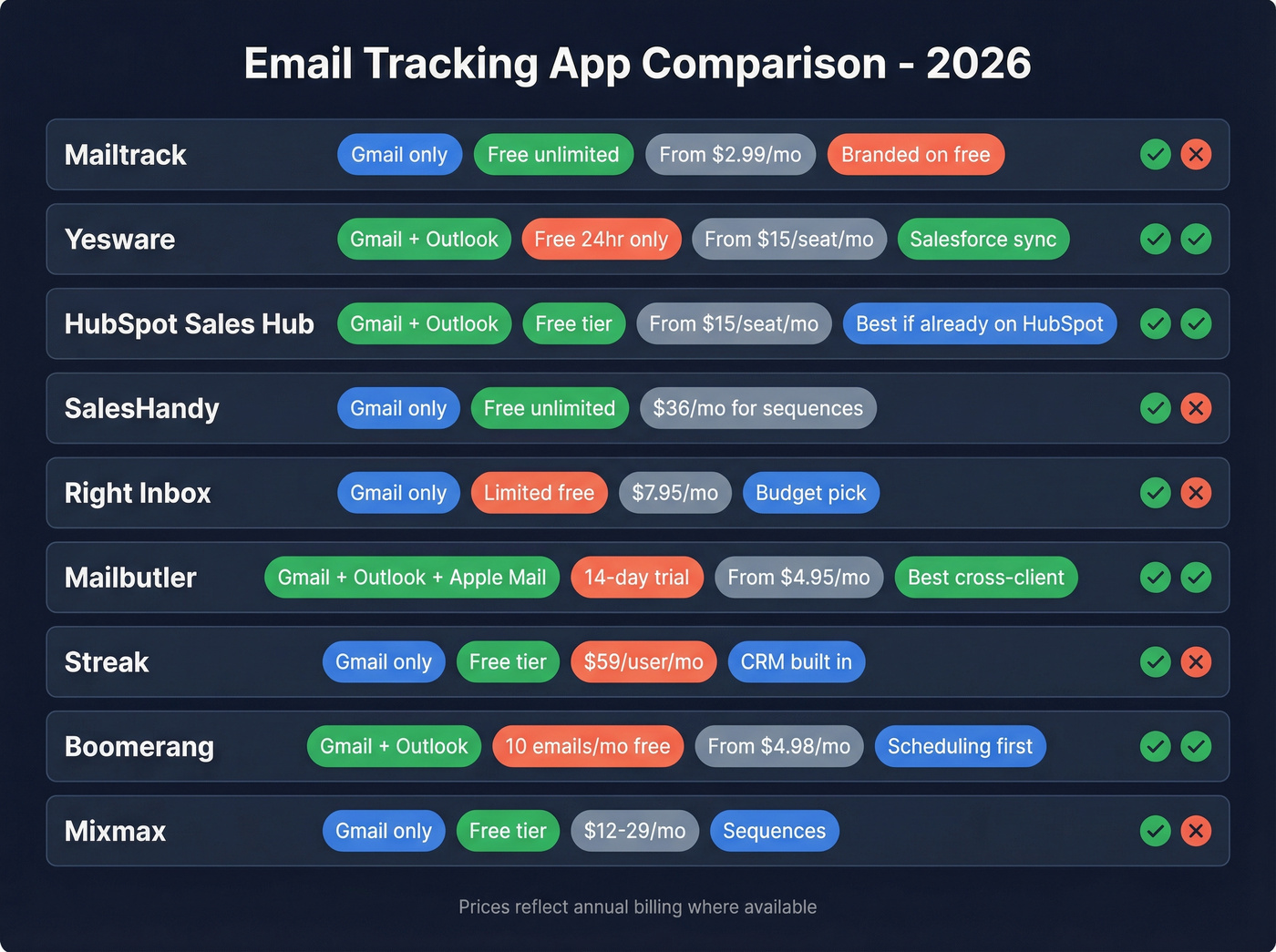

Open tracking is only useful when you're emailing real inboxes. Prospeo's 98% email accuracy and 7-day data refresh mean your tracking dashboards reflect actual engagement - not bounces and dead addresses inflating your numbers.
Fix your data before you track another open.
The Best Email Tracking Tools
Mailtrack
Use this if you're a freelancer or solo rep who just needs to know whether a prospect opened your email. The free plan gives you genuinely unlimited open tracking - no credit limits, no 30-day cutoff.
Skip this if you're sending cold outreach. Every free email gets stamped with Mailtrack branding, and in our testing, that stamp kills response rates on cold emails to senior buyers. Premium runs $5.99/user/month on monthly billing or $2.99/user/month on yearly billing and removes the stamp. It's CASA-compliant with yearly security reviews. Gmail only - no Outlook, no CRM sync.
The branding issue is the number one complaint on Reddit threads about Mailtrack, and for good reason. If you're emailing people who don't know you, that stamp screams "I'm tracking whether you open this." Not a great first impression.
Yesware
We've tested most of these extensions side by side, and Yesware is the one that disappears into a sales team's workflow the fastest. The Pro plan at $15/seat/month on annual billing gives you unlimited open, link, and attachment tracking plus reporting dashboards. It works on both Gmail and Outlook, which already puts it ahead of most competitors.

The free plan deserves a warning: tracking and feed features are limited to emails sent less than 24 hours ago, which makes it more of a demo than a real tool. Premium ($35/seat/month billed annually) removes Yesware branding and adds team features. Enterprise ($65/seat/month billed annually) is where you get the deepest Salesforce sync plus security controls. Skip this if you're a solo user who doesn't need CRM workflows - you're overpaying for infrastructure you won't touch.
HubSpot Sales Hub
Don't buy HubSpot for email tracking. But if you're already running HubSpot CRM, turn it on - basic tracking is included free. Paid plans start at $15/seat/month and layer in sequences, templates, and meeting scheduling. Everything logs directly to contact records without a separate integration.
SalesHandy
Unlimited free email tracking on Gmail. The limitations show up elsewhere: Outlook users can't use the free version, and sequences start at $36/month. For pure open/click notifications at zero cost, it's hard to beat.
Right Inbox
Scheduling, tracking, and email reminders in one extension for $7.95/user/month. Gmail-only, doesn't try to be a CRM. A solid utility extension under $8/month.
Mailbutler
Here's the thing about most trackers: they only work on Gmail. Mailbutler works across Gmail, Outlook, and Apple Mail via its dedicated extension. If your team is split across email clients, this is one of the few options that won't leave half the team stranded. Plans run from $4.95/month up to $32.95/month for the Business tier.
Streak
Gmail-native CRM with free tracking built in. Paid plans start at $59/user/month. At that price, you're paying for pipeline management - Streak is overpriced if all you need is tracking.
Boomerang
Scheduling-first tool with tracking as a bonus. Free tier covers 10 emails/month, paid from $4.98/month. Best for people who need send-later and follow-up reminders more than open tracking.
Mixmax
Gmail-only. Free plan available, paid from $12-29/user/month. Worth it if you're already running Mixmax sequences - otherwise, cheaper options exist for tracking alone.
Best Trackers for Outlook
Many trackers are Gmail-first, which leaves Outlook users with fewer options. The strongest picks: Yesware for full tracking and Salesforce workflows, Mailbutler for cross-client coverage, and Boomerang for scheduling plus tracking on both clients. HubSpot Sales Hub also supports Outlook through its add-in.
If you're an Outlook-only shop, start with Mailbutler or Yesware. Many popular extensions don't support Outlook at all, and you'll save yourself the frustration of installing something only to find out it's Gmail-exclusive.
Is Email Tracking Legal?
Tracking pixels count as personal data processing under GDPR, requiring consent that's "freely given, specific, informed and unambiguous." France's CNIL went further with a draft recommendation requiring explicit prior consent for individual-level open tracking. In the US, 19 states now have comprehensive privacy laws with varying opt-out requirements.
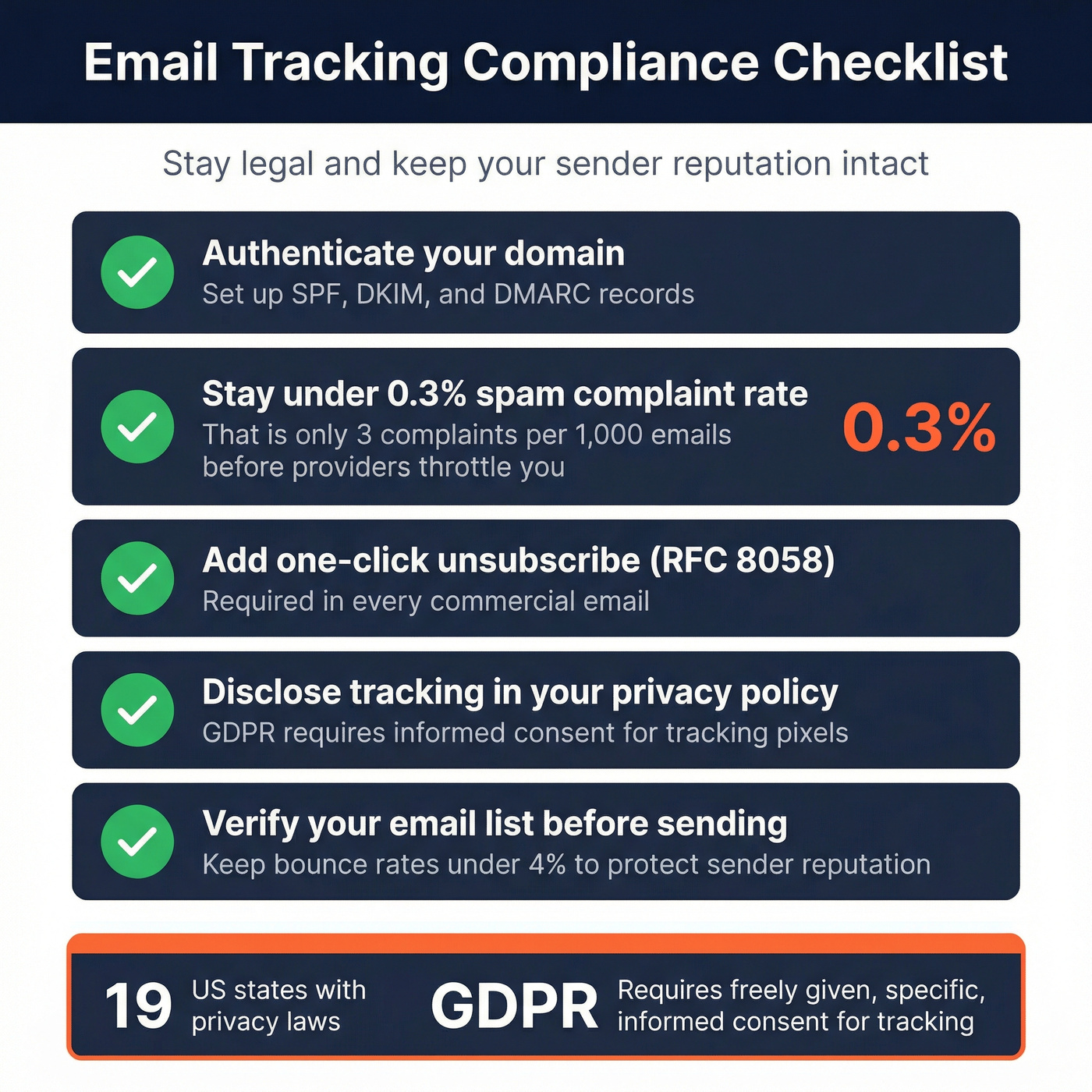
Quick compliance checklist: authenticate your domain with SPF, DKIM, and DMARC. Stay under the 0.3% spam complaint threshold - that's 3 complaints per 1,000 emails before providers throttle you. Include one-click unsubscribe (RFC 8058) in every commercial email, and disclose tracking in your privacy policy.
How to Choose the Right Tracker
Let's be honest: if your average deal size is under five figures and your list is under 1,000 contacts, a free tracker plus verified emails will outperform any $50/seat platform. Most teams overspend on tracking infrastructure and underspend on data quality.
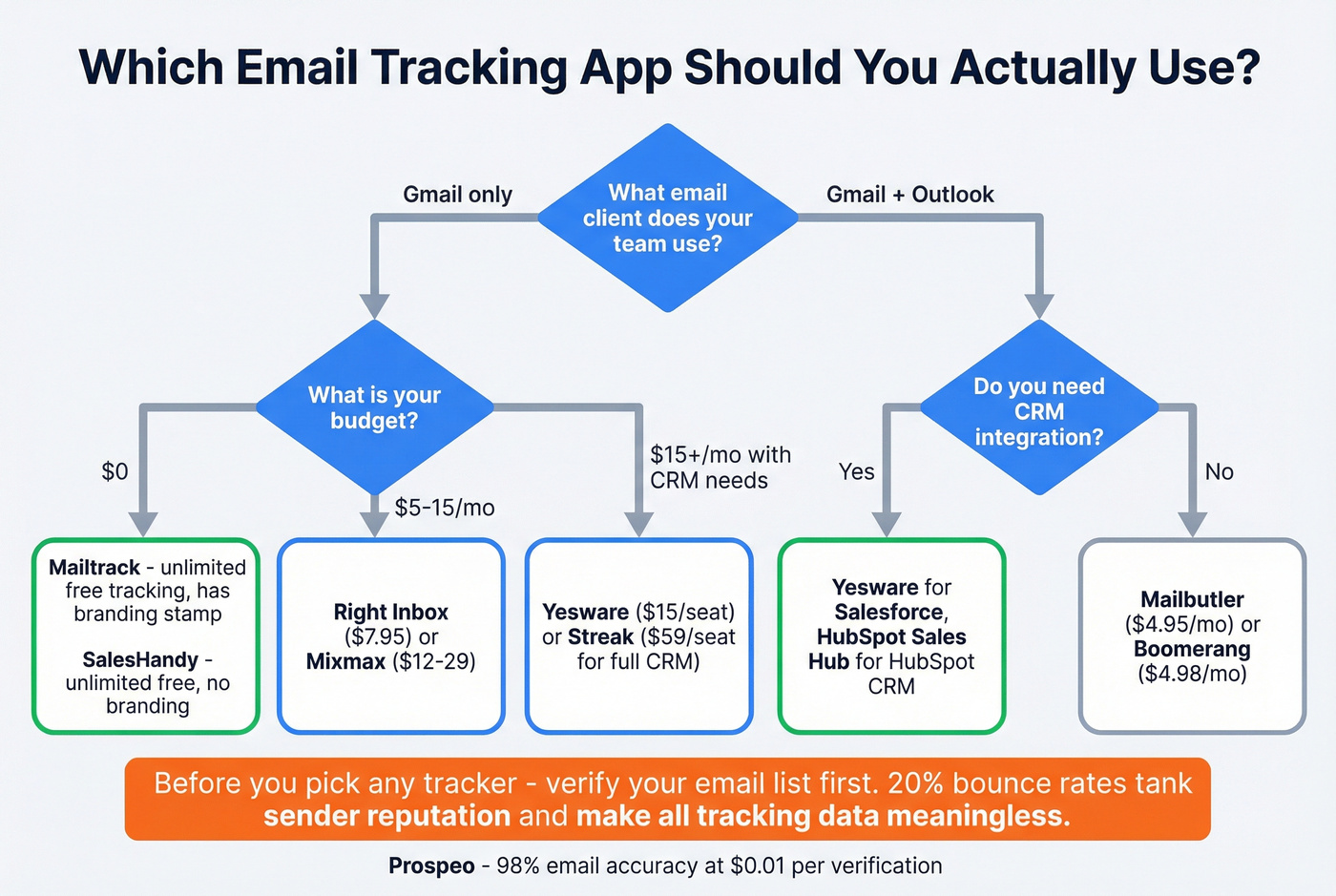
When evaluating any tracker, a few features separate useful tools from noise:
Custom tracking domains top the list. Generic tracking domains get flagged by spam filters, and tools that let you use your own domain protect deliverability. Click tracking matters more than open tracking post-MPP - opens are unreliable, clicks are intentional. CRM integration is non-negotiable for teams; if tracking data doesn't flow into Salesforce or HubSpot automatically, reps won't use it. Check cross-client support before you commit, because Gmail-only tools leave Outlook users stranded. And test free tiers carefully - some are genuinely useful, others are 24-hour demos wearing a "free" label.
The single highest-leverage move we've seen, though, is verifying your list before you send. Tracking is meaningless if 20% of your emails bounce. Prospeo's 5-step verification process catches invalid addresses, spam traps, and honeypots before they tank your sender reputation - 98% accuracy across 143M+ verified emails. One of our customers, Snyk, dropped their bounce rate from 35-40% to under 5% after switching. Clean data makes every downstream metric from your email tracking app more trustworthy.

Every bounce is a phantom signal polluting your tracking data. Prospeo's 5-step verification eliminates bad emails before you hit send - so your click rates, reply rates, and conversion metrics tell the truth. At $0.01 per email, clean data costs less than one wasted follow-up.
Stop tracking emails that never land. Start with verified contacts.
FAQ
Do tracking apps work with Apple Mail Privacy Protection?
Open tracking is unreliable for Apple Mail users - roughly 46% of email clients. Focus on click tracking and reply rates instead, which require intentional action that MPP can't fake.
What's the best free tracker for Gmail?
Mailtrack for unlimited tracking with branding, SalesHandy for unlimited tracking without branding. Both are Gmail-only, so Outlook users should look at Yesware or Mailbutler instead.
Can email tracking hurt deliverability?
Yes. Shared or generic tracking domains trigger spam filters. Use tools with custom tracking domains, stay under the 0.3% complaint threshold, and verify your list before sending to keep bounce rates under 4%.
Do I need to verify emails before tracking them?
If 20% of your list bounces, your sender reputation tanks and future emails land in spam. Verify addresses before sending so tracking metrics reflect real engagement, not delivery failures.
Is email tracking legal under GDPR?
Tracking pixels require informed consent under GDPR. France's CNIL recommends explicit prior consent for individual-level tracking. In the US, 19 states have privacy laws with varying requirements. Authenticate your domain and include one-click unsubscribe in every commercial email.