How to Use Custom Objects in Sales Automation (Without Creating Technical Debt)
A RevOps lead builds a custom object on Monday. By Friday, it's wired into three workflows, two dashboards, and a sequence trigger. Six months later, nobody remembers why it exists, the schema can't be renamed, and every new hire asks what "CObj_PartnerRef_v2" means.
Sales automation custom objects are powerful - they let you model data your CRM wasn't designed for. But they're also one of the fastest ways to create technical debt that haunts your org for years. You need relational data to run sophisticated automations, but every custom object is a permanent architectural decision. In our experience, the biggest regret teams have isn't building the wrong schema - it's building it with bad data underneath. Here's when custom objects are worth it, how to implement them across platforms, and the mistakes that'll cost you later.
Before You Build Anything
- Most teams don't need custom objects. Custom fields handle 70%+ of use cases. If your data is a simple attribute - a flag, a date, a category - use a field.
- Use custom objects when you have one-to-many or many-to-many relationships where the "many" side needs its own lifecycle: contracts, subscriptions, demos, campaign memberships.
- Platform tier matters. Salesforce supports custom objects across editions. HubSpot locks them behind Enterprise. ActiveCampaign lets all plans use custom objects imported by supported integrations, but Enterprise is required to create them via API or the Manage Data page.
- Data quality comes first. None of this matters if the contact data flowing into your objects is stale. Verify your data before building automations on top of it.
What Are Custom Objects in CRM?
Think of your CRM as a relational database with a friendlier interface. Standard objects - Contacts, Companies, Deals - are the tables your CRM ships with. Custom objects are tables you create yourself to model data that doesn't fit those defaults.
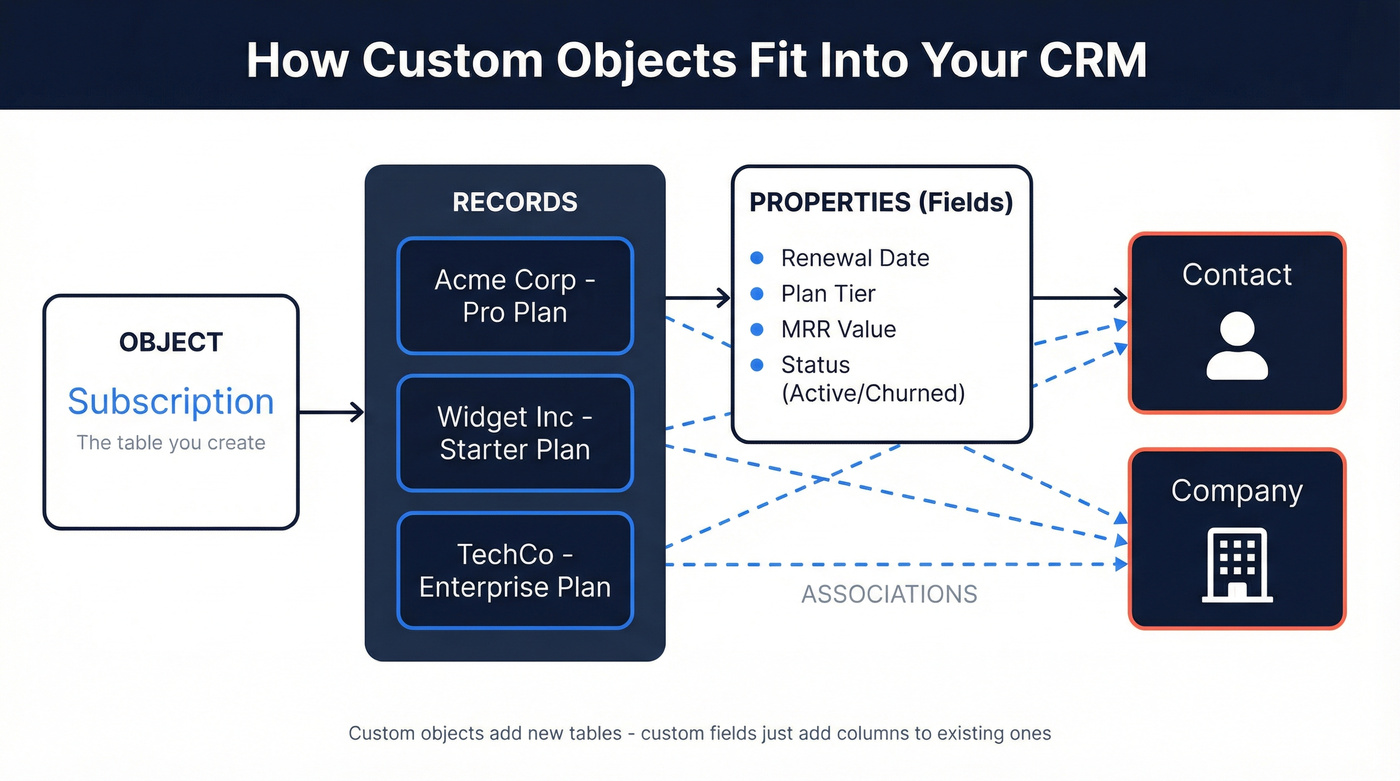
The architecture follows a consistent pattern: objects contain records, records have properties (fields), and associations link records across objects. A "Subscription" custom object might have records for each customer's subscription, properties like renewal date and plan tier, and associations linking each subscription to a Contact and a Company.
A custom field adds a column to an existing table. A custom object adds an entirely new table with its own records, properties, and relationships. That's a fundamentally different level of commitment.
Custom Objects vs. Custom Fields
The decision framework is simpler than most people make it:
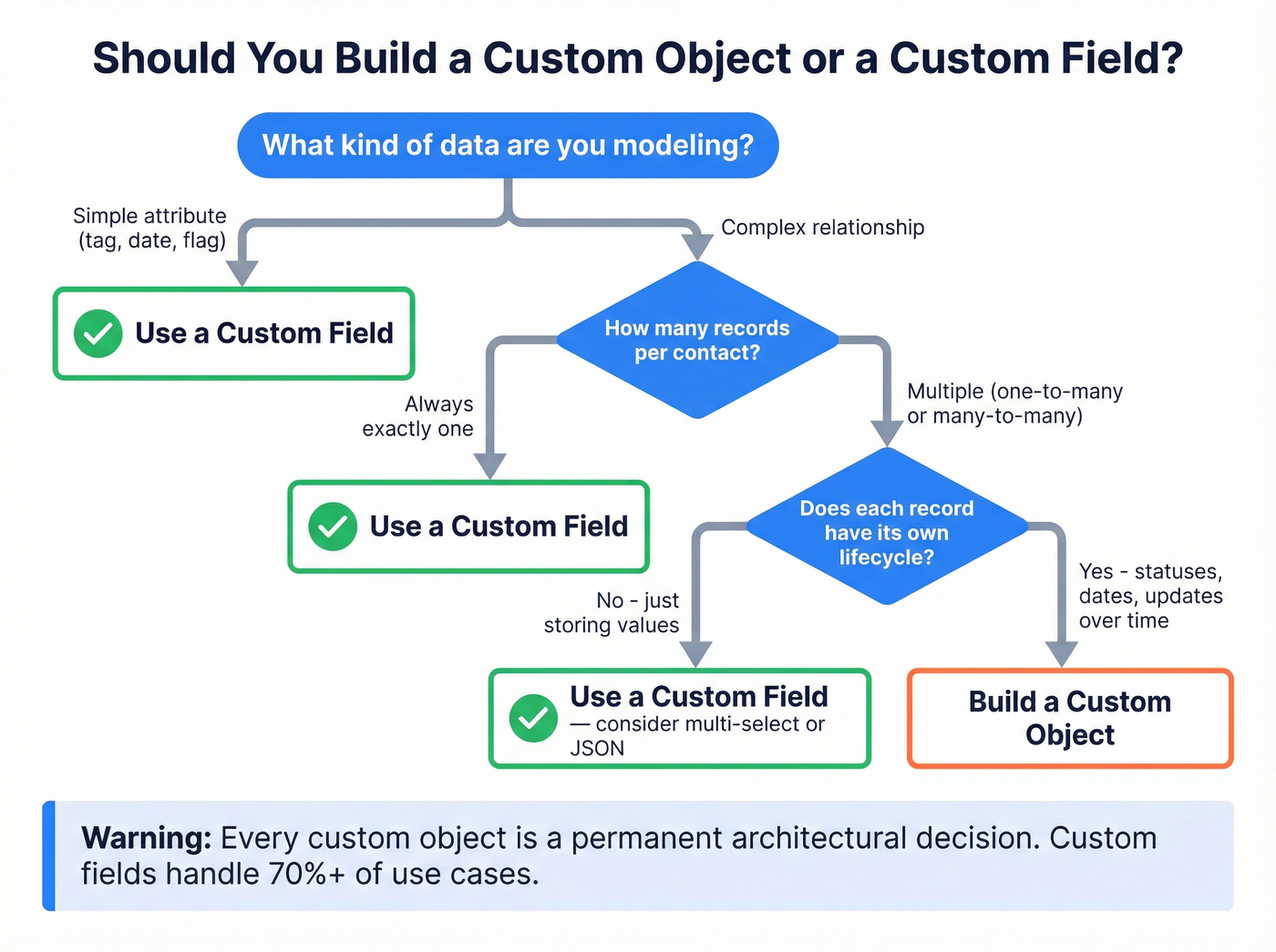
| Scenario | Custom Field | Custom Object |
|---|---|---|
| Simple attribute (tag, date, flag) | ✅ | ❌ |
| One-to-one relationship | ✅ | ❌ |
| One-to-many, each needs tracking | ❌ | ✅ |
| Many-to-many relationships | ❌ | ✅ |
| Data with its own lifecycle | ❌ | ✅ |
If a contact can have multiple contracts, each with renewal dates, terms, and statuses - that's a custom object. If you just need to flag whether someone's under contract, that's a custom field.
The danger zone is overloading standard objects. A Salesforce community discussion makes the case that custom objects give you control, support, and stability you lose when you pile fields onto standard objects already crowded by other packages. On the HubSpot side, teams routinely create 200+ custom properties when 40 would suffice, causing reporting bottlenecks and user confusion.

You just read it: data quality comes first. Every custom object, workflow trigger, and sequence automation depends on the contact data underneath. Prospeo's 7-day refresh cycle and 98% email accuracy mean the records flowing into your custom objects are verified - not six weeks stale like most providers.
Fix the data before you build the architecture.
Platform Implementation Guide
Here's how custom objects work across the four platforms that matter most for sales automation:
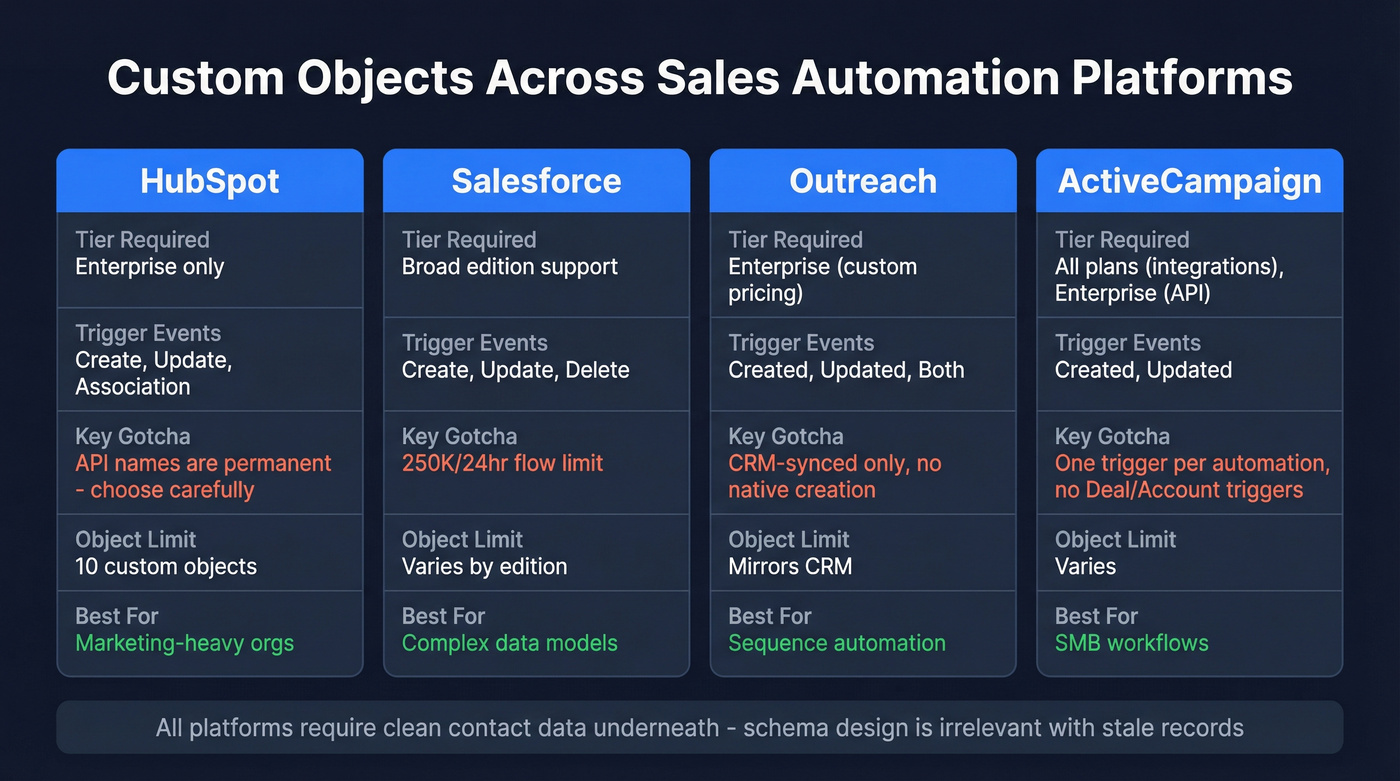
| Platform | Tier Required | Trigger Events | Key Limitation | Best For |
|---|---|---|---|---|
| HubSpot | Enterprise | Create, update, association | Names permanent | Marketing-heavy orgs |
| Salesforce | Broad edition support | Create, update, delete | 250K/24hr flow limit | Complex data models |
| Outreach | Enterprise (custom pricing) | Created, Updated, Both | CRM-synced only | Sequence automation |
| ActiveCampaign | All (integrations) | Created, Updated | One trigger per automation | SMB workflows |
HubSpot
Use this if you're already on Enterprise and need custom objects wired into marketing workflows. HubSpot workflows treat custom objects like standard objects - you can trigger on property changes, record creation, and association updates. Teams focused on personalization will find HubSpot's workflow builder particularly flexible for tailoring outreach based on object-level data.
Skip this if you're on Professional or below. Custom objects are Enterprise-only and require super admin access. Setup lives under Settings, then Data Management, then Objects.
Here's the thing about HubSpot custom objects: the internal API name you choose on day one is the name you're stuck with forever. You can change display labels, but not the underlying name. Unlike standard objects, custom objects don't ship with built-in Owner, team assignment, or Last Activity Date properties - you'll create those yourself and wire up automation to populate them. HubSpot caps association labels at 100 per object pair, which is generous but worth knowing before you design a complex schema.
Salesforce
Salesforce gives you the most flexibility for building a CRM custom data model. Record-Triggered Flows work on custom objects for create, update, and delete events, and you can auto-generate opportunity records when a custom object meets specific criteria - eliminating manual deal creation entirely.
The key distinction is between Fast Field Updates (before save, for same-record changes) and Actions and Related Records (after save, for cross-object updates, emails, and external calls). Set entry conditions on every flow. Triggering on all records of a custom object will eat through your 250K/24-hour schedule-triggered flow limit fast. A practitioner on StackExchange put it bluntly: if you don't have a Salesforce admin who understands Flow optimization, the power here will hurt more than help.
Outreach
Outreach doesn't create custom objects natively - it syncs them from your CRM. But the trigger system is where it gets genuinely useful. Three trigger events are available: Created, Updated, and Created or Updated. The setup path is Administration, then Workflow automations, then Triggers, then Add Trigger.
A practical example: when a Campaign Member is created and synced to Outreach, a trigger checks if Campaign equals "Q4 Product Launch Campaign," then adds the associated prospect to a sequence automatically. Outreach also supports Demo tracking objects and Storefront visit objects for teams running product-led motions. Testing tip: set the event to Updated with Run Indefinitely so you can validate repeatedly without creating new records each time.
ActiveCampaign
ActiveCampaign is the wild card. All plans can access custom objects via supported integrations, but Enterprise customers get API access and the Manage Data page for creating them directly. Deal and Account custom object automation triggers aren't available. The Created trigger runs Multiple Times and can't be adjusted, and you're limited to one trigger per automation.
Two gotchas that trip up developers. First, personalization tags in custom-object-triggered automations reference the trigger record, while in all other automations they reference the most recently created record - a subtle distinction that causes confusing bugs. Second, triggers appear under "Apps" for integration-imported objects versus "Objects" for API-created ones. A developer in the ActiveCampaign community reported that API-created records in developer sandboxes don't appear in the UI because sandboxes run on Professional plan settings. An ActiveCampaign employee confirmed they can manually enable it for testing, but it's a frustrating surprise mid-build.
Workflow Recipes Worth Building
Five workflows you can build this week:
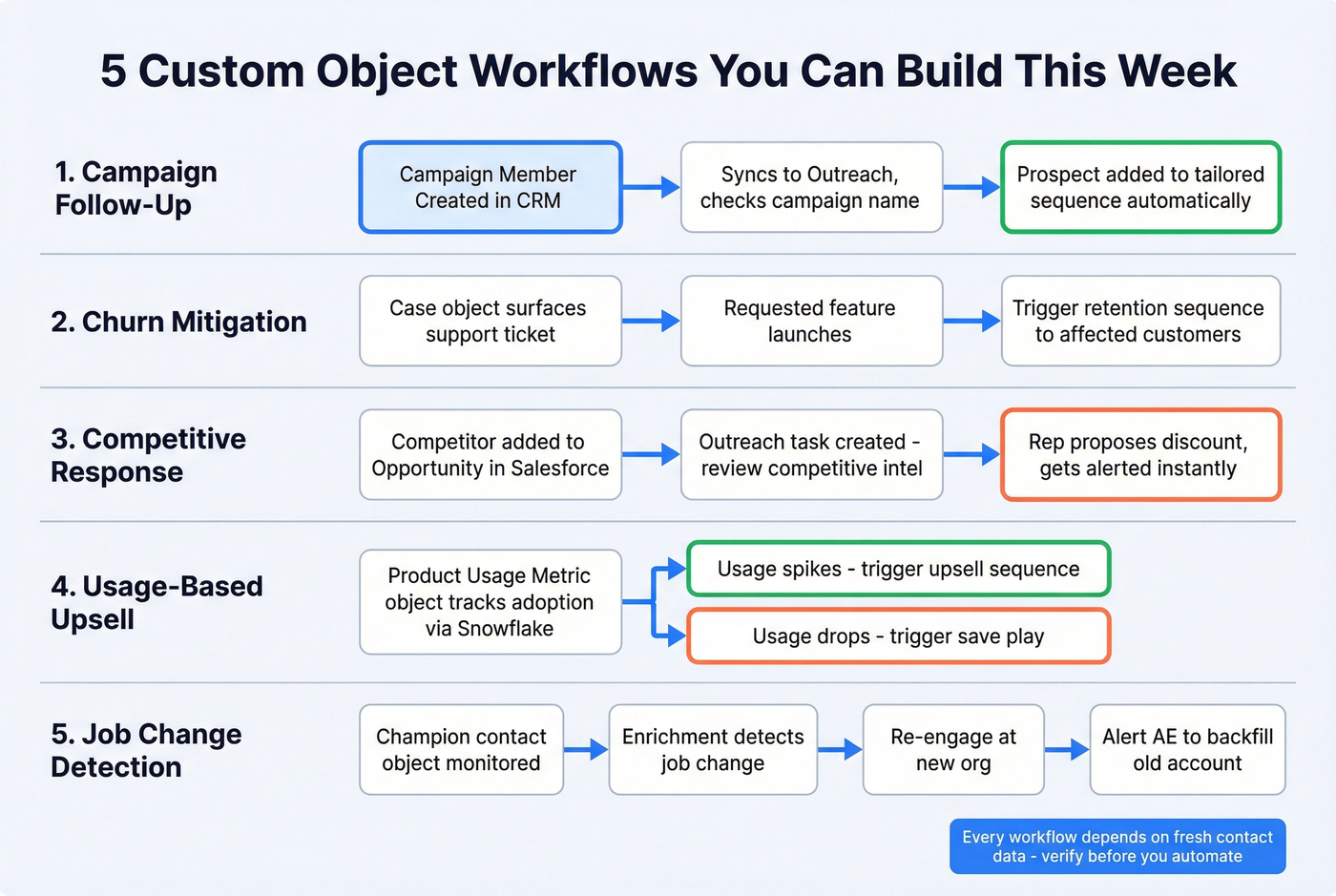
Campaign follow-up. Campaign Member Created in CRM syncs to Outreach, trigger checks campaign name, adds prospect to a tailored sequence. No manual list pulls, no delays.
Churn mitigation. A Case custom object surfaces support tickets to sellers. When a requested feature launches, trigger a retention sequence to affected customers automatically. Enrich custom object fields with verified contact data from Prospeo before your automation triggers fire - stale emails here mean bounced retention plays.
Competitive response. Opportunity Competitor added in Salesforce triggers an Outreach task to review competitive intel and propose a discount. Reps get alerted the moment a competitor enters the deal.
Usage-based upsell. A Product Usage Metric custom object tracks adoption data via Snowflake Connector. When usage spikes, trigger an upsell sequence. When it drops, trigger a save play.
Job change detection. Monitor a custom object tracking champion contacts. When enrichment data reveals a key contact has moved companies, trigger a sequence to re-engage them at their new org and alert the account owner to backfill the relationship at the original account. We've seen teams recover six-figure deals this way - but only when the underlying contact data was fresh enough to catch the move within days, not weeks.
Data Quality: The Part Everyone Skips
Let's be honest - nobody talks about this in custom object tutorials. You build a beautiful partner referral custom object. It triggers a sequence when a new referral comes in. The sequence fires and 23% of the emails bounce because the contact data was stale when it entered the system. Your schema was perfect. Your data wasn't.
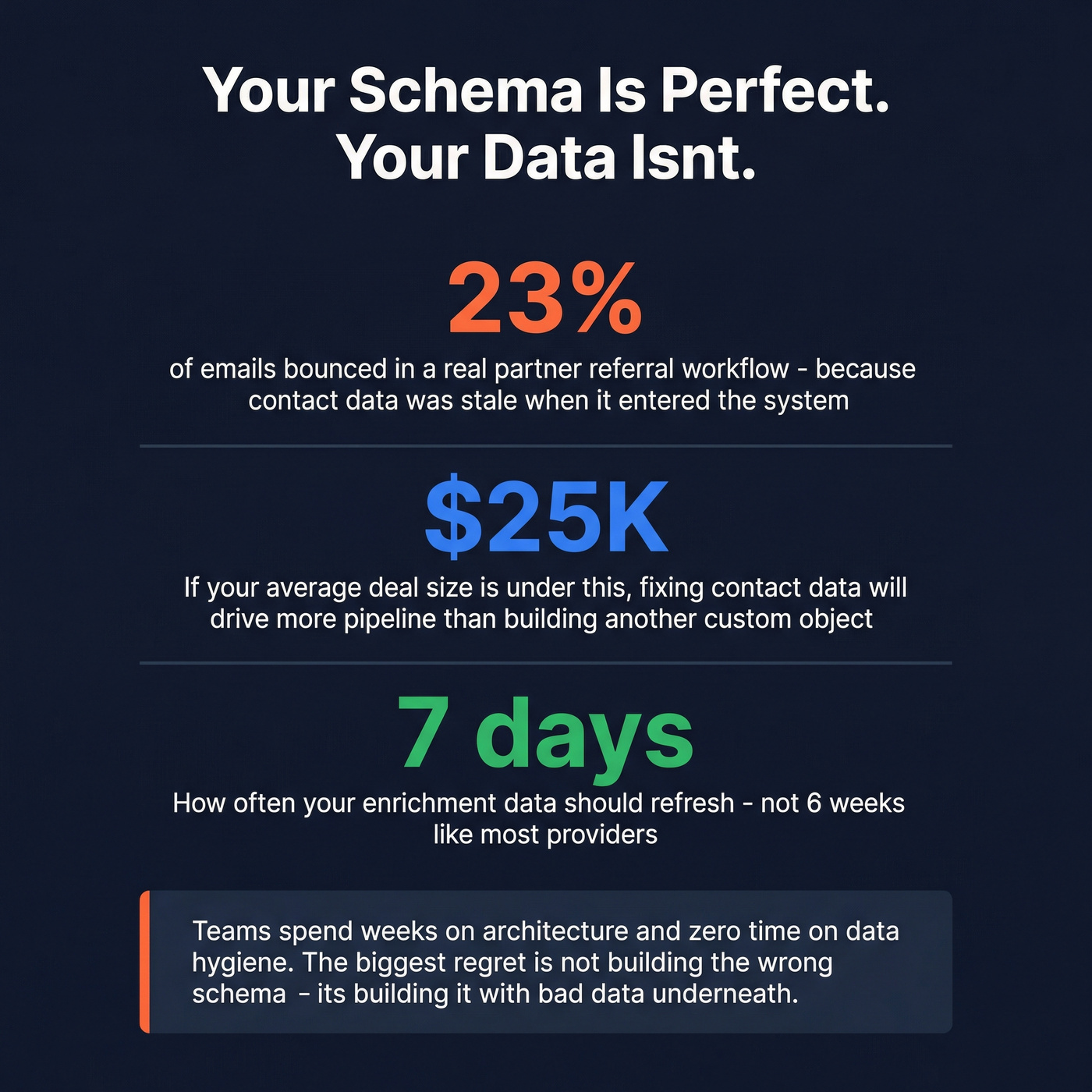
If your average deal size is under $25k, you'll get more pipeline lift from fixing your contact data than from building another custom object. Schema design is irrelevant if the data feeding your objects is garbage. We've seen this pattern repeatedly - teams spend weeks on architecture and zero time on data hygiene.
CRM hygiene automation is the missing layer most teams overlook. Instead of running manual data cleanup sprints, build automated workflows that validate, deduplicate, and enrich records on a recurring schedule. Prospeo handles this upstream with 98% email accuracy and a 7-day refresh cycle, so your custom object fields stay current without manual imports. Native integrations with HubSpot, Salesforce, and Outreach mean enriched data flows directly into your objects - no stale records triggering automations that damage your domain reputation.
Building CRM automations on custom objects that trigger sequences, create deals, or enrich records? Prospeo's CRM enrichment returns 50+ data points per contact at a 92% match rate - directly into Salesforce or HubSpot. No stale records breaking your flows.
Enrich your CRM records for $0.01 each before your automations touch them.
Mistakes That Create Technical Debt
Permanent names, permanent regret. Object names are permanent in HubSpot. Deleting and recreating means rewiring every workflow, report, and integration that touched it. Take naming seriously on day one.
Assuming parity with standard objects. Custom objects don't ship with Owner, team assignment, or Last Activity Date. You'll discover this when a VP asks "who owns these records?" and nobody has an answer.
Property sprawl. 200+ properties when 40 suffice. Every unnecessary property is a reporting bottleneck and a training burden for new hires.
No governance cadence. Run monthly schema audits and quarterly stakeholder reviews. Without them, nobody knows what "CObj_Legacy_Test_v3" does six months later. The consensus on r/salesforce is that undocumented custom objects are the number-one cause of CRM migration nightmares.
Ignoring plan gating. Designing workflows around Enterprise features before confirming your tier supports them. Especially painful in ActiveCampaign sandboxes where the behavior differs from production.
FAQ
Do I need Enterprise to use custom objects?
Salesforce supports custom objects across editions. HubSpot requires Enterprise plus super admin access. ActiveCampaign users on any plan get custom objects through supported integrations, but creating them via API or Manage Data requires Enterprise.
Can I rename a custom object after creating it?
In HubSpot, no - internal API names are permanent. You can change display labels only. In Salesforce, you can rename objects and update API names, giving you more flexibility to correct early mistakes.
How do I keep custom object data accurate?
Use an enrichment tool with a short refresh cycle and pair it with automated deduplication workflows. The combination of fresh data flowing in and automated cleanup catches most quality issues before they trigger downstream problems.
Can custom objects auto-generate opportunities in Salesforce?
Yes. Using Record-Triggered Flows, you can auto-generate opportunity records when a custom object - like a product usage metric or a qualified referral - meets defined criteria. This eliminates manual deal creation and ensures your pipeline reflects real buying signals in near real-time.