

Multi-Channel Sales Automation in 2026: The Operating System (Not "More Touches")
You can spend $15k/year on a sales engagement platform, another $10k on data, and still watch reps copy-paste the same "just bumping this" follow-up into three different places.
That's not multi-channel sales automation. It's stack sprawl with extra steps.
Real multi-channel is orchestration: one audience, one set of rules, and one place to measure what's actually working.
What you need (quick version)
Most teams don't have a channel problem. They've got an inputs + orchestration problem.

Checklist (the minimum viable system)
- One system of record (CRM): accounts, contacts, stages, attribution.
- One system of action (SEP / sequencer): tasks + sequences + logging.
- One data layer: list building, verification, enrichment, suppression.
- One signals layer: intent, website activity, job changes, engagement signals.
- One governance layer: owners, SLAs, QA, and "what happens when it breaks."
Two numbers to keep in your head:
- The average B2B sales stack is 8.3 tools per rep, and redundant overlap burns about $2,340 per rep/year.
- Coordinated multichannel typically improves meetings 2-4x vs email-only. Not because "more touches," but because you catch people where they actually respond and you stop each channel from operating in a silo.
Implement this week (no heroics)
- Pick one sequencer your team'll actually use.
- Create a suppression list (customers, open opps, unsubscribes, do-not-contact).
- Build one ICP list, then verify before sending.
- Ship one 10-14 touch sequence with branching.
- Track replies, meetings, and deliverability - not opens.
What multi-channel sales automation is (and isn't)
Multi-channel sales automation coordinates outreach across channels (email, calls, professional networks, SMS, video) with shared logic: who gets contacted, when, on what trigger, with what message, and what happens next.
It's orchestration, not "spam in more places."
In practice, the goal is a single decision engine that decides whether the next best step is an email, a call task, a professional-network message, or a video touch, and then writes every action back so the next step is based on truth, not vibes.
Here's a concrete example you can build in a normal CRM + SEP setup:
- IF Persona = CFO AND Intent topic = "cost optimization" AND Last touch < 7 days -> route to Sequence B (ROI proof + finance angle)
- ELSE -> Sequence A (pain + quick win)
- IF Pricing page view -> create "Call in 30 minutes" task + send 3-sentence email
- IF Reply (any) -> stop automation immediately, assign owner task, lock the account from re-enrollment for 30 days
- IF Hard bounce or opt-out -> set global DNC + add to suppression everywhere
Most teams add channels because email performance dips, then they "automate" by stacking more tools. That's how you end up with three sources of truth, broken attribution, and reps doing manual cleanup in the CRM.
The real constraint in 2026 is personalization at scale, and most orgs aren't close. A recent survey from Seamless.AI (May-June 2026, 64 sales pros) found only 21% fully personalize outbound emails. So the typical rollout becomes: generic email + generic connection request + generic voicemail. That's not a channel strategy. That's just louder noise.
Myths vs reality
- Myth: Multichannel means more touches. Reality: It means better timing + better routing. A call after a key page view beats five random follow-ups.

Myth: Automation replaces reps. Reality: Automation replaces admin work and forces consistent execution. Reps still win deals.
Myth: Tools are the strategy. Reality: The strategy is your ICP, your triggers, and your governance. Tools just enforce it.
Myth: "Omnichannel" is automatically better. Reality: If your data's wrong or your consent model's sloppy, omnichannel multiplies risk.
The operating model: orchestration layers (CRM, SEP, data, signals)
If you want this to work, you need a clean operating model.

I've watched teams buy a "best-in-class" engagement platform and still miss quota because nothing upstream (data) or downstream (measurement) was stable, so the system never got a fair shot.
The simplest taxonomy that holds up:
- CRM = system of record (the brain). It stores truth: accounts, contacts, lifecycle stage, ownership, consent flags, and outcomes.
- SEP / sequencer = system of action (the hands). It executes touches, creates tasks, and logs activity back to the CRM.
Now add two layers most teams underbuild:
- Data layer: verified emails/mobiles, enrichment, dedupe, suppression, routing fields.
- Signals/intelligence layer: intent topics, job changes, web activity, engagement, and "next best action" logic.
A solid default stack pattern is CRM + SEP + data source + intelligence layer. Everything else is optional until you've earned the complexity.
Orchestration layer table (what breaks when you skip a layer)
| Layer | Job | Owner | Failure if missing |
|---|---|---|---|
| CRM | Source of truth | RevOps | No attribution, dupes |
| SEP | Execute + log | Sales Ops | Reps go rogue |
| Data | Verify + enrich | RevOps | Bounces, bad routing |
| Signals | Triggers + intent | RevOps/Marketing Ops | Random timing |
| Governance | SLAs + QA | RevOps + Sales | Drift + compliance risk |


You just read that bad emails kill every channel downstream. Prospeo's 5-step verification delivers 98% email accuracy and 125M+ verified mobiles - the data layer your orchestration stack actually needs.
Fix the input layer and every channel gets easier overnight.
Build a multi-channel sales automation system in 7 steps (practical setup)
You don't need a 12-week "RevOps transformation" to get value. You need a repeatable build process and a few non-negotiables.
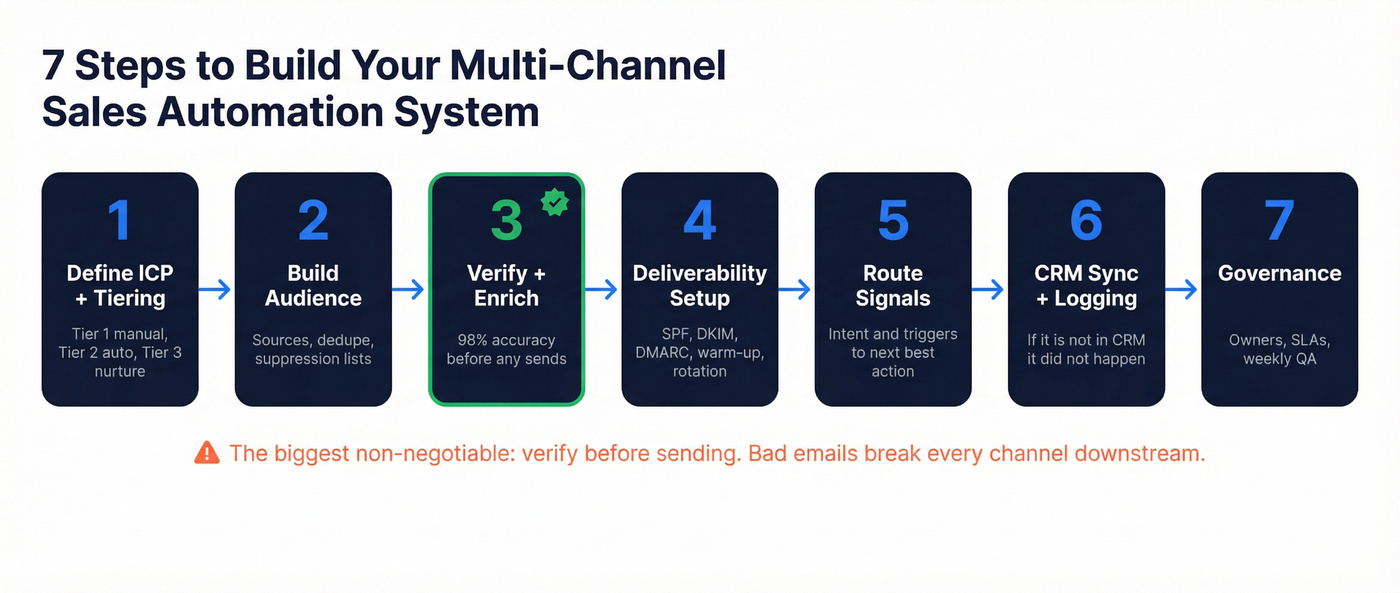
The biggest non-negotiable: verify before sending. Bad emails create bounces, bounces hurt reputation, and then every channel gets harder.
1) Define ICP + tiering policy (Tier 1 manual, Tier 2 automated, Tier 3 nurture)
- Tier 1 (high value): manual research + custom messaging + human tasks (calls, targeted comments, tailored video). If you automate video prospecting here, keep it selective: use a short 30-60 second video only after a real trigger (pricing view, intent spike, or a warm intro), not as a default step.
- Tier 2 (core volume): automated sequencing with light personalization + trigger-based tasks.
- Tier 3 (long tail): nurture and periodic re-qualification, not aggressive sequences.
Use/avoid:
- Use: tiering rules that can be enforced by fields (revenue band, headcount, region, intent topic).
- Avoid: "everyone gets the same cadence" because it's easy.
2) Build the audience (sources, dedupe, suppression lists)
Audience building is where most automation projects quietly die.
You need:
- Sources: database pulls, inbound leads, event lists, product signups, partner lists.
- Dedupe rules: match on domain + name + email; decide which record wins.
- Suppression lists: customers, active opps, recent unsubscribes, do-not-contact, competitors, internal domains.
The fastest way to create CRM chaos is letting reps import lists directly into the sequencer without dedupe and suppression. You'll spend the next month cleaning duplicates and explaining why a customer got a cold email.
3) Verify + enrich before sequencing (data-quality-first)
This is the rule in practice:
- Build your list (accounts + contacts).
- Verify emails and mobiles.
- Enrich the fields you need for routing (industry, tech stack, headcount growth, intent topics).
- Only then push into sequences.
Operational stats that matter:
- 98% verified email accuracy
- 7-day refresh cycle
- 83% enrichment match rate
- 92% API match rate
- Spam-trap and honeypot filtering baked into verification

4) Deliverability prerequisites (SPF/DKIM/DMARC, warm-up, rotation concept)
Don't overcomplicate deliverability, but don't ignore it.
Baseline checklist:
- SPF, DKIM, DMARC configured for each sending domain.
- Separate outbound domains if you're doing volume.
- Warm-up for new inboxes.
- Rotate senders so one inbox doesn't take all the heat.
Use/avoid:
- Use: conservative daily caps and gradual ramp.
- Avoid: turning on open tracking everywhere. Opens are unreliable, and tracking pixels can hurt deliverability.
5) Route signals to "next best action" (intent/triggers -> tasks)
Automation gets real when signals change what happens next.
Common triggers:
- Intent topic spike -> add to a "hot" sequence.
- Job change / promotion -> restart outreach with a "new role" angle.
- Website pricing page view -> call task within 15 minutes.
- No response after X days -> switch channel (call/SMS) or downgrade to nurture.
Dynamic playbook minimum spec (build this once, then reuse forever)
A "dynamic playbook" isn't a PDF. It's CRM-embedded logic that makes reps faster and keeps you compliant.
Minimum spec:
- Where it lives: CRM (as fields + a simple "Playbook" view per persona/segment).
- Fields it uses: ICP tier, persona, industry, region, intent topic, last touch date, consent/DNC flags, stage.
- What it surfaces: talk track bullets, 2 approved hooks, 1 objection response, 1 proof asset, and compliance notes per channel.
- Update cadence: RevOps owns it; weekly edits; monthly audit against outcomes.
If your playbook isn't tied to fields, it won't run. It'll rot in a folder.
6) CRM sync + activity logging rules (what must be captured)
If it's not in the CRM, it didn't happen - at least not for forecasting and learning.
Non-negotiables to log:
- Sequence enrollment + exit reason
- Replies (positive/neutral/negative)
- Meetings booked + held
- Calls placed + outcomes
- Opt-outs and do-not-contact flags
One rule to enforce: the SEP logs activity to the CRM automatically, and reps don't get to "choose" whether to log.
If you want a deeper setup, see CRM integration for sales automation and CRM automatic email logging.
7) Governance (owners, SLAs, QA)
Governance sounds boring until you don't have it.
Minimum viable governance:
- Owner per layer: RevOps owns CRM + data; Sales Ops owns SEP; Marketing Ops often owns signals.
- SLAs: opt-outs processed same day; bounce rate thresholds; dedupe cadence.
- QA: weekly sample of sequences + list pulls; monthly deliverability review.
I've run bake-offs where the "best" sequencer lost because nobody owned suppression lists, and the team spammed customers by accident. Governance prevents that.
A 10-14 touch sequence blueprint (with branching logic)
A 10-14 step sequence is the sweet spot in 2026 because it gives you room to switch channels without sounding desperate. It's enough touches to catch timing, not so many you burn your domain and your brand.

Real talk: the sequence isn't the magic. The branching is.
If you want more examples, start with an outreach sequences library and a proven B2B cold email sequence structure.
The template (10-14 touches over ~14-18 days)
Day 1
- Touch 1: Email (tight hook, one ask)
- Touch 2: Professional-network connect + short note
Day 3
- Touch 3: Call + voicemail
- Touch 4: Email follow-up (new angle, not "bump")
Day 7
- Touch 5: Professional-network message (value nugget)
- Touch 6: Call task (best time window)
Day 10
- Touch 7: Email (proof + mini case)
- Touch 8: SMS (only if your consent model supports it)
Day 14
- Touch 9: "Breakup" email (polite, clear next step)
- Touch 10-14: Adds (video, referral ask, event invite, retarget trigger)
Cadence note: use a 3-7-7 rhythm as a forcing function. One benchmark analysis found 93% of replies arrived by Day 10, which matches the operator reality: after Day 10, you're usually better off switching persona or downgrading to nurture than adding "one more follow-up."
Branching logic (what happens when signals show up)
- If they reply: stop automation immediately, create a CRM task, and route to owner.
- If they view key pages (pricing/case study): call task within 15-60 minutes; send a short "saw you checking X" email.
- If they accept a connection but don't reply: send one high-signal message, then switch back to email/call.
- If no signal by Day 10: downgrade to nurture or switch persona (multi-thread). Don't add more "checking in."
Benchmarks by channel (what "good" looks like in 2026)
Benchmarks keep you honest. They also stop the classic mistake: swapping tools when you should fix targeting.
Two anchors worth using:
- Cold email reply baseline: 4.1%
- Professional-network reply: 9.36% with a message vs 5.44% without
Dataset context matters: Belkins analyzed 20M+ outreach attempts run through Expandi (Jan-Dec 2026) to produce the professional-network benchmarks below. That's why we take them seriously.
If you want more context on channel performance, see social selling statistics.
Benchmarks table
| Channel | Metric | "Good" in 2026 | Notes |
|---|---|---|---|
| Cold email | Reply rate | 3-5% baseline | 4.1% anchor |
| Cold email | Top-tier | 15-25% | tight ICP + hooks |
| Pro network | Reply w/ msg | 9.36% | vs 5.44% no msg (20M+ attempts) |
| Pro network | Best day | Tuesday 6.90% | Monday 6.85% |
| Pro network | SaaS reply | 4.77% | lowest vertical in dataset |
How to use benchmarks (this is where teams get it wrong):
- Email reply is low + bounces are high: it's data/deliverability, not copy. Fix verification, suppression, and sending volume first.
- Email reply is low + bounces are normal: it's targeting and hooks. Tighten ICP, segment smaller, and rewrite the first line.
- Network reply is fine but meetings are flat: your CTA's weak or your call follow-up is slow. Speed-to-lead matters more than another touch.
- Everything is low across channels: your list is wrong. Stop. Rebuild the audience.
Email levers that actually move replies (numbers you can plan around)
These are from a benchmark analysis (not a law of physics), but they're directionally dead-on for planning:
| Lever | Result |
|---|---|
| Timeline-based hooks vs "problem" hooks | 10.01% vs 4.39% reply rate |
| Meeting rate (strong segmentation + hook discipline) | 2.34% vs 0.69% |
| Cohorts <=50 vs larger blasts | 2.76x better performance |
My opinion: if you're blasting 500-person lists with one message, you're not doing multi-channel sales automation. You're doing multi-channel reputation damage.
Compliance and risk management by channel (non-negotiables)
Automation doesn't reduce compliance risk. It concentrates it.
If you add SMS and calls, you step into a different penalty regime. If you automate professional-network actions, you also take on platform enforcement risk, not just legal risk.
Compliance-by-channel table
| Channel | Consent model | Opt-out rule | Quiet hours | Penalties |
|---|---|---|---|---|
| Email (US) | Opt-out | 10 biz days | N/A | CAN-SPAM up to ~$53,088 per email |
| SMS (US) | Prior consent | STOP = immediate | 8am-9pm | TCPA $500-$1,500 per violation |
| Calls (US) | Prior consent | DNC honored | 8am-9pm | TCPA $500-$1,500 per violation |
| EU email | Explicit opt-in | Fast + provable | N/A | GDPR up to EUR20M/4% |
Operational checklist: consent storage + audit trail (do this or don't automate)
Store compliance as enforceable fields, not notes:
- Consent status per channel: email, SMS, phone (yes/no/unknown + timestamp)
- Source of consent: web form, contract, inbound request, event, etc.
- Opt-out](https://www.ftc.gov/business-guidance/resources/can-spam-act-compliance-guide-business) status: global + per channel (with timestamp + method)
- DNC / suppression reason: customer, active opp, competitor, employee, "do not sell/share," etc.
- Audit trail: keep change history (who/what system changed the field)
CCPA note (US): treat "Do Not Sell/Share" as a first-class suppression flag. Operationally, that means your enrichment, list pulls, and exports must honor it the same way you honor unsubscribes.
No exceptions.
Penalty math (why "we'll fix it later" is dumb)
If you text or call 1,000 contacts without proper consent, TCPA exposure is $500k-$1.5M. That's one campaign.
Platform enforcement risk rules (professional networks)
Don't run high-volume automation from a single account. Treat accounts like infrastructure: low daily caps, consistent behavior, and ongoing maintenance.
Rules that keep you out of trouble:
- Cap daily actions per sender and ramp slowly.
- Keep activity patterns consistent (no sudden spikes).
- Don't bet the quarter on one profile. Always have redundancy.
- Monitor account health weekly: connection acceptance, reply rate, restrictions/limits, and message quality.
- Use suppression logic: if an account's in an active deal/customer state, it should be excluded from automated touches everywhere.
Why automation fails (and how to fix it fast)
Automation fails for predictable reasons. The fixes are boring - and fast.
Failure mode: You automated bad targeting
- Diagnosis: low reply across every channel, high negatives, low meeting rate.
- Fix: tighten ICP, segment into cohorts of <=50, and rewrite the hook. Don't touch tooling yet.
Failure mode: You scaled touches without orchestration
More touchpoints help, but only when they're coordinated.
- Diagnosis: lots of activity, inconsistent outcomes, reps improvising.
- Fix: cap sequences at 10-14 steps, add branching, and define exit criteria (reply, meeting, disqualify, nurture).
Failure mode: You optimized for opens (and hurt deliverability)
- Diagnosis: open rates look fine, replies don't move, deliverability drifts.
- Fix: stop obsessing over opens. Track replies, meetings, bounce rate, and spam complaints.
Failure mode: Bad data wrecked your sender reputation
This is the silent killer. One dirty list can create bounces, spam traps, and a reputation hit that takes weeks to unwind.
- Diagnosis: bounce rate spikes, inbox placement drops, sequences "stop working."
- Fix: verify before sending, suppress risky addresses, and enforce global opt-outs.
Failure mode: No governance, so the system drifts
- Diagnosis: duplicates in CRM, inconsistent fields, broken attribution.
- Fix: assign owners, set SLAs, and run weekly QA. Governance isn't bureaucracy - it's how you keep automation from turning into chaos.
Tooling map for multi-channel sales automation + pricing expectations (keep the stack lean)
This isn't a "50 tools" roundup. A lean stack wins because it's easier to govern, easier to measure, and harder for reps to bypass.
If you’re rebuilding your stack, start with a B2B sales stack baseline.
Tooling + pricing table (reality-based)
| Category | Tool | Best for | Pricing signal |
|---|---|---|---|
| Data | Prospeo | verify + enrich + fresh B2B data | Free tier; ~$0.01/verified email |
| SEP | Lemlist | SMB multichannel sequences | $79/mo (Email Pro) or $109/mo (Multichannel Expert) + add-ons |
| SEP | Salesloft | enterprise SEP + governance | Quote-based; Advanced/Premier; dialer add-on |
| SEP | Typical SEP | mid-market sequencing | Budget $50-$200/seat/mo |
Data layer (Tier 1)
Look, if your data's wrong, everything downstream turns into theater: deliverability tanks, reps lose trust, and leadership starts swapping tools instead of fixing the input.
That's why we treat Prospeo as the default data layer under multi-channel systems. It's built for accuracy and freshness, with 300M+ professional profiles, 143M+ verified emails, and 125M+ verified mobile numbers, all refreshed on a 7-day cycle (while the industry drifts for about 6 weeks). That refresh cadence is the difference between "we hit the right person" and "we emailed someone who left two months ago and bounced."
It's also operational, which is what RevOps teams actually need: 30+ search filters, real-time verification, and enrichment that returns 50+ data points per contact, with an 83% enrichment match rate and 92% API match rate. On top of that, intent attributes cover 15,000 topics powered by Bombora, which is plenty to route sequences by in-market signals without turning your team into an ABM science project.
Engagement/SEP layer (Tier 1)
Lemlist is the fastest way we've seen for a small team to ship real multichannel sequences without an enterprise rollout. Pricing's straightforward: $79/mo for Email Pro and $109/mo for Multichannel Expert. Add-ons are where costs creep (WhatsApp automation $20/user/mo, a calling number $15/number/mo, extra sender $9/mo), so someone needs to own the "how many senders do we actually need?" conversation.
What we like: it pushes you toward execution. What we hate: sender sprawl gets messy fast if nobody owns naming conventions, rotation rules, and suppression. You'll create chaos with a smile.
Salesloft is what you buy when you need governance, reporting, and tight CRM integration across a real team. It's quote-based with Advanced and Premier packages, and the dialer is an add-on. Enterprise teams buy it for three things: cross-channel reporting leadership trusts, governance (permissions, templates, QA, consistent logging), and coaching signals like buyer sentiment and best times to call.
Skip Salesloft if you don't have ops/admin capacity. You'll pay enterprise prices to recreate a spreadsheet.
Engagement/SEP layer (Tier 2)
Instantly is an outbound email sending engine that shines when you care about inbox rotation and speed. Budget $50-$150/user/month for typical SMB plans. It's not a CRM and it's not a data source - treat it like a delivery system, and keep your rules (suppression, routing, logging) somewhere more durable.
Smartlead sits in the same "sending at scale" lane with strong automation for multi-inbox setups. Budget $50-$150/user/month for typical SMB ranges. It's great when you want velocity; it's a bad choice if your team can't follow process, because it'll scale your mess.
Reply.io is a more classic multichannel sequencing platform that fits SMB to mid-market. Budget $60-$150/user/month for typical plans. It's a solid middle ground when you want more than "send email at scale" but you're not ready for enterprise governance.
CRM layer (Tier 2)
HubSpot (CRM) is the cleanest system of record for teams that want speed and decent governance without a dedicated admin army. Budget $1,200-$5,000/year for small teams, and $15k-$60k/year once you add seats, automation, and reporting. If your team's allergic to process, HubSpot's guardrails help.
Salesforce (CRM) is still the enterprise default when you need deep object modeling, permissions, and complex attribution. Budget $25-$150/user/month plus admin/ops overhead. Salesforce is unbeatable when you have complexity; it's overkill when you don't.
Tier 3 tools (shortlist, 2 sentences each)
- Salesforge: AI-assisted outbound workflows for teams that want help drafting and iterating without enterprise overhead. Budget $60-$200/user/month.
- Heyreach: Control layer for scaling professional-network outreach across multiple senders with guardrails. Budget $50-$300/month depending on seats/senders.
- Amplemarket: Prospecting + sequencing + AI personalization for reps who want one workflow. Budget $200-$800/user/month.
- Waalaxy: Simple automation for agencies managing multiple client accounts. Budget $30-$120/month.
- Dripify: Lightweight cloud sequences for solo/lean teams. Budget $40-$100/month.
- Expandi: Mature automation controls and pacing for teams that care about safety and consistency. Budget $99-$199/month.
- Clay: Enrichment/workflow LEGO for chaining data actions across tools. Budget $150-$800/month depending on volume.
- Dealfront: Company intelligence that's often easier to justify for EU-heavy motions. Budget $300-$1,500/month depending on modules.
- Zapier: Fast glue for "when X happens, do Y" across your stack. Budget $30-$150/month for most RevOps setups.
- Make: Better value at scale for complex scenarios and heavy automation volume. Budget $10-$100/month for many teams.
- Aircall: Cloud dialer add-on when your SEP dialer's not enough. Budget $30-$80/user/month plus numbers/usage.
- Vidyard: Lightweight video layer for Tier 1 accounts when used sparingly, especially when you trigger video off high-intent actions instead of blasting videos to cold lists. Budget $20-$80/user/month.
Closing: how to make this actually work
Multi-channel sales automation isn't a tool purchase. It's an operating system: clean inputs, shared logic, and ruthless measurement.
If you do nothing else, do these three things:
- Verify + suppress before sequencing. Bad data is the fastest way to torch deliverability and trust.
- Make the CRM the rulebook. Consent, suppression, routing fields, and stop conditions must live in enforceable fields.
- Ship one sequence with branching and an owner. One owner, one QA cadence, one place to measure replies -> meetings -> pipeline.
Start here: pick one ICP segment, build a <=50-person cohort, run a 10-14 touch sequence with clear exit criteria, and review results weekly. That's how you earn complexity without buying your way into chaos.
Step 3 says verify + enrich before sequencing. Prospeo returns 50+ data points per contact at a 92% match rate - intent topics, tech stack, headcount growth - so your routing logic actually fires correctly.
Stop orchestrating on bad data. Enrich every contact for $0.01.
FAQ
What's the difference between multi-channel and omnichannel sales automation?
Multi-channel runs outreach across 2-5 channels, while omnichannel connects those channels into one coordinated experience with shared rules, timing, and measurement. For most B2B outbound teams, the win is orchestration: one ICP, one suppression model, one CRM truth, and channel switching based on signals.
What metrics should you track if open rates are unreliable in 2026?
Track outcomes and deliverability: bounce rate, spam complaints, reply rate (positive/neutral/negative), meetings booked, meetings held, and pipeline created per cohort. As leading indicators, use time-to-first-reply and step-level conversion rates, then cut steps that don't move meetings.
How do you stay compliant when adding SMS and calls to outbound?
Use prior consent for SMS and calls, store consent/opt-outs as enforceable CRM fields, and honor quiet hours (8am-9pm local time). TCPA exposure is $500-$1,500 per violation, so suppression lists and immediate STOP handling must be automated. For email, process CAN-SPAM opt-outs within 10 business days.
What's a good free tool for verifying emails before you run sequences?
A good free option is Prospeo, which includes 75 verified emails + 100 Chrome extension credits/month and delivers 98% verified email accuracy with spam-trap and honeypot filtering. If you're scaling beyond a small test, pick a verifier that supports suppression, enrichment, and a frequent refresh cycle so lists don't go stale mid-campaign.