

Sales Email Management: The 5-Pillar System That Actually Works
The average business takes 42 hours to respond to a lead. Responding within one minute drives 391% more conversions. That gap - between what sales teams know they should do and what actually happens inside their inbox - is where deals die quietly.
The fix isn't another tool. It's a system. We've pressure-tested this across dozens of outbound campaigns, and it comes down to five pillars.
Five Pillars of Effective Inbox Management
Inbox Triage
Most reps treat their inbox like a to-do list and wonder why things slip. The fix is dead simple: labels, priority rules, and time blocks.
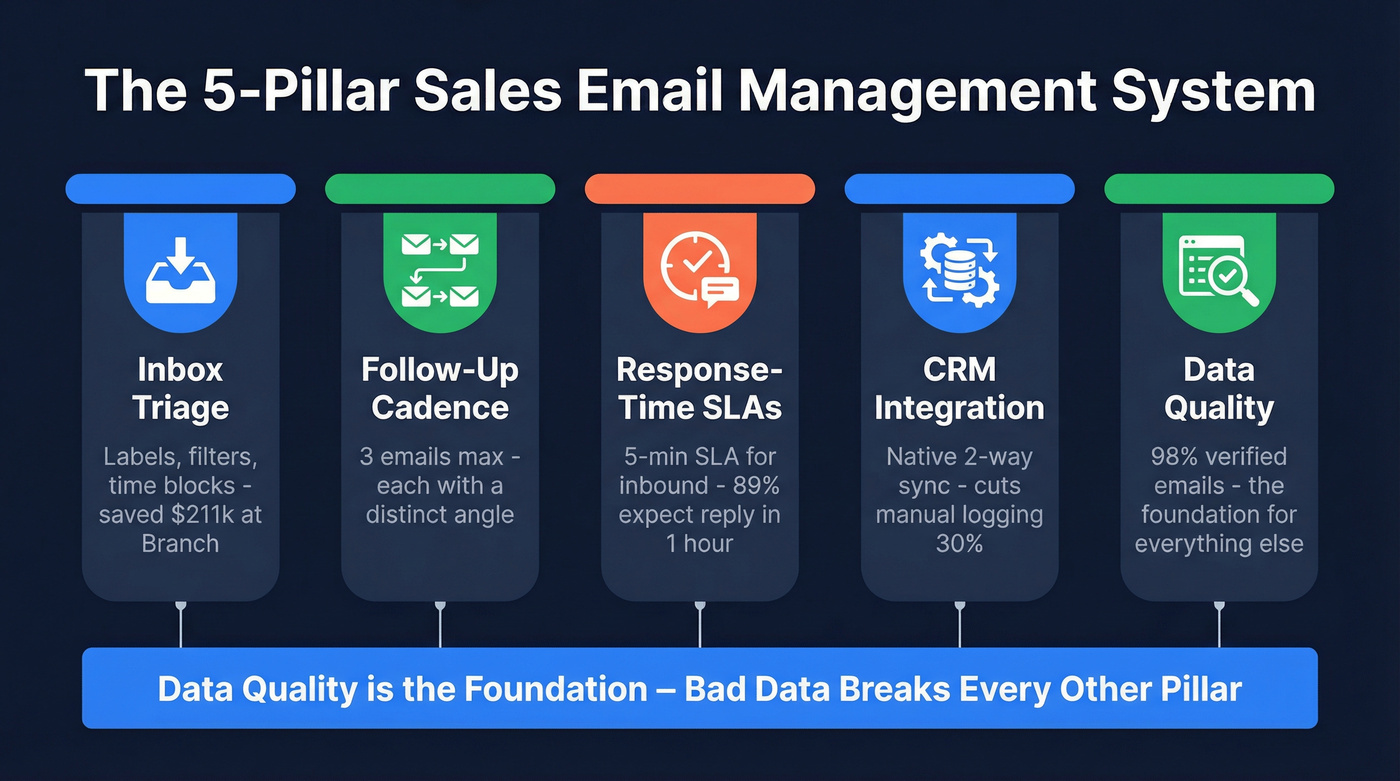
Set up three labels - hot leads, active deals, internal - and let filters auto-sort incoming mail. Then block two 30-minute windows per day for email instead of checking constantly. Branch implemented this kind of structured triage and saved $211,250 while recovering 1+ hour per team member daily. That's real capacity you can redeploy into selling. For agencies juggling multiple books of business, this triage structure is the foundation everything else sits on.
Follow-Up Cadence
More follow-ups don't mean more replies. Belkins analyzed 16.5 million cold emails across 93 business domains and found the highest reply rate - 8.4% - came from a single email. Each additional follow-up dragged that number down, and sending four or more tripled spam complaints.
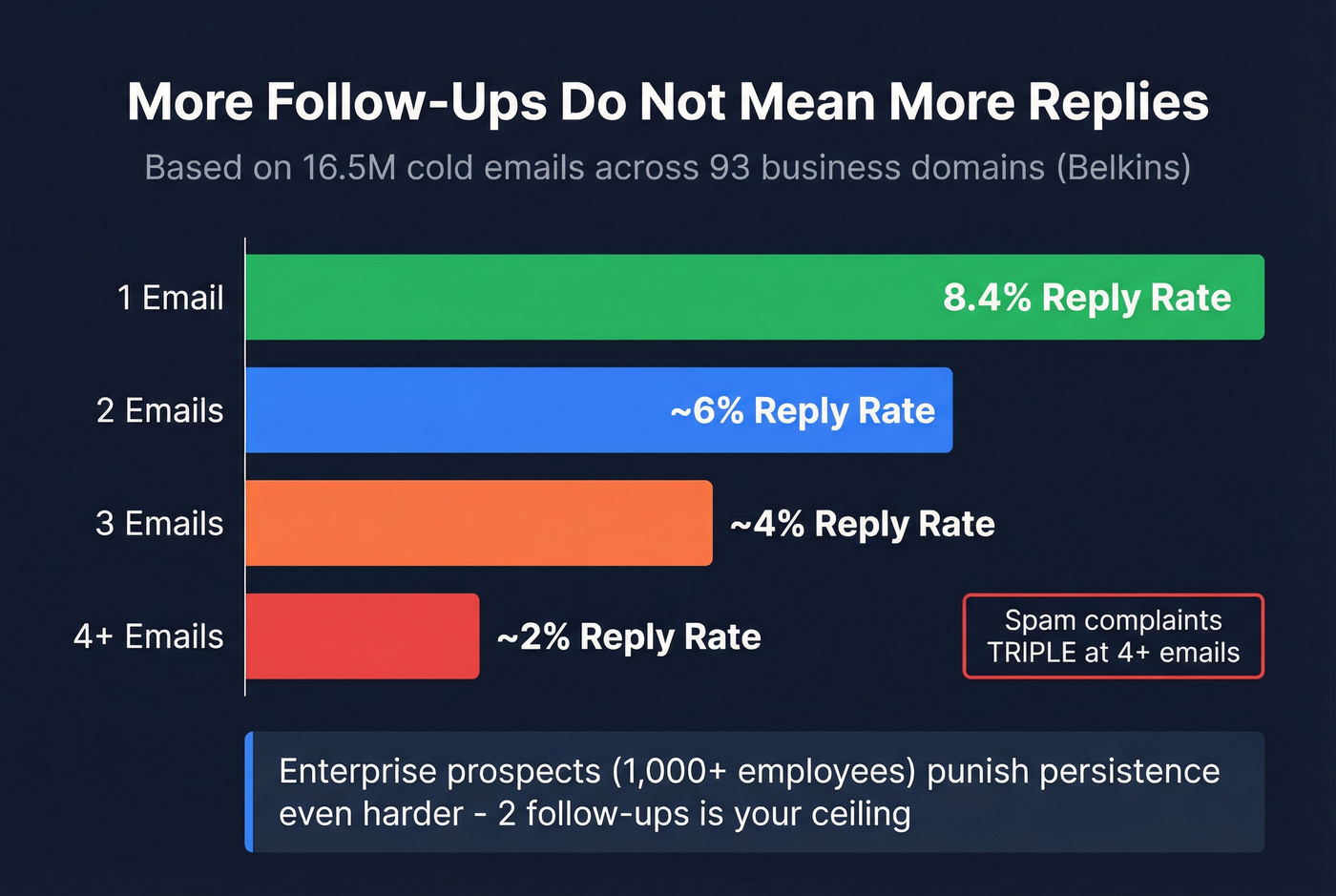
Typical cold email response rates run 1-5%, so every percentage point from better cadence design matters. Enterprise prospects at 1,000+ employees punish persistence harder than SMBs do. If you're selling into large orgs, two follow-ups is your ceiling. Three emails max for anyone, each with a distinct angle - not just "bumping this to the top of your inbox." If you need copy that fits this approach, start with these outreach email templates.
Response-Time SLAs
89% of customers expect a response within one hour. The average email response time sits around 12 hours. 62% of companies don't respond at all.
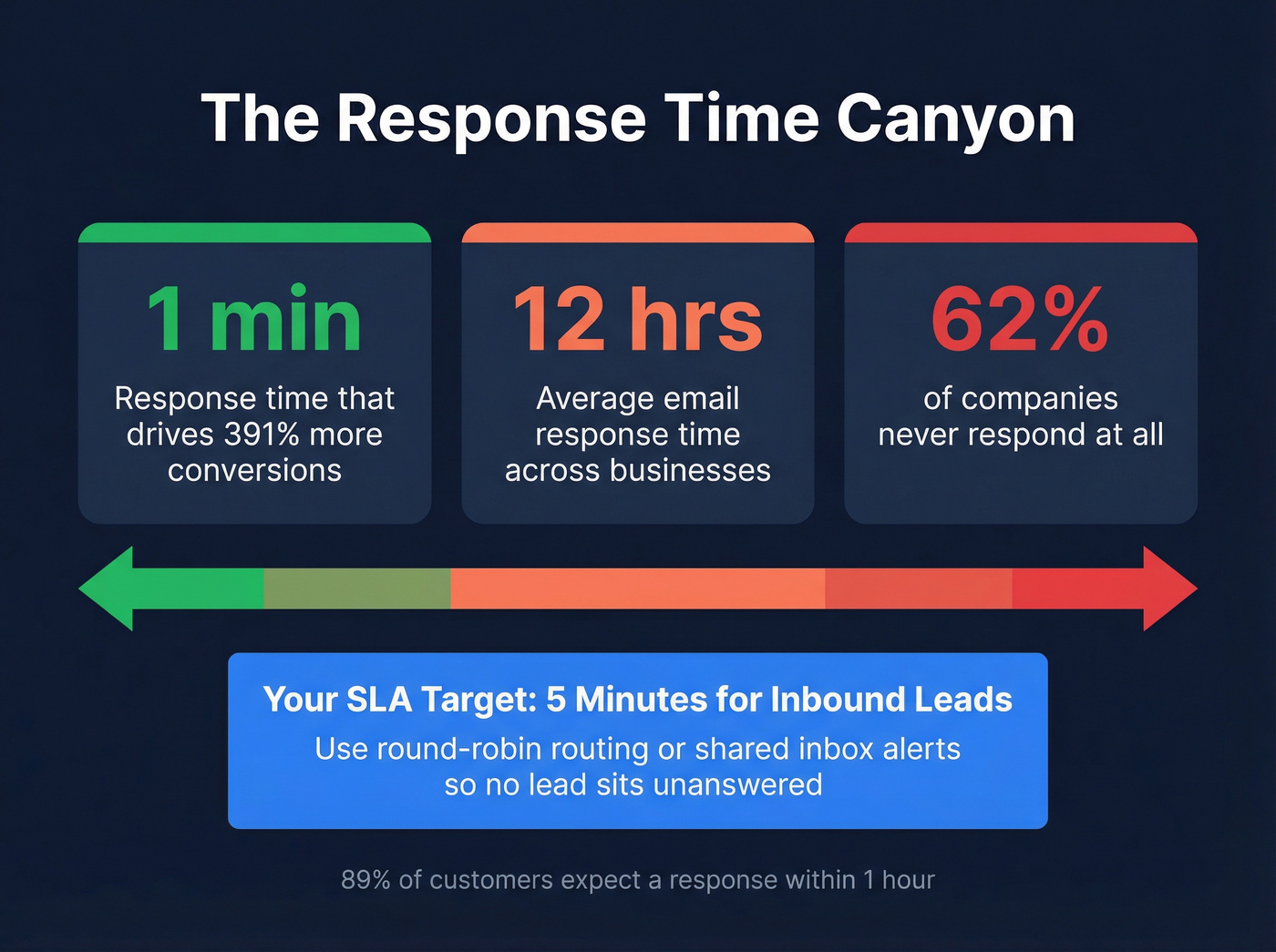
That's not a gap. It's a canyon.
Set a 5-minute SLA for inbound leads. Not aspirational - enforced. Use round-robin routing or shared inbox alerts so no lead sits unanswered while a rep is in a meeting. Email delegation, where specific reps own specific lead segments, makes these SLAs enforceable instead of just something on a slide deck. If you want the ops layer behind this, build it around inbound lead qualification and a real lead scoring system.
CRM Integration
Use this if: your CRM offers native two-way email sync (HubSpot, Salesforce, Pipedrive). Set sync refresh to every 5-10 minutes. This alone cuts manual logging by roughly 30%. If your team runs unlimited email accounts, CRM sync becomes even more critical - every sending address needs to feed into a single source of truth.
Acceptable fallback: Forward/CC logging to a CRM-specific address. It works, but threads get fragmented.
Skip this entirely: Manual copy-paste logging. Reps won't do it consistently, data goes stale within days, and you'll end up with duplicate outreach that embarrasses the team in front of prospects.
Your CRM is the system of record; your email tool is the system of engagement. Pick tools that bridge both without forcing reps to switch tabs. If you're trying to reduce admin work further, look at AI CRM data entry automation.
Data Quality
This is the pillar most sales teams ignore until it's too late - and it silently kills everything else. Bad email addresses bounce. Bounces damage your domain reputation. Damaged domain reputation pushes even your warm follow-ups into spam. One bad list can tank deliverability for your entire team for weeks.

Here's the thing: ask any SDR what kills their pipeline and you'll hear the same answer. Bounced emails from bad lists. Prospeo runs every address through a 5-step verification process - catch-all handling, spam-trap removal, honeypot filtering - before you ever hit send. The result is 98% email accuracy on 143M+ verified addresses, refreshed every 7 days. Teams like Snyk went from 35-40% bounce rates to under 5% after switching their verification layer, and AE-sourced pipeline jumped 180%. That's the difference between landing in the inbox and landing in spam. If you want a deeper breakdown of what “good” looks like, start with data quality and email verification for outreach.
Deliverability Checklist
Before you scale a single sequence, nail these fundamentals:
- Authenticate everything. SPF, DKIM, and DMARC are non-negotiable. Google and Yahoo enforce these for bulk senders, and Microsoft follows similar requirements. Add RFC 8058 one-click unsubscribe headers. (If you need the step-by-step, use this SPF, DKIM, DMARC guide.)
- Warm up new domains slowly. Start at 5-10 emails per day. Ramp over 4-6 weeks. Use an automated email warmup process if you're scaling mailboxes.
- Hold the line on thresholds. Spam complaints under 0.3%. Bounces under 2%. If either spikes, pause before sending another email.
- Test before scaling. Hit 80%+ inbox placement on seed tests before you increase volume. Use a custom tracking domain via branded CNAME to isolate your reputation.
- Monitor weekly. Track inbox placement, bounce rate, and spam complaints via Gmail Postmaster. Pause any mailbox that trends toward the thresholds. If you need a full playbook, use our email deliverability checklist.

Your deliverability checklist means nothing if 10% of your list bounces. Prospeo's 5-step verification - catch-all handling, spam-trap removal, honeypot filtering - delivers 98% email accuracy across 143M+ verified addresses, refreshed every 7 days. Snyk cut bounce rates from 35-40% to under 5% and grew AE-sourced pipeline 180%.
Stop letting bad data sabotage your sales email system. Start verifying free.
Best Tools for Sales Email in 2026
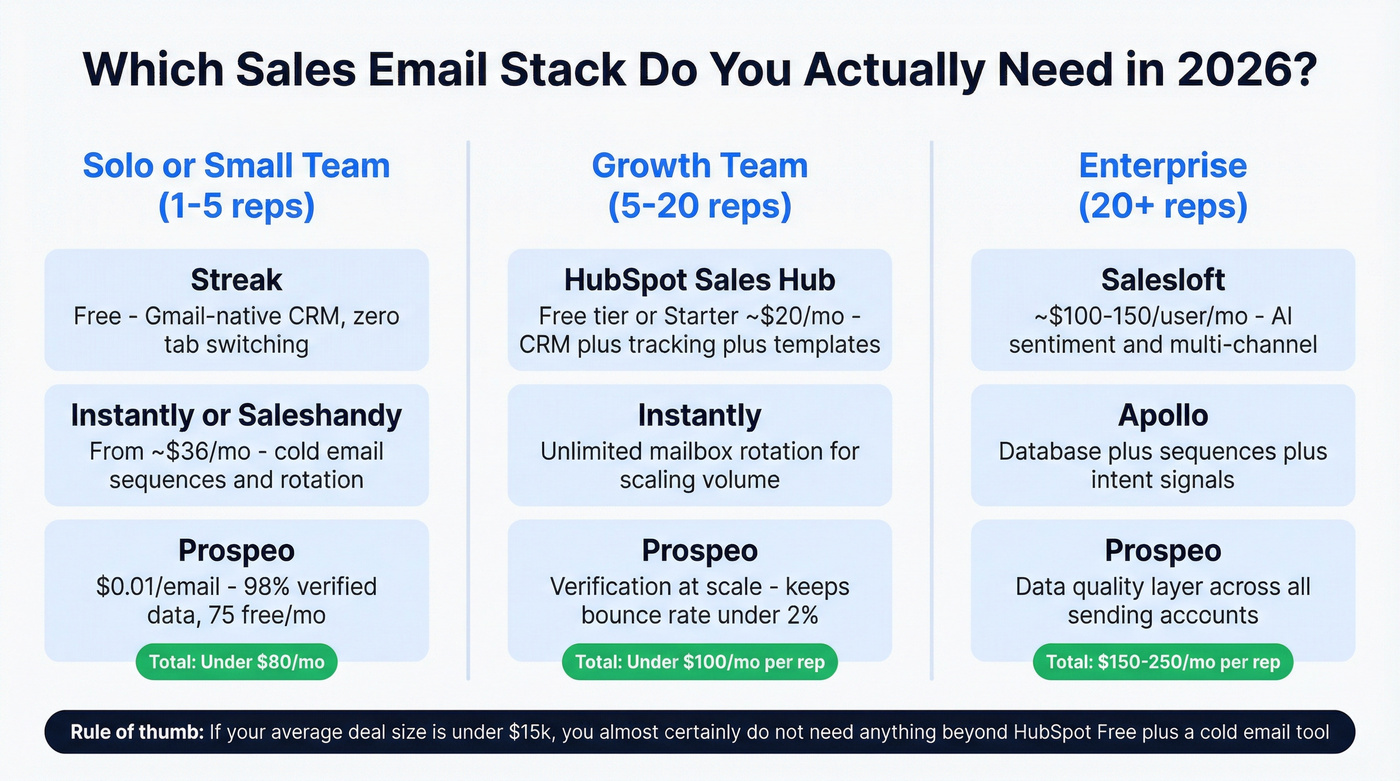
You don't need a $100+/user/month platform to manage outbound email well. In our experience, most teams need three tools - not seven.
| Tool | Best For | Starting Price | Key Strength |
|---|---|---|---|
| Prospeo | Email verification & data quality | Free (75/mo); ~$0.01/email | 98% accuracy, 7-day refresh, 5-step verification |
| Streak | Gmail-native CRM | Free plan available | Lives inside Gmail - zero context switching |
| HubSpot Sales Hub | Scaling teams | Free; Starter ~$20/mo | CRM + tracking + templates |
| Salesloft | Enterprise engagement | ~$100-150/user/mo | AI sentiment + multi-channel |
| Instantly | Cold email at scale | Free plan available; paid from ~$37/mo | Unlimited mailbox rotation |
| Saleshandy | Budget cold email | From ~$36/mo | Affordable + deliverability tools |
| Apollo | All-in-one prospecting | Free (100 credits/mo); paid from ~$59/user/mo | Database + sequences + intent |
Small teams that live in Gmail should start with Streak. Reps actually use it because there's no tab to switch to. When you outgrow it, HubSpot Sales Hub is the natural step up; the free tier alone covers tracking and templates. Salesloft earns its price tag for enterprise with AI-powered sentiment analysis, but don't buy it until the cheaper stack genuinely can't keep up.
Let's be honest: if your average deal size is under $15k, you almost certainly don't need anything beyond HubSpot's free tier plus a cold email tool. For cold outreach under ~$40/mo, Instantly and Saleshandy both deliver - Instantly edges ahead on infrastructure with unlimited email accounts and built-in rotation, while Saleshandy wins on budget. Apollo tries to do everything and does most of it well enough, though the UI can feel overwhelming when you're just getting started. If you want a broader shortlist, compare more cold email marketing tools.
Every pillar of sales email management - triage, cadence, SLAs, CRM sync - collapses when your contact data is wrong. At $0.01 per email, Prospeo gives you the data quality foundation that makes everything else work. No contracts, no sales calls, 75 free emails to prove it.
Fix the data layer and watch every other pillar actually perform.
Three Mistakes That Kill Deals
Over-automating sequences. The Belkins data is unambiguous: four or more emails triple spam complaints. We've seen it firsthand - teams that cut to three emails per sequence and rewrote each with a distinct angle saw reply rates climb while complaints dropped. Cut the fat and make each touch count.
Sending to unverified lists. Every bounce chips away at your domain reputation. Do this enough and even replies to warm inbound leads start hitting spam. Verify every address before you send. No exceptions. If you're auditing bounces, start with hard bounce and invalid emails.
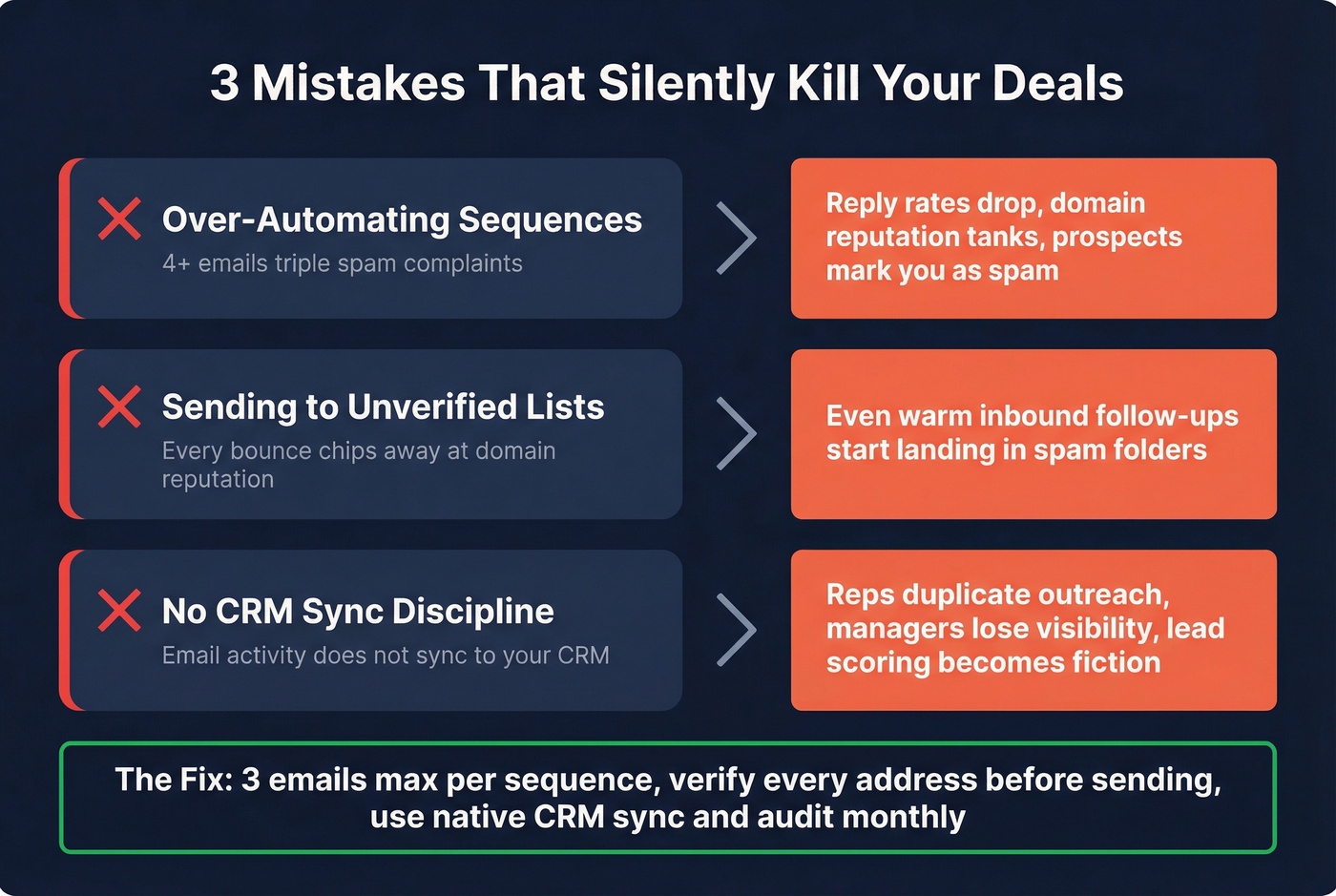
No CRM sync discipline. When email activity doesn't sync, reps duplicate outreach, managers lose pipeline visibility, and lead scoring becomes fiction. Pick native sync over manual entry and audit monthly. If you find gaps, fix the integration before you fix the messaging.
Sales Email Management FAQ
How many follow-up emails should I send?
Two to three max. Belkins' 16.5M-email study shows the highest reply rate at 8.4% from a single email, and four or more triples spam complaints. Keep sequences short. Each touchpoint needs a distinct value angle, not just a "checking in" nudge.
What's the biggest mistake teams make?
Sending to unverified lists. Every bounce damages your domain reputation, pushing even warm follow-ups into spam. Any verification tool beats none, but the difference between 79% accuracy and 98% accuracy compounds fast across thousands of sends.
Do I need an expensive email platform?
No. Most teams under 20 reps need a Gmail-native CRM like Streak (free), a sequence tool like Instantly or Saleshandy from ~$36/mo, and verified data. Skip $100+/user platforms until the cheaper stack genuinely can't keep up with your volume.
How do agencies handle multi-client campaigns?
Workspace separation is non-negotiable. Keep each client's sending domains, sequences, and reporting isolated so one client's deliverability issues don't bleed into another's. Instantly and Saleshandy support multi-client setups natively, letting you manage all accounts from a single dashboard without cross-contamination.