

The Best Email Analytics Software in 2026
Your VP just pinged Slack: "Why are our average reply times six hours?" You pull up your ESP dashboard, your CRM reports, and your tracking tool - and all three measure different things, none agree, and one is counting Apple's privacy bots as "opens." Sound familiar?
Picking the right email analytics software starts with knowing which question you're actually trying to answer: campaign performance, individual email tracking, or team productivity metrics. We've tested the major options across all three categories, and the differences are bigger than most comparison posts let on.
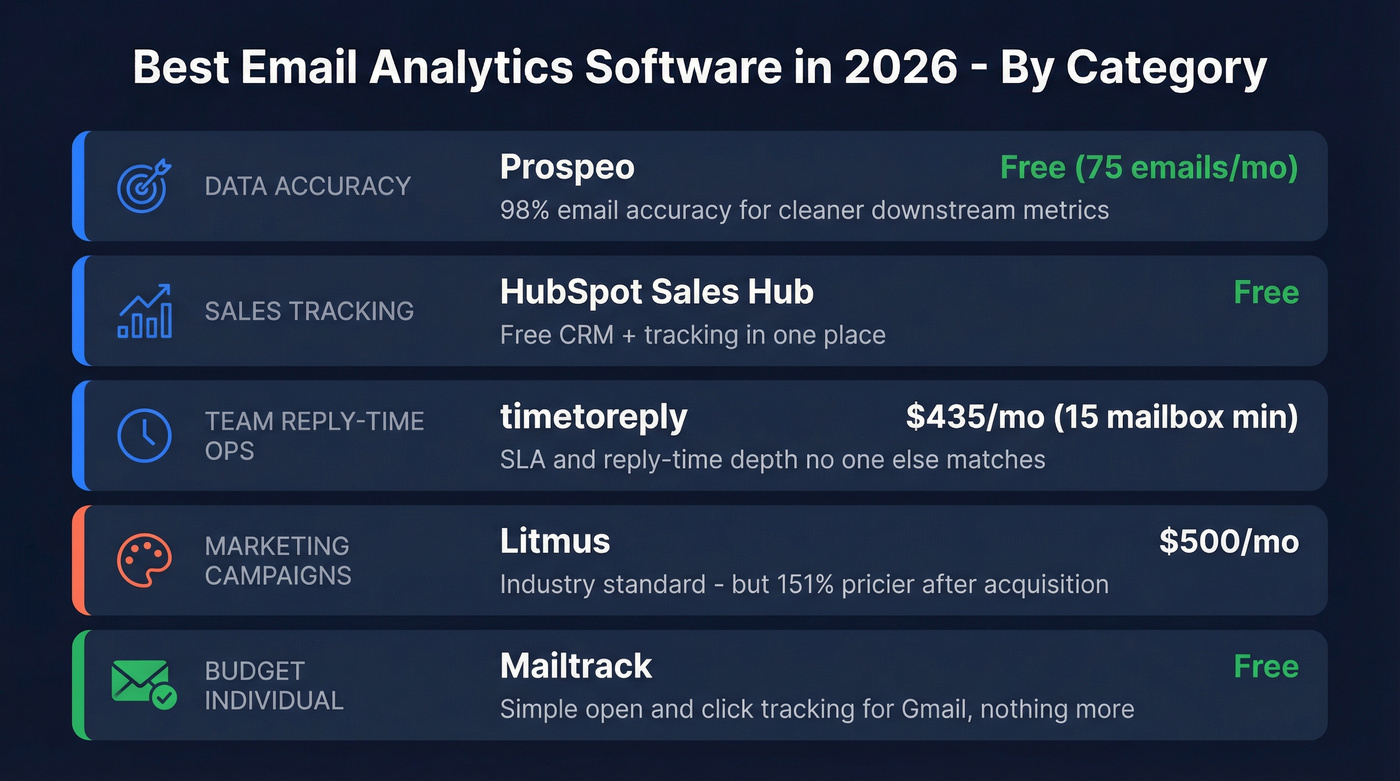
Our Picks at a Glance
| Category | Pick | Starting Price | Why |
|---|---|---|---|
| Data accuracy | Prospeo | Free (75 emails/mo) | 98% email accuracy = cleaner downstream metrics |
| Sales tracking | HubSpot Sales Hub | Free | Free CRM + tracking in one place |
| Team reply-time ops | timetoreply | $435/mo (15-mailbox min) | SLA + reply-time depth no one else matches |
| Marketing campaigns | Litmus | $500/mo | Industry standard - but 151% pricier now |
| Budget individual | Mailtrack | Free | Simple open/click for Gmail, nothing more |
Why Open Rates Don't Mean What You Think
A HubSpot study of 80,000+ email marketing accounts found open rates jumped 18 points after Apple Mail Privacy Protection launched, landing the all-industry average at 42.35%. That's not engagement. That's Apple's servers pre-fetching every image, including your tracking pixel.
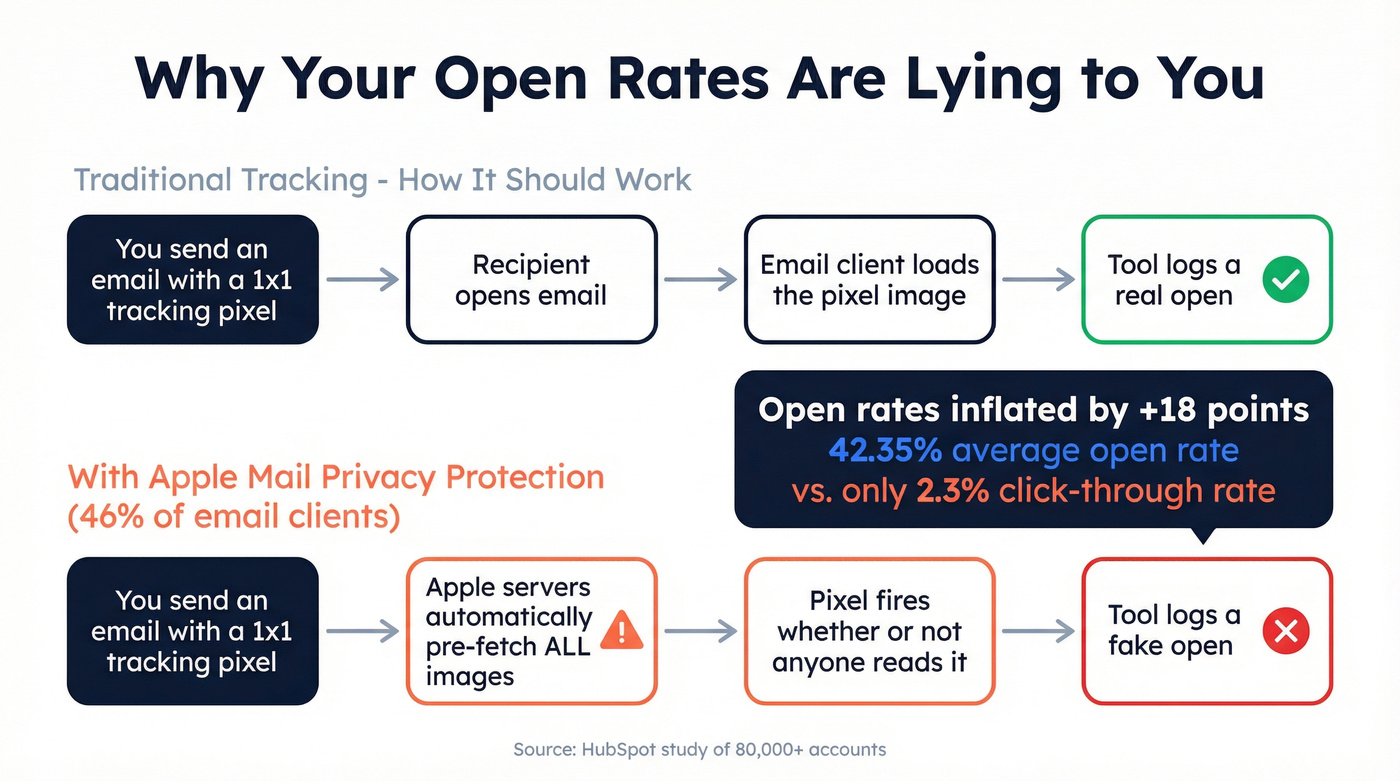
Here's how it works: most email tracking tools embed a 1x1 invisible image in your message. When the recipient's client loads it, the tool logs an "open" - unless the client blocks images or pre-fetches them like Apple Mail does. With Apple Mail representing roughly 46% of email clients, nearly half your "opens" are ghosts. The all-industry click-through rate? Just 2.3%. SaaS companies fare even worse at 1.19% CTR.
The consensus on r/sales and r/emailmarketing is blunt: post-Apple MPP, open rates are vanity metrics. Prioritize clicks, replies, and conversions. Everything else is noise.

Top Tools by Category
Sales Tracking & Outbound
HubSpot Sales Hub is the most commonly recommended starting point in sales communities, and for good reason. The free plan includes open, click, and reply tracking plus a basic CRM - which means you're not stitching together two separate tools from day one. Paid plans start at $90/month per seat when you need sequences and deeper reporting. It won't give you team-level reply-time analytics or marketing campaign reporting, but for individual rep tracking, nothing beats free-with-a-CRM-attached. If your team is already in the HubSpot ecosystem, this is a no-brainer.
If you're building a full outbound stack, pair tracking with a modern sales engagement platform so analytics actually map to your sequences and follow-ups.
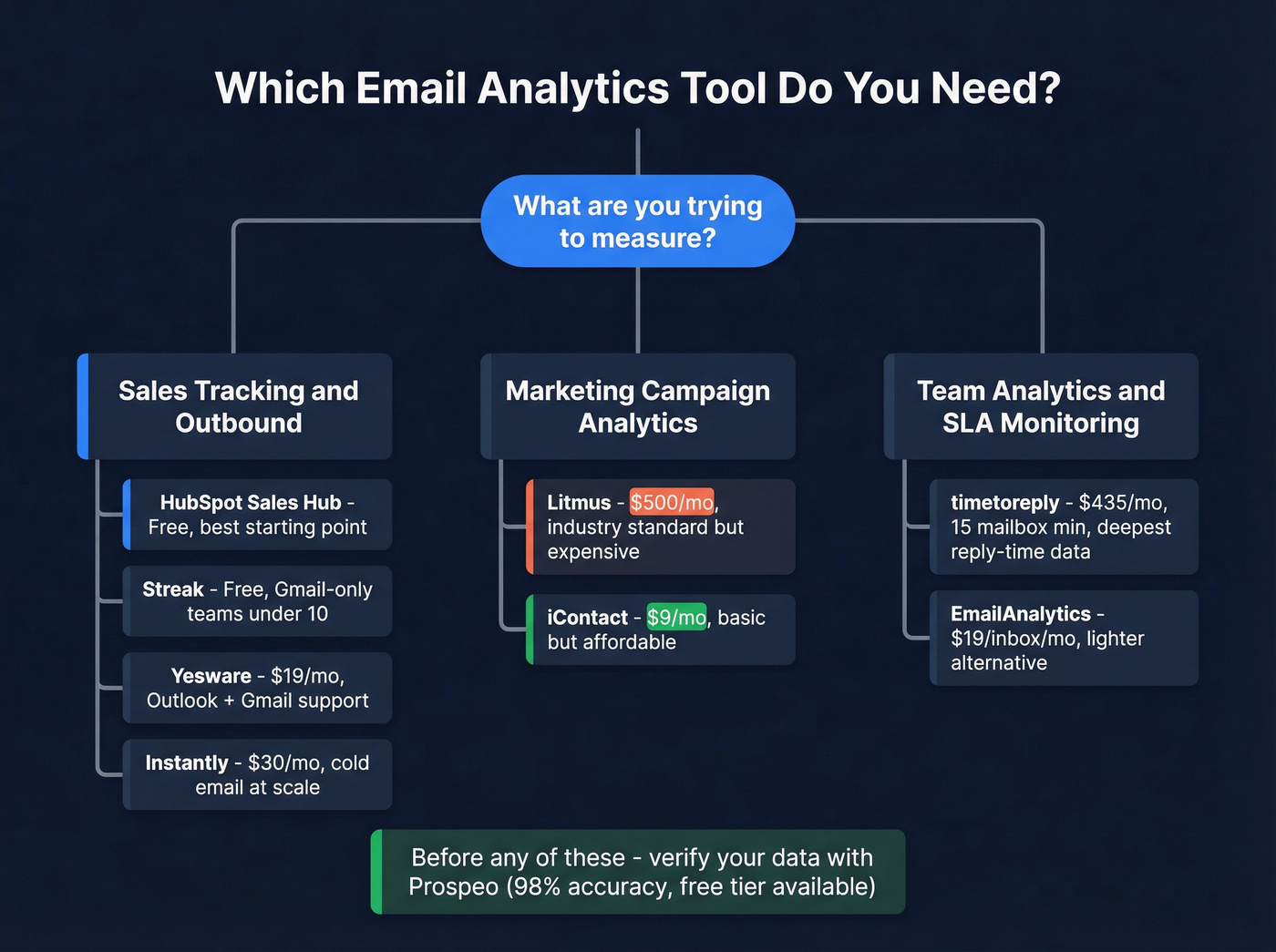
Streak is for teams that live in Gmail and refuse to leave. Free plan covers basic tracking; paid starts at $59/user/month with pipeline views and mail merge. Best for solopreneurs and teams under 10. Outlook users and larger teams will hit its ceiling fast - skip it if you're not all-in on Google Workspace.
Yesware is the safe mid-market pick when you need Outlook support without committing to HubSpot's ecosystem. Free plan handles 10 recipients/month, Pro runs $19/month, Premium $45/month. Nothing flashy. It just covers both major email clients with solid tracking.
If you're comparing tools in this lane, see our breakdown of Outreach vs Yesware before you commit.
Instantly is purpose-built for cold email at scale. From $30/month, you get campaign-level analytics - open, click, and reply rates per sequence - plus inbox rotation and warmup. If you're running multi-sender outbound, this is the tool. It pairs well with Prospeo for building verified contact lists before you load sequences, since bad addresses will tank your sender reputation and make every metric downstream unreliable.
If you're scaling volume, follow cold email volume best practices so your analytics don't get distorted by deliverability issues.
Marketing Campaign Analytics
Litmus remains the industry standard for pre-send testing and post-send engagement data. But here's the painful part: Validity acquired Litmus in April 2025, and pricing jumped 151% that August. The old Basic plan ($79-$99/month) is gone. Entry is now Core at $500/month ($415/month annual) for 5 seats, 2,000 previews/month, and 500K analytics opens/month.
For SMBs, this went from accessible to prohibitive overnight. If you're spending $6K+/year on email analytics and your list is under 50K contacts, you need to seriously question the ROI.
If you're optimizing campaigns, you may get more lift from email A/B testing tools than from deeper dashboards.
iContact starts at $9/month with a 30-day free trial. It won't match Litmus on rendering previews or depth, but for basic campaign open/click reporting without the sticker shock, it gets the job done.
Team Analytics & SLA Monitoring
timetoreply is the tool you need if you manage 15+ mailboxes and care about reply-time SLAs. It tracks individual, shared mailbox, and team-level response times across Outlook and Google Workspace. Real outcomes from their case studies: responsiveness jumped from 62% to 86%, and average reply times dropped from 7 hours to 2 hours.
We've found the 15-mailbox minimum is the biggest barrier to adoption - Essentials starts at $29/mailbox/month (annual), so you're at $435/month before you've tracked a single email. The compliance posture is strong though: SOC 2 Type II, ISO27001, HIPAA, and GDPR. They only process header data, never body content, which sidesteps a whole category of privacy concerns.
If you're formalizing SLAs, it helps to align on BDR performance management so response-time metrics translate into coaching and process changes.
EmailAnalytics is the lighter alternative when timetoreply's minimum is too steep. It starts at $19/inbox/month with a 14-day free trial, covers Gmail and Outlook, and gives you the core metrics: emails sent/received, response times, busiest hours. For sales teams that want visibility without the enterprise price tag, it's a solid entry point. Skip it if you need SLA breach tracking or enterprise compliance certifications.
Mailtrack (Mailsuite) is free open and click tracking for Gmail. Period. If you're an individual contributor who just wants to know whether the prospect opened your email, this does the job without a credit card. Paid plans start around EUR14.99/user/month for link tracking and daily reports.
If you're relying on opens, read why they break (and what to track instead) in our guide to the best email open tracker.
Honorable mentions: Lavender (AI writing coach with engagement analytics), Right Inbox (from $7.95/month for Gmail scheduling + tracking).

Every metric downstream - open rates, reply rates, deliverability - is only as reliable as the email addresses you're sending to. Prospeo's 98% email accuracy and 5-step verification eliminate bounces before they wreck your analytics. At $0.01/email with a free tier, clean data costs less than one bad campaign.
Fix your analytics at the source - start with verified emails.
Pricing Comparison
| Tool | Category | Starting Price | Free Tier? |
|---|---|---|---|
| Prospeo | Data accuracy | ~$0.01/email | Yes (75/mo) |
| HubSpot Sales | Sales tracking | $0 | Yes |
| Streak | Sales tracking | $0 | Yes |
| Yesware | Sales tracking | $19/user/mo | Yes (limited) |
| Instantly | Cold email | $30/mo | No |
| Mailtrack | Individual | $0 | Yes |
| Litmus | Marketing | $500/mo | No |
| iContact | Marketing | $9/mo | 30-day trial |
| timetoreply | Team ops | $435/mo (min) | No |
| EmailAnalytics | Team ops | From $19/inbox/mo | 14-day trial |
Privacy and Compliance in 2026
Regulations have moved fast. Here's what actually matters for your reporting and tracking setup:
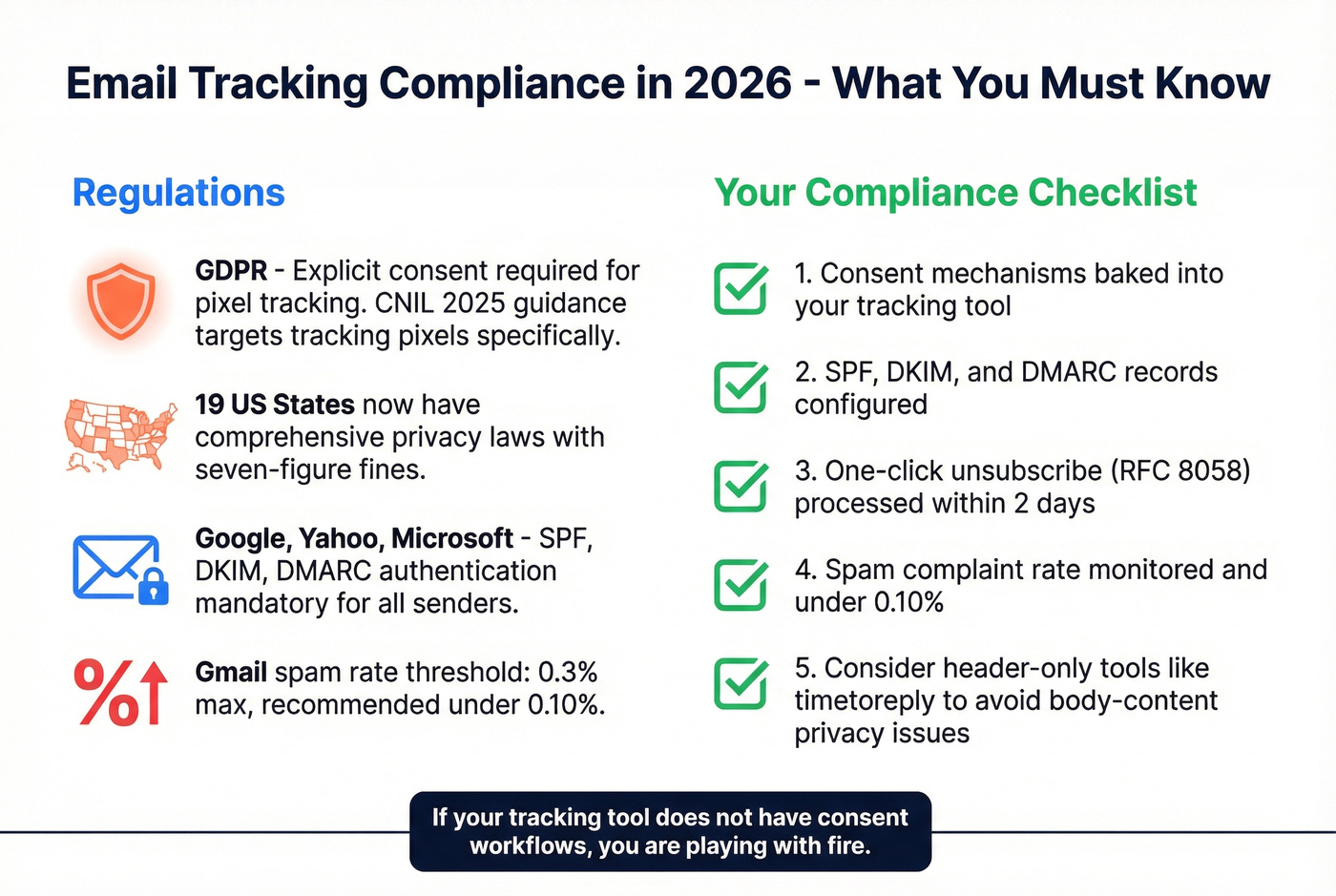
GDPR requires explicit consent for pixel-based tracking. CNIL's 2025 draft guidance specifically targets tracking pixels as personal-data processing - this isn't theoretical anymore. 19 US states now have comprehensive privacy laws, with enforcement fines reaching seven figures.
Google and Yahoo's 2024 sender rules mandate SPF, DKIM, and DMARC authentication. Microsoft followed with enforcement starting May 2025. Gmail's spam-rate threshold is 0.3%, with a recommended target under 0.10%. One-click unsubscribe (RFC 8058) is required, processed within 2 days.
If you need a refresher on authentication, start with SPF, DKIM, DMARC before you evaluate any tracking stack.
Let's be honest: if your tracking tool doesn't have consent mechanisms baked in, you're playing with fire. Tools that process only header data (like timetoreply) sidestep body-content privacy concerns entirely. Tools relying on tracking pixels need consent workflows front and center.
Do You Actually Need a Dedicated Tool?
Here's the thing - if your average deal size is under $15k and your team is fewer than 10 reps, you probably don't need dedicated email analytics software. Native Gmail or Outlook reporting plus your ESP's built-in dashboard will cover 80% of what you need.
If you're still unsure, it helps to map your reporting to a simple sales management dashboard so you don't buy tools for metrics you won't use.
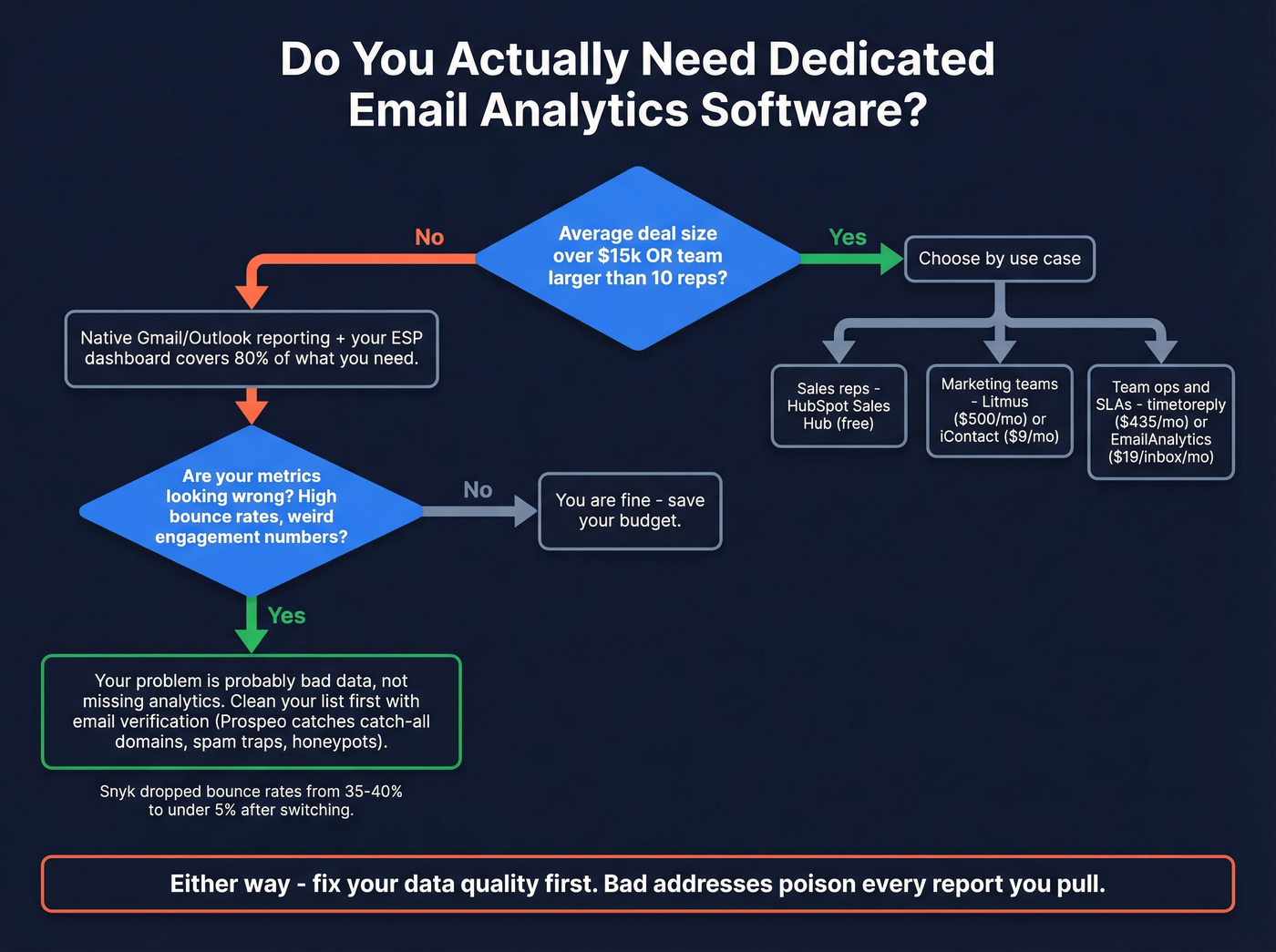
We've seen teams buy analytics tools to solve a problem that was actually bad data: bounces inflating failure rates, invalid addresses skewing engagement metrics, catch-all domains muddying reply tracking. If your numbers look wrong, the problem is usually data quality, not missing analytics. Clean your list first with a verification tool, then decide if you still have a visibility gap. Prospeo's 5-step verification process catches catch-all domains, spam traps, and honeypots - the exact junk that makes your campaign metrics lie to you.
If you're evaluating vendors, compare options in our roundup of the best email ID validators.
One customer, Snyk, saw bounce rates drop from 35-40% to under 5% after switching, which completely changed what their analytics dashboards were telling them.
For teams running cold outbound through Instantly or Smartlead, bad data doesn't just skew reports - it burns domains. Fix the inputs before you invest in fancier outputs. If you're troubleshooting bounces, start with the basics of a hard bounce.
Bad addresses don't just bounce - they poison every report you pull. Prospeo verifies 143M+ emails on a 7-day refresh cycle, catches spam traps and honeypots, and handles catch-all domains. Pair it with Instantly or any outbound tool and watch your deliverability metrics actually mean something.
Stop analyzing dirty data. Start with emails that land.
FAQ
What's the difference between email tracking and email analytics?
Tracking monitors individual email interactions - opens, clicks, link taps. Analytics aggregates that data into patterns: team performance trends, campaign benchmarks, SLA compliance rates. Tracking is per-email; analytics is per-team or per-campaign.
Are email open rates still accurate in 2026?
Mostly no. Apple Mail Privacy Protection covers roughly 46% of email clients and inflates open rates by about 18 points. Click-through rate, reply rate, and conversion rate are far more reliable engagement signals today.
What's the cheapest option for small teams?
HubSpot Sales Hub and Streak both offer free plans for sales email tracking. Mailtrack is free for basic open tracking in Gmail. For marketing campaign reporting, iContact starts at $9/month. If bad data is your real problem, Prospeo's free tier (75 verified emails/month) often fixes misleading metrics before you spend on analytics.
How does data quality affect email analytics?
Bad email addresses cause bounces, which tank sender reputation and skew every downstream metric. A list with 10%+ invalid addresses will show artificially low engagement across every report you pull. Cleaning your list before sending is the single highest-leverage fix for misleading analytics - and it's cheaper than buying another dashboard.