

Free Gmail Email Tracker Risks (2026): What Can Go Wrong + Safer Options
Free Gmail trackers look harmless right up until you hit the OAuth screen, your "open" data turns into noise, and you realize you just gave a third party a seat at the table in your inbox.
Our angle is simple: start with permissions, then privacy, then deliverability. Opens come last.
Here's the thing: for most teams, open tracking isn't worth the trade. We've tested this across outbound and customer follow-ups, and the best results almost always come from cleaner lists, fewer bounces, and workflows that trigger on replies and qualified clicks instead of "opened 3 times."
Why "free Gmail trackers" are everywhere (and why that matters)
Email tracking is cheap to run and easy to sell. A tracker is usually just (1) a tiny image request (pixel) and/or (2) a redirect link that logs clicks. The infrastructure cost is tiny; distribution is the whole game.
"Free" isn't a vibe. It's a funnel.
Most monetization paths are predictable:
- Upsell to sequences, templates, meeting booking, and CRM features
- Team visibility upgrades (dashboards, manager views, "standard process")
- Seat expansion once tracking becomes habit
- Affiliate/referral loops (marketplaces, partner bundles)
- Benchmarking built from aggregated usage patterns
- Data monetization of metadata: who emails whom, when, and from where
DuckDuckGo's Email Protection team has shared a stat that should make anyone pause: over 85% of emails sent to Duck Addresses contained trackers. That isn't just marketers. That's modern email.
Incentives matter. If the product's free, the incentive is to collect more data, get deeper into your workflow, and upsell you into broader access. Your incentive is the opposite: keep risk low, keep deliverability clean, and avoid turning your inbox into shadow IT.
What you need (quick version)
If you remember nothing else: opens are noisy, permissions are real, and "free" usually means you're paying in risk.
- Avoid full mailbox access. If a tracker asks for read/compose/send/delete, treat it like handing over your office keys.
- Assume opens are unreliable. They're a weak hint, not a trigger for automation.
- Minimize tracking. If you track anything, track one high-intent link (not every link plus a pixel).
- Measure replies and qualified clicks. A reply beats an open every day of the week.
- Use governed tools when you must track. Admin controls and consent gating beat random extensions.
- Keep a revocation plan. Know how to remove access fast if something feels off.
Do only three things and you'll dodge most of the damage:
- Don't install anything that requests full Gmail access.
- Stop using opens to score leads or change cadence.
- Audit and revoke app access quarterly.
How a Gmail email tracker actually works (pixels, links, extensions)
Most Gmail trackers combine three mechanisms. The risks come directly from the mechanics, so it's worth understanding the basics.

1) Tracking pixel (the classic)
A tracking pixel is a 1x1 (or invisible) image embedded in the email HTML. When the recipient's client loads images, it requests that pixel from the tracker's server.
That request can log:
- Time of load (shown as "open time")
- IP-derived location (rough, and often wrong)
- Device/client hints (headers/user agent, if captured)
If images are blocked, the pixel never loads. No request, no "open."
2) Tracking link redirect (click tracking)
A tracking link redirect rewrites your links so they go:
your-tracker-domain.com/r?c=123&m=abc -> final-destination.com
When the recipient clicks, the tracker logs the click, then forwards them to the real page. This is why tracked emails often show "weird" URLs.
Click tracking is more useful than open tracking, but it adds an extra domain (filters notice), an extra hop (security tools inspect), and another vendor system sitting in the middle of your customer journey.
3) Chrome extension / add-on model (how it hooks into Gmail)
Extensions and add-ons typically:
- Inject UI into Gmail (toggles, sidebars, templates)
- Modify outgoing HTML (insert pixel, rewrite links)
- Read message context (thread, recipient, subject) to match events back to emails
- Call the vendor's API to log events and show notifications
This is why "just tracking opens" often comes with broad permissions: the product isn't only watching an image load. It's wiring itself into your mailbox workflow.
The nuance most people miss: correlation
Tracking only works if the vendor can map an "open" or "click" back to a specific message and recipient. That correlation usually happens via a send ID embedded in the pixel URL, a recipient hash, and a campaign ID so the dashboard can group events.
A lot of tools request read access because they reconcile events against Sent Mail and threads: they parse what was sent, store the mapping, then display open/click history inside Gmail. That's also why permissions balloon the moment the tool adds "helpful" features like templates, sequences, or auto-logging.
One simple flow:
- You click Send in Gmail
- Extension modifies HTML -> adds pixel + rewrites links
- Email goes out
- Recipient opens -> pixel request hits vendor server
- Vendor matches request -> message/recipient ID -> shows "open" in Gmail UI

Free trackers trade your inbox security for noisy open data. Prospeo skips the pixel games entirely - 143M+ verified emails at 98% accuracy mean your outbound connects without risky extensions or bloated OAuth permissions.
Replace open-rate guessing with emails that actually land.
The 5 biggest free Gmail email tracker risks (permissions, privacy, deliverability)
1) Permission scope (the #1 hidden risk)
Least privilege is the whole game.
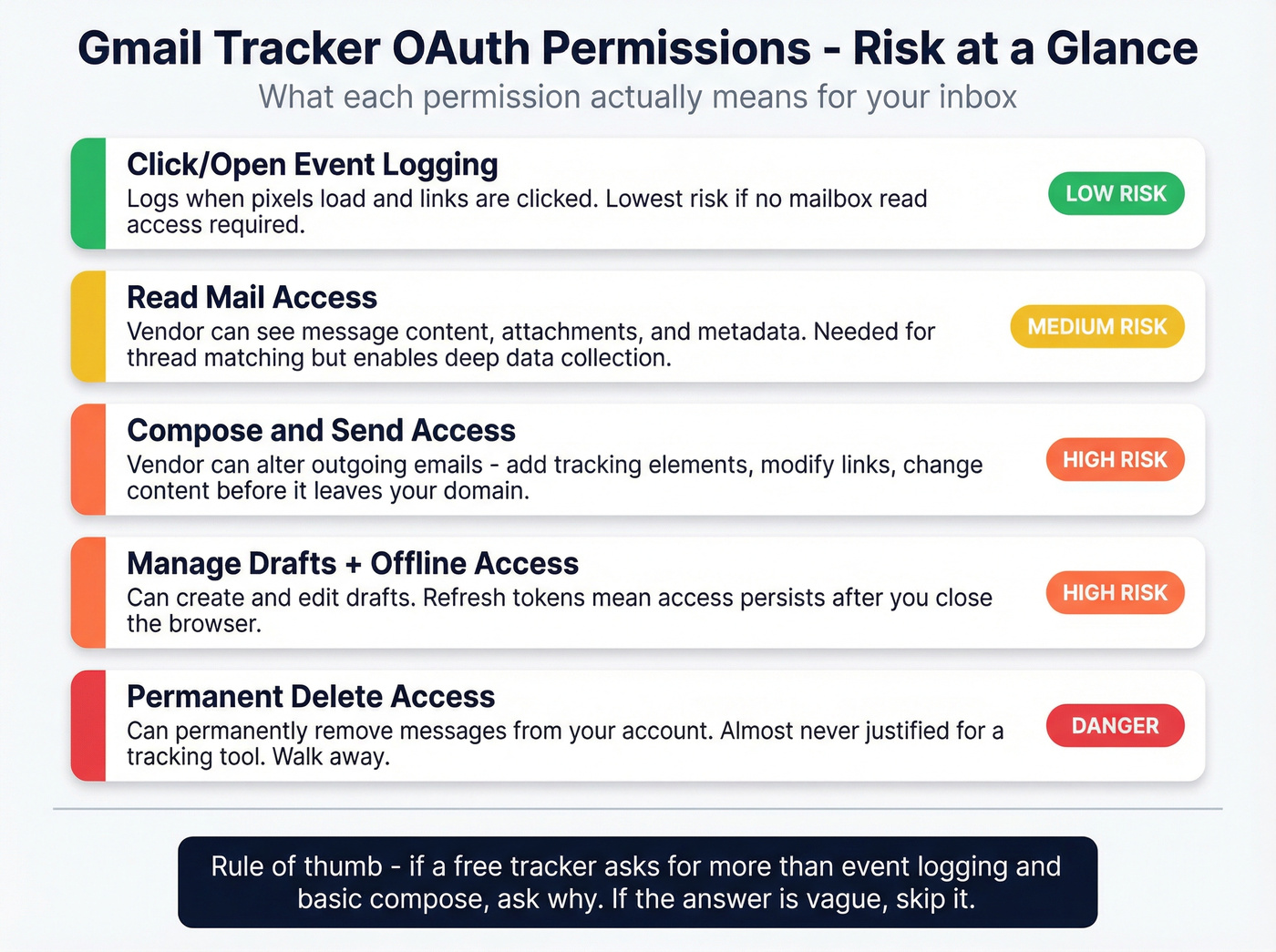
In practice, free trackers ask for broad scopes because it's easier to build a product that "just works" across Gmail changes, and because broad access enables upsells (templates, sequences, logging, CRM sync). Once a vendor has broad access, you're trusting their security posture, internal controls, and incident response with your inbox.
Plain-English scope translation:
- Read mail: the vendor can access message content and attachments your account can access.
- Compose/send: the vendor can alter what leaves your domain (links, content, tracking elements).
- Manage drafts: the vendor can create/edit drafts (useful for templates; dangerous if abused).
- Delete/permanently delete: the vendor can remove messages and trash. For tracking, this is almost never justified.
- Offline access / refresh tokens: access persists after you close the browser; revocation matters more than uninstalling.
Minimum acceptable scopes for a "tracking-only" tool:
- Click/open event logging without delete permissions
- No permanent delete scope
- A clear, documented reason for any "read" scope (and ideally a mode that works with less)
Hard red flags:
- Any permission that includes permanent delete
- Vague scope explanations ("needed for best experience")
- No admin controls, no audit trail, no clear revocation instructions
Skip this if you handle contracts, HR, legal, finance, or customer data in Gmail. Also skip it if you can't explain the OAuth scopes to your security team without hand-waving.
One real-world scenario we've seen: a small agency installs a "free" tracker on a shared inbox, then a month later a client asks for a copy of a thread for a dispute. The agency can't find it. Turns out an over-permissioned add-on had an "auto-cleanup" feature enabled and deleted messages after logging activity. That cleanup wasn't malicious. It was still a mess.
Also: if you're using a personal free Gmail account for business, you're stacking risk. Offboarding, account recovery, and data ownership get ugly fast. Google Workspace admin controls are the difference between "manageable" and "we lost the inbox."
2) Privacy and third-party sharing (metadata is still valuable)
Even if a tracker never reads your emails, metadata is sensitive:
- Who you email (customer list, prospects, partners)
- When you email (cadence, deal cycles)
- How often you follow up (sales motion)
- Who opens/clicks (or appears to)
- Which domains and industries you target
That's enough to infer pipeline movement and competitive strategy. Free tools have a built-in incentive to reuse that data for analytics, benchmarking, "product improvement," and partner ecosystems.
Two privacy checks most teams skip:
- Sub-processors list: who else touches the data (hosting, analytics, support, error logging)?
- Retention window: how long do they keep event logs and message mappings?
If those aren't explicit, assume long retention.
3) Security abuse surface (tokens, extensions, offboarding)
Trackers increase your attack surface in three direct ways.
1) OAuth token risk If an attacker gets the vendor's tokens (vendor breach, misconfig, compromised admin), they get mailbox access at scale. Offline access and refresh tokens matter because access persists until revoked.
2) Extension supply-chain risk Browser extensions are powerful. A compromised extension update can become a distribution channel for credential theft, session hijacking, or silent content injection into outgoing emails.
3) Phishing enablement Tracking data makes phishing sharper. "Opened" events (even false ones) help attackers time follow-ups and tailor lures.
Security checks that separate grown-up tools from toys:
- Central extension management (Workspace policies) and a known publisher identity
- SSO + role-based access for the vendor dashboard
- A real security page with an incident process and contact
- Token lifecycle clarity: what persists, how to revoke, what happens on offboarding
If anyone in your org can install anything, you're not "trying a tool." You're creating shadow IT.
4) Deliverability and reputation (tracking adds filter signals)
Pixels and redirects are normal in marketing email. In cold outreach, they add common spam-filter signals:
- Extra domains in links (redirectors)
- Hidden HTML elements (pixels)
- Patterns associated with bulk tooling
This doesn't mean "pixel = spam." It means tracking raises scrutiny, and if your reputation's borderline, it's the extra weight that pushes you into Promotions or Spam.
Deliverability guardrails that actually matter:
- Keep bounce rate under ~2%
- Keep spam complaints under ~0.1%
If you can't hit those, remove tracking and fix list quality first. Then fix copy and cadence.
Mitigations that help in practice:
- Track clicks only (skip the pixel) when deliverability's fragile
- Track one link (high intent) instead of rewriting every URL
- Avoid link shorteners and odd redirect domains
- Keep HTML simple (or plain text)
- Warm up gradually if you're ramping volume
For a deeper deliverability-first setup, see Email Deliverability 2026.
5) Bad decisions from bad data (opens break workflows)
This is the silent killer: you start operationalizing opens.
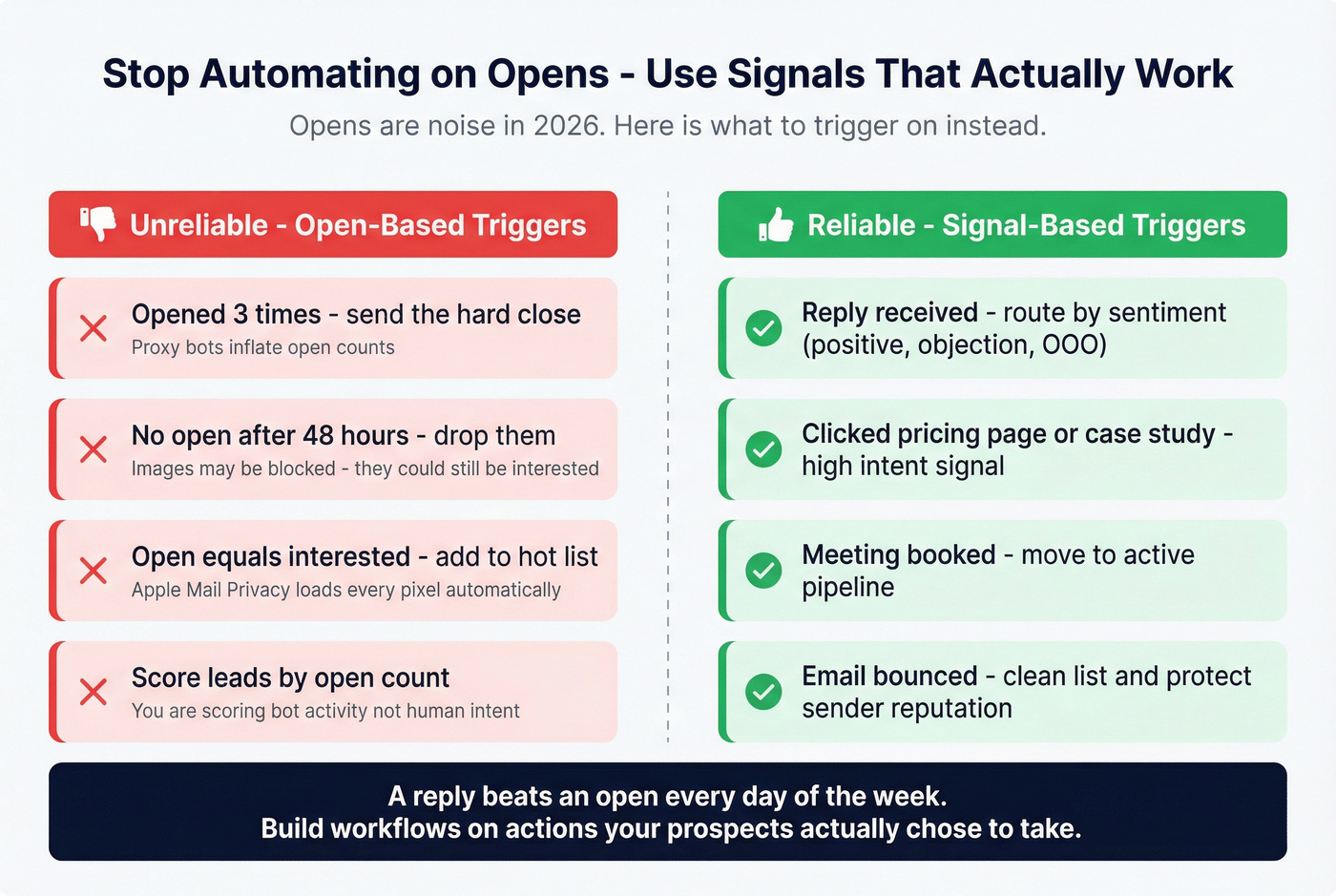
Common bad moves:
- "They opened 3 times, send the hard close."
- "No open, drop them."
- "Open = interested."
In 2026, opens are polluted by proxies, caching, and bots. When you build automations on top of opens, you don't just get it wrong. You get it wrong at scale.
Automate these instead:
- Reply-based triggers (positive reply, objection reply, out-of-office)
- Click-based triggers (clicked pricing/case study/demo page)
- Meeting-booked triggers
- Bounce-based suppression (stop immediately, fix data)
If you're building sequences, align this with Sales Sequence Best Practices and Conditional Sequences.
Why Gmail open tracking is unreliable in 2026 (false opens + proxy caching)
Open tracking used to be "good enough." Now it's a noisy sensor.
Two mechanisms drive most of the unreliability.
Mechanism 1: Proxy caching (Gmail Image Proxy, since 2013)
Gmail proxies images through Google's servers. That breaks:
- Repeat opens: caching often prevents the pixel from firing again, so "opened 5 times" is often fiction
- Granular device/location: proxying blurs details
Mechanism 2: Bot and security prefetch (false opens)
Automated systems create false opens. GMass documented a pattern where Gmail triggers a bot-like pixel hit immediately after receipt, creating an "open" event with no human reading.
They also identified a user-agent string associated with these false opens:
Mozilla/5.0 (Windows NT 10.0; Win64; x64) AppleWebKit/537.36 (KHTML, like Gecko) Chrome/42.0.2311.135 Safari/537.36 Edge/12.246 Mozilla/5.0
If your tracker can't show user agents (most free ones don't), you can't diagnose this. You just see "opened" and act on it.
Consequence: opens are a hint, not proof.
We've watched teams do this exact faceplant: send at 9:02, get an "open" at 9:02, follow up at 9:05, and look desperate because nobody actually read the email. The rep thinks they're being "responsive." The prospect thinks they're being chased by a bot.
Treat opens like weather. Useful sometimes. Not something you schedule your day around.
If you're still set on tracking, compare options in Best Email Open Tracker in 2026.
Permission-scope reality check: what Google asks you to allow
Here's the consent-screen moment that should make you pause.
A common OAuth permission string people see when installing Gmail tracking add-ons is:
"Read, compose, send, and permanently delete all your email from Gmail."
That's not "track email opens." That's full mailbox power.
Why a tracker asks for this:
- It inserts pixels and rewrites links (compose/send access)
- It matches events to threads and shows history inside Gmail (read access)
- It adds workflow features (templates, sequences, logging) that expand scope
- Vendors request broad scopes to reduce edge cases across Gmail UI changes
How to interpret scopes fast:
- Read-only: still sensitive (your inbox is your company's nervous system).
- Compose/send: the tool can influence what leaves your domain.
- Delete/permanent delete: almost never justified for tracking. Treat it as a stop sign.
- Offline access: uninstalling the extension does nothing unless you revoke access.
Failure modes: when tracking doesn't work (and makes you look spammy)
Tracking fails more often than people admit, and the failure can make you look worse.
Quick troubleshooting checklist:
- Images are blocked -> pixel never fires. Gmail can show recipients: "Images in this message are hidden. This message might be suspicious or spam." That banner kills trust.
- Security scanners prefetch -> you get an "open" that's actually a scan.
- Corporate gateways rewrite links -> click tracking breaks or double-redirects.
- Plain-text mode -> no pixel, no HTML tracking.
- Privacy tools strip trackers -> the recipient opens, but you see nothing.
Some tools try to hide tracking elements in the HTML. Real talk: that can backfire. Security gateways and privacy protections still catch a lot of it, and if a recipient notices you're trying to be sneaky, you've lost the relationship before you start.
Operationally, this creates a nasty loop: you don't get opens, you send more follow-ups, you look spammy, you get blocked more, and you end up with even fewer real signals.
Design a workflow that still works when tracking is blind. That's the grown-up approach.
Legal and compliance risk (EU + US): what changes heading into 2026
Not legal advice. Talk to counsel if this matters for your business.
The practical reality is simple: individual-level email tracking is increasingly treated like cookie-style tracking, especially in the EU.
EU: ePrivacy scope covers pixels and tracking links
EU guidance on the technical scope of ePrivacy Art. 5(3) covers tracking links and pixels. Regulators treat these as tracking technologies, not harmless "email analytics."
If you need a practical outbound lens, start with GDPR for Sales and Marketing (2026).
France (CNIL): pixels treated like cookies + "double consent"
CNIL's 12 June 2025 draft recommendation is the most operationally important:
- It treats email pixels like cookies (consent required unless strictly necessary).
- It introduces "double consent": one consent to receive marketing emails, and a separate consent for tracking pixels.
- It pushes immediate withdrawal effects, including server-side suppression of tracking.
If your EU program depends on individual open tracking, you're building on sand.
Operational compliance checklist for EU recipients
If you email EU recipients, run this model:
Default: tracking off for EU Disable individual open tracking by default for EU recipients. Turn it on only when you have explicit tracking consent.
Separate marketing consent vs tracking consent Capture consent to receive emails separately from consent to track opens/clicks. Don't bundle it.
Store proof of consent Log who consented, what they consented to, timestamp, source, and the exact consent language shown.
Withdrawal must be immediate Provide a withdrawal mechanism and enforce server-side suppression right away.
Prefer aggregate reporting Campaign-level measurement without identifying individuals is the safer posture and still answers most business questions.
US: patchwork + a real operational deadline
The US is still a patchwork of state laws and sector rules. One concrete operational date: California's Delete Act requires an accessible deletion mechanism by Jan 1, 2026. Even when a law isn't "about email tracking," it forces better data inventories and deletion workflows, which is exactly where free trackers tend to be sloppy.
A safer playbook (audit a tracker + measure success without opens)
You need measurement. You don't need creepy measurement.
Step 1: Decide what you're actually trying to learn
Most teams want one of these:
- "Did this message reach a human?"
- "Is my copy working?"
- "Who should I follow up with?"
Replies and qualified clicks answer the last two cleanly. Opens don't.
Step 2: Replace "open obsession" with better inputs (clean data + reply-first)
If you want better outcomes without invasive tracking, start with list quality and real engagement metrics.
In our experience, most "we need tracking" conversations are really "our targeting and deliverability are shaky" conversations. Tools like Prospeo fit here because they fix the upstream problem: bad data. Prospeo is "The B2B data platform built for accuracy" with 300M+ professional profiles, 143M+ verified emails at 98% verified email accuracy, and a 7-day refresh cycle. When bounces drop and the list matches your ICP, you can measure what matters (replies, qualified clicks, meetings) without turning every email into a surveillance project.
If you're building or buying lists, pair this with B2B Email Marketing Lists and a clean SOP like Email Verification List SOP.
Step 3: Use governed tracking when you truly need tracking
If you must track opens/clicks inside Gmail, use a governed platform with admin controls and compliance gating.
HubSpot Sales Hub (governed tracking example) HubSpot supports admin-controlled defaults and privacy settings. When data privacy settings are enabled, email opens can be tracked only for contacts with an assigned legal basis, and Super Admins can enforce default tracking/logging behavior org-wide. Pricing typically lands in the ~$20-$100+/seat/month range depending on tier and governance needs.
DuckDuckGo Email Protection (mitigation concept) DuckDuckGo Email Protection strips many trackers before emails hit your inbox. It's also a reminder that buyers are moving toward anti-tracking defaults, so open tracking keeps getting less reliable over time.
Step 4: Minimal tracking setup (the version that doesn't wreck trust)
If you want some measurement without the worst free gmail email tracker risks, use this setup:
- No open pixel
- One tracked link only (your highest-intent destination: pricing, case study, demo)
- UTM parameters on that one link (campaign + persona + offer)
- Plain text or very light HTML
- Follow-ups triggered by:
- Replies
- Qualified click on that one link
- Meeting booked
- Bounces (immediate suppression)
This gives you a clean signal (click intent) without turning every email into a tracking experiment.
To tune the rest of the system, use Email Outreach Analytics and a sane Email Cadence Meaning baseline.
Step 5: Pricing sidebar: why "free" exists
Free trackers aren't free because vendors are generous. They're free because tracking is top-of-funnel for upsells.
| Tool | Free tier | Paid starting (typical) |
|---|---|---|
| MailSuite | Yes | $11.99/user/mo |
| Mixmax | Yes (20 tracked emails) | $34/user/mo |
| Yesware | Yes | $19/seat/mo |
| Streak | No free tracking tier | ~$59/user/mo |
| HubSpot Sales Hub | Free entry | ~$20-$100+/seat/mo |
Step 6: Quick audit checklist before you click Allow
Before you click "Allow," run this audit. It takes 10 minutes and saves months of cleanup.
Publisher identity Real company, real domain, real support, real security page. If it's a mystery brand, stop.
OAuth scopes (least privilege) If you see read/compose/send/delete, demand a feature-by-feature explanation. If "delete" is included, walk away.
Data retention + sub-processors Retention window and sub-processor list should be explicit. If it's vague, assume long retention and broad sharing.
Consent controls Can you disable tracking by default? Restrict by region? Separate aggregate reporting from individual tracking?
Admin governance Admin console, audit logs, SSO, role-based access. If it's "every user installs it," you've created shadow IT.
Uninstall + revoke clarity Uninstalling an extension isn't the same as revoking OAuth access. You need both steps documented.
Quarterly review Set a calendar reminder to review connected apps and extensions.
Step 7: Revocation walkthrough (uninstall isn't enough)
Do this when you remove a tracker, or when something feels off.
Revoke Google access (the important part) Google Account -> Security -> Third-party access (or "Your connections to third-party apps & services") -> find the app -> Remove access.
Remove the Chrome extension Chrome -> Extensions -> Manage Extensions -> Remove (then refresh Gmail).
Check Workspace admin (if applicable) If you're on Google Workspace, have an admin review OAuth app access and extension policies in the Admin console to prevent re-installation.
Rotate anything the tool touched If the tool integrated with a CRM or sequence platform, rotate API keys/tokens there too.
Confirm it's gone Send a test email and verify no tracking UI, no rewritten links, and no vendor dashboard activity.
Tracker risk score: what to check before you click "Allow"
| Scope | Admin/SSO | Retention | Consent | Revoke | Risk |
|---|---|---|---|---|---|
| Read/send/delete | None | Unclear | None | Unclear | High |
| Read/send | Basic | Partial | Limited | Basic | Med |
| Read-only | Strong | Clear | Strong | Clear | Low |
You just read why opens are unreliable and permissions are dangerous. The real signal is replies - and replies start with clean data. Prospeo's 7-day refresh cycle and 5-step verification keep bounce rates under 4%, no tracking pixel required.
Ditch the tracker. Fix the list. Book more meetings.
FAQ
Can recipients tell if I'm using an email tracker in Gmail?
Yes. Trackers add a hidden pixel and/or rewrite links through a redirect domain, and privacy tools surface both. Recipients also see blocked-image warnings or "suspicious" banners more often in cold emails.
Can a Gmail email tracker get my Google account flagged or restricted?
Gmail restrictions come from sending behavior (volume, complaints, patterns). The bigger risk is security and compliance: broad OAuth scopes and extensions expand your attack surface and create data-handling liabilities even if Gmail never flags you.
Are Gmail open rates accurate anymore (or mostly false opens)?
Open rates are noisy. Gmail's image proxy breaks repeat-open counting, and automated behavior creates false opens. Treat opens as a weak timing hint, not an intent signal.
Is email open tracking legal in the EU in 2026?
EU regulators treat pixels and tracking links as consent-based tracking under ePrivacy rules. CNIL's June 12, 2025 draft recommendation pushes toward explicit consent for pixels and even "double consent." For EU recipients, default to tracking off unless you've captured explicit tracking consent.
What's a safer alternative to open tracking for outbound?
Use reply-first measurement plus cleaner targeting: verify emails, reduce bounces, and track outcomes like replies, qualified clicks, and meetings booked. This holds up even when opens are polluted by proxies, caching, and bots.
Summary: when free tracking is a bad trade
If you're weighing free gmail email tracker risks against the value of "open notifications," the math usually doesn't work out. You take on broad permissions, extra privacy exposure, more deliverability scrutiny, and then you still get unreliable open data.
Measure what's real (replies and qualified clicks), keep tracking minimal, and invest in clean targeting and verification so your emails land and get answered.