

B2B Email Marketing Lists in 2026: How to Get Emails That Actually Deliver
$300 for 1,000 "targeted B2B emails" sounds like a steal... until your first send bounces 6% and your domain reputation faceplants. Most list problems aren't copy problems. They're data freshness and verification problems.
Fix those, and everything downstream gets easier.
What you need (quick version)
Use this checklist before you spend $1 on b2b email marketing lists:
- Pick your list type (don't mix them):
- Opt-in list (newsletter/subscribers): best deliverability, slower growth.
- Outbound prospecting list (cold email): fastest pipeline, highest compliance + deliverability risk.
- Partner/co-marketing list (shared audiences): can work, but consent provenance is everything.
- Non-negotiable rule of thumb: if bounce rate >2%, you've got a data problem. Pause sends and fix the list.
- Decide build vs buy in 60 seconds:
- If you need repeatable pipeline -> build a living database (refresh + verify continuously).
- If you need one campaign -> you can buy, but only if you verify + suppress + segment first.
- If you're in EU/UK/Canada -> treat "buying a list" as a documentation project, not a shortcut.

What "B2B email marketing lists" means (3 list types)
People say "email list" like it's one thing. It's not. In practice, there are three totally different assets, and they behave differently in deliverability, compliance, and ROI.

1) Permission-based (opt-in) lists This is your newsletter list, webinar registrants, product signups, and content subscribers. Use it for lifecycle marketing, nurture, product updates, and upsell.
Skip it if you're trying to create pipeline next week. Opt-in lists are compounding assets, not instant fuel.
2) Outbound prospecting lists (cold email lists) This is a targeted list of people who didn't ask to hear from you, built from firmographics + roles + buying signals. Use it when you need meetings and you're willing to run real ops: verification, suppression, authentication, and tight targeting.
Skip it if your org can't handle the basics. I've watched teams "try cold email" and torch their primary domain because they treated it like a newsletter blast.
3) Partner/co-marketing lists This is when a partner "shares their list" or you do a co-hosted event and both parties email attendees. Use it when the consent language is explicit and the partner's list hygiene is strong.
Skip it when the partner can't prove how they collected consent. "They opted in at some point" isn't a compliance strategy.
The most common failure pattern is simple: buying a sloppy outbound list, then sending it like it's an opt-in newsletter. That mismatch is where bounces and complaints come from.
Build vs buy: the decision framework (and the "living database" idea)
Static lists rot. That's not a metaphor. It's math.
ZeroBounce's Jan-Dec 2025 verification dataset shows at least 23% of an email list degrades yearly. People change jobs, domains change, inboxes get disabled, and "valid last quarter" becomes "hard bounce today." (If you want the mechanics and KPIs, see contact data decay.)
So the real decision isn't "build vs buy." It's:
- Static list (one-time export) vs
- Living database (continuous refresh + verification)
A simple decision tree that actually works
Build (opt-in) if:
- You're running newsletters, product comms, or nurture.
- You can trade speed for long-term deliverability.
- You want higher CTR and lower complaint risk.

Buy/build outbound lists if:
- You need pipeline now and you're doing list building the grown-up way (tight ICP + ongoing refresh), not a one-off export.
- You can define an ICP tightly (industry, headcount, tech stack, role).
- You can run verification + suppression + ongoing refresh without "we'll do it later" turning into never.
Partner lists if:
- You've got a partner with a similar ICP and clean consent language.
- You're willing to treat it like a test, not a guaranteed win.
The "living database" criterion: refresh cadence
In most sales databases, refresh cycles are 4-6 weeks. That's fine for account planning. It's not fine for high-volume outbound, where a few percentage points of decay turns into a bounce spike, and a bounce spike turns into deliverability problems you can't "copywrite" your way out of.
A living database in 2026 looks like this: frequent refresh + verification gates so you're not paying to relearn the same lesson every month (stale data causes bounces).
Hot take: if your average deal size is relatively small, you probably don't need ZoomInfo-level "everything." You need clean emails, tight targeting, and a verification gate that never lets junk touch your sequencer.

You just read that 23% of email lists decay every year. Prospeo refreshes its 300M+ profiles every 7 days - not 6 weeks like the industry average. With 98% email accuracy and 5-step verification that catches spam traps and honeypots, your bounce rate stays under 2% where it belongs.
Stop paying to relearn the stale-data lesson every month.
Is buying B2B email lists legal? (US, EU, UK, Canada)
Legal doesn't mean "safe," and "safe" doesn't mean "effective." You need both.
Here's the operational compliance checklist most teams actually need.
The baseline rules (everywhere)
- Identify yourself clearly (real company, real sender).
- Don't mislead (subject line and content).
- Provide an opt-out method that works.
- Honor opt-outs fast and keep a suppression list.
- Only email relevant people (this is deliverability and compliance risk management).
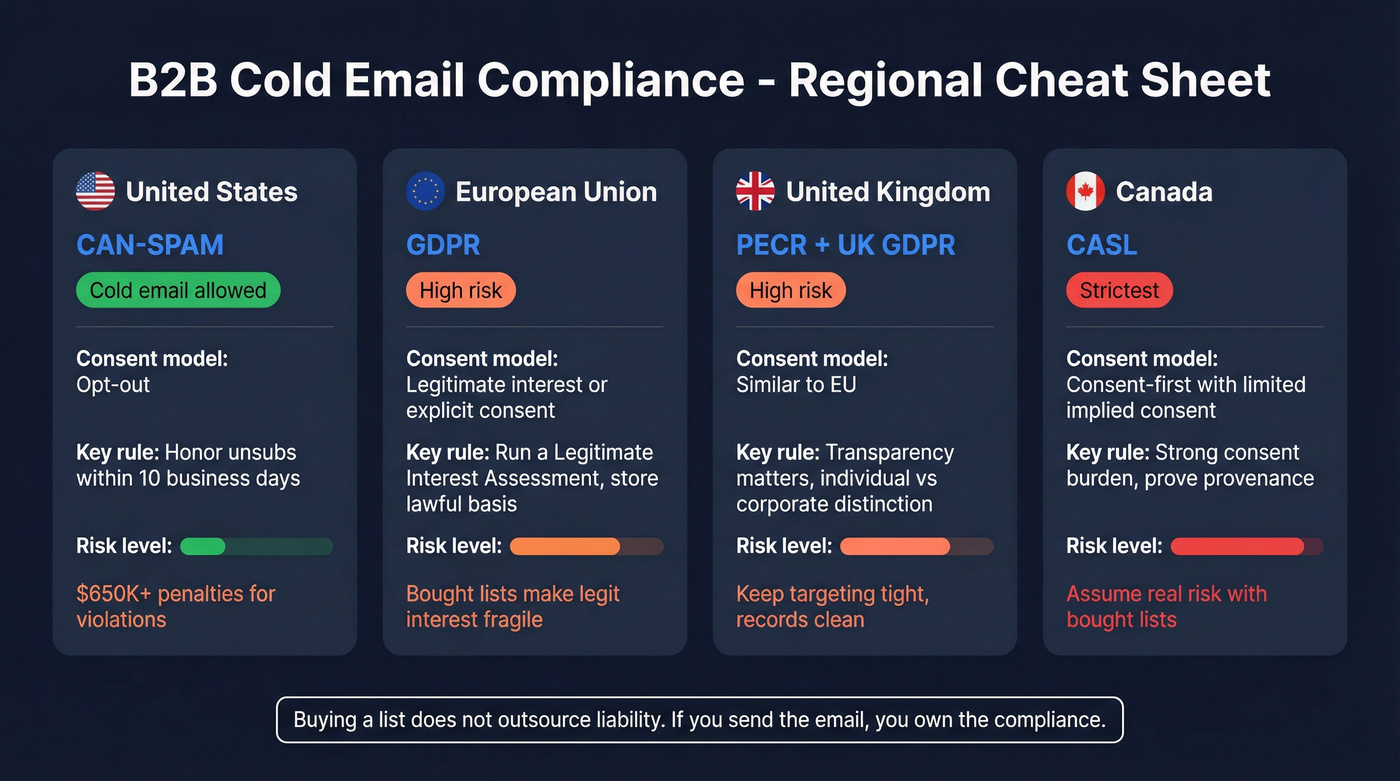
Regional cheat sheet
| Region | Cold email allowed? | Consent standard | Key operational rule |
|---|---|---|---|
| US (CAN-SPAM) | Yes | Opt-out | Unsub in 10 biz days |
| EU (GDPR) | High-risk | Legit interest/consent | Store lawful basis |
| UK (PECR + GDPR) | High-risk | Similar to EU | Transparency + opt-out |
| Canada (CASL) | Limited | Consent-first | Strong consent burden |
The documentation to keep (minimum viable)
If you buy, share, or import any list, store this per source (vendor, partner, event, form, scrape, etc.):
- Source name + source URL (or vendor contract/order ID)
- Collection method (form, event registration, partner opt-in, etc.)
- Consent language shown (exact text or screenshot) + whether it covered third-party marketing
- Timestamp + location captured (page/event name)
- Lawful basis (consent vs legitimate interest) and the owner of that decision
- Privacy notice link that applied at capture time
- Suppression proof: when/how unsubscribes were applied across tools
- Data subject request (DSR) process owner + response workflow (EU/UK especially)
For EU/UK outreach under legitimate interest, your Legitimate Interest Assessment (LIA) should cover:
- Purpose test: what you're trying to achieve (and why email's the channel)
- Necessity test: why you need personal data for that purpose (and why less data won't do)
- Balancing test: why your interest doesn't override the person's rights (relevance, expectations, opt-out ease)
US (CAN-SPAM): opt-out is the core requirement
In the US, cold email's legal under CAN-SPAM if you follow the rules. The one teams mess up constantly: opt-out requests must be honored within 10 business days.
The FTC's enforcement page lays out the basics and points to a case that included a $650,000 civil penalty tied to CAN-SPAM violations (including missing opt-out mechanisms and mislabeling): https://consumer.ftc.gov/consumer-alerts/2023/08/ftc-lawsuit-reminds-businesses-can-spam-means-cant-spam
Operationally: your unsubscribe link can't be decorative. It has to work, and your suppression list needs to be applied to every send, including "newly purchased" lists. (Related: CAN-SPAM physical address requirement.)
EU (GDPR): bought lists are where teams get hurt
GDPR treats business emails as personal data when they identify a person (which most do). You can use legitimate interest for B2B outreach in some cases, but purchased lists are where that argument gets fragile fast because you often can't prove how the data was collected or what the person expected.
If you're emailing EU residents, run a real LIA, keep the artifacts above, and make opt-out immediate and frictionless.
UK (PECR + GDPR): treat it like EU with extra caution
In practice, run the same playbook as EU: relevance, documentation, and fast suppression. UK enforcement tends to care a lot about transparency and whether you're marketing to individuals vs corporate subscribers, so keep your targeting tight and your records clean.
Canada (CASL): consent-first, not "opt-out later"
CASL's the strictest of the bunch. The practical framing is consent-first, with limited implied consent scenarios. If you're sending into Canada from a bought list, assume you're taking on real risk unless you've got clear consent provenance.
Callout: the compliance trap
Buying a list doesn't outsource liability. If you send the email, you own the compliance and the reputation damage.
The list quality scorecard (numeric thresholds you can enforce)
Most teams "judge list quality" by vibes. That's how you end up paying for garbage twice.
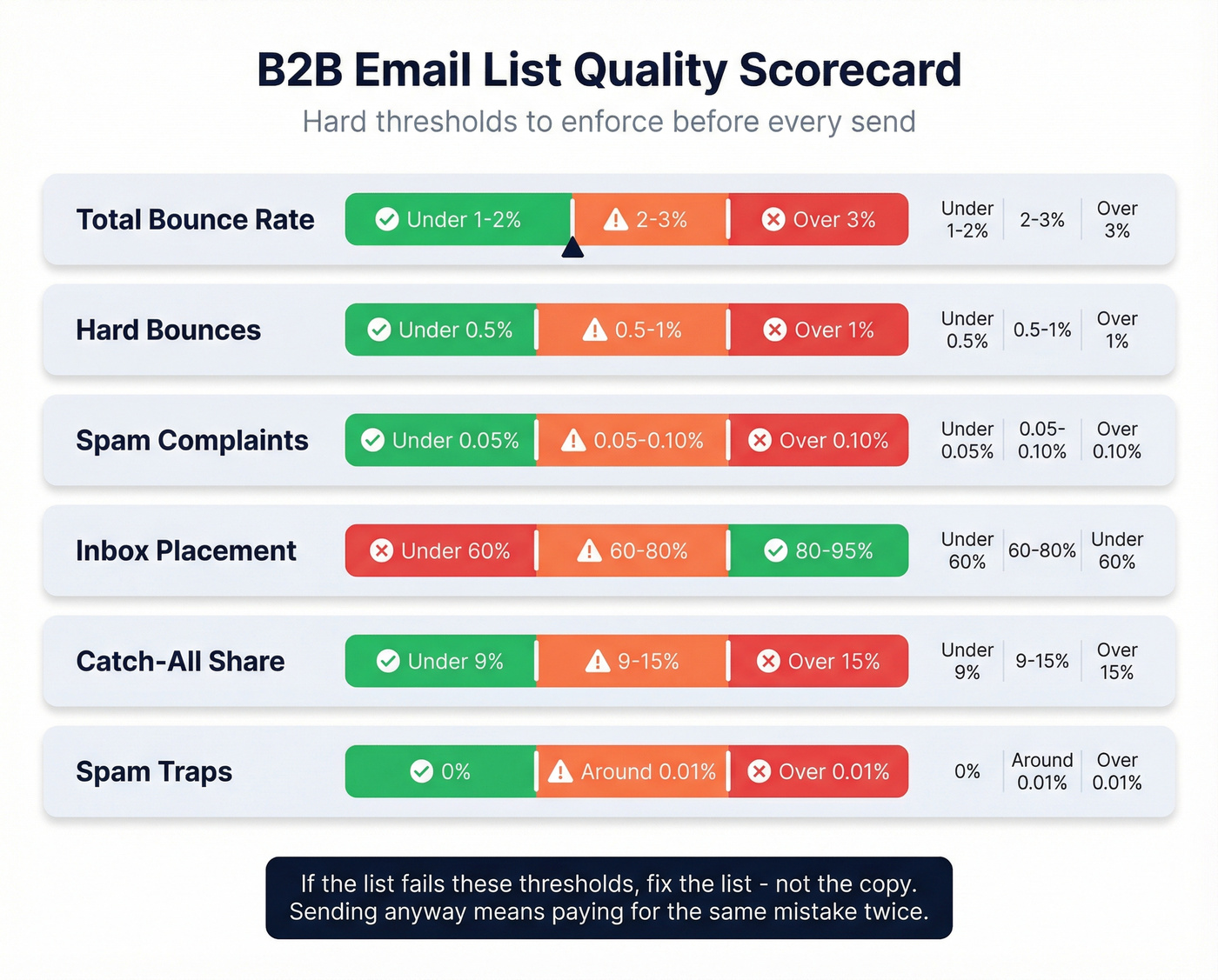
Use a scorecard with hard thresholds. If the list fails, you fix the list, not the copy.
Quality scorecard (pass/fail)
| Metric | Pass | Warning | Fail |
|---|---|---|---|
| Total bounce rate | <1-2% | 2-3% | >3% |
| Hard bounces | <0.2-0.5% | 0.5-1% | >1% |
| Spam complaints | <0.05% | 0.05-0.10% | >0.10% |
| Inbox placement | 80-95% | 60-80% | <60% |
| Catch-all share | <9% | 9-15% | >15% |
| Spam traps | 0% | ~0.01% | >0.01% |
Notes behind the numbers:
- Bounce targets: keep total bounces under 1-2%. Above 2% triggers provider alarms and reputation damage.
- Complaint warning line: 0.05%-0.10% is where you start getting punished.
- Inbox placement: healthy programs live around 80-95%. Measure it with seed-testing tools (GlockApps-style tests) or your ESP's deliverability dashboard if you've got one. Opens won't tell you this.
- Catch-all prevalence: ZeroBounce reports 9%+ of emails as catch-all in their dataset. Catch-all isn't an auto-fail, but it's a risk bucket.
- Spam traps: you don't measure traps directly in a dashboard. You prevent them with verification filters, conservative sourcing, and by refusing to mail "unknown" addresses at scale. (More: spam rate threshold.)
What to do if you fail (the fix list)
- Bounces too high: stop sending, run verification, remove invalid/unknown, and re-segment by role + company fit.
- Complaints too high: your targeting's off. Tighten ICP and reduce volume.
- Catch-all too high: treat catch-all as "send cautiously." Start with smaller batches and watch bounces by domain.
- Trap risk: stop using that source, scrub aggressively, and rebuild from cleaner inputs.
Here's the thing: this is where teams get stubborn. They keep sending because "we already paid for the list."
That's how you pay again.

How to build campaign-ready lists (step-by-step workflow)
This is the workflow we recommend when you need outbound-ready lists that won't wreck deliverability, whether you're building a list for marketing or for sales outreach.
Source -> verify -> segment -> authenticate -> send -> maintain
1) Source: define ICP like you mean it
Pick 3-5 filters that actually correlate with buying:
- Industry + headcount band
- Geography
- Job function + seniority
- Tech stack (if relevant)
- Growth signals (hiring, funding, headcount growth)
If you're feeding sequences from prospect lists, the same rule applies: don't export "everyone." Export "people who look like buyers."
A scenario we see a lot: a team grabs "SaaS, 11-200 employees" and calls it an ICP, then wonders why unsubscribes spike and replies are salty; the real fix is narrowing to a specific function, a specific trigger, and a specific reason you belong in their inbox.
2) Verify: gate the list before it touches your sequencer
Verification isn't a nice-to-have. It's the difference between scaling and getting blocked.
Your rule: bounce >2% triggers provider alarms. So you verify first, then send. (If you need a full SOP, use this email verification list.)
SOP: the "sequencer gate" (copy/paste policy)
Set this as a hard rule in your CRM/sequencer import process:
- Verified/Valid -> OK to sequence. Import immediately.
- Invalid -> suppress permanently. Log the source (vendor/export/date). If a source produces >3% invalid, stop buying from it.
- Catch-all -> throttle + test. Start with max 25 emails/day per catch-all domain. If catch-all bounces exceed 2% on that domain over the first 100 sends, pause that domain and re-verify before sending more.
- Unknown/Risky -> quarantine, then retest. Re-verify in 7 days. If it's still unknown, suppress it for outbound and keep it only for non-email channels (ads/retargeting) or manual research.
Batch sizing that keeps you safe:
- New source you don't trust yet: 200-500 contacts max for the first send.
- Known-good source: ramp weekly, not daily. Inbox providers reward consistency.
3) Segment: don't send one message to five personas
At minimum, segment by:
- Persona (VP Sales vs RevOps vs Marketing Ops)
- Company size band
- Trigger (hiring, new tool, funding)
This is where most "bought lists" fail. They're not lists. They're piles. (If you want a deeper segmentation framework, see how to segment email list.)
4) Authenticate: SPF/DKIM/DMARC are non-optional ops
If you skip authentication, you're basically asking inbox providers to distrust you.
Minimum bar:
- SPF configured correctly
- DKIM signing enabled
- DMARC policy set (start with monitoring, then tighten) (see SPF DKIM & DMARC)
If you're doing cold email at volume, separate domains and mailboxes are common. Don't treat that as a loophole. Treat it as risk containment.
5) Send: ramp volume and watch the early warning signals
- Start smaller, then scale.
- Watch bounces, complaints, and replies daily for the first week.
- Keep first-touch emails tight: one idea, one CTA.
6) Maintain: suppression + opt-out handling (fast)
Two operational rules:
- Suppression list is sacred. Every send checks it.
- Under CAN-SPAM, opt-outs must be processed within 10 business days. Build that into your workflow, not a sticky note.
What your verification/export screen should show you
When you verify or enrich, you should see statuses that let you make sending decisions immediately: Verified/Valid, Invalid, Catch-all, and Unknown, plus enriched fields (role, company, domain, and firmographics). (Related: data quality.)
Your outbound list should only include Verified/Valid by default. Catch-all gets tested in small batches. Invalid gets suppressed permanently. Unknown gets retested once, then suppressed.
Building a living database shouldn't cost enterprise money. Prospeo delivers verified B2B emails at ~$0.01 each - 90% cheaper than ZoomInfo - with 30+ filters for ICP targeting, intent data across 15,000 topics, and catch-all domain handling built in. No contracts, no sales calls.
Teams using Prospeo book 26% more meetings than ZoomInfo users.
What results to expect in 2026 (cold email vs newsletter benchmarks)
Expectations matter because they change how you judge list quality.
Cold email benchmarks (outbound prospecting lists)
Instantly's 2026 benchmark report puts:
- 3.43% average reply rate
- 5.5%+ for top quartile
- 10.7%+ for top 10%
It also reports that 58% of replies come from the first email, and the sweet spot is 4-7 touchpoints. Best-performing first emails are under 80 words with a single CTA: https://instantly.ai/cold-email-benchmark-report-2026
Do:
- Keep copy short and specific.
- Follow up 4-7 times.
- Treat list quality and deliverability as step zero.
Don't:
- Judge a list on opens (they're noisy).
- Scale volume before you've proven bounce/complaint rates are stable.
One operator sending 100K+/month sees ~1.6% reply at scale. That's normal. High reply rates often come from tiny, hyper-targeted lists. Use Instantly's numbers as "what's possible," and the 1.6% as "what's common at scale." Judge list quality on bounce/complaints first, replies second.
Newsletter benchmarks (opt-in lists)
For opt-in programs, CTR's a better north star than open rate. Salesforce puts "good" email CTR around 2-5%, with promos often 1-3% and transactional 5%+. Apple Mail Privacy Protection makes open rates less reliable, so optimize for clicks and downstream conversions: https://www.salesforce.com/marketing/email/benchmarks/
Tools to build and verify lists (with pricing reality)
Most "best list providers" posts dodge pricing and pretend every tool's the same. They're not.
Two pricing realities you should anchor on:
- One-time list buys often land around $300-$1,000+ per 1,000 B2B contacts (and you still need to verify).
- ZoomInfo-style platforms typically run $15k-$45k+/year once you include seats, credits, and the modules you'll inevitably be pitched.
Prospeo - best for verified, self-serve list building (Tier 1)
Prospeo is "The B2B data platform built for accuracy." It's also the cleanest path we've seen to campaign-ready data without enterprise contracts, because it combines a leads database with real-time verification and refreshes records every 7 days (not every month and a half).
What you get:
- 300M+ professional profiles and 143M+ verified emails
- 125M+ verified mobile numbers with a 30% pickup rate
- 15,000 Bombora-powered intent topics
- 98% email accuracy with a 7-day refresh cycle
- 92% API match rate and 83% enrichment match rate (50+ data points per enrichment)
Why it wins for outbound deliverability: weekly refresh + 5-step verification (including catch-all handling and spam-trap/honeypot filtering) means fewer landmines make it into your sequencer. In our experience, the biggest performance jump doesn't come from "better copy." It comes from enforcing a verification gate before sequences go live, then keeping that gate in place even when someone's pushing to "just send it."
Pricing is transparent and credit-based at about ~$0.01/email, with a free tier (75 emails + 100 Chrome extension credits/month) and no contracts.
If you're evaluating it seriously, these pages answer most of the practical questions:
- B2B leads database: https://prospeo.io/b2b-leads-database
- Email finder: https://prospeo.io/email-finder
- Integrations: https://prospeo.io/integrations
Hunter - best for domain-based finding + verification (Tier 1)
Hunter's the classic "find emails from a domain" tool, and it's still good at what it does. It's not a full database. It's a scalpel for targeted account lists.
Best for: building emails from a known account list (you already know the companies). Not for: "give me 10,000 net-new contacts in my ICP."
Pricing is straightforward: Starter $49/mo, Growth $149/mo, or Scale $299/mo depending on credits. Verification costs 0.5 credit/email, so you can verify 2x the volume you can "find."
Gotcha: Hunter won't decide who your ICP is. If your targeting's sloppy upstream, Hunter just helps you email the wrong people faster.
Lead411 - best budget-friendly database access (Tier 1)
Lead411's the budget database option that's unusually transparent about pricing. If you want database access without ZoomInfo's contract gravity, it's a legit contender.
Pros
- Clear packaging and predictable costs
- Works well for lean teams that enforce verification before sending
Cons
- Export limits are real; you'll feel them if you scale fast
- Reverification cadence is 3-6 months, which is slow compared to weekly-refresh tools
Pricing: entry tiers include $49/mo (1,000 exports), $490/yr, and $1,500/yr as you scale. Their Ignite plan starts at $150/mo.
ZoomInfo - best for enterprise ABM (Tier 2)
ZoomInfo's still the enterprise default when you need ABM workflows, intent, and deep company intel in one platform. It's also the tool most smaller teams regret buying too early.
Typical pricing lands around $15k-$45k+/year depending on tier, seats, and add-ons. Packaging's credit-based and module-heavy.
Real user sentiment is blunt. From practitioner threads on Reddit, the vibe is: "the renewal quote made my eyes water" and "we bought modules we never used." That's not a data problem. It's a procurement problem.
Decision rule: pick ZoomInfo if you'll actually use the platform (ABM workflows + governance). Skip it if you just need clean emails for outbound.
Cognism - best for EU/UK-focused teams (Tier 2)
Cognism's the pick when you sell heavily into the EU/UK and want a provider that leans hard into compliance positioning. It's closer to the enterprise buying motion than self-serve tools.
Pick it if: your pipeline's meaningfully EU/UK and you want a vendor built around that reality. Skip it if: you want transparent self-serve pricing and fast time-to-value.
Pricing is custom-quoted; for small teams, expect $1,000-$3,000/mo as a realistic range.
Apollo - best rep-friendly all-in-one (Tier 2)
Apollo's the obvious starting point when you want reps prospecting fast and you like having outreach in the same tool.
Best for: fast rollout, rep adoption, "one tool" simplicity. Watch out for: data quality variance by market and seat costs stacking up.
Pricing is commonly reported as: Free, then $59 / $99 / $149 per user/mo depending on tier.
Snov.io - best for outreach + warmup bundle (Tier 2)
Snov.io bundles list building, verification, sequences, and warmup in one place. If you want "one login" for outbound, it's convenient.
Pick Snov.io if: you want a bundled outbound stack on a budget. Skip it if: you've already got a sequencer and just need data/verification.
Pricing starts around $29.25/mo (Starter, annualized) and $74.25/mo (Pro S, annualized). Add-on automation is $69/mo per slot. Operator gotcha: recipients don't roll over, even if credits do.
People Data Labs (PDL) - best for API-first enrichment (Tier 3)
PDL's for teams that want enrichment and identity data wired into their systems. It needs engineering, but it's strong for automation-heavy workflows.
Pricing is usage-based; expect ~$500-$5,000+/mo depending on volume.
D&B Hoovers Essentials - best SMB entry to enterprise data (Tier 3)
D&B Hoovers Essentials is a surprisingly accessible entry point into a legacy data provider. It's more company-first than contact-first, but it can work for account list building.
Pricing is $49/mo or $529/yr. Coverage is huge (330M+ companies, 520M+ contacts). Compared to ZoomInfo: cheaper entry, less modern outbound workflow.
Melissa / Data Axle - best for one-time list buys (Tier 3)
If you insist on a one-time list buy, these are the traditional options.
- Melissa: ~$185 per 1,000 emails (scrubbed) with a 93-97% deliverability guarantee.
- Data Axle: more opaque; expect $150 minimum for up to 1,000 addresses, then a per-record ladder as volume increases.
Reality check: you're buying a static asset that starts decaying immediately. If you don't verify and suppress, you'll pay twice: once for the list, then again in reputation damage.
Honorable mentions (quick picks)
If you're scanning the market, these show up constantly in competitor roundups:
- UpLead: clean UI + SMB-friendly database; typically ~$99-$399/mo depending on credits.
- RocketReach: good for finding contacts across companies; typically ~$80-$300+/mo.
- Lusha: popular for direct dials + browser workflow; typically ~$40-$100+/user/mo plus credit packs.
- Seamless.AI: high-volume prospecting motion; often ~$150-$400+/user/mo depending on package.
- AeroLeads: lightweight lead capture; typically ~$49-$149/mo.
Skip this if you're hoping a new vendor magically fixes deliverability. It won't. The gate fixes deliverability.
Comparison table (quick reality check)
| Provider | Best for | Freshness/refresh | Verification notes | Pricing model | Reality check |
|---|---|---|---|---|---|
| Prospeo | Verified lists | 7d | 5-step + traps | ~$0.01/email | Self-serve |
| Hunter | Domain find | On-demand | Verify = 0.5 cr | $49-$299/mo | Needs ICP |
| Lead411 | Budget DB | 3-6mo | Triple-verified | $49-$150+/mo | Export caps |
| ZoomInfo | Ent ABM | 4-6w | Tier-based | $15k-$45k/yr | Add-on creep |
| Apollo | Rep all-in-1 | Varies | Market variance | $0-$149/u/mo | Seats add up |
| Cognism | EU/UK | Varies | Compliance-led | $1k-$3k/mo | Sales-led |
| Melissa | One-time buy | Static | Scrubbed | $185/1k | Still verify |
Table notes (so you can actually choose):
- Winner for freshness: Prospeo (7-day refresh).
- Winner for enterprise ABM workflows: ZoomInfo (if you'll use the platform).
- Winner for "I have accounts, need emails fast": Hunter.
- Winner for budget database access: Lead411 (especially if you can live with export caps).
- Winner for EU/UK-heavy selling: Cognism.
- Winner for one-off list purchase: Melissa (but only with strict suppression + verification).
Maintenance playbook (keep the list healthy after day 30)
If you do nothing, your list decays. Remember the 23% yearly degradation number. That's why "one-time list building" turns into "why are bounces creeping up again?"
What to log (so you can fix problems fast)
Track these in a simple sheet or dashboard every week:
- Bounce rate by domain (you care about company domains)
- Bounce rate by source (vendor/export/campaign)
- Complaint rate by segment (persona + industry + geo)
- Catch-all share by domain (top 20 domains)
- Blocklist checks (weekly): if you send volume, check your sending IP/domain against common blocklists
- Unsubscribe rate by segment (it's a targeting signal, not just a metric)
30/60/90-day plan (simple, boring, effective)
Day 0-30: prove safety
- Verify every import before sequencing (no exceptions).
- Start with 200-500 contacts per new source.
- Build your suppression list workflow across every tool (ESP + sequencer + CRM).
Day 31-60: scale what works
- Ramp volume only on segments that stay under 2% bounces and 0.05% complaints.
- Re-verify catch-all heavy domains before you expand them.
- Kill sources that produce repeated invalid/unknown outcomes.
Day 61-90: make it repeatable
- Quarterly scrub of your active outbound pool (or top segments).
- Standardize your "sequencer gate" as a written policy (owner + checklist).
- Add a monthly deliverability review: inbox placement test + domain-level bounce review.
The schedule that keeps you out of trouble
Weekly
- Re-verify new contacts before they enter sequences.
- Review bounce and complaint rates by segment/persona.
- Run a quick blocklist check if you're sending meaningful volume. (If you need a triage flow, see blacklist alert.)
Monthly
- Re-verify any catch-all heavy segments.
- Audit suppression list application across every tool (ESP + sequencer + CRM).
- Run an inbox placement test (seed list) to catch issues before revenue does.
Quarterly
- Re-verify your full active outbound pool (or at least your top segments).
- Prune segments with high complaints or low engagement.
If/then troubleshooting
- If bounces rise above 2% -> pause, verify, and remove invalid/unknown. Don't "send through it."
- If catch-all share rises -> reduce send volume to those domains and tighten verification rules.
- If you suspect a spam trap event -> stop using that source, scrub aggressively, and rebuild from cleaner inputs.
Weekly refresh + verification gates beat quarterly scrubs every time.
FAQ
What's the difference between a B2B email marketing list and a cold email prospecting list?
A B2B email marketing list is permission-based (subscribers, customers, registrants) and built for long-term engagement, while a cold prospecting list is for outbound outreach to non-subscribers and needs stricter verification, suppression, and targeting to stay under 2% bounces. Treat them as different assets with different rules.
Is it legal to buy B2B email lists in the US/EU/Canada?
In the US, it's generally legal under CAN-SPAM if you identify the sender and process opt-outs within 10 business days; in the EU/UK, purchased data is high-risk unless you can document lawful basis and provenance; in Canada, CASL is consent-first, so bought lists are usually risky without explicit consent records.
What bounce rate is "too high" for a B2B list?
A bounce rate above 2% is too high for most B2B sending and usually means your data's stale or unverified, so you should pause and scrub before sending more. Strong programs aim for 1-2% total bounces and 0.2-0.5% hard bounces to protect domain reputation.
What's a good free alternative for building verified lists?
For small teams, Prospeo's a strong free starting point because its free tier includes 75 email credits plus 100 Chrome extension credits per month, and it runs 5-step verification with catch-all handling.
Summary: how to stop getting burned by b2b email marketing lists
If you remember one thing: lists aren't "good" or "bad." They're either verified and maintained, or they're decaying and quietly wrecking deliverability.
Pick the right list type, keep bounces under 2%, document your sourcing, and enforce a verification gate before anything hits your sequencer. That's how b2b email marketing lists become pipeline instead of a reputation tax.