How to Import a CSV Into Any Outreach Tool - Without Wrecking Your Data
You import 5,000 leads into your sequencer on Monday morning. By Wednesday, 30% have bounced, your domain reputation's taken a hit, and the campaign's dead before it started. Bad CRM data costs companies up to 10% of annual revenue - and most of that damage traces back to a sloppy CSV import that nobody bothered to QA.
The fix isn't complicated. It's a process most teams skip because they're rushing to start sequences. Every CSV import follows the same pattern: clean, verify, format, upload, map. Get the order wrong and you pay for it in bounces.
What You Need Before Any Import
- UTF-8 encoding, every time. Wrong encoding turns accented characters and non-Latin scripts into garbled text. Save as CSV UTF-8 in Excel before anything else.
- Verify emails before importing. Some platforms offer enrichment or paid verification during upload, but you should still verify upstream to protect deliverability (and avoid hard bounces).
- Know your row limits. Outreach caps at 100K rows, Apollo recommends under 10K, and Instantly charges 0.25 credits per lead if you verify during upload.
Clean and Verify Before You Upload
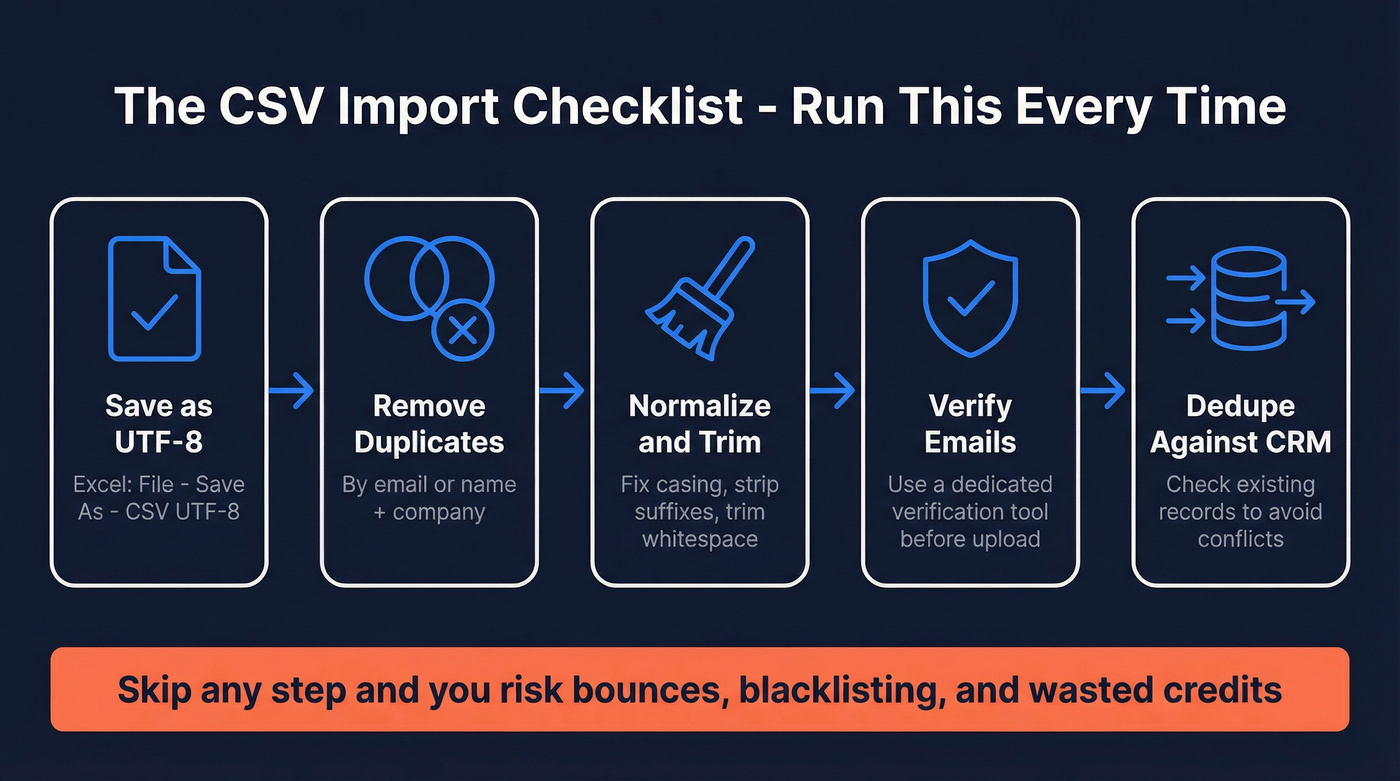
The single biggest mistake teams make isn't a formatting error - it's importing dirty data. We run this checklist before every import:
- Remove duplicates by email address, or by full name + company if emails are missing
- Normalize company names - strip legal suffixes (Inc, LLC, Ltd), fix casing
- Trim whitespace from every column (trailing spaces break field matching)
- Validate email addresses through a dedicated email verification tool
- Deduplicate against your existing CRM before uploading to your sequencer
If your CSV includes email, company domain, and a professional profile URL, enrichment tools can fill in 50+ data points per contact. Name and company alone? Expect gaps. Data decays fast - plan to refresh lists every 3-6 months at minimum (see B2B contact data decay).
Before any CSV touches an outreach platform, run it through Prospeo's enrichment and verification. You get 98% email accuracy and 50+ data points returned per contact on a 7-day refresh cycle, at roughly $0.01 per email - cheaper than a single bounced sequence.


Every bounced email from a bad CSV import chips away at your domain reputation. Prospeo's enrichment returns 50+ data points per contact at 98% email accuracy - on a 7-day refresh cycle, not the 6-week industry average. At $0.01 per email, verification costs less than a single bounced sequence.
Verify and enrich your CSV before it kills your sender domain.
Import Specs by Platform
Here's how the major tools stack up on import mechanics:
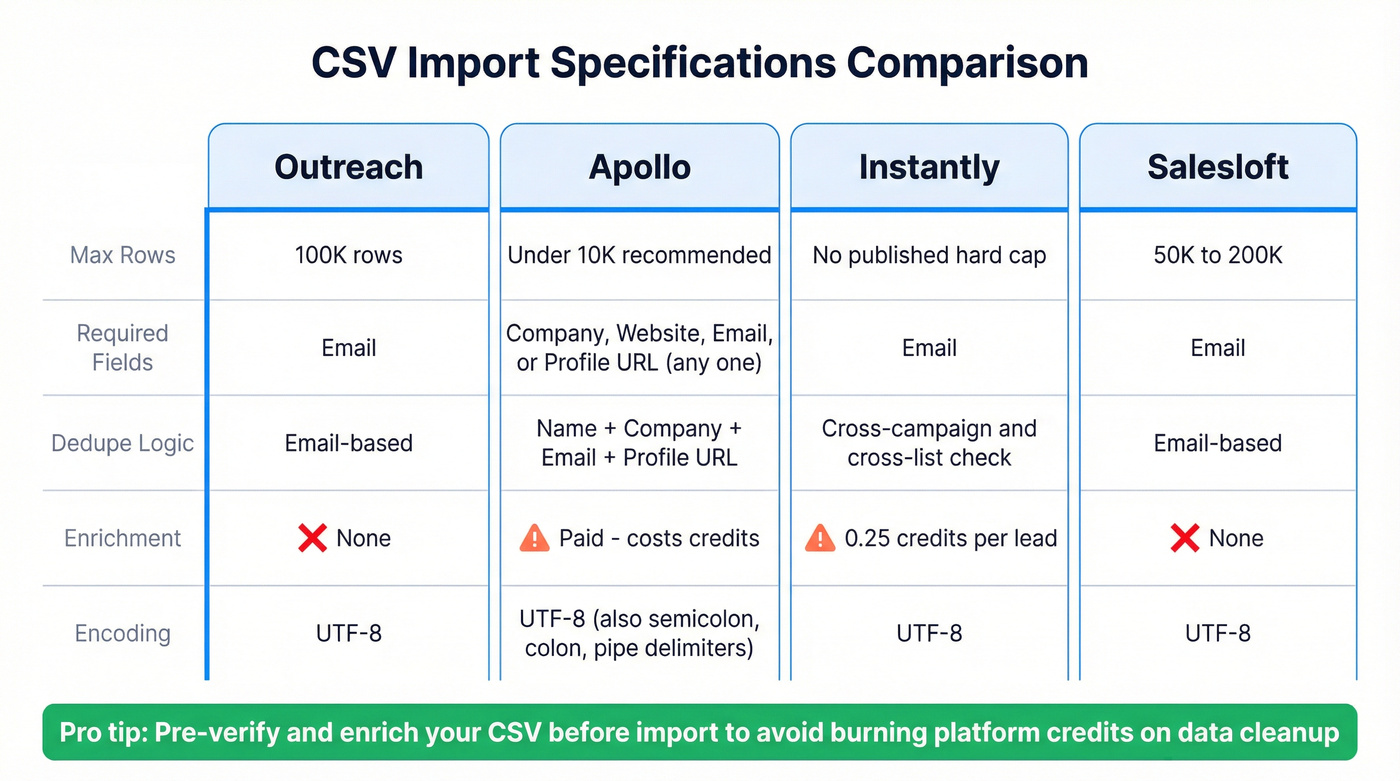
| Platform | Max Rows | Required Fields | Dedupe Logic | Enrichment / Verification |
|---|---|---|---|---|
| Outreach | 100K | Email-based | None | |
| Apollo | Under 10K recommended | Company Name, Website, Email, or profile URL (at least one) | First name + last name + company + email + profile URL | Waterfall enrichment (paid; costs credits) |
| Instantly | No published hard cap | Cross-campaign/list duplicate check | Optional verification at 0.25 credits/lead | |
| Salesloft | ~50K-200K | Email-based | None |
Most platforms support comma-delimited CSVs. Outreach, Apollo, and Instantly all require UTF-8 encoding, and Apollo also accepts semicolon, colon, and pipe delimiters. While some tools offer enrichment or paid verification, they won't protect your sender reputation by default - catching invalid addresses before import is the difference between a healthy sender domain and a blacklisted one (use a deliverability checklist if you're scaling volume).
One behavior worth knowing: some platforms use "delete by omission" on re-import, meaning records absent from the new CSV get removed automatically. Always check your platform's overwrite behavior before uploading a replacement file.
Apollo charges credits for enrichment on import. Instantly charges 0.25 credits per lead for verification. Pre-enrich your CSV with Prospeo at 98% accuracy and 92% match rate - then import clean data into any platform without burning sequencer credits on data cleanup.
Stop paying your outreach tool to fix what should already be clean.
Platform-by-Platform Walkthroughs
Outreach
- Save your CSV as UTF-8. In Excel: File -> Save As -> select "CSV UTF-8 (Comma-delimited)." Non-negotiable.
- Go to Actions -> Bulk create and upload your file. Max import size is 100,000 rows.
- Map your columns to Outreach fields.
- Choose duplicate handling: Skip, Overwrite Existing Fields, or Update Missing Fields.
- Optionally load additional data from Salesforce by mapping External ID + External Type fields.
Here's the thing: the #1 hidden gotcha isn't encoding or row limits. If you're associating prospects to accounts, you must map your column to "Account" or "Account name" - not "Company." Mapping to "Company" produces zero account associations, and you won't get an error message about it. The accounts also need to already exist in Outreach, and you need to select Assign account during field mapping.
Apollo
Apollo is the most flexible importer of the bunch - and the most likely to eat your credits if you're not careful.
Your CSV needs at least one of these columns: Company Name, Company Website, Contact Email, or a professional profile URL. Format websites as bare domains - drop the www and any prefixes. For multi-select fields, separate values with semicolons; for checkboxes, use True/False as text.
Split large files. Apollo recommends keeping CSVs under 10,000 rows. Larger files work but slow down processing and increase the chance of timeout errors. When you toggle enrichment during import, Apollo shows a credit estimate before you confirm - pay attention to that number, because we've seen teams accidentally burn through a month's credits on a single import by leaving enrichment toggled on for a list they'd already enriched elsewhere.
Weekly import caps scale by annual subscription spend:
| Annual Spend | Weekly Row Limit |
|---|---|
| $1K | 100K rows |
| $5K | 500K rows |
| $20K | 3M rows |
| $100K | 10M rows |
If your source data is already pre-verified, skip Apollo's enrichment step and save credits for net-new prospecting. That one toggle saves more money than most people realize (especially if you're building a repeatable outbound sales engine).
Instantly
- Map your email column to the predefined "Email" variable - mandatory.
- Format column headers correctly: first row must contain headers, each starting with a capital letter. Keep names under 20 characters, no duplicates.
- Enable "Check for Duplicates Across All Campaigns/Lists" to prevent the same lead appearing in multiple sequences.
- Optionally verify leads at 0.25 credits per lead during upload.
Instantly enforces a maximum of 50 variables per upload and requires UTF-8 encoding. Remove empty columns, merged rows, and boolean-typed values - use plain text instead ("Yes" or "No"). After upload, Instantly shows counts for invalid emails and skipped duplicates. Lead counts update within about five minutes.
SalesLoft
Salesloft follows the same CSV import pattern most sales engagement tools use - email is the primary required field, deduplication is email-based, and the flow is: upload, map fields, choose duplicate handling. If you've imported into Outreach, you already know the drill. Skip this section and focus your time on data quality instead (start with CRM hygiene).
Common Import Errors and Fixes
We've seen teams lose entire campaigns to problems that take 30 seconds to fix. Import errors are often silent - you don't know rows were skipped until you check your count and realize 800 leads vanished. Here are the usual culprits.
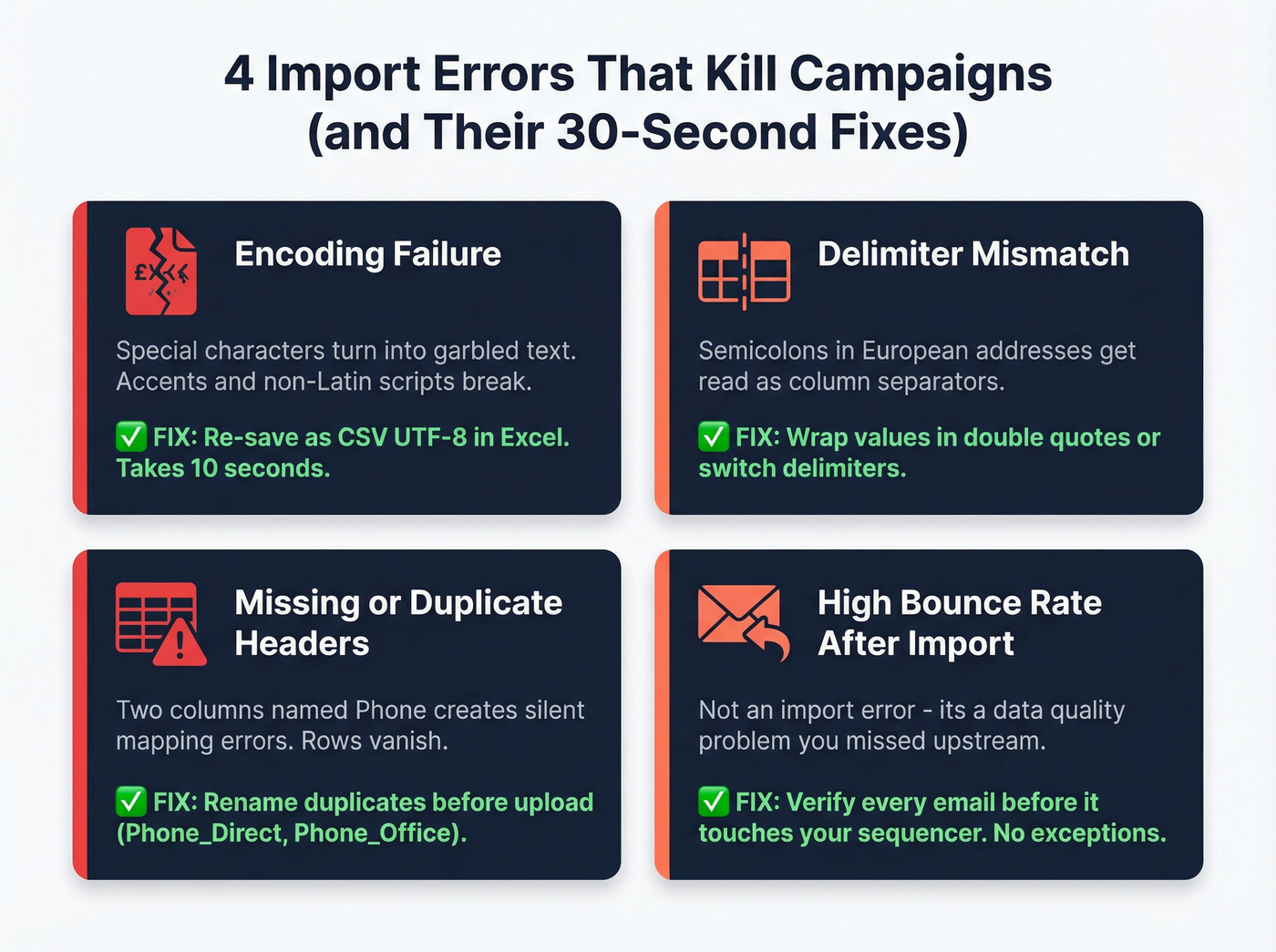
Encoding failure is the most frequent offender. Your file was saved with the wrong encoding, and special characters - accents, non-Latin scripts - import as garbled text. Re-save in Excel as CSV UTF-8. That's it. A 10-second fix for a problem that ruins entire imports.
Delimiter mismatches hit hardest with European address formats, where semicolons in your data get interpreted as column separators. Wrap values containing delimiters in double quotes, or switch to a different delimiter if your platform supports it.
Missing required fields and duplicate column headers both cause rows to vanish without warning. Two columns named "Phone" creates mapping errors that are hard to diagnose - rename them before upload ("Phone_Direct" and "Phone_Office"). Always check your platform's minimum required columns before uploading.
High bounce rate after import isn't an import problem - it's a data quality problem you should have caught upstream. The consensus on r/coldemail is pretty clear: if you skip verification before uploading, you deserve the bounces. Harsh, but accurate. Run verification first, every time (use a CRM verify workflow if you're syncing multiple sources).

Automating Imports via API
For RevOps teams running bulk workflows and automating list loads from data warehouses, Outreach's Bulk API supports programmatic CSV imports:
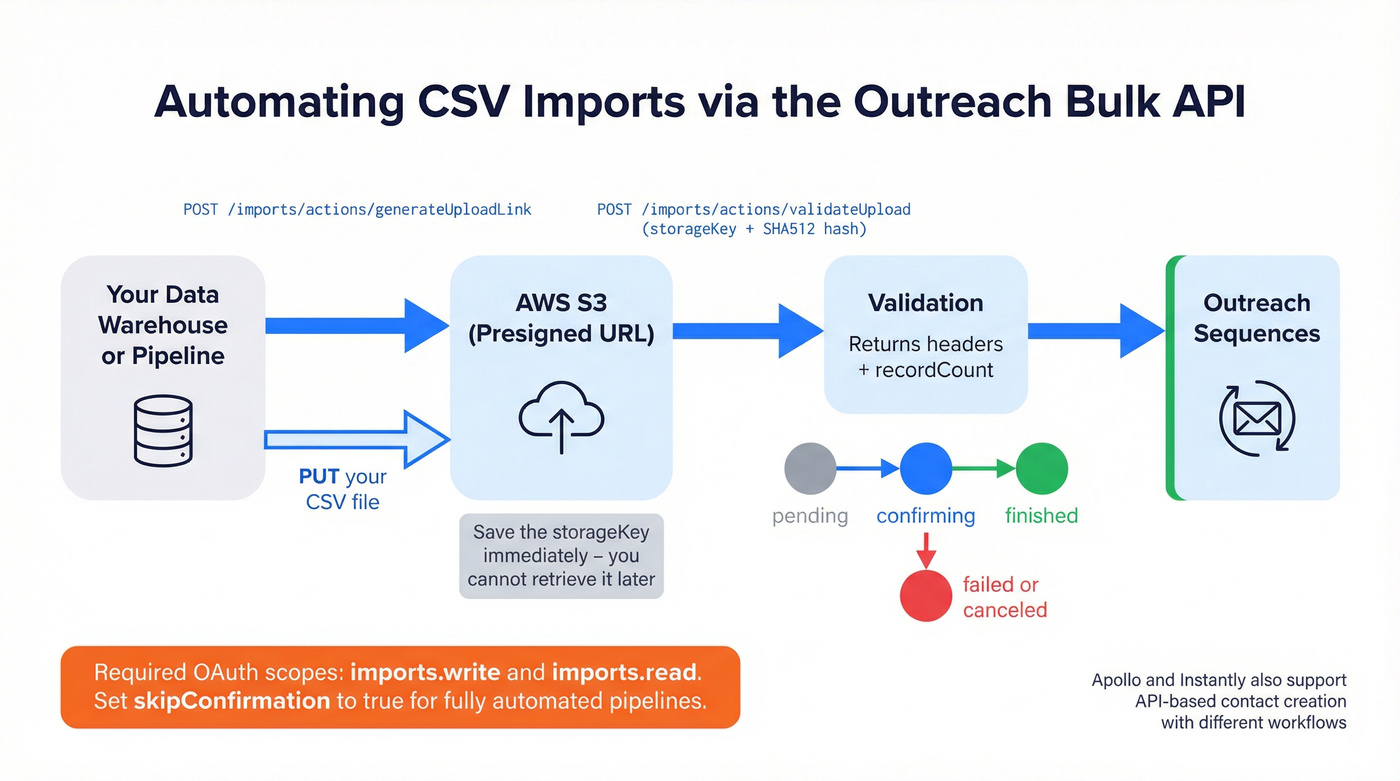
POST /api/v2/imports/actions/generateUploadLink- returns a presigned S3 URL and astorageKey(save this immediately; you can't retrieve it later)PUTyour CSV to the presigned URLPOST /api/v2/imports/actions/validateUploadwith thestorageKeyand a SHA512 hash of the uploaded file- The validation response returns extracted headers and
recordCount
You'll need OAuth scopes imports.write and imports.read. Batches move through states: pending -> confirming -> finished (or failed/canceled). Set skipConfirmation=true for automated pipelines that don't need manual approval gates. Apollo and Instantly also support API-based contact creation, though the workflows differ. For recurring imports from a data warehouse, the Outreach Bulk API is the most documented option.
Let's be honest - if you're at the point of automating imports via API, you should also be automating your verification step. Piping unverified CSVs into a sequencer on a cron job is a recipe for domain blacklisting at scale (see how to prevent email blacklisting).
FAQ
What encoding should my CSV use?
UTF-8. Outreach, Apollo, and Instantly all require it. In Excel, use File -> Save As -> CSV UTF-8 (Comma-delimited). Wrong encoding is the most common cause of garbled imports, especially with accented characters or non-Latin scripts.
How many rows can I import at once?
Outreach caps at 100,000 rows per file. Apollo recommends under 10,000 and enforces weekly limits based on your annual spend tier. Instantly doesn't publish a hard cap but performance degrades with very large files.
Should I verify emails before or after importing?
Before - always. Verifying upstream at ~$0.01/email prevents bounces that damage your sender reputation before your first sequence even sends. Platform-side verification costs more and catches less.
Can I automate CSV imports via API?
Yes - Outreach offers a Bulk API for programmatic imports using presigned S3 URLs and SHA512 validation. Apollo and Instantly also support API-based contact creation, though the workflows differ. For automated pipelines pulling from data warehouses, the Outreach Bulk API is the most documented option.